2014 Hyundai Santa Fe camera
[x] Cancel search: cameraPage 15 of 711
23
Your vehicle at a glance
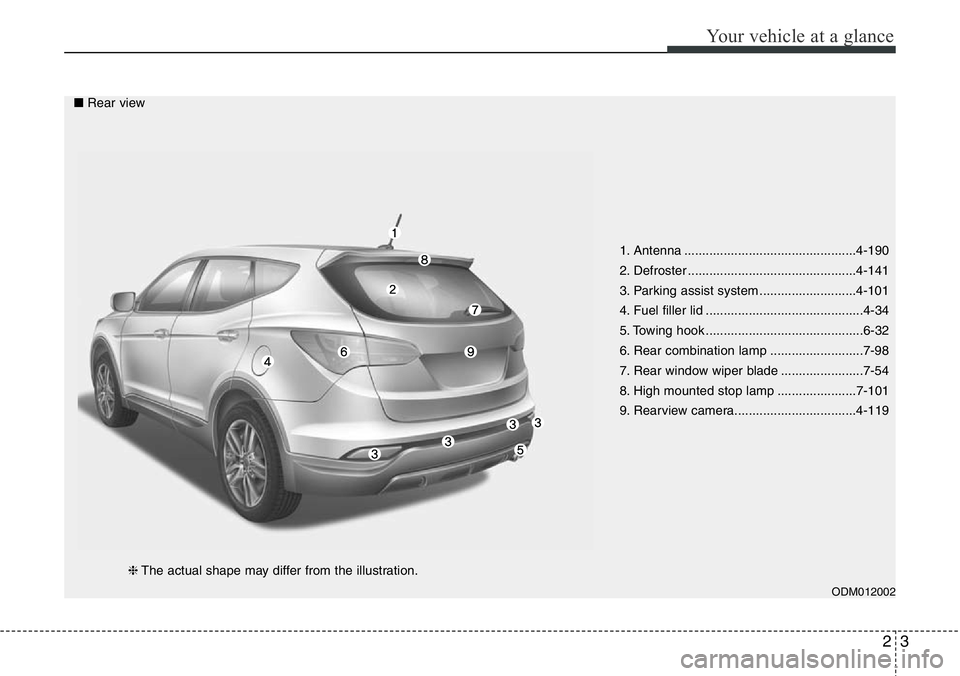
1. Antenna ................................................4-190
2. Defroster ...............................................4-141
3. Parking assist system ...........................4-101
4. Fuel filler lid ............................................4-34
5. Towing hook ............................................6-32
6. Rear combination lamp ..........................7-98
7. Rear window wiper blade .......................7-54
8. High mounted stop lamp ......................7-101
9. Rearview camera..................................4-119
ODM012002
■Rear view
❈The actual shape may differ from the illustration.
Page 103 of 711
Mirrors . . . . . . . . . . . . . . . . . . . . . . . . . . . . . . . . . . 4-48
• Inside rearview mirror . . . . . . . . . . . . . . . . . . . . . . . . 4-48
• Outside rearview mirror . . . . . . . . . . . . . . . . . . . . . . . 4-52
Instrument cluster . . . . . . . . . . . . . . . . . . . . . . . . . 4-56
• Instrument Cluster Control . . . . . . . . . . . . . . . . . . . . 4-58
• LCD Display Control . . . . . . . . . . . . . . . . . . . . . . . . . 4-59
• Gauges . . . . . . . . . . . . . . . . . . . . . . . . . . . . . . . . . . . . . 4-59
• Transaxle Shift Indicator . . . . . . . . . . . . . . . . . . . . . . 4-64
LCD display . . . . . . . . . . . . . . . . . . . . . . . . . . . . . . 4-66
• LCD Modes . . . . . . . . . . . . . . . . . . . . . . . . . . . . . . . . . 4-66
• Service Mode . . . . . . . . . . . . . . . . . . . . . . . . . . . . . . . . 4-67
• User Settings Mode . . . . . . . . . . . . . . . . . . . . . . . . . . . 4-68
• A/V Mode . . . . . . . . . . . . . . . . . . . . . . . . . . . . . . . . . . . 4-71
• Turn By Turn Mode. . . . . . . . . . . . . . . . . . . . . . . . . . . 4-71
• Warning Messages . . . . . . . . . . . . . . . . . . . . . . . . . . . . 4-72
Trip computer . . . . . . . . . . . . . . . . . . . . . . . . . . . . . 4-79
• Overview. . . . . . . . . . . . . . . . . . . . . . . . . . . . . . . . . . . . 4-79
• Trip A/B . . . . . . . . . . . . . . . . . . . . . . . . . . . . . . . . . . . . 4-80
• Fuel Economy . . . . . . . . . . . . . . . . . . . . . . . . . . . . . . . 4-81
Warning and indicator lights . . . . . . . . . . . . . . . . 4-83
• Warning lights . . . . . . . . . . . . . . . . . . . . . . . . . . . . . . . 4-83
• Indicator Lights . . . . . . . . . . . . . . . . . . . . . . . . . . . . . . 4-93
Rear parking assist system . . . . . . . . . . . . . . . . . . 4-98
• Operation . . . . . . . . . . . . . . . . . . . . . . . . . . . . . . . . . . . 4-98
• Non-operational conditions . . . . . . . . . . . . . . . . . . . . 4-99• Self-diagnosis . . . . . . . . . . . . . . . . . . . . . . . . . . . . . . . 4-100
Parking assist system . . . . . . . . . . . . . . . . . . . . . . 4-101
• Operation . . . . . . . . . . . . . . . . . . . . . . . . . . . . . . . . . . 4-101
• Non-operational conditions . . . . . . . . . . . . . . . . . . . 4-103
• Self-diagnosis . . . . . . . . . . . . . . . . . . . . . . . . . . . . . . . 4-105
Smart parking assist system(SPAS) . . . . . . . . . . 4-106
• Operation . . . . . . . . . . . . . . . . . . . . . . . . . . . . . . . . . . 4-107
• Non-operational conditions . . . . . . . . . . . . . . . . . . . 4-107
• How the system works . . . . . . . . . . . . . . . . . . . . . . . 4-110
• Additional instructions . . . . . . . . . . . . . . . . . . . . . . . 4-117
• System malfunction . . . . . . . . . . . . . . . . . . . . . . . . . . 4-118
Rearview camera . . . . . . . . . . . . . . . . . . . . . . . . . 4-119
Hazard warning flasher . . . . . . . . . . . . . . . . . . . . 4-120
Lighting . . . . . . . . . . . . . . . . . . . . . . . . . . . . . . . . . 4-121
• Battery saver function. . . . . . . . . . . . . . . . . . . . . . . . 4-121
• Headlamp escort function. . . . . . . . . . . . . . . . . . . . . 4-121
• Smart cornering light . . . . . . . . . . . . . . . . . . . . . . . . 4-121
• Lighting control . . . . . . . . . . . . . . . . . . . . . . . . . . . . . 4-122
• Traffic change . . . . . . . . . . . . . . . . . . . . . . . . . . . . . . 4-124
• High - beam operation . . . . . . . . . . . . . . . . . . . . . . . 4-125
• Turn signals and lane change signals . . . . . . . . . . . 4-126
• Front fog light . . . . . . . . . . . . . . . . . . . . . . . . . . . . . . 4-127
• Rear fog light . . . . . . . . . . . . . . . . . . . . . . . . . . . . . . . 4-128
• Daytime running light . . . . . . . . . . . . . . . . . . . . . . . . 4-128
• Headlight leveling device . . . . . . . . . . . . . . . . . . . . . 4-129
4
Page 220 of 711
4119
Features of your vehicle
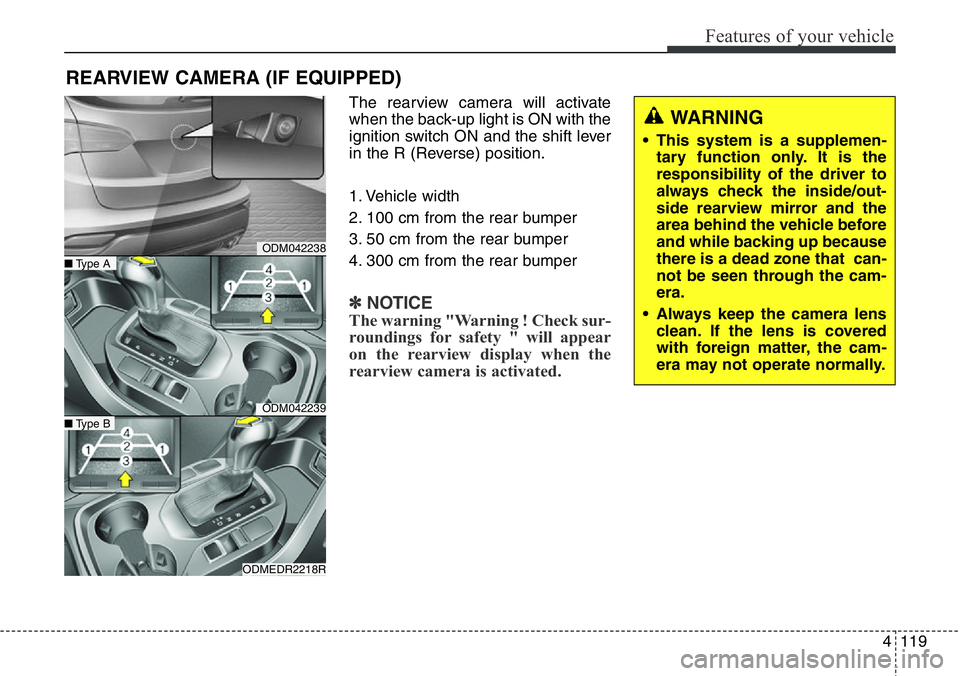
The rearview camera will activate
when the back-up light is ON with the
ignition switch ON and the shift lever
in the R (Reverse) position.
1. Vehicle width
2. 100 cm from the rear bumper
3. 50 cm from the rear bumper
4. 300 cm from the rear bumper
✽NOTICE
The warning "Warning ! Check sur-
roundings for safety " will appear
on the rearview display when the
rearview camera is activated.
REARVIEW CAMERA (IF EQUIPPED)
WARNING
• This system is a supplemen-
tary function only. It is the
responsibility of the driver to
always check the inside/out-
side rearview mirror and the
area behind the vehicle before
and while backing up because
there is a dead zone that can-
not be seen through the cam-
era.
• Always keep the camera lens
clean. If the lens is covered
with foreign matter, the cam-
era may not operate normally.
ODM042238
ODM042239
ODMEDR2218R
■Type A
■Type B
Page 300 of 711
4199
Features of your vehicle
(Continued)
• If you use devices such as a USB
hub purchased separately, the
vehicle’s audio system may not
recognize the USB device. In that
case, connect the USB device
directly to the multimedia termi-
nal of the vehicle.
• If the USB device is divided by log-
ical drives, only the music files on
the highest-priority drive are rec-
ognized by car audio.
• Devices such as MP3 Player/
Cellular phone/Digital camera can
be unrecognizable by standard
USB I/F can be unrecognizable.
• Charging through the USB may
not be supported in some mobile
devices.
• USB HDD or USB types liable to
connection failures due to vehicle
vibrations are not supported. (i-
stick type)
• Some non-standard USB devices
(METAL COVER TYPE USB)
can be unrecognizable.
(Continued)(Continued)
• Some USB flash memory readers
(such as CF, SD, micro SD, etc.) or
external-HDD type devices can be
unrecognizable.
• Music files protected by DRM
(DIGITAL RIGHTS MANAGE-
MENT) are not recognizable.
• The data in the USB memory may
be lost while using this audio.
Always back up important data on
a personal storage device.
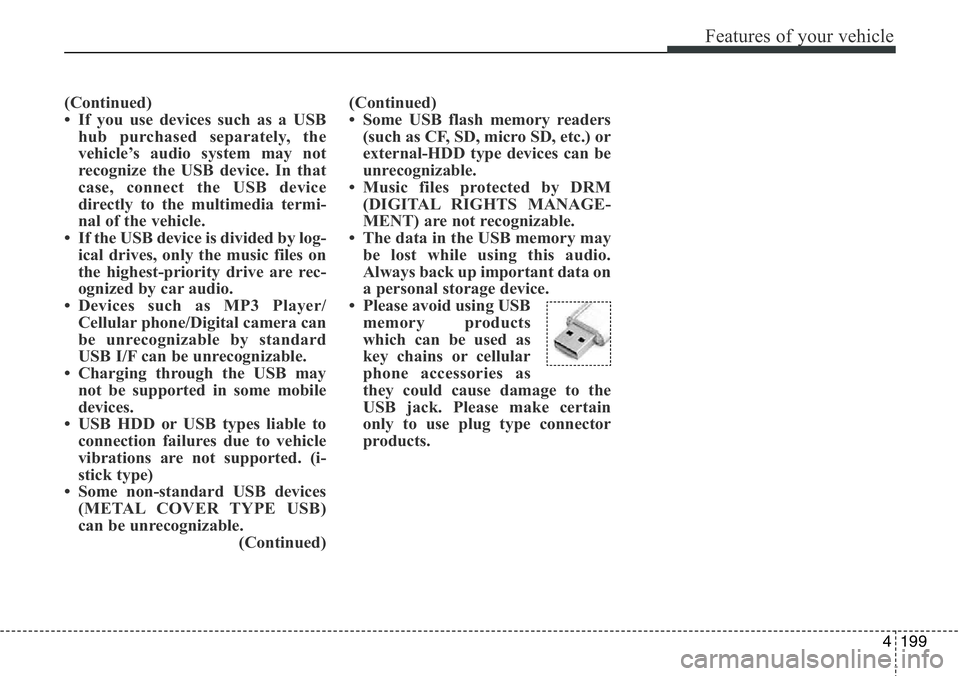
• Please avoid using USB
memory products
which can be used as
key chains or cellular
phone accessories as
they could cause damage to the
USB jack. Please make certain
only to use plug type connector
products.
Page 384 of 711
4283
Features of your vehicle
✽NOTICE - USING THE USB
DEVICE
• Connect the USB device after
turning on the engine. The USB
device may become damaged if it
is already connected when the
ignition is turned on.The USB
device may not operate properly if
the car ignition is turned on or off
with the USB device connected.
• Heed caution to static electricity
when connecting/disconnecting
USB devices.
• Encoded MP3 Players will not be
recognized when connected as an
external device.
• When connecting an external USB
device, the device may not proper-
ly recognize the USB is in some
states.
• Only products formatted with
byte/sectors under 64Kbyte will be
recognized.
• This device recognizes USB
devices formatted in FAT 12/16/32
file formats. This device does not
recognize files in NTFS file for-
mat.
(Continued)(Continued)
• Some USB devices may not be sup-
ported due to compatibility issues.
• Avoid contact between the USB
connector with bodily parts or for-
eign objects.
• Repeated connecting/disconnect-
ing of USB devices within short
periods of time may result in prod-
uct malfunction.
• A strange noise may occur when
disconnecting the USB.
• Make sure to connect/disconnect
external USB devices with the
audio power turned off.
• The amount of time required to
recognize the USB device may dif-
fer depending on the type, size or
file formats stored in the USB.
Such differences in time are not
indications of malfunctions.
• The device only supports USB
devices used to play music files.
• USB images and videos are not
supported.
(Continued)(Continued)
• Do not use the USB I/F to charge
batteries or USB accessories that
generate heat. Such acts may lead
to worsened performance or dam-
age to the device.
• The device may not recognize the
USB device if separately pur-
chased USB hubs and extension
cables are being used. Connect the
USB directly with the multimedia
terminal of the vehicle.
• When using mass storage USB
devices with separate logical
drives, only files saved to the root
drive can be played.
• Files may not properly operate if
application programs are installed
to the USBs.
• The device may not operate nor-
mally if MP3 Players, cellular
phones, digital cameras, or other
electronic devices (USB devices
not recognized as portable disk
drives) are connected with the
device.
(Continued)
Page 447 of 711
![Hyundai Santa Fe 2014 Owners Manual Features of your vehicle
346 4
System Setting
Memory Information
Press the key Select
[System] Select [Memory Information]
This feature displays information
related to system memory.
1) Using : Displ](/manual-img/35/16363/w960_16363-446.png "Hyundai Santa Fe 2014 Owners Manual Features of your vehicle
346 4
System Setting
Memory Information
Press the key Select
[System] Select [Memory Information]
This feature displays information
related to system memory.
1) Using : Displ")
Features of your vehicle
346 4
System Setting
Memory Information
Press the key Select
[System] Select [Memory Information]
This feature displays information
related to system memory.
1) Using : Displays capacity currently
in use
2) Capacity : Displays total capacity
Language
Press the key Select
[System] Select [Language]
This feature is used to change the
system and voice recognition lan-
guage.
If the language is changed, the sys-
tem will restart and apply the select-
ed language.
REAR VIEW CAMERA
(if equipped)
• The system has been equipped
with a rear view camera for user
safety by allowing a wider rear
range of vision.
• The rear view camera will automat-
ically operate when the ignition key
is turned ON and the transmission
lever is set to R.
• The rear view camera will automat-
ically stop operating when set to a
different lever.
SETUP
SETUP
CAUTION
The rear view camera has been
equipped with an optical lens to
provide a wider range of vision
and may appear different from
the actual distance. For safety,
directly check the rear and
left/right sides.