2014 HYUNDAI IX35 lock
[x] Cancel search: lockPage 568 of 1534

Features of your vehicle
78
4
DBC (Downhill brake con-
trol) indicator (if equipped)
The DBC indicator will illuminate when
the ignition switch is turned ON, but
should go off after approximately 3 sec-
onds. The DBC indicator will illuminate when
the DBC button is pressed and the sys-tem is on.
When driving down a steep hill at a speed under 35 km/h (22 mph), the DBC
will operate and the DBC indicator will
blink to indicate the DBC is operating.
If the red indicator illuminates, the DBC
system may have malfunctioned. We rec-
ommend that the system be checked by
an authorized HYUNDAI dealer.
KEY OUT indicator (if equipped)
When the ENGINE START/STOP button
is in the ACC or ON position, if any door
is open, the system checks for the smart
key. If the smart key is not in the vehicle,
the indicator will blink, and if all doors are
closed, the chime will also sound for
about 5 seconds. The indicator will go off
while the vehicle is moving. Keep the
smart key in the vehicle.
Key reminder warning chime (if equipped)
If the driver’s door is opened while the
ignition key is left in the ignition switch
(ACC or LOCK position), the key
reminder warning chime will sound. This
is to prevent you from locking your keys
in the vehicle. The chime sounds until the
key is removed from the ignition switch or
the driver’s door is closed.
KEY
OUT
EL(FL) Eng 4A.QXP 7/23/2013 4:34 PM Page 78
Page 569 of 1534

479
Features of your vehicle
Glow indicator (Dieselengine)
The indicator light illuminates when the
ignition switch is placed at the ON posi-
tion. The engine can be started after the
preheat indicator light goes off. The illu-
minating time varies with the water tem-
perature, air temperature and batterycondition.
✽✽ NOTICE
If the engine was not started within 10
seconds after the preheating is complet-
ed, turn the ignition key once more tothe LOCK position during 10 seconds,
and then to the ON position, in order to
preheat again.
Fuel filter warning light (Diesel engine)
This warning light illuminates for 3 sec-
onds after the ignition switch is set to the
ON position and then it will go out. If it
lights up while the engine is running, it
indicates that water has accumulated
inside the fuel filter. If this happens,
remove the water from the fuel filter. For
more Information, refer to “Fuel filter” insection 7.
4WD system warning light (if equipped)
When the ignition switch is turned to the ON position, the 4WD indicator will illumi-
nate and then go off in a few seconds.
If the 4WD system warning light
illuminates, this indicates that there is a
malfunction in the 4WD system. If this
occurs, we recommend that the system
be checked by an authorized HYUNDAI
dealer.
CAUTION
When the fuel filter warning light is
illuminated, engine power (vehiclespeed & idle speed) may decrease. If you keep driving with the warning
light on, you can damage your vehi- cle's engine parts and injection sys-tem of the Common Rail. If this occurs, we recommend that thesystem be checked by an author-
ized HYUNDAI dealer.
CAUTION
If the preheat indicator continues to illuminate or flash on and off after
the engine has warmed up or whiledriving, we recommend that thesystem be checked by an author- ized HYUNDAI dealer.
EL(FL) Eng 4A.QXP 7/11/2013 11:34 AM Page 79
Page 570 of 1534
Features of your vehicle
80
4
4WD LOCK indicator
(if equipped)
The 4WD LOCK indicator light is illumi-
nated when the 4WD LOCK button is
pushed. The purpose of this 4WD LOCK
mode is to increase the drive power
when driving on wet pavement, snow-
covered roads and/or off-road. The 4WD
LOCK indicator light is turned off by
pushing the button again.
Engine coolant tempera-ture warning light (if equipped)
The warning light illuminates if the tem-
perature of the engine coolant is above120±3°C (248±5.4°F).
Do not continue driving with an overheat-
ed engine. If your vehicle overheats, refer
to “Overheating” in section 6.
✽✽ NOTICE
If the engine coolant temperature warn- ing light illuminates, it indicates over-heating that may damage the engine.
Electronic power steering (EPS) system warninglight (if equipped)
This indicator light comes on after the
ignition key is turned to the ON positionand then it will go out. This light also comes on when the EPS
has some troubles. If it comes on while
driving, we recommend that the system
be inspected by an authorized HYUNDAI
dealer.
CAUTION
Do not use 4WD LOCK mode on dry paved roads or highway, it cancause noise, vibration or damage of
4WD related parts.
EL(FL) Eng 4A.QXP 7/11/2013 11:34 AM Page 80
Page 573 of 1534

483
Features of your vehicle
Non-operational conditions
The rear parking assist system may not
operate properly when:
1. Moisture is frozen to the sensor. (It willoperate normally when the moisture has been cleared.)
2. The sensor is covered with foreign matter, such as snow or water, or the
sensor cover is blocked. (It will operate
normally when the material is removed
or the sensor is no longer blocked.)
3. Driving on uneven road surfaces. (unpaved roads, gravel, bumps, gradi-ent)
4. Objects generating excessive noise (vehicle horns, loud motorcycle
engines, or truck air brakes) are within
range of the sensor.
5. Heavy rain or water spray exists.
6. Wireless transmitters or mobile phones are within range of the sensor.
7. The sensor is covered with snow.
8. Trailer towing.
9. The place light the fluorescent lamp. The detecting range may decrease when:
1. The sensor is stained with foreign mat-
ter such as snow or water. (The sens-
ing range will return to normal when
removed.)
2. Outside air temperature is extremely hot or cold.
The following objects may not be recog-
nized by the sensor:
1. Sharp or slim objects such as ropes, chains or small poles.
2. Objects which tend to absorb the sen- sor frequency such as clothes, spongy
material or snow.
3. Undetectable objects smaller than 1 m (40 in.) in height and narrower than 14
cm (6 in.) in diameter.
Rear parking assist system precau-
tions
The rear parking assist system may not sound sequentially depending on the speed and shapes of the objectsdetected.
The rear parking assist system may malfunction if the vehicle bumperheight or sensor installation has been
modified or damaged. Any non-factory
installed equipment or accessories
may also interfere with the sensor per-
formance.
The sensor may not recognize objects less than 30 cm (11.8 in.) from the sen-
sor, or it may sense an incorrect dis-
tance. Use caution.
When the sensor is frozen or stained with snow, dirt, or water, the sensor
may be inoperative until the stains are
removed using a soft cloth.
Do not push, scratch or strike the sen- sor. Sensor damage could occur.
EL(FL) Eng 4A.QXP 7/11/2013 11:34 AM Page 83
Page 578 of 1534
Features of your vehicle
88
4
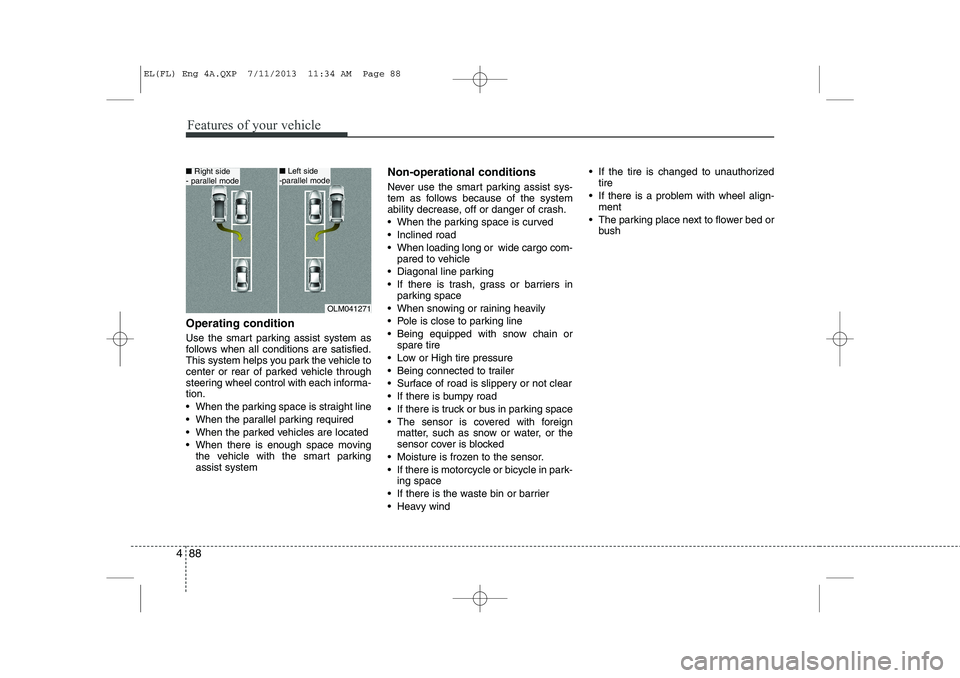
Operating condition
Use the smart parking assist system as
follows when all conditions are satisfied.
This system helps you park the vehicle to
center or rear of parked vehicle through
steering wheel control with each informa-tion.
When the parking space is straight line
When the parallel parking required
When the parked vehicles are located
When there is enough space moving
the vehicle with the smart parking assist system Non-operational conditions
Never use the smart parking assist sys-
tem as follows because of the system
ability decrease, off or danger of crash.
When the parking space is curved
Inclined road
When loading long or wide cargo com-
pared to vehicle
Diagonal line parking
If there is trash, grass or barriers in parking space
When snowing or raining heavily
Pole is close to parking line
Being equipped with snow chain or spare tire
Low or High tire pressure
Being connected to trailer
Surface of road is slippery or not clear
If there is bumpy road
If there is truck or bus in parking space
The sensor is covered with foreign matter, such as snow or water, or the
sensor cover is blocked
Moisture is frozen to the sensor.
If there is motorcycle or bicycle in park- ing space
If there is the waste bin or barrier
Heavy wind If the tire is changed to unauthorized
tire
If there is a problem with wheel align- ment
The parking place next to flower bed or bush
OLM041271
■Right side
- parallel mode■ Left side
-parallel mode
EL(FL) Eng 4A.QXP 7/11/2013 11:34 AM Page 88
Page 589 of 1534

499
Features of your vehicle
Battery saver function
The purpose of this feature is to pre-vent the battery from being dis-
charged. The system automatically
turns off the parking lights when the
driver removes the ignition key and
opens the driver- side door.
With this feature, the parking lights will be turned off automatically if the driver
parks on the side of road at night.
If necessary, to keep the lights on
when the ignition key is removed, per-
form the following :
1) Open the driver-side door.
2) Turn the parking lights OFF and ON again using the light switch on the
steering column. Headlight escort function (if equipped) The headlights (and/or taillights) remain
on for approximately 5 minutes after the
ignition key is removed or turned to the
ACC or LOCK position. However, if the
driver’s door is opened and closed, the
headlights are turned off after 15 sec-
onds.
The headlights can be turned off by
pressing the lock button on the transmit-
ter (or smart key) twice or turning off the
light switch from the headlight or Autolight position.
Headlight welcome function (if equipped)
When the headlight switch is in the ON or
AUTO position and all doors (and tail-
gate) are closed and locked, if you press
the door unlock button on the transmitter
(or smart key), the headlights will come
on for about 15 seconds.
If the headlight switch is in the AUTO
position, the function can only operate atnight.
At this time, if you press the door unlock
button again or door lock button on the
transmitter (or smart key), the headlights
will turn off immediately.
LIGHTING
CAUTION
If the driver gets out of the vehicle
through other doors (except dri- ver’s door), the battery saver func-tion does not operate and the head-
light escort function does not turnoff automatically. Therefore, it caus- es the battery to be discharged. Inthis case, make sure to turn off the
lamp before getting out of the vehi- cle.
EL(FL) Eng 4A.QXP 7/11/2013 11:35 AM Page 99
Page 600 of 1534

Features of your vehicle
110
4
Map lamp (if equipped)
Push the lens (1) to turn the map lamp on
or off.
: The light (with room lamp) stays
on at all times.
: The light (with room lamp) comes on when any door (except tail- gate) is opened regardless of the
ignition switch position. When
doors (except tailgate) are
unlocked by the transmitter (or
smart key), the light (with room
lamp) comes on for approximate-
ly 30 seconds as long as any door
(except tailgate) is not opened. Also, the light (with room lamp)
goes out gradually after approxi-mately 30 seconds if the door
(except tailgate) is closed.
However, if the ignition switch is
ON or all doors (except tailgate)
are locked, the light will turn off
immediately.
If a door (except tailgate) is
opened with the ignition switch in
the ACC or LOCK position, the
light (with room lamp) stays on for
about 20 minutes. However, if a
door (except tailgate) is opened
with the ignition switch in the ONposition, the light (with room lamp)
stays on continuously.
: The lights turn off even if a door is opened.
❈ When the lamp is turned ON by
pressing the lens (1), the lamp
does not turn off even if the
switch (2) is in the OFF posi-tion.
INTERIOR LIGHT
CAUTION
Do not use the interior lights for
extended periods when the engine
is not running.
It may cause battery discharge.
OEL049100
WARNING
Do not use the interior lights when
driving in the dark. Accidents could
happen because the view may be
obscured by interior lights.
EL(FL) Eng 4A.QXP 7/11/2013 11:36 AM Page 110
Page 611 of 1534
Operation Tips
To keep dust or unpleasant fumes fromentering the vehicle through the venti-
lation system, temporarily set the air
intake control to the recirculated air
position. Be sure to return the control
to the fresh air position when the irrita-
tion has passed to keep fresh air in the
vehicle. This will help keep the driver
alert and comfortable.
Air for the heating/cooling system is drawn in through the grilles just ahead
of the windshield. Care should be
taken that these are not blocked by
leaves, snow, ice or other obstructions.
To prevent interior fog on the wind- shield, set the air intake control to the
fresh air position and fan speed to the
desired position, turn on the air condi-tioning system, and adjust the temper-
ature control to desired temperature.Air conditioning (if equipped)
HYUNDAI Air Conditioning Systems are
filled with environmentally friendly
R-134a refrigerant.
1. Start the engine. Push the air condi- tioning button.
2. Set the mode to the position.
3. Set the air intake control to the outside air or recirculated air position.
4. Adjust the fan speed control and tem- perature control to maintain maximum
comfort.
When maximum cooling is desired, set the temperature control to the extremeleft position (press the MAX A/C posi-
tion selection button (if equipped)) then
set the fan speed control to the highestspeed.✽✽ NOTICE