Page 210 of 422
When the appropriate audio unit is
connected to the auxiliary input jack,
press the CD/AUX or AUX button to
select the unit.
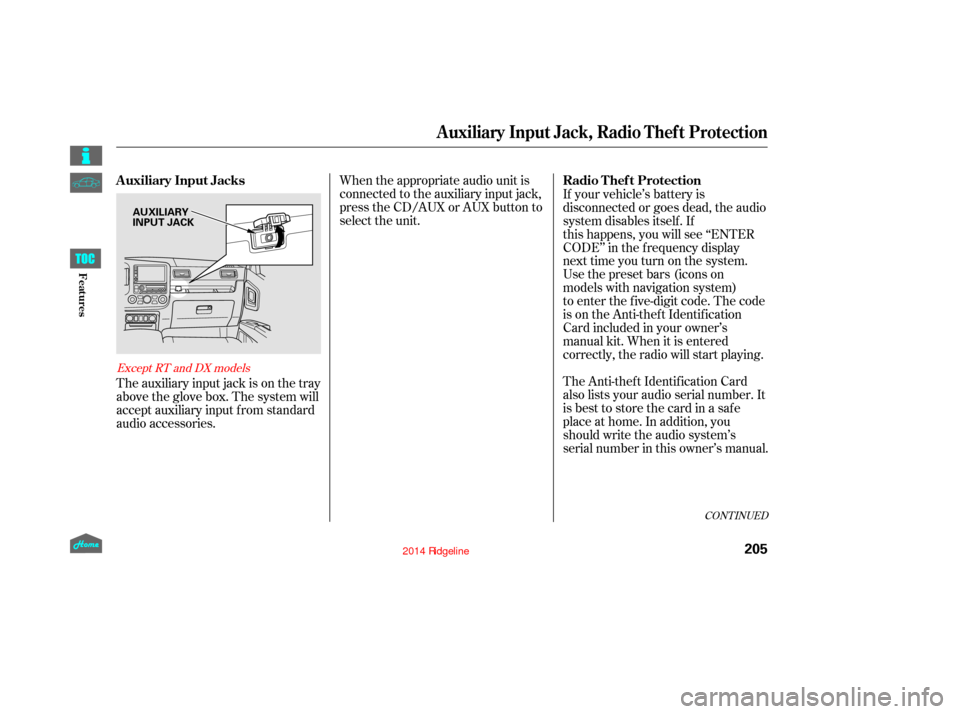
The auxiliary input jack is on the tray
above the glove box. The system will
accept auxiliary input f rom standard
audio accessories. The Anti-thef t Identif ication Card
also lists your audio serial number. It
is best to store the card in a saf e
place at home. In addition, you
should write the audio system’s
serial number in this owner’s manual. If your vehicle’s battery is
disconnected or goes dead, the audio
system disables itself. If
this happens, you will see ‘‘ENTER
CODE’’ in the frequency display
next time you turn on the system.
Use the preset bars (icons on
models with navigation system)
to enter the five-digit code. The code
is on the Anti-theft Identification
Card included in your owner’s
manual kit. When it is entered
correctly, the radio will start playing.
CONT INUED
Except RT and DX models
Auxiliary Input Jack, Radio Thef t Protection
Auxiliary Input Jacks
Radio Thef t Protection
205
AUXILIARY
INPUT JACK
12/08/09 16:26:12 31SJC670_212
Features
Page 212 of 422
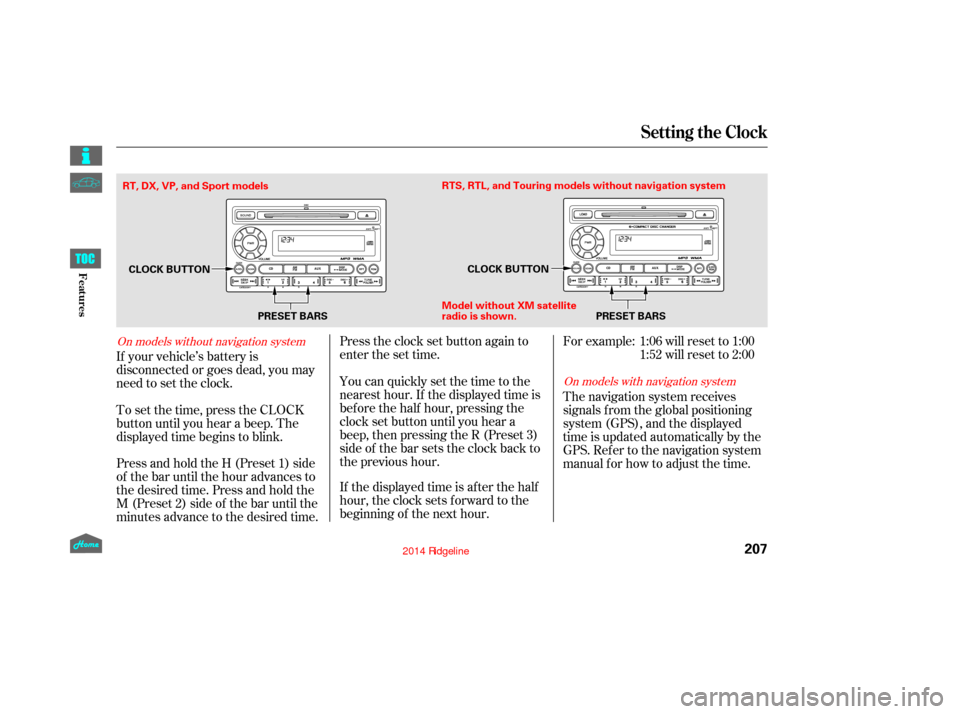
Press and hold the H (Preset 1) side
of the bar until the hour advances to
the desired time. Press and hold the
M (Preset 2) side of the bar until the
minutes advance to the desired time. To set the time, press the CLOCK
button until you hear a beep. The
displayed time begins to blink. If your vehicle’s battery is
disconnected or goes dead, you may
need to set the clock.You can quickly set the time to the
nearest hour. If the displayed time is
bef ore the half hour, pressing the
clock set button until you hear a
beep, then pressing the R (Preset 3)
side of the bar sets the clock back to
the previous hour.
If the displayed time is after the half
hour, the clock sets f orward to the
beginning of the next hour. Press the clock set button again to
enter the set time. For example:
The navigation system receives
signals f rom the global positioning
system (GPS), and the displayed
time is updated automatically by the
GPS. Ref er to the navigation system
manual f or how to adjust the time.1:06 will reset to 1:00
1:52 will reset to 2:00
On models with navigation system
On models without navigation system
Setting the Clock
207
PRESET BARS
CLOCK BUTTON
CLOCK BUTTON
Model without XM sate llite
radio is shown. PRESET BARS
RTS, RTL, and Touring models without navigation system
RT, DX, VP, and Sport models
12/08/09 16:26:26 31SJC670_214
Features
Page 214 of 422
The security system does not set if
the hood, In-Bed Trunk, or any door
is not f ully closed. If the system will
not set, check the door and tailgate
open monitor and In-Bed Trunk open
indicator on the instrument panel
(see pages and ) to see if the
doors and In-Bed Trunk are f ully
closed. Since it is not part of the
monitor display, manually check the
hood.Use the remote transmitter
to quickly check that the hood,
In-Bed Trunk, and all doors are
closed. Push the lock button twice
within f ive seconds. There should be
an audible conf irmation beep.
Do not attempt to alter this system
or add other devices to it.
11 75
Security System
209
NOTE:
12/08/09 16:26:36 31SJC670_216
Features
Page 224 of 422
CONT INUED
To hear general HFL inf ormation,
including help on pairing a phone
or setting up the system, say
‘‘Tutorial.’’
For help at any time, including a
list of available commands, say
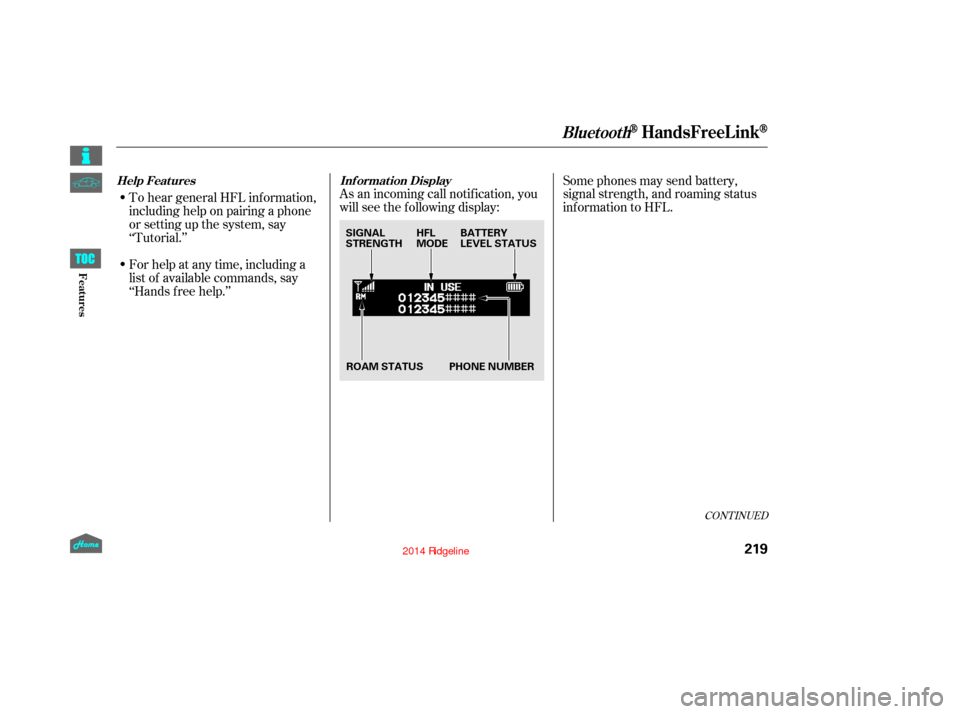
‘‘Hands f ree help.’’As an incoming call notif ication, you
will see the f ollowing display:
Some phones may send battery,
signal strength, and roaming status
inf ormation to HFL.
BluetoothHandsFreeL ink
Help Features
Inf ormation Display
219
HFL
MODEBATTERY
LEVEL STATUS
ROAM STATUS
SIGNAL
STRENGTH
PHONE NUMBER
12/08/09 16:27:49 31SJC670_226
Features
Page 225 of 422
A notif ication that there is an
incoming call, or HFL is in use, will
appear on the navigation screen
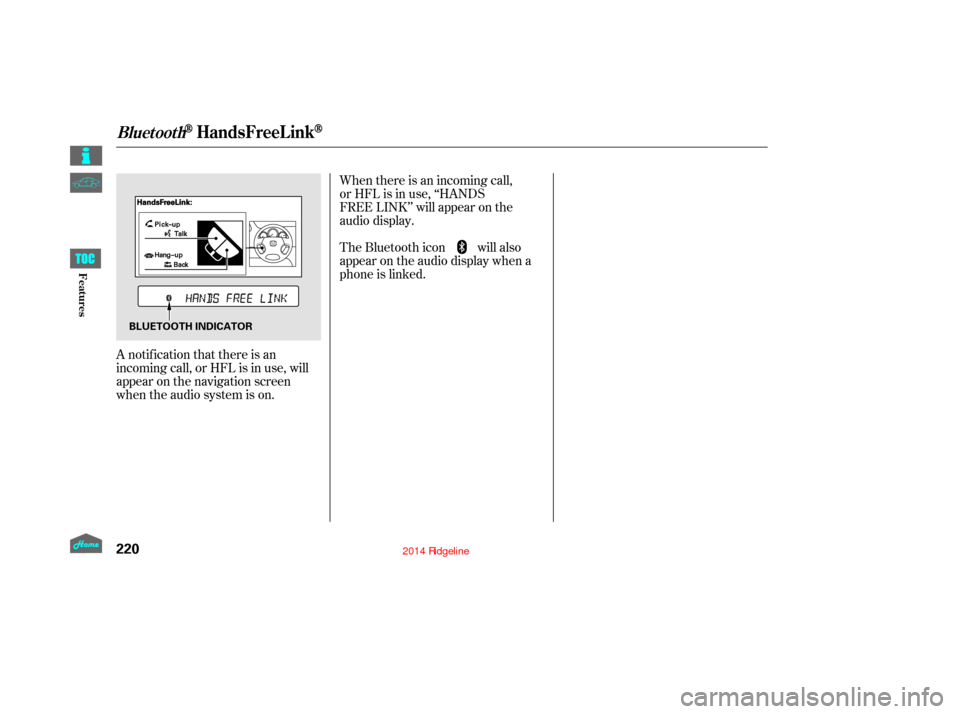
when the audio system is on.When there is an incoming call,
or HFL is in use, ‘‘HANDS
FREE LINK’’ will appear on the
audio display.
The Bluetooth icon will also
appear on the audio display when a
phone is linked.
BluetoothHandsFreeL ink
220
BLUETOOTH INDICATOR
12/08/09 16:27:54 31SJC670_227
Features
Page 234 of 422
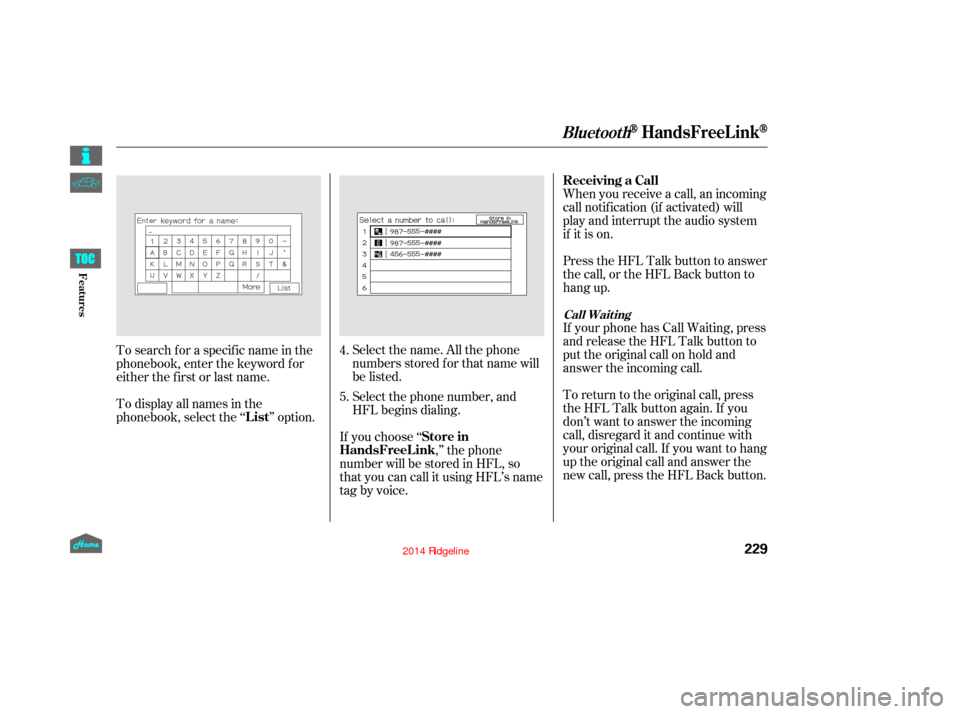
Select the name. All the phone
numbers stored f or that name will
be listed.When you receive a call, an incoming
call notif ication (if activated) will
play and interrupt the audio system
if it is on.
Press the HFL Talk button to answer
the call, or the HFL Back button to
hang up.
If your phone has Call Waiting, press
and release the HFL Talk button to
put the original call on hold and
answer the incoming call.
To return to the original call, press
the HFL Talk button again. If you
don’t want to answer the incoming
call, disregard it and continue with
your original call. If you want to hang
up the original call and answer the
new call, press the HFL Back button.
To search f or a specif ic name in the
phonebook, enter the keyword f or
either the f irst or last name.
To display all names in the
phonebook, select the ‘‘ ’’ option.
If you choose ‘‘,’’ the phone
number will be stored in HFL, so
that you can call it using HFL’s name
tag by voice. Select the phone number, and
HFL begins dialing.
4.
5.
BluetoothHandsFreeL ink
Receiving a Call
List Store in
HandsFreeL ink
Call Wait ing
229
12/08/09 16:29:17 31SJC670_236
Features
Page 238 of 422
(available on some phones)
If you select
f rom the Inf ormation screen menu,
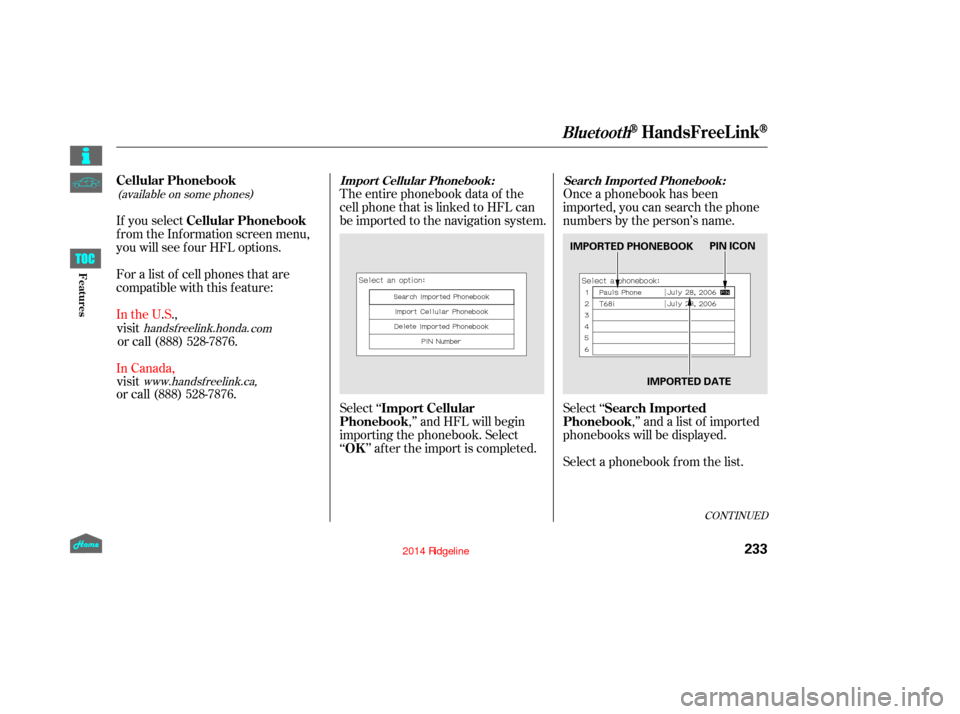
you will see f our HFL options.The entire phonebook data of the
cell phone that is linked to HFL can
be imported to the navigation system.
Select ‘‘
,’’ and HFL will begin
importing the phonebook. Select
‘‘ ’’ af ter the import is completed. Once a phonebook has been
imported, you can search the phone
numbers by the person’s name.
Select ‘‘
,’’ and a list of imported
phonebooks will be displayed.
Select a phonebook f rom the list.
For a list of cell phones that are
compatible with this f eature:
CONT INUED
BluetoothHandsFreeL ink
Cellular Phonebook
Cellular Phonebook
Import Cellular
Phonebook
OK Search Imported
PhonebookImport Cellular Phonebook: Search Import ed Phonebook:
233
IMPORTED PHONEBOOK
IMPORTED DATEPIN ICON
12/08/09 16:30:04 31SJC670_240
Features
handsf reelink.honda.
com
www.handsfree link.ca,
In the U.S.,
visit or call (888) 528-7876.
In Canada, visit
or call (888) 528-7876.
Page 239 of 422
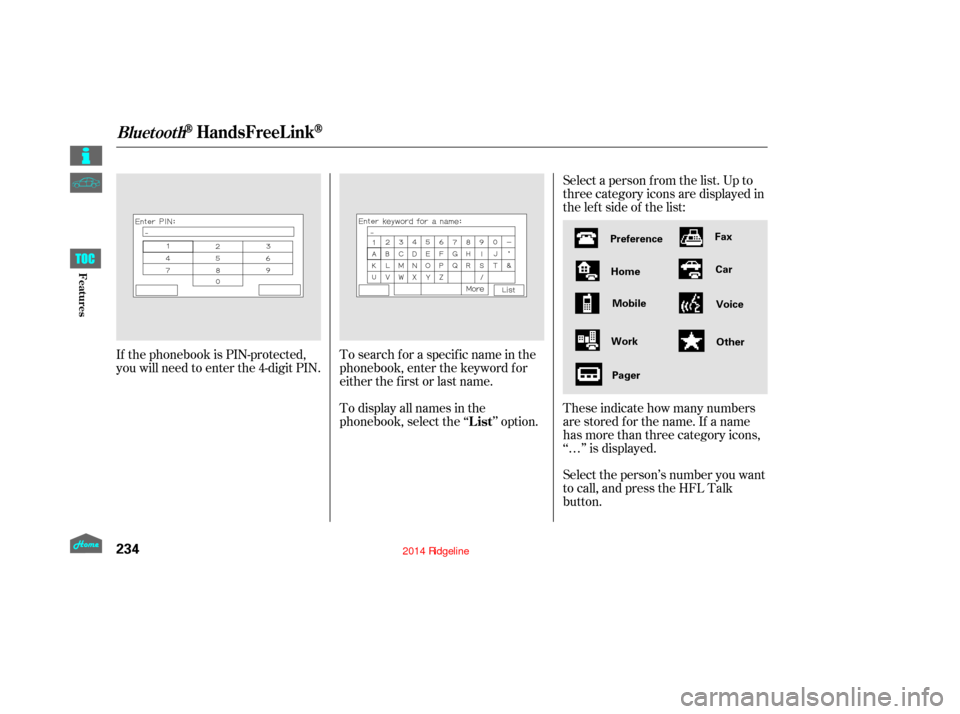
Select a person f rom the list. Up to
three category icons are displayed in
the lef t side of the list:
Select the person’s number you want
to call, and press the HFL Talk
button. These indicate how many numbers
are stored for the name. If a name
has more than three category icons,
‘‘…’’ is displayed.
If the phonebook is PIN-protected,
you will need to enter the 4-digit PIN.
To search f or a specif ic name in the
phonebook, enter the keyword f or
either the f irst or last name.
To display all names in the
phonebook, select the ‘‘ ’’ option.
BluetoothHandsFreeL ink
List
234
Preference
Home Mobile
Work Pager Fax
Car
Voice
Other
12/08/09 16:30:16 31SJC670_241
Features