Page 127 of 488

uu Operating the Switches Around the Steering Wheel u Light Switches
126
Controls
Automatic lighting control can be used when
the ignition switch is in ON
(
w
.
When you turn the light switch to AUTO, the
headli
ghts and other exterior lights will switch
on and off automatically depending on the
ambient brightness. u You can change the au to ligh
t sensitivity
setting.
2 Customized Features P. 90
The headlights, all other exterior lights, and the instrument panel lights turn off
within 15 seconds after you remove the key and close the driver's door.
u You can
change the headlight auto off timer setting.
2 Customized Features P. 90
If you turn the ignition switch to LOCK (0
with the headlight switch on, but do not
open the door, the lights turn off after 10 minutes (three minutes, if the switch is in
the AUTO position).
The lights turn on again when you unlock or
open the driver's door. If you unlock
the door, but do not open it within 15 seconds, the lights go off. If you open the
driver's door, you will hear a lights on reminder chime.
■Automatic Lighting Control1Automatic Lighting Control
We recommend that you turn on the lights manually
when driving at night, in a dense fog, or in dark areas
such as long tunnels or parking facilities.
The light sensor is in the location shown below.
Do not cover this light sensor with anything;
otherwise, the automatic lighting system may not
work properly.
Adjust the auto light sensitivity as follows:
SettingThe exterior lights come on
when the ambient light is at
MAX
HIGH
MID
LOW
MIN
Light Sensor
Bright
Dark
■Automatic Lighting Off Feature
Page 130 of 488
129
uu Operating the Switches Around the Steering Wheel u Wipers and Washers
Controls
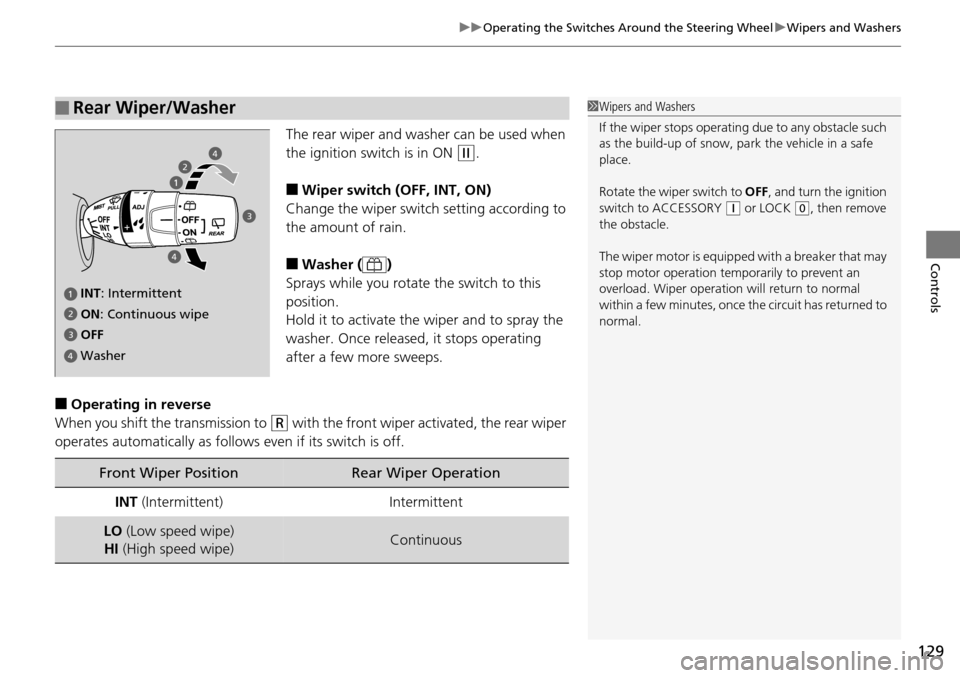
The rear wiper and washer can be used when
the ignition switch is in ON
(w
.
■Wiper switch (OFF, INT, ON)
Change the wiper switch setting according to
the amount of rain.
■Washer ( )
Sprays while you rotate the switch to this
posi
tion.
Hold it to activate th e wiper
and to spray the
washer. Once released , it stops operating
after a few more sweeps.
■Operating in reverse
When you shift the transmission to
(R
with the front wiper activated, the rear wiper
operates automatically as follows even if its switch is off.
■Rear Wiper/Washer1 Wipers and Washers
If the wiper stops operating due to any obstacle such
as the build-up of snow, pa rk the vehicle in a safe
place.
Rotate the wiper switch to OFF, and turn the ignition
switch to ACCESSORY
(
q
or LOCK (
0
, then remove
the obstacle.
The wiper motor is equipped with a breaker that may
stop motor operation temp orarily to prevent an
overload. Wiper operation will return to normal
within a few minutes, once the circuit has returned to
normal.
INT : Intermittent
OFF ON : Continuous wipe
Washer
2
3
4
4
2
3
4
Front Wiper PositionRear Wiper Operation
INT (Intermittent)Intermittent
LO (Low speed wipe)
HI (High speed wipe)Continuous
Page 133 of 488

132
uu Operating the Switches Around the Steering Wheel u Driving Position Memory System *
Controls
Driving Position Memory System *
You can store two driver’s seat and door mirror positions with the driving position
memory system.
When you unlock and open the driver’s door with a remote transmitter, the seat and
door mirrors adjust
automatically to one of the two preset positions.
The multi-information display shows you which remote transmitter you used to
un
lock the vehicle when you enter.
• Driver 1 transmitter
is linked to memory button 1.
• Driver 2 transmitter
is linked to memory button 2.
1Driving Position Memory System *
Using the multi-information display, you can disable
the automatic seat adjustment function. 2 Customized Features P. 90
The customize setting is also stored by the Driver 1
and 2 transmitters. What setting is recalled next time
depends on which transmitter you use to unlock and
open the driver's door.
Driver 1 Driver 2
* Not available on all models
Page 135 of 488

134
uu Operating the Switches Around the Steering Wheel u Adjusting the Steering Wheel
Controls
Adjusting the Steering Wheel
The steering wheel height and distance from your body can be adjusted so that you
can comfortably grip the steering wheel in an appropriate driving posture.
1.Push t
he steering wheel adjustment lever
down.
u T
he steering wheel adjustment lever is
under the steering column.
2. Mo
ve the steering wheel up or down, and
in or out.
u Make
sure you can see the instrument
panel gauges and indicators.
3. Pull the steering wheel adjustment lever up
to lock the
steering wheel in position.
u Af
ter adjusting the position, make sure
you have securely locked the steering
wheel in place by trying to move it up,
down, in, and out.
1Adjusting the Steering Wheel
Make any steering wheel adjustments before you
start driving.
3 WARNING
Adjusting the steering wheel position while
driving may cause you to lose control of the
vehicle and be seriously injured in a crash.
Adjust the steering wheel only when the
vehicle is stopped.
Lever
Page 139 of 488
uu Adjusting the Seats u Adjusting the Seat Positions
138
Controls
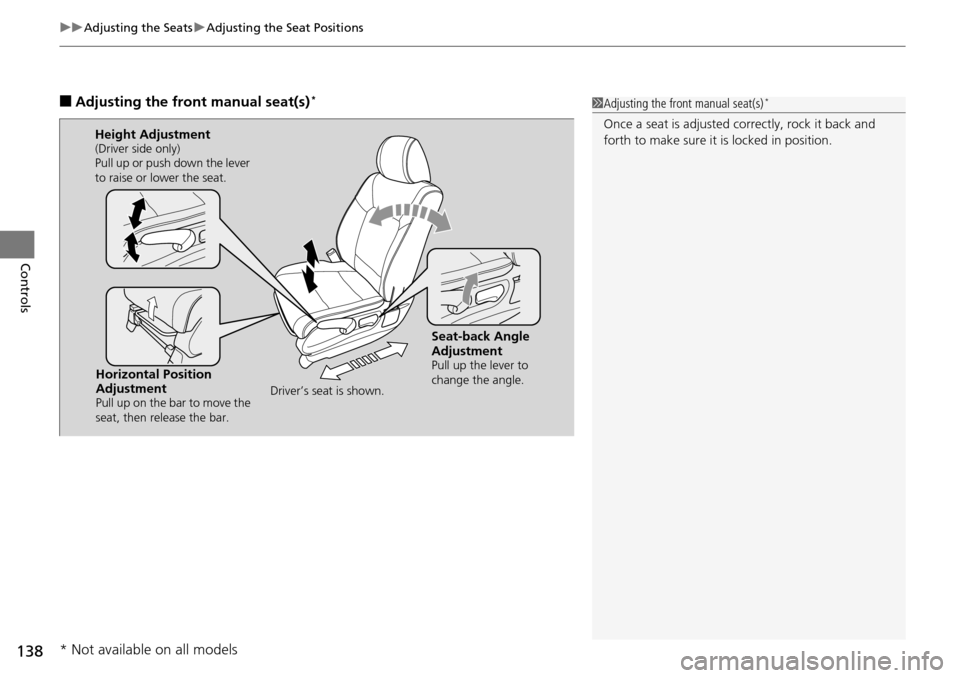
■Adjusting the front manual seat(s) *1Adjusting the front manual seat(s) *
Once a seat is adjusted co rrectly, rock it back and
forth to make sure it is locked in position.
Horizontal Position
Adjustment
Pull up on the bar to move the
seat, then release the bar.
Height Adjustment(Driver side only)
Pull up or push down the lever
to raise or lower the seat.
Seat-back Angle
Adjustment
Pull up the lever to
change the angle.
Driver’s seat is shown.
* Not available on all models
Page 140 of 488
Continued139
uu Adjusting the Seats u Adjusting the Seat Positions
Controls
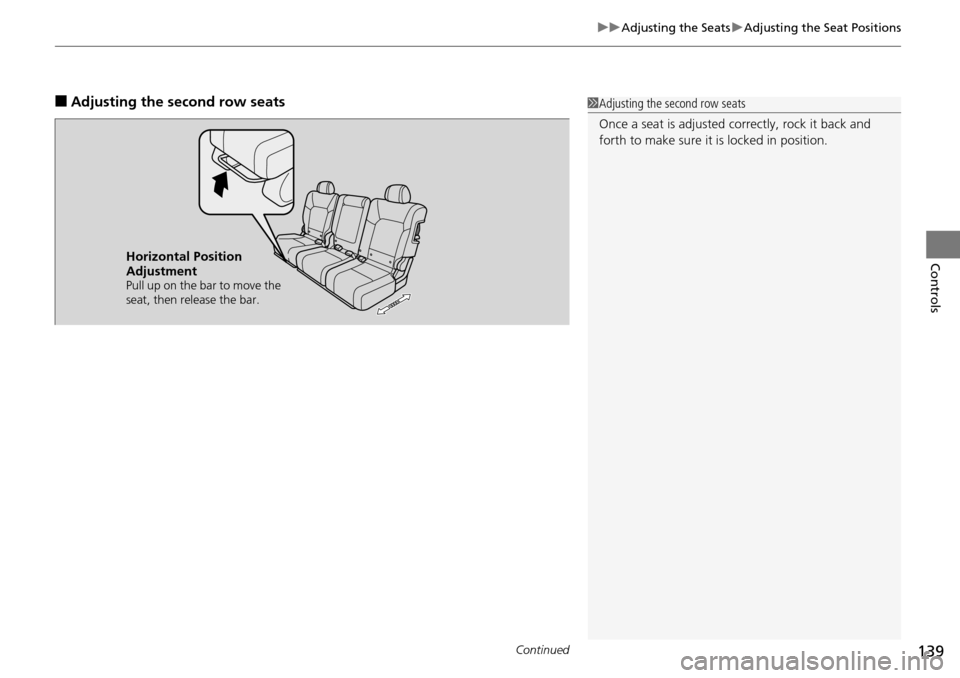
■Adjusting the second row seats1Adjusting the second row seats
Once a seat is adjusted co rrectly, rock it back and
forth to make sure it is locked in position.
Horizontal Position
Adjustment
Pull up on the bar to move the
seat, then release the bar.
Page 145 of 488

uu Adjusting the Seats u Adjusting the Seat Positions
144
Controls
Head restraints can be removed for cleaning or repair.
To remove a head restraint:
Pull the restraint up as far as it will go. T
hen push the release button, and pull the
restraint up and out.
To reinstall a head restraint:
Insert the legs back in place, then adjust the head restraint to an a
ppropriate height
while pressing the release button. Pull up on the restraint to make sure it is locked
in position.
After all occupants have adjusted their seats and head restraints, and put on their
seat
belts, it is very important that they continue to sit upright, well back in their
seats, with their feet on the floor, until the vehicle is safely parked and the engine is
off.
Sitting improperly can increase the chance of injury during a crash. For example, if
an oc
cupant slouches, lies down, turns si deways, sits forward, leans forward or
sideways, or puts one or both feet up, the chance of injury during a crash is greatly
increased.
In addition, an occupant who is out of position in the front seat can be seriously or
fatally
injured in a crash by striking interior parts of the vehicle or being struck by an
inflating front airbag.
■Removing and Reinstalling the Head Restraints
■Maintain a Proper Sitting Position
1 Removing and Reinstalling the Head Restraints
3 WARNING
Failure to reinstall, or correctly reinstall, the
head restraints can result in severe injury
during a crash.
Always replace the he ad restraints before
driving.
1 Maintain a Proper Sitting Position
3 WARNING
Sitting improperly or out of position can
result in serious injury or death in a crash.
Always sit upright, well back in the seat,
with your feet on the floor.
Page 151 of 488

150
Controls
Interior Lights/Interior Convenience Items
Interior Lights
■ON
The interior lights come on regardless of
whet
her the doors are open or closed.
■Door activated
The interior lights come on in the following
situ
ations:
• W
hen any of the doors are opened.
•You un
lock the driver's door.
•You remove the k
ey from the ignition
switch.
Only the cargo area light comes on when the
tailgate is ope
ned.
■OFF
The interior lights remain off regardless of
whet
her the doors are open or closed.
■Interior Light Switches1Interior Light Switches
In the door activated position, the interior lights fade
out and go off about 30 se conds after the doors are
closed.
The lights go off after 30 seconds in the following
situations:
•When you unlock the driver's door but do not open
it.
•When you remove the key from the ignition switch
but do not open a door.
The interior lights go off i mmediately in the following
situations:
•When you lock the driver's door.
•When you close the driver's door with the key in
the ignition switch.
•When you turn the ignition switch to ON (
w
.
If you leave any of the doors open without the key in
the ignition switch, the interior lights go off after
about 15 minutes.
You can change the interi or lights dimming time.
2 Customized Features P. 90
Models with multi-information display
Door Activated
Position
OFF
Front
Door Activated Position
ON
OFF
Cargo Area
ON