2014 HONDA PILOT lock
[x] Cancel search: lockPage 362 of 488

361
uu Braking u Brake System
Driving
Your vehicle is equipped with disc brakes at all four wheels. A vacuum power assist
helps reduce the effort needed on the brake pedal. The brake assist system increases
the stopping force when you depress the brake pedal hard in an emergency
situation. The anti-lock brake system (ABS) helps you retain steering control when
braking very hard.
2 Brake Assist System P. 363
2 ABS (Anti-lock Brake System) P. 362
■Foot Brake1Foot Brake
Check the brakes after driving through deep water,
or if there is a buildup of road surface water. If
necessary, dry the brakes by lightly depressing the
pedal several times.
If you hear a continuous me tallic friction sound when
applying the brakes, the brake pads need to be
replaced. Have the vehicle checked by a dealer.
Constantly using the brak e pedal while going down a
long hill builds up heat, which reduces the brake
effectiveness. Apply engine braking by taking your
foot off the accelerator pe dal and downshifting to a
lower gear.
Do not rest your foot on the brake pedal while
driving, as it will lightly apply the brakes and cause
them to lose effectiveness over time and reduce pad
life. It will also conf use drivers behind you.
Page 363 of 488

362
uu Braking u ABS (Anti-lock Brake System)
Driving
ABS (Anti-lock Brake System)
Helps prevent the wheels from locking up, a nd helps you retain steering control by
pumping the brakes rapidly, much faster than you.
The electronic brake distribution (EBD) system, which
is part of the ABS, also
balances the front-to-rear braking distri bution according to vehicle loading.
You should never pump the brake pedal. Let
the ABS work for you by always
keeping firm, steady pressure on the brake pe dal. This is sometimes referred to as
“stomp and steer.”
■ABS operation
The brake pedal may pulsate slightly when the ABS
is working. Keep holding the
pedal firmly down. On dry pavement, you will need to press on the brake pedal very
hard before the ABS activates. However, you may feel the ABS activate immediately
if you are trying to stop on snow or ice.
When the vehicle speed goes under 6 mph (10 km/h), the ABS stops.
■ABS1 ABS (Anti-lock Brake System)
NOTICE
The ABS may not function correctly if you use an
incorrect tire type and size.
When the ABS indicator comes on while driving,
there may be a problem with the system.
While normal braking is not affected, there is a
possibility of the ABS not operating. Have the vehicle
checked by a dealer immediately.
The ABS does not reduce the ti me or distance it takes
to stop the vehicle. It only helps with steering control
during hard braking.
In the following cases, yo ur vehicle may need more
stopping distance than a vehicle without the ABS:
•When driving on rough road surfaces, including
when driving on uneven surf aces, such as gravel or
snow.
•When tire chains are installed.
You may hear a motor sound coming from the
engine compartment while system checks are being
performed immediately after starting the engine or
while driving. This is normal.
Page 369 of 488

uu Parking Your Vehicle u Parking Sensor System *
368
Driving
■The parking sensor system on navigation screen
•An appro
priate indicato r blinks when there
are any obstacles around the parking
sensors. The color of the indicator changes
in accordance with the distance between
your vehicle and obstacles.
• An appr
opriate indicator stays on in red
when there is a problem with the
corresponding parking sensor.
2 Multi-Information Display Warning
and Information Messages * P. 78
1. Make sure that the parking sensor system is not activated. Turn the ignition
switch to LOCK
(0
.
2. Press
and hold the parking sensor system button, and turn the ignition switch to
ON
(w
.
3. Keep pressi
ng the button for ten seconds. Release the button when the indicator
in the button flashes.
4. Press the
button again. The indi cator in the button goes off.
u The
beeper sounds twice. The re ar sensors are now turned off.
To turn the rear sensors on again, follow the above procedure. The beeper sounds
three
times when the rear sensors come back on.
■Turning off All Rear Sensors1Turning off All Rear Sensors
When you shift to
(
R
, the indicator in the parking
sensor system button blinks as a reminder that the
rear sensors have been turned off.
* Not available on all models
Page 391 of 488
390
uu Maintenance Under the Hood u Opening the Hood
Maintenance
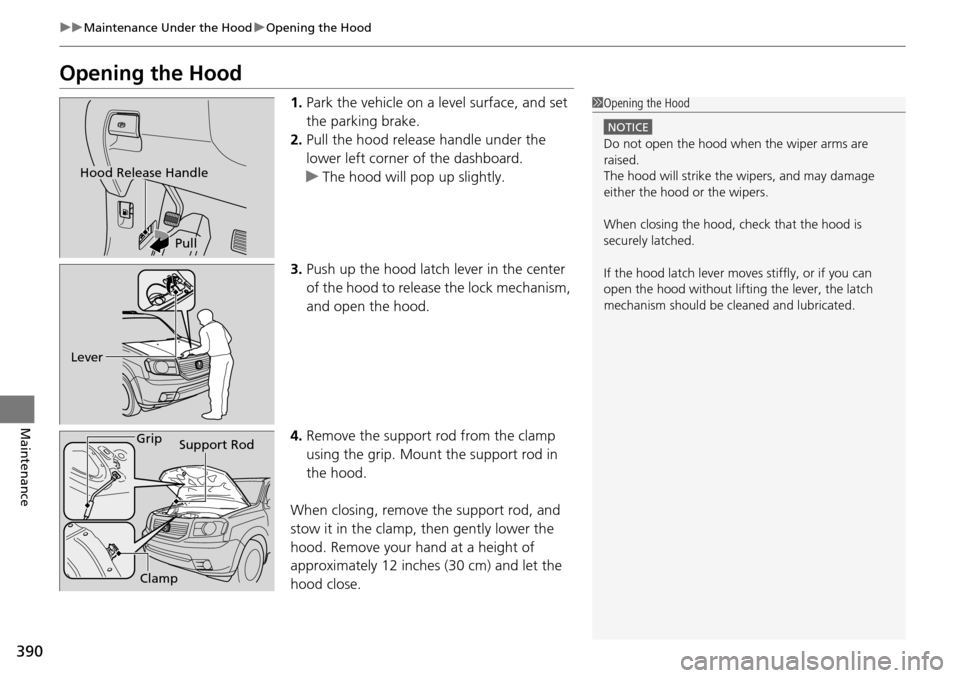
Opening the Hood
1. Park the vehicle on a level surface, and set
the parking brake.
2. Pul
l the hood release handle under the
lower left corner of the dashboard.
u Th
e hood will pop up slightly.
3. Pus
h up the hood latch lever in the center
of the hood to release the lock mechanism,
and open the hood.
4. R
emove the support rod from the clamp
using the grip. Mount the support rod in
the hood.
When closing, remove the support rod,
and
stow it in the clamp, then gently lower the
hood. Remove your hand at a height of
approximately 12 inches (30 cm) and let the
hood close.
1 Opening the Hood
NOTICE
Do not open the hood when the wiper arms are
raised.
The hood will strike the wipers, and may damage
either the hood or the wipers.
When closing the hood, check that the hood is
securely latched.
If the hood latch lever moves stiffly, or if you can
open the hood without lifti ng the lever, the latch
mechanism should be cl eaned and lubricated.
Hood Release Handle
Pull
Lever
Support Rod
Grip
Clamp
Page 397 of 488

uu Maintenance Under the Hood u Changing the Engine Oil and Oil Filter
396
Maintenance
4. Remove the oil filter and dispose of the
remaining oil.
5.Check that the filter ga sket is not stuck to
the engine contact surface.
u If it
is stuck, you must detach it.
6. Wipe away
dirt and dust adhering to the
contact surface of the engine block, and
install a new oil filter.
u Appl
y a light coat of new engine oil to
the filter gasket.
7. Pu
t a new washer on the drain bolt, then
reinstall the drain bolt.
u Tighte
ning torque:
29 lbf∙ft (39 N∙m, 4.0 kgf∙m)
8. P
our the recommended engine oil into the
engine.
u Engi
ne oil change capacity (including
filter):
4.5 US qt (4.3 L)
9. Reins
tall the engine oil fill cap securely and
start the engine.
10. Run the engin
e for a few minutes, and
then check that there is no leak from the
drain bolt or oil filter.
11. S
top the engine, wait for three minutes,
and then check the oil level on the
dipstick.
u If neces
sary, add more engine oil.
1Changing the Engine Oil and Oil Filter
You will need a special wrench to replace the oil
filter. You can buy this wrench from a dealer.
When installing the new oil filter, follow the
instructions supplied with the oil filter.
Reinstall the engine oil fill cap. Start the engine. The
low oil pressure indicator should go off within five
seconds. If it does not, turn off the engine, and check
your work.
Oil Filter
Page 399 of 488
uu Maintenance Under the Hood u Engine Coolant
398
Maintenance
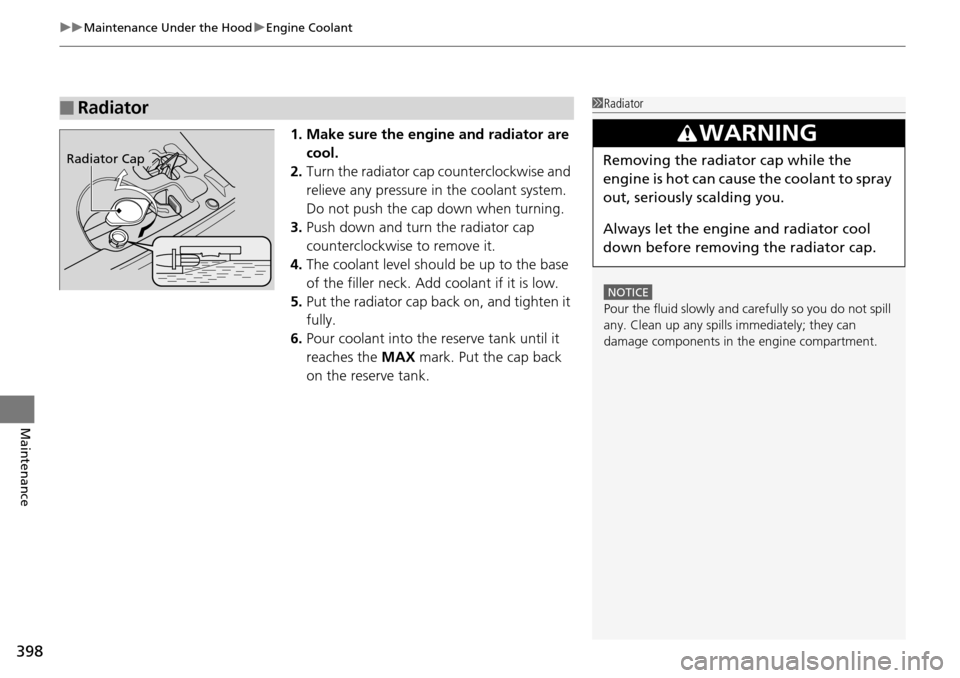
1. Make sure the engine and radiator are
cool.
2.Turn the radiator cap counterclockwise and
relieve any pressure in the coolant system.
Do not push the cap down when turning.
3. Pus
h down and turn the radiator cap
counterclockwise to remove it.
4. The co
olant level should be up to the base
of the filler neck. Add coolant if it is low.
5. Put the
radiator cap back on, and tighten it
fully.
6. Pour coola
nt into the reserve tank until it
reaches the MAX mark. Put the cap back
on the reserve tank.
■Radiator1 Radiator
NOTICE
Pour the fluid slowly and ca refully so you do not spill
any. Clean up any spills immediately; they can
damage components in the engine compartment.
3 WARNING
Removing the radiator cap while the
engine is hot can cause the coolant to spray
out, seriously scalding you.
Always let the engine and radiator cool
down before removing the radiator cap.Radiator Cap
Page 401 of 488

400
uu Maintenance Under the Hood u Brake Fluid
Maintenance
Brake Fluid
The fluid level should be between the MIN
and MAX marks on the side of the reservoir.
Power Steering Fluid
We recommend that you check the power st eering fluid level every time you refuel.
Check when the engi ne is not running.
1.Look at
the side of the reservoir. The fluid
should be between the UPPER LEVEL and
LOWER LEVEL .
2. Add power ste
ering fluid if necessary to the
UPPER LEVEL mark.
u Inspect the
system for a leak. If the fluid
level goes below the LOWER LEVEL
frequently, have the system inspected as
soon as possible.
Specified fluid: Honda Heavy Duty Brake Fluid DOT 3
■Checking the Brake Fluid
1Brake Fluid
NOTICE
Brake fluid marked DOT 5 is not compatible with your
vehicle's braking system and can cause extensive
damage.
If the specified brake fluid is not available, you should
use only DOT 3 or DOT 4 fluid from a sealed
container as a temporary replacement.
Using any non-Honda brake fluid can cause corrosion
and decrease the longevity of the system. Have the
brake system flushed and re filled with Honda Heavy
Duty Brake Fluid DOT 3 as soon as possible.
If the brake fluid level is at or below the MIN mark,
have a dealer inspect for l eaks or worn brake pads as
soon as possible.
Brake Reservoir
MINMAX
Specified fluid: Honda Power Steering Fluid
1Power Steering Fluid
NOTICE
Turning the steering wheel to full left or right lock
and holding it there can da mage the power steering
pump.
NOTICE
Pour the fluid slowly and ca refully so you do not spill
any. Clean up any spills imme diately; it could damage
components in the e ngine compartment.
UPPER LEVEL
LOWER LEVEL
Page 424 of 488

423
Maintenance
Battery
Checking the Battery
Check the battery condition monthly. Look at
the test indicator window and check the
terminals for corrosion.
If your vehicle's battery is disconnected or goes dead:
• The audio
system is disabled.
2Reactivate the audio system P. 174
• The clock resets.
2 Setting the Clock P. 98
• The navigation system * is disabled.
2Refer to the navigation system manual
Charging the Battery
Disconnect both battery cables to prevent damaging your vehicle's electrical system.
Always disconnect the negative (–) cable first, and reconnect it last.
1Battery
WARNING: Battery post, terminals,
and related accessories contain lead
and lead compounds.
Wash your hands after handling.
The test indicator's color information is on the
battery.
When you find corrosion, cl ean the battery terminals
by applying a baking powder and water solution.
Clean terminals with a damp towel. Cloth/towel dry
the battery. Coat the terminals with grease to help
prevent future corrosion.
3 WARNING
The battery gives off explosive hydrogen
gas during normal operation.
A spark or flame can cause the battery to
explode with enough force to kill or
seriously hurt you.
When conducting any battery
maintenance, wear prot ective clothing and
a face shield, or have a skilled technician do
it.
Test Indicator Window
* Not available on all models