Page 55 of 488
54
uu Child Safety u Safety of Infants and Small Children
Safe Driving
Safety of Infants and Small Children
An infant must be properly restrained in a rear-facing, reclining child seat until the
infant reaches the seat maker's weight or he ight limit for the seat, and the infant is
at least one year old.
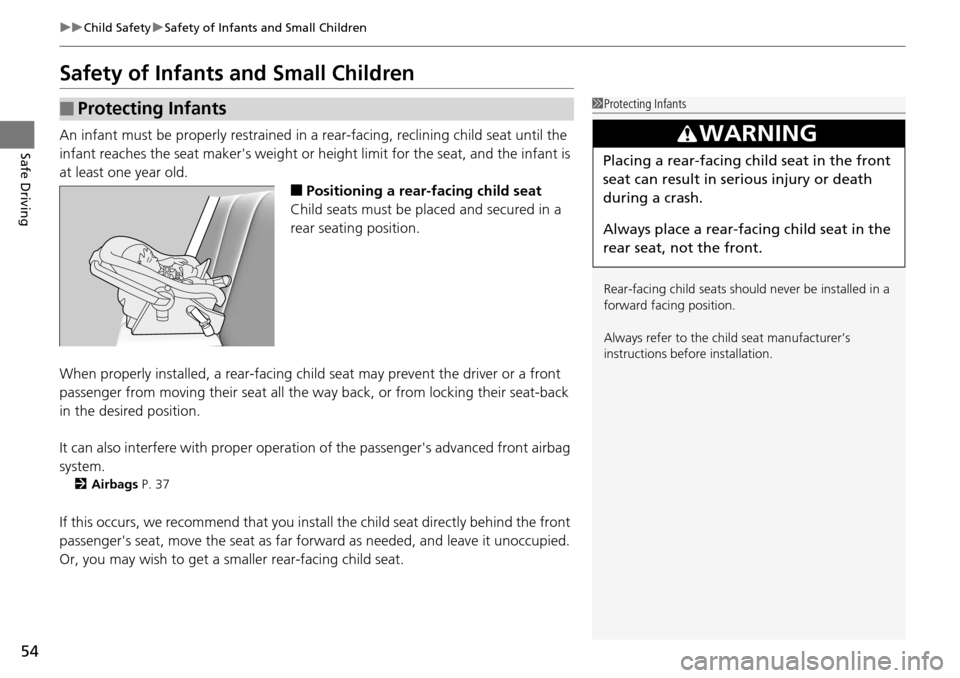
■Positioning a rear-facing child seat
Child seats must be placed and secured in a
rear
seating position.
When properly installed, a rear-facing child seat m
ay prevent the driver or a front
passenger from moving their seat all the way back, or from locking their seat-back
in the desired position.
It can also interfere with pr op
er operation of the passenger's advanced front airbag
system.
2 Airbags P. 37
If this occurs, we recommend that you install the child seat directly behind the front
passenger's seat, move the seat as far fo rward as needed, and leave it unoccupied.
Or, you may wish to get a sm aller rear-facing child seat.
■Protecting Infants1Protecting Infants
Rear-facing child seats should never be installed in a
forward facing position.
Always refer to the child seat manufacturer’s
instructions before installation.
3 WARNING
Placing a rear-facing child seat in the front
seat can result in serious injury or death
during a crash.
Always place a rear-fac ing child seat in the
rear seat, not the front.
Page 60 of 488
59
uu Child Safety u Safety of Infants and Small Children
Continued
Safe Driving
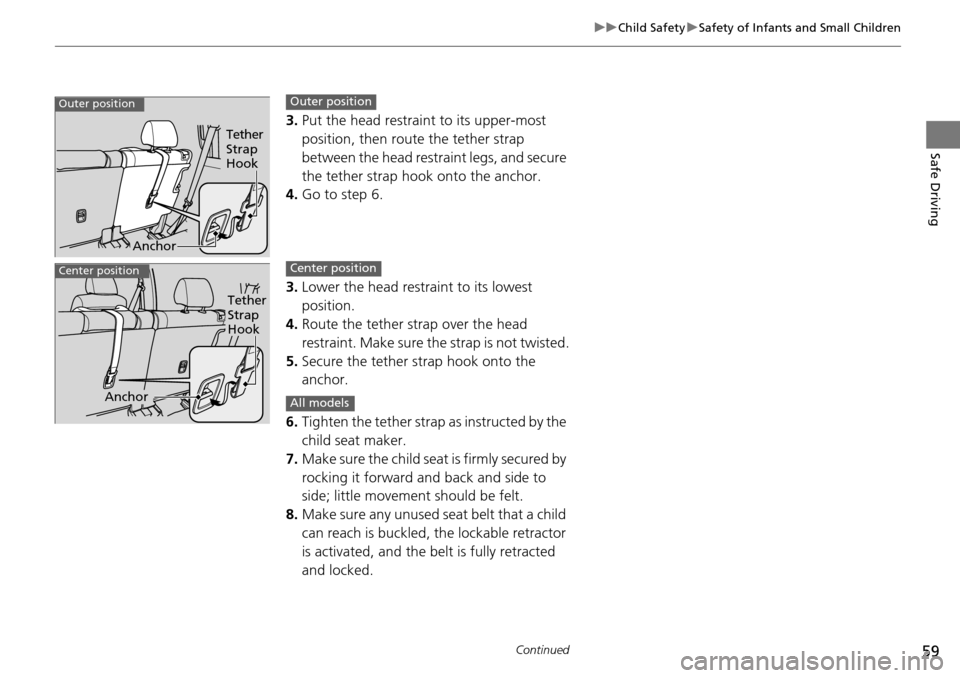
3. Put the head restraint to its upper-most
position, then route the tether strap
between the head restraint legs, and secure
the tether strap hook onto the anchor.
4.Go to step 6.
3. Lower
the head restraint to its lowest
position.
4. Route the
tether strap over the head
restraint. Make sure the strap is not twisted.
5. Secur
e the tether strap hook onto the
anchor.
6. Tighte
n the tether strap as instructed by the
child seat maker.
7. Make
sure the child seat is firmly secured by
rocking it forward and back and side to
side; little movement should be felt.
8. Make su
re any unused seat belt that a child
can reach is buckled, the lockable retractor
is activated, and the be lt is fully retracted
and locked.
Tether
Strap
Hook
Anchor
Outer positionOuter position
Tether
Strap
Hook
Anchor
Center positionCenter position
All models
Page 61 of 488
uu Child Safety u Safety of Infants and Small Children
60
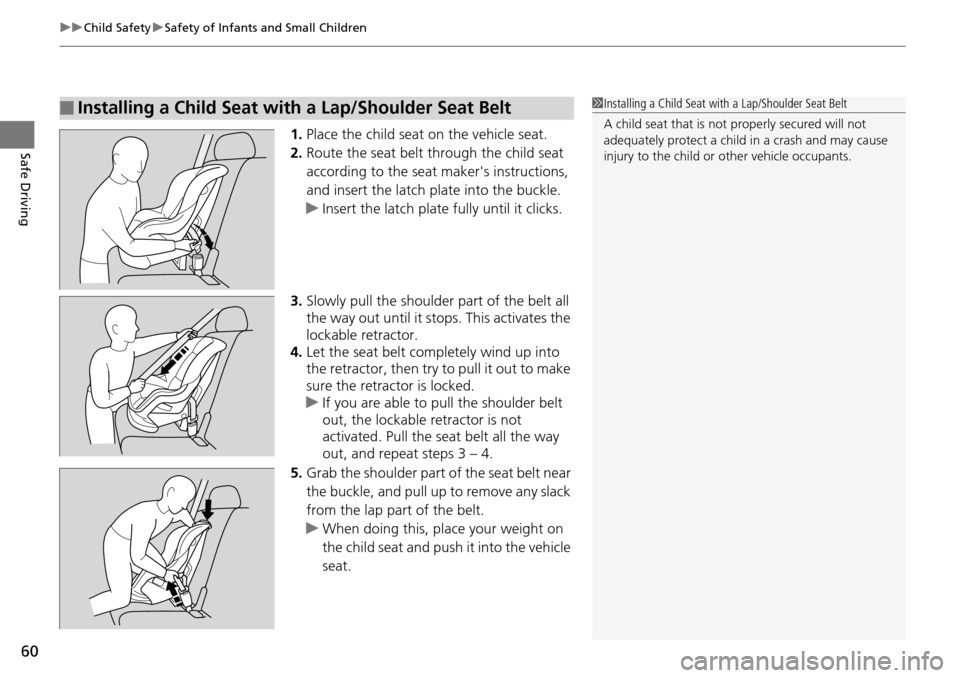
Safe Driving1. Place the child seat on the vehicle seat.
2.Route the seat belt through the child seat
according to the seat maker's instructions,
and insert the latch plate into the buckle.
u Insert the
latch plate fully until it clicks.
3. Slo
wly pull the shoulder part of the belt all
the way out until it stops. This activates the
lockable retractor.
4. Let
the seat belt completely wind up into
the retractor, then try to pull it out to make
sure the retractor is locked.
u If you
are able to pull the shoulder belt
out, the lockable retractor is not
activated. Pull the seat belt all the way
out, and repeat steps 3 – 4.
5. Grab
the shoulder part of the seat belt near
the buckle, and pull up to remove any slack
from the lap part of the belt.
u When do
ing this, plac e your weight on
the child seat and push it into the vehicle
seat.
■Installing a Child Seat with a Lap/Shoulder Seat Belt1 Installing a Child Seat with a Lap/Shoulder Seat Belt
A child seat that is not properly secured will not
adequately protect a child in a crash and may cause
injury to the child or other vehicle occupants.
Page 62 of 488
Continued61
uu Child Safety u Safety of Infants and Small Children
Safe Driving
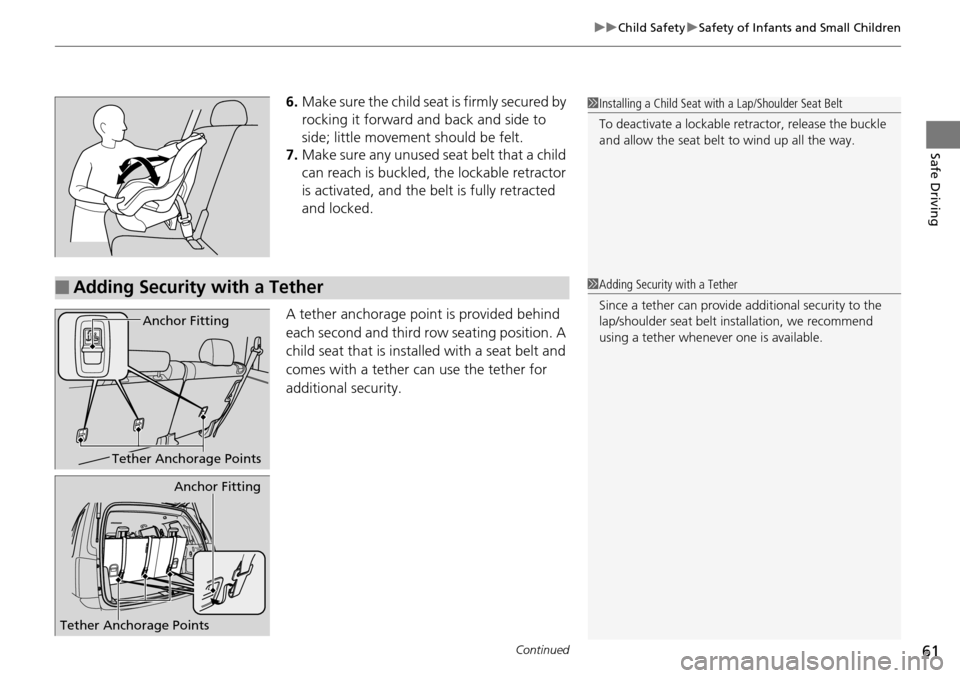
6. Make sure the child seat is firmly secured by
rocking it forward and back and side to
side; little movement should be felt.
7.Make sure any unused seat belt that a child
can reach is buckled, the lockable retractor
is activated, and the be lt is fully retracted
and locked.
A tether anchorage point is provided behind
ea
ch second and third row seating position. A
child seat that is installed with a seat belt and
comes with a tether can use the tether for
additional security.
1 Installing a Child Seat with a Lap/Shoulder Seat Belt
To deactivate a lockable retractor, release the buckle
and allow the seat belt to wind up all the way.
■Adding Security with a Tether
Tether Anchorage Points
Anchor Fitting
Tether Anchorage Points
Anchor Fitting
1 Adding Security with a Tether
Since a tether can provide additional security to the
lap/shoulder seat belt in stallation, we recommend
using a tether whenever one is available.
Page 72 of 488

71
uu Indicators u
Continued
Instrument Panel
IndicatorNameOn/BlinkingExplanationMessage *
ABS (Anti-lock
Brake System)
Indicator
●Comes on for a few seconds when
you turn the igniti on switch to ON
(w
, then goes off.●If it comes on at any other time, there
is a problem with the ABS.
●Stays on constantly - Have the vehicle
checked by
a dealer. With this indicator
on, your vehicle still has normal braking
ability but no an ti-lock function.
2ABS (Anti-lock Brake System) P. 362
Supplemental
Restraint System
Indicator
●Comes on for a few seconds when
you turn the igniti on switch to ON
(w
, then goes off.●Comes on if a problem with any of
the following is detected:
-Supplemental restraint system
- Side air
bag system
-Side curtain
airbag system
-Seat belt tensioner
●Stays on constantly or does not come
on at all
- Have the vehicle checked by a
dealer.
VTM-4 ® System
Indicator *
●Comes on for a few seconds when
you turn the igniti on switch to ON
(w
, then goes off.●Comes on if there is a problem with
the VTM-4 ®.
●Blinks when the VTM-4 ® system is
overheated. The system is inactive.
●Stays on constantly - Have the vehicle
checked by
a dealer.
●Blinks while driving - The VTM-4® fl uid
temperature is too high. Stop in a safe
place, shift to
(P
, and idle the engine
until the indicator goes off. If the
indicator does not stop blinking, take
your vehicle to a dealer.
2 VTM (Variable Torque
Management)-4 r System * P. 354
—
* Not available on all models
Page 77 of 488

76
uu Indicators u
Instrument Panel
IndicatorNameOn/BlinkingExplanationMessage *
Immobilizer
System Indicator
●Comes on briefly when you turn the
ignition switch to ON
(w
, then goes
off.
●Comes on if the immobilizer system
cannot recognize the key
information.
●Blinks - You cannot start the engine.
Turn
the ignition switch to LOCK
(0
, pull
the key out, and then insert the key and
turn it to ON
(w
again.●Repeatedly blinks - The system may be
malfu
nctioning. Have the vehicle checked
by a dealer.
●Do not attempt to alter this system or add
other devices to it. Electrical problems
can occur.
—
Security System
Alarm Indicator *
●Blinks when the secu rity system alarm
has been set.2 Security System Alarm * P. 118—
Starter System
Indicator *
●Comes on if there is a problem with
the starter system.●As a temporary measure, hold the
ignition switch to START
(e
for up to 15
seconds and start the engine. Have the
vehicle checked by a dealer.
Fuel Economy
Indicator●Comes on and stays on while you are
driving with good fuel economy.——
U.S.
CanadaU.S.
Canada
* Not available on all models
Page 79 of 488
78
uu Indicators u Multi-Information Display Warn ing and Information Messages *
Instrument Panel
Multi-Information Display Warn ing and Information Messages *
The following messages appear only on the multi-information display. Press the / (information) button to see the message again
with the system me ss
age indicator on.
MessageConditionExplanation
●Appears when the fuel fill cap is loose or is not
installed.
2Check/Tighten Fuel Cap Message P. 451
●Appears when the schedul ed maintenance is due
soon.
●Consequently, SERVICE DUE NOW and SERVICE
PAST DUE follow.
2Maintenance Minder Messages on the Multi-
Information Display P.
386
●Appears when you open the driver's door while the
ignition key is in LOCK
(0
.
●Remove the key from the ignition switch.
●Appears when the engine coolant temperature gets
abnormally high.
2 Overheating P. 448
●Appears when the daytime running lights are off.
2 Daytime Running Lights P. 127
* Not available on all models
Page 91 of 488
uu Gauges and Displays u Multi-Information Display *
90
Instrument Panel
Use the multi-information display to customize certain features.
■How to customize
Select the CUS
TOMIZE SETTINGS by pressing the / button while the
ignition switch is in ON
(w
, and the vehicle is at a complete stop. Press the SEL/
RESET button to change the display to the CHG SETTING.
■Customized Features1Customized Features
To customize other features, press the /
button.
2 List of customizable options P. 92
2 Example of customization settings P. 94
Customization is possible when you see the driver’s
ID ( DRIVER 1 or DRIVER 2) on the CHG SETTING
screen.
The driver’s ID indicates which remote transmitter
you have used to unlock the driver’s door.
The customized settings are recalled every time you
unlock the driver’s door with that remote.
When you customize settings:
Shift to
(
P
.
SEL/RESET Button
Enters the selected item. / Button
Changes the customize
menu and items.