Page 82 of 289
81
uuLocking and Unlocking the DoorsuLocking/Unlocking the Doors from the Outside
Controls
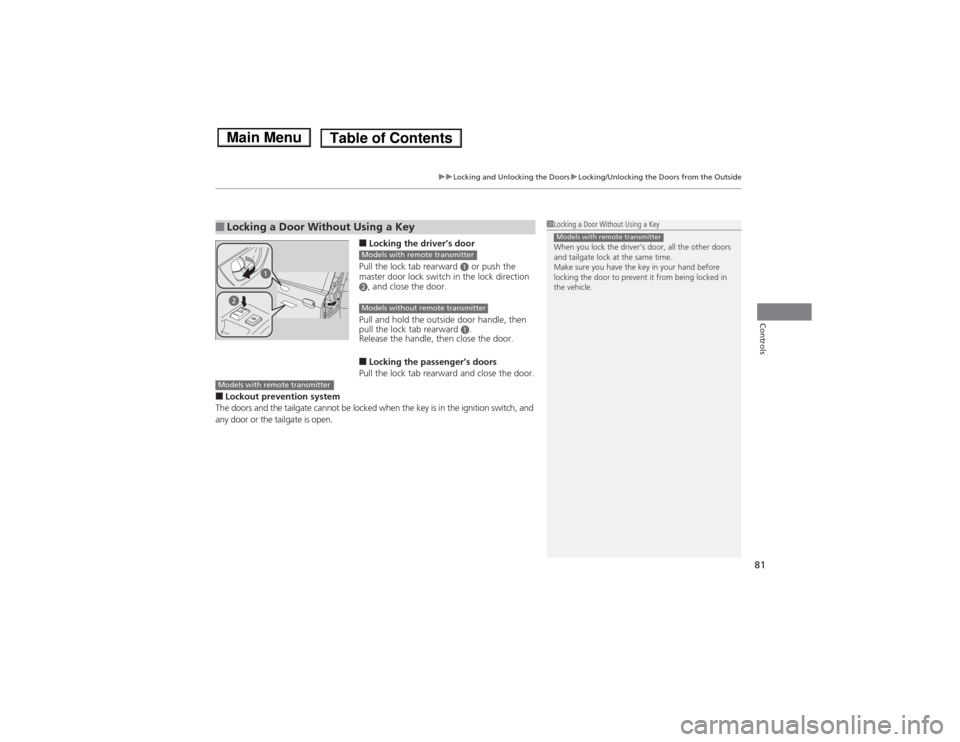
■Locking the driver’s door
Pull the lock tab rearward
a or push the
master door lock switch in the lock direction
b, and close the door.
Pull and hold the outside door handle, then
pull the lock tab rearward
a.
Release the handle, then close the door.
■Locking the passenger’s doors
Pull the lock tab rearward and close the door.
■Lockout prevention system
The doors and the tailgate cannot be locked when the key is in the ignition switch, and
any door or the tailgate is open.■Locking a Door Without Using a Key
1Locking a Door Without Using a Key
When you lock the driver’s door, all the other doors
and tailgate lock at the same time.
Make sure you have the key in your hand before
locking the door to prevent it from being locked in
the vehicle.Models with remote transmitter
Models with remote transmitterModels without remote transmitter
Models with remote transmitter
Page 89 of 289
88Controls
Opening and Closing the TailgatePrecautions for Opening/Closing the TailgateAlways make sure individuals and objects are clear of the tailgate before opening or
closing it.■Opening the tailgate
•Open the tailgate all the way.
uIf it is not fully opened, the tailgate may begin to close under its own weight.
•Be careful when it is windy. The wind may cause the tailgate to close.■Closing the tailgate
Keep the tailgate closed while driving to:
uAvoid possible damage.
uPrevent exhaust gas from leaking into the vehicle.2Carbon Monoxide Gas P. 61
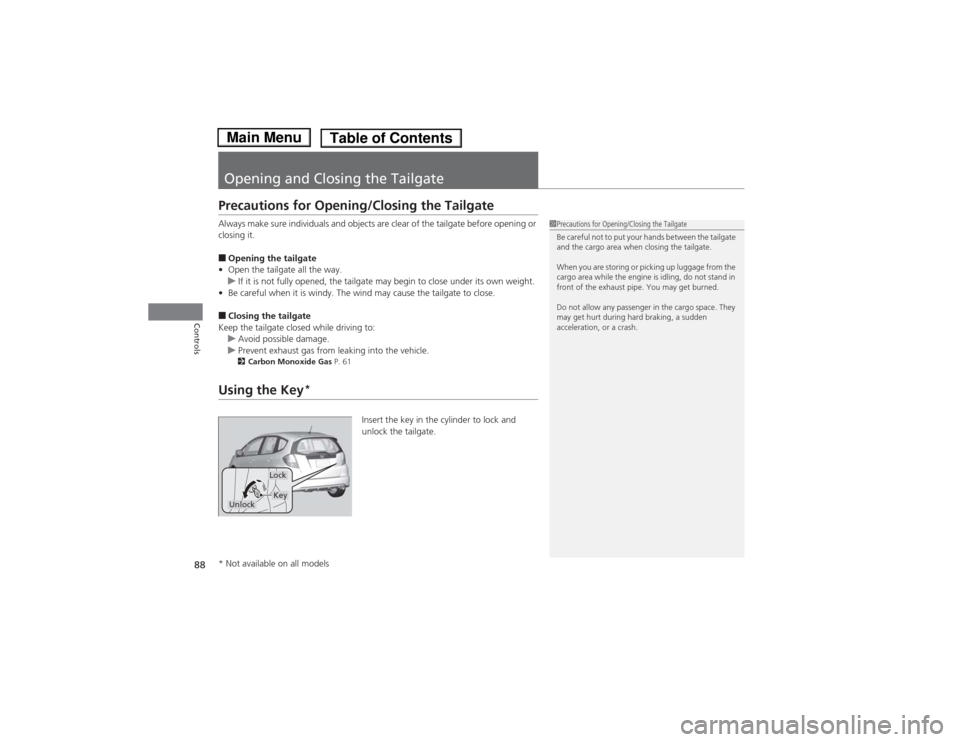
Using the Key
*
Insert the key in the cylinder to lock and
unlock the tailgate.
1Precautions for Opening/Closing the Tailgate
Be careful not to put your hands between the tailgate
and the cargo area when closing the tailgate.
When you are storing or picking up luggage from the
cargo area while the engine is idling, do not stand in
front of the exhaust pipe. You may get burned.
Do not allow any passenger in the cargo space. They
may get hurt during hard braking, a sudden
acceleration, or a crash.
Lock
Unlock
Key
* Not available on all models
Page 91 of 289
90Controls
Security SystemImmobilizer SystemThe immobilizer system prevents a key that has not been pre-registered from
starting the engine. Each key contains electronic transmitters that use electronic
signals to verify the key.
Pay attention to the following when inserting the key into the ignition switch:
•Do not allow objects that emit strong radio waves near the ignition switch.
•Make sure the key is not covered by or touching a metal object.
•Do not bring a key from another vehicle’s immobilizer system near the ignition
switch.Security System Alarm
*
The security system alarm activates when the doors, tailgate, or hood are opened
without the key, or remote transmitter.■When the security system alarm activates
The horn sounds intermittently and all of the exterior lights flash.■To deactivate the security system alarm
Unlock the vehicle using the key, or remote transmitter. The system, along with the
horn and flashing lights, is deactivated.
1Immobilizer SystemNOTICELeaving the ignition key in the vehicle can result in
theft or accidental movement of the vehicle.
Always take the ignition key with you whenever you
leave the vehicle unattended.
Do not alter the system or add other devices to it.
Doing so may damage the system and make your
vehicle inoperable.1Security System Alarm
*
The security alarm continues for a maximum of two
minutes until the security system deactivates.
* Not available on all models
Page 92 of 289
91
uuSecurity SystemuSecurity System Alarm
*
Controls
■Setting the security system alarm
The security system alarm automatically sets when the following conditions have
been met:
•The ignition switch is in LOCK
(0, and the key has been removed from the
ignition switch.
•The hood is closed.
•All doors and the tailgate are locked with the key or the remote transmitter.
■When the security system alarm sets
The security system alarm indicator in the instrument panel blinks. When the
blinking interval changes after about 15 seconds, the security system alarm is set.■To cancel the security system alarm
The security system alarm is canceled when the vehicle is unlocked using the key or
remote transmitter. The security system alarm indicator goes off at the same time.
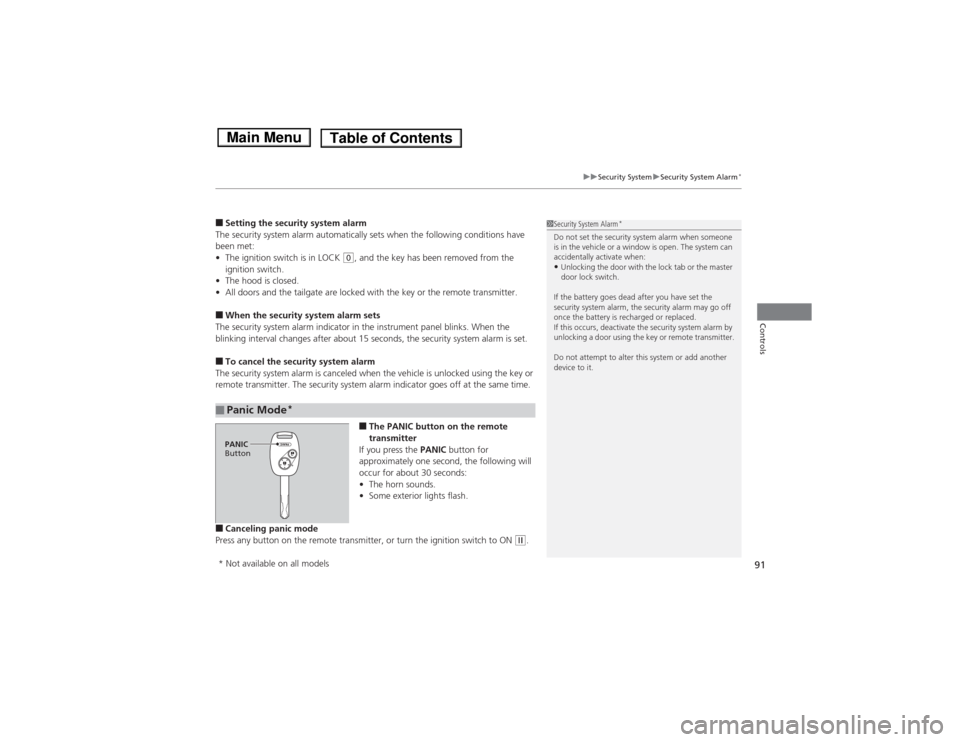
■The PANIC button on the remote
transmitter
If you press the PANIC button for
approximately one second, the following will
occur for about 30 seconds:
•The horn sounds.
•Some exterior lights flash.
■Canceling panic mode
Press any button on the remote transmitter, or turn the ignition switch to ON
(w.
■Panic Mode
*
1Security System Alarm
*
Do not set the security system alarm when someone
is in the vehicle or a window is open. The system can
accidentally activate when:•Unlocking the door with the lock tab or the master
door lock switch.
If the battery goes dead after you have set the
security system alarm, the security alarm may go off
once the battery is recharged or replaced.
If this occurs, deactivate the security system alarm by
unlocking a door using the key or remote transmitter.
Do not attempt to alter this system or add another
device to it.
PANIC
Button* Not available on all models
Page 95 of 289
94Controls
Operating the Switches Around the Steering WheelIgnition Switch
1Ignition Switch
You cannot take the key out unless the shift lever is
in
(P.
If you open the driver’s door when the key is in LOCK
(0 or ACCESSORY
(q, a warning buzzer will sound
to remind you to take the key out.
If the key won’t turn from LOCK
(0 to ACCESSORY
(q, turn the key while moving the steering wheel left
and right. The steering wheel will unlock, allowing
the key to turn.
3
WARNING
Removing the key from the ignition switch
while driving locks the steering. This can
cause you to lose control of the vehicle.
Remove the key from the ignition switch
only when parked.Manual transmission modelsAutomatic transmission modelsAll models
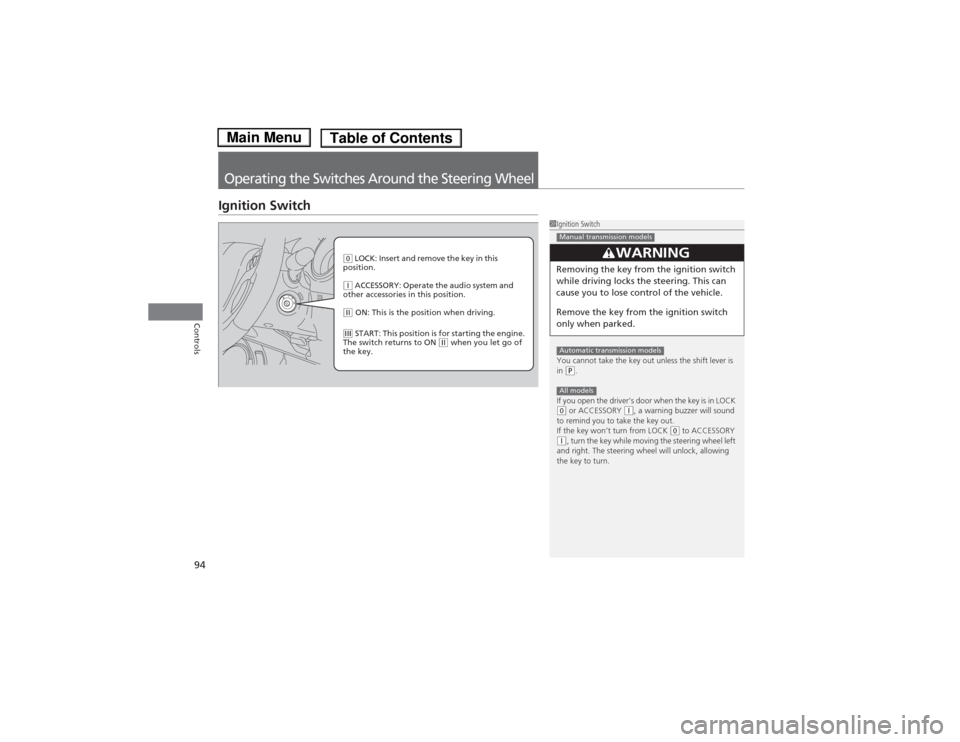
(0 LOCK: Insert and remove the key in this
position.(q ACCESSORY: Operate the audio system and
other accessories in this position.(w ON: This is the position when driving.(e START: This position is for starting the engine.
The switch returns to ON
(w when you let go of
the key.
Page 96 of 289
95
uuOperating the Switches Around the Steering WheeluTurn Signals
Controls
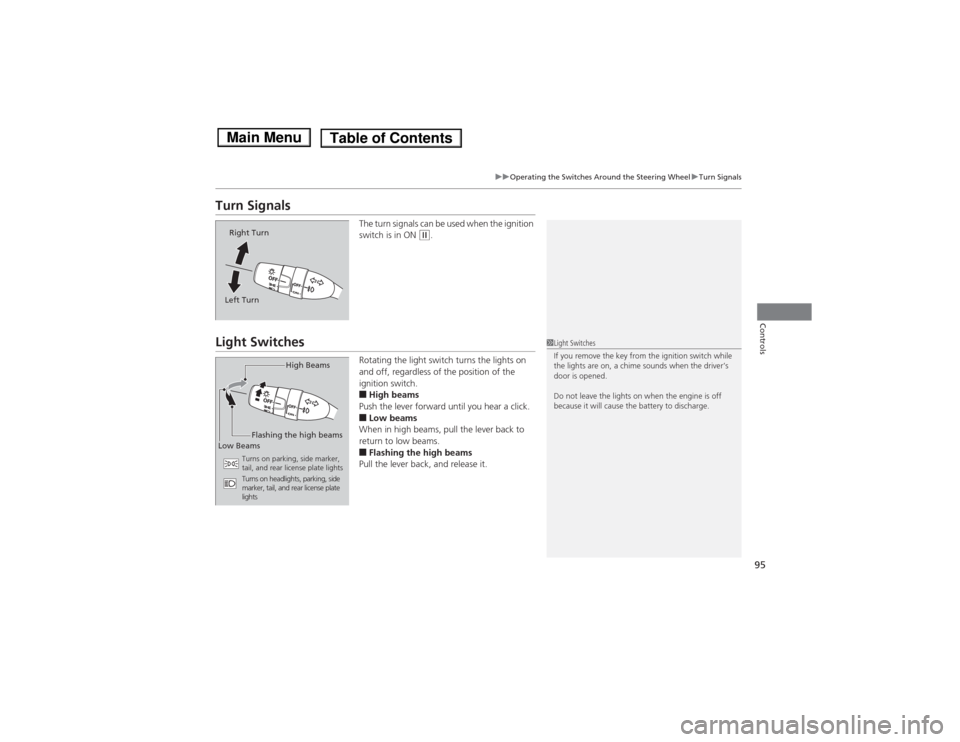
Turn Signals
The turn signals can be used when the ignition
switch is in ON
(w.
Light Switches
Rotating the light switch turns the lights on
and off, regardless of the position of the
ignition switch.■High beams
Push the lever forward until you hear a click.■Low beams
When in high beams, pull the lever back to
return to low beams.■Flashing the high beams
Pull the lever back, and release it.
Right Turn
Left Turn
1Light Switches
If you remove the key from the ignition switch while
the lights are on, a chime sounds when the driver’s
door is opened.
Do not leave the lights on when the engine is off
because it will cause the battery to discharge.
High Beams
Flashing the high beams
Low Beams
Turns on parking, side marker,
tail, and rear license plate lights
Turns on headlights, parking, side
marker, tail, and rear license plate
lights
Page 112 of 289
111
Continued
Controls
Interior Lights/Interior Convenience ItemsInterior Lights
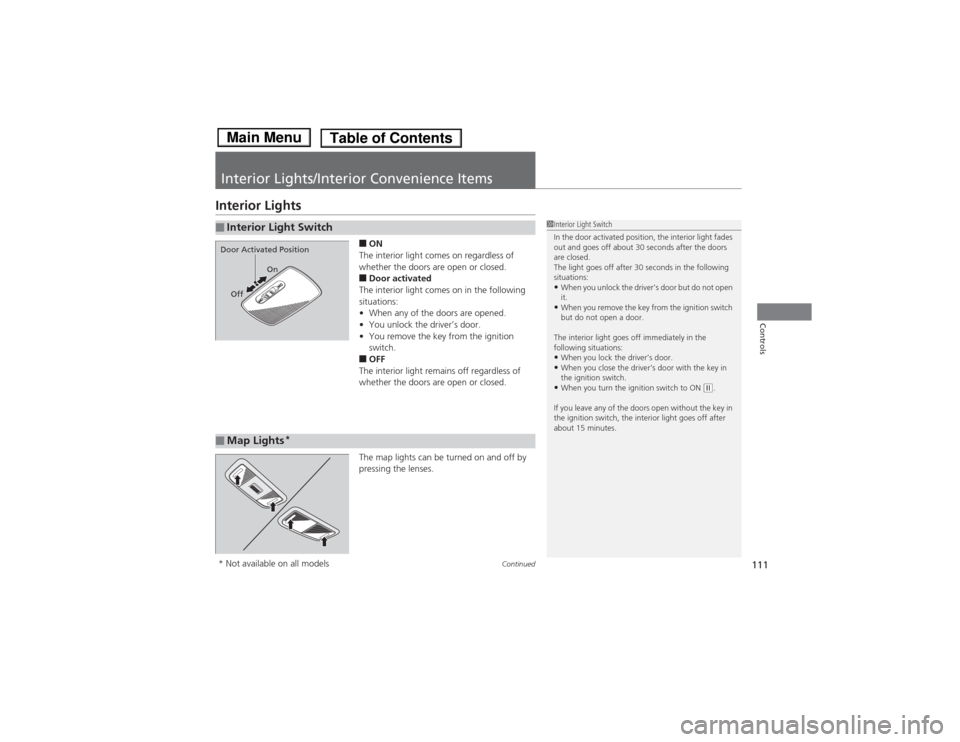
■ON
The interior light comes on regardless of
whether the doors are open or closed.■Door activated
The interior light comes on in the following
situations:
•When any of the doors are opened.
•You unlock the driver’s door.
•You remove the key from the ignition
switch.■OFF
The interior light remains off regardless of
whether the doors are open or closed.
The map lights can be turned on and off by
pressing the lenses.
■Interior Light Switch
1Interior Light Switch
In the door activated position, the interior light fades
out and goes off about 30 seconds after the doors
are closed.
The light goes off after 30 seconds in the following
situations:•When you unlock the driver’s door but do not open
it.•When you remove the key from the ignition switch
but do not open a door.
The interior light goes off immediately in the
following situations:•When you lock the driver’s door.•When you close the driver’s door with the key in
the ignition switch.•When you turn the ignition switch to ON
(w.
If you leave any of the doors open without the key in
the ignition switch, the interior light goes off after
about 15 minutes.
On
Off
Door Activated Position■Map Lights
*
* Not available on all models
Page 144 of 289

143
uuBluetooth® HandsFreeLink®
*uHFL Menus
Continued
Features
“Change passcode”
Store a phonebook entry.
Edit the number of an existing phonebook entry.
Delete a phonebook entry.
Hear a list of all stored phonebook entries.
Transfer contacts from your phone to HFL.
Apply a security passcode to the system that must be input at each key
cycle to access the system.
Change your security passcode.
Set how you want to be notified of an incoming call.
Set to automatically transfer calls from your phone to HFL when you
enter the vehicle.
Switch the system language between English and French.
Hear a tutorial for general rules on using the system.
Hear a list of available commands and additional information describing each command.“Store”
“Edit”“Delete”“List”“Receive contact”
*
“Security”“Call notification”“Auto transfer”
“Phonebook”“System setup”“Change language”“Tutorial”“Hands-free help”
Clear the system of all paired phones, phonebook entries, and security
passcode. “Clear”
* Not available on all models