Page 100 of 573
99
uuLocking and Unlocking the DoorsuLocking/Unlocking the Doors from the Inside
Continued
Controls
Locking/Unlocking the Doors from the Inside
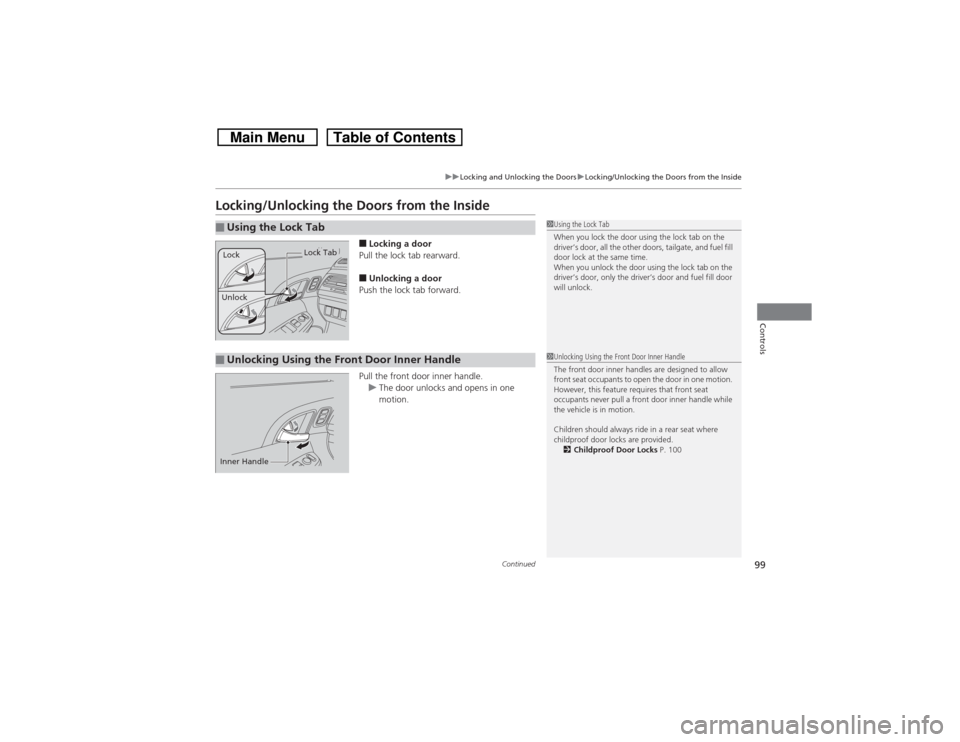
■Locking a door
Pull the lock tab rearward.■Unlocking a door
Push the lock tab forward.
Pull the front door inner handle.
uThe door unlocks and opens in one
motion.
■Using the Lock Tab
1Using the Lock Tab
When you lock the door using the lock tab on the
driver’s door, all the other doors, tailgate, and fuel fill
door lock at the same time.
When you unlock the door using the lock tab on the
driver’s door, only the driver’s door and fuel fill door
will unlock.
Unlock
Lock Tab
Lock
■Unlocking Using the Front Door Inner Handle
1Unlocking Using the Front Door Inner Handle
The front door inner handles are designed to allow
front seat occupants to open the door in one motion.
However, this feature requires that front seat
occupants never pull a front door inner handle while
the vehicle is in motion.
Children should always ride in a rear seat where
childproof door locks are provided.
2Childproof Door Locks P. 100
Inner Handle
Page 101 of 573
uuLocking and Unlocking the DoorsuChildproof Door Locks
100Controls
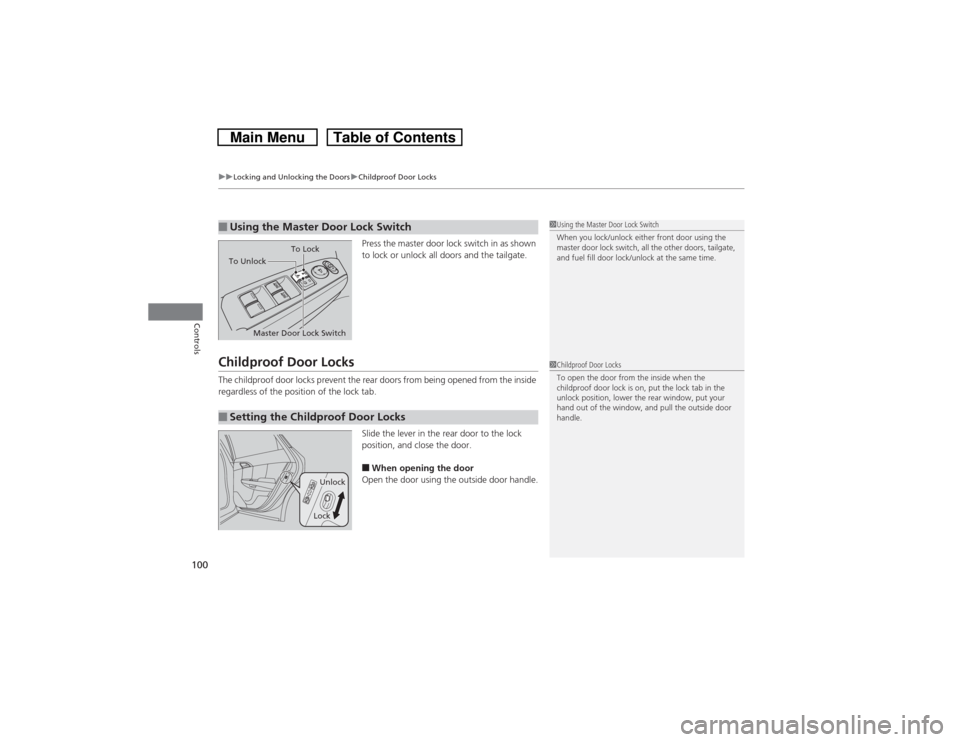
Press the master door lock switch in as shown
to lock or unlock all doors and the tailgate.
Childproof Door LocksThe childproof door locks prevent the rear doors from being opened from the inside
regardless of the position of the lock tab.
Slide the lever in the rear door to the lock
position, and close the door.
■When opening the door
Open the door using the outside door handle.
■Using the Master Door Lock Switch
1Using the Master Door Lock Switch
When you lock/unlock either front door using the
master door lock switch, all the other doors, tailgate,
and fuel fill door lock/unlock at the same time.
To Unlock
Master Door Lock SwitchTo Lock
■Setting the Childproof Door Locks
1Childproof Door Locks
To open the door from the inside when the
childproof door lock is on, put the lock tab in the
unlock position, lower the rear window, put your
hand out of the window, and pull the outside door
handle.
Unlock
Lock
Page 102 of 573
101
uuLocking and Unlocking the DoorsuAuto Door Locking/Unlocking
Controls
Auto Door Locking/UnlockingYour vehicle locks all doors and unlocks the driver’s door automatically when a
certain condition is met.■Drive lock modeAll doors and tailgate lock when the vehicle’s speed reaches about 10 mph (15 km/h).■Park unlock mode
The driver’s door unlocks when the shift lever is moved into
(P with the brake pedal
depressed.
■Auto Door Locking■Auto Door Unlocking
1Auto Door Locking/Unlocking
You can turn off or change to another auto door
locking/unlocking setting using the audio/
information screen.
2Customized Features
* P. 281
You can turn off or change to another auto door
locking/unlocking setting using the master door lock
switch.
2Customizing the Auto Door Locking/
Unlocking Setting
* P. 102
Models with audio/information screenModels without audio/information screen
* Not available on all models
Page 103 of 573
102
uuLocking and Unlocking the DoorsuCustomizing the Auto Door Locking/Unlocking Setting
*
Controls
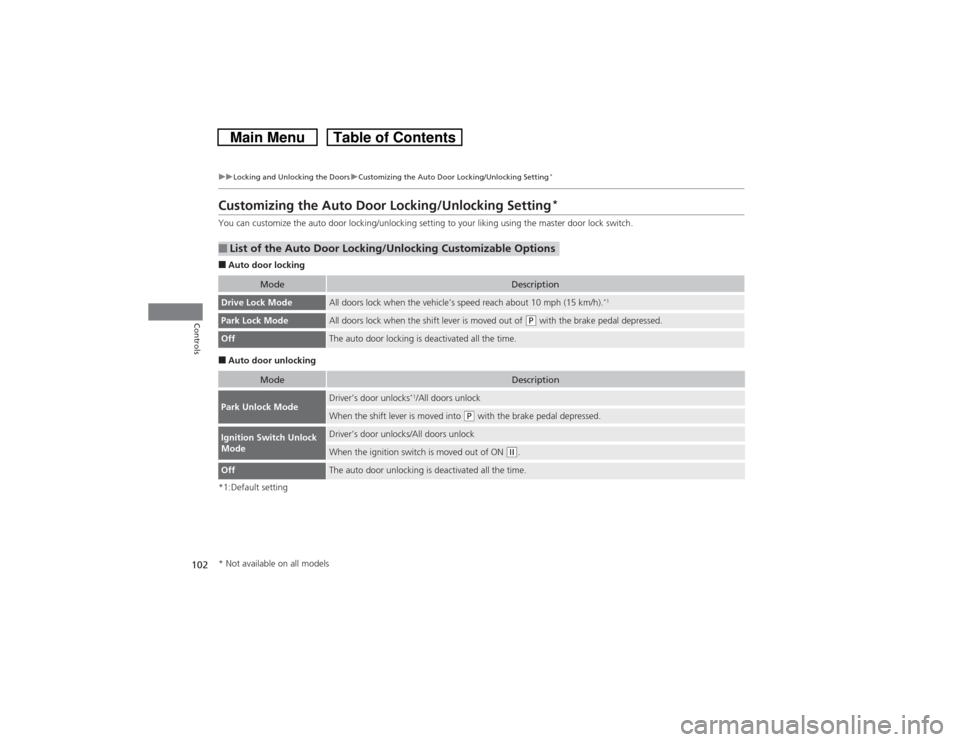
Customizing the Auto Door Locking/Unlocking Setting
*
You can customize the auto door locking/unlocking setting to your liking using the master door lock switch.■Auto door locking■Auto door unlocking
*1:Default setting■List of the Auto Door Locking/Unlocking Customizable Options
Mode
Description
Drive Lock Mode
All doors lock when the vehicle’s speed reach about 10 mph (15 km/h).
*1
Park Lock Mode
All doors lock when the shift lever is moved out of
(P with the brake pedal depressed.
Off
The auto door locking is deactivated all the time.
Mode
Description
Park Unlock Mode
Driver’s door unlocks
*1/All doors unlock
When the shift lever is moved into
(P with the brake pedal depressed.
Ignition Switch Unlock
Mode
Driver’s door unlocks/All doors unlockWhen the ignition switch is moved out of ON
(w.
Off
The auto door unlocking is deactivated all the time.
* Not available on all models
Page 104 of 573
103
uuLocking and Unlocking the DoorsuCustomizing the Auto Door Locking/Unlocking Setting
*
Continued
Controls
■Customizing Flow for Auto Door Locking OptionsSteps
Drive Lock Mode
Park Lock Mode
Off
1
Apply the parking brake. Make sure the shift lever is in
(P.
2
Turn the ignition switch to ON
(w.
3
The driver’s door must be closed at this stage.
Open the driver’s door.
4
Move the shift lever out of
(P with the
brake pedal depressed.
—
Pull the lock tab rearward.
5
Press and hold the front of the master door lock switch on the driver’s door for more
than five seconds. Release the switch after you hear a click twice.
Press and hold the front of the master
door lock switch on the driver’s door for
more than five seconds. Release the switch
after you hear one click.
6
Move the shift lever to
(P.
—
7
Turn the ignition switch to LOCK
(0 within five seconds.
uCustomization is completed.
Page 105 of 573
104
uuLocking and Unlocking the DoorsuCustomizing the Auto Door Locking/Unlocking Setting
*
Controls
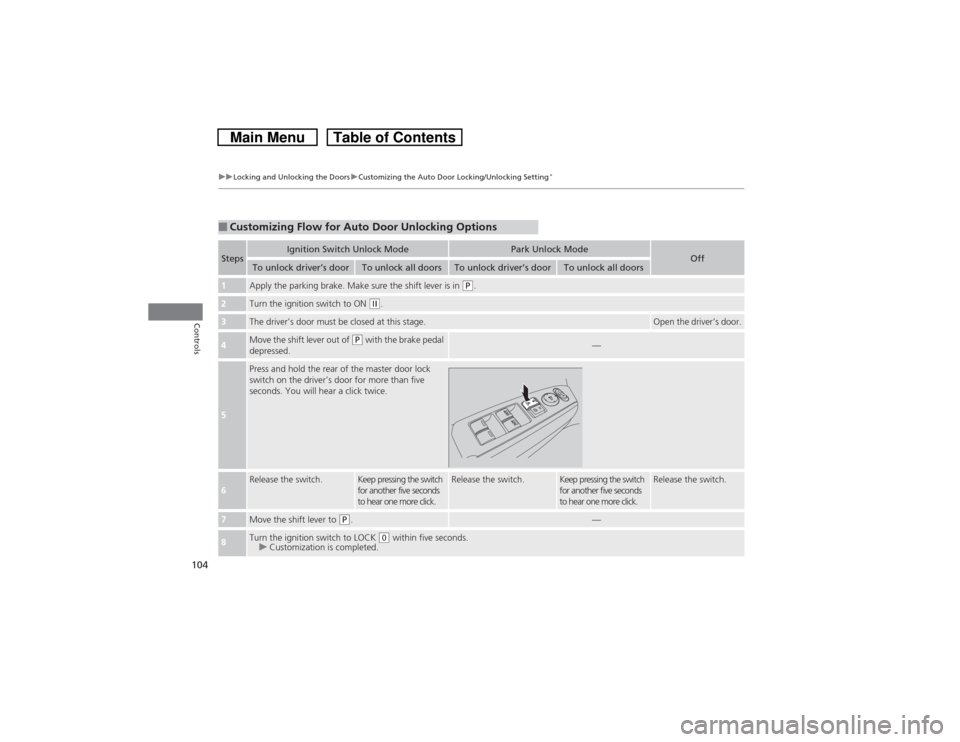
■Customizing Flow for Auto Door Unlocking OptionsSteps
Ignition Switch Unlock Mode
Park Unlock Mode
Off
To unlock driver’s door
To unlock all doors
To unlock driver’s door
To unlock all doors
1
Apply the parking brake. Make sure the shift lever is in
(P.
2
Turn the ignition switch to ON
(w.
3
The driver’s door must be closed at this stage.
Open the driver’s door.
4
Move the shift lever out of
(P with the brake pedal
depressed.
—
5
Press and hold the rear of the master door lock
switch on the driver’s door for more than five
seconds. You will hear a click twice.
6
Release the switch.
Keep pressing the switch
for another five seconds
to hear one more click.
Release the switch.
Keep pressing the switch
for another five seconds
to hear one more click.
Release the switch.
7
Move the shift lever to
(P.
—
8
Turn the ignition switch to LOCK
(0 within five seconds.
uCustomization is completed.
Page 107 of 573
106
uuOpening and Closing the TailgateuUsing the Tailgate Release Button
Controls
Using the Tailgate Release Button
When all the doors are unlocked, the tailgate
is unlocked. Press the tailgate release button
and lift open the tailgate.
Even if the tailgate is locked, you can open the
tailgate if you carry the smart entry remote.
To close the tailgate, grab the inner handle,
pull the tailgate down, and push it closed
from outside.
1Using the Tailgate Release Button•Do not leave the smart entry remote in the vehicle
when you get out. Carry it with you.•A person who is not carrying the smart entry
remote can unlock the tailgate if a person who is
carrying it is within range.•Do not leave the smart entry remote inside the
cargo area and close the tailgate. The beeper
sounds and the tailgate cannot be closed.Models with smart entry system
Tailgate Release
Button
Models with smart entry system
Inner Handle
Page 108 of 573

107
Continued
Controls
Security SystemImmobilizer SystemThe immobilizer system prevents a key that has not been pre-registered from
starting the engine. Each key contains electronic transmitters that use electronic
signals to verify the key.
Pay attention to the following when inserting the key into the ignition switch or
pressing the ENGINE START STOP button:
•Do not allow objects that emit strong radio waves near the ignition switch or the
ENGINE START STOP button.
•Make sure the key is not covered by or touching a metal object.
•Do not bring a key from another vehicle’s immobilizer system near the ignition
switch.Security System AlarmThe security system alarm activates when the doors, tailgate, or hood are opened
without the key, remote transmitter, or smart entry system.■When the security system alarm activates
The horn sounds intermittently and all of the exterior lights flash.■To deactivate the security system alarm
Unlock the vehicle using the key, remote transmitter or smart entry remote, or turn
the ignition switch to ON
(w*1. The system, along with the horn and flashing lights,
is deactivated.
*1: Models with the smart entry system have an ENGINE START/STOP button instead of an
ignition switch.
1Immobilizer SystemNOTICELeaving the ignition key in the vehicle can result in
theft or accidental movement of the vehicle.
Always take the ignition key with you whenever you
leave the vehicle unattended.
Do not alter the system or add other devices to it.
Doing so may damage the system and make your
vehicle inoperable.1Security System Alarm
The security alarm continues for a maximum of two
minutes until the security system deactivates.