Page 2 of 469

Contents
Child Safety P. 52Exhaust Gas Hazard P. 64Safety Labels P. 65Opening and Closing the Trunk P. 121 Security System P. 125 Opening and Closing the Windows P. 128
Operating the Switches Around the Steering Wheel P. 131 Adjusting the Mirrors P. 144
Interior Lights/Interior Convenience Items P. 154 Heating and Cooling
* P. 161
Audio Error Messages P. 224General Information on the Audio System P. 230When Driving P. 313 Braking P. 337Parking Your Vehicle P. 341
Accessories and Modifications P. 347Maintenance Under the Hood P. 361 Replacing Light Bulbs P. 376
Checking and Maintaining Tires P. 391 Battery P. 400 Remote Transmitter Care
* P. 401
Cleaning P. 404
Engine Does Not Start P. 426 Jump Starting P. 429Shift Lever Does Not Move P. 432
Fuses P. 439 Emergency Towing P. 442Devices that Emit Radio Waves P. 449 Reporting Safety Defects P. 450
Authorized Manuals P. 455 Customer Service Information P. 456
Quick Reference Guide
P. 2
Safe Driving
P. 27
Instrument Panel
P. 67
Controls
P. 103
Features
P. 169
Driving
P. 303
Maintenance
P. 349
Handling the Unexpected
P. 409
Information
P. 443
Index
P. 457
Page 4 of 469
3Quick Reference Guide
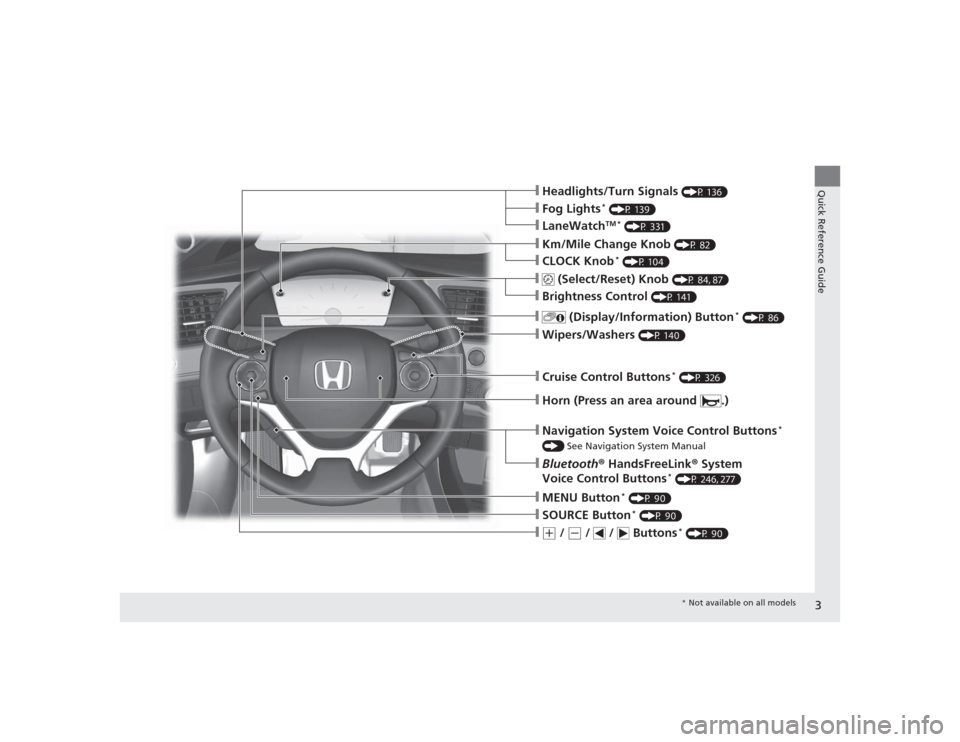
❙Headlights/Turn Signals
(P 136)
❙Wipers/Washers
(P 140)
❙Cruise Control Buttons
* (P 326)
❙Km/Mile Change Knob
(P 82)
❙CLOCK Knob
* (P 104)
❙MENU Button
* (P 90)
❙(+
/
(-
/ / Buttons
* (P 90)
❙Navigation System Voice Control Buttons
*
() See Navigation System Manual❙Bluetooth® HandsFreeLink ® System
Voice Control Buttons
* (P 246, 277)
❙
(Select/Reset) Knob
(P 84, 87)
❙SOURCE Button
* (P 90)
❙
(Display/Information) Button
* (P 86)
❙Brightness Control
(P 141)
❙Horn (Press an area around .)❙LaneWatch
TM *
(P 331)
❙Fog Lights
* (P 139)
* Not available on all models
Page 6 of 469
5Quick Reference Guide
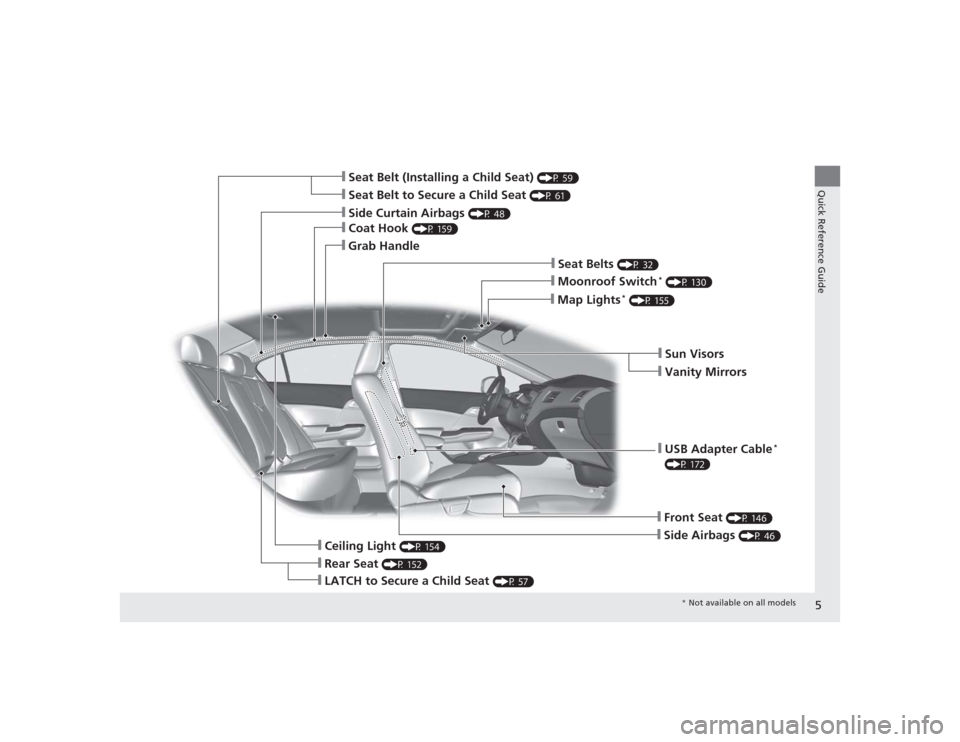
❙Seat Belt to Secure a Child Seat
(P 61)
❙Seat Belt (Installing a Child Seat)
(P 59)
❙Sun Visors❙Vanity Mirrors
❙Moonroof Switch
* (P 130)
❙Map Lights
* (P 155)
❙USB Adapter Cable
*
(P 172)❙Front Seat
(P 146)
❙Seat Belts
(P 32)
❙Side Airbags
(P 46)
❙Rear Seat
(P 152)
❙LATCH to Secure a Child Seat
(P 57)
❙Ceiling Light
(P 154)
❙Side Curtain Airbags
(P 48)
❙Coat Hook
(P 159)
❙Grab Handle
* Not available on all models
Page 7 of 469
Visual Index
6Quick Reference Guide
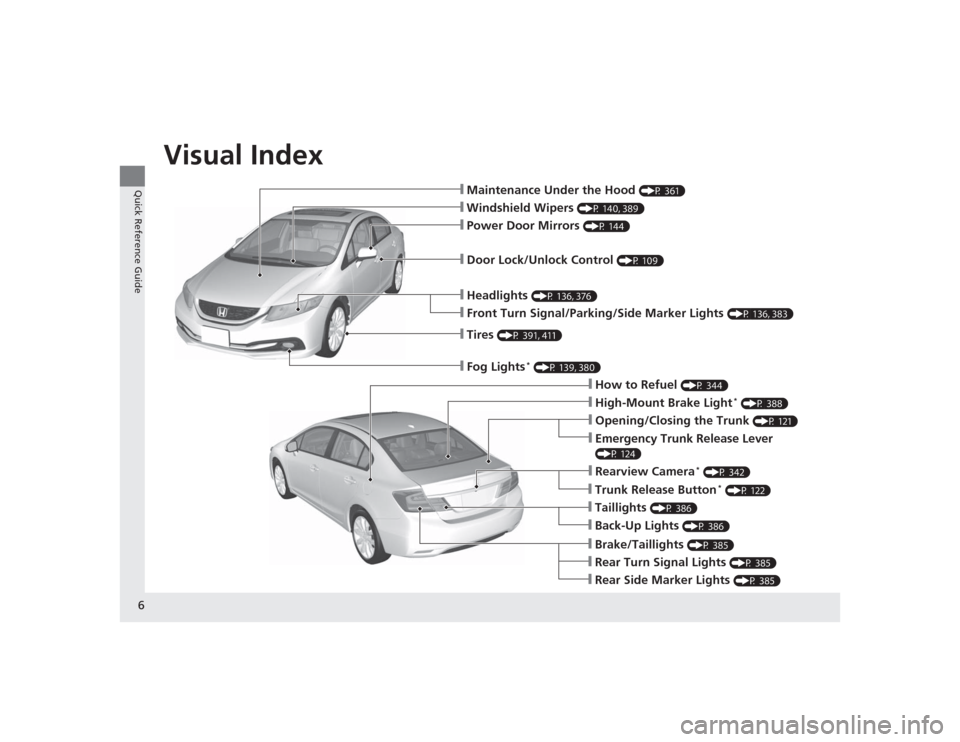
❙Maintenance Under the Hood
(P 361)
❙Windshield Wipers
(P 140, 389)
❙Tires
(P 391, 411)
❙Fog Lights
* (P 139, 380)
❙Door Lock/Unlock Control
(P 109)
❙Power Door Mirrors
(P 144)
❙Headlights
(P 136, 376)
❙Front Turn Signal/Parking/Side Marker Lights
(P 136, 383)
❙How to Refuel
(P 344)
❙High-Mount Brake Light
* (P 388)
❙Emergency Trunk Release Lever (P 124)❙Opening/Closing the Trunk
(P 121)
❙Rearview Camera
* (P 342)
❙Back-Up Lights
(P 386)
❙Taillights
(P 386)
❙Brake/Taillights
(P 385)
❙Rear Turn Signal Lights
(P 385)
❙Rear Side Marker Lights
(P 385)
❙Trunk Release Button
* (P 122)
Page 10 of 469
9Quick Reference Guide
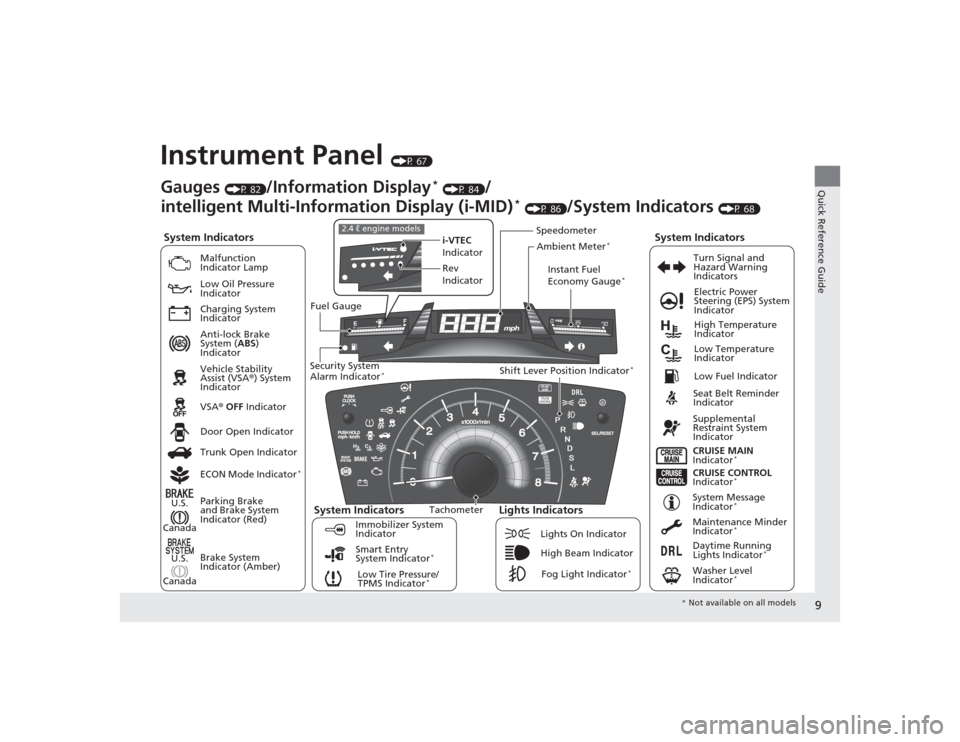
Instrument Panel
(P 67)
System Indicators
Malfunction
Indicator Lamp
Low Oil Pressure
Indicator
Charging System
Indicator
Anti-lock Brake
System (ABS)
Indicator
Vehicle Stability
Assist (VSA ®) System
Indicator
VSA ® OFF Indicator
Low Tire Pressure/
TPMS Indicator
*
Electric Power
Steering (EPS) System
Indicator
Lights Indicators
Lights On Indicator
High Beam IndicatorFog Light Indicator
*
Immobilizer System
Indicator Seat Belt Reminder
Indicator
System Indicators
CRUISE CONTROL
Indicator
*
System Message
Indicator
*
Parking Brake
and Brake System
Indicator (Red)
Supplemental
Restraint System
Indicator
Door Open Indicator
CRUISE MAIN
Indicator
*
Tachometer Instant Fuel
Economy Gauge
*
Speedometer
Fuel Gauge
Security System
Alarm Indicator
*
Shift Lever Position Indicator
*
Low Fuel Indicator
Gauges
(P 82)
/Information Display
* (P 84)
/
intelligent Multi-Information Display (i-MID)
* (P 86)
/System Indicators
(P 68)
Trunk Open Indicator
ECON Mode Indicator
*
Turn Signal and
Hazard Warning
Indicators
High Temperature
Indicator
Low Temperature
Indicator
Maintenance Minder
Indicator
*
Daytime Running
Lights Indicator
*
Washer Level
Indicator
*
i-VTEC
Indicator
Rev
Indicator
2.4 ℓ engine models
Ambient Meter
*
Smart Entry
System Indicator
*
Brake System
Indicator (Amber)
System Indicators
U.S.
Canada
U.S.
Canada
* Not available on all models
Page 11 of 469
10Quick Reference Guide
Controls
(P 103)
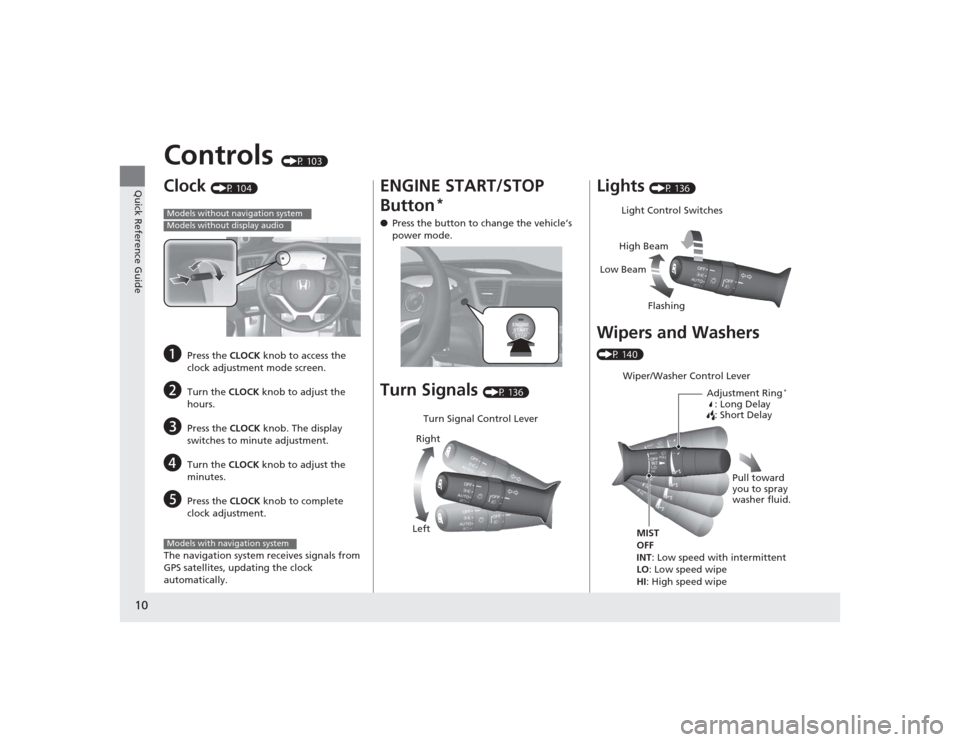
Clock
(P 104)
a
Press the CLOCK knob to access the
clock adjustment mode screen.
b
Turn the CLOCK knob to adjust the
hours.
c
Press the CLOCK knob. The display
switches to minute adjustment.
d
Turn the CLOCK knob to adjust the
minutes.
e
Press the CLOCK knob to complete
clock adjustment.
The navigation system receives signals from
GPS satellites, updating the clock
automatically.
Models without navigation systemModels without display audioModels with navigation system
ENGINE START/STOP
Button
*
● Press the button to change the vehicle’s
power mode.Turn Signals
(P 136)
Turn Signal Control Lever
Right
Left
Lights
(P 136)
Wipers and Washers (P 140)
Light Control Switches
Low Beam High Beam
FlashingWiper/Washer Control Lever Adjustment Ring
*
: Long Delay
: Short Delay
MIST
OFF
INT: Low speed with intermittent
LO: Low speed wipe
HI: High speed wipe Pull toward
you to spray
washer fluid.
Page 20 of 469
19Quick Reference Guide
Maintenance
(P 349)
Under the Hood
(P 361)
● Check engine oil, engine coolant, and windshield washer
fluid. Add when necessary.
● Check brake fluid and clutch* fluid.
● Check the battery condition monthly.
a
Pull the hood release handle under the corner of the
dashboard.
b
Locate the hood latch lever, pull the lever up, and lift up
the hood.
c
When finished, close the hood and make sure it is firmly
locked in place.
Lights
(P 376)
● Inspect all lights regularly.
Wiper Blades
(P 389)
● Replace blades if they leave streaks
across the windshield.
Tires
(P 391)
● Inspect tires and wheels regularly.
● Check tire pressures regularly.
● Install snow tires for winter
driving.
* Not available on all models
Page 22 of 469
21Quick Reference Guide
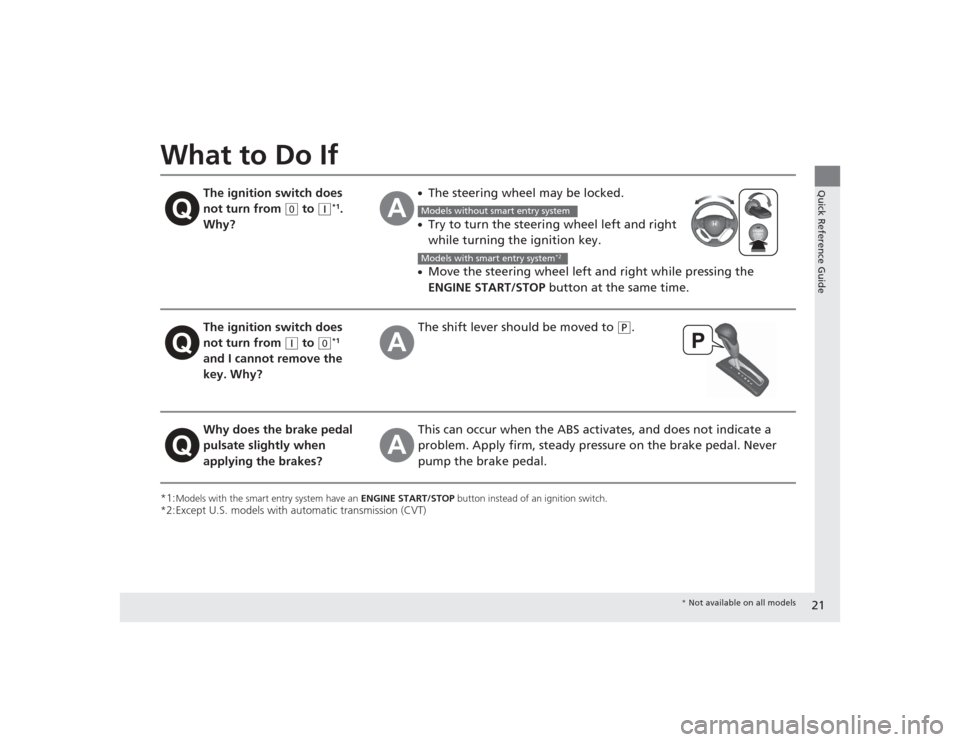
What to Do If*1:
Models with the smart entry system have an ENGINE START/STOP button instead of an ignition switch.
*2:Except U.S. models with automatic transmission (CVT)
The ignition switch does
not turn from
(0
to
(q
*1.
Why?
●The steering wheel may be locked.●Try to turn the steering wheel left and right
while turning the ignition key.●Move the steering wheel left and right while pressing the
ENGINE START/STOP button at the same time.
The ignition switch does
not turn from
(q
to
(0
*1
and I cannot remove the
key. Why?
The shift lever should be moved to
(P
.
Why does the brake pedal
pulsate slightly when
applying the brakes?
This can occur when the ABS activates, and does not indicate a
problem. Apply firm, steady pressu re on the brake pedal. Never
pump the brake pedal.Models without smart entry systemModels with smart entry system
*2
* Not available on all models