uuWhen Driving uCruise Control
*
328Driving
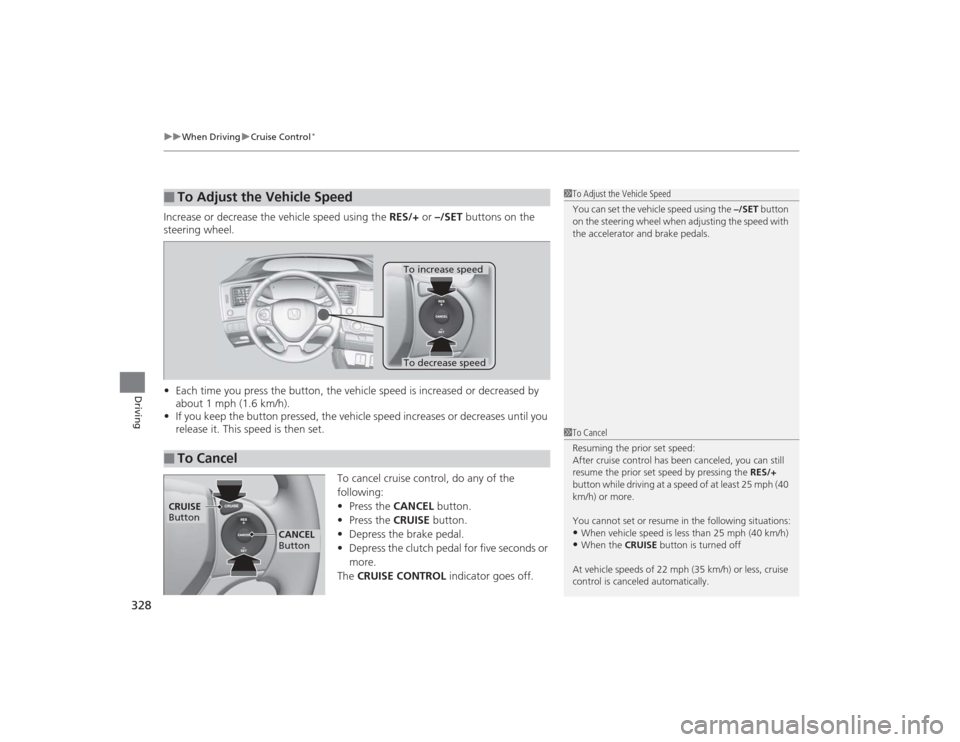
Increase or decrease the vehicle speed using the RES/+ or –/SET buttons on the
steering wheel.
• Each time you press the button, the vehicle speed is increased or decreased by
about 1 mph (1.6 km/h).
• If you keep the button pressed, the vehicle speed increases or decreases until you
release it. This speed is then set.
To cancel cruise control, do any of the
following:
•Press the CANCEL button.
• Press the CRUISE button.
• Depress the brake pedal.
• Depress the clutch pedal for five seconds or
more.
The CRUISE CONTROL indicator goes off.■
To Adjust the Vehicle Speed
1To Adjust the Vehicle Speed
You can set the vehicle speed using the –/SET button
on the steering wheel when adjusting the speed with
the accelerator and brake pedals.
■
To Cancel
To decrease speedTo increase speed
1 To Cancel
Resuming the prior set speed:
After cruise control has been canceled, you can still
resume the prior set speed by pressing the RES/+
button while driving at a speed of at least 25 mph (40
km/h) or more.
You cannot set or resume in the following situations:•When vehicle speed is less than 25 mph (40 km/h)•When the CRUISE button is turned off
At vehicle speeds of 22 mph (35 km/h) or less, cruise
control is canceled automatically.
CRUISE
Button
CANCEL
Button
402
uuRemote Transmitter Care
*uReplacing the Button Battery
Maintenance
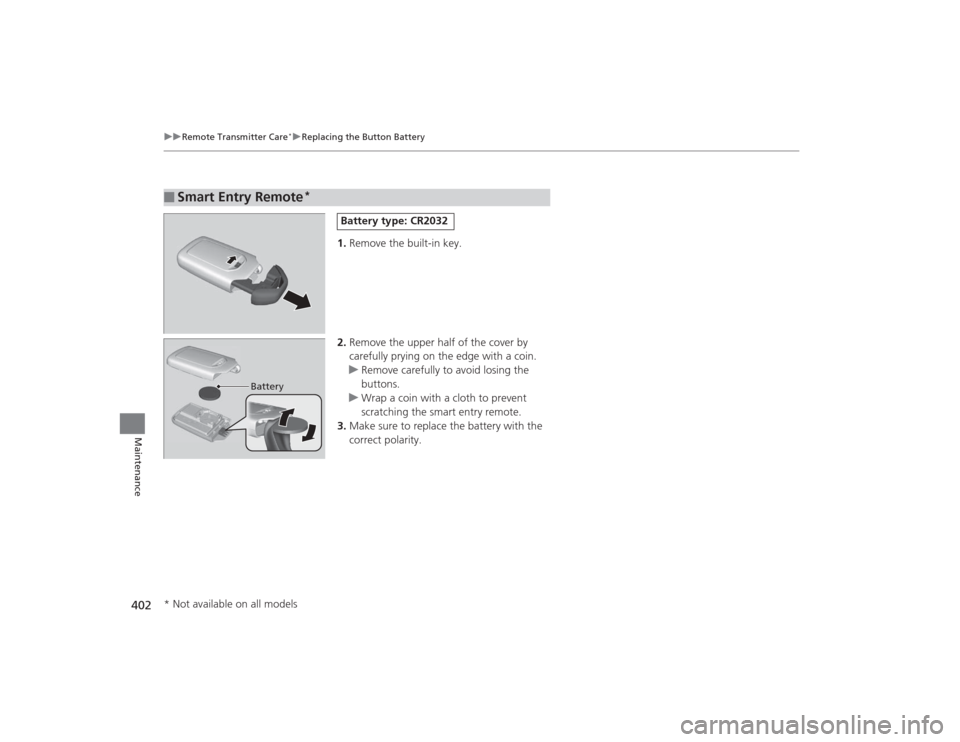
1. Remove the built-in key.
2. Remove the upper half of the cover by
carefully prying on the edge with a coin.
u Remove carefully to avoid losing the
buttons.
u Wrap a coin with a cloth to prevent
scratching the smart entry remote.
3. Make sure to replace the battery with the
correct polarity.
■
Smart Entry Remote
*
Battery type: CR2032
Battery
* Not available on all models
427
uuEngine Does Not Start uIf the Smart Entry Remote Battery is Weak
Handling the Unexpected
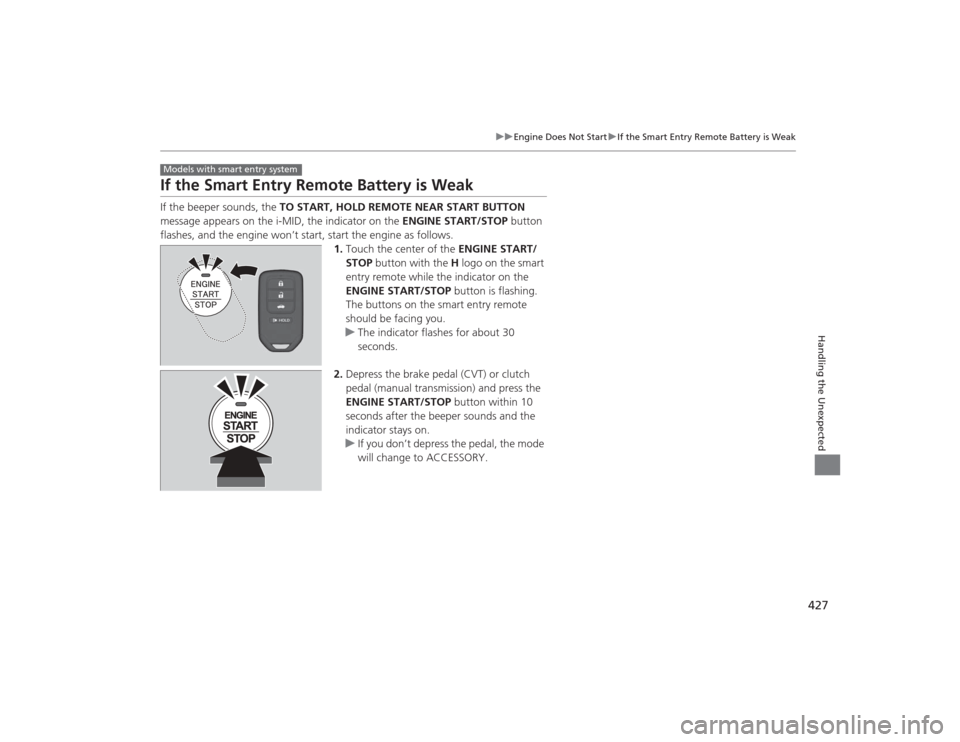
If the Smart Entry Remote Battery is WeakIf the beeper sounds, the TO START, HOLD REMOTE NEAR START BUTTON
message appears on the i-MID, the indicator on the ENGINE START/STOP button
flashes, and the engine won’t start, start the engine as follows. 1.Touch the center of the ENGINE START/
STOP button with the H logo on the smart
entry remote while the indicator on the
ENGINE START/STOP button is flashing.
The buttons on the smart entry remote
should be facing you.
u The indicator flashes for about 30
seconds.
2. Depress the brake pedal (CVT) or clutch
pedal (manual transmission) and press the
ENGINE START/STOP button within 10
seconds after the beeper sounds and the
indicator stays on.
u If you don’t depress the pedal, the mode
will change to ACCESSORY.Models with smart entry system
460Index
Fuel Fill Door....................................... 18, 344
Fuses .......................................................... 439
Inspecting and Changing ......................... 441
Locations ......................................... 439, 440GGasoline (Fuel) Economy ................................................. 346
Gauge ....................................................... 82
Information ............................................. 343
Instant Fuel Economy ........................... 82, 89
Low Fuel Indicator ..................................... 71
Refueling ................................................. 343
Gauges ......................................................... 82
Gear Shift Lever Positions
Automatic Transmission (CVT) ................. 320
Manual Transmission ............................... 323
Glass (care) ................................................ 407
Glove Box .................................................. 156HHalogen Bulbs ................................... 376, 380
Handling the Unexpected ........................ 409
HandsFreeLink® (HFL)....................... 246, 277
Automatic Import of Cellular Phonebook and Call History .................................... 262, 289
Automatic Transferring ............................ 260
Caller’s ID Information ............................. 260
Displaying Messages ........................ 273, 298 HFL Buttons..................................... 246, 277
HFL Menus ...................................... 248, 279
HFL Status Display ........................... 247, 278
Limitations for Manual Operation ............ 247
Making a Call .................................. 266, 292
Options During a Call ...................... 271, 295
Phone Setup.................................... 253, 283
Receiving a Call ............................... 270, 295
Receiving a Text Message/E-mail...... 272, 296
Ring Tone................................................ 288
Selecting a Mail Account ......................... 297
Speed Dial ....................................... 263, 290
Text Message .................. 258, 272, 287, 296
To Clear the System ................................ 261
To Create a Security PIN .......................... 259
To Set Up a Text Message/E-mail
Options ......................................... 258, 287
Hazard Warning Button .............................. 2
Head Restraints ........................................ 149
Headlights ................................................. 136
Aiming .................................................... 376
Automatic Operation............................... 137
Dimming ......................................... 136, 139
Operating................................................ 136
Heaters (Seat) ........................................... 160
Heating and Cooling System ................... 161
Cooling ................................................... 163
Defrosting the Windshield and
Windows ............................................... 164
Dust and Pollen Filter............................... 403
Heating ................................................... 162 HFL (HandsFreeLink
®) ...................... 246, 277
High Beam Indicator .................................. 74
Hill Start Assist System ..................... 314, 317
IIdentification Numbers ............................ 448
Engine and Transmission ......................... 448
Vehicle Identification............................... 448
Ignition Switch ......................................... 131
Illumination Control ................................ 141
Knob ...................................................... 141
i-MID ........................................................... 86
Immobilizer System .................................. 125
Indicator ................................................... 75
Indicators .................................................... 68
Anti-lock Brake System (ABS) .................... 71
Brake System (Amber) ............................... 68
Charging System............................... 69, 435
CRUISE CONTROL ............................. 76, 327
CRUISE MAIN.................................... 76, 326
Daytime Running Lights ............................ 73
Door Open.......................................... 31, 72
ECON Mode ..................................... 76, 325
Electric Power Steering (EPS) System ............................................ 73, 437
Fog Light .................................................. 74
High Beam ................................................ 74
High Temperature ..................................... 72
Immobilizer System ................................... 75
i-VTEC ................................................ 76, 83