2014 FORD SUPER DUTY steering
[x] Cancel search: steeringPage 65 of 458
ADJUSTING THE PEDALS
Note:
Never use the controls while your feet
are on the accelerator and brake pedals and
the vehicle is moving.
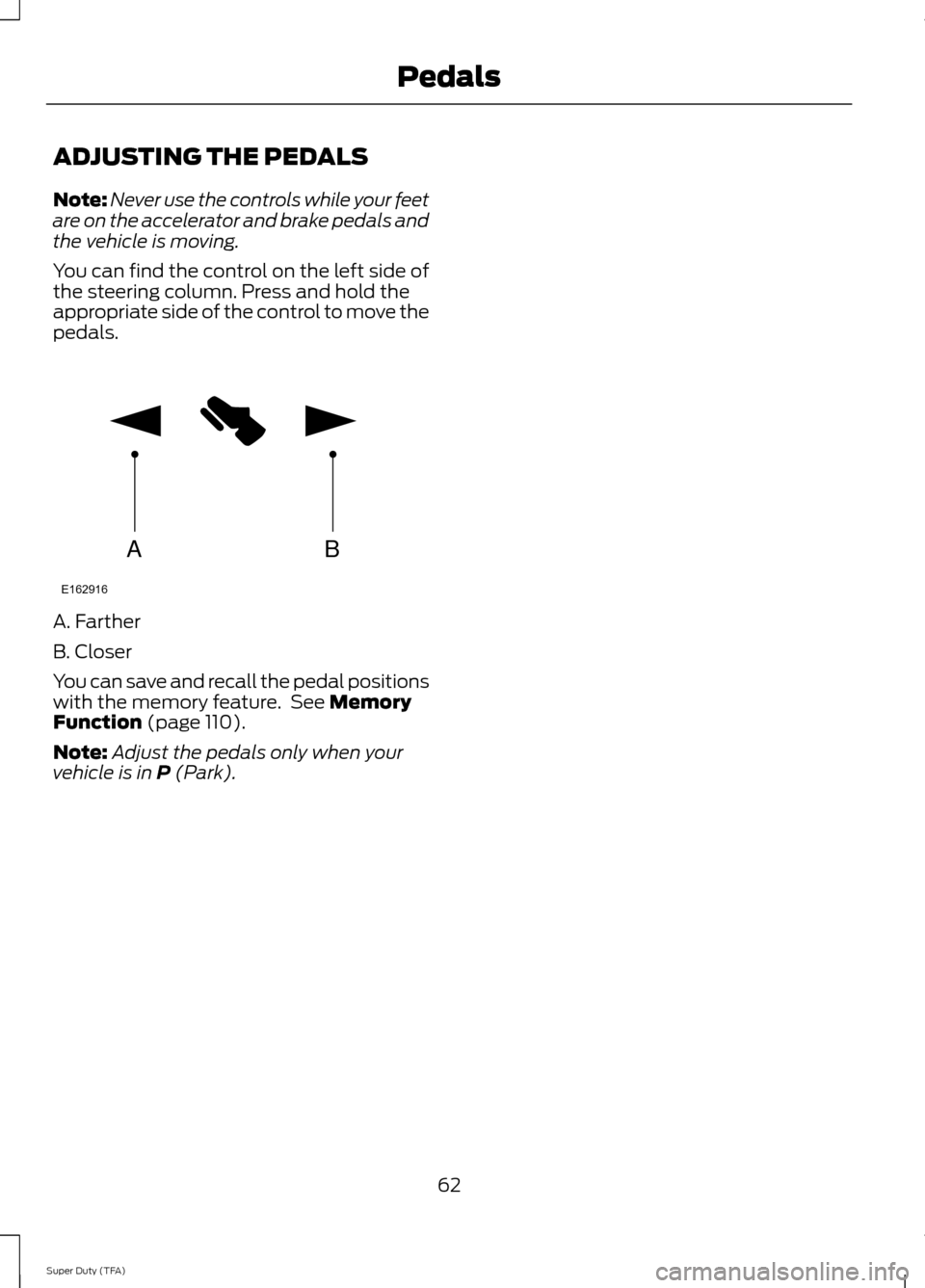
You can find the control on the left side of
the steering column. Press and hold the
appropriate side of the control to move the
pedals. A. Farther
B. Closer
You can save and recall the pedal positions
with the memory feature. See Memory
Function (page 110).
Note: Adjust the pedals only when your
vehicle is in
P (Park).
62
Super Duty (TFA) PedalsAB
E162916
Page 83 of 458
GENERAL INFORMATION
WARNING
Driving while distracted can result in
loss of vehicle control, crash and
injury. We strongly recommend that
you use extreme caution when using any
device that may take your focus off the
road. Your primary responsibility is the safe
operation of your vehicle. We recommend
against the use of any hand-held device
while driving and encourage the use of
voice-operated systems when possible.
Make sure you are aware of all applicable
local laws that may affect the use of
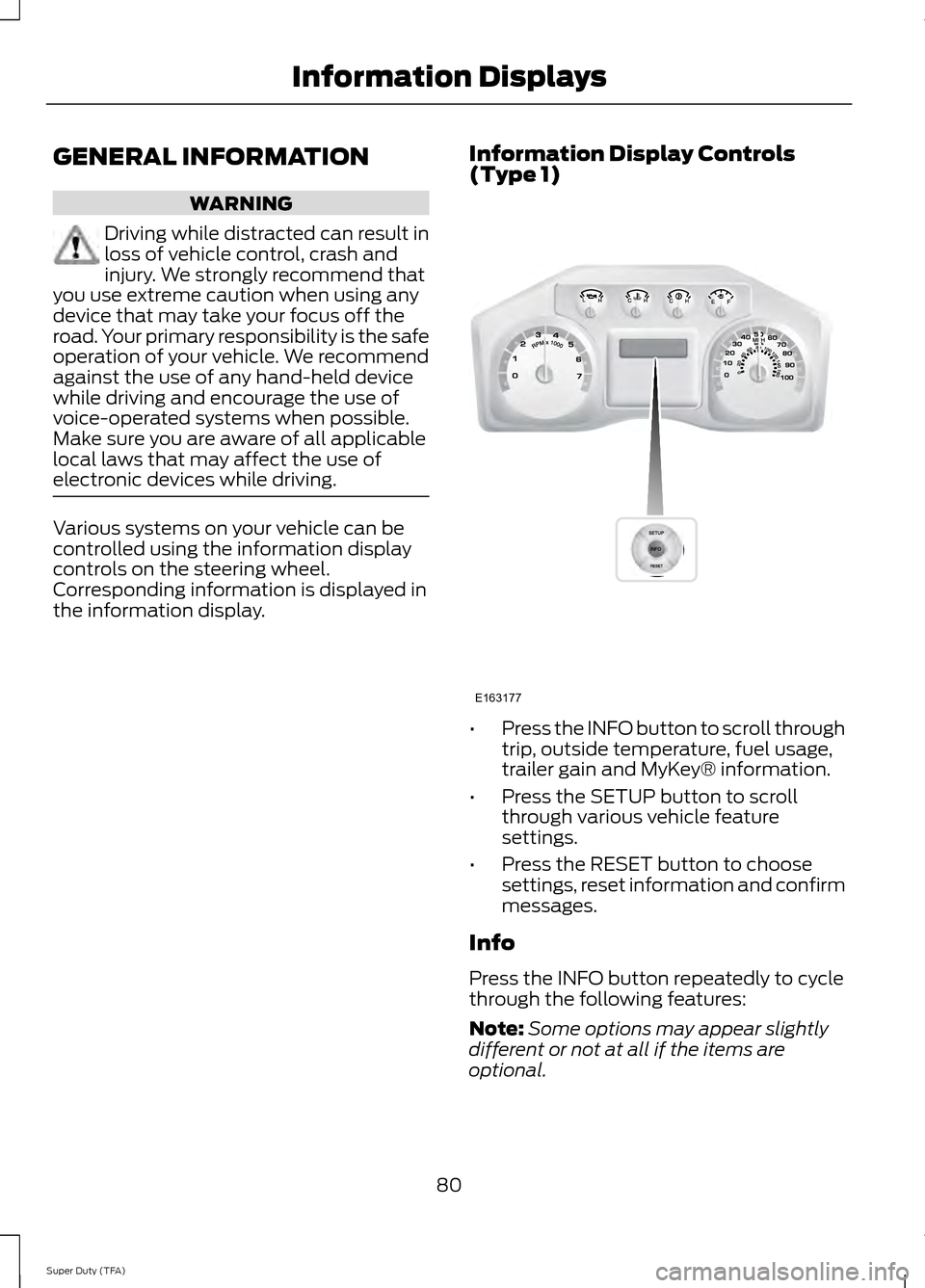
electronic devices while driving. Various systems on your vehicle can be
controlled using the information display
controls on the steering wheel.
Corresponding information is displayed in
the information display.
Information Display Controls
(Type 1) •
Press the INFO button to scroll through
trip, outside temperature, fuel usage,
trailer gain and MyKey® information.
• Press the SETUP button to scroll
through various vehicle feature
settings.
• Press the RESET button to choose
settings, reset information and confirm
messages.
Info
Press the INFO button repeatedly to cycle
through the following features:
Note: Some options may appear slightly
different or not at all if the items are
optional.
80
Super Duty (TFA) Information DisplaysE163177
Page 90 of 458
Fuel Hist.
Shows fuel usage as a bar graph based on
time. The graph is updated each minute
with the fuel economy that was achieved
during the prior 5, 10, 30 minutes of driving.
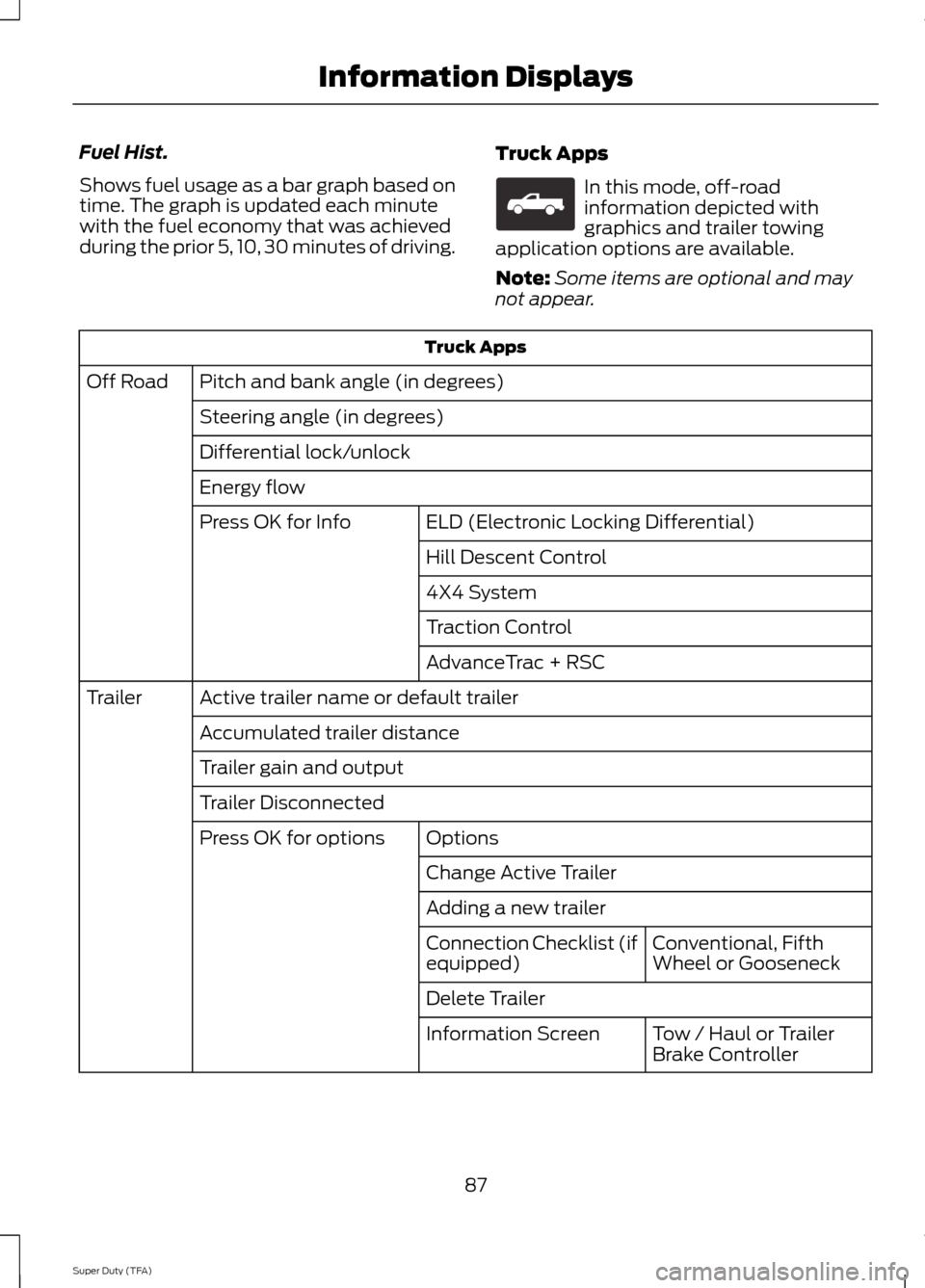
Truck Apps In this mode, off-road
information depicted with
graphics and trailer towing
application options are available.
Note: Some items are optional and may
not appear. Truck Apps
Pitch and bank angle (in degrees)
Off Road
Steering angle (in degrees)
Differential lock/unlock
Energy flow ELD (Electronic Locking Differential)
Press OK for Info
Hill Descent Control
4X4 System
Traction Control
AdvanceTrac + RSC
Active trailer name or default trailer
Trailer
Accumulated trailer distance
Trailer gain and output
Trailer Disconnected Options
Press OK for options
Change Active Trailer
Adding a new trailerConventional, Fifth
Wheel or Gooseneck
Connection Checklist (if
equipped)
Delete Trailer
Tow / Haul or Trailer
Brake Controller
Information Screen
87
Super Duty (TFA) Information DisplaysE163181
Page 101 of 458
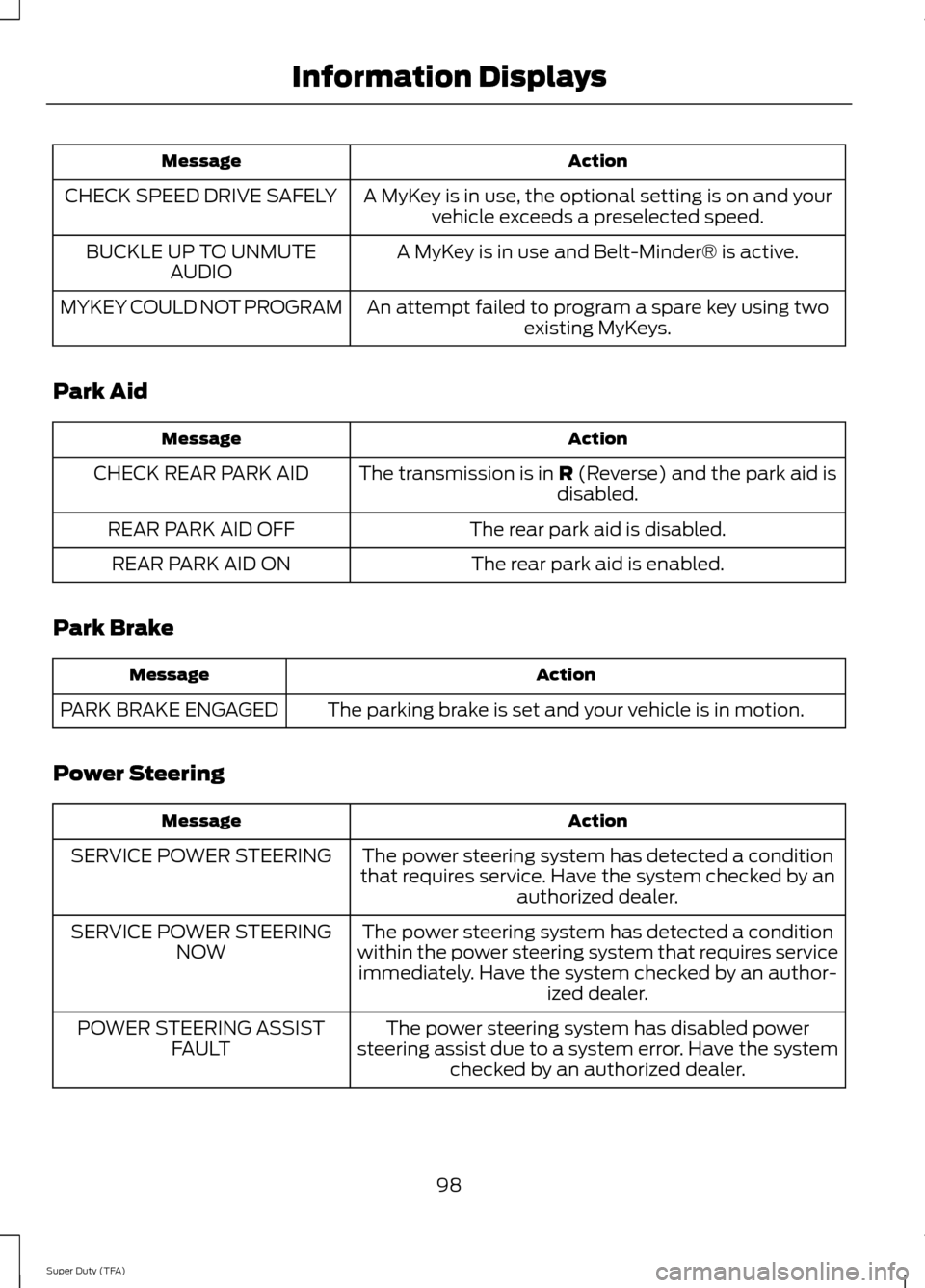
Action
Message
A MyKey is in use, the optional setting is on and yourvehicle exceeds a preselected speed.
CHECK SPEED DRIVE SAFELY
A MyKey is in use and Belt-Minder® is active.
BUCKLE UP TO UNMUTE
AUDIO
An attempt failed to program a spare key using twoexisting MyKeys.
MYKEY COULD NOT PROGRAM
Park Aid Action
Message
The transmission is in R (Reverse) and the park aid is
disabled.
CHECK REAR PARK AID
The rear park aid is disabled.
REAR PARK AID OFF
The rear park aid is enabled.
REAR PARK AID ON
Park Brake Action
Message
The parking brake is set and your vehicle is in motion.
PARK BRAKE ENGAGED
Power Steering Action
Message
The power steering system has detected a condition
that requires service. Have the system checked by an authorized dealer.
SERVICE POWER STEERING
The power steering system has detected a condition
within the power steering system that requires service immediately. Have the system checked by an author- ized dealer.
SERVICE POWER STEERING
NOW
The power steering system has disabled power
steering assist due to a system error. Have the system checked by an authorized dealer.
POWER STEERING ASSIST
FAULT
98
Super Duty (TFA) Information Displays
Page 109 of 458
You cannot adjust the system during
remote start operation. Turn the ignition
on to return the system to its previous
settings. You can now make adjustments.
You will need to turn certain
vehicle-dependent features back on, such
as:
•
heated seats
• cooled seats
• heated steering wheel
• heated mirrors
• heated rear window.
You can adjust the settings using the
information display controls. See
Information Displays (page 80).
Automatic Settings
You can set the climate control to operate
in AUTO mode through the information
display setting: Remote Start > Climate
Control > Heater-A/C > Auto. The climate
control system automatically sets the
interior temperature to 72°F (22°C).
In hot weather, the system is set to 72°F
(22°C). Cooled seats are set to high (if
available, and selected to AUTO in the
information display).
In moderate weather, the system either
heats or cools (based on previous
settings). The rear defroster, heated
mirrors, heated seats and cooled seats do
not automatically turn on.
In cold weather, the system is set to 72°F
(22°C). The heated seats and heated
steering wheel are set to high (if available,
and selected to AUTO in the information
display). The rear defroster and heated
mirrors automatically turn on. Heated and Cooled Devices
The climate control system controls other
heated and cooled devices inside the
vehicle. You can switch these devices on
(if available, and selected to AUTO in the
information displays) during remote start.
Heated devices usually switch on during
cold weather, and cooled devices during
hot weather. If your vehicle is equipped
with a diesel engine and a supplemental
heater, the supplemental heater also turns
on.
106
Super Duty (TFA) Climate Control
Page 110 of 458
SITTING IN THE CORRECT
POSITION
WARNINGS
Sitting improperly, out of position or
with the seat back reclined too far
can take weight off the seat cushion
and affect the decision of the passenger
sensing system, resulting in serious injury
or death in the event of a crash. Always sit
upright against your seat back, with your
feet on the floor. Do not recline the seat back as this
can cause the occupant to slide
under the safety belt, resulting in
serious injury in the event of a crash. Do not place objects higher than the
seat back to reduce the risk of
serious injury in the event of a crash
or during heavy braking. When you use them properly, the seat,
head restraint, safety belt and air bags will
provide optimum protection in the event
of a crash. We recommend that you follow these
guidelines:
•
Sit in an upright position with the base
of your spine as far back as possible.
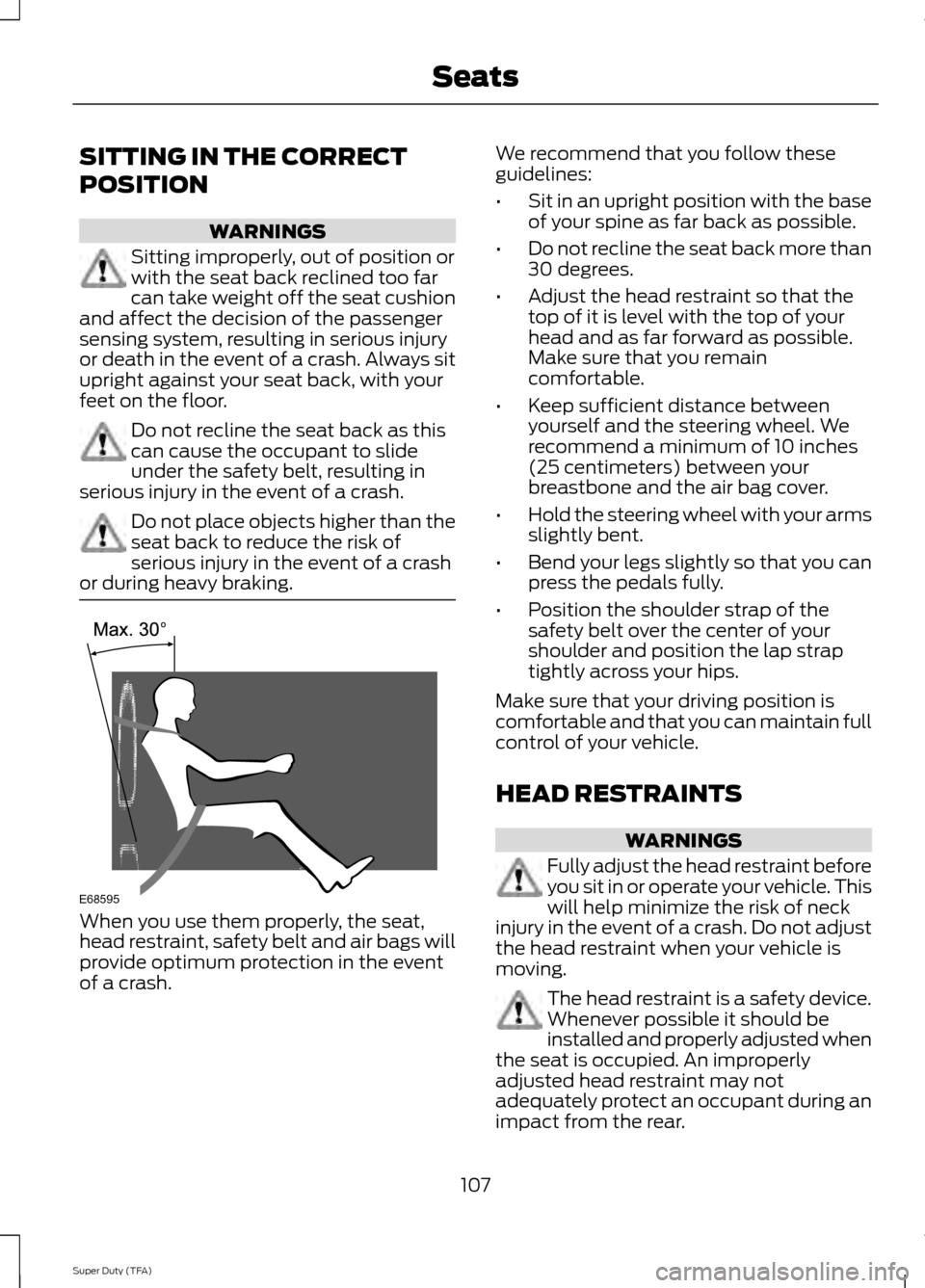
• Do not recline the seat back more than
30 degrees.
• Adjust the head restraint so that the
top of it is level with the top of your
head and as far forward as possible.
Make sure that you remain
comfortable.
• Keep sufficient distance between
yourself and the steering wheel. We
recommend a minimum of 10 inches
(25 centimeters) between your
breastbone and the air bag cover.
• Hold the steering wheel with your arms
slightly bent.
• Bend your legs slightly so that you can
press the pedals fully.
• Position the shoulder strap of the
safety belt over the center of your
shoulder and position the lap strap
tightly across your hips.
Make sure that your driving position is
comfortable and that you can maintain full
control of your vehicle.
HEAD RESTRAINTS WARNINGS
Fully adjust the head restraint before
you sit in or operate your vehicle. This
will help minimize the risk of neck
injury in the event of a crash. Do not adjust
the head restraint when your vehicle is
moving. The head restraint is a safety device.
Whenever possible it should be
installed and properly adjusted when
the seat is occupied. An improperly
adjusted head restraint may not
adequately protect an occupant during an
impact from the rear.
107
Super Duty (TFA) SeatsE68595
Page 133 of 458
STARTING A GASOLINE
ENGINE
When you start the engine, the idle speed
increases, this helps to warm up the
engine. If the engine idle speed does not
slow down automatically, have your
vehicle checked by an authorized dealer.
Before starting the engine check the
following:
•
Make sure all occupants have fastened
their safety belts.
• Make sure the headlamps and
electrical accessories are off.
• Make sure the parking brake is on.
• Move the transmission selector lever
to position P.
• Turn the ignition key to the on position.
Note: Do not touch the accelerator pedal.
1. Fully press the brake pedal.
2. Turn the key to the start position to start the engine. Release the key when
the engine starts.
Note: The engine may continue cranking
for up to 15 seconds or until it starts.
Note: If you cannot start the engine on the
first try, wait for a short period and try again.
Failure to Start
If you cannot start the engine after three
attempts, wait 10 seconds and follow this
procedure:
1. Fully press the brake pedal.
2. Fully press the accelerator pedal and hold it there.
3. Start the engine.
Stopping the Engine When Your
Vehicle is Stationary
1. Move the transmission selector lever to position
P. 2. Turn the key to the off position.
3. Apply the parking brake.
Stopping the Engine When Your
Vehicle is Moving
WARNING
Switching off the engine when the
vehicle is still moving will result in a
loss of brake and steering assistance.
The steering will not lock, but higher effort
will be required. When the ignition is
switched off, some electrical circuits,
warning lamps and indicators may also be
off. 1. Move the transmission selector lever
to position
N and use the brakes to
bring your vehicle to a safe stop.
2. When your vehicle has stopped, move the transmission selector lever to
position
P and turn the key to the off
position.
3. Apply the parking brake.
Cold Weather Starting (Flexible
Fuel Vehicles Only)
The starting characteristics of all grades
of E85 ethanol make it unsuitable for use
when ambient temperatures fall below
0°F (-18°C). Consult your fuel distributor
for the availability of winter grade ethanol.
As the outside temperature approaches
freezing, ethanol fuel distributors should
supply winter grade ethanol (same as with
unleaded gasoline). If summer grade
ethanol is used in cold weather conditions,
0°F to 32°F (-18°C to 0°C), you may
experience increased cranking times, rough
idle or hesitation until the engine has
warmed up.
You may experience a decrease in peak
performance when the engine is cold when
operating on E85 ethanol.
130
Super Duty (TFA) Starting and Stopping the Engine
Page 148 of 458
WARNINGS
When doing this procedure, you will
be taking the vehicle out of park
which means the vehicle can roll
freely. To avoid unwanted vehicle
movement, always fully set the parking
brake prior to doing this procedure. Use
wheel chocks if appropriate. If the parking brake is fully released,
but the brake warning lamp remains
illuminated, the brakes may not be
working properly. See your authorized
dealer. Your vehicle is equipped with a brake-shift
interlock feature that prevents the
gearshift lever from being moved from P
(Park) when the ignition is in the 3 (on)
position and the brake pedal is not pressed.
If you cannot move the gearshift lever out
of P (Park) position with the ignition in the
4 (on) position and the brake pedal
pressed, a malfunction may have occurred.
It is possible that a fuse has blown or the
vehicle
’s brake lamps are not operating
properly. See Fuse Specification Chart
(page 214).
If the fuse is not blown and the brake
lamps are working properly, the following
procedure will allow you to move the
gearshift lever from P (Park):
1. Apply the parking brake. Turn the ignition key to 1 (off), then remove the
key.
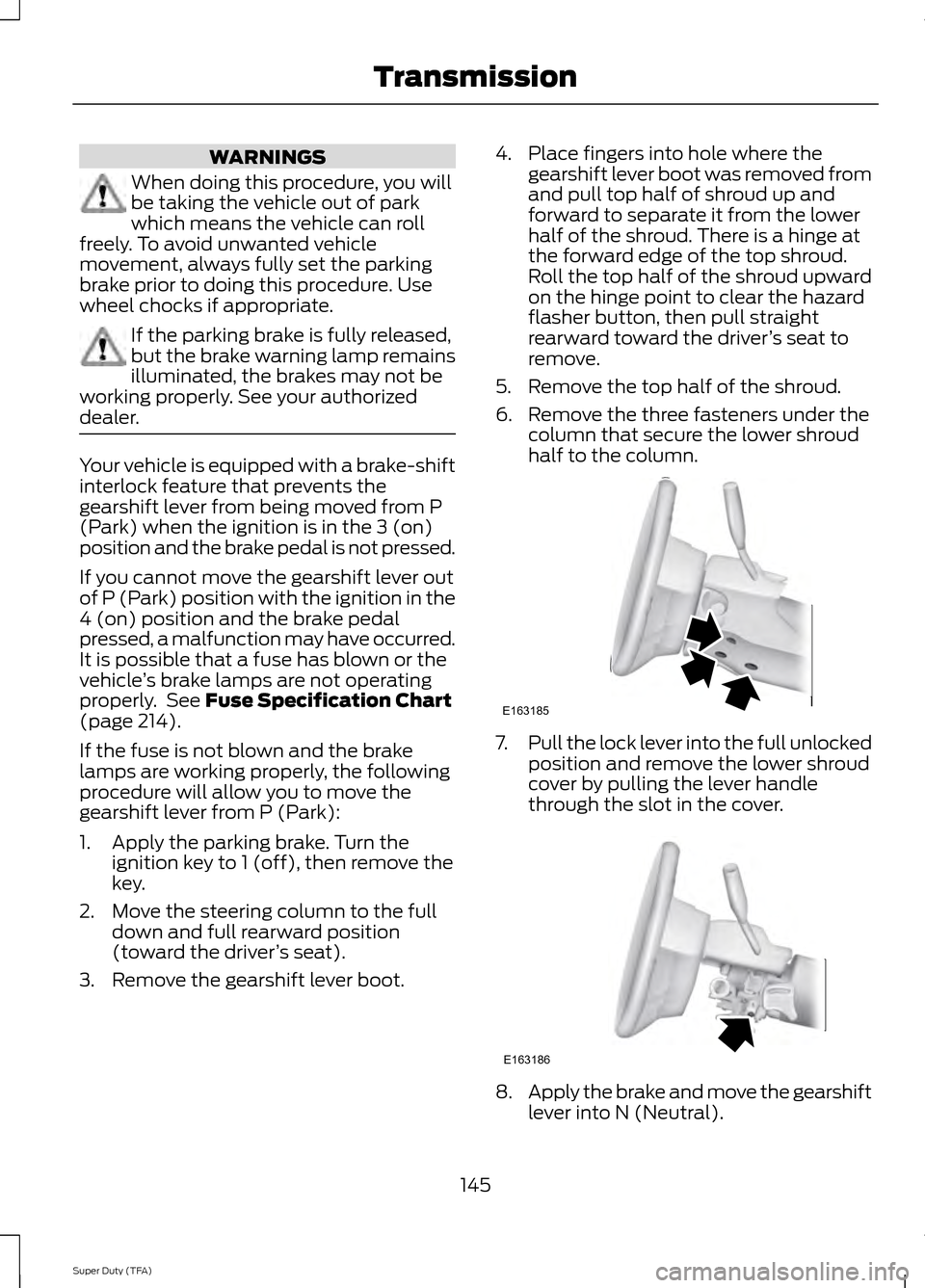
2. Move the steering column to the full down and full rearward position
(toward the driver ’s seat).
3. Remove the gearshift lever boot. 4. Place fingers into hole where the
gearshift lever boot was removed from
and pull top half of shroud up and
forward to separate it from the lower
half of the shroud. There is a hinge at
the forward edge of the top shroud.
Roll the top half of the shroud upward
on the hinge point to clear the hazard
flasher button, then pull straight
rearward toward the driver ’s seat to
remove.
5. Remove the top half of the shroud.
6. Remove the three fasteners under the column that secure the lower shroud
half to the column. 7.
Pull the lock lever into the full unlocked
position and remove the lower shroud
cover by pulling the lever handle
through the slot in the cover. 8.
Apply the brake and move the gearshift
lever into N (Neutral).
145
Super Duty (TFA) TransmissionE163185 E163186