Page 108 of 461
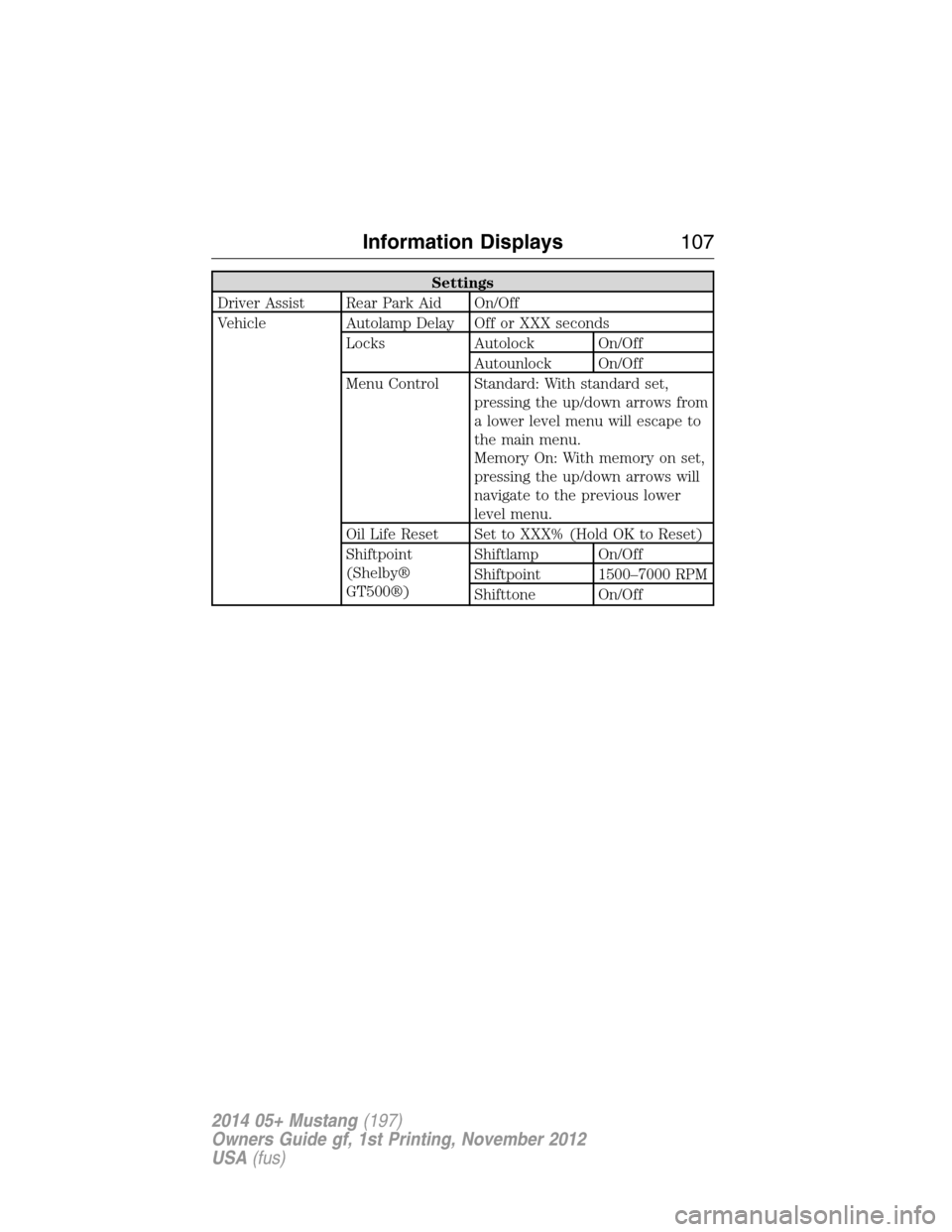
Settings
Driver Assist Rear Park Aid On/Off
Vehicle Autolamp Delay Off or XXX seconds
Locks Autolock On/Off
Autounlock On/Off
Menu Control Standard: With standard set,
pressing the up/down arrows from
a lower level menu will escape to
the main menu.
Memory On: With memory on set,
pressing the up/down arrows will
navigate to the previous lower
level menu.
Oil Life Reset Set to XXX% (Hold OK to Reset)
Shiftpoint
(Shelby®
GT500®)Shiftlamp On/Off
Shiftpoint 1500–7000 RPM
Shifttone On/Off
Information Displays107
2014 05+ Mustang(197)
Owners Guide gf, 1st Printing, November 2012
USA(fus)
Page 109 of 461
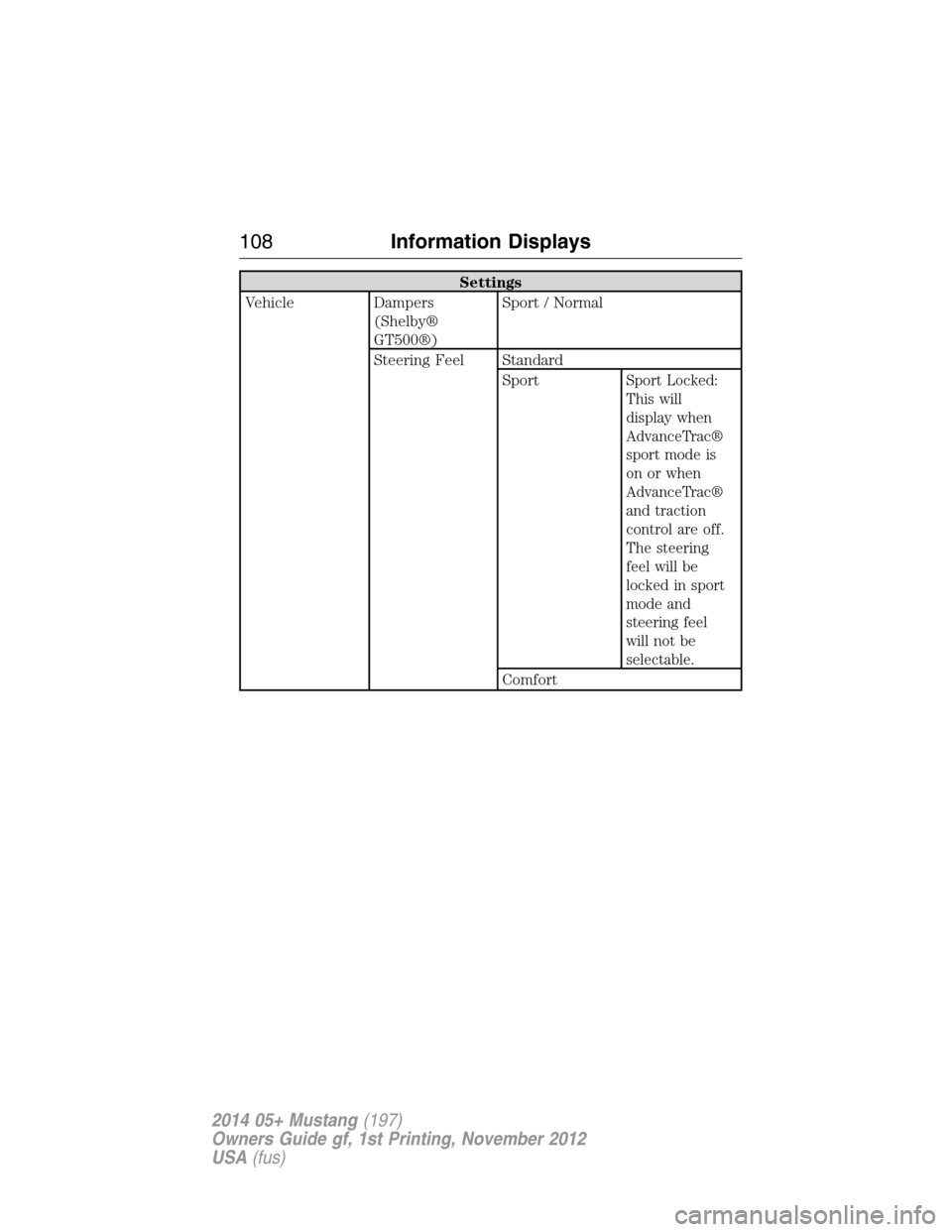
Settings
Vehicle Dampers
(Shelby®
GT500®)Sport / Normal
Steering Feel Standard
Sport
Sport Locked:
This will
display when
AdvanceTrac®
sport mode is
on or when
AdvanceTrac®
and traction
control are off.
The steering
feel will be
locked in sport
mode and
steering feel
will not be
selectable.
Comfort
108Information Displays
2014 05+ Mustang(197)
Owners Guide gf, 1st Printing, November 2012
USA(fus)
Page 123 of 461

AM/FM/CD/SIRIUS SATELLITE RADIO
WARNING:Driving while distracted can result in loss of vehicle
control, crash and injury. We strongly recommend that you use
extreme caution when using any device that may take your focus off
the road. Your primary responsibility is the safe operation of your
vehicle. We recommend against the use of any hand-held device while
driving and encourage the use of voice-operated systems when possible.
Make sure you are aware of all applicable local laws that may affect the
use of electronic devices while driving.
Note:Some features, such as SIRIUS satellite radio, may not be available
in your location. Check with your authorized dealer.
A.Memory presets:
•Store your favorite stations for later access. When tuned to any
station, press and hold a preset button until sound returns and
PRESET # SAVED appears in the display.
•
Save presets automatically by using the autoset feature. Press MENU
repeatedly until AUTO PRESET ON/OFF appears in the display. Use the
SEEK buttons to turn AUTO PRESET to ON, and either wait five
seconds for the search to initiate or pressOKto immediately start the
search. If you press another control within those five seconds, the
search does not start. The system fills the presets with the 10 strongest
stations; the station stored in preset 1 begins playing. If there are fewer
than 10 strong stations, the system stores the last one in the remaining
presets.
OKTUNE LOAD
VOLCD
AUX AM/FM
SIRIUS TEXT
SCANCAT/FOLDCLOCK #
SOUNDMENU
SEEK
1
23
45
6
78
90
PHONE
BRC
D
F
IKJL
HM
N
P
Q
EO
G
A
S
122Audio System
2014 05+ Mustang(197)
Owners Guide gf, 1st Printing, November 2012
USA(fus)
Page 124 of 461

Note:Autoset does not delete your original preset stations.
Note:In order to re-run the autoset features, you must first turn it off
before turning it back on.
B.MENU:Press this button to access different audio features:
•Compressionbrings the soft and loud CD passages together for a
more consistent listening level.
•Shuffleplays the current CD tracks in random order.
•RDS Radioallows you to search RDS-equipped stations for a certain
category of music format such as CLASSIC, COUNTRY, JAZZ/RB or
ROCK.
•SIRIUSallows you to access different satellite radio options.
C.CLOCK:Press this button to set the time. Use the memory presets
buttons to enter the time, and then pressOK.
D.PHONE:Press this button to access the phone features of the
SYNC® system. See theSYNC®chapter for more information. If your
vehicle is not equipped with SYNC®, the display reads NO PHONE.
E.SOUND:Press this button to access settings for Treble, Middle, Bass,
Balance and Fade. Use theSEEKorTUNEcontrols to change the
settings.
•Basslevels can be increased or decreased.
•Treblelevels can be increased or decreased.
•Balanceadjusts the sound between left and right speakers.
•Fadeadjusts the sound between the front and back speakers.
•Speed Compensated Volumeadjusts the volume to compensate for
speed and wind noise. You can set the system between off and +7.
•All Seat Mode/Driver Seat Mode/Top Down Mode (if equipped)
optimizes sound quality for the chosen seating position.
•DSP Mode (if equipped)allows you to choose between STEREO
SURROUND mode and STEREO mode.
F.Eject:Press this button to eject a CD.
G.CD slot:Insert a CD.
H.TUNE/OK/Play/Pause:
•In radio mode, turn the control to manually search through the radio
frequency band.
•In SIRIUS mode, turn the control to find the next or previous
available satellite radio station.
•OKallows you to confirm commands with phone and media features.
If your vehicle is equipped with SYNC®, see theSYNC®chapter for
more information.
•
Play/Pause allows you to play or pause a track when listening to a CD.
Audio System123
2014 05+ Mustang(197)
Owners Guide gf, 1st Printing, November 2012
USA(fus)
Page 131 of 461
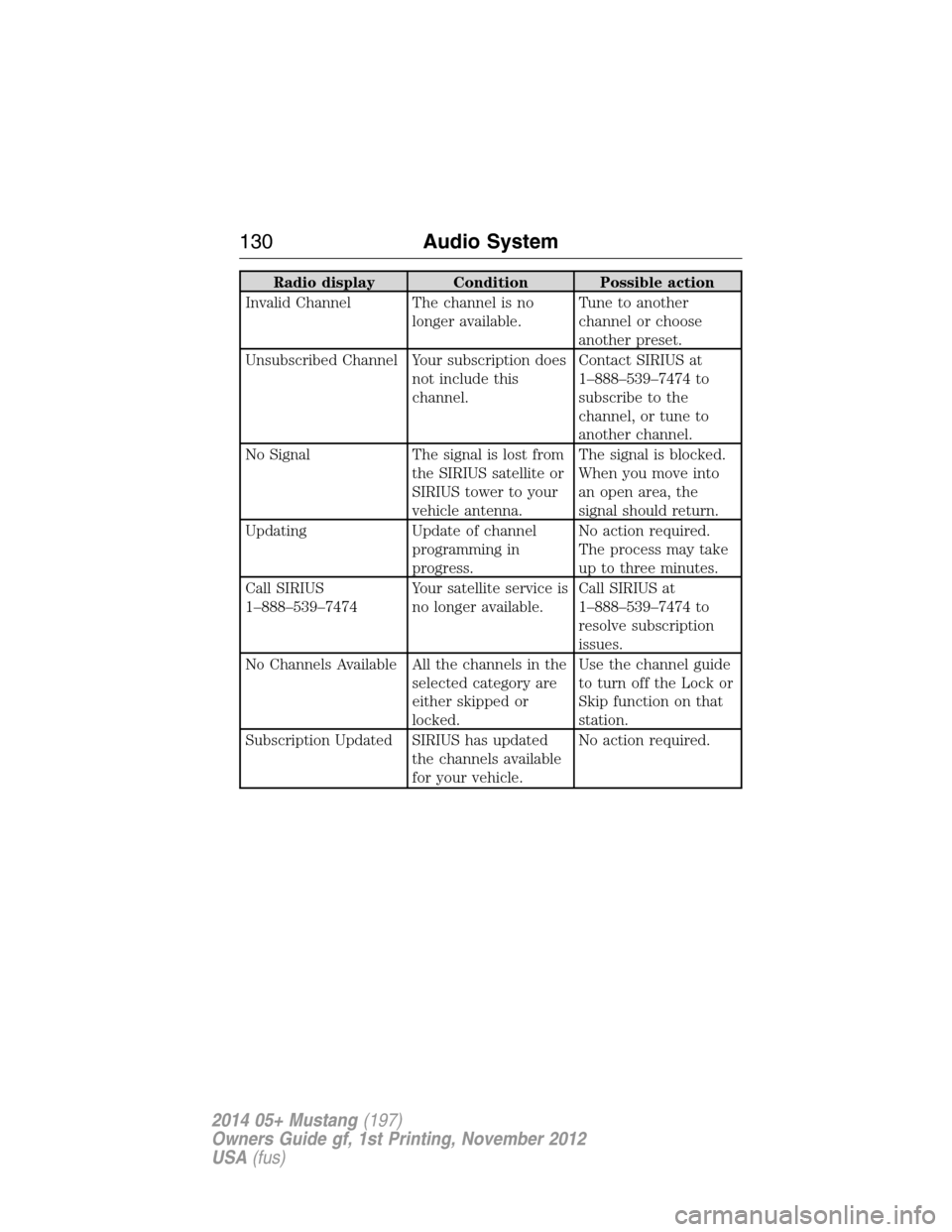
Radio display Condition Possible action
Invalid Channel The channel is no
longer available.Tune to another
channel or choose
another preset.
Unsubscribed Channel Your subscription does
not include this
channel.Contact SIRIUS at
1–888–539–7474 to
subscribe to the
channel, or tune to
another channel.
No Signal The signal is lost from
the SIRIUS satellite or
SIRIUS tower to your
vehicle antenna.The signal is blocked.
When you move into
an open area, the
signal should return.
Updating Update of channel
programming in
progress.No action required.
The process may take
up to three minutes.
Call SIRIUS
1–888–539–7474Your satellite service is
no longer available.Call SIRIUS at
1–888–539–7474 to
resolve subscription
issues.
No Channels Available All the channels in the
selected category are
either skipped or
locked.Use the channel guide
to turn off the Lock or
Skip function on that
station.
Subscription Updated SIRIUS has updated
the channels available
for your vehicle.No action required.
130Audio System
2014 05+ Mustang(197)
Owners Guide gf, 1st Printing, November 2012
USA(fus)
Page 141 of 461
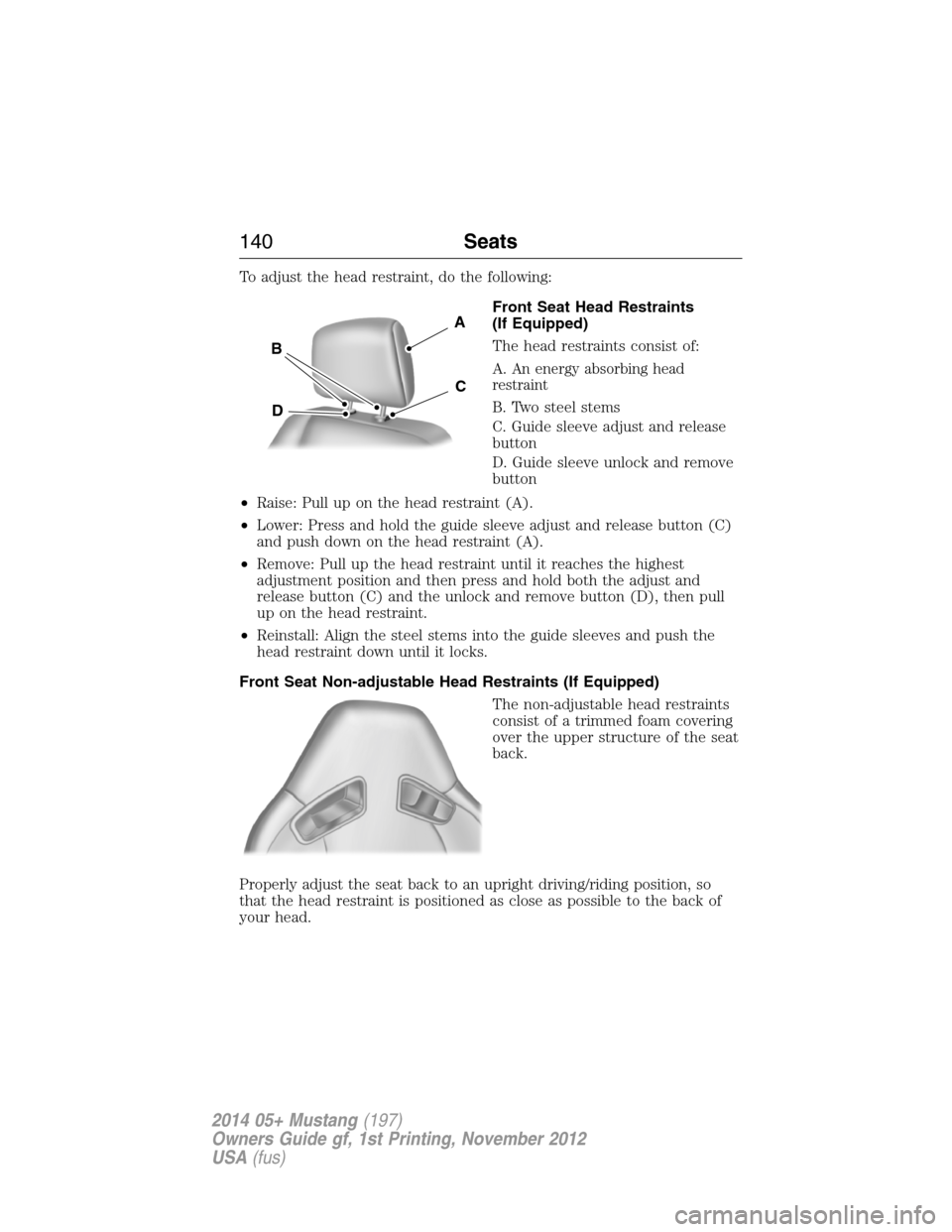
To adjust the head restraint, do the following:
Front Seat Head Restraints
(If Equipped)
The head restraints consist of:
A.
An energy absorbing head
restraint
B. Two steel stems
C. Guide sleeve adjust and release
button
D. Guide sleeve unlock and remove
button
•Raise: Pull up on the head restraint (A).
•Lower: Press and hold the guide sleeve adjust and release button (C)
and push down on the head restraint (A).
•Remove: Pull up the head restraint until it reaches the highest
adjustment position and then press and hold both the adjust and
release button (C) and the unlock and remove button (D), then pull
up on the head restraint.
•Reinstall: Align the steel stems into the guide sleeves and push the
head restraint down until it locks.
Front Seat Non-adjustable Head Restraints (If Equipped)
The non-adjustable head restraints
consist of a trimmed foam covering
over the upper structure of the seat
back.
Properly adjust the seat back to an upright driving/riding position, so
that the head restraint is positioned as close as possible to the back of
your head.
A
B
D
C
140Seats
2014 05+ Mustang(197)
Owners Guide gf, 1st Printing, November 2012
USA(fus)
Page 142 of 461

Rear Seat Non-adjustable Outboard Head Restraints
The second row outboard non-adjustable head restraints can be rotated
forward to improve rear vision when there are no rear occupants.
The non-adjustable head restraints
consist of:
A. a trimmed energy absorbing foam
and structure
B. a rotation button.
Press the rotation button to rotate the head restraint forward in order to
improve rear vision when there are no rear seat occupants.
Properly adjust the head restraint to an upright driving or riding position
by lifting up on the head restraint until it locks into its original position.
Tilting Head Restraints (If Equipped)
The front head restraints may have a tilting feature for extra comfort.
To tilt the head restraint, do the following:
1. Adjust the seat back to an upright driving or
riding position.
2. Tilt the head restraint forward by gently pulling
the top of the head restraint.
Once it is in its forward-most position, tilt it forward once more to
release it to the upright position.
Note:Do not attempt to force the head restraint backward after it is
tilted. Instead, continue tilting it forward until the head restraint releases
to the upright position.
A
B
Seats141
2014 05+ Mustang(197)
Owners Guide gf, 1st Printing, November 2012
USA(fus)
Page 146 of 461
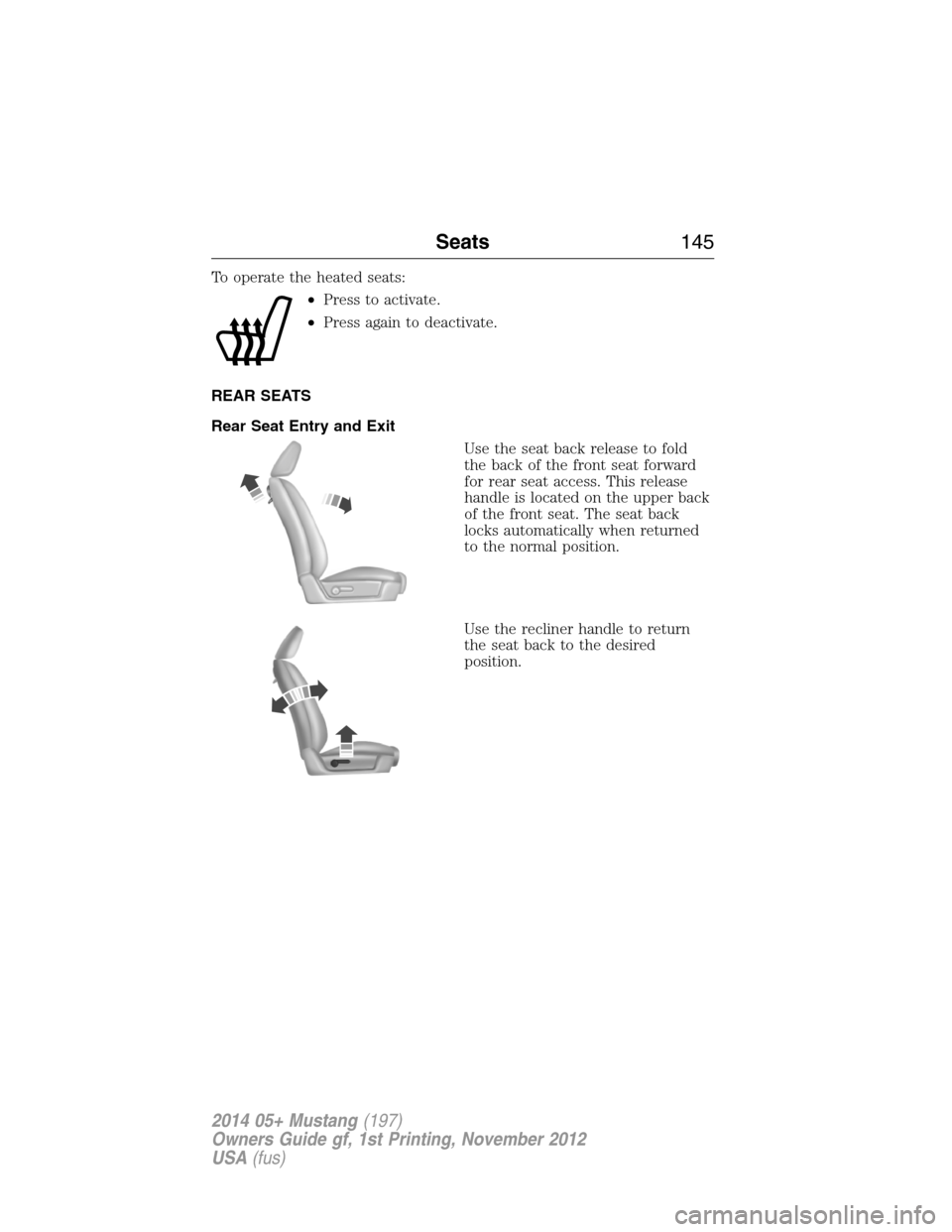
To operate the heated seats:
•Press to activate.
•Press again to deactivate.
REAR SEATS
Rear Seat Entry and Exit
Use the seat back release to fold
the back of the front seat forward
for rear seat access. This release
handle is located on the upper back
of the front seat. The seat back
locks automatically when returned
to the normal position.
Use the recliner handle to return
the seat back to the desired
position.
Seats145
2014 05+ Mustang(197)
Owners Guide gf, 1st Printing, November 2012
USA(fus)