2014 FORD MONDEO audio
[x] Cancel search: audioPage 322 of 446

Downloaded from www.Manualslib.com manuals search engine Description and ActionMessage
Check or uncheck this option to turn the Bluetooth interfaceof the system on or off. Select this option then press the OKbutton to change the option's status.
Bluetooth on
This selection does not erase your indexed information(phonebook, call history, text messages and paired devices).Set defaults
Select this option and confirm when prompted in the audiodisplay. Return to the factory default settings.
Completely erase all information stored on the system(phonebook, call history, text messages and paired devices)and return to the factory default settings.
Master reset
Select this option and confirm when prompted in the audiodisplay. The display indicates when complete and the systemtakes you back to the previous menu.
Install applications or software updates you have down-loaded.Install on SYNC
Select this option and confirm when prompted in the audiodisplay. There must be a valid SYNC application or updateavailable on the USB thumb drive in order to finish aninstallation successfully.
Display the system's version numbers as well as its serialnumber.System info
Press the OK button to select.
The voice settings submenu contains various options. SeeUsing Voice Recognition (page 306).Voice settings
Browse the actual menu structure of the connected USBdevice. Press the OK button and use the up or down arrowsto scroll through the folders and files. Use the left or rightarrows to enter and leave a folder. Media content can bedirectly selected for playback from this menu.
Browse USB
You can turn the emergency assistance feature on or off. SeeSYNC™ Applications and Services (page 320).Emergency Assistance
SYNC™ APPLICATIONS AND
SERVICES
A list of available applications appears.Each application may have its own specificsettings.
Press the MENU button to enter thesystem menu.
320Mondeo (CNG) Vehicles Built From: 08-09-2014 Vehicles Built Up To: 19-04-2015, CG3633en enGBR, Edition date: 10/2014, First PrintingSYNC™
Page 329 of 446

Downloaded from www.Manualslib.com manuals search engine •To allow your vehicle to providelocation information, including: GPSand speed.
•To allow the app to send pushnotifications using the vehicle displayand voice capabilities while running ina background state.
Note:You will only need to grantpermissions the first time you use an appwith SYNC.
Note:We are not responsible or liable forany damages or loss of privacy relating tousage of an app, or dissemination of anyvehicle data that you approve us to provideto an app.
USING SYNC™ WITH YOUR
MEDIA PLAYER
You can access and play music from yourmedia player through your vehicle'sspeaker system using the system's mediamenu or voice commands. You can alsosort and play your music by specificcategories, for example artist or albums.
SYNC is capable of hosting nearly anymedia player including: iPod, Zune, Playsfrom device players, and most USB drives.SYNC also supports audio formats, forexample MP3, WMA, WAV and ACC.
Confirm that the USB device has beenformatted correctly and has the followingspecifications:
•USB 2.0.
•File format must be FAT16/32.
Note:NTFS file format is not supported.
The format of the audio files on the USBdevice must be:
•MP3.
•Non DRM protected WMA.
•WAV.
•AAC.
Connecting Your Media Player tothe USB Port
Note:If your media player has a powerswitch, make sure you switch on the device.
To Connect Using Voice Commands
1.Plug the device into your vehicle's USBport.
2.Press the voice button and whenprompted say:
Description and ActionVoice Command
You can now play music by saying any of the appropriatevoice commands. Refer to the media voice commands.(USB [stick] | iPod | MP3[player])
Words in brackets [ ] are optional and do not have to be spoken for the system tounderstand the command. For example, for where (USB [stick] | iPOD | MP3 [player])appears, you can say USB or USB stick.
To Connect Using the System Menu
1.Plug the device into your vehicle's USBport.
2.Press the Media button (next to theaudio display) until an initializingmessage appears in the display.
327Mondeo (CNG) Vehicles Built From: 08-09-2014 Vehicles Built Up To: 19-04-2015, CG3633en enGBR, Edition date: 10/2014, First PrintingSYNC™
Page 332 of 446
![FORD MONDEO 2014 4.G Owners Manual Downloaded from www.Manualslib.com manuals search engine Voice Command
[play] (similar music | more like this)
((whos | who is) this | who plays this | (whats | what is) playing [now] | (what | whic](/manual-img/11/5483/w960_5483-331.png "FORD MONDEO 2014 4.G Owners Manual Downloaded from www.Manualslib.com manuals search engine Voice Command
[play] (similar music | more like this)
((whos | who is) this | who plays this | (whats | what is) playing [now] | (what | whic")
Downloaded from www.Manualslib.com manuals search engine Voice Command
[play] (similar music | more like this)
((who's | who is) this | who plays this | (what's | what is) playing [now] | (what | which)(song | track | artist) is this | (who's | who is) playing | (what's | what is) this)
* This voice command is not available until indexing is complete.
Voice Command Guide
Description and ActionVoice Command
The system searches all the data from your indexed musicand if available, begins to play the chosen type of music.(browse | search | show)genre
The system compiles a playlist and then plays similar musicto what is currently playing from the USB port using indexedmetadata information.
[play] (similar music |more like this)
The system searches for a specific artist, track or album fromthe music indexed through the USB port.(browse | search | show)artist
The system searches for a specific artist, track or album fromthe music indexed through the USB port.(browse | search | show)album
The system is also capable of playingmusic from your cell phone throughBluetooth.
To switch the Bluetooth audio on, use theMEDIA button (next to the audio display)or Source button, or press the voice buttonand when prompted say:
Description and ActionVoice Command
Bluetooth audio
Then any of the following:
Description and ActionVoice Command
pause
play
[play] next track
[play] previous track
330Mondeo (CNG) Vehicles Built From: 08-09-2014 Vehicles Built Up To: 19-04-2015, CG3633en enGBR, Edition date: 10/2014, First PrintingSYNC™
Page 333 of 446
Downloaded from www.Manualslib.com manuals search engine Media Menu Features
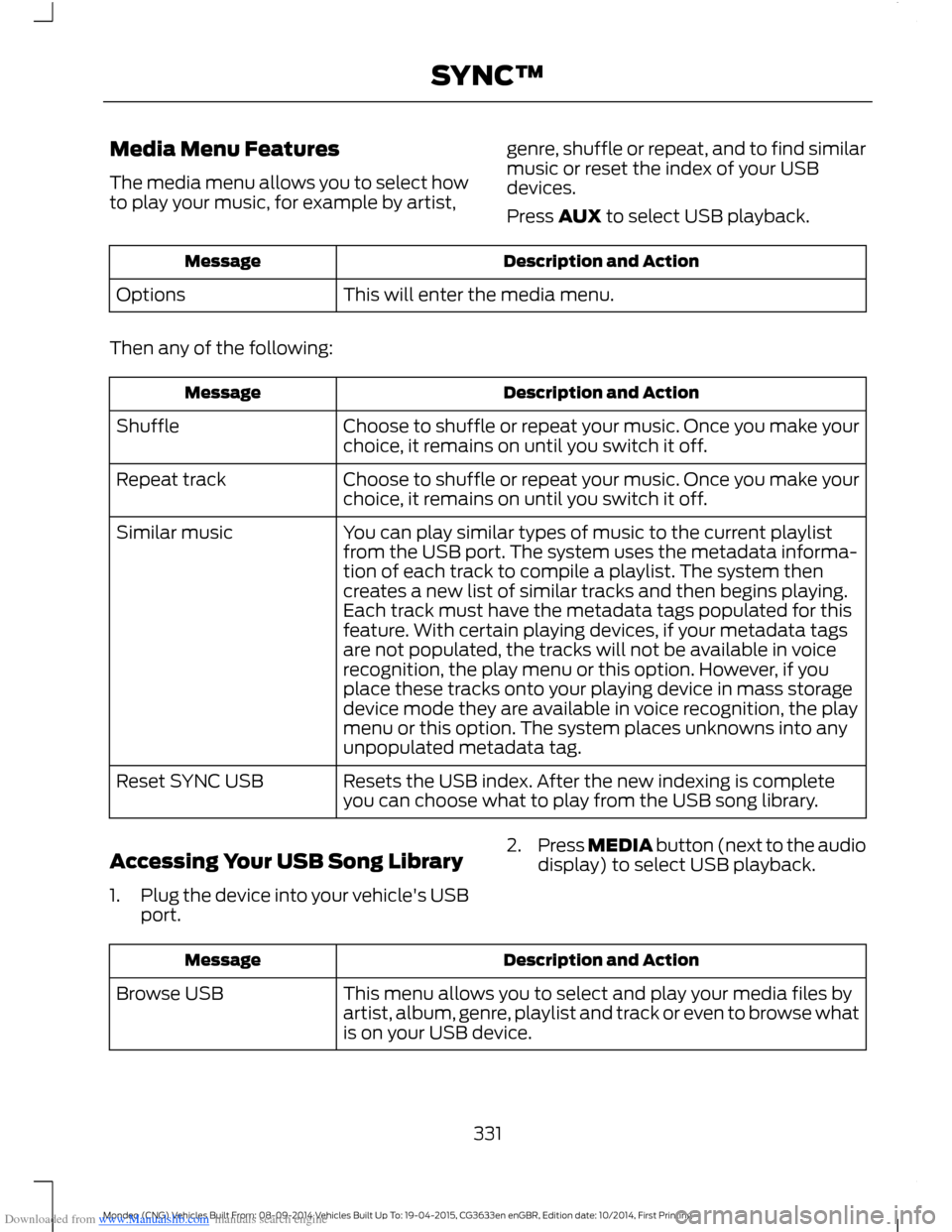
The media menu allows you to select howto play your music, for example by artist,
genre, shuffle or repeat, and to find similarmusic or reset the index of your USBdevices.
Press AUX to select USB playback.
Description and ActionMessage
This will enter the media menu.Options
Then any of the following:
Description and ActionMessage
Choose to shuffle or repeat your music. Once you make yourchoice, it remains on until you switch it off.Shuffle
Choose to shuffle or repeat your music. Once you make yourchoice, it remains on until you switch it off.Repeat track
You can play similar types of music to the current playlistfrom the USB port. The system uses the metadata informa-tion of each track to compile a playlist. The system thencreates a new list of similar tracks and then begins playing.Each track must have the metadata tags populated for thisfeature. With certain playing devices, if your metadata tags
Similar music
are not populated, the tracks will not be available in voicerecognition, the play menu or this option. However, if youplace these tracks onto your playing device in mass storagedevice mode they are available in voice recognition, the playmenu or this option. The system places unknowns into anyunpopulated metadata tag.
Resets the USB index. After the new indexing is completeyou can choose what to play from the USB song library.Reset SYNC USB
Accessing Your USB Song Library
1.Plug the device into your vehicle's USBport.
2.Press MEDIA button (next to the audiodisplay) to select USB playback.
Description and ActionMessage
This menu allows you to select and play your media files byartist, album, genre, playlist and track or even to browse whatis on your USB device.
Browse USB
331Mondeo (CNG) Vehicles Built From: 08-09-2014 Vehicles Built Up To: 19-04-2015, CG3633en enGBR, Edition date: 10/2014, First PrintingSYNC™
Page 335 of 446
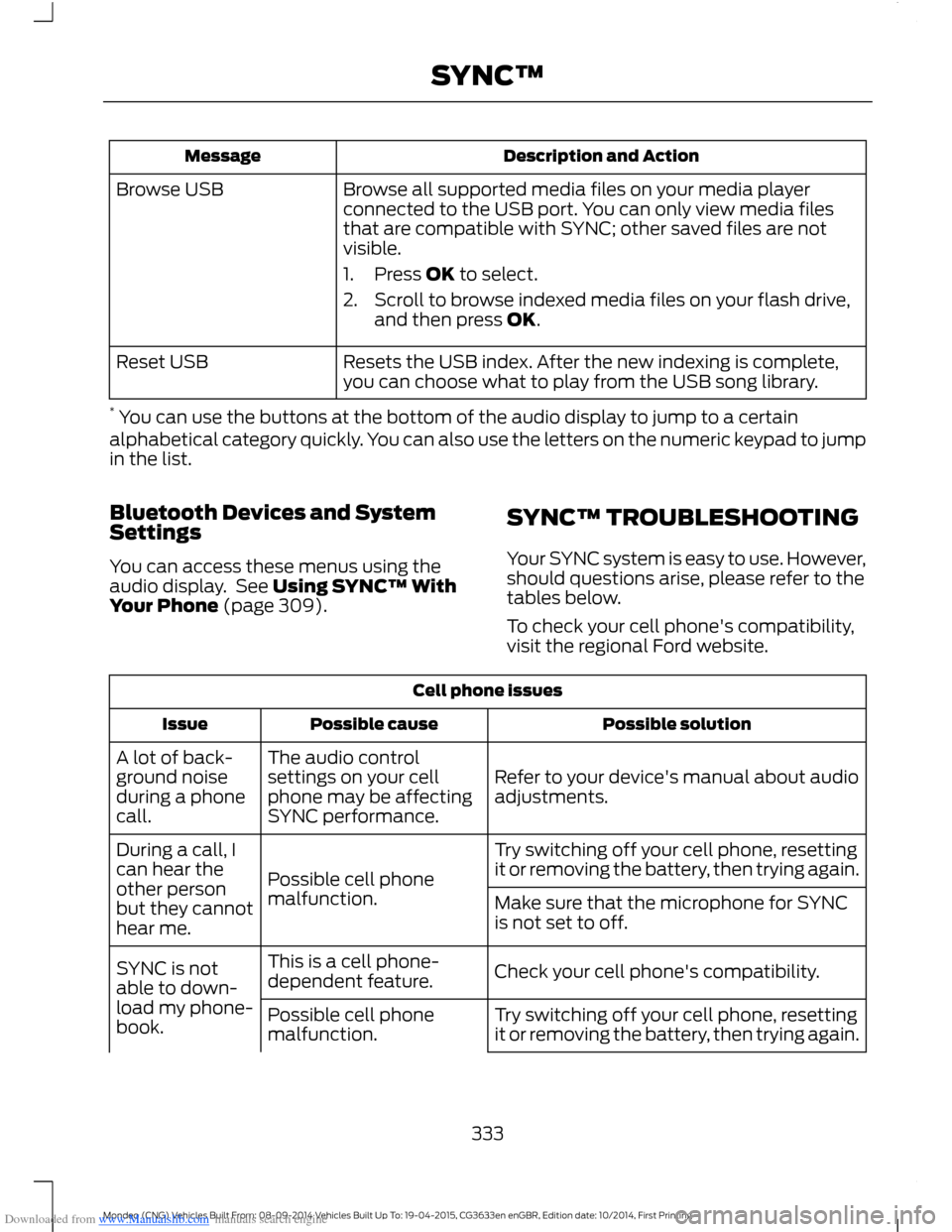
Downloaded from www.Manualslib.com manuals search engine Description and ActionMessage
Browse all supported media files on your media playerconnected to the USB port. You can only view media filesthat are compatible with SYNC; other saved files are notvisible.
1.Press OK to select.
2.Scroll to browse indexed media files on your flash drive,and then press OK.
Browse USB
Resets the USB index. After the new indexing is complete,you can choose what to play from the USB song library.Reset USB
* You can use the buttons at the bottom of the audio display to jump to a certainalphabetical category quickly. You can also use the letters on the numeric keypad to jumpin the list.
Bluetooth Devices and SystemSettings
You can access these menus using theaudio display. See Using SYNC™ WithYour Phone (page 309).
SYNC™ TROUBLESHOOTING
Your SYNC system is easy to use. However,should questions arise, please refer to thetables below.
To check your cell phone's compatibility,visit the regional Ford website.
Cell phone issues
Possible solutionPossible causeIssue
Refer to your device's manual about audioadjustments.
The audio controlsettings on your cellphone may be affectingSYNC performance.
A lot of back-ground noiseduring a phonecall.
Try switching off your cell phone, resettingit or removing the battery, then trying again.Possible cell phonemalfunction.
During a call, Ican hear theother personbut they cannothear me.
Make sure that the microphone for SYNCis not set to off.
Check your cell phone's compatibility.This is a cell phone-dependent feature.SYNC is notable to down-load my phone-book.Try switching off your cell phone, resettingit or removing the battery, then trying again.Possible cell phonemalfunction.
333Mondeo (CNG) Vehicles Built From: 08-09-2014 Vehicles Built Up To: 19-04-2015, CG3633en enGBR, Edition date: 10/2014, First PrintingSYNC™
Page 338 of 446
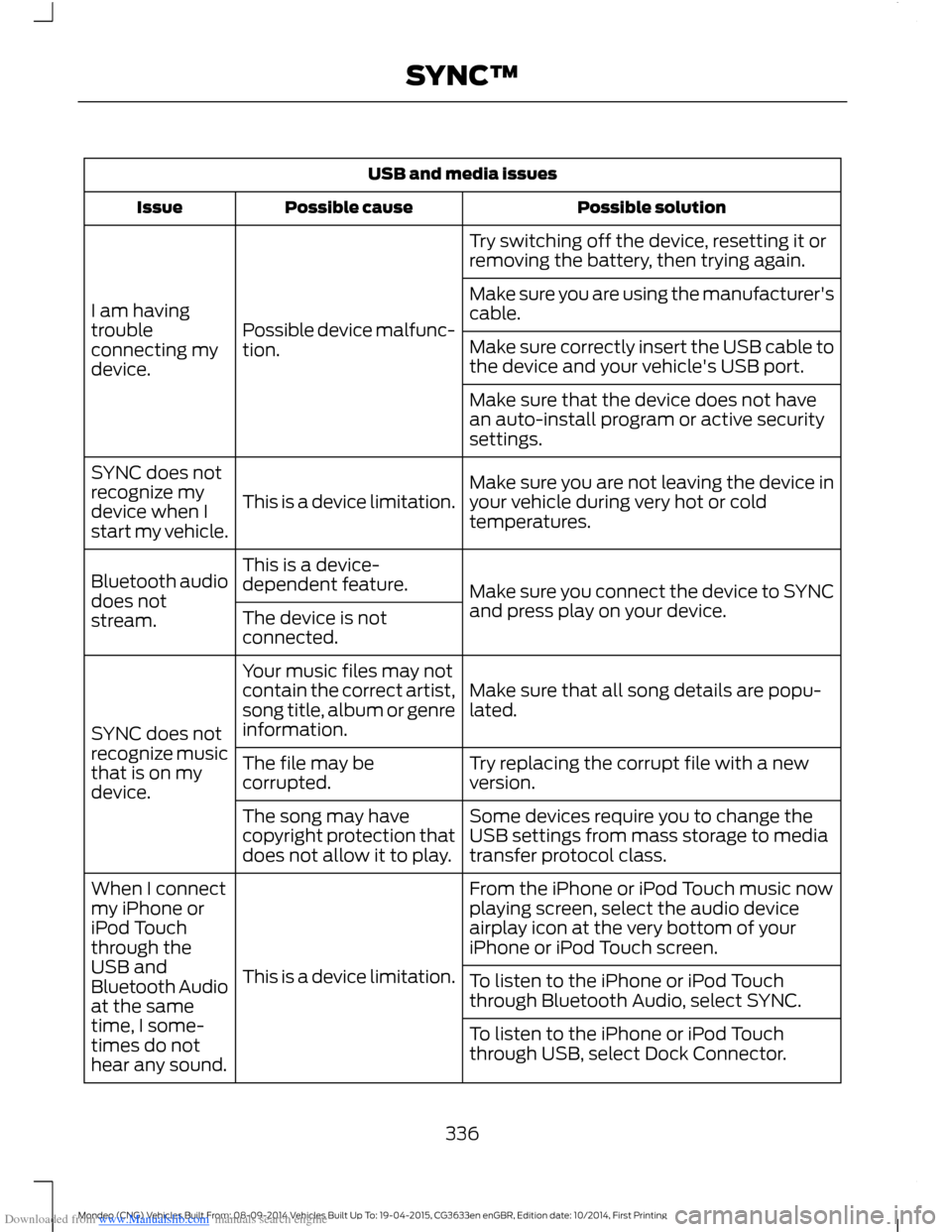
Downloaded from www.Manualslib.com manuals search engine USB and media issues
Possible solutionPossible causeIssue
Try switching off the device, resetting it orremoving the battery, then trying again.
Possible device malfunc-tion.
I am havingtroubleconnecting mydevice.
Make sure you are using the manufacturer'scable.
Make sure correctly insert the USB cable tothe device and your vehicle's USB port.
Make sure that the device does not havean auto-install program or active securitysettings.
Make sure you are not leaving the device inyour vehicle during very hot or coldtemperatures.This is a device limitation.
SYNC does notrecognize mydevice when Istart my vehicle.
Make sure you connect the device to SYNCand press play on your device.
This is a device-dependent feature.Bluetooth audiodoes notstream.The device is notconnected.
Make sure that all song details are popu-lated.
Your music files may notcontain the correct artist,song title, album or genreinformation.SYNC does notrecognize musicthat is on mydevice.
Try replacing the corrupt file with a newversion.The file may becorrupted.
Some devices require you to change theUSB settings from mass storage to mediatransfer protocol class.
The song may havecopyright protection thatdoes not allow it to play.
From the iPhone or iPod Touch music nowplaying screen, select the audio deviceairplay icon at the very bottom of youriPhone or iPod Touch screen.
This is a device limitation.
When I connectmy iPhone oriPod Touchthrough theUSB andBluetooth Audioat the sametime, I some-times do nothear any sound.
To listen to the iPhone or iPod Touchthrough Bluetooth Audio, select SYNC.
To listen to the iPhone or iPod Touchthrough USB, select Dock Connector.
336Mondeo (CNG) Vehicles Built From: 08-09-2014 Vehicles Built Up To: 19-04-2015, CG3633en enGBR, Edition date: 10/2014, First PrintingSYNC™
Page 339 of 446

Downloaded from www.Manualslib.com manuals search engine Voice command issues
Possible solutionPossible causeIssue
Review the cell phone voice commandsand the media voice commands at thebeginning of their respective sections.You may be using thewrong voice commands.
SYNC does notunderstandwhat I amsaying.Refer to the audio display during an activevoice session to find a list of voicecommands there.
The microphone for the system is either inyour rear view mirror or in the headliner justabove the windshield.
You may be speaking toosoon or at the wrongtime.
Review the media voice commands at thebeginning of the media section.You may be using thewrong voice commands.
SYNC does notunderstand thename of a songor artist.
Say the song or artist exactly as the systemsaved it. If you say, "Play Artist Prince", thesystem does not play music by Prince andthe Revolution or Prince and the NewPower Generation.You may not be sayingthe name exactly as thesystem saved it.Make sure you are saying the complete titlesuch as "California remix featuring JenniferNettles".
If the song titles are in capital letters, youhave to spell them. LOLA requires you tosay "L-O-L-A".
Do not use special characters in the title,as the system does not recognize them.
The system may not bereading the name thesame way you are sayingit.
Review the cell phone voice commands atthe beginning of the cell phone section.
You may be using thewrong voice commands.
SYNC does notunderstand or iscalling thewrong contactwhen I want tomake a call.
You can also use the cell phone and mediasuggestion lists to get a list of possiblesuggestions when the system cannot fullyunderstand you. See Using Voice Recog-nition (page 306).
337Mondeo (CNG) Vehicles Built From: 08-09-2014 Vehicles Built Up To: 19-04-2015, CG3633en enGBR, Edition date: 10/2014, First PrintingSYNC™
Page 342 of 446
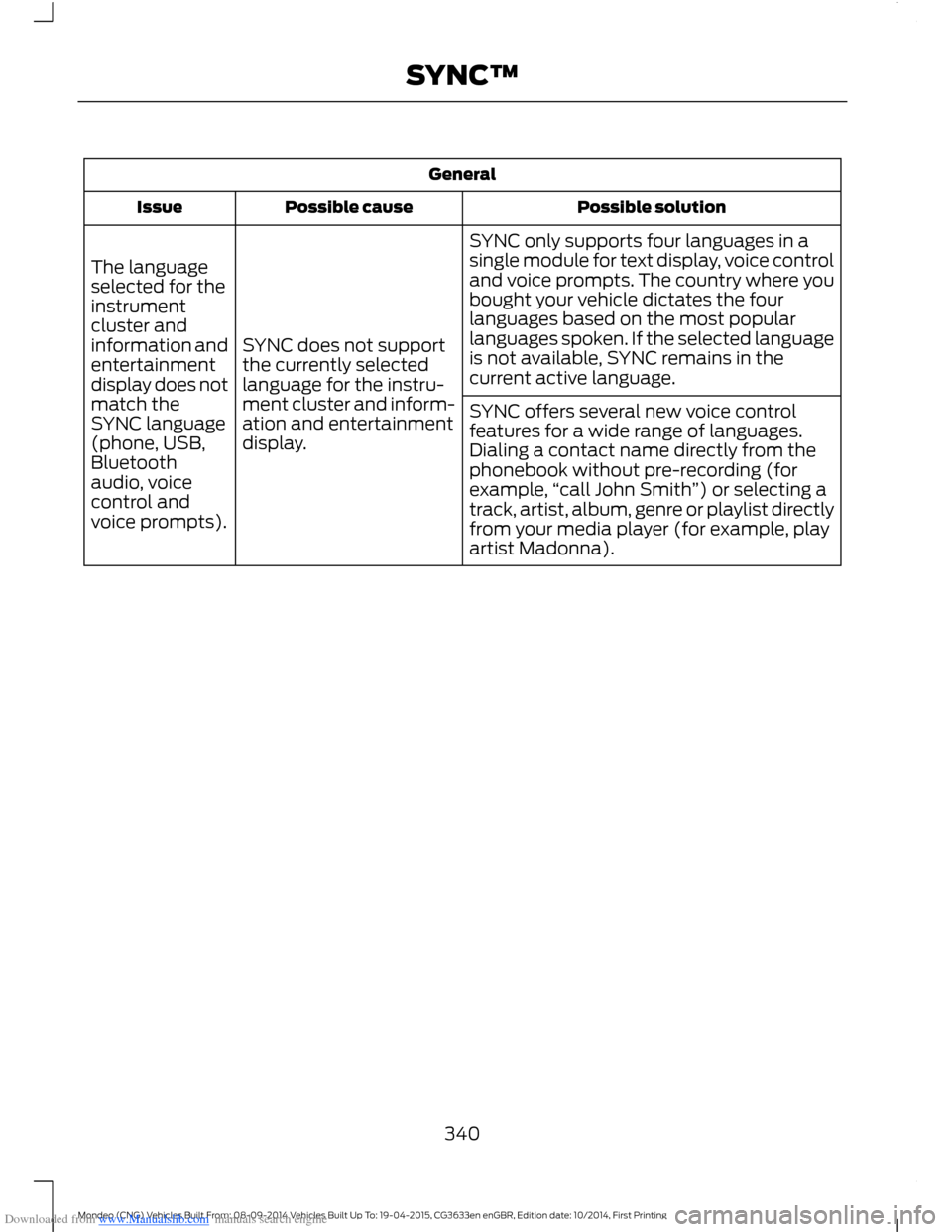
Downloaded from www.Manualslib.com manuals search engine General
Possible solutionPossible causeIssue
SYNC only supports four languages in asingle module for text display, voice controland voice prompts. The country where youbought your vehicle dictates the fourlanguages based on the most popularlanguages spoken. If the selected languageis not available, SYNC remains in thecurrent active language.
SYNC does not supportthe currently selectedlanguage for the instru-ment cluster and inform-ation and entertainmentdisplay.
The languageselected for theinstrumentcluster andinformation andentertainmentdisplay does notmatch theSYNC language(phone, USB,Bluetoothaudio, voicecontrol andvoice prompts).
SYNC offers several new voice controlfeatures for a wide range of languages.Dialing a contact name directly from thephonebook without pre-recording (forexample,“call John Smith”) or selecting atrack, artist, album, genre or playlist directlyfrom your media player (for example, playartist Madonna).
340Mondeo (CNG) Vehicles Built From: 08-09-2014 Vehicles Built Up To: 19-04-2015, CG3633en enGBR, Edition date: 10/2014, First PrintingSYNC™