2014 FORD MONDEO audio
[x] Cancel search: audioPage 346 of 446

Downloaded from www.Manualslib.com manuals search engine This system uses a four-corner strategy toprovide quick access to several vehiclefeatures and settings. The touchscreenprovides easy interaction with your cellularphone, multimedia, climate control andnavigation system. The corners display anyactive modes within those menus, such asphone status or the climate temperature.
Note:Some features are not available whileyour vehicle is moving.
Note:Your system is equipped with afeature that allows you to access andcontrol audio features for 10 minutes afteryou switch the ignition off (and no doorsopen).
PHONE
Press to select any of the following:
Message
Phone
Quick Dial
Phonebook
History
Messaging
Settings
NAVIGATION
Press to select any of the following:
Message
My Home
Favorites
Previous Destinations
Point of Interest
Emergency
Street Address
Message
Intersection
City Center
Latitude/Longitude
Edit Route
Cancel Route
CLIMATE
Press the corresponding icons to controlthe following options:
•Driver Settings
•Recirculated Air
•Auto
•Dual
•Passenger Settings
•A/C
•Defrost
SETTINGS
Press to select any of the following:
Message
Clock
Display
Sound
Vehicle
Settings
Help
344Mondeo (CNG) Vehicles Built From: 08-09-2014 Vehicles Built Up To: 19-04-2015, CG3633en enGBR, Edition date: 10/2014, First PrintingSYNC™ 2
Page 347 of 446
Downloaded from www.Manualslib.com manuals search engine HOME
Press to access your homescreen. Depending on yourvehicle’s option package andsoftware, your screens may vary inappearance from the descriptions in thissection. Your features may also be limiteddepending on your market. Check with anauthorized dealer for availability.
INFORMATION
Press to select any of the following:
Message
Traffic
Alerts
Calendar
Apps
Where Am I?
ENTERTAINMENT
Press to select any of the following:
Message
AM
FM
*DAB
CD
USB
BT Stereo
SD Card
A/V In
* If equipped.
Using the Audio Controls
Depending on your vehicle, it may also have the following controls:
Action and DescriptionMessage
Switch the media features on or off.Power
Adjust the volume of playing media.Vol:
Use as you normally would in media modes.Seek
Use as you normally would in media modes.Tune
Eject a CD from the entertainment system.Eject
Press this button to switch the display screen off. Press again,or touch the screen to switch the display screen on.Display
Touch the control repeatedly to switch between mediamodes.Source
345Mondeo (CNG) Vehicles Built From: 08-09-2014 Vehicles Built Up To: 19-04-2015, CG3633en enGBR, Edition date: 10/2014, First PrintingSYNC™ 2
Page 348 of 446

Downloaded from www.Manualslib.com manuals search engine Action and DescriptionMessage
Adjust the settings for:Sound
Bass
Treble
Midrange
Set Balance and Fade
DSP
EQ Mode
Speed Compensated Volume
Using the Steering Wheel Controls
Depending on your vehicle and optionpackage, you can use your steering wheelcontrols to interact with the touchscreensystem.
•VOL: Control the volume of audiooutput.
•Mute: Mute the audio output.
•Voice: Press to start a voice session.Press again and hold to end a voicesession.
•SEEK and PHONE ACCEPT:
•While in radio mode, press to seekbetween memory presets or pressand hold to seek between stations.
•While in USB or CD mode, press toseek between stations or press andhold to fast seek.
•While in phone mode, press toanswer a call, or to switch betweencalls.
•SEEK and PHONE REJECT:
•While in radio mode, press to seekbetween memory presets or pressand hold to seek between stations.
•While in USB or CD mode, press toseek between stations or press andhold to fast seek.
•While in phone mode, press to enda call, or to reject an incoming call.
•Source: Touch the control repeatedlyto switch between media modes.
•Sound: Touch the control to adjust thesound settings. See Settings (page352).
See Steering Wheel (page 56).
Cleaning the Touchscreen Display
Use a dry, clean, soft cloth. If dirt orfingerprints are still visible, apply a smallamount of alcohol to the cloth. Do not pouror spray alcohol onto the display. Do notuse detergent or any type of solvent toclean the display.
Support
For further support, contact an authorizeddealer. For more information, visit theregional Ford website.
346Mondeo (CNG) Vehicles Built From: 08-09-2014 Vehicles Built Up To: 19-04-2015, CG3633en enGBR, Edition date: 10/2014, First PrintingSYNC™ 2
Page 351 of 446
Downloaded from www.Manualslib.com manuals search engine Accessing and Adjusting Modes Through Your Right Vehicle InformationDisplay
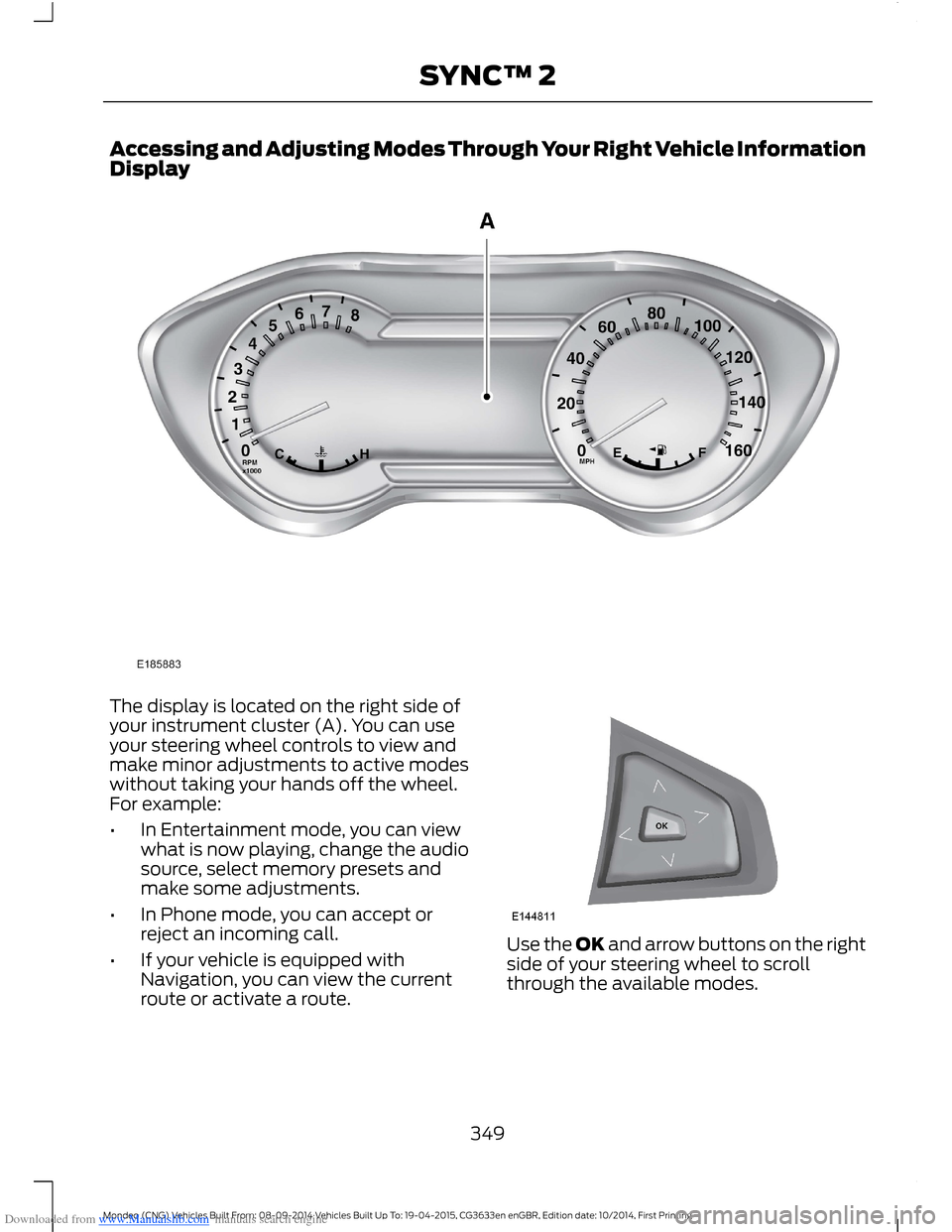
The display is located on the right side ofyour instrument cluster (A). You can useyour steering wheel controls to view andmake minor adjustments to active modeswithout taking your hands off the wheel.For example:
•In Entertainment mode, you can viewwhat is now playing, change the audiosource, select memory presets andmake some adjustments.
•In Phone mode, you can accept orreject an incoming call.
•If your vehicle is equipped withNavigation, you can view the currentroute or activate a route.
Use the OK and arrow buttons on the rightside of your steering wheel to scrollthrough the available modes.
349Mondeo (CNG) Vehicles Built From: 08-09-2014 Vehicles Built Up To: 19-04-2015, CG3633en enGBR, Edition date: 10/2014, First PrintingSYNC™ 2
Page 368 of 446

Downloaded from www.Manualslib.com manuals search engine ENTERTAINMENT
Action and DescriptionMessage
AMA
FMB
DABC
CDD
USBE
Touch this button to scrolldown for more options, such asSD Card, BT Stereo and A/V In
F
These buttons change with themedia mode you are in.G
Radio memory presets and CDcontrols.H
Note:Some features may not be availablein your area. Contact an authorized dealerfor more information.
You can access these options using thetouchscreen or voice commands.
AM/FM Radio
Touch the AM or FM tab to listento the radio.
To change between AM and FM presets,just touch the AM or FM tab.
Memory Presets
Save a station by pressing and holding oneof the memory preset areas. There is a briefmute while the radio saves the station.Sound returns when finished.
TA
When active TA interrupts active audiosource to provide incoming trafficannouncements.
Scan
Touch this button to scan through AM orFM band. The system will remain on anystrong station for 10 seconds. The light onthe button illuminates when the feature ison.
366Mondeo (CNG) Vehicles Built From: 08-09-2014 Vehicles Built Up To: 19-04-2015, CG3633en enGBR, Edition date: 10/2014, First PrintingSYNC™ 2
Page 369 of 446
Downloaded from www.Manualslib.com manuals search engine Info (DAB only)
When the info button is pressed, thesystem shows the corresponding block
number for the active DAB radio station. Ifyou press the info button a second timethe radio station name is displayed again.
Options
Action and DescriptionMenu Item
Touch this button to adjust settings for:Sound Settings
Bass
Midrange
Treble
Set Balance and Fade
Occupancy Mode
EQ Mode
Speed Compensated Volume
This allows you to view the informationbroadcast by FM stations.Radio Text
AST (Autostore) allows you to have thesystem automatically store the sixstrongest stations in your current location.
AST
With news announcement option active,the system interrupts active audio sourceto provide incoming news announcements,if currently tuned station (or last tunedstation in case of other media active)supports news.
News announcement
With Regional option active, the systemstays on the regional subprogram insteadof switching to a different frequency withbetter reception.
Regional
With alternative frequency option active,the system re-tunes to a differentfrequency with better reception for thesame station.
Alternate Frequency
With Service Linking active, the systemautomatically switches from DAB to FM, incase DAB becomes unavailable.
Service Linking
367Mondeo (CNG) Vehicles Built From: 08-09-2014 Vehicles Built Up To: 19-04-2015, CG3633en enGBR, Edition date: 10/2014, First PrintingSYNC™ 2
Page 374 of 446

Downloaded from www.Manualslib.com manuals search engine Action and DescriptionMessage
Displays software and firmware information about thecurrently connected media device.Device Information
Indexes your device when you connect it for the first time andeach time the content changes (for example adding orremoving tracks) to make sure you have the latest voicecommands available for all media on the device.
Update Media Index
Note:Your vehicle may not have all these sound settings.
Browse
This feature allows you to view thecontents of the device. It also allows youto search by categories, for example genre,artist or album.
If you want to view song information, forexample Title, Artist, File, Folder, Album,and Genre, touch the on-screen album art.
You can also select:
Action and DescriptionMessage
To hear how the system pronounces the current band andsong. This can be helpful when using voice commands tomake sure the system correctly plays your request.
What’s Playing?
Playing Video from Your Device
To access and play video from your device,your vehicle's transmission must be in park(P) with the ignition in accessory mode.See Starting and Stopping the Engine(page 138).
USB and SD Card Voice Commands
The voice system allows you to controlyour media with voice commands. Forexample, if you are listening to music onyour USB device, and wish to changesongs, you can press the voice button andthe system provides you with audioprompts.
Press the voice button and when prompted say:
Voice command
SD Card
USB
Then commands such as the following:
372Mondeo (CNG) Vehicles Built From: 08-09-2014 Vehicles Built Up To: 19-04-2015, CG3633en enGBR, Edition date: 10/2014, First PrintingSYNC™ 2
Page 375 of 446

Downloaded from www.Manualslib.com manuals search engine Voice command
Browse
Next Track
Pause
Say the name of what you would like to listen to such asa band, song, album or playlist.Play
Similar Music
Help
Supported Media Players, Formatsand Metadata Information
SYNC is capable of hosting nearly anydigital media player, including iPod,Zune™, plays from device players, andmost USB drives. Supported audio formatsinclude MP3, WMA, WAV and AAC.
It is also able to organize your indexedmedia from your playing device bymetadata tags. Metadata tags, which aredescriptive software identifiers embeddedin the media files, provide informationabout the file.
If your indexed media files contain noinformation embedded in these metadatatags, SYNC may classify the emptymetadata tags as unknown.
In order to playback video from your iPodor iPhone, you must have a specialcombination USB/RCA composite videocable (which you can buy from Apple).When you connect the cable to your iPodor iPhone, plug the other end into both theRCA jacks and the USB port.
Bluetooth Audio
The system allows you to stream audioover your vehicle's speakers from yourconnected, Bluetooth-enabled cell phone.
To access, press the lower left corneron the touchscreen, then select:
Message
BT Stereo
Bluetooth Audio Voice Commands
The voice system allows you to controlyour media with a simple voice command.For example to change songs, press thevoice button and follow the systemprompts.
A/V Inputs
WARNINGS
Driving while distracted can result inloss of vehicle control, crash andinjury. We strongly recommend thatyou use extreme caution when using anydevice that may take your focus off theroad. Your primary responsibility is the safeoperation of your vehicle. We recommend
373Mondeo (CNG) Vehicles Built From: 08-09-2014 Vehicles Built Up To: 19-04-2015, CG3633en enGBR, Edition date: 10/2014, First PrintingSYNC™ 2