2014 FORD MONDEO USB
[x] Cancel search: USBPage 365 of 446

Downloaded from www.Manualslib.com manuals search engine Action and DescriptionMenu Item
Makes SYNC an access point for a phone or a computer whenturned on. This forms the local area network within yourvehicle for things, such as game playing, file transfer andinternet browsing. Press ? for more information.
Gateway (Access Point) Settings
Allows you to view and change settings for using SYNC asthe internet gateway.
Gateway (Access Point) Devices List
Allows you to view recent connections to your Wi-Fi system.
Instead of using Wi-Fi, your system can also use a USB mobilebroadband connection to access the internet. (You mustswitch on your mobile broadband device on your personalcomputer before connecting it to the system.) This screenallows you to set up what is your typical area for your USBmobile broadband connection. (USB mobile broadbandsettings may not display if the device is already on.) You canselect the following:
USB Mobile Broadband
Country
Carrier
Phone Number
User Name
Password
Shows you the currently paired devices as well as giving youyour typical Bluetooth options to connect, disconnect, set asfavorite, delete and add device. Bluetooth is a registeredtrademark of the Bluetooth SIG.
Bluetooth Settings
Choose your connection methods and change them asneeded. You can select to change order and have the systemeither always attempt to connect using a USB mobilebroadband or using Wi-Fi.
Prioritize ConnectionMethods
363Mondeo (CNG) Vehicles Built From: 08-09-2014 Vehicles Built Up To: 19-04-2015, CG3633en enGBR, Edition date: 10/2014, First PrintingSYNC™ 2
Page 368 of 446

Downloaded from www.Manualslib.com manuals search engine ENTERTAINMENT
Action and DescriptionMessage
AMA
FMB
DABC
CDD
USBE
Touch this button to scrolldown for more options, such asSD Card, BT Stereo and A/V In
F
These buttons change with themedia mode you are in.G
Radio memory presets and CDcontrols.H
Note:Some features may not be availablein your area. Contact an authorized dealerfor more information.
You can access these options using thetouchscreen or voice commands.
AM/FM Radio
Touch the AM or FM tab to listento the radio.
To change between AM and FM presets,just touch the AM or FM tab.
Memory Presets
Save a station by pressing and holding oneof the memory preset areas. There is a briefmute while the radio saves the station.Sound returns when finished.
TA
When active TA interrupts active audiosource to provide incoming trafficannouncements.
Scan
Touch this button to scan through AM orFM band. The system will remain on anystrong station for 10 seconds. The light onthe button illuminates when the feature ison.
366Mondeo (CNG) Vehicles Built From: 08-09-2014 Vehicles Built Up To: 19-04-2015, CG3633en enGBR, Edition date: 10/2014, First PrintingSYNC™ 2
Page 372 of 446
Downloaded from www.Manualslib.com manuals search engine SD Card Slot and USB Port
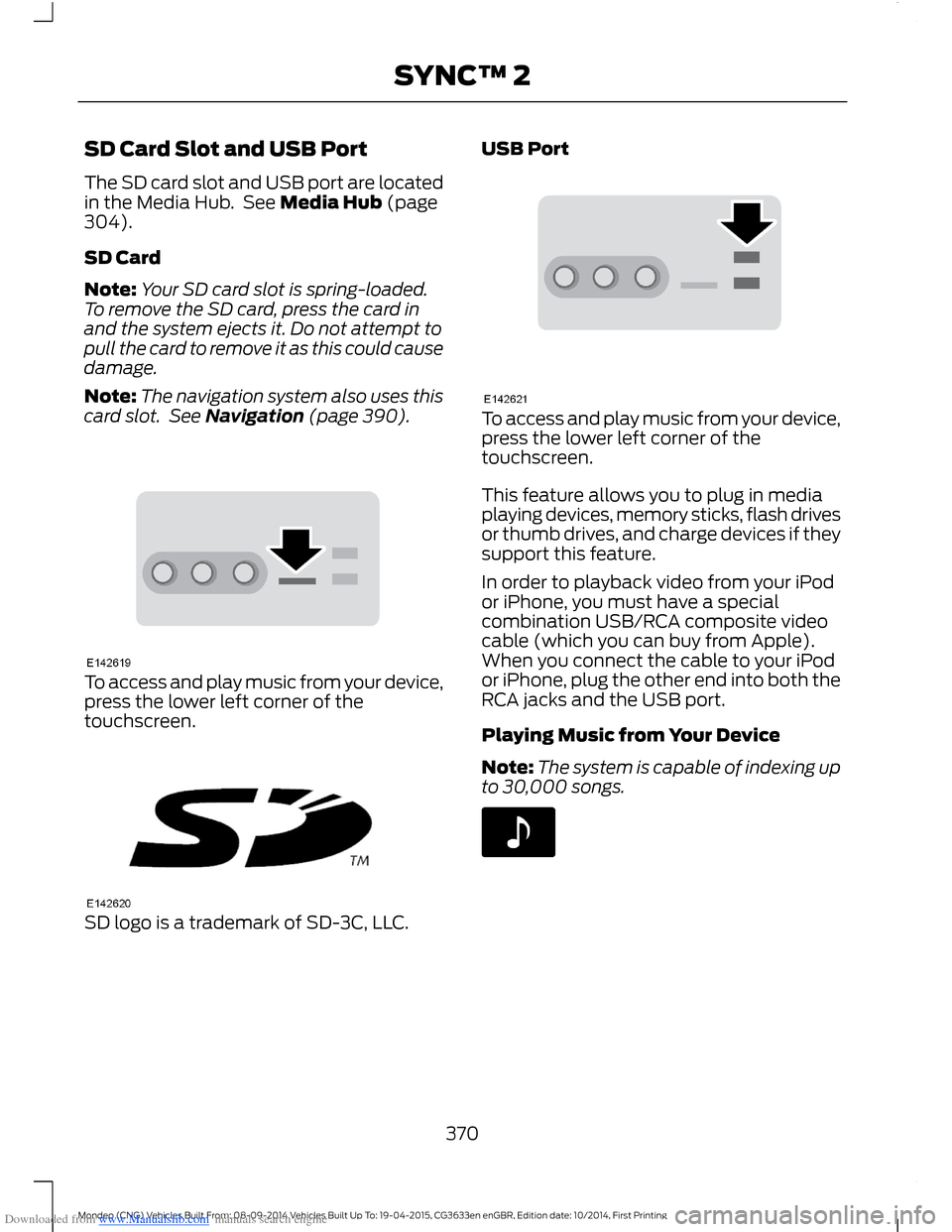
The SD card slot and USB port are locatedin the Media Hub. See Media Hub (page304).
SD Card
Note:Your SD card slot is spring-loaded.To remove the SD card, press the card inand the system ejects it. Do not attempt topull the card to remove it as this could causedamage.
Note:The navigation system also uses thiscard slot. See Navigation (page 390).
To access and play music from your device,press the lower left corner of thetouchscreen.
SD logo is a trademark of SD-3C, LLC.
USB Port
To access and play music from your device,press the lower left corner of thetouchscreen.
This feature allows you to plug in mediaplaying devices, memory sticks, flash drivesor thumb drives, and charge devices if theysupport this feature.
In order to playback video from your iPodor iPhone, you must have a specialcombination USB/RCA composite videocable (which you can buy from Apple).When you connect the cable to your iPodor iPhone, plug the other end into both theRCA jacks and the USB port.
Playing Music from Your Device
Note:The system is capable of indexing upto 30,000 songs.
370Mondeo (CNG) Vehicles Built From: 08-09-2014 Vehicles Built Up To: 19-04-2015, CG3633en enGBR, Edition date: 10/2014, First PrintingSYNC™ 2
Page 373 of 446
Downloaded from www.Manualslib.com manuals search engine Insert your device and select:
Action and DescriptionMessage
Once the system recognizes your USB or SD card you canthen select from the following options:USB
SD Card
This feature replays the currently playing song or album.Repeat
Touch this button to play music on the selected album orfolder in random order.Shuffle
This feature allows you to choose music similar to what iscurrently playing.Similar Music
Touch this button to see disc information, for example currenttrack, artist name, album and genre.More Info
Touch this button to view and adjust various media settings.Options
Sound
Sound settings allows you to adjust settings for:
Action and DescriptionMessage
Bass
Midrange
Treble
Set Balance and Fade
Occupancy Mode
EQ Mode
Speed CompensatedVolume
Allows you to select more settings, which is under MediaPlayer. See Settings (page 352).Media Player Settings
371Mondeo (CNG) Vehicles Built From: 08-09-2014 Vehicles Built Up To: 19-04-2015, CG3633en enGBR, Edition date: 10/2014, First PrintingSYNC™ 2
Page 374 of 446

Downloaded from www.Manualslib.com manuals search engine Action and DescriptionMessage
Displays software and firmware information about thecurrently connected media device.Device Information
Indexes your device when you connect it for the first time andeach time the content changes (for example adding orremoving tracks) to make sure you have the latest voicecommands available for all media on the device.
Update Media Index
Note:Your vehicle may not have all these sound settings.
Browse
This feature allows you to view thecontents of the device. It also allows youto search by categories, for example genre,artist or album.
If you want to view song information, forexample Title, Artist, File, Folder, Album,and Genre, touch the on-screen album art.
You can also select:
Action and DescriptionMessage
To hear how the system pronounces the current band andsong. This can be helpful when using voice commands tomake sure the system correctly plays your request.
What’s Playing?
Playing Video from Your Device
To access and play video from your device,your vehicle's transmission must be in park(P) with the ignition in accessory mode.See Starting and Stopping the Engine(page 138).
USB and SD Card Voice Commands
The voice system allows you to controlyour media with voice commands. Forexample, if you are listening to music onyour USB device, and wish to changesongs, you can press the voice button andthe system provides you with audioprompts.
Press the voice button and when prompted say:
Voice command
SD Card
USB
Then commands such as the following:
372Mondeo (CNG) Vehicles Built From: 08-09-2014 Vehicles Built Up To: 19-04-2015, CG3633en enGBR, Edition date: 10/2014, First PrintingSYNC™ 2
Page 375 of 446

Downloaded from www.Manualslib.com manuals search engine Voice command
Browse
Next Track
Pause
Say the name of what you would like to listen to such asa band, song, album or playlist.Play
Similar Music
Help
Supported Media Players, Formatsand Metadata Information
SYNC is capable of hosting nearly anydigital media player, including iPod,Zune™, plays from device players, andmost USB drives. Supported audio formatsinclude MP3, WMA, WAV and AAC.
It is also able to organize your indexedmedia from your playing device bymetadata tags. Metadata tags, which aredescriptive software identifiers embeddedin the media files, provide informationabout the file.
If your indexed media files contain noinformation embedded in these metadatatags, SYNC may classify the emptymetadata tags as unknown.
In order to playback video from your iPodor iPhone, you must have a specialcombination USB/RCA composite videocable (which you can buy from Apple).When you connect the cable to your iPodor iPhone, plug the other end into both theRCA jacks and the USB port.
Bluetooth Audio
The system allows you to stream audioover your vehicle's speakers from yourconnected, Bluetooth-enabled cell phone.
To access, press the lower left corneron the touchscreen, then select:
Message
BT Stereo
Bluetooth Audio Voice Commands
The voice system allows you to controlyour media with a simple voice command.For example to change songs, press thevoice button and follow the systemprompts.
A/V Inputs
WARNINGS
Driving while distracted can result inloss of vehicle control, crash andinjury. We strongly recommend thatyou use extreme caution when using anydevice that may take your focus off theroad. Your primary responsibility is the safeoperation of your vehicle. We recommend
373Mondeo (CNG) Vehicles Built From: 08-09-2014 Vehicles Built Up To: 19-04-2015, CG3633en enGBR, Edition date: 10/2014, First PrintingSYNC™ 2
Page 377 of 446
Downloaded from www.Manualslib.com manuals search engine Menu Item
Adjust the sound on yourportable music player untilit reaches the level of theFM station by switchingback and forth betweenthe controls.
In order to playback video from your iPodor iPhone, you must have a specialcombination USB/RCA composite videocable (which you can buy from Apple).When you connect the cable to your iPodor iPhone, plug the other end into both theRCA jacks and the USB port.
Troubleshooting
•Do not connect the audio input jack toa line level output. The jack only workscorrectly with devices that have aheadphone output with a volumecontrol.
•Do not set the portable music player'svolume level higher than is necessaryto match the volume of the FM radioas this causes distortion and reducessound quality.
•If the music sounds distorted at lowerlistening levels, turn the portable musicplayer volume down. If the problempersists, replace or recharge thebatteries in the portable media player.
•Control the portable media player inthe same manner when used withheadphones, as the auxiliary input jackdoes not provide control (such as Playor Pause) over the attached portablemedia player.
PHONE
375Mondeo (CNG) Vehicles Built From: 08-09-2014 Vehicles Built Up To: 19-04-2015, CG3633en enGBR, Edition date: 10/2014, First PrintingSYNC™ 2
Page 382 of 446
Downloaded from www.Manualslib.com manuals search engine Menu Item
View
Delete
Delete All
Composing a Text Message
Note:This is a speed-dependent feature.It is unavailable when your vehicle istraveling at speeds over 5 mph (8 km/h).
Note:Downloading and sending textmessages using Bluetooth are cellphone-dependent features.
To compose and send a text message, select:
Action and DescriptionMenu Item
Phone
Messaging
Enter a cell phone number or choose from your phonebook.Send Text
Allows you to customize the pre-defined message or createa message on your own.Edit Text
Sends the message as it is.Send
You can then preview the message, verifythe recipient as well as update themessage list, and send it to a connecteddevice, for example a USB drive.
Text Message Options
Messages
I’ll call you back in a few minutes.
I just left, I’ll be there soon.
Can you give me a call?
I’m on my way.
I’m running a few minutes late.
I’m ahead of schedule, so I’ll be thereearly.
Messages
I’m outside.
I’ll call you when I get there.
OK
Yes
No
Thanks
Stuck in traffic.
Call me later.
LOL
380Mondeo (CNG) Vehicles Built From: 08-09-2014 Vehicles Built Up To: 19-04-2015, CG3633en enGBR, Edition date: 10/2014, First PrintingSYNC™ 2