2014 FORD MONDEO instrument cluster
[x] Cancel search: instrument clusterPage 185 of 446

Downloaded from www.Manualslib.com manuals search engine Use the steering wheel controls to operatethe system.
Switching the System On
Press and release the Adaptive CruiseControl CAN/OFF button.
The cruise control indicator,SET mph(kph), the current gap setting indicatorand Standby displays in the instrumentcluster.
Setting a Speed
1.Drive to desired speed.
2.Press and release SET-.
3.The information display shows a greenindicator light, current gap setting anddesired set speed.
4.Take your foot off the acceleratorpedal.
5.When the system detects a vehicle infront of you, it will be displayed abovethe horizontal bars.
Note:When adaptive cruise control isactive, the set speed displayed in theinformation display may vary slightly fromthe speedometer.
Changing the Set Speed
•Press the accelerator or brake pedaluntil you reach the desired speed. Pressand release SET-.
•Press and hold RES+ or SET- until thedesired set speed shows on theinformation display. The vehicle speedwill gradually change to the selectedspeed.
•Press and release RES+ or SET-. Theset speed changes in 1 mph (1 km/h)increments.
The system may apply the brakes to slowthe vehicle to the new set speed. The setspeed displays continuously in theinformation display while the system isactive.
Canceling the Set Speed
Press the brake pedal or the clutch pedalfor an extended period, or press andrelease the Adaptive Cruise ControlCAN/OFF button. The last set speeddisplays with a strikethrough.
183Mondeo (CNG) Vehicles Built From: 08-09-2014 Vehicles Built Up To: 19-04-2015, CG3633en enGBR, Edition date: 10/2014, First PrintingCruise Control
Page 236 of 446
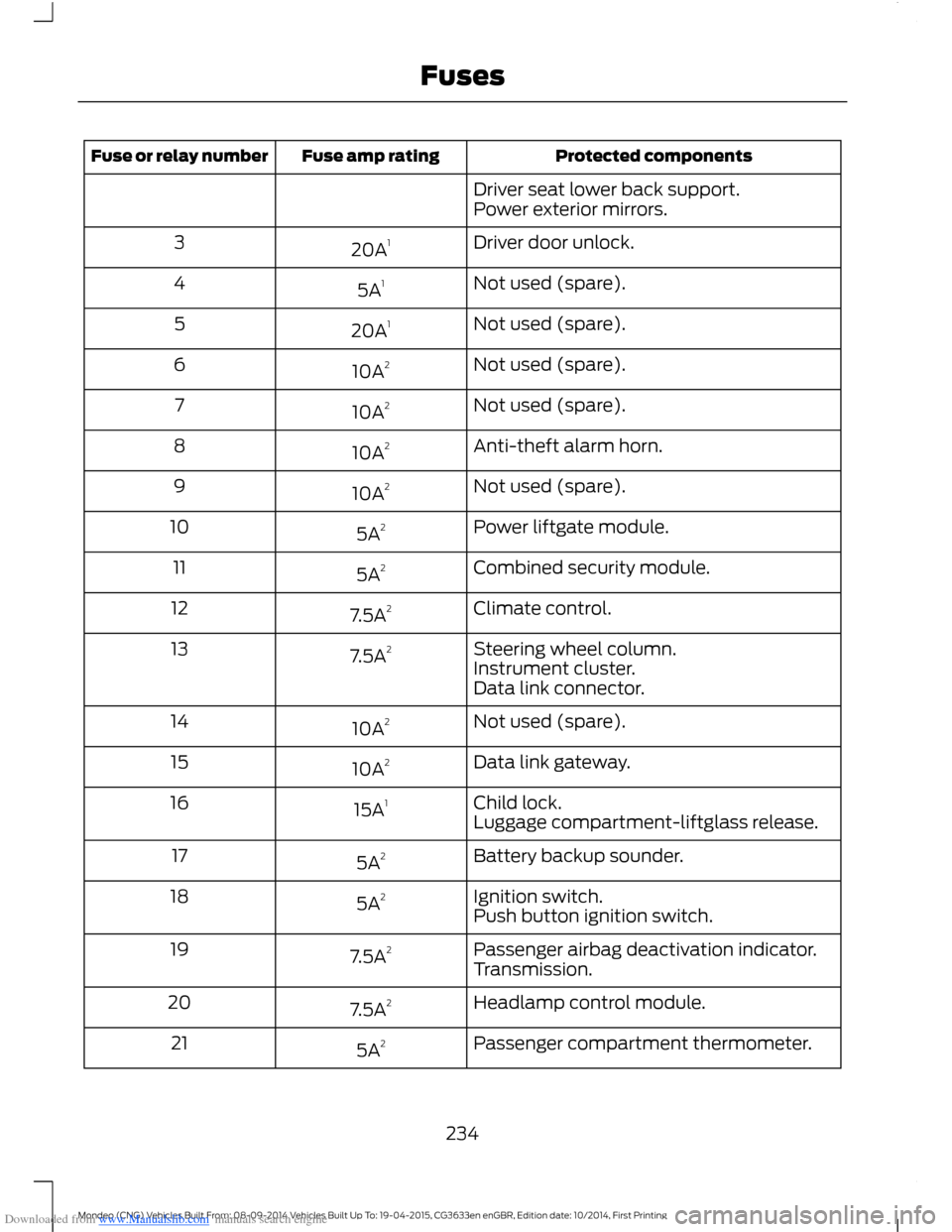
Downloaded from www.Manualslib.com manuals search engine Protected componentsFuse amp ratingFuse or relay number
Driver seat lower back support.Power exterior mirrors.
Driver door unlock.20A13
Not used (spare).5A14
Not used (spare).20A15
Not used (spare).10A26
Not used (spare).10A27
Anti-theft alarm horn.10A28
Not used (spare).10A29
Power liftgate module.5A210
Combined security module.5A211
Climate control.7.5A212
Steering wheel column.7.5A213Instrument cluster.Data link connector.
Not used (spare).10A214
Data link gateway.10A215
Child lock.15A116Luggage compartment-liftglass release.
Battery backup sounder.5A217
Ignition switch.5A218Push button ignition switch.
Passenger airbag deactivation indicator.7.5A219Transmission.
Headlamp control module.7.5A220
Passenger compartment thermometer.5A221
234Mondeo (CNG) Vehicles Built From: 08-09-2014 Vehicles Built Up To: 19-04-2015, CG3633en enGBR, Edition date: 10/2014, First PrintingFuses
Page 260 of 446

Downloaded from www.Manualslib.com manuals search engine Note: Do not use razor blades or othersharp objects to clean or remove decalsfrom the inside of the heated rear window.The vehicle warranty does not coverdamage caused to the heated rear windowgrid lines.
CLEANING THE INTERIOR
Note:Do not allow air fresheners and handsanitizers to spill on interior surfaces. If aspill occurs, wipe off immediately. Damagemay not be covered by your warranty.
Safety Belts
Note:Do not use abrasives, or chemicalsolvents to clean them.
Note:Do not allow moisture to penetratethe safety belt retractor mechanism.
Clean them with interior cleaner or waterapplied with a soft sponge. Let them drynaturally, away from artificial heat.
Instrument Cluster Screens, LCDScreens and Radio Screens
Note:Do not use abrasives, alcoholicsolvents or chemical solvents to clean them.
Rear Windows
Note:Do not use any abrasive materials toclean the interior of the rear windows.
Note:Do not install stickers or labels to theinterior of the rear windows.
REPAIRING MINOR PAINT
DAMAGE
You should repair paintwork damagecaused by stones from the road or minorscratches as soon as possible. A choice ofproducts are available from an authorizeddealer.
Remove particles such as bird droppings,tree sap, insect deposits, tar spots, roadsalt and industrial fallout before repairingpaint chips.
Always read and follow the manufacturer’sinstructions before using the products.
CLEANING THE ALLOY
WHEELS
Note:Do not apply a cleaning chemical towarm or hot wheel rims and covers.
Note:Industrial-strength (heavy-duty)cleaners, or cleaning chemicals, incombination with brush agitation to removebrake dust and dirt, could wear away theclear coat finish over a period of time.
Note:Do not use hydrofluoric acid-basedor high caustic-based wheel cleaners, steelwool, fuels or strong household detergent.
Note:If you intend parking your vehicle foran extended period after cleaning thewheels with a wheel cleaner, drive yourvehicle for a few minutes before doing so.This will reduce the risk of increasedcorrosion of the brake discs, brake pads andlinings.
Note:Some automatic car washes maycause damage to the finish on your wheelrims and covers.
Alloy wheels and wheel covers are coatedwith a clear coat paint finish. To maintaintheir condition we recommend that you:
•Clean them weekly with therecommended wheel and tire cleaner.
•Use a sponge to remove heavydeposits of dirt and brake dustaccumulation.
•Rinse them thoroughly with apressurized stream of water when youhave completed the cleaning process.
258Mondeo (CNG) Vehicles Built From: 08-09-2014 Vehicles Built Up To: 19-04-2015, CG3633en enGBR, Edition date: 10/2014, First PrintingVehicle Care
Page 342 of 446
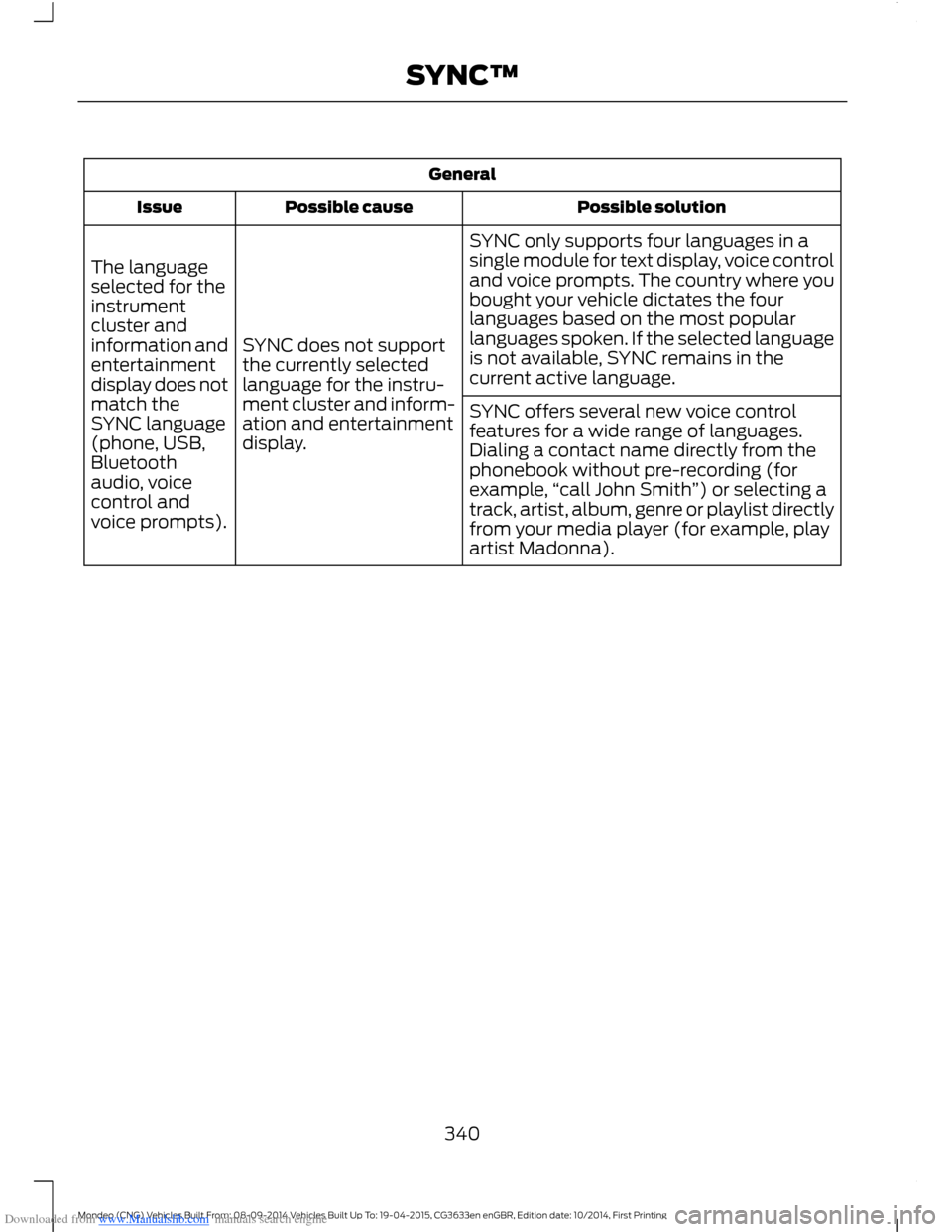
Downloaded from www.Manualslib.com manuals search engine General
Possible solutionPossible causeIssue
SYNC only supports four languages in asingle module for text display, voice controland voice prompts. The country where youbought your vehicle dictates the fourlanguages based on the most popularlanguages spoken. If the selected languageis not available, SYNC remains in thecurrent active language.
SYNC does not supportthe currently selectedlanguage for the instru-ment cluster and inform-ation and entertainmentdisplay.
The languageselected for theinstrumentcluster andinformation andentertainmentdisplay does notmatch theSYNC language(phone, USB,Bluetoothaudio, voicecontrol andvoice prompts).
SYNC offers several new voice controlfeatures for a wide range of languages.Dialing a contact name directly from thephonebook without pre-recording (forexample,“call John Smith”) or selecting atrack, artist, album, genre or playlist directlyfrom your media player (for example, playartist Madonna).
340Mondeo (CNG) Vehicles Built From: 08-09-2014 Vehicles Built Up To: 19-04-2015, CG3633en enGBR, Edition date: 10/2014, First PrintingSYNC™
Page 351 of 446
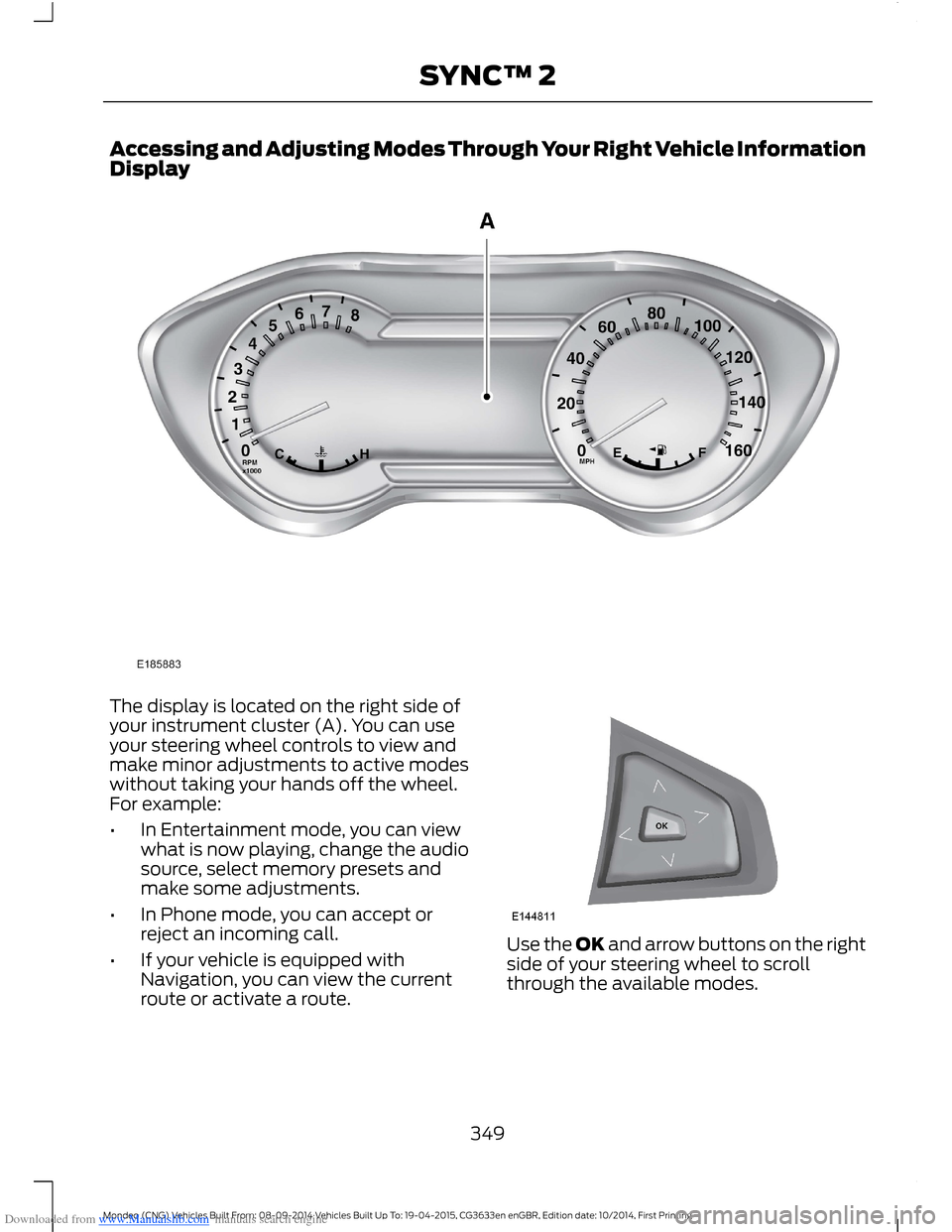
Downloaded from www.Manualslib.com manuals search engine Accessing and Adjusting Modes Through Your Right Vehicle InformationDisplay
The display is located on the right side ofyour instrument cluster (A). You can useyour steering wheel controls to view andmake minor adjustments to active modeswithout taking your hands off the wheel.For example:
•In Entertainment mode, you can viewwhat is now playing, change the audiosource, select memory presets andmake some adjustments.
•In Phone mode, you can accept orreject an incoming call.
•If your vehicle is equipped withNavigation, you can view the currentroute or activate a route.
Use the OK and arrow buttons on the rightside of your steering wheel to scrollthrough the available modes.
349Mondeo (CNG) Vehicles Built From: 08-09-2014 Vehicles Built Up To: 19-04-2015, CG3633en enGBR, Edition date: 10/2014, First PrintingSYNC™ 2
Page 409 of 446
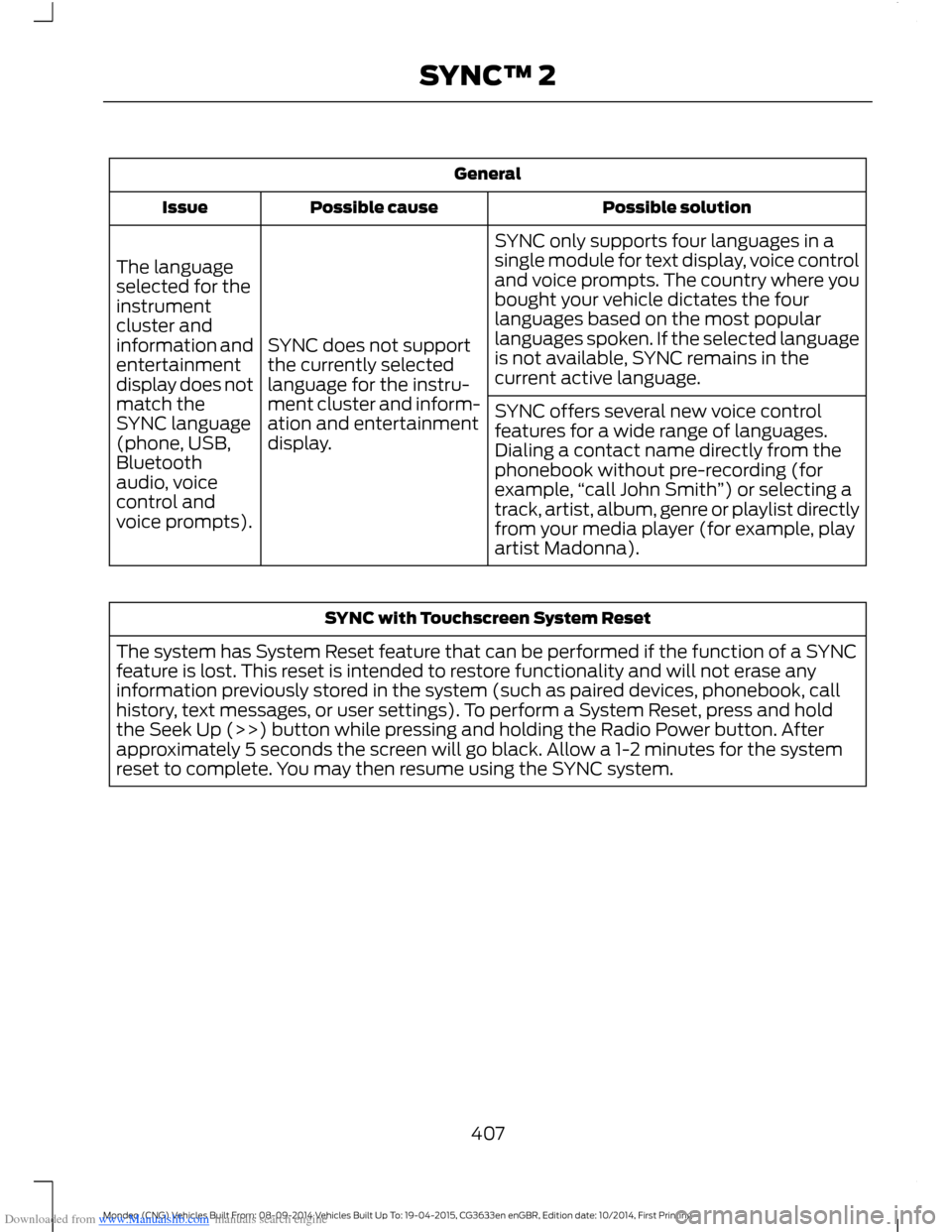
Downloaded from www.Manualslib.com manuals search engine General
Possible solutionPossible causeIssue
SYNC only supports four languages in asingle module for text display, voice controland voice prompts. The country where youbought your vehicle dictates the fourlanguages based on the most popularlanguages spoken. If the selected languageis not available, SYNC remains in thecurrent active language.
SYNC does not supportthe currently selectedlanguage for the instru-ment cluster and inform-ation and entertainmentdisplay.
The languageselected for theinstrumentcluster andinformation andentertainmentdisplay does notmatch theSYNC language(phone, USB,Bluetoothaudio, voicecontrol andvoice prompts).
SYNC offers several new voice controlfeatures for a wide range of languages.Dialing a contact name directly from thephonebook without pre-recording (forexample,“call John Smith”) or selecting atrack, artist, album, genre or playlist directlyfrom your media player (for example, playartist Madonna).
SYNC with Touchscreen System Reset
The system has System Reset feature that can be performed if the function of a SYNCfeature is lost. This reset is intended to restore functionality and will not erase anyinformation previously stored in the system (such as paired devices, phonebook, callhistory, text messages, or user settings). To perform a System Reset, press and holdthe Seek Up (>>) button while pressing and holding the Radio Power button. Afterapproximately 5 seconds the screen will go black. Allow a 1-2 minutes for the systemreset to complete. You may then resume using the SYNC system.
407Mondeo (CNG) Vehicles Built From: 08-09-2014 Vehicles Built Up To: 19-04-2015, CG3633en enGBR, Edition date: 10/2014, First PrintingSYNC™ 2
Page 435 of 446

Downloaded from www.Manualslib.com manuals search engine Changing the 12V Battery.........................249Changing the Wiper Blades.....................249Changing the Front Wiper Blades...............249Changing the Rear Window WiperBlades...............................................................249Checking MyKey System Status................41Checking the Wiper Blades.....................249Child Safety........................................................17Child Safety Locks - Vehicles With:Mechanical Child Proof Locks................24Left-Hand Side......................................................24Right-Hand Side...................................................24Child Safety Locks - Vehicles With:Remote Child Proof Locks.......................24Child Seat Positioning..................................20Cigar Lighter...................................................136Cleaning the Alloy Wheels.......................258Cleaning the Exterior...................................257Body Paintwork Preservation........................257Cleaning the Chrome Trim..............................257Cleaning the Headlamps.................................257Cleaning the Rear Window.............................257Cleaning the Interior...................................258Instrument Cluster Screens, LCD Screensand Radio Screens.......................................258Rear Windows.....................................................258Safety Belts.........................................................258Cleaning the Windows and WiperBlades............................................................257Clearing All MyKeys.......................................39Climate............................................................388Climate Control Voice Commands............390Climate Control...............................................111Principle of Operation.........................................111Climate Controlled Seats..........................133Cooled Seats........................................................134Cold Weather Precautions.......................222Collision Warning System.........................201PRINCIPLE OF OPERATION...........................201Coolant CheckSee: Engine Coolant Check............................247Cornering Lamps............................................69Creating a MyKey...........................................38Programming/Changing ConfigurableSettings...............................................................39
Cruise Control..................................................58Principle of Operation........................................181Type 1........................................................................58Type 2.......................................................................58Cruise controlSee: Using Cruise Control.................................181Cup Holders.....................................................137
D
Data Recording..................................................9Daytime Running Lamps.............................65Diesel Particulate Filter..............................143Regeneration........................................................143Digital Radio...................................................301General Information..........................................301Using Digital Audio Broadcast and SYNCwith Touchscreen.........................................302Using Digital Audio Broadcast on aNon-Touchscreen..........................................301Direction Indicators.......................................69Dog Guard........................................................212Installing behind the front seats...................212Installing behind the rear seats.....................213DPFSee: Diesel Particulate Filter...........................143Drive Control.................................................205Adaptive Steering..............................................205Driver Select Suspension...............................205Driver Airbag.....................................................27Driver Alert......................................................189Principle of Operation......................................189Using Driver Alert................................................190Driver Knee Airbag.........................................29Driving Aids.....................................................189Driving Hints....................................................221Driving Through Water...............................222DRLSee: Daytime Running Lamps.........................65
433Mondeo (CNG) Vehicles Built From: 08-09-2014 Vehicles Built Up To: 19-04-2015, CG3633en enGBR, Edition date: 10/2014, First PrintingIndex
Page 438 of 446

Downloaded from www.Manualslib.com manuals search engine Information Messages.................................96Active City Stop....................................................96Active Park..............................................................96Adaptive Cruise Control.....................................97Airbag........................................................................97Alarm........................................................................98All-Wheel Drive....................................................98Automatic Engine Shutdown..........................98Automatic High Beam Control.......................99Auto Start-Stop....................................................99Blind Spot Information and Cross TrafficAlert System...................................................100Climate Control..................................................100Diesel Messages.................................................100Doors and Locks..................................................101Driver Alert.............................................................101Electronic Stability Control.............................102Engine.....................................................................102Fuel..........................................................................102Hill Start Assist....................................................103Keys and Keyless Entry.....................................103Lane Keeping System.......................................104Maintenance........................................................104MyKey.....................................................................105Park Aid..................................................................106Park Brake.............................................................106Power Steering....................................................107Pre-Collision Warning System.......................107Seats........................................................................107Starting System .................................................108Tire Pressure Monitoring System.................108Towing....................................................................108Traction Control..................................................109Transmission........................................................109Installing Child Seats......................................17Attaching a Child Seat with TopTethers................................................................20Booster Seats.........................................................18Child Seats for Different Mass Groups..........17ISOFIX Anchor Points..........................................19Top Tether Anchor Points..................................19Instrument Cluster.........................................78Instrument Lighting Dimmer.....................65Instrument Panel Overview - LHD............14Instrument Panel Overview - RHD...........15Interior Lamps.................................................70Front Interior Lamp..............................................70Rear Interior Lamp.................................................71
Interior Mirror....................................................75Auto-Dimming Mirror..........................................75Introduction.........................................................7
J
Jump Starting the Vehicle........................225To Connect the Booster Cables....................225To Start the Engine...........................................226
K
Keyless Entry...................................................48Disabled Passive Keys........................................50General Information...........................................48Locking and Unlocking the Doors with theKey Blade...........................................................50Locking Your Vehicle...........................................49Passive Key.............................................................49Unlocking Your Vehicle......................................49Keyless Starting............................................138Starting Your Vehicle.........................................139Switching the Ignition On................................139Keys and Remote Controls.........................32
L
Lane Keeping System..................................191Lane Keeping Aid................................................193Lane Keeping Alert..............................................191Lighting Control..............................................63Headlamp Flasher...............................................64High Beams............................................................63Lighting..............................................................63General Information............................................63Load CarriersSee: Roof Racks and Load Carriers.............210Load Carrying................................................207General Information..........................................207Load Retaining Fixtures...............................211Installing the Load Bracket..............................211Installing the Load Retaining Fixtures..........211
436Mondeo (CNG) Vehicles Built From: 08-09-2014 Vehicles Built Up To: 19-04-2015, CG3633en enGBR, Edition date: 10/2014, First PrintingIndex