2014 FORD MONDEO center console
[x] Cancel search: center consolePage 162 of 446
Downloaded from www.Manualslib.com manuals search engine GENERAL INFORMATION
WARNING
Driving while distracted can result inloss of vehicle control, crash andinjury. We strongly recommend thatyou use extreme caution when using anydevice that may take your focus off theroad. Your primary responsibility is the safeoperation of your vehicle. We recommendagainst the use of any handheld devicewhile driving and encourage the use ofvoice-operated systems when possible.Make sure you are aware of all applicablelocal laws that may affect the use ofelectronic devices while driving.
Note:Occasional brake noise is normal. Ifa metal-to-metal, continuous grinding orcontinuous squeal sound is present, thebrake linings may be worn-out. If yourvehicle has continuous vibration or shudderin the steering wheel while braking, haveyour vehicle checked by an authorizeddealer.
Note:Brake dust may accumulate on thewheels, even under normal drivingconditions. Some dust is inevitable as thebrakes wear. See Cleaning the AlloyWheels (page 258).
Note:Depending on applicable laws andregulations in the country for which yourvehicle was originally built, the brake lampsmay flash during heavy braking. Followingthis the hazard warning flashers may alsoflash when your vehicle comes to a stop.
Wet brakes result in reduced brakingefficiency. Gently press the brake pedal afew times when driving from a car wash orstanding water to dry the brakes.
Brake Assist
Brake assist detects when you brakeheavily by measuring the rate at which youpress the brake pedal. It providesmaximum braking efficiency as long as youpress the pedal. Brake assist can reducestopping distances in critical situations.
Anti-lock Brake System
This system helps you maintain steeringcontrol and vehicle stability duringemergency stops by keeping the brakesfrom locking.
HINTS ON DRIVING WITH
ANTI-LOCK BRAKES
Note:When the system is operating, thebrake pedal will pulse and may travelfurther. Maintain pressure on the brakepedal. You may also hear a noise from thesystem. This is normal.
The anti-lock braking system will noteliminate the risks when:
•You drive too closely to the vehicle infront of you.
•Your vehicle is hydroplaning.
•You take corners too fast.
•The road surface is poor.
ELECTRIC PARKING BRAKE
The electric parking brake replaces theconventional handbrake. The operatingswitch is located in the center console.
WARNING
Always set the parking brake andleave your vehicle with thetransmission in park (P) (automatictransmission) or in first gear (1) or reverse(R) (manual transmission).
160Mondeo (CNG) Vehicles Built From: 08-09-2014 Vehicles Built Up To: 19-04-2015, CG3633en enGBR, Edition date: 10/2014, First PrintingBrakes
Page 174 of 446
Downloaded from www.Manualslib.com manuals search engine ACTIVE PARK ASSIST
Parallel Parking, PerpendicularParking, Park Out Assist
WARNINGS
You must remain in your vehiclewhen the system turns on. At alltimes, you are responsible forcontrolling your vehicle, supervising thesystem and intervening if required. Failureto take care may result in the loss ofcontrol of your vehicle, serious personalinjury or death.
The sensors may not detect objectsin heavy rain or other conditions thatcause disruptive reflections.
The system scans the area adjacent toboth sides of your vehicle to locate asuitable parking space.
The system informs you when it locates asuitable parking space. When you stopyour vehicle, the system takes control ofthe steering to guide your vehicle into theparking space.
Park Out Assist automatically steers yourvehicle out of a parallel parking space(hands-free) while you control theaccelerator, gearshift and brakes. Thesystem visually and audibly instructs youto enter traffic.
The system may not correctly operate inany of the following conditions:
•a spare tire or a significantly worn tiremore than the other tires is used
•you use a tire size not recommendedby us
•you try to park on a tight curve
•if the edge of the neighboring parkedvehicle is high off the ground (forexample, a bus, tow truck or flatbedtruck)
•the weather conditions are poor (heavyrain, snow, fog, etc).
Note:Keep the sensors, located on thebumper or fascia, free from snow, ice andlarge accumulations of dirt. Covered sensorscan affect the system's accuracy. Do notclean the sensors with sharp objects.
Do not use the system if:
•You have attached a foreign object(bike rack or trailer) to the front or rearof your vehicle or close to the sensors.
•You have attached an overhangingobject (surfboard) to the roof.
•A foreign object damages or obstructsthe front or rear bumper or sidesensors.
•The correct tire size is not in use on yourvehicle (for example, a mini-spare tire).
Using Active Park Assist - ParallelParking
Press the button located on thecenter console near the gearshiftlever once.
When driving at a speed less than 19 mph(30 km/h) the system automatically scansboth sides of your vehicle for an availableparking space. The system displays amessage and a corresponding graphic toindicate it is searching for a parking space.Use the direction indicator to selectsearching either to the left-hand side orright-hand side of your vehicle.
Note:If you do not make a selection thesystem will default to the passenger's side.
172Mondeo (CNG) Vehicles Built From: 08-09-2014 Vehicles Built Up To: 19-04-2015, CG3633en enGBR, Edition date: 10/2014, First PrintingParking Aids
Page 176 of 446

Downloaded from www.Manualslib.com manuals search engine When you think your vehicle is properlyparked, or you hear a solid tone from theparking aid (accompanied by a displaymessage and a chime), bring your vehicleto a complete stop.
When automatic steering is complete, thesystem displays a message and a tonesounds, indicating that the active parkassist process is finished. You areresponsible for checking the parking joband making any necessary correctionsbefore leaving your vehicle.
Using Active Park Assist -Perpendicular Parking
Press the button located on thecenter console near the gearshiftlever twice.
The system displays a message and acorresponding graphic to indicate it issearching for a parking space. Use thedirection indicator to select searchingeither to the left-hand side or right-handside of your vehicle.
Note:If you do not make a selection thesystem will default to the passenger's side.
When the system finds a suitable space,it displays a message and a tone sounds.Stop your vehicle and follow theinstructions on the screen. If your vehicleis moving very slowly, you may need to pullforward a short distance before the systemis ready to park.
Note:You must observe that the selectedspace remains clear of obstructions at alltimes during the maneuver.
Note:You should drive your vehicle asperpendicular to the other vehicles aspossible while passing a parking space.
Note:The system always offers the lastdetected parking space (for example, if yourvehicle detects multiple spaces while youare driving, it offers the last one).
Note:If driven above approximately 19 mph(30 km/h), the system shows a message toalert you to reduce your vehicle speed.
Automatic Steering into Parking Space
Note:If your vehicle speed exceeds 6 mph(9 km/h) or an object interrupts a maneuverbefore completion, the automatic steeringfunction switches off and you need to takefull control of your vehicle.
174Mondeo (CNG) Vehicles Built From: 08-09-2014 Vehicles Built Up To: 19-04-2015, CG3633en enGBR, Edition date: 10/2014, First PrintingParking Aids
Page 305 of 446
Downloaded from www.Manualslib.com manuals search engine 2.Press and hold one of the presetbuttons. A message appears when theradio station has been stored. Thesystem mutes momentarily asconfirmation.
Once stored, press a preset button at anytime to select a favorite radio station.
Note:Radio stations stored on the presetbuttons may not always be available if youhave left the coverage area. The system willmute when this happens.
Radio Text
You can display extra information. Forexample; artist name. To switch this optionon select Options > Radio Text On.
Note:Extra information may not always beavailable.
AUDIO INPUT JACK
WARNINGS
Driving while distracted can result inloss of vehicle control, crash andinjury. We strongly recommend thatyou use extreme caution when using anydevice that may take your focus off theroad. Your primary responsibility is the safeoperation of your vehicle. We recommendagainst the use of any hand-held devicewhile driving and encourage the use ofvoice-operated systems when possible.Make sure you are aware of all applicablelocal laws that may affect the use ofelectronic devices while driving.
For safety reasons, do not connector adjust the settings on yourportable music player while yourvehicle is moving.
WARNINGS
Store the portable music player in asecure location, such as the centerconsole or the glove box, when yourvehicle is moving. Hard objects maybecome projectiles in a collision or suddenstop, which may increase the risk of seriousinjury. The audio extension cable must belong enough to allow the portable musicplayer to be safely stored while yourvehicle is moving.
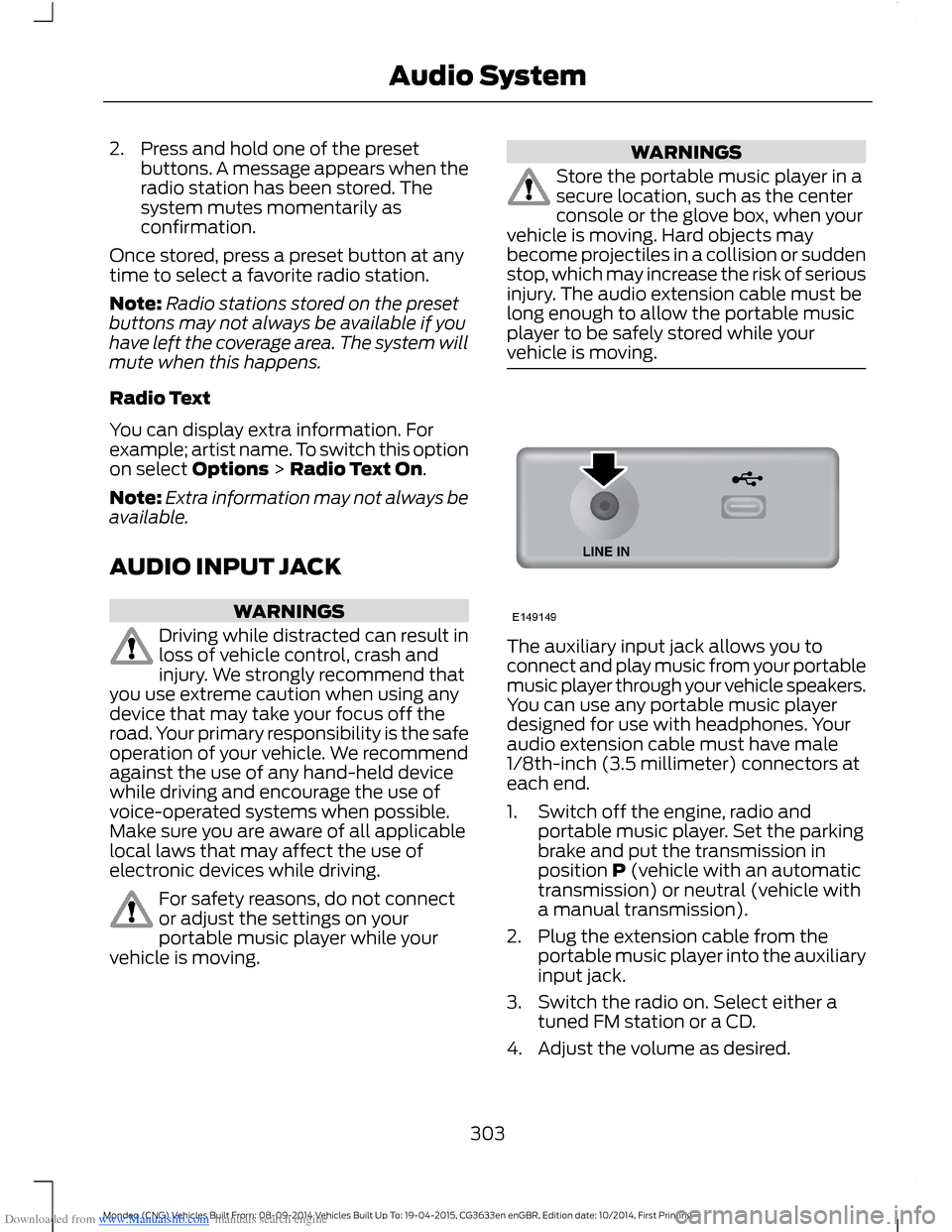
The auxiliary input jack allows you toconnect and play music from your portablemusic player through your vehicle speakers.You can use any portable music playerdesigned for use with headphones. Youraudio extension cable must have male1/8th-inch (3.5 millimeter) connectors ateach end.
1.Switch off the engine, radio andportable music player. Set the parkingbrake and put the transmission inposition P (vehicle with an automatictransmission) or neutral (vehicle witha manual transmission).
2.Plug the extension cable from theportable music player into the auxiliaryinput jack.
3.Switch the radio on. Select either atuned FM station or a CD.
4.Adjust the volume as desired.
303Mondeo (CNG) Vehicles Built From: 08-09-2014 Vehicles Built Up To: 19-04-2015, CG3633en enGBR, Edition date: 10/2014, First PrintingAudio System
Page 306 of 446
Downloaded from www.Manualslib.com manuals search engine 5.Switch your portable music player onand adjust its volume to half itsmaximum level.
6.Press AUX until LINE or LINE INappears in the display. You should hearmusic from your device even if it is low.
7.Adjust the volume on your portablemusic player until it reaches the volumelevel of the FM station or CD. Do thisby switching back and forth betweenthe AUX and FM or CD controls.
USB PORT
The USB port allows you to plug in mediaplaying devices, memory sticks and chargedevices (if supported).
MEDIA HUB
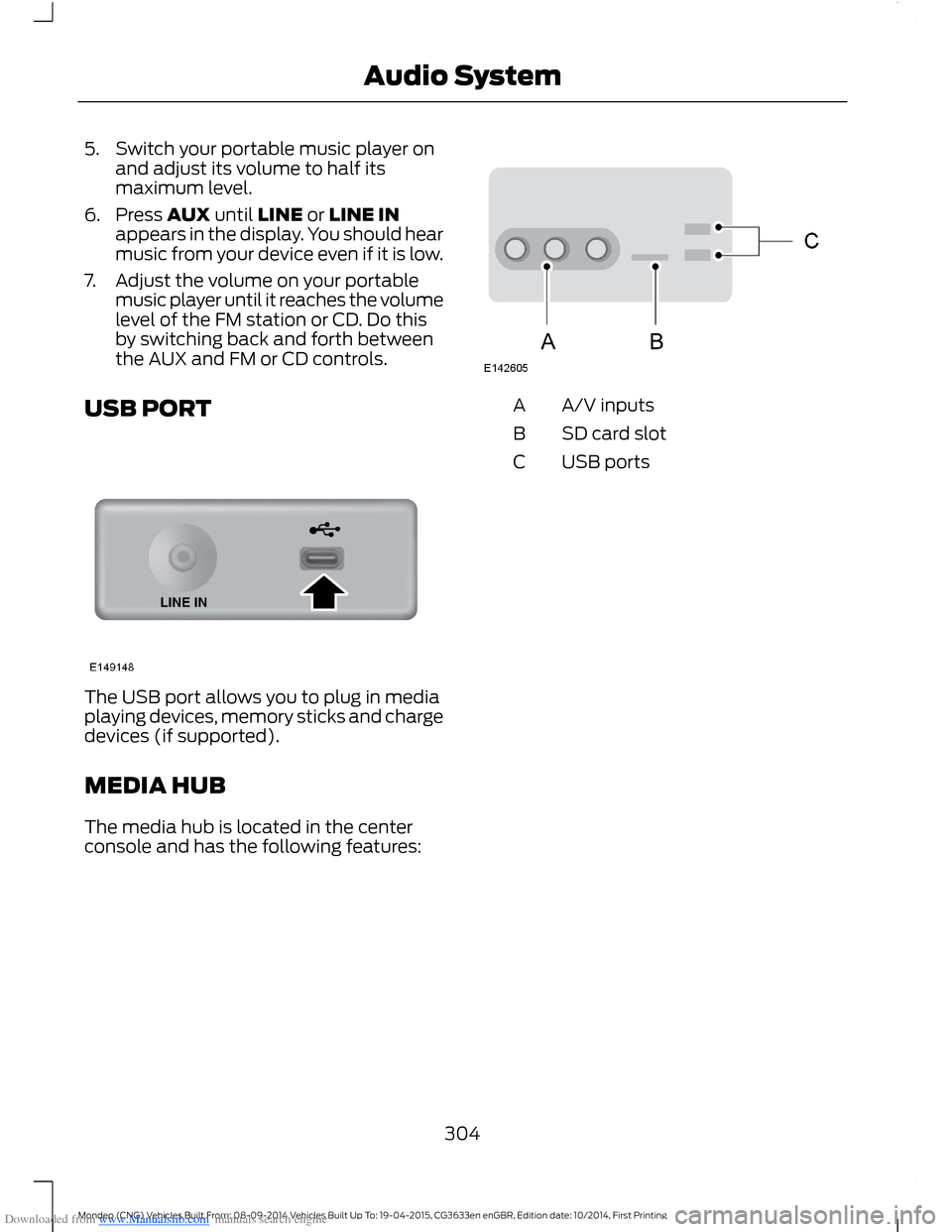
The media hub is located in the centerconsole and has the following features:
A/V inputsA
SD card slotB
USB portsC
304Mondeo (CNG) Vehicles Built From: 08-09-2014 Vehicles Built Up To: 19-04-2015, CG3633en enGBR, Edition date: 10/2014, First PrintingAudio System
Page 376 of 446

Downloaded from www.Manualslib.com manuals search engine WARNINGS
against the use of any handheld devicewhile driving and encourage the use ofvoice-operated systems when possible.Make sure you are aware of all applicablelocal laws that may affect the use ofelectronic devices while driving.
For safety reasons, do not connector adjust the settings on yourportable music player while yourvehicle is moving.
Store the portable music player in asecure location, such as the centerconsole or the glove box, when yourvehicle is moving. Hard objects maybecome projectiles in a crash or suddenstop, which may increase the risk of seriousinjury. The audio extension cable must belong enough to allow the portable musicplayer to be safely stored while yourvehicle is moving.
The A/V inputs allow you to connect anauxiliary audio/video source (for examplegaming systems or a personal camcorder)by connecting RCA cords (not included)to these input jacks. The jacks are yellow,red and white and are located eitherbehind a small access door on theinstrument panel or in your center console.
You can also use the A/V inputs as anauxiliary input jack to play music from yourportable music player over your vehicle'sspeakers. Plug in your 1/8 inch (3.5millimeter) RCA adapter into the two leftA/V input jacks (red and white).
To use the auxiliary input jack feature,make sure that your portable music playeris designed for use with headphones andthat it is fully charged. You also need anaudio extension cable with stereo male1/8-inch (3.5 millimeter) connectors at oneend and a RCA jack at the other.
1.Switch off the engine, radio andportable music player. Set the parkingbrake and put the transmission inposition P.
2.Attach one end of the audio extensioncable to the headphone output of yourplayer and the other end into theadapter in one of the two left A/V inputjacks (white or red) inside the centerconsole.
3.Press the lower left corner on thetouchscreen. Select a tuned FM station.
4.Adjust the volume as desired.
5.Switch the portable music player onand adjust the volume to ½ themaximum.
6.Press the lower left corner on thetouchscreen, then select:
Menu Item
You should hear audiofrom your portable musicplayer although it may below.
A/V In
374Mondeo (CNG) Vehicles Built From: 08-09-2014 Vehicles Built Up To: 19-04-2015, CG3633en enGBR, Edition date: 10/2014, First PrintingSYNC™ 2
Page 434 of 446
Downloaded from www.Manualslib.com manuals search engine Automatic Transmission............................155Automatic Transmission AdaptiveLearning.............................................................159Emergency Park Position ReleaseLever....................................................................157If Your Vehicle Gets Stuck In Mud orSnow..................................................................159Selector Lever Positions...................................155SelectShift Automatic™Transmission...................................................156Automatic Transmission FluidCheck............................................................248Auto-Start-Stop...........................................146Switching the System Off and On................147Using Start-Stop (AutomaticTransmissions)...............................................146Using Start-Stop (ManualTransmissions)...............................................146Autowipers.......................................................60Auxiliary Heater.............................................122Fuel Operated Heater........................................125Fuel Operated Parking Heater........................122Auxiliary Power Points................................13512 Volt DC Power Point.....................................135230 Volt Power Point........................................135
B
Blind Spot Information System..............194Blind Spot Information System (BLIS™)with Cross Traffic Alert................................194Bonnet LockSee: Opening and Closing the Hood...........237Brake and Clutch Fluid Check.................248Brakes...............................................................160General Information..........................................160Breaking-In......................................................221Brakes and Clutch...............................................221Engine......................................................................221Tires..........................................................................221Bulb Specification Chart...........................255
C
Capacities and Specifications - 1.0LEcoBoost™..................................................281Capacities..............................................................281Specifications.....................................................282
Capacities and Specifications - 1.5LDuratorq-TDCi Diesel..............................287Capacities.............................................................287Specifications......................................................287Capacities and Specifications - 1.5LEcoBoost™.................................................283Capacities.............................................................283Specifications.....................................................283Capacities and Specifications - 1.6LDiesel............................................................288Capacities............................................................288Specifications.....................................................288Capacities and Specifications - 2.0LDiesel............................................................289Capacities............................................................289Specifications.....................................................290Capacities and Specifications - 2.0LEcoBoost™.................................................284Capacities............................................................284Specifications.....................................................284Capacities and Specifications -2.5L................................................................285Capacities.............................................................285Specifications.....................................................286Capacities and Specifications.................277Cargo Nets.....................................................208Luggage retention net.....................................208Car WashSee: Cleaning the Exterior...............................257Catalytic Converter......................................152Driving with a Catalytic Converter................152Center Console...............................................137Rear Seat Armrest...............................................137Changing a Bulb...........................................252Headlamp.............................................................252LED Lamps...........................................................253Replacing the License Plate LampBulb....................................................................255Reverse Lamp.....................................................253Changing a Fuse..........................................236Fuses......................................................................236Changing a Road Wheel...........................268Installing a Road Wheel....................................271Jacking and Lifting Points..............................268Lug Nuts................................................................268Removing a Road Wheel................................270Vehicle Jack.........................................................268Vehicles with a Spare Wheel........................268
432Mondeo (CNG) Vehicles Built From: 08-09-2014 Vehicles Built Up To: 19-04-2015, CG3633en enGBR, Edition date: 10/2014, First PrintingIndex
Page 439 of 446
Downloaded from www.Manualslib.com manuals search engine Locking and Unlocking.................................44Locking and Unlocking the Doors FromInside....................................................................45Locking and Unlocking the DoorsIndividually with the Key Blade..................45Locking and Unlocking the Doors with theKey Blade............................................................45Power Door Locks................................................44Remote Control....................................................44Locks...................................................................44Luggage Anchor Points.............................2074-door and 5-door............................................207Hybrid....................................................................208Wagon....................................................................207Luggage Covers............................................209Stowing the luggage cover - Estate withoutfull size spare wheel.....................................210Lug NutsSee: Changing a Road Wheel.......................268Lug Nuts..........................................................276
M
Maintenance..................................................237General Information..........................................237Manual Climate Control..............................112Manual Liftgate..............................................46Closing the Liftgate.............................................46Opening the Liftgate...........................................46Manual Seats.................................................128Manual Transmission..................................155Selecting Reverse Gear....................................155Media Hub......................................................304Memory Function...........................................131Easy Entry and Exit Function..........................132Linking a PreSet Position to Your RemoteControl or Intelligent Access Key.............132Saving a PreSet Position..................................132Message CenterSee: Information Displays.................................86MirrorsSee: Heated Windows and Mirrors................121See: Windows and Mirrors.................................72Mobile CommunicationsEquipment......................................................10
Moonroof...........................................................76Bounce-Back..........................................................77Opening and Closing the Moonroof..............76Venting the Moonroof.........................................77MyKey Troubleshooting...............................42MyKey™.............................................................38Principle of Operation........................................38
N
Navigation......................................................390Destination Mode..............................................390Map Mode............................................................396Michelin Travel Guide.......................................392Navigation Map Updates...............................399Navigation Voice Commands.......................399Point of Interest (POI) Categories...............392Quick-touch Buttons.......................................398Setting Your Navigation Preferences.........393
O
Oil CheckSee: Engine Oil Check......................................246Opening and Closing the Hood...............237Closing the Hood...............................................238Opening the Hood..............................................237Overhead Console........................................137
P
Parking Aids....................................................167Principle of Operation.......................................167Passenger Airbag...........................................28.....................................................................................28Switching the Passenger Airbag Off.............28Switching the Passenger Airbag On.............29Passive Anti-Theft System..........................51Arming the Engine Immobilizer........................51Coded Keys..............................................................51Disarming the Engine Immobilizer..................51Principle of Operation..........................................51PATSSee: Passive Anti-Theft System......................51
437Mondeo (CNG) Vehicles Built From: 08-09-2014 Vehicles Built Up To: 19-04-2015, CG3633en enGBR, Edition date: 10/2014, First PrintingIndex