Page 7 of 554
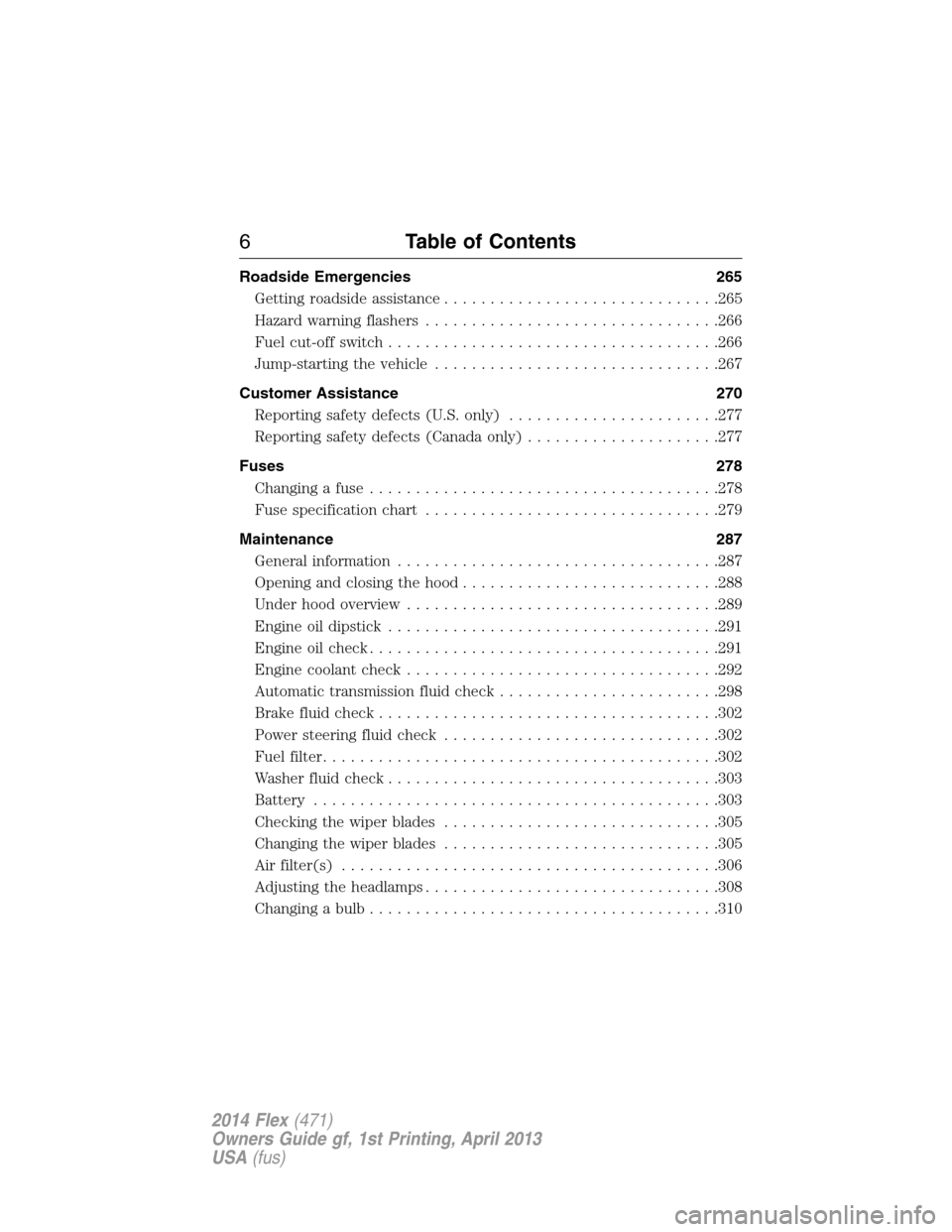
Roadside Emergencies 265
Getting roadside assistance..............................265
Hazard warning flashers................................266
Fuel cut-off switch....................................266
Jump-starting the vehicle...............................267
Customer Assistance 270
Reporting safety defects (U.S. only).......................277
Reporting safety defects (Canada only).....................277
Fuses 278
Changing a fuse......................................278
Fuse specification chart................................279
Maintenance 287
General information...................................287
Opening and closing the hood............................288
Under hood overview..................................289
Engine oil dipstick....................................291
Engine oil check......................................291
Engine coolant check..................................292
Automatic transmission fluid check........................298
Brake fluid check.....................................302
Power steering fluid check..............................302
Fuel filter...........................................302
Washer fluid check....................................303
Battery ............................................303
Checking the wiper blades..............................305
Changing the wiper blades..............................305
Air filter(s).........................................306
Adjusting the headlamps................................308
Changing a bulb......................................310
6Table of Contents
2014 Flex(471)
Owners Guide gf, 1st Printing, April 2013
USA(fus)
Page 11 of 554
SYMBOL GLOSSARY
WARNING:You risk death or serious injury to yourself and
others if you do not follow the instruction highlighted by the
warning symbol.
These are some of the symbols you may see on your vehicle.
Symbol Description Symbol Description Symbol Description
Safety alertSee Owner’s
ManualAnti-lock
braking
system
Avoid
smoking,
flames, or
sparksBatteryBattery acid
Brake fluid –
non
petroleum
baseBrake systemCabin air
filter
Check fuel
capChild Safety
Door Lock
and UnlockChild seat
lower anchor
Child seat
tether anchorCruise
controlDo not open
when hot
Engine air
filterEngine
coolantEngine
coolant
temperature
Engine oilExplosive gasFan warning
Fasten safety
beltFront airbagFront fog
lamps
10Introduction
2014 Flex(471)
Owners Guide gf, 1st Printing, April 2013
USA(fus)
Page 49 of 554

CHILD RESTRAINT AND SAFETY BELT MAINTENANCE
Inspect the vehicle safety belts and child safety seat systems periodically
to make sure they work properly and are not damaged. Inspect the
vehicle and child seat safety belts to make sure there are no nicks, tears
or cuts. Replace if necessary. All vehicle safety belt assemblies, including
retractors, buckles, front safety belt buckle assemblies, buckle support
assemblies (slide bar-if equipped), shoulder belt height adjusters (if
equipped), shoulder belt guide on seatback (if equipped), rear inflatable
safety belts (if equipped), child safety seat LATCH and tether anchors,
and attaching hardware, should be inspected after a crash. See the child
restraint manufacturer’s instructions for additional inspection and
maintenance information specific to the child restraint.
Ford Motor Company recommends that all safety belt assemblies in use
in vehicles involved in a crash be replaced. However, if the crash was
minor and an authorized dealer finds that the belts do not show damage
and continue to operate properly, they do not need to be replaced.
Safety belt assemblies not in use during a crash should also be inspected
and replaced if either damage or improper operation is noted.
For proper care of soiled safety belts, seeInteriorin theCleaning
chapter.
48Safety Belts
2014 Flex(471)
Owners Guide gf, 1st Printing, April 2013
USA(fus)
Page 80 of 554

LIFTGATE
WARNING:It is extremely dangerous to ride in a cargo area,
inside or outside of a vehicle. In a crash, people riding in these
areas are more likely to be seriously injured or killed. Do not allow
people to ride in any area of your vehicle that is not equipped with
seats and safety belts. Be sure everyone in your vehicle is in a seat and
using a safety belt properly.
Manual Liftgate
WARNING:Make sure that the liftgate is closed to prevent
exhaust fumes from being drawn into the vehicle. This will also
prevent passengers and cargo from falling out. If you must drive with
the liftgate door open, keep the vehicle well ventilated so outside air
comes into the vehicle. Failure to follow this warning could result in
serious personal injury.
Note:Be careful when opening or closing the liftgate in a garage or
other enclosed area to avoid damaging the liftgate.
Note:Do not hang anything (bike rack, etc.) from the spoiler, glass or
liftgate. This could damage the liftgate and its components.
Note:Do not leave the liftgate open while driving. This could damage
the liftgate and its components.
The liftgate area is only intended for cargo, not passengers.
To open the liftgate:Press the
button located in the top of the
liftgate pull cup handle to unlatch the
liftgate, then pull on the outside
handle.
Power Liftgate (If Equipped)
WARNING:Make sure all persons are clear of the power liftgate
area before using the power liftgate control.
Locks79
2014 Flex(471)
Owners Guide gf, 1st Printing, April 2013
USA(fus)
Page 114 of 554

WARNING:Driving a vehicle with the brake system warning
light on is dangerous. A significant decrease in braking
performance may occur. It will take you longer to stop the vehicle.
Have the vehicle checked by your authorized dealer as soon as possible.
Driving extended distances with the parking brake engaged can cause
brake failure and the risk of personal injury.
Charging system (RTT)
Illuminates when the battery is not charging properly. If it stays
on while the engine is running, there may be a malfunction with
the charging system. Contact your authorized dealer as soon as
possible. This indicates a problem with the electrical system or a related
component.
Door ajar (RTT)
Displays when the ignition is on and any door is not completely
closed.
Engine oil pressure (RTT)
Illuminates when the oil pressure falls below the normal range.
Engine coolant temperature (RTT)
Illuminates when the engine coolant temperature is high. Stop
the vehicle as soon as possible, switch off the engine and let
cool.
Fog lamps (if equipped)
Illuminates when the fog lamps are turned on.
Instrument Cluster11 3
2014 Flex(471)
Owners Guide gf, 1st Printing, April 2013
USA(fus)
Page 120 of 554
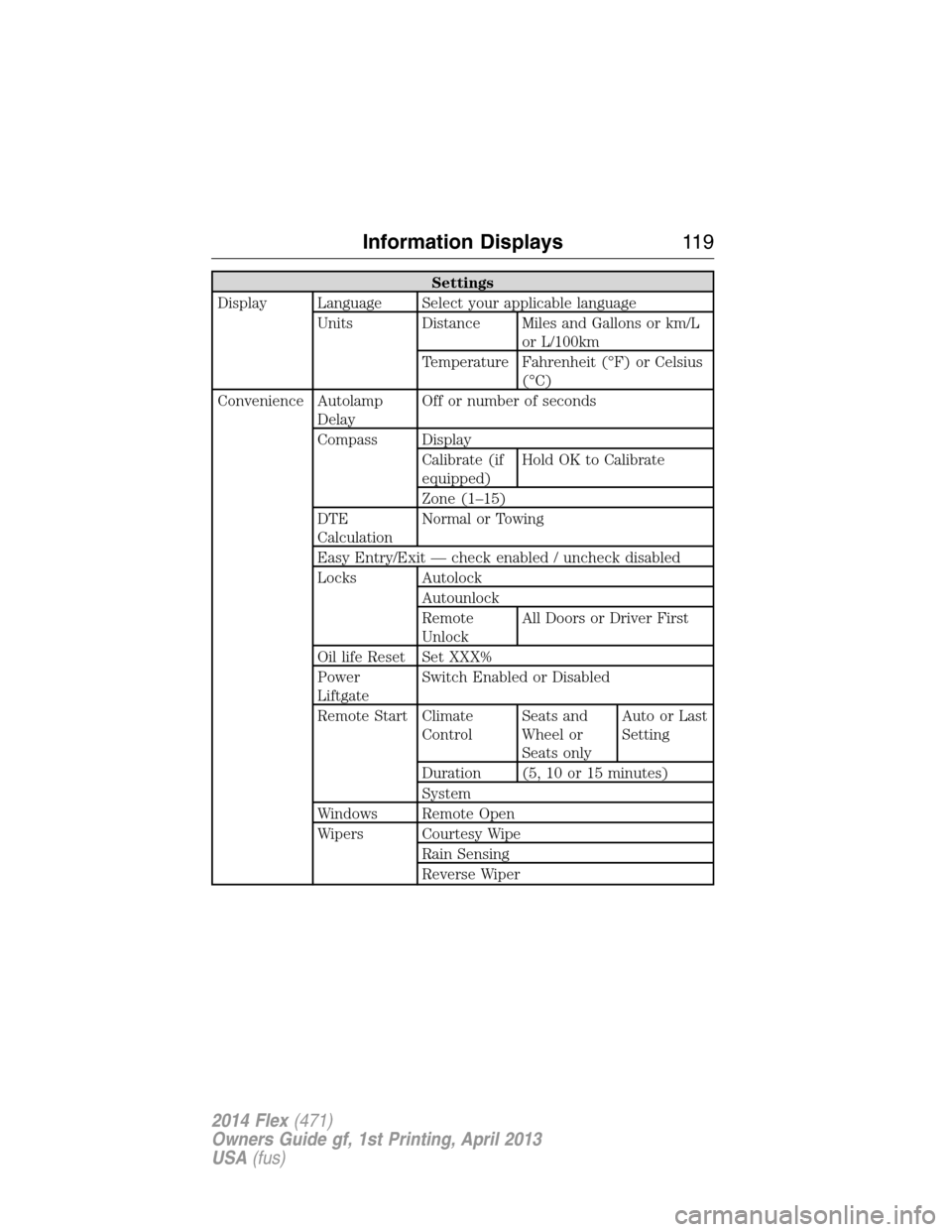
Settings
Display Language Select your applicable language
Units Distance Miles and Gallons or km/L
or L/100km
Temperature Fahrenheit (°F) or Celsius
(°C)
Convenience Autolamp
DelayOff or number of seconds
Compass Display
Calibrate (if
equipped)Hold OK to Calibrate
Zone (1–15)
DTE
CalculationNormal or Towing
Easy Entry/Exit — check enabled / uncheck disabled
Locks Autolock
Autounlock
Remote
UnlockAll Doors or Driver First
Oil life Reset Set XXX%
Power
LiftgateSwitch Enabled or Disabled
Remote Start Climate
ControlSeats and
Wheel or
Seats onlyAuto or Last
Setting
Duration (5, 10 or 15 minutes)
System
Windows Remote Open
Wipers Courtesy Wipe
Rain Sensing
Reverse Wiper
Information Displays11 9
2014 Flex(471)
Owners Guide gf, 1st Printing, April 2013
USA(fus)
Page 126 of 554
Settings
Vehicle DTE Calculation Normal / Towing
Easy Entry/Exit — check enabled / uncheck
disabled
Lighting Autolamp Delay Off or number
of seconds
Locks Autolock On / Off
Autounlock On / Off
Remote
UnlockingAll doors /
Driver’s door
Oil Life Reset Set to XXX %
Power Liftgate Enable / Disable
Remote StartClimate Control
(using this
feature allows
you to select
different climate
control modes
when the
vehicle is
started using
the remote start
feature)Auto / Last
Settings
Seats and Wheel
or Seats onlyAuto / Off
Duration 5 / 10
/15 minutes
System Enable /
Disable
Windows Remote Open or Remote Close
WipersCourtesy Wipe On / Off
Rain Sensing On / Off
Information Displays125
2014 Flex(471)
Owners Guide gf, 1st Printing, April 2013
USA(fus)
Page 133 of 554

Keys and Intelligent
Access MessagesAction / Description
Max Number of Keys
LearnedDisplayed during spare key programming when
the maximum number of keys have been
programmed.
Press Brake to Start Displayed when the start/stop button is
pressed without the brake pedal being applied.
This is a reminder that the brake pedal must
be applied when the start/stop button is
pressed in order to start the engine.
Restart Now or Key is
NeededDisplayed when the start/stop button is
pressed to shut off the engine and a Intelligent
Access Key is not detected inside the vehicle.
Accessory Power is
ActiveDisplayed when the vehicle is in the accessory
ignition state.
Starting System Fault This message is displayed when there is a
problem with your vehicle’s starting system.
See your authorized dealer for service.
Maintenance
MessagesAction / Description
LOW Engine Oil
PressureStop the vehicle as soon as safely possible,
turn off the engine. Check the oil level. If the
warning stays on or continues to come on with
your engine running, contact your authorized
dealer as soon as possible.
Change Engine Oil
SoonDisplayed when the engine oil life remaining is
10% or less.
Oil Change Required Displayed when the oil life left reaches 0%.
Engine Coolant
OvertemperatureDisplayed when the engine coolant
temperature is excessively high.
Washer Fluid Level
LOWIndicates the washer fluid reservoir is less than
one quarter full. Check the washer fluid level.
Steering Malfunction
Service NowDisplays when the steering system needs
service. See your authorized dealer.
132Information Displays
2014 Flex(471)
Owners Guide gf, 1st Printing, April 2013
USA(fus)