2014 FORD FLEX horn
[x] Cancel search: hornPage 52 of 554

WARNING:If the airbag has deployed, the airbag will not function
again and must be replaced immediately. If the airbag is not
replaced, the unrepaired area will increase the risk of injury in a crash.
The airbags are a supplemental restraint system and are designed to
work with the safety belts to help protect the driver and right front
passenger from certain upper body injuries. Airbags do not inflate slowly;
there is a risk of injury from a deploying airbag.
Note:You will hear a loud bang and see a cloud of harmless powdery
residue if an airbag deploys. This is normal.
The airbags inflate and deflate rapidly upon activation. After airbag
deployment, it is normal to notice a smoke-like, powdery residue or smell
the burnt propellant. This may consist of cornstarch, talcum powder (to
lubricate the bag) or sodium compounds (for example, baking soda) that
result from the combustion process that inflates the airbag. Small
amounts of sodium hydroxide may be present which may irritate the skin
and eyes, but none of the residue is toxic.
While the system is designed to help reduce serious injuries, contact
with a deploying airbag may also cause abrasions or swelling. Temporary
hearing loss is also a possibility as a result of the noise associated with a
deploying airbag. Because airbags must inflate rapidly and with
considerable force, there is the risk of death or serious injuries, such as
fractures, facial and eye injuries or internal injuries, particularly to
occupants who are not properly restrained or are otherwise out of
position at the time of airbag deployment. Thus, it is extremely
important that occupants be properly restrained as far away from the
airbag module as possible while maintaining vehicle control.
Routine maintenance of the airbags is not required.
SOS POST-CRASH ALERT SYSTEM™
The system flashes the turn signal lamps and sounds the horn
(intermittently) in the event of a serious impact that deploys an airbag
equipped on your vehicle, such as front, side, side curtain or Safety
Canopy®.
The horn and lamps will turn off when:
•the hazard control button is pressed
•the panic button (if equipped) is pressed on the remote entry
transmitter, or
•your vehicle runs out of power.
Supplementary Restraints System51
2014 Flex(471)
Owners Guide gf, 1st Printing, April 2013
USA(fus)
Page 68 of 554

Programming memory to the transmitter
To activate this feature:
1. Move the memory features to the desired positions using the
associated controls.
2. Press and hold button1for five
seconds. A tone will sound
confirming memory position has
been set. Continue to hold until a
second tone is heard after five
seconds.
3. Within three seconds press the lock button on the remote control.
4. Wait 10 seconds, then press the unlock button on the remote control.
5. Repeat this procedure for memory button2and another transmitter if
desired.
Deactivating memory from the transmitter
To deactivate this feature:
1. Press and hold either the1or2button for five seconds. A tone will
sound when the memory store is done. Continue to hold until a second
tone is heard.
2. Within three seconds press the unlock button on the remote control .
3. Repeat this procedure for each additional transmitter if desired.
Car Finder
Press the button twice within three seconds. The horn will sound
and the turn signals will flash. We recommend you use this
method to locate your vehicle, rather than using the panic alarm.
Sounding a Panic Alarm
Press the button to activate the alarm. Press the button again
or switch the ignition on to deactivate.
Note:The panic alarm will only operate when the ignition is off.
21
Keys and Remote Control67
2014 Flex(471)
Owners Guide gf, 1st Printing, April 2013
USA(fus)
Page 70 of 554
Remote Starting the Vehicle
Note:You must press each button within three seconds of each other.
Your vehicle will not remote start and the horn will not sound if you do
not follow this sequence.
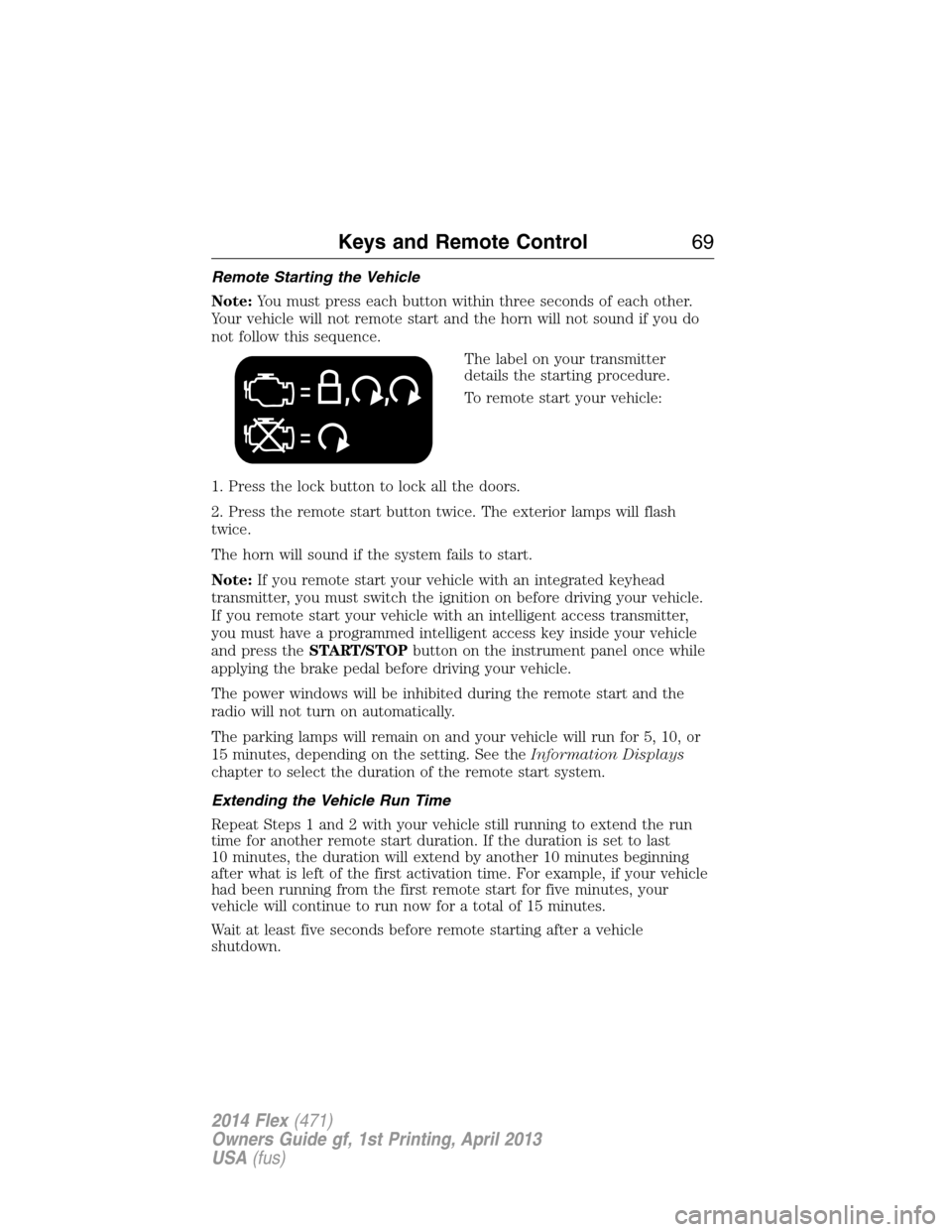
The label on your transmitter
details the starting procedure.
To remote start your vehicle:
1. Press the lock button to lock all the doors.
2. Press the remote start button twice. The exterior lamps will flash
twice.
The horn will sound if the system fails to start.
Note:If you remote start your vehicle with an integrated keyhead
transmitter, you must switch the ignition on before driving your vehicle.
If you remote start your vehicle with an intelligent access transmitter,
you must have a programmed intelligent access key inside your vehicle
and press theSTART/STOPbutton on the instrument panel once while
applying the brake pedal before driving your vehicle.
The power windows will be inhibited during the remote start and the
radio will not turn on automatically.
The parking lamps will remain on and your vehicle will run for 5, 10, or
15 minutes, depending on the setting. See theInformation Displays
chapter to select the duration of the remote start system.
Extending the Vehicle Run Time
Repeat Steps 1 and 2 with your vehicle still running to extend the run
time for another remote start duration. If the duration is set to last
10 minutes, the duration will extend by another 10 minutes beginning
after what is left of the first activation time. For example, if your vehicle
had been running from the first remote start for five minutes, your
vehicle will continue to run now for a total of 15 minutes.
Wait at least five seconds before remote starting after a vehicle
shutdown.
Keys and Remote Control69
2014 Flex(471)
Owners Guide gf, 1st Printing, April 2013
USA(fus)
Page 76 of 554

LOCKING AND UNLOCKING
You can use the power door lock control or the remote control to lock
and unlock your vehicle.
Power Door Locks
The power door lock control is located on the driver and front passenger
door panels.
A. Unlock
B. Lock
Remote Control
You can use the remote control anytime the vehicle is not running.
Unlocking the Doors (Two-Stage Unlock)
Press the button to unlock the driver door.
Press the button again within three seconds to unlock all doors.
The turn signals will flash.
Press and hold both the lock and unlock buttons on the remote control
for four seconds to disable or enable two-stage unlocking. Disabling
two-stage unlocking allows all vehicle doors to unlock with one press of
the button. The turn signals will flash twice to indicate the unlocking
mode was changed. The unlocking mode applies to the remote control,
keyless entry keypad and intelligent access.
Intelligent access at the driver door unlocks all doors when you have
disabled two-stage unlocking.
Locking the Doors
Press the button to lock all the doors. The turn signals will
illuminate.
Press the button again within three seconds to confirm that all the doors
are closed. The doors will lock again, the horn will sound and the turn
signals will illuminate if all the doors and the luggage compartment are
closed.
A
B
Locks75
2014 Flex(471)
Owners Guide gf, 1st Printing, April 2013
USA(fus)
Page 77 of 554

Note:If any door or the luggage compartment is open, or if the hood is
open on vehicles with an anti-theft alarm or remote start, the horn
sounds twice and the lamps will not flash.
Activating Intelligent Access (If Equipped)
The intelligent access key must be within 3 feet (1 meter) of your
vehicle.
At the Front Doors
Pull a front exterior door handle. The door will unlock and can be
opened.
Press and hold the door handle lock
sensor to lock your vehicle. To avoid
unlocking the door inadvertently, be
sure to only touch the lock sensor
and not other areas of the door
handle.
At the Liftgate
Press the button hidden near the license plate.
Smart Unlocks for Integrated Keyhead Transmitter
This feature helps to prevent you from locking yourself out of your
vehicle if your key is still in the ignition.
When you open one of the front doors and lock your vehicle with the
power door lock control, all the doors will lock then unlock if your key is
still in the ignition.
You can still lock your vehicle with the key in the ignition using the
keyless entry keypad with the driver door closed, or by pressing the lock
button on the transmitter even if the doors are not closed.
If both front doors are closed, you can lock your vehicle by any method,
regardless of whether the key is in the ignition or not.
Smart Unlocks for Intelligent Access Keys (If Equipped)
This feature helps to prevent you from unintentionally locking your
intelligent access key inside your vehicle’s passenger compartment or
rear cargo area.
When you lock your vehicle using the driver or passenger power door
lock control (with the door open, transmission inPand ignition off),
76Locks
2014 Flex(471)
Owners Guide gf, 1st Printing, April 2013
USA(fus)
Page 78 of 554

after you close the door your vehicle will search for an intelligent access
key in the passenger compartment. All the doors will immediately unlock
and the horn will sound if the vehicle detects an intelligent access key
inside.
In order to override the smart unlock feature and intentionally lock the
intelligent access key inside your vehicle, do one of the following:
•Lock your vehicle with the keyless entry keypad after all doors are
closed.
•Press the lock button on another intelligent access key.
•Touch the locking area on the handle with another intelligent access
key in your hand.
When you open one of the front doors and lock your vehicle using the
power door lock control, all doors will lock then unlock if:
•the ignition is on, or
•the ignition is off and the transmission is not inP.
Autolock Feature (If Enabled)
The autolock feature will lock all the doors when:
•all the doors are closed,
•the ignition is on,
•you shift into any gear putting your vehicle in motion, and
•your vehicle reaches a speed greater than 12 mph (20 km/h).
The autolock feature repeats when:
•you open then close any door while the ignition is on and the vehicle
speed is 9 mph (15 km/h) or lower, and
•your vehicle then reaches a speed greater than 12 mph (20 km/h).
Autounlock Feature (If Enabled)
The autounlock feature will unlock all the doors when:
•the ignition is on, all the doors are closed, and your vehicle has been
in motion at a speed greater than 12 mph (20 km/h);
•your vehicle has then come to a stop and the ignition is switched off
or to accessory; and
•the driver door is opened within 10 minutes of the ignition being
switched off or to accessory.
Note:The doors will not autounlock if you electronically lock the vehicle
after you switch the ignition off and before you open the driver door.
Locks77
2014 Flex(471)
Owners Guide gf, 1st Printing, April 2013
USA(fus)
Page 90 of 554

5. Press and release the brake pedal one time. The indicator on the
START/STOPbutton should begin to rapidly flash, indicating the
programming mode has been entered and two programmed intelligent
access keys have been detected in your vehicle.
6. Press theSTART/STOPbutton within one minute. A message will
appear in the information display indicating that the new intelligent
access key was programmed.
7. Remove the intelligent access key from the center console pocket and
press the unlock button on the newly programmed intelligent access key
to exit programming mode.
8. Verify that the remote entry functions operate (press lock then
unlock, making sure you end in unlock) and that your vehicle starts with
new intelligent access key.
ANTI-THEFT ALARM (IF EQUIPPED)
The system will warn you of unauthorized entry to your vehicle.
The turn signal lamps will flash and sound the horn up to a total of
10 times when:
•any door, the hood or the luggage compartment is opened without
using the keypad, the remote control or the intelligent access
transmitter (if equipped)
•the ignition is turned on with an invalid key.
Take all keys and remote controls to an authorized dealer if there is any
potential alarm problem with your vehicle.
Arming the Alarm
The system is ready to arm whenever the ignition is off. Lock the vehicle
to arm the alarm.
The turn signal lamps will flash once after locking the vehicle to indicate
the alarm is in the pre-armed mode. It will become fully armed in
20 seconds.
Security89
2014 Flex(471)
Owners Guide gf, 1st Printing, April 2013
USA(fus)
Page 91 of 554
Disarming the Alarm
To disarm the alarm, do any of the following:
•Press the power door unlock button within the 20-second pre-armed
mode.
•Press the unlock button on the remote control.
•Unlock the doors with the keyless entry pad.
•Enter the vehicle using intelligent access (if equipped).
•Turn the ignition on with a valid key (if equipped with an integrated
keyhead transmitter only).
•Press the panic button on the remote control. The alarm system will
still be armed, but this shuts off the horn and turn lamps when the
alarm is sounding.
Note:If the driver door is unlocked with a key, a tone will sound when
you open the door and a message will appear in the information display.
You will have 12 seconds to disarm the alarm using any of the actions
above, otherwise the alarm will trigger.
90Security
2014 Flex(471)
Owners Guide gf, 1st Printing, April 2013
USA(fus)