2014 FORD FLEX transmission
[x] Cancel search: transmissionPage 5 of 554

Seats 145
Sitting in the correct position............................145
Head restraints.......................................146
Manual seats........................................148
Power seats.........................................150
Memory function.....................................151
Heated seats........................................153
Heated and ventilated seats..............................155
Rear seats..........................................157
Universal Garage Door Opener (If Equipped) 167
HomeLink® wireless control system.......................167
Auxiliary Power Points 172
Storage Compartments 175
Center console.......................................175
Overhead console.....................................177
Starting and Stopping the Engine 178
Ignition switch.......................................179
Engine block heater...................................184
Fuel and Refueling 186
Fuel quality.........................................187
Running out of fuel....................................188
Refueling...........................................189
Fuel consumption.....................................191
Transmission 195
Automatic transmission.................................195
All-Wheel Drive (If Equipped) 200
All wheel drive.......................................200
Brakes 207
Brakes.............................................207
4Table of Contents
2014 Flex(471)
Owners Guide gf, 1st Printing, April 2013
USA(fus)
Page 7 of 554
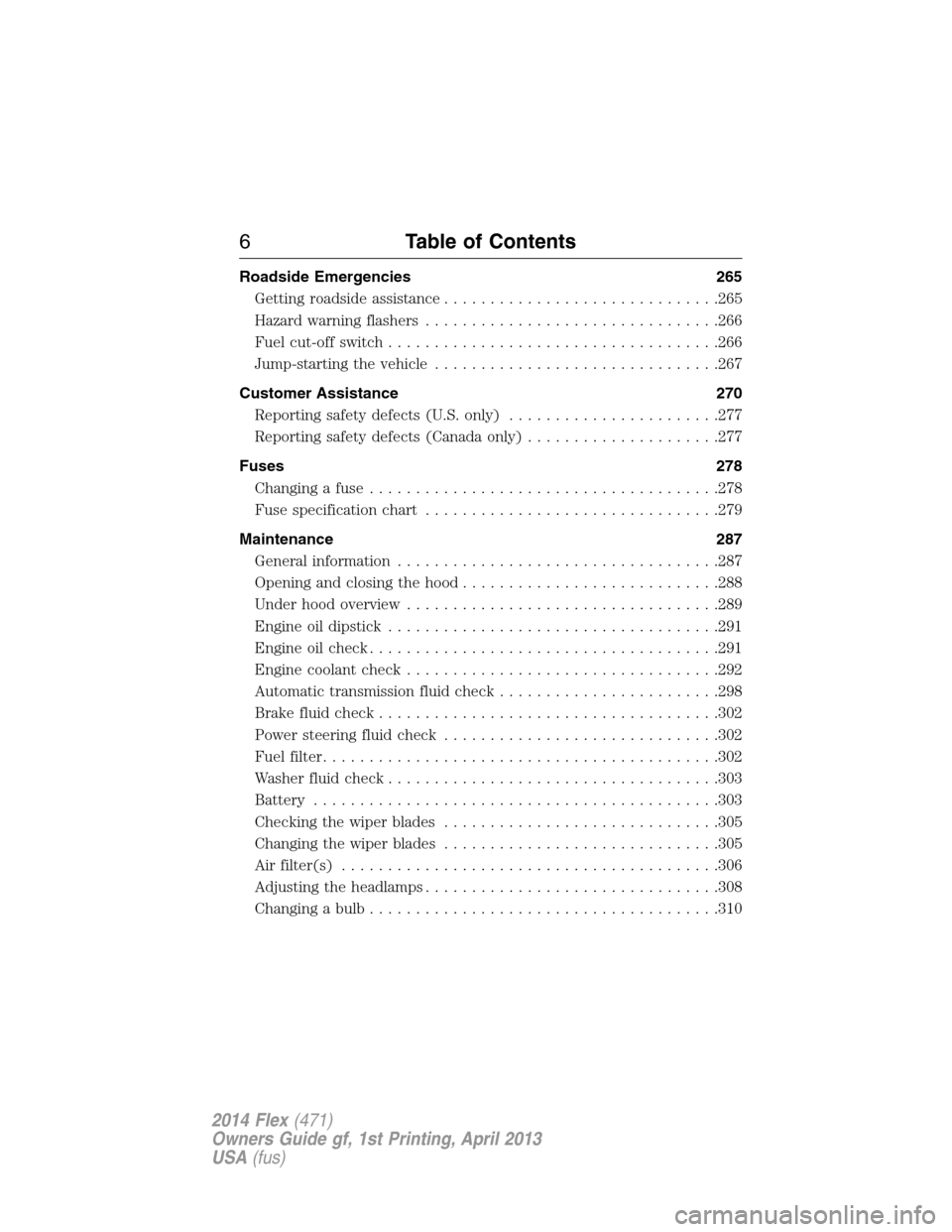
Roadside Emergencies 265
Getting roadside assistance..............................265
Hazard warning flashers................................266
Fuel cut-off switch....................................266
Jump-starting the vehicle...............................267
Customer Assistance 270
Reporting safety defects (U.S. only).......................277
Reporting safety defects (Canada only).....................277
Fuses 278
Changing a fuse......................................278
Fuse specification chart................................279
Maintenance 287
General information...................................287
Opening and closing the hood............................288
Under hood overview..................................289
Engine oil dipstick....................................291
Engine oil check......................................291
Engine coolant check..................................292
Automatic transmission fluid check........................298
Brake fluid check.....................................302
Power steering fluid check..............................302
Fuel filter...........................................302
Washer fluid check....................................303
Battery ............................................303
Checking the wiper blades..............................305
Changing the wiper blades..............................305
Air filter(s).........................................306
Adjusting the headlamps................................308
Changing a bulb......................................310
6Table of Contents
2014 Flex(471)
Owners Guide gf, 1st Printing, April 2013
USA(fus)
Page 8 of 554

Vehicle Care 315
Cleaning products.....................................315
Cleaning the exterior..................................315
Waxing.............................................317
Repairing minor paint damage............................317
Cleaning the engine...................................317
Cleaning the windows and wiper blades.....................318
Cleaning the interior...................................319
Cleaning the instrument panel and instrument cluster lens.......319
Cleaning leather seats..................................320
Cleaning the alloy wheels...............................321
Vehiclestorage.......................................321
Wheels and Tires 324
Tire care...........................................326
Tire Pressure Monitoring System (TPMS)...................342
Changing a road wheel.................................347
Technical specifications.................................353
Wheel lug nut torque..................................353
Capacities and Specifications 355
Engine specifications..................................355
Engine drivebelt......................................355
Maintenance product specifications and capacities.............356
Part numbers........................................359
Vehicle identification number............................359
Vehicle certification label...............................360
Transmission code designation............................361
Accessories 362
Accessories.........................................362
Table of Contents7
2014 Flex(471)
Owners Guide gf, 1st Printing, April 2013
USA(fus)
Page 46 of 554

Note:The driver and front passenger Belt-Minder are deactivated and
activated independently. When deactivating or activating one seating
position, do not buckle the other position as this will terminate the
process.
Read Steps1-5thoroughly before proceeding with the programming
procedure.
Note:If you are using MyKey®, the Belt-Minder cannot be disabled.
Also, if the Belt-Minder has been previously disabled, it will be
re-enabled during the use of MyKey®. See theMyKey®chapter.
The driver and front passenger Belt-Minder features can be deactivated
or activated by performing the following procedure:
Before following the procedure, make sure that:
•the parking brake is set
•the transmission selector lever is in positionP
•the ignition is off
•the driver and front passenger safety belts are unbuckled
1. Turn the ignition on. Do not start the engine.
2. Wait until the safety belt warning light turns off (about one minute).
3. Wait 10 seconds after the safety belt warning light turns off.
•Step 4 must be completed within 20 seconds after the completion of
Step 3.
4. For the seating position being disabled buckle then unbuckle the
safety belt three times at a moderate speed, ending in the unbuckled
state.
•After Step 4, the safety belt warning light will be turned on for three
seconds.
5. Within about seven seconds of the light turning off, buckle then
unbuckle the safety belt.
•This will disable the Belt-Minder feature for that seating position if it
is currently enabled.
•This will enable the Belt-Minder feature for that seating position if it is
currently disabled.
Safety Belts45
2014 Flex(471)
Owners Guide gf, 1st Printing, April 2013
USA(fus)
Page 64 of 554

GENERAL INFORMATION ON RADIO FREQUENCIES
This device complies with part 15 of the FCC Rules and with Industry
Canada license-exempt RSS standard(s). Operation is subject to the
following two conditions: (1) This device may not cause harmful
interference, and (2) This device must accept any interference received,
including interference that may cause undesired operation.
Note:Changes or modifications not expressly approved by the party
responsible for compliance could void the user’s authority to operate the
equipment. The termICbefore the radio certification number only
signifies that Industry Canada technical specifications were met.
The typical operating range for your transmitter is approximately 33 feet
(10 meters). Vehicles with the remote start feature will have a greater
range. A decrease in operating range could be caused by:
•weather conditions
•nearby radio towers
•structures around your vehicle
•other vehicles parked next to your vehicle.
The radio frequency used by your remote control can also be used by
other short-distance radio transmissions, for example amateur radios,
medical equipment, wireless headphones, remote controls and alarm
systems. If the frequencies are jammed, you will not be able to use your
remote control. You can lock and unlock the doors with the key.
Note:Make sure your vehicle is locked before leaving it unattended.
Note:If you are in range, the remote control will operate if you press
any button unintentionally.
Intelligent Access (If Equipped)
The system uses a radio frequency signal to communicate with your
vehicle and authorize your vehicle to unlock when one of the following
conditions is met:
•You touch the inside of the front exterior door handle.
•You press the luggage compartment button.
•You press a button on the transmitter.
If excessive radio frequency interference is present in the area or if the
transmitter battery is low, it may be necessary to mechanically unlock
your door. You can use the mechanical key blade in your intelligent
access key to open the driver door in this situation. Refer toRemote
Controlin this chapter for more information on the location and use of
the mechanical key blade.
Keys and Remote Control63
2014 Flex(471)
Owners Guide gf, 1st Printing, April 2013
USA(fus)
Page 69 of 554

Remote Start (If Equipped)
WARNING:To avoid exhaust fumes, do not use remote start if
your vehicle is parked indoors or areas that are not well
ventilated.
Note:Do not use remote start if your vehicle is low on fuel.
The remote start button is on the transmitter.
This feature allows you to start your vehicle from outside your vehicle.
The transmitter has an extended operating range.
Vehicles with automatic climate control can be configured to operate
when the vehicle is remote started. See theClimate Controlchapter for
more information. A manual climate control system will run at the setting
it was set to when your vehicle was last turned off.
Many states and provinces have restrictions for the use of remote start.
Check your local and state or provincial laws for specific requirements
regarding remote start systems.
The remote start system will not work if:
•the ignition is on
•the alarm system is triggered
•you disable the feature
•the hood is not closed
•the transmission is not inP
•the vehicle battery voltage is too low
•your service engine soon light is on.
68Keys and Remote Control
2014 Flex(471)
Owners Guide gf, 1st Printing, April 2013
USA(fus)
Page 77 of 554

Note:If any door or the luggage compartment is open, or if the hood is
open on vehicles with an anti-theft alarm or remote start, the horn
sounds twice and the lamps will not flash.
Activating Intelligent Access (If Equipped)
The intelligent access key must be within 3 feet (1 meter) of your
vehicle.
At the Front Doors
Pull a front exterior door handle. The door will unlock and can be
opened.
Press and hold the door handle lock
sensor to lock your vehicle. To avoid
unlocking the door inadvertently, be
sure to only touch the lock sensor
and not other areas of the door
handle.
At the Liftgate
Press the button hidden near the license plate.
Smart Unlocks for Integrated Keyhead Transmitter
This feature helps to prevent you from locking yourself out of your
vehicle if your key is still in the ignition.
When you open one of the front doors and lock your vehicle with the
power door lock control, all the doors will lock then unlock if your key is
still in the ignition.
You can still lock your vehicle with the key in the ignition using the
keyless entry keypad with the driver door closed, or by pressing the lock
button on the transmitter even if the doors are not closed.
If both front doors are closed, you can lock your vehicle by any method,
regardless of whether the key is in the ignition or not.
Smart Unlocks for Intelligent Access Keys (If Equipped)
This feature helps to prevent you from unintentionally locking your
intelligent access key inside your vehicle’s passenger compartment or
rear cargo area.
When you lock your vehicle using the driver or passenger power door
lock control (with the door open, transmission inPand ignition off),
76Locks
2014 Flex(471)
Owners Guide gf, 1st Printing, April 2013
USA(fus)
Page 78 of 554

after you close the door your vehicle will search for an intelligent access
key in the passenger compartment. All the doors will immediately unlock
and the horn will sound if the vehicle detects an intelligent access key
inside.
In order to override the smart unlock feature and intentionally lock the
intelligent access key inside your vehicle, do one of the following:
•Lock your vehicle with the keyless entry keypad after all doors are
closed.
•Press the lock button on another intelligent access key.
•Touch the locking area on the handle with another intelligent access
key in your hand.
When you open one of the front doors and lock your vehicle using the
power door lock control, all doors will lock then unlock if:
•the ignition is on, or
•the ignition is off and the transmission is not inP.
Autolock Feature (If Enabled)
The autolock feature will lock all the doors when:
•all the doors are closed,
•the ignition is on,
•you shift into any gear putting your vehicle in motion, and
•your vehicle reaches a speed greater than 12 mph (20 km/h).
The autolock feature repeats when:
•you open then close any door while the ignition is on and the vehicle
speed is 9 mph (15 km/h) or lower, and
•your vehicle then reaches a speed greater than 12 mph (20 km/h).
Autounlock Feature (If Enabled)
The autounlock feature will unlock all the doors when:
•the ignition is on, all the doors are closed, and your vehicle has been
in motion at a speed greater than 12 mph (20 km/h);
•your vehicle has then come to a stop and the ignition is switched off
or to accessory; and
•the driver door is opened within 10 minutes of the ignition being
switched off or to accessory.
Note:The doors will not autounlock if you electronically lock the vehicle
after you switch the ignition off and before you open the driver door.
Locks77
2014 Flex(471)
Owners Guide gf, 1st Printing, April 2013
USA(fus)