2014 FORD FLEX reset
[x] Cancel search: resetPage 455 of 554

“SIRIUS”
“SAT 1” “Sirius on”
“SAT 1 preset <#>” “Sports game”
*
“SAT 2” “Tune”**
“SAT 2 preset <#>” “Help”
*If you have said, “Sports game”, see the following “Sports game” chart.
**If you have said, “Tune”, see the following “Tune” chart.
“SPORTS GAME”
“Tune to the
“Tune to the
“Tune to the
“Tune to the
“Help”
“TUNE”
“Sirius <0–223>”
“
“Preset <#>”
“SAT”
“SAT 1”
“SAT 1 preset <#>”
“SAT 2”
“SAT 2 preset <#>”
“SAT 3”
“SAT 3 preset <#>”
“Help”
SIRIUS Satellite Radio Information
Note:SIRIUS reserves the unrestricted right to change, rearrange, add
or delete programming including canceling, moving or adding particular
channels, and its prices, at any time, with or without notice to you. Ford
Motor Company shall not be responsible for any such programming
changes.
Note:This receiver includes the eCos real-time operating system. eCos
is published under the eCos License.
454MyFord Touch® (If Equipped)
2014 Flex(471)
Owners Guide gf, 1st Printing, April 2013
USA(fus)
Page 457 of 554
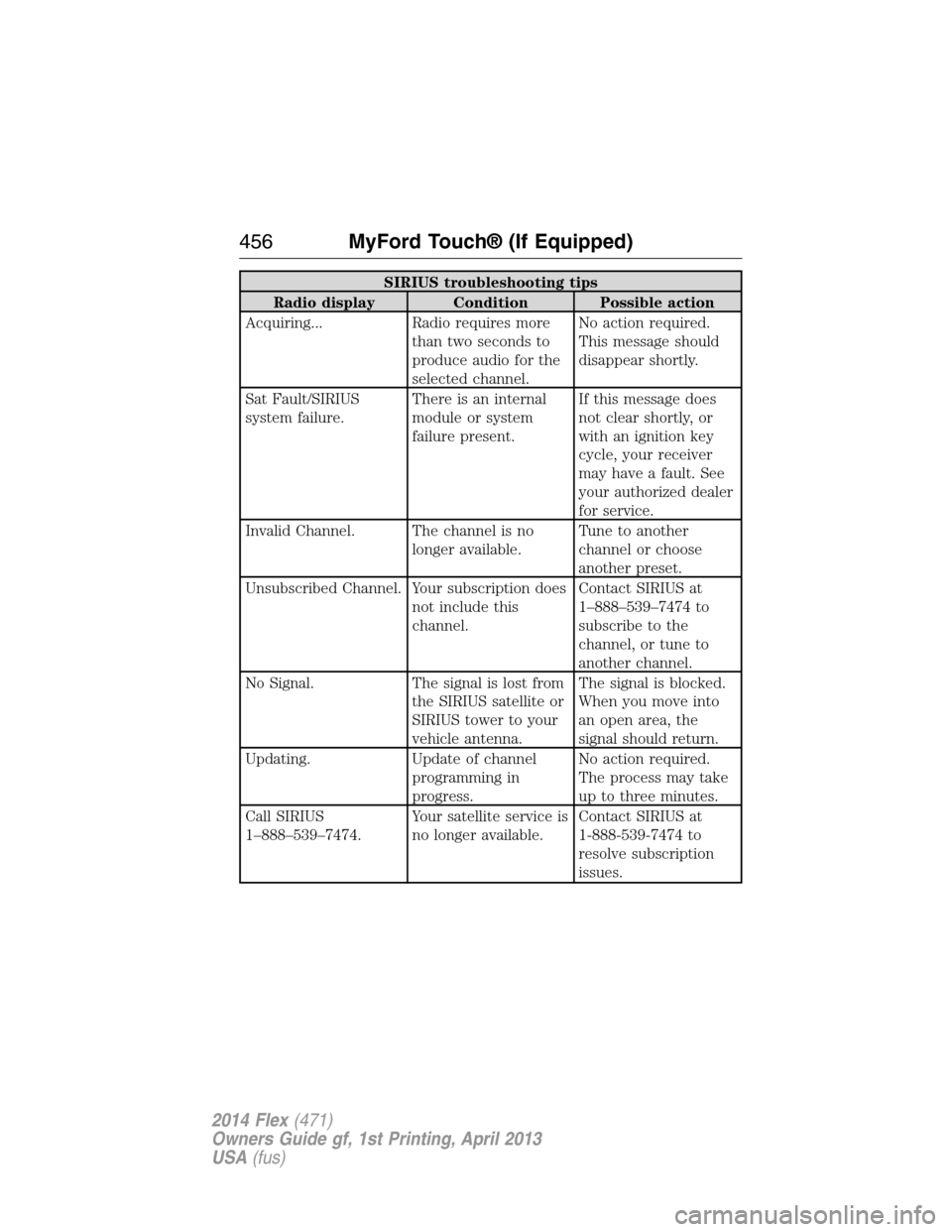
SIRIUS troubleshooting tips
Radio display Condition Possible action
Acquiring... Radio requires more
than two seconds to
produce audio for the
selected channel.No action required.
This message should
disappear shortly.
Sat Fault/SIRIUS
system failure.There is an internal
module or system
failure present.If this message does
not clear shortly, or
with an ignition key
cycle, your receiver
may have a fault. See
your authorized dealer
for service.
Invalid Channel. The channel is no
longer available.Tune to another
channel or choose
another preset.
Unsubscribed Channel. Your subscription does
not include this
channel.Contact SIRIUS at
1–888–539–7474 to
subscribe to the
channel, or tune to
another channel.
No Signal. The signal is lost from
the SIRIUS satellite or
SIRIUS tower to your
vehicle antenna.The signal is blocked.
When you move into
an open area, the
signal should return.
Updating. Update of channel
programming in
progress.No action required.
The process may take
up to three minutes.
Call SIRIUS
1–888–539–7474.Your satellite service is
no longer available.Contact SIRIUS at
1-888-539-7474 to
resolve subscription
issues.
456MyFord Touch® (If Equipped)
2014 Flex(471)
Owners Guide gf, 1st Printing, April 2013
USA(fus)
Page 488 of 554

Rear View Camera
This menu allows you to access settings for your rear view camera.
Press the Settings icon >Vehicle>Rear View Camera,then select
from the following settings:
•Rear Camera Delay
•Visual Park Aid Alert
•Guidelines.
Enable Valet Mode
Note:If the system locks, and you need to reset the PIN, enter 3681 and
the system unlocks.
Valet mode allows you to lock the system. No information is accessible
until the system is unlocked with the correct PIN.
1. Press the Settings icon >Vehicle>Enable Valet Mode.
2. When prompted, enter a four-digit PIN.
After you press Continue, the system locks until you enter the PIN again.
Settings
Access and adjust system settings, voice features, as well as phone,
navigation and wireless settings.
System
Press the Settings icon >Settings>System,then select from
the following:
System
LanguageSelect to have the touchscreen display in
English, Spanish or French.
DistanceSelect to display units in kilometers or miles.
TemperatureSelect to display units in Celsius or
Fahrenheit.
System Prompt
VolumeAdjust the volume of voice prompts from the
system.
Touch Screen Button
BeepSelect to have the system beep to confirm
choices made through the touchscreen.
Touch Panel Button
BeepSelect to have the system beep to confirm
button choices made through the climate or
audio system.
MyFord Touch® (If Equipped)487
2014 Flex(471)
Owners Guide gf, 1st Printing, April 2013
USA(fus)
Page 489 of 554

System
Keyboard LayoutHave the touchscreen keyboard display in
QWERTY or ABC format.
Install ApplicationsInstall any downloaded applications or view
the current software licenses.
Master ResetSelect to restore factory defaults. This erases
all personal settings and personal data.
Voice Control
Press the Settings icon >Settings>Voice Control,then
select from the following:
Voice control
Interaction ModeStandard interaction mode provides more
detailed interaction and guidance. Advanced
mode has less audible interaction and more
tone prompts.
Confirmation
PromptsHave the system ask you short questions if it
has not clearly heard or understood your
request.
Note:Even with confirmation prompts turned
off, the system may occasionally ask you to
confirm settings.
Media Candidate
ListsCandidate lists are possible results from your
voice commands. The system simply makes a
best guess at your request with these turned
off.
Phone Candidate
ListsCandidate lists are possible results from your
voice commands. The system simply makes a
best guess at your request with these turned
off.
Voice Control VolumeThis allows you to adjust the system’s voice
volume level.
488MyFord Touch® (If Equipped)
2014 Flex(471)
Owners Guide gf, 1st Printing, April 2013
USA(fus)
Page 531 of 554

Protecting Your Investment
Maintenance is an investment that will pay dividends in the form of
improved reliability, durability and resale value. To maintain the proper
performance of your vehicle and its emission control systems, it is
imperative that scheduled maintenance be completed at the designated
intervals.
Your vehicle is equipped with the Intelligent Oil-Life Monitor® (IOLM)
system which displays a message in the information display at the proper
oil change service interval; this interval may be up to one year or
10000 miles (16000 kilometers). When ENGINE OIL CHANGE DUE or
OIL CHANGE REQUIRED appears in the information display, it is time
for an oil change; the oil change must be done within two weeks or
500 miles (800 kilometers) of the ENGINE OIL CHANGE DUE or OIL
CHANGE REQUIRED message appearing. The Intelligent Oil-Life
Monitor® must be reset after each oil change; see theInformation
Displayschapter.
If your information display is prematurely reset or becomes inoperative,
you should perform the oil change interval at six months or 5000 miles
(8000 kilometers) from your last oil change. Never exceed one year or
10000 miles (16000 kilometers) between oil change intervals.
Your vehicle is very sophisticated and built with multiple, complex,
performance systems. Every manufacturer develops these systems using
different specifications and performance features. That is why it is
important to rely upon your dealership to properly diagnose and repair
your vehicle.
Ford Motor Company has recommended maintenance intervals for
various parts and component systems based upon engineering testing.
Ford Motor Company relies upon this testing to determine the most
appropriate mileage for replacement of oils and fluids to protect your
vehicle at the lowest overall cost to you and recommends against
maintenance schedules that deviate from the scheduled maintenance
information.
Ford strongly recommends the use of only genuine Ford, Motorcraft® or
Ford-authorized remanufactured replacement parts because they are
engineered for your vehicle.
Additives and Chemicals
Ford Motor Company recommended additives and chemicals are listed in
the owner manual and in the Ford Workshop Manual. Additional
chemicals or additives not approved by Ford Motor Company are not
recommended as part of normal maintenance. Please consult your
warranty information.
530Scheduled Maintenance
2014 Flex(471)
Owners Guide gf, 1st Printing, April 2013
USA(fus)
Page 536 of 554

Normal scheduled maintenance*
At every oil change
interval as indicated by
the information displayChange engine oil and filter.**
Rotate tires, inspect tire wear and measure
tread depth.
Perform multi-point inspection
(recommended).
Inspect automatic transmission fluid level (if
equipped with dipstick). Consult dealer for
requirements.
Inspect brake pads, shoes, rotors, drums,
brake linings, hoses and parking brake.
Inspect cabin air filter (if equipped).
Inspect engine cooling system strength and
hoses.
Inspect exhaust system and heat shields.
Inspect rear axle and U-joints. Lubricate if
equipped with grease fittings (All-wheel drive
vehicles).
Inspect half-shaft boots (if equipped).
Inspect steering linkage, ball joints,
suspension, tie-rod ends, driveshaft and
U-joints. Lubricate if equipped with grease
fittings.
Inspect wheels and related components for
abnormal noise, wear, looseness or drag.
*Do not exceed one year or 10000 miles (16000 kilometers) between
service intervals.
**Reset your Intelligent Oil-Life Monitor after each engine oil and filter
change. See theInstrument Clusterchapter.
Scheduled Maintenance535
2014 Flex(471)
Owners Guide gf, 1st Printing, April 2013
USA(fus)
Page 541 of 554

SPECIAL OPERATING CONDITIONS
If you operate your vehicleprimarilyin any of the following conditions,
you need to perform additional maintenance as indicated. If you
occasionallyoperate your vehicle under any of these conditions, it is
not necessary to perform the additional maintenance. For specific
recommendations, see your dealership service advisor or technician.
Perform the services shown in the following tables when specified or
within 3000 miles (4800 kilometers) of the OIL CHANGE REQUIRED
message appearing in the information display.
Example #1:The OIL CHANGE REQUIRED message comes on at
28751 miles (46270 kilometers); perform the 30000 mile (48000
kilometer) automatic transmission fluid replacement.
Example #2:The OIL CHANGE REQUIRED message hasnotcome on,
but the odometer reads 30000 miles (48000 kilometers); perform the
engine air filter replacement. (For example, the Intelligent Oil-Life
Monitor was reset at 25000 miles [40000 kilometers].)
Towing a trailer or using a camper or car-top carrier
As required Change engine oil and filter as indicated by
the information display and perform services
listed in the Normal Scheduled Maintenance
chart.
Inspect frequently,
service as requiredInspect and lubricate U-joints.
See axle maintenance items under
Exceptions.
Every 30000 miles
(48000 km)Change automatic transmission fluid.
540Scheduled Maintenance
2014 Flex(471)
Owners Guide gf, 1st Printing, April 2013
USA(fus)
Page 542 of 554

Extensive idling or low-speed driving for long distances as in
heavy commercial use (such as delivery, taxi, patrol car or
livery)
As required Change engine oil and filter as indicated by
the information display and perform services
listed in the Normal Scheduled Maintenance
chart.
Inspect frequently,
service as requiredReplace cabin air filter (if equipped).
Replace engine air filter.
Every 30000 miles
(48000 km)Change automatic transmission fluid.
Every 60000 miles
(96000 km)Replace spark plugs.
Operating in dusty or sandy conditions such as unpaved or
dusty roads
Inspect frequently,
service as requiredReplace cabin air filter (if equipped).
Replace engine air filter.
Every 5000 miles
(8000 km)Inspect the wheels and related components for
abnormal noise, wear, looseness or drag.
Rotate tires, inspect tires for wear and
measure tread depth.
Every 5000 miles
(8000 km) or six
monthsChange engine oil and filter.
*
Perform multi-point inspection.
Every 30000 miles
(48000 km)Change automatic transmission fluid.
*Reset your Intelligent Oil-Life Monitor after each engine oil and filter
change. See theInstrument Clusterchapter.
Scheduled Maintenance541
2014 Flex(471)
Owners Guide gf, 1st Printing, April 2013
USA(fus)