Page 351 of 554

WARNING:Always use the jack provided as original equipment
with your vehicle. If using a jack other than the one provided as
original equipment with your vehicle, make sure the jack capacity is
adequate for the vehicle weight, including any vehicle cargo or
modifications.
Note:Passengers should not remain in the vehicle when the vehicle is
being jacked.
1. Park on a level surface, set the parking brake and activate hazard
flashers.
2. Place the transmission selector lever in positionPand turn the engine
off.
If the third row seat is stowed in the floor, you will need to unstow it to
access the spare tire and jack.
3. Remove the carpeted floor panel
located in the rear of the vehicle, then
remove the wing nut that secures the
spare tire by turning it counterclockwise.
4. Lift and remove the spare tire from
the trunk.
5. Remove the second wing nut that
secures the jack retention bracket by
turning it counterclockwise, then remove
the jack kit from the vehicle.
6. Remove the jack, L-shaped bolt, and
the wrench from the felt bag. Fold down
the wrench socket to use to loosen the
lug nuts and to operate the jack.
7. Block the diagonally opposite
wheel.
350Wheels and Tires
2014 Flex(471)
Owners Guide gf, 1st Printing, April 2013
USA(fus)
Page 352 of 554

8. Remove the wheel cover with the lug wrench tip and loosen each
wheel lug nut one-half turn counterclockwise, but do not remove them
until the wheel is raised off the ground.
9. The vehicle jacking points are
shown here, and are depicted on the
yellow warning label on the jack.
Note:Jack at the specific locations
to avoid damage to the vehicle.
10. Put the jack in the jack notch next to
the tire you are changing. Turn the jack
handle clockwise until the wheel is
completely off the ground.
11. Remove the lug nuts with the lug wrench.
12. Replace the flat tire with the spare tire, making sure the valve stem
is facing outward. Reinstall the lug nuts until the wheel is snug against
the hub. Do not fully tighten the lug nuts until the wheel has been
lowered.
13. Lower the wheel by turning the jack handle counterclockwise.
14. Remove the jack and fully tighten the
lug nuts in the order shown. SeeWheel Lug
Nut Torque Specificationslater in this
chapter for the proper lug nut torque
specification.
15. Install the wheel cover.
Wheels and Tires351
2014 Flex(471)
Owners Guide gf, 1st Printing, April 2013
USA(fus)
Page 354 of 554

If you are stowing the flat tire,
remove the L-shaped bolt from the
external pocket of the felt bag. With
the third row seat in the raised
position, stand the flat tire in the
rear of the vehicle with the tire’s
valve stem facing the rear of the
vehicle. Fasten the flat tire to the
vehicle by inserting the L-shaped
bolt through one of the lug bolt
holes in the wheel. Turn it
clockwise into the threaded hole in the vehicle until the tire is secured.
If you are stowing the temporary spare tire, place the tire over the jack
and secure it with the large wing nut.
TECHNICAL SPECIFICATIONS
Wheel Lug Nut Torque Specifications
WARNING:When a wheel is installed, always remove any
corrosion, dirt or foreign materials present on the mounting
surfaces of the wheel or the surface of the wheel hub, brake drum or
brake disc that contacts the wheel. Make sure that any fasteners that
attach the rotor to the hub are secured so they do not interfere with
the mounting surfaces of the wheel. Installing wheels without correct
metal-to-metal contact at the wheel mounting surfaces can cause the
wheel nuts to loosen and the wheel to come off while the vehicle is in
motion, resulting in loss of control.
Wheels and Tires353
2014 Flex(471)
Owners Guide gf, 1st Printing, April 2013
USA(fus)
Page 359 of 554

Items CapacityFord Part Name or
equivalentFord Part Number /
Ford Specification
A/C Refrigerant
Compressor Oil
8
3.5L GTDI
7.9 oz (0.23 L)
3.5LTiVCT
8.9 oz (0.26 L)Motorcraft PAG
Refrigerant Compressor
OilYN-12–D
WSH-M1C231–B
1Use only Motorcraft™ DOT 4 LV High Performance Brake Fluid or equivalent meeting
WSS-M6C65-A2 and ISO 4925 Class 6. Use of any fluid other than the recommended fluid may
cause brake system damage.2Approximate dry fill capacity. Actual amount may vary during fluid changes.3Automatic transmissions that require MERCON™ LV should only use MERCON™ LV fluid. Refer
toscheduled maintenance informationto determine the correct service interval. Use of any
fluid other than the recommended fluid may cause transmission damage.4See your authorized dealer for fluid level checking or filling.5Your engine has been designed to use engine oil that meets Ford specification or an equivalent
engine oil of the recommended viscosity grade that displays the API Certification Mark for
gasoline engines.6Add the coolant type originally equipped in your vehicle.7Warning: The A/C refrigerant system contains refrigerant R134A under high pressure. Opening
the A/C refrigerant system can cause personal injury. A/C refrigerant system is to be serviced
only by qualified personnel.
358Capacities and Specifications
2014 Flex(471)
Owners Guide gf, 1st Printing, April 2013
USA(fus)
Page 370 of 554

MyFord® SYSTEM
WARNING:Driving while distracted can result in loss of vehicle
control, crash and injury. We strongly recommend that you use
extreme caution when using any device that may take your focus off
the road. Your primary responsibility is the safe operation of your
vehicle. We recommend against the use of any hand-held device while
driving and encourage the use of voice-operated systems when possible.
Make sure you are aware of all applicable local laws that may affect the
use of electronic devices while driving.
Note:Some features, such as SIRIUS satellite radio, may not be available
in your location. Check with an authorized dealer.
A.RADIO:Press this button to listen to the radio or change radio
frequency bands. Press the function buttons below the radio screen to
select different radio functions.
B.CD:Press this button to listen to a CD. Press the function buttons
below the radio screen to select on-screen options of Repeat or Shuffle.
AB
O
NMLKJ
EI
H
C
FG
D
Audio System369
2014 Flex(471)
Owners Guide gf, 1st Printing, April 2013
USA(fus)
Page 375 of 554

AM/FM/CD PREMIUM AUDIO SYSTEM
WARNING:Driving while distracted can result in loss of vehicle
control, crash and injury. We strongly recommend that you use
extreme caution when using any device that may take your focus off
the road. Your primary responsibility is the safe operation of your
vehicle. We recommend against the use of any hand-held device while
driving and encourage the use of voice-operated systems when possible.
Make sure you are aware of all applicable local laws that may affect the
use of electronic devices while driving.
Note:The MyFord Touch® system controls most of the audio features.
See theMyFord Touch®chapter for more information.
A.Eject:Press this button to eject a CD.
B.CD Slot:Insert a CD.
C.TUNE + and TUNE - :
•In radio mode, press these buttons to manually search through the
radio frequency band.
•In SIRIUS mode, press these buttons to find the next or previous
available satellite radio station.
D.Volume and Power:
•Press this button to switch the system off and on.
•Turn it to adjust the volume.
A
ED
BC
374Audio System
2014 Flex(471)
Owners Guide gf, 1st Printing, April 2013
USA(fus)
Page 376 of 554

E.SEEK, Reverse and Fast Forward:
•In radio mode, select a frequency band and press one of these
buttons. The system stops at the first station it finds in that direction.
•In SIRIUS mode, press these buttons to select the previous or next
channel. If a specific category is selected (such as Jazz, Rock or
News), use these buttons to find the previous or next channel in the
selected category.
•In CD mode, press these buttons to select the previous or next track.
AM/FM/CD SONY® AUDIO SYSTEM
WARNING:Driving while distracted can result in loss of vehicle
control, crash and injury. We strongly recommend that you use
extreme caution when using any device that may take your focus off
the road. Your primary responsibility is the safe operation of your
vehicle. We recommend against the use of any hand-held device while
driving and encourage the use of voice-operated systems when possible.
Make sure you are aware of all applicable local laws that may affect the
use of electronic devices while driving.
Note:The MyFord Touch® system controls most of the audio features.
See theMyFord Touch®chapter for more information.
A.SOURCE:Press this button to access different audio modes, such as
AM, FM and A/V Input.
B
D
AC
E
Audio System375
2014 Flex(471)
Owners Guide gf, 1st Printing, April 2013
USA(fus)
Page 383 of 554
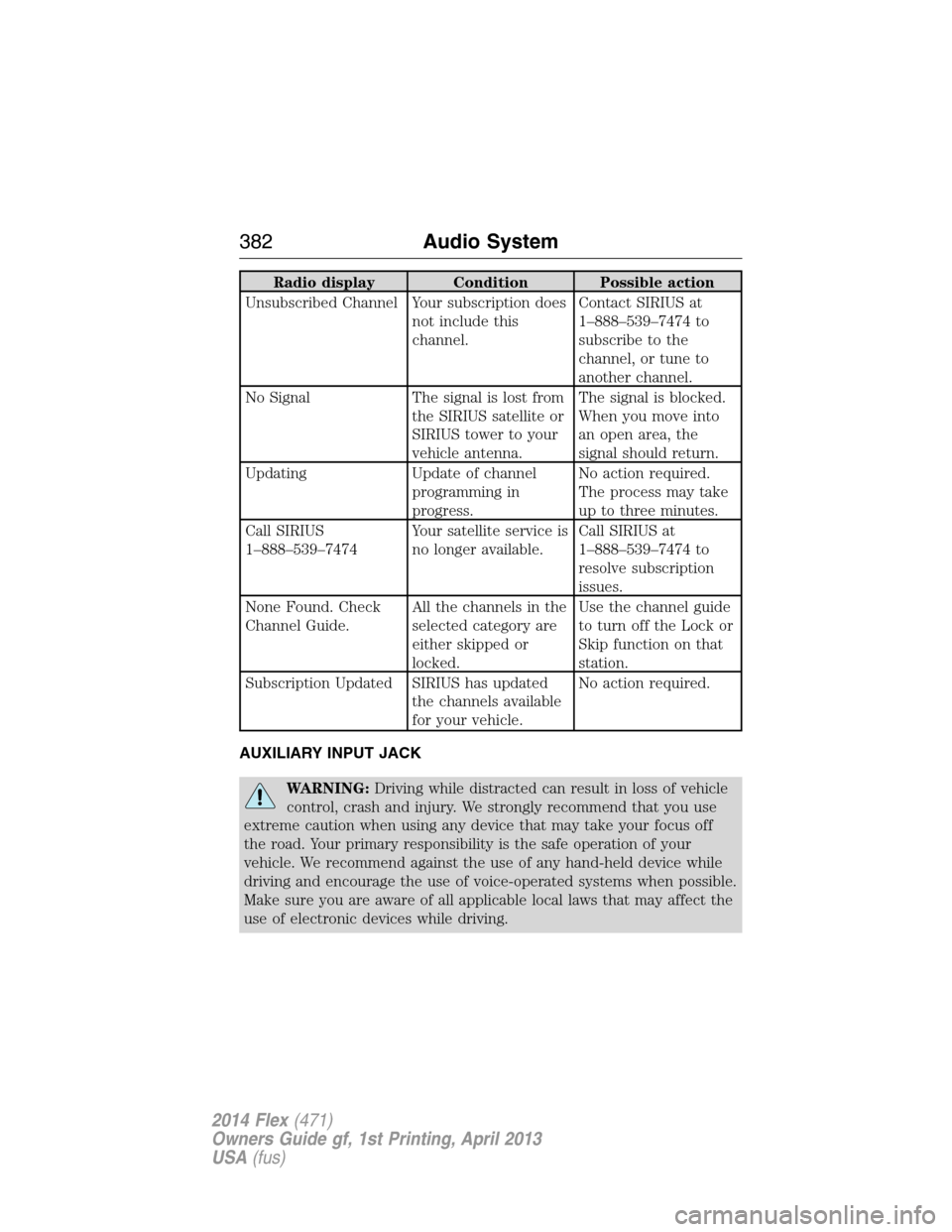
Radio display Condition Possible action
Unsubscribed Channel Your subscription does
not include this
channel.Contact SIRIUS at
1–888–539–7474 to
subscribe to the
channel, or tune to
another channel.
No Signal The signal is lost from
the SIRIUS satellite or
SIRIUS tower to your
vehicle antenna.The signal is blocked.
When you move into
an open area, the
signal should return.
Updating Update of channel
programming in
progress.No action required.
The process may take
up to three minutes.
Call SIRIUS
1–888–539–7474Your satellite service is
no longer available.Call SIRIUS at
1–888–539–7474 to
resolve subscription
issues.
None Found. Check
Channel Guide.All the channels in the
selected category are
either skipped or
locked.Use the channel guide
to turn off the Lock or
Skip function on that
station.
Subscription Updated SIRIUS has updated
the channels available
for your vehicle.No action required.
AUXILIARY INPUT JACK
WARNING:Driving while distracted can result in loss of vehicle
control, crash and injury. We strongly recommend that you use
extreme caution when using any device that may take your focus off
the road. Your primary responsibility is the safe operation of your
vehicle. We recommend against the use of any hand-held device while
driving and encourage the use of voice-operated systems when possible.
Make sure you are aware of all applicable local laws that may affect the
use of electronic devices while driving.
382Audio System
2014 Flex(471)
Owners Guide gf, 1st Printing, April 2013
USA(fus)