2014 FORD F150 steering
[x] Cancel search: steeringPage 4 of 472

Introduction
About This Manual...........................................7
Symbols Glossary
.............................................7
Data Recording
..................................................9
California Proposition 65..............................11
Perchlorate.........................................................11
Ford Credit
..........................................................11
Replacement Parts Recommendation
........................................11
Special Notices................................................12
Mobile Communications Equipment.....................................................12
Export Unique Options..................................13
Child Safety
General Information
.......................................14
Installing Child Seats.....................................15
Booster Seats
..................................................24
Child Seat Positioning..................................26
Child Safety Locks.........................................28
Safety Belts
Principle of Operation
..................................30
Fastening the Safety Belts...........................31
Safety Belt Height Adjustment
.................34
Safety Belt Warning Lamp and Indicator Chime.............................................................34
Safety Belt Minder
.........................................35
Child Restraint and Safety Belt Maintenance................................................37
Personal Safety System ™
Personal Safety System ™
..........................38
Supplementary Restraints System
Principle of Operation..................................39
Driver and Passenger Airbags
...................40
Front Passenger Sensing System.............41
Side Airbags
.....................................................45 Safety Canopy
™
............................................46
Crash Sensors and Airbag Indicator.......48
Airbag Disposal..............................................48
Keys and Remote Controls
General Information on Radio Frequencies.................................................49
Remote Control
..............................................49
Replacing a Lost Key or Remote Control............................................................52
MyKey ™
Principle of Operation..................................53
Creating a MyKey............................................53
Clearing All MyKeys.......................................55
Checking MyKey System Status...............55
Using MyKey With Remote Start Systems.........................................................55
MyKey Troubleshooting...............................56
Locks
Locking and Unlocking.................................57
Keyless Entry
...................................................58
Security
Passive Anti-Theft System
..........................61
Anti-Theft Alarm............................................62
Power Running Boards
Using Power Running Boards....................63
Steering Wheel
Adjusting the Steering Wheel
...................65
Audio Control
..................................................66
Voice Control....................................................67
Cruise Control
..................................................67
Information Display Control
.......................67
Pedals
Adjusting the Pedals
....................................68
1
F150 (TF6) , enUSA Table of Contents
Page 6 of 472

Transmission
Automatic Transmission............................147
Four-Wheel Drive
Using Four-Wheel Drive
.............................153
Rear Axle
Limited Slip Differential..............................161
Electronic Locking Differential
.................161
Brakes
General Information
....................................163
Hints on Driving With Anti-Lock Brakes...........................................................163
Parking Brake.................................................164
Hill Start Assist..............................................164
Traction Control
Principle of Operation................................166
Using Traction Control...............................166
Stability Control
Principle of Operation.................................167
Using Stability Control...............................168
Terrain Response
Principle of Operation.................................170
Using Hill Descent Control........................170
Parking Aids
Parking Aid
.......................................................172
Rear View Camera........................................173
Cruise Control
Principle of Operation.................................176
Using Cruise Control
....................................176
Driving Aids
Steering
.............................................................177 Load Carrying
Load Limit
........................................................179
Tailgate.............................................................186
Towing
Towing a Trailer..............................................191
Trailer Sway Control....................................192
Recommended Towing Weights............192
Essential Towing Checks...........................201
Transporting the Vehicle
...........................207
Towing the Vehicle on Four Wheels......208
Driving Hints
Breaking-In......................................................210
Economical Driving
......................................210
Driving Through Water.................................211
Floor Mats.........................................................211
Snowplowing..................................................212
Roadside Emergencies
Roadside Assistance...................................215
Hazard Warning Flashers
..........................216
Fuel Shutoff....................................................216
Jump Starting the Vehicle.........................216
Post-Crash Alert System
...........................218
Customer Assistance
Getting the Services You Need................219
In California (U.S. Only)
............................220
The Better Business Bureau (BBB) Auto Line Program (U.S. Only).......................221
Utilizing the Mediation/Arbitration Program (Canada Only)
........................221
Getting Assistance Outside the U.S. and Canada........................................................222
Ordering Additional Owner's Literature.....................................................223
Reporting Safety Defects (U.S. Only).............................................................223
Reporting Safety Defects (Canada Only).............................................................224
3
F150 (TF6) , enUSA Table of Contents
Page 7 of 472

Fuses
Fuse Specification Chart...........................225
Changing a Fuse
...........................................233
Maintenance
General Information
...................................235
Opening and Closing the Hood..............235
Under Hood Overview -
3.5L
Ecoboost™................................................236
Under Hood Overview - 3.7L....................237
Under Hood Overview - 5.0L..................238
Under Hood Overview -
6.2L...................239
Engine Oil Dipstick
......................................240
Engine Oil Check..........................................240
Engine Coolant Check
................................241
Automatic Transmission Fluid Check...........................................................245
Transfer Case Fluid Check........................245
Brake Fluid Check........................................246
Power Steering Fluid Check....................246
Washer Fluid Check
....................................246
Fuel Filter
........................................................246
Changing the 12V Battery.........................246
Checking the Wiper Blades
.....................249
Changing the Wiper Blades.....................249
Adjusting the Headlamps........................249
Removing a Headlamp
...............................251
Changing a Bulb...........................................252
Bulb Specification Chart...........................254
Changing the Engine Air Filter -
3.5L
Ecoboost™................................................256
Changing the Engine Air Filter -
3.7L/
5.0L/6.2L.....................................................257
Vehicle Care
General Information...................................259
Cleaning Products.......................................259
Cleaning the Exterior
..................................259
Waxing............................................................260
Cleaning the Engine
...................................260 Cleaning the Windows and Wiper
Blades...........................................................261
Cleaning the Interior....................................261
Cleaning the Instrument Panel and Instrument Cluster Lens........................261
Cleaning Leather Seats.............................262
Repairing Minor Paint Damage
..............263
Cleaning the Alloy Wheels.......................264
Vehicle Storage............................................264
Wheels and Tires
General Information...................................266
Tire Care
..........................................................268
Using Snow Chains
.....................................283
Tire Pressure Monitoring System...........283
Changing a Road Wheel...........................289
Technical Specifications
...........................294
Capacities and Specific- ations
Engine Specifications................................296
Motorcraft Parts
..........................................298
Vehicle Identification Number
...............298
Vehicle Certification Label.......................299
Transmission Code Designation...........300
Technical Specifications
............................301
Audio System
General Information...................................306
Audio unit - Vehicles With: AM/FM.......307
Audio unit -
Vehicles With: AM/FM/CD/
SYNC/Satellite Radio...........................308
Audio unit -
Vehicles With: AM/FM/CD/
SYNC/Satellite Radio.............................312
Audio unit - Vehicles With: Sony AM/FM/ CD...................................................................315
Digital Radio...................................................316
Satellite Radio
...............................................318
Audio Input Jack............................................321
USB Port
..........................................................322
Media Hub......................................................322
4
F150 (TF6) , enUSA Table of Contents
Page 12 of 472
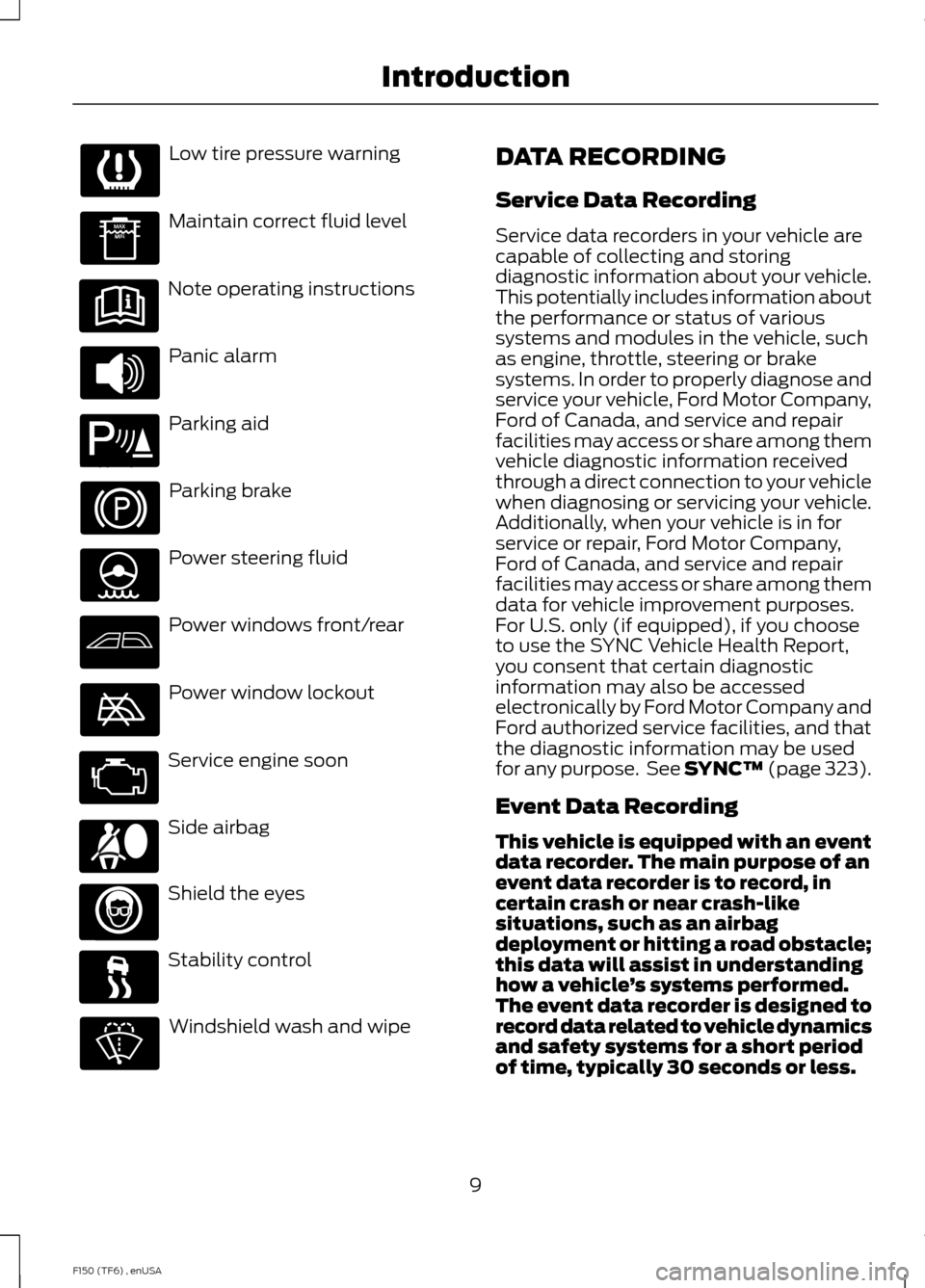
Low tire pressure warning
Maintain correct fluid level
Note operating instructions
Panic alarm
Parking aid
Parking brake
Power steering fluid
Power windows front/rear
Power window lockout
Service engine soon
Side airbag
Shield the eyes
Stability control
Windshield wash and wipe DATA RECORDING
Service Data Recording
Service data recorders in your vehicle are
capable of collecting and storing
diagnostic information about your vehicle.
This potentially includes information about
the performance or status of various
systems and modules in the vehicle, such
as engine, throttle, steering or brake
systems. In order to properly diagnose and
service your vehicle, Ford Motor Company,
Ford of Canada, and service and repair
facilities may access or share among them
vehicle diagnostic information received
through a direct connection to your vehicle
when diagnosing or servicing your vehicle.
Additionally, when your vehicle is in for
service or repair, Ford Motor Company,
Ford of Canada, and service and repair
facilities may access or share among them
data for vehicle improvement purposes.
For U.S. only (if equipped), if you choose
to use the SYNC Vehicle Health Report,
you consent that certain diagnostic
information may also be accessed
electronically by Ford Motor Company and
Ford authorized service facilities, and that
the diagnostic information may be used
for any purpose. See SYNC™ (page 323).
Event Data Recording
This vehicle is equipped with an event
data recorder. The main purpose of an
event data recorder is to record, in
certain crash or near crash-like
situations, such as an airbag
deployment or hitting a road obstacle;
this data will assist in understanding
how a vehicle
’s systems performed.
The event data recorder is designed to
record data related to vehicle dynamics
and safety systems for a short period
of time, typically 30 seconds or less.
9
F150 (TF6) , enUSA Introduction E139213 E167012
Page 13 of 472

The event data recorder in this vehicle
is designed to record such data as:
•
How various systems in your vehicle
were operating;
• Whether or not the driver and
passenger safety belts were
buckled/fastened;
• How far (if at all) the driver was
depressing the accelerator and/or
the brake pedal; and
• How fast the vehicle was traveling;
and
• Where the driver was positioning
the steering wheel.
This data can help provide a better
understanding of the circumstances in
which crashes and injuries occur.
Note: Event data recorder data is
recorded by your vehicle only if a
non-trivial crash situation occurs; no data
is recorded by the event data recorder
under normal driving conditions and no
personal data or information (e.g., name,
gender, age, and crash location) is
recorded (see limitations regarding 911
Assist and Traffic, directions and
Information privacy below). However,
parties, such as law enforcement, could
combine the event data recorder data
with the type of personally identifying
data routinely acquired during a crash
investigation.
To read data recorded by an event data
recorder, special equipment is required,
and access to the vehicle or the event
data recorder is needed. In addition to
the vehicle manufacturer, other
parties, such as law enforcement, that
have such special equipment, can read
the information if they have access to
the vehicle or the event data recorder.
Ford Motor Company and Ford of
Canada do not access event data
recorder information without obtaining
consent, unless pursuant to court order or where required by law enforcement,
other government authorities or other
third parties acting with lawful
authority. Other parties may seek to
access the information independently
of Ford Motor Company and Ford of
Canada.
Note:
Including to the extent that any
law pertaining to Event Data Recorders
applies to SYNC or its features, please
note the following: Once 911 Assist (if
equipped) is enabled (set ON), 911 Assist
may, through any paired and connected
cell phone, disclose to emergency
services that the vehicle has been in a
crash involving the deployment of an
airbag or, in certain vehicles, the
activation of the fuel pump shut-off.
Certain versions or updates to 911 Assist
may also be capable of being used to
electronically or verbally provide to 911
operators the vehicle location (such as
latitude and longitude), and/or other
details about the vehicle or crash or
personal information about the
occupants to assist 911 operators to
provide the most appropriate emergency
services. If you do not want to disclose
this information, do not activate the 911
Assist feature. See SYNC™ (page 323).
Additionally, when you connect to
Traffic, Directions and Information (if
equipped, U.S. only), the service uses
GPS technology and advanced vehicle
sensors to collect the vehicle ’s current
location, travel direction, and speed
(“ vehicle travel information ”), only to
help provide you with the directions,
traffic reports, or business searches
that you request. If you do not want
Ford or its vendors to receive this
information, do not activate the
service. For more information, see
Traffic, Directions and Information,
Terms and Conditions. See
SYNC™
(page 323).
10
F150 (TF6) , enUSA Introduction
Page 53 of 472
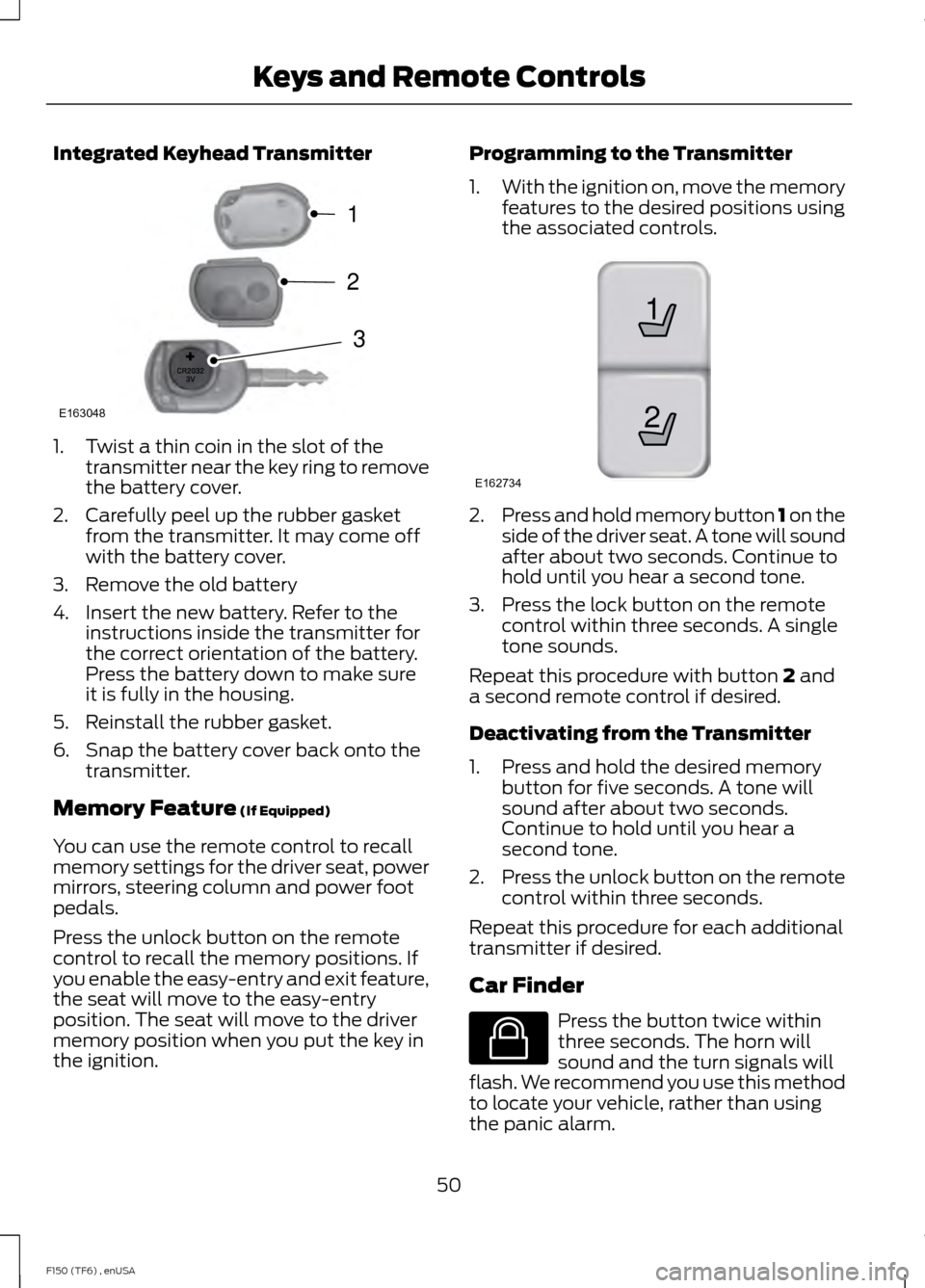
Integrated Keyhead Transmitter
1. Twist a thin coin in the slot of the
transmitter near the key ring to remove
the battery cover.
2. Carefully peel up the rubber gasket from the transmitter. It may come off
with the battery cover.
3. Remove the old battery
4. Insert the new battery. Refer to the instructions inside the transmitter for
the correct orientation of the battery.
Press the battery down to make sure
it is fully in the housing.
5. Reinstall the rubber gasket.
6. Snap the battery cover back onto the transmitter.
Memory Feature (If Equipped)
You can use the remote control to recall
memory settings for the driver seat, power
mirrors, steering column and power foot
pedals.
Press the unlock button on the remote
control to recall the memory positions. If
you enable the easy-entry and exit feature,
the seat will move to the easy-entry
position. The seat will move to the driver
memory position when you put the key in
the ignition. Programming to the Transmitter
1.
With the ignition on, move the memory
features to the desired positions using
the associated controls. 2.
Press and hold memory button 1 on the
side of the driver seat. A tone will sound
after about two seconds. Continue to
hold until you hear a second tone.
3. Press the lock button on the remote control within three seconds. A single
tone sounds.
Repeat this procedure with button
2 and
a second remote control if desired.
Deactivating from the Transmitter
1. Press and hold the desired memory button for five seconds. A tone will
sound after about two seconds.
Continue to hold until you hear a
second tone.
2. Press the unlock button on the remote
control within three seconds.
Repeat this procedure for each additional
transmitter if desired.
Car Finder Press the button twice within
three seconds. The horn will
sound and the turn signals will
flash. We recommend you use this method
to locate your vehicle, rather than using
the panic alarm.
50
F150 (TF6) , enUSA Keys and Remote ControlsE163048
3
2
1 21
E162734 E138623
Page 68 of 472
ADJUSTING THE STEERING
WHEEL
WARNING
Do not adjust the steering wheel
when your vehicle is moving.
Note:
Make sure that you are sitting in the
correct position. See Sitting in the Correct
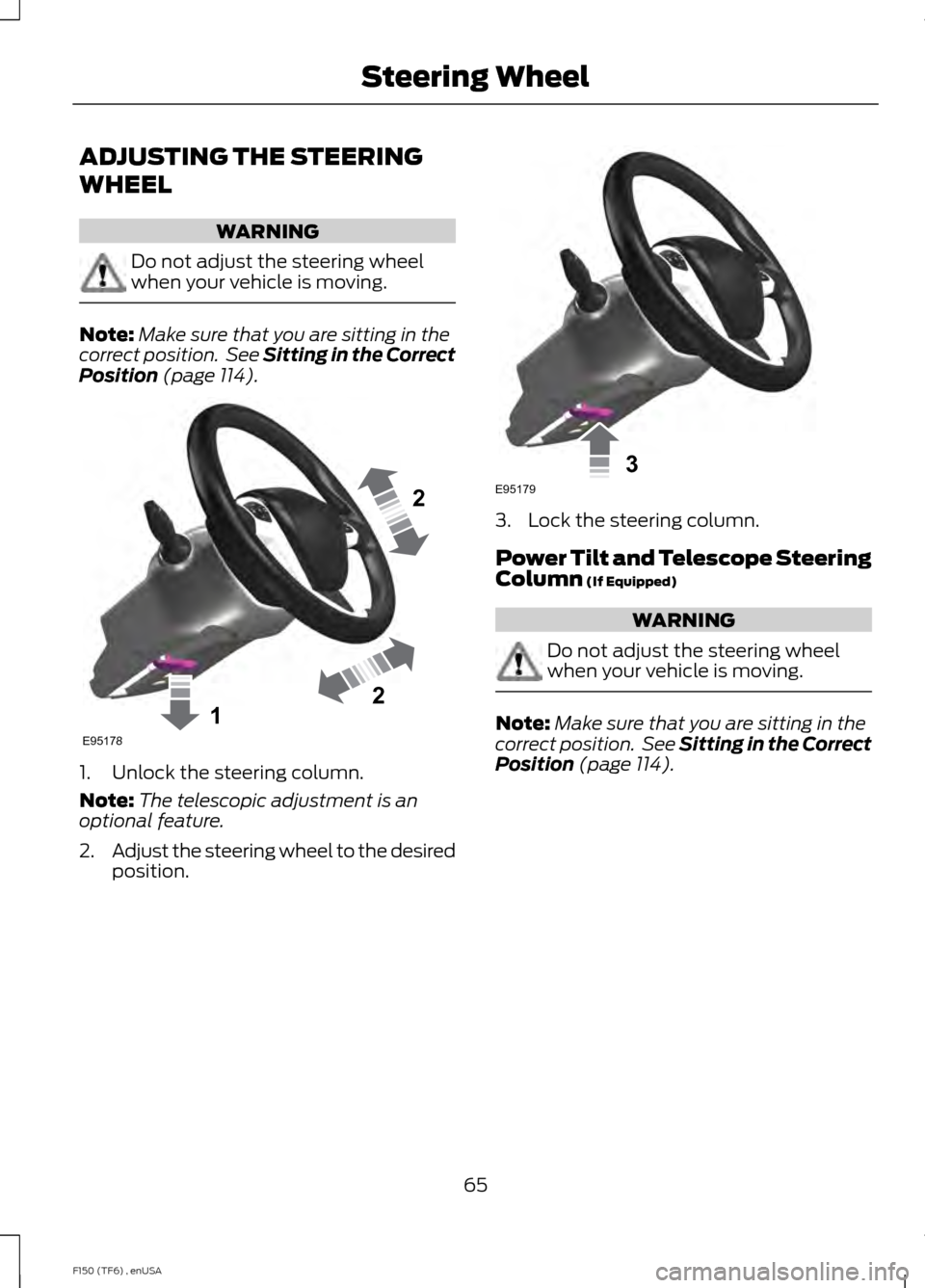
Position (page 114). 1. Unlock the steering column.
Note:
The telescopic adjustment is an
optional feature.
2. Adjust the steering wheel to the desired
position. 3. Lock the steering column.
Power Tilt and Telescope Steering
Column
(If Equipped)
WARNING
Do not adjust the steering wheel
when your vehicle is moving.
Note:
Make sure that you are sitting in the
correct position. See Sitting in the Correct
Position
(page 114).
65
F150 (TF6) , enUSA Steering Wheel122E95178 3E95179
Page 69 of 472
Use the control on the side of the steering
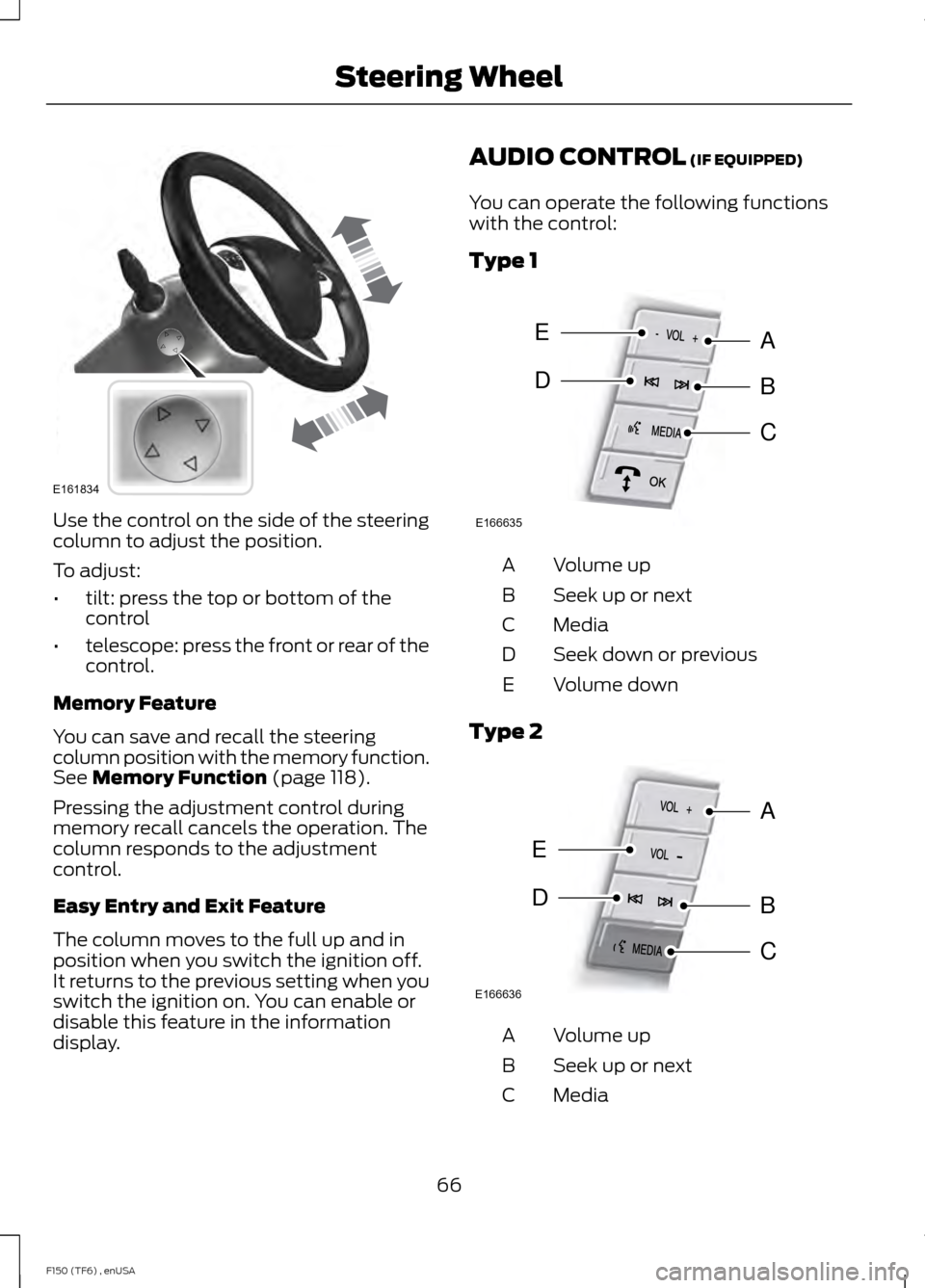
column to adjust the position.
To adjust:
•
tilt: press the top or bottom of the
control
• telescope: press the front or rear of the
control.
Memory Feature
You can save and recall the steering
column position with the memory function.
See Memory Function (page 118).
Pressing the adjustment control during
memory recall cancels the operation. The
column responds to the adjustment
control.
Easy Entry and Exit Feature
The column moves to the full up and in
position when you switch the ignition off.
It returns to the previous setting when you
switch the ignition on. You can enable or
disable this feature in the information
display. AUDIO CONTROL
(IF EQUIPPED)
You can operate the following functions
with the control:
Type 1 Volume up
A
Seek up or next
B
Media
C
Seek down or previous
D
Volume down
E
Type 2 Volume up
A
Seek up or next
B
Media
C
66
F150 (TF6) , enUSA Steering WheelE161834 E166635
E
DB
A
C E166636
E
DB
A
C