2014 FORD F150 radio
[x] Cancel search: radioPage 70 of 472
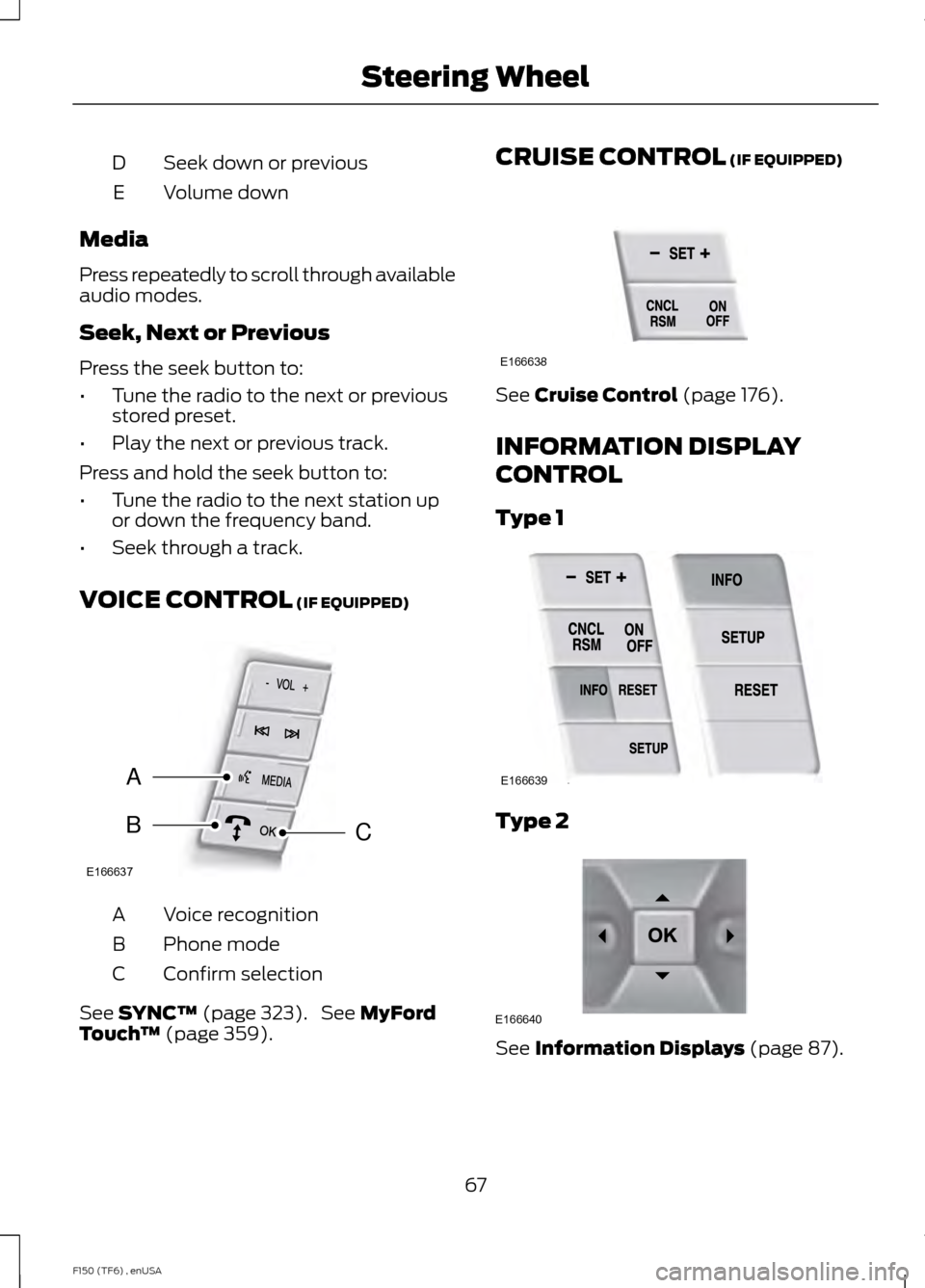
Seek down or previous
D
Volume down
E
Media
Press repeatedly to scroll through available
audio modes.
Seek, Next or Previous
Press the seek button to:
• Tune the radio to the next or previous
stored preset.
• Play the next or previous track.
Press and hold the seek button to:
• Tune the radio to the next station up
or down the frequency band.
• Seek through a track.
VOICE CONTROL (IF EQUIPPED) Voice recognition
A
Phone mode
B
Confirm selection
C
See
SYNC™ (page 323). See MyFord
Touch ™ (page 359). CRUISE CONTROL
(IF EQUIPPED)
See
Cruise Control (page 176).
INFORMATION DISPLAY
CONTROL
Type 1 Type 2
See
Information Displays (page 87).
67
F150 (TF6) , enUSA Steering WheelE166637
A
BC E166638 E166639 E166640
Page 131 of 472
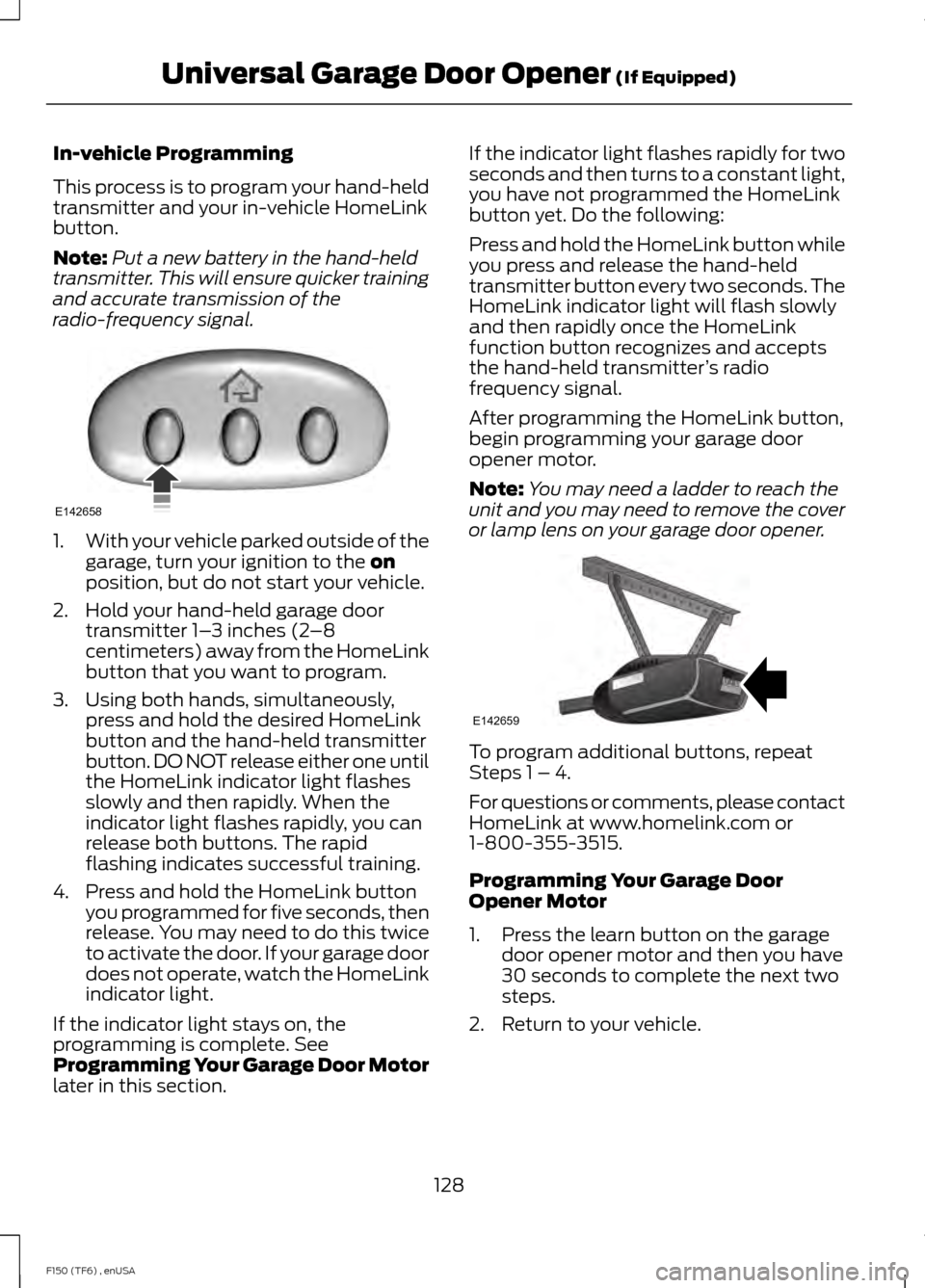
In-vehicle Programming
This process is to program your hand-held
transmitter and your in-vehicle HomeLink
button.
Note:
Put a new battery in the hand-held
transmitter. This will ensure quicker training
and accurate transmission of the
radio-frequency signal. 1.
With your vehicle parked outside of the
garage, turn your ignition to the on
position, but do not start your vehicle.
2. Hold your hand-held garage door transmitter 1– 3 inches (2–8
centimeters) away from the HomeLink
button that you want to program.
3. Using both hands, simultaneously, press and hold the desired HomeLink
button and the hand-held transmitter
button. DO NOT release either one until
the HomeLink indicator light flashes
slowly and then rapidly. When the
indicator light flashes rapidly, you can
release both buttons. The rapid
flashing indicates successful training.
4. Press and hold the HomeLink button you programmed for five seconds, then
release. You may need to do this twice
to activate the door. If your garage door
does not operate, watch the HomeLink
indicator light.
If the indicator light stays on, the
programming is complete. See
Programming Your Garage Door Motor
later in this section. If the indicator light flashes rapidly for two
seconds and then turns to a constant light,
you have not programmed the HomeLink
button yet. Do the following:
Press and hold the HomeLink button while
you press and release the hand-held
transmitter button every two seconds. The
HomeLink indicator light will flash slowly
and then rapidly once the HomeLink
function button recognizes and accepts
the hand-held transmitter
’s radio
frequency signal.
After programming the HomeLink button,
begin programming your garage door
opener motor.
Note: You may need a ladder to reach the
unit and you may need to remove the cover
or lamp lens on your garage door opener. To program additional buttons, repeat
Steps 1 – 4.
For questions or comments, please contact
HomeLink at www.homelink.com or
1-800-355-3515.
Programming Your Garage Door
Opener Motor
1. Press the learn button on the garage
door opener motor and then you have
30 seconds to complete the next two
steps.
2. Return to your vehicle.
128
F150 (TF6) , enUSA Universal Garage Door Opener
(If Equipped)E142658 E142659
Page 138 of 472
GENERAL INFORMATION
WARNINGS
Extended idling at high engine
speeds can produce very high
temperatures in the engine and
exhaust system, creating the risk of fire or
other damage. Do not park, idle or drive your vehicle
on dry grass or other dry ground
cover. The emission system heats up
the engine compartment and exhaust
system, creating the risk of fire. Do not start the engine in a closed
garage or in other enclosed areas.
Exhaust fumes can be toxic. Always
open the garage door before you start the
engine. If you smell exhaust fumes inside
your vehicle, have your vehicle
checked by an authorized dealer
immediately. Do not drive your vehicle if
you smell exhaust fumes. If you disconnect the battery, your vehicle
may exhibit some unusual driving
characteristics for approximately 5 miles
(8 kilometers) after you reconnect it. This
is because the engine management system
must realign itself with the engine. You can
disregard any unusual driving
characteristics during this period.
The powertrain control system meets all
Canadian interference-causing equipment
standard requirements regulating the
impulse electrical field or radio noise.
When you start the engine, avoid pressing
the accelerator pedal before and during
operation. Only use the accelerator pedal
when you have difficulty starting the
engine. IGNITION SWITCH
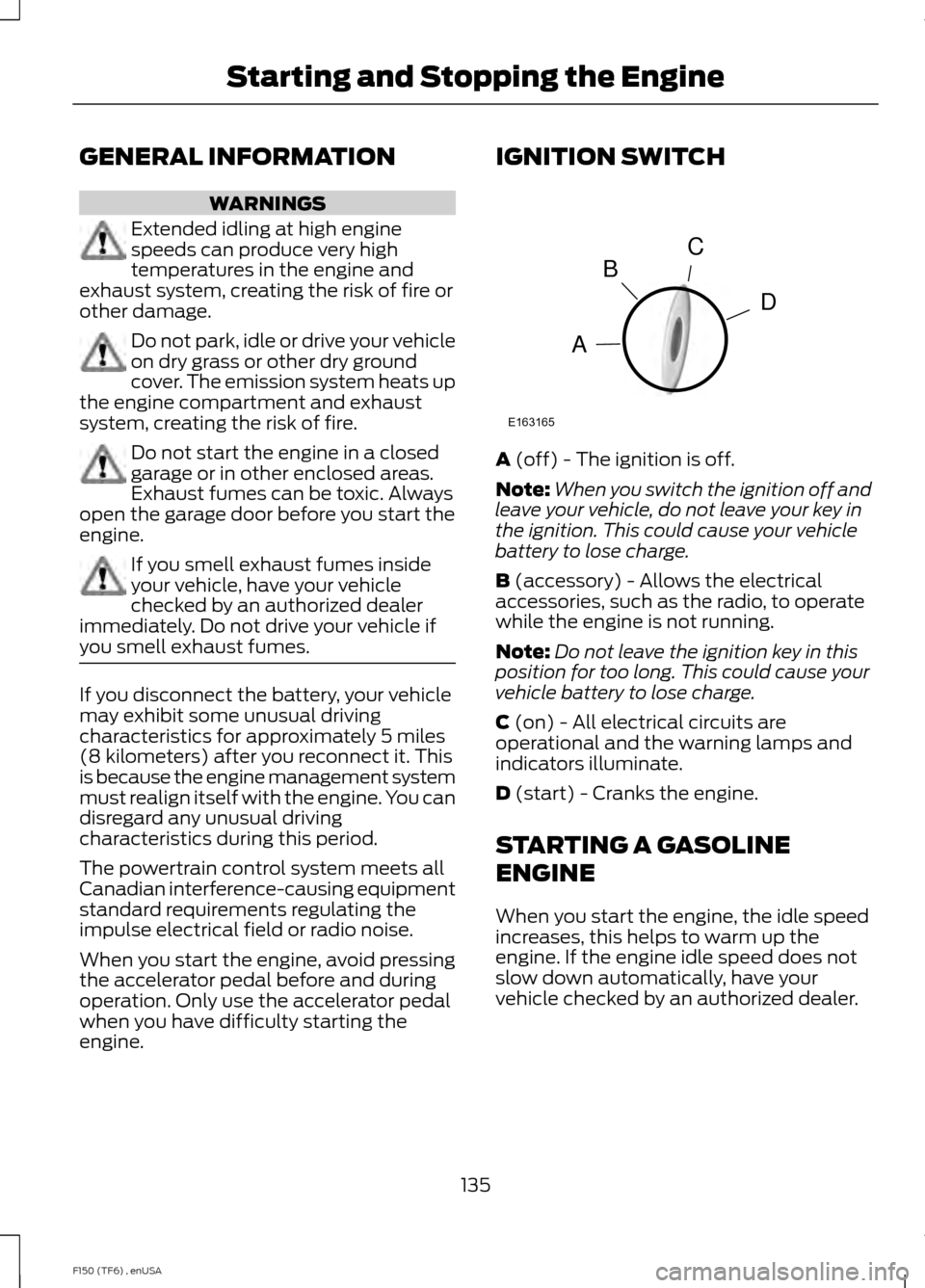
A (off) - The ignition is off.
Note: When you switch the ignition off and
leave your vehicle, do not leave your key in
the ignition. This could cause your vehicle
battery to lose charge.
B
(accessory) - Allows the electrical
accessories, such as the radio, to operate
while the engine is not running.
Note: Do not leave the ignition key in this
position for too long. This could cause your
vehicle battery to lose charge.
C
(on) - All electrical circuits are
operational and the warning lamps and
indicators illuminate.
D
(start) - Cranks the engine.
STARTING A GASOLINE
ENGINE
When you start the engine, the idle speed
increases, this helps to warm up the
engine. If the engine idle speed does not
slow down automatically, have your
vehicle checked by an authorized dealer.
135
F150 (TF6) , enUSA Starting and Stopping the EngineC
D
B
A
E163165
Page 175 of 472

PARKING AID (IF EQUIPPED)
WARNINGS
To help avoid personal injury, please
read and understand the limitations
of the system as contained in this
section. Sensing is only an aid for some
(generally large and fixed) objects when
moving in reverse on a flat surface at
parking speeds. Traffic control systems,
inclement weather, air brakes, and external
motors and fans may also affect the
function of the sensing system; this may
include reduced performance or a false
activation. To help avoid personal injury, always
use caution when in R (Reverse) and
when using the sensing system.
This system is not designed to
prevent contact with small or moving
objects. The system is designed to
provide a warning to assist the driver in
detecting large stationary objects to avoid
damaging the vehicle. The system may not
detect smaller objects, particularly those
close to the ground. Certain add-on devices such as large
trailer hitches, bike or surfboard racks
and any device that may block the
normal detection zone of the system, may
create false beeps. Note:
Keep the sensors, located on the
bumper or fascia, free from snow, ice and
large accumulations of dirt. If the sensors
are covered, the system ’s accuracy can be
affected. Do not clean the sensors with
sharp objects.
Note: If your vehicle sustains damage to
the bumper or fascia, leaving it misaligned
or bent, the sensing zone may be altered
causing inaccurate measurement of
obstacles or false alarms. Note:
If your vehicle is equipped with
MyKey ™, it is possible to prevent turning
the sensing system off. See MyKey ™
(page
53).
Note: If your vehicle is equipped with a fully
integrated electronic trailer brake controller
(TBC) and a trailer with electric trailer
brakes is connected to your vehicle, the RSS
will be disabled. When the vehicle is shifted
into reverse, the information display will
remain in the Rear Park Aid Off selection.
For more information on the TBC, See
Trailer Sway Control
(page 192).
The sensing system warns the driver of
obstacles within a certain range of the
bumper area. The system turns on
automatically whenever the ignition is
switched on.
When receiving a detection warning, the
radio volume is reduced to a
predetermined level. After the warning
goes away, the radio volume returns to the
previous level.
Rear Sensing System
The rear sensors are only active when the
transmission is in R (Reverse). As the
vehicle moves closer to the obstacle, the
rate of the audible warning increases.
When the obstacle is fewer than 12 inches
(30 centimeters) away, the warning
sounds continuously. If a stationary or
receding object is detected farther than 12
inches (30 centimeters) from the side of
the vehicle, the tone sounds for only three
seconds. Once the system detects an
object approaching, the warning sounds
again.
172
F150 (TF6) , enUSA Parking Aids
Page 219 of 472
HAZARD WARNING FLASHERS
Note:
The hazard warning flashers will
operate when the ignition is in any position
or if the key is not in the ignition. If used
when the engine is not running, the battery
will lose charge. As a result, there may be
insufficient power to restart your engine. The hazard flasher control is
located on the instrument panel
by the radio. Use it when your
vehicle is disabled and is creating a safety
hazard for other motorists.
• Press the flasher control and all front
and rear direction indicators flash.
• Press the flasher control again to turn
them off.
FUEL SHUTOFF WARNING
Failure to inspect and, if necessary,
repair fuel leaks after a collision may
increase the risk of fire and serious
injury. Ford Motor Company recommends
that the fuel system be inspected by an
authorized dealer after any collision. In the event of a moderate to severe
collision, this vehicle is equipped with a
fuel pump shut-off feature that stops the
flow of fuel to the engine. Not every impact
will cause a shut-off.
Should your vehicle shut off after a
collision, you may restart your vehicle. For
vehicles equipped with a key system:
1. Switch off the ignition.
2. Switch on the ignition.
3. Repeat Steps 1 and 2 to re-enable the
fuel pump. For vehicles equipped with a push button
start system:
1. Press the START/STOP button to
switch off the ignition.
2. Press the brake pedal and press the START/STOP
button to start the
vehicle.
3. Remove your foot from the brake pedal
and press the
START/STOP button
to switch off the ignition.
4. You can either attempt to start the engine by pressing the brake pedal and
the
START/STOP button, or switch
on the ignition only by pressing the
START/STOP
button without
pressing the brake pedal. Both ways
re-enable the fuel system.
Note: When you try to restart your vehicle
after a fuel shutoff, the vehicle makes sure
that various systems are safe to restart.
Once your vehicle determines that the
systems are safe, then the vehicle will allow
you to restart.
Note: In the event that your vehicle does
not restart after your third attempt, contact
an authorized dealer.
JUMP STARTING THE VEHICLE WARNINGS
The gases around the battery can
explode if exposed to flames, sparks,
or lit cigarettes. An explosion could
result in personal injury or vehicle damage. Batteries contain sulfuric acid which
can burn skin, eyes and clothing, if
contacted.
Use only an adequate-sized cable
with insulated clamps.
216
F150 (TF6) , enUSA Roadside EmergenciesE142663
Page 233 of 472

To reinstall the fuse panel cover, place the
top part of the cover on the fuse panel and
push the bottom part until it latches.
Gently pull on the cover to make sure it has
latched properly. Protected components
Fuse amp rating
Fuse or relay number
Driver side front window
30A
1
SYNC , Display module (8 inch)
15A
2
Passenger side front window
30A
3
Interior lamps
10A
4
Memory module
20A
5
Not used (spare)
5A
6
Power mirror switch, Memory seat module
7.5A
7
Not used (spare)
10A
8
Radio display, GPS module, Electric finish
panel module
10A
9
230
F150 (TF6) , enUSA FusesE163102
Page 234 of 472

Protected components
Fuse amp rating
Fuse or relay number
Run/accessory relay
10A
10
Instrument cluster
10A
11
Interior lighting, Puddle lamps, Back-
lighting, Cargo lamp
15A
12
Right turn signals/stop lamps
15A
13
Left turn signals/stop lamps
15A
14
Reverse lights, High-mounted stop lamp
15A
15
Right low-beam headlamp
10A
16
Left low-beam headlamp
10A
17
Brake-shift interlock, Keypad illumination,
Powertrain control module wake-up,
Passive anti-theft system
10A
18
Audio amplifier
20A
19
Power door locks
20A
20
Not used (spare)
10A
21
Horn
20A
22
Steering wheel control module
15A
23
Datalink connector, Steering wheel control
module
15A
24
Not used (spare)
15A
25
Radio frequency module
5A
26
Not used (spare)
20A
27
Ignition switch
15A
28
Radio
20A
29
Front parking lamps
15A
30
Brake on/off – Instrument panel, Engine
5A
31
Delay/accessory – moonroof, power
windows, locks, Automatic dimming
mirror/Compass, Trailer tow power tele-
scope mirrors
15A
32
231
F150 (TF6) , enUSA Fuses
Page 235 of 472

Protected components
Fuse amp rating
Fuse or relay number
Rear heated seats
10A
33
Reverse sensing system, 4x4 switch, Rear
video, Off-road indicator (SVT Raptor),
Front video (SVT Raptor), Camera splice
module (SVT Raptor)
10A
34
Hill descent switch (SVT Raptor)
5A
35
Restraint control module, Occupant classi-
fication system module
10A
36
Trailer brake control
10A
37
Delayed accessory – 110-volt power point,
Radio
10A
38
High-beam headlamps
15A
39
Rear park lamps
10A
40
Passenger airbag deactivation indicator,
Auxiliary switch (SVT Raptor)
7.5A
41
Overdrive cancel switch
5A
42
Not used (spare)
10A
43
Not used (spare)
10A
44
Not used (spare)
5A
45
Climate controls module
10A
46
Fog lamps, Exterior mirror turn signals
15A
47
Power windows, Power sliding back
window
30A Circuit breaker
48
Delayed accessory
Relay
49
232
F150 (TF6) , enUSA Fuses