2014 FORD F150 differential
[x] Cancel search: differentialPage 6 of 472

Transmission
Automatic Transmission............................147
Four-Wheel Drive
Using Four-Wheel Drive
.............................153
Rear Axle
Limited Slip Differential..............................161
Electronic Locking Differential
.................161
Brakes
General Information
....................................163
Hints on Driving With Anti-Lock Brakes...........................................................163
Parking Brake.................................................164
Hill Start Assist..............................................164
Traction Control
Principle of Operation................................166
Using Traction Control...............................166
Stability Control
Principle of Operation.................................167
Using Stability Control...............................168
Terrain Response
Principle of Operation.................................170
Using Hill Descent Control........................170
Parking Aids
Parking Aid
.......................................................172
Rear View Camera........................................173
Cruise Control
Principle of Operation.................................176
Using Cruise Control
....................................176
Driving Aids
Steering
.............................................................177 Load Carrying
Load Limit
........................................................179
Tailgate.............................................................186
Towing
Towing a Trailer..............................................191
Trailer Sway Control....................................192
Recommended Towing Weights............192
Essential Towing Checks...........................201
Transporting the Vehicle
...........................207
Towing the Vehicle on Four Wheels......208
Driving Hints
Breaking-In......................................................210
Economical Driving
......................................210
Driving Through Water.................................211
Floor Mats.........................................................211
Snowplowing..................................................212
Roadside Emergencies
Roadside Assistance...................................215
Hazard Warning Flashers
..........................216
Fuel Shutoff....................................................216
Jump Starting the Vehicle.........................216
Post-Crash Alert System
...........................218
Customer Assistance
Getting the Services You Need................219
In California (U.S. Only)
............................220
The Better Business Bureau (BBB) Auto Line Program (U.S. Only).......................221
Utilizing the Mediation/Arbitration Program (Canada Only)
........................221
Getting Assistance Outside the U.S. and Canada........................................................222
Ordering Additional Owner's Literature.....................................................223
Reporting Safety Defects (U.S. Only).............................................................223
Reporting Safety Defects (Canada Only).............................................................224
3
F150 (TF6) , enUSA Table of Contents
Page 86 of 472

Anti-Lock Braking System
If it illuminates when you are
driving, this indicates a
malfunction. You will continue
to have the normal braking system
(without ABS) unless the brake system
warning lamp is also illuminated. Have the
system checked by your authorized dealer.
Battery If it illuminates while driving, it
indicates a malfunction. Switch
off all unnecessary electrical
equipment and have the system checked
by your authorized dealer immediately.
Brake System Illuminates when you engage the
parking brake with the ignition
on.
If it illuminates when you are driving, check
that the parking brake is not engaged. If
the parking brake is not engaged, this
indicates low brake fluid level or a brake
system malfunction. Have the system
checked immediately by your authorized
dealer. WARNING
Driving your vehicle with the warning
lamp on is dangerous. A significant
decrease in braking performance
may occur. It will take you longer to stop
your vehicle. Have your vehicle checked by
your authorized dealer immediately. Driving
extended distances with the parking brake
engaged can cause brake failure and the
risk of personal injury. Check 4X4 (If Equipped)
Illuminates with the message
CHECK 4X4 when a four-wheel
drive fault is present. See Using
Four-Wheel Drive
(page 153).
Cruise Control
(If Equipped) Illuminates when you switch this
feature on. See
Using Cruise
Control (page 176).
Direction Indicator Illuminates when the left or right
turn signal or the hazard warning
flasher is turned on. If the
indicators stay on or flash faster, check for
a burned out bulb.
Door Ajar Displays when the ignition is on
and any door is not completely
closed.
Electronic Locking Differential Illuminates when using the
electronic locking differential.
Engine Coolant Temperature Illuminates when the engine
coolant temperature is high.
Stop the vehicle as soon as
possible, switch off the engine and let cool.
Engine Oil If it illuminates with the engine
running or when you are driving,
this indicates a malfunction.
Stop your vehicle as soon as it is safe to
do so and switch the engine off. Check the
engine oil level. See
Engine Oil Check
(page 240).
83
F150 (TF6) , enUSA Instrument Cluster E144522 E71340 E163170
Page 96 of 472
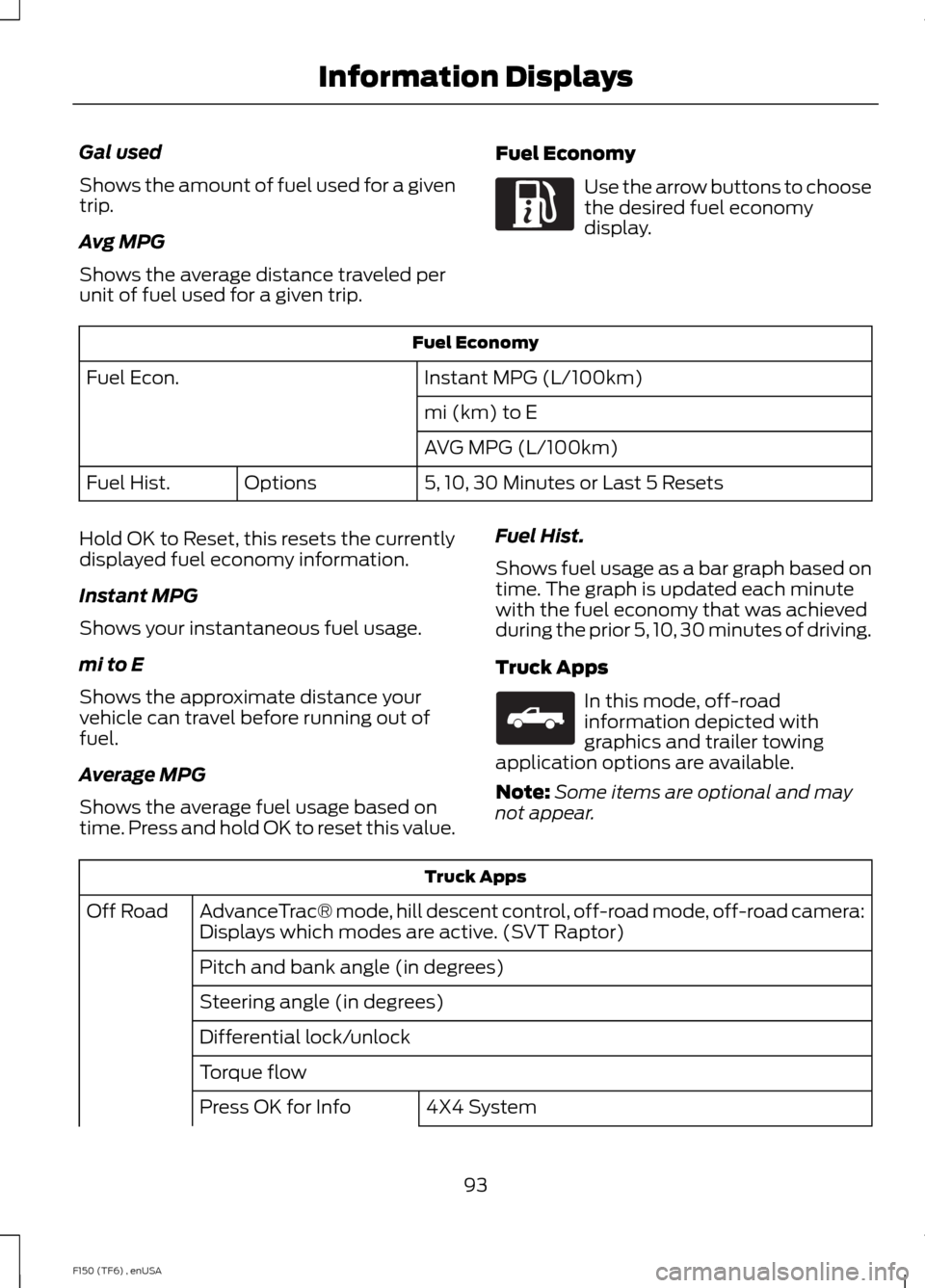
Gal used
Shows the amount of fuel used for a given
trip.
Avg MPG
Shows the average distance traveled per
unit of fuel used for a given trip.
Fuel Economy Use the arrow buttons to choose
the desired fuel economy
display.
Fuel Economy
Instant MPG (L/100km)
Fuel Econ.
mi (km) to E
AVG MPG (L/100km)
5, 10, 30 Minutes or Last 5 Resets
Options
Fuel Hist.
Hold OK to Reset, this resets the currently
displayed fuel economy information.
Instant MPG
Shows your instantaneous fuel usage.
mi to E
Shows the approximate distance your
vehicle can travel before running out of
fuel.
Average MPG
Shows the average fuel usage based on
time. Press and hold OK to reset this value. Fuel Hist.
Shows fuel usage as a bar graph based on
time. The graph is updated each minute
with the fuel economy that was achieved
during the prior 5, 10, 30 minutes of driving.
Truck Apps In this mode, off-road
information depicted with
graphics and trailer towing
application options are available.
Note: Some items are optional and may
not appear. Truck Apps
AdvanceTrac® mode, hill descent control, off-road mode, off-road camera:
Displays which modes are active. (SVT Raptor)
Off Road
Pitch and bank angle (in degrees)
Steering angle (in degrees)
Differential lock/unlock
Torque flow 4X4 System
Press OK for Info
93
F150 (TF6) , enUSA Information DisplaysE163180 E163181
Page 97 of 472
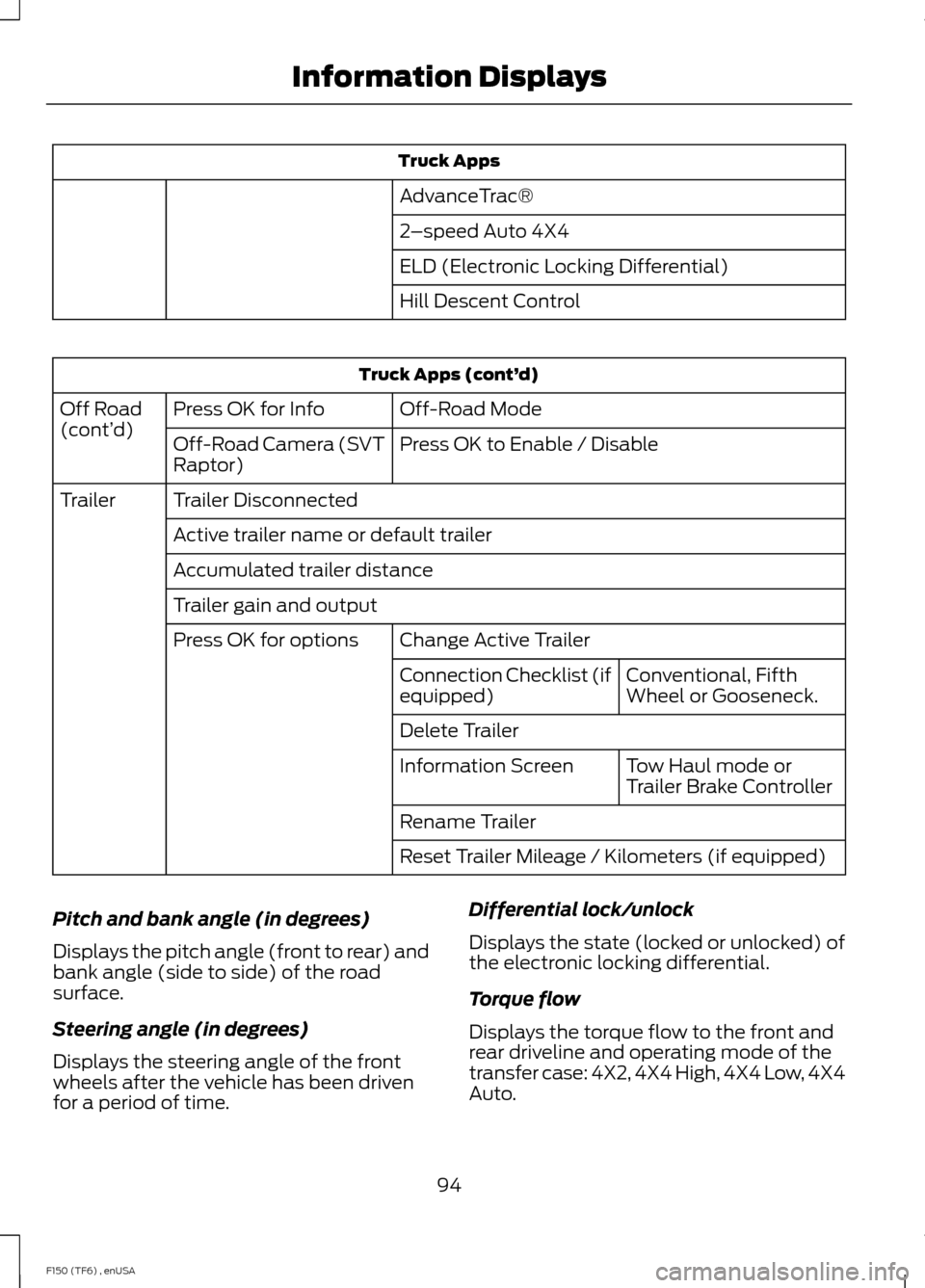
Truck Apps
AdvanceTrac®
2 –speed Auto 4X4
ELD (Electronic Locking Differential)
Hill Descent Control Truck Apps (cont’
d)
Off-Road Mode
Press OK for Info
Off Road
(cont’ d)
Press OK to Enable / Disable
Off-Road Camera (SVT
Raptor)
Trailer Disconnected
Trailer
Active trailer name or default trailer
Accumulated trailer distance
Trailer gain and output Change Active Trailer
Press OK for options
Conventional, Fifth
Wheel or Gooseneck.
Connection Checklist (if
equipped)
Delete Trailer
Tow Haul mode or
Trailer Brake Controller
Information Screen
Rename Trailer
Reset Trailer Mileage / Kilometers (if equipped)
Pitch and bank angle (in degrees)
Displays the pitch angle (front to rear) and
bank angle (side to side) of the road
surface.
Steering angle (in degrees)
Displays the steering angle of the front
wheels after the vehicle has been driven
for a period of time. Differential lock/unlock
Displays the state (locked or unlocked) of
the electronic locking differential.
Torque flow
Displays the torque flow to the front and
rear driveline and operating mode of the
transfer case: 4X2, 4X4 High, 4X4 Low, 4X4
Auto.
94
F150 (TF6) , enUSA Information Displays
Page 103 of 472
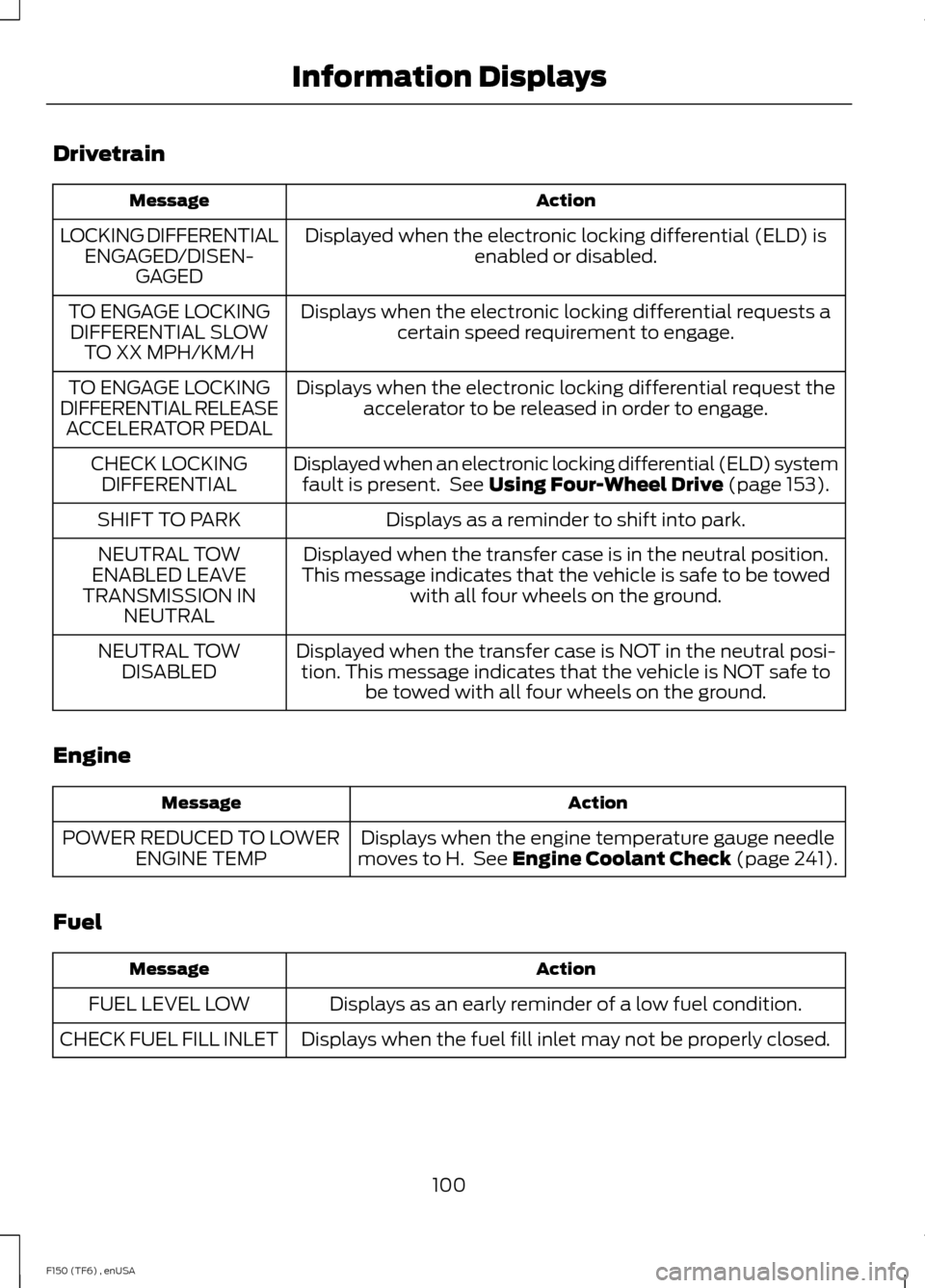
Drivetrain
Action
Message
Displayed when the electronic locking differential (ELD) isenabled or disabled.
LOCKING DIFFERENTIAL
ENGAGED/DISEN- GAGED
Displays when the electronic locking differential requests acertain speed requirement to engage.
TO ENGAGE LOCKING
DIFFERENTIAL SLOW TO XX MPH/KM/H
Displays when the electronic locking differential request theaccelerator to be released in order to engage.
TO ENGAGE LOCKING
DIFFERENTIAL RELEASE ACCELERATOR PEDAL
Displayed when an electronic locking differential (ELD) systemfault is present. See Using Four-Wheel Drive (page 153).
CHECK LOCKING
DIFFERENTIAL
Displays as a reminder to shift into park.
SHIFT TO PARK
Displayed when the transfer case is in the neutral position.
This message indicates that the vehicle is safe to be towed with all four wheels on the ground.
NEUTRAL TOW
ENABLED LEAVE
TRANSMISSION IN NEUTRAL
Displayed when the transfer case is NOT in the neutral posi-tion. This message indicates that the vehicle is NOT safe to be towed with all four wheels on the ground.
NEUTRAL TOW
DISABLED
Engine Action
Message
Displays when the engine temperature gauge needle
moves to H. See
Engine Coolant Check (page 241).
POWER REDUCED TO LOWER
ENGINE TEMP
Fuel Action
Message
Displays as an early reminder of a low fuel condition.
FUEL LEVEL LOW
Displays when the fuel fill inlet may not be properly closed.
CHECK FUEL FILL INLET
100
F150 (TF6) , enUSA Information Displays
Page 164 of 472
LIMITED SLIP DIFFERENTIAL
(IF EQUIPPED)
This axle provides added traction on
slippery surfaces, particularly when one
wheel is on a poor traction surface. Under
normal conditions, the limited-slip axle
functions like a standard rear axle. The axle
may exhibit a slight noise or vibration
during tight turns with low vehicle speed.
This is normal behavior and indicates the
axle is working.
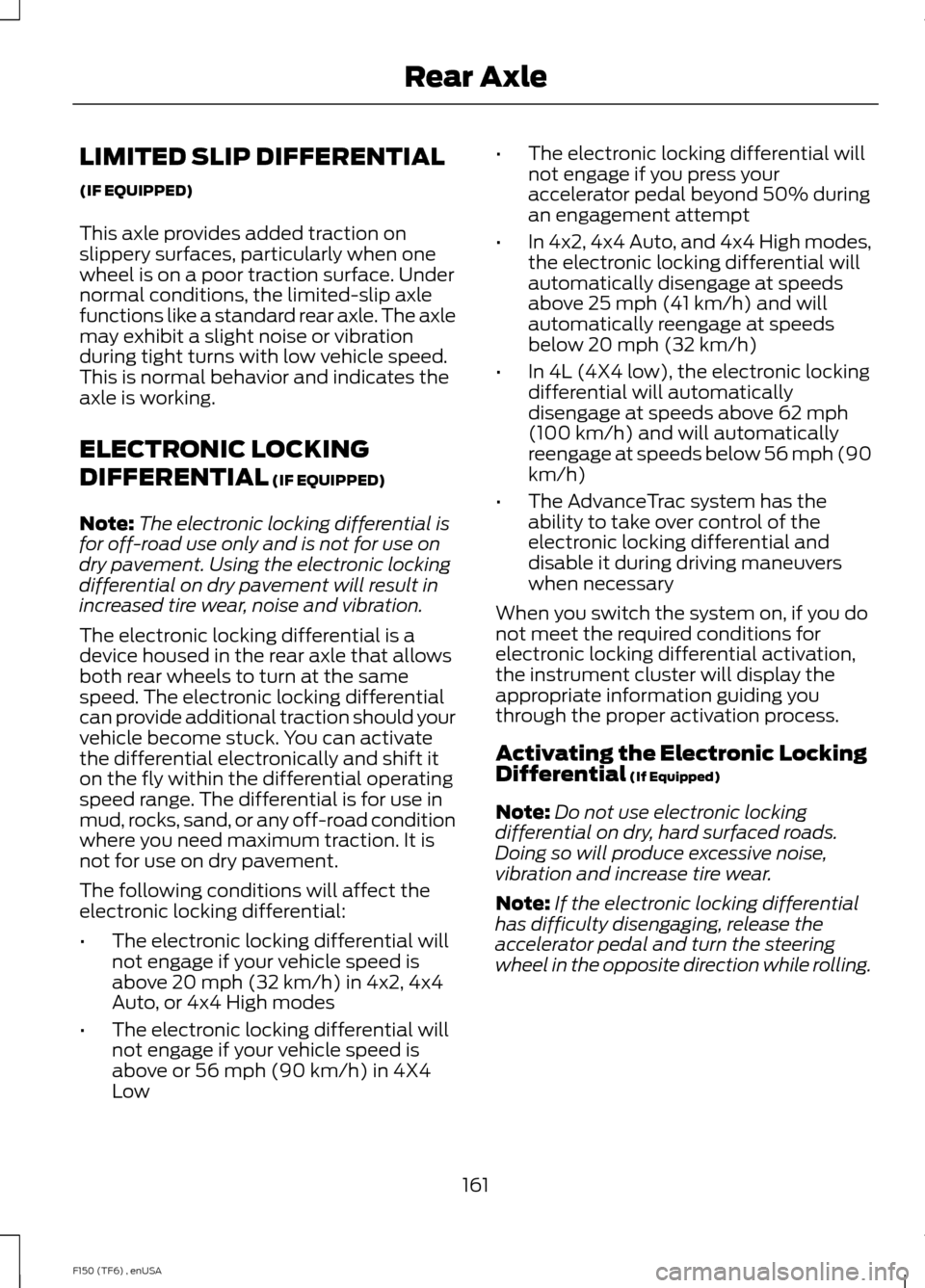
ELECTRONIC LOCKING
DIFFERENTIAL (IF EQUIPPED)
Note: The electronic locking differential is
for off-road use only and is not for use on
dry pavement. Using the electronic locking
differential on dry pavement will result in
increased tire wear, noise and vibration.
The electronic locking differential is a
device housed in the rear axle that allows
both rear wheels to turn at the same
speed. The electronic locking differential
can provide additional traction should your
vehicle become stuck. You can activate
the differential electronically and shift it
on the fly within the differential operating
speed range. The differential is for use in
mud, rocks, sand, or any off-road condition
where you need maximum traction. It is
not for use on dry pavement.
The following conditions will affect the
electronic locking differential:
• The electronic locking differential will
not engage if your vehicle speed is
above 20 mph (32 km/h) in 4x2, 4x4
Auto, or 4x4 High modes
• The electronic locking differential will
not engage if your vehicle speed is
above or 56 mph (90 km/h) in 4X4
Low •
The electronic locking differential will
not engage if you press your
accelerator pedal beyond 50% during
an engagement attempt
• In 4x2, 4x4 Auto, and 4x4 High modes,
the electronic locking differential will
automatically disengage at speeds
above 25 mph (41 km/h) and will
automatically reengage at speeds
below 20 mph (32 km/h)
• In 4L (4X4 low), the electronic locking
differential will automatically
disengage at speeds above 62 mph
(100 km/h) and will automatically
reengage at speeds below 56 mph (90
km/h)
• The AdvanceTrac system has the
ability to take over control of the
electronic locking differential and
disable it during driving maneuvers
when necessary
When you switch the system on, if you do
not meet the required conditions for
electronic locking differential activation,
the instrument cluster will display the
appropriate information guiding you
through the proper activation process.
Activating the Electronic Locking
Differential
(If Equipped)
Note: Do not use electronic locking
differential on dry, hard surfaced roads.
Doing so will produce excessive noise,
vibration and increase tire wear.
Note: If the electronic locking differential
has difficulty disengaging, release the
accelerator pedal and turn the steering
wheel in the opposite direction while rolling.
161
F150 (TF6) , enUSA Rear Axle
Page 165 of 472
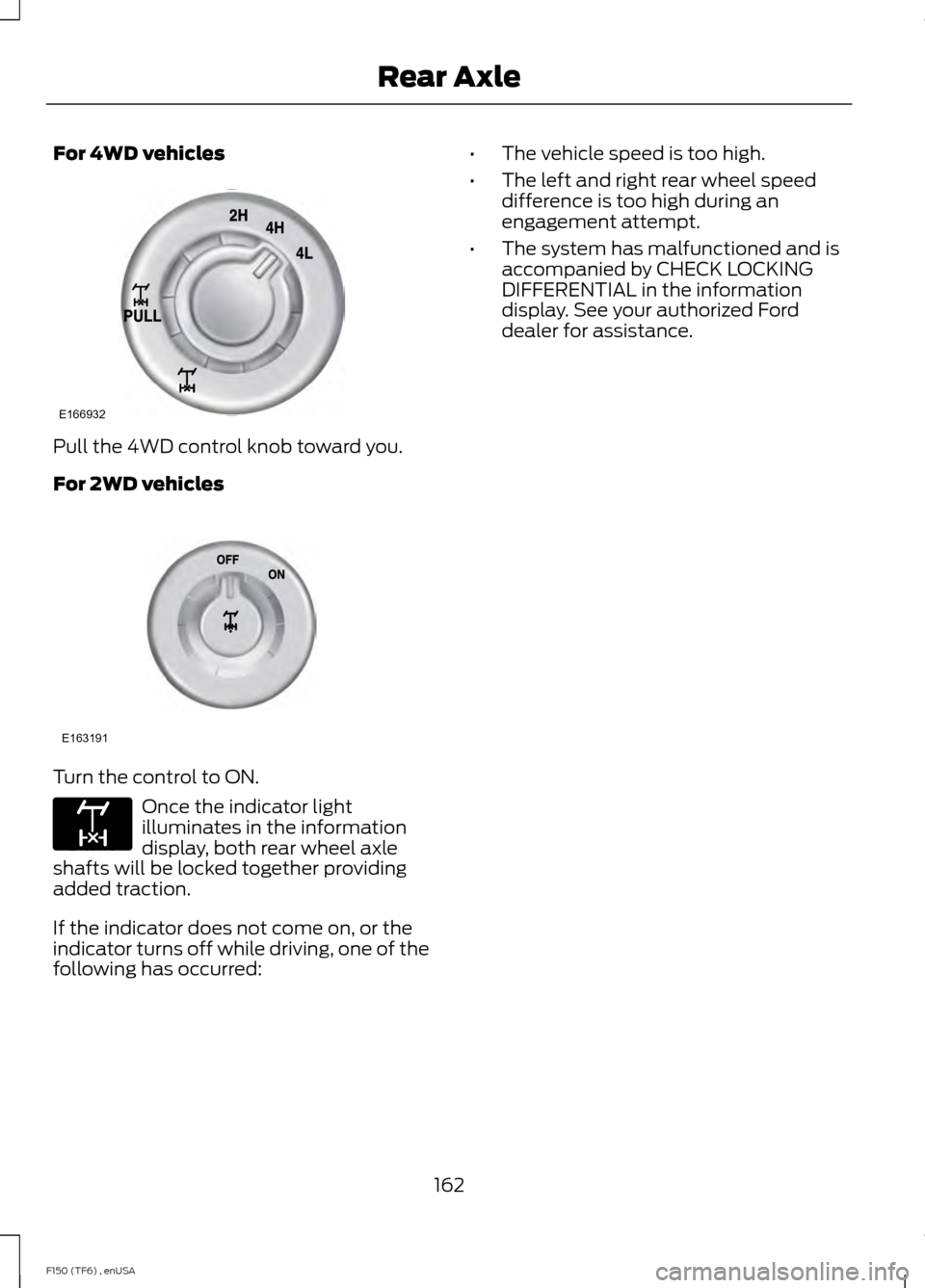
For 4WD vehicles
Pull the 4WD control knob toward you.
For 2WD vehicles
Turn the control to ON.
Once the indicator light
illuminates in the information
display, both rear wheel axle
shafts will be locked together providing
added traction.
If the indicator does not come on, or the
indicator turns off while driving, one of the
following has occurred: •
The vehicle speed is too high.
• The left and right rear wheel speed
difference is too high during an
engagement attempt.
• The system has malfunctioned and is
accompanied by CHECK LOCKING
DIFFERENTIAL in the information
display. See your authorized Ford
dealer for assistance.
162
F150 (TF6) , enUSA Rear AxleE166932 E163191 E163170
Page 464 of 472

E
Economical Driving......................................210
Electronic Locking Differential.................161 Activating the Electronic Locking
Differential........................................................ 161
Emission Control System
..........................144
On-Board Diagnostics (OBD-II).................... 145
Readiness for Inspection/Maintenance (I/M) Testing................................................... 146
End User License Agreement...................421 SYNC® End User License Agreement
(EULA)............................................................... 421
Engine Block Heater.....................................137 Using the Engine Block Heater...................... 138
Engine Coolant Check
.................................241
Adding Engine Coolant.................................... 242
Checking the Engine Coolant......................... 241
Recycled Engine Coolant................................ 242
Severe Climates................................................. 243
What You Should Know About Fail-Safe Cooling.............................................................. 243
Engine Immobilizer See: Passive Anti-Theft System...................... 61
Engine Oil Check
..........................................240
Adding Engine Oil.............................................. 240
Engine Oil Dipstick......................................240
Engine Specifications................................296 Drivebelt Routing............................................... 296
Entertainment...............................................376 A/V Inputs............................................................ 392
AM/FM Radio...................................................... 378
Bluetooth Audio.................................................. 391
Browsing Device Content................................ 376
CD........................................................................\
.... 387
SD Card Slot and USB Port........................... 388
SIRIUS® Satellite Radio (If Activated)........................................................ 383
Supported Media Players, Formats and Metadata Information................................. 391Essential Towing Checks...........................201
Before Towing a Trailer................................... 206
Hitches.................................................................... 201
Launching or Retrieving a Boat or Personal Watercraft (PWC)........................................ 207
Safety Chains...................................................... 202
Trailer Brakes....................................................... 202
Trailer Lamps...................................................... 206
Trailer Towing Connector................................. 201
Using a Step Bumper (If Equipped)..........206
When Towing a Trailer..................................... 206
Event Data Recording See: Data Recording.............................................. 9
Export Unique Options..................................13
Extended Service Plan (ESP).................436 SERVICE PLANS (CANADA ONLY).............437
SERVICE PLANS (U.S. Only)......................... 436
Exterior Mirrors
................................................76
Auto-dimming Feature (if equipped)...........77
Clearance Lamps ................................................. 77
Fold-Away Exterior Mirrors................................ 77
Heated Exterior Mirrors ...................................... 77
Integrated Blind Spot Mirror (If Equipped).......................................................... 78
Memory Mirrors ..................................................... 77
Power Exterior Mirrors......................................... 76
Signal Indicator Mirrors ...................................... 77
Telescoping Mirrors ............................................. 77
F
Fastening the Safety Belts...........................31 Fastening the Cinch Tongue............................. 32
Safety Belt Extension Assembly.................... 34
Safety Belt Locking Modes............................... 32
Using Safety Belts During Pregnancy...........32
Using the Safety Belt with Cinch Tongue (Front Center Seat)......................................... 31
Floor Mats.........................................................211
Fog Lamps - Front See: Front Fog Lamps......................................... 72
Foot Pedals See: Adjusting the Pedals................................. 68
Ford Credit
..........................................................11
(U.S. Only)................................................................. 11
Four-Wheel Drive..........................................153
Front Fog Lamps.............................................72
Front Passenger Sensing System.............41
461
F150 (TF6) , enUSA Index