Page 446 of 519
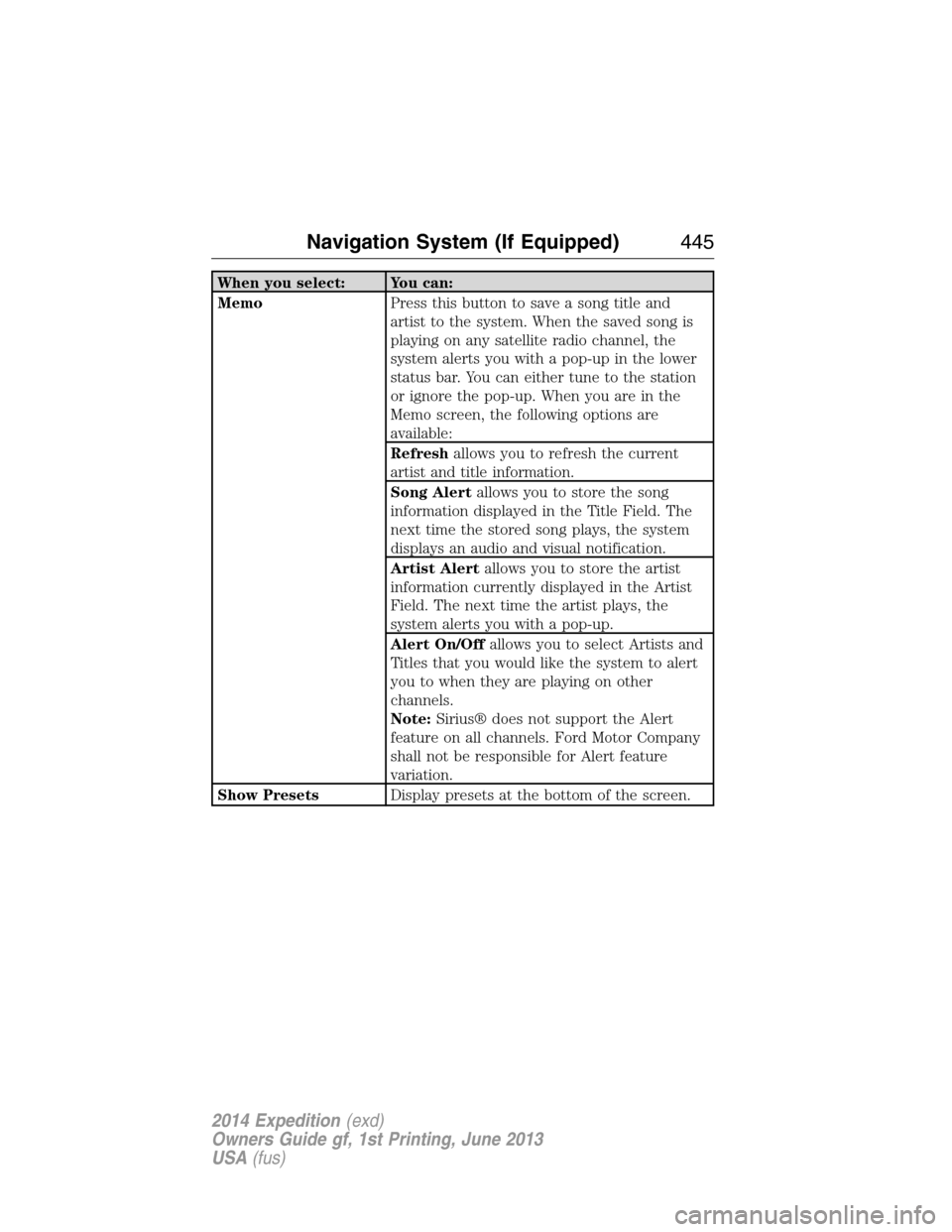
When you select: You can:
MemoPress this button to save a song title and
artist to the system. When the saved song is
playing on any satellite radio channel, the
system alerts you with a pop-up in the lower
status bar. You can either tune to the station
or ignore the pop-up. When you are in the
Memo screen, the following options are
available:
Refreshallows you to refresh the current
artist and title information.
Song Alertallows you to store the song
information displayed in the Title Field. The
next time the stored song plays, the system
displays an audio and visual notification.
Artist Alertallows you to store the artist
information currently displayed in the Artist
Field. The next time the artist plays, the
system alerts you with a pop-up.
Alert On/Offallows you to select Artists and
Titles that you would like the system to alert
you to when they are playing on other
channels.
Note:Sirius® does not support the Alert
feature on all channels. Ford Motor Company
shall not be responsible for Alert feature
variation.
Show PresetsDisplay presets at the bottom of the screen.
Navigation System (If Equipped)445
2014 Expedition(exd)
Owners Guide gf, 1st Printing, June 2013
USA(fus)
Page 447 of 519
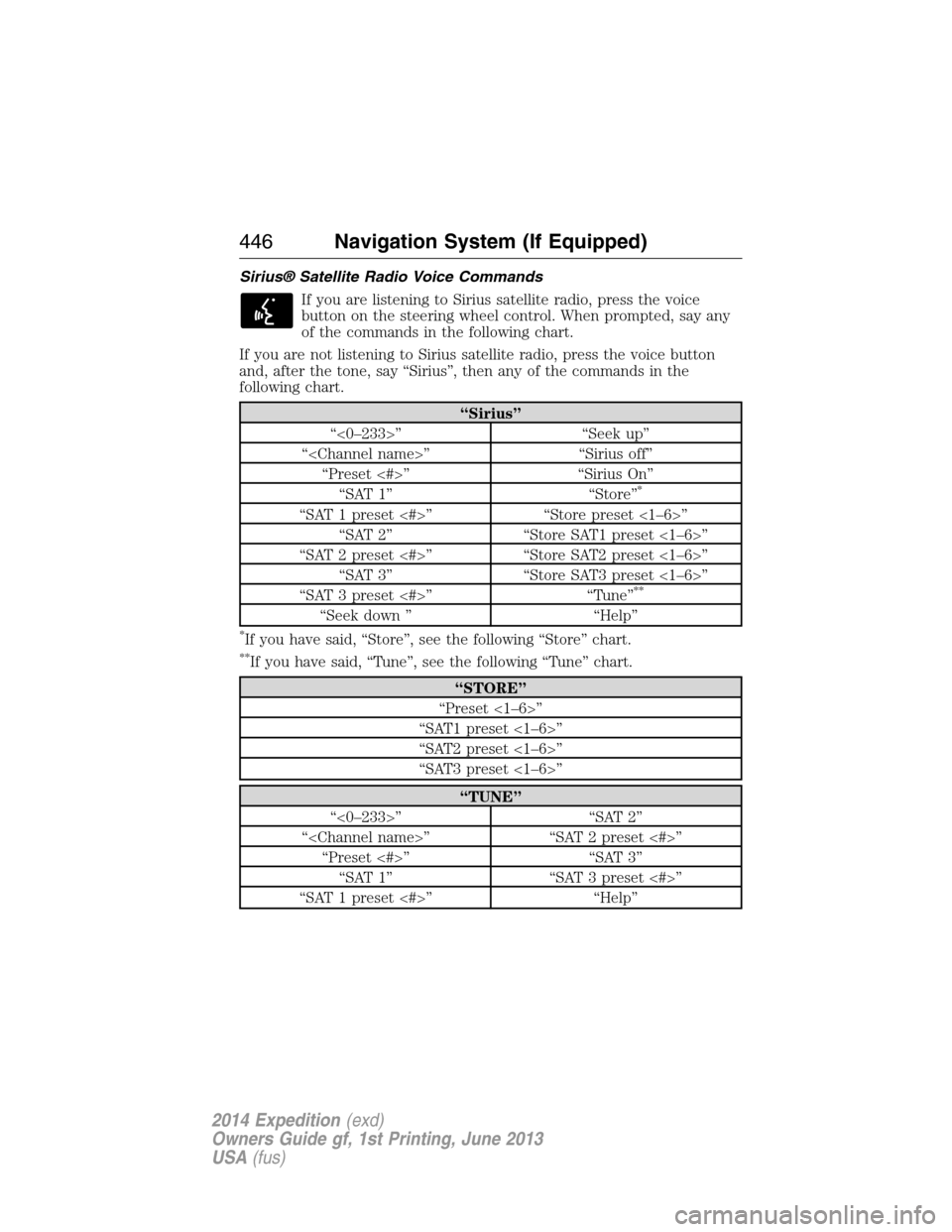
Sirius® Satellite Radio Voice Commands
If you are listening to Sirius satellite radio, press the voice
button on the steering wheel control. When prompted, say any
of the commands in the following chart.
If you are not listening to Sirius satellite radio, press the voice button
and, after the tone, say “Sirius”, then any of the commands in the
following chart.
“Sirius”
“<0–233>” “Seek up”
“” “Sirius off”
“Preset <#>” “Sirius On”
“SAT 1” “Store”
*
“SAT 1 preset <#>” “Store preset <1–6>”
“SAT 2” “Store SAT1 preset <1–6>”
“SAT 2 preset <#>” “Store SAT2 preset <1–6>”
“SAT 3” “Store SAT3 preset <1–6>”
“SAT 3 preset <#>” “Tune”
**
“Seek down ” “Help”
*If you have said, “Store”, see the following “Store” chart.
**If you have said, “Tune”, see the following “Tune” chart.
“STORE”
“Preset <1–6>”
“SAT1 preset <1–6>”
“SAT2 preset <1–6>”
“SAT3 preset <1–6>”
“TUNE”
“<0–233>” “SAT 2”
“” “SAT 2 preset <#>”
“Preset <#>” “SAT 3”
“SAT 1” “SAT 3 preset <#>”
“SAT 1 preset <#>” “Help”
446Navigation System (If Equipped)
2014 Expedition(exd)
Owners Guide gf, 1st Printing, June 2013
USA(fus)
Page 449 of 519
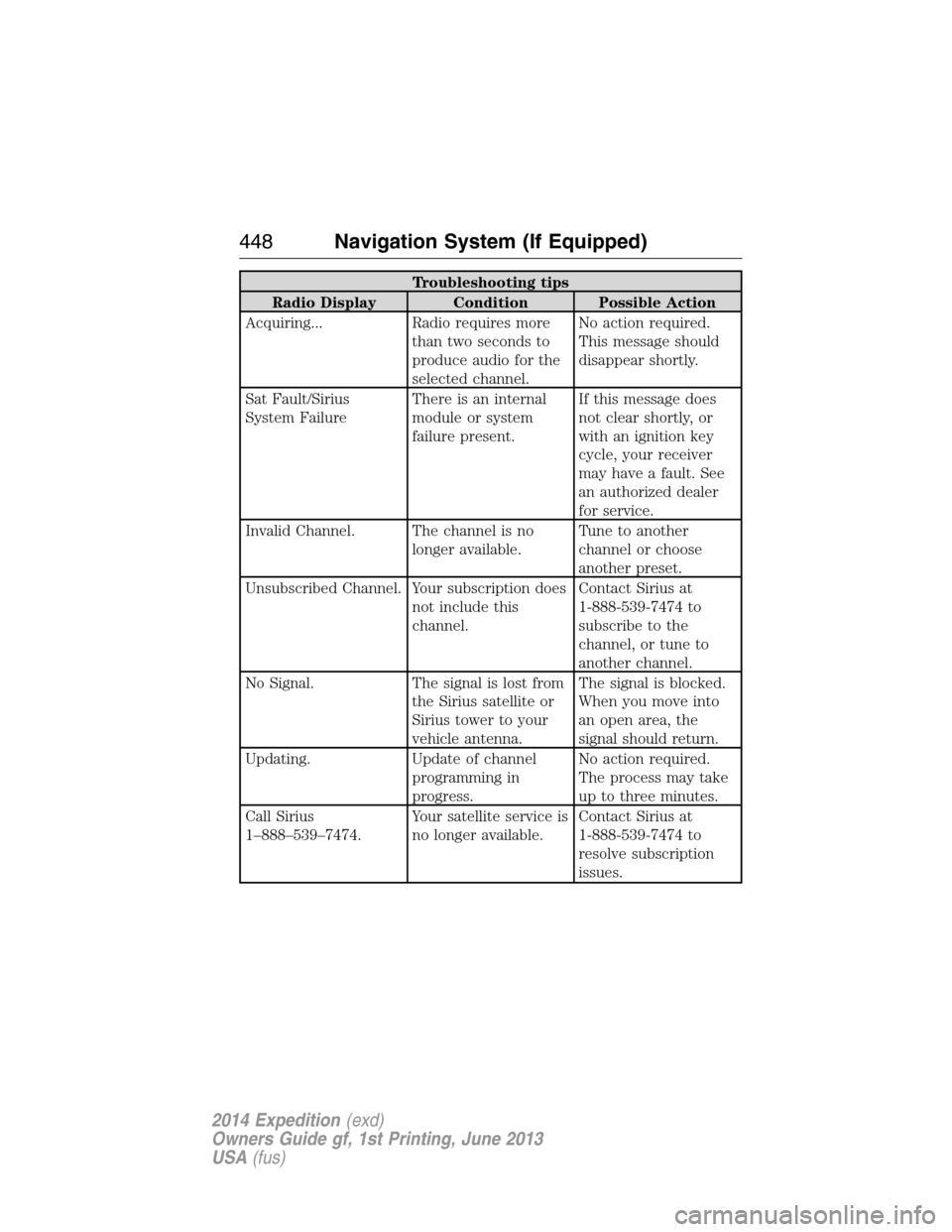
Troubleshooting tips
Radio Display Condition Possible Action
Acquiring... Radio requires more
than two seconds to
produce audio for the
selected channel.No action required.
This message should
disappear shortly.
Sat Fault/Sirius
System FailureThere is an internal
module or system
failure present.If this message does
not clear shortly, or
with an ignition key
cycle, your receiver
may have a fault. See
an authorized dealer
for service.
Invalid Channel. The channel is no
longer available.Tune to another
channel or choose
another preset.
Unsubscribed Channel. Your subscription does
not include this
channel.Contact Sirius at
1-888-539-7474 to
subscribe to the
channel, or tune to
another channel.
No Signal. The signal is lost from
the Sirius satellite or
Sirius tower to your
vehicle antenna.The signal is blocked.
When you move into
an open area, the
signal should return.
Updating. Update of channel
programming in
progress.No action required.
The process may take
up to three minutes.
Call Sirius
1–888–539–7474.Your satellite service is
no longer available.Contact Sirius at
1-888-539-7474 to
resolve subscription
issues.
448Navigation System (If Equipped)
2014 Expedition(exd)
Owners Guide gf, 1st Printing, June 2013
USA(fus)
Page 463 of 519
Route Guidance in Incompletely Mapped Areas
There are some rural areas in the map database without fully verified
roads. When the system is in route guidance mode, and the navigation
system encounters these incompletely mapped areas, the system alerts
you by:
•Announcing, “Entering an area with incomplete map data; please
follow with caution”
•Saying, “with caution” in the first route guidance instruction before
each turn
•Highlighting the route on the map in yellow
•Highlighting the incomplete mapped streets in yellow on the turn list
•Coloring the guidance arrows yellow.
Please drive using extra caution when driving in these areas as the
mapping information may be somewhat inaccurate.
Programming a Destination Using the Touchscreen
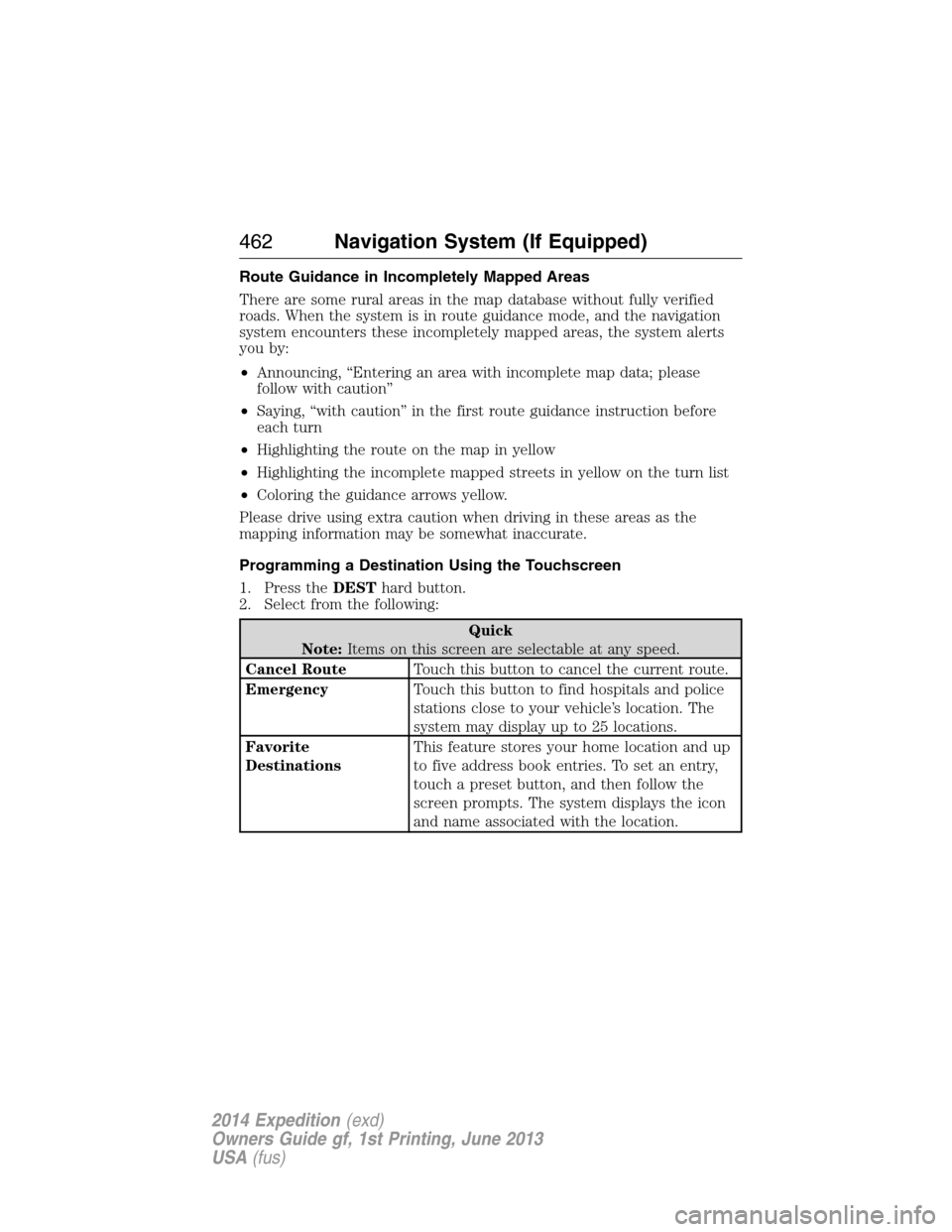
1. Press theDESThard button.
2. Select from the following:
Quick
Note:Items on this screen are selectable at any speed.
Cancel RouteTouch this button to cancel the current route.
EmergencyTouch this button to find hospitals and police
stations close to your vehicle’s location. The
system may display up to 25 locations.
Favorite
DestinationsThis feature stores your home location and up
to five address book entries. To set an entry,
touch a preset button, and then follow the
screen prompts. The system displays the icon
and name associated with the location.
462Navigation System (If Equipped)
2014 Expedition(exd)
Owners Guide gf, 1st Printing, June 2013
USA(fus)
Page 475 of 519
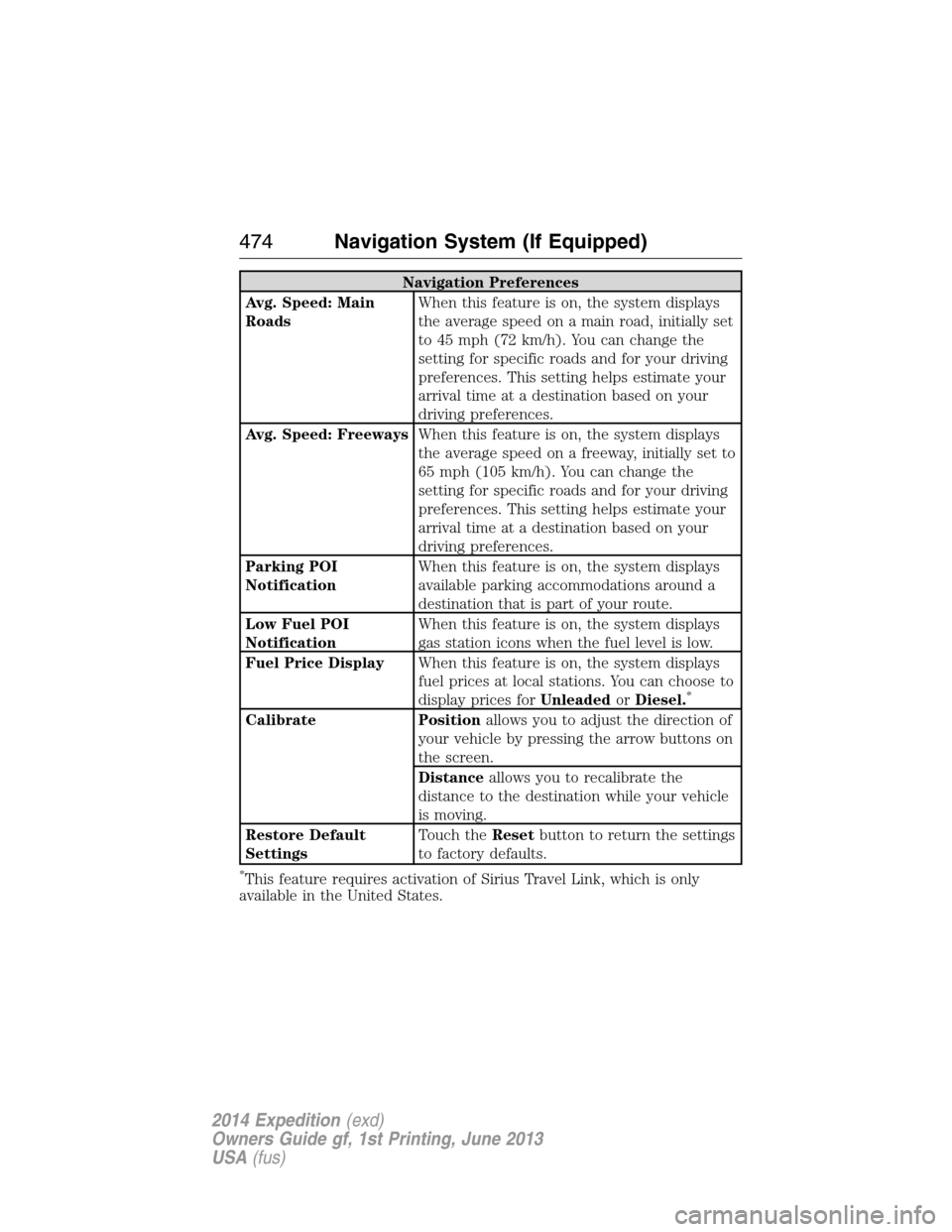
Navigation Preferences
Avg. Speed: Main
RoadsWhen this feature is on, the system displays
the average speed on a main road, initially set
to 45 mph (72 km/h). You can change the
setting for specific roads and for your driving
preferences. This setting helps estimate your
arrival time at a destination based on your
driving preferences.
Avg. Speed: FreewaysWhen this feature is on, the system displays
the average speed on a freeway, initially set to
65 mph (105 km/h). You can change the
setting for specific roads and for your driving
preferences. This setting helps estimate your
arrival time at a destination based on your
driving preferences.
Parking POI
NotificationWhen this feature is on, the system displays
available parking accommodations around a
destination that is part of your route.
Low Fuel POI
NotificationWhen this feature is on, the system displays
gas station icons when the fuel level is low.
Fuel Price DisplayWhen this feature is on, the system displays
fuel prices at local stations. You can choose to
display prices forUnleadedorDiesel.
*
Calibrate Positionallows you to adjust the direction of
your vehicle by pressing the arrow buttons on
the screen.
Distanceallows you to recalibrate the
distance to the destination while your vehicle
is moving.
Restore Default
SettingsTouch theResetbutton to return the settings
to factory defaults.
*This feature requires activation of Sirius Travel Link, which is only
available in the United States.
474Navigation System (If Equipped)
2014 Expedition(exd)
Owners Guide gf, 1st Printing, June 2013
USA(fus)
Page 500 of 519
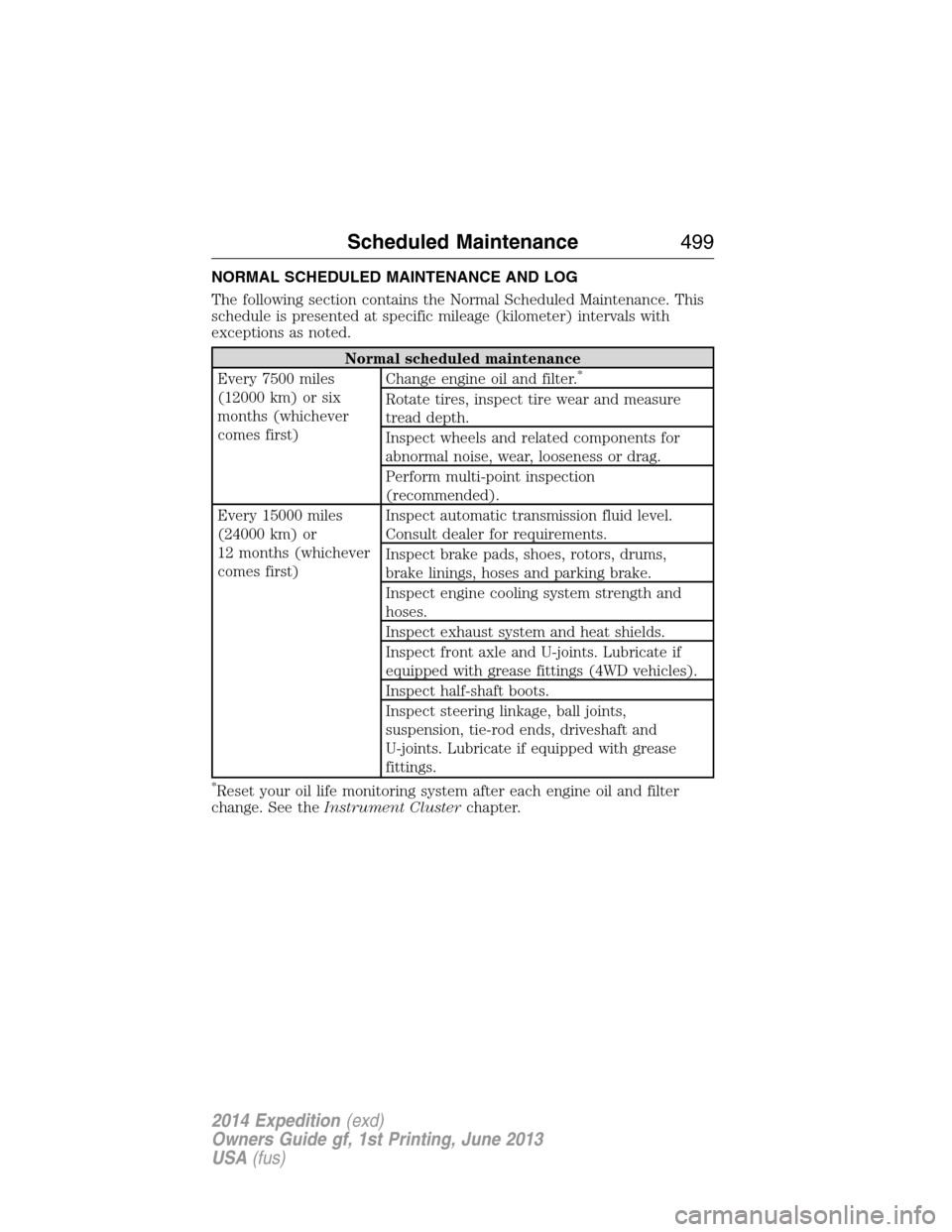
NORMAL SCHEDULED MAINTENANCE AND LOG
The following section contains the Normal Scheduled Maintenance. This
schedule is presented at specific mileage (kilometer) intervals with
exceptions as noted.
Normal scheduled maintenance
Every 7500 miles
(12000 km) or six
months (whichever
comes first)Change engine oil and filter.*
Rotate tires, inspect tire wear and measure
tread depth.
Inspect wheels and related components for
abnormal noise, wear, looseness or drag.
Perform multi-point inspection
(recommended).
Every 15000 miles
(24000 km) or
12 months (whichever
comes first)Inspect automatic transmission fluid level.
Consult dealer for requirements.
Inspect brake pads, shoes, rotors, drums,
brake linings, hoses and parking brake.
Inspect engine cooling system strength and
hoses.
Inspect exhaust system and heat shields.
Inspect front axle and U-joints. Lubricate if
equipped with grease fittings (4WD vehicles).
Inspect half-shaft boots.
Inspect steering linkage, ball joints,
suspension, tie-rod ends, driveshaft and
U-joints. Lubricate if equipped with grease
fittings.
*Reset your oil life monitoring system after each engine oil and filter
change. See theInstrument Clusterchapter.
Scheduled Maintenance499
2014 Expedition(exd)
Owners Guide gf, 1st Printing, June 2013
USA(fus)
Page 505 of 519
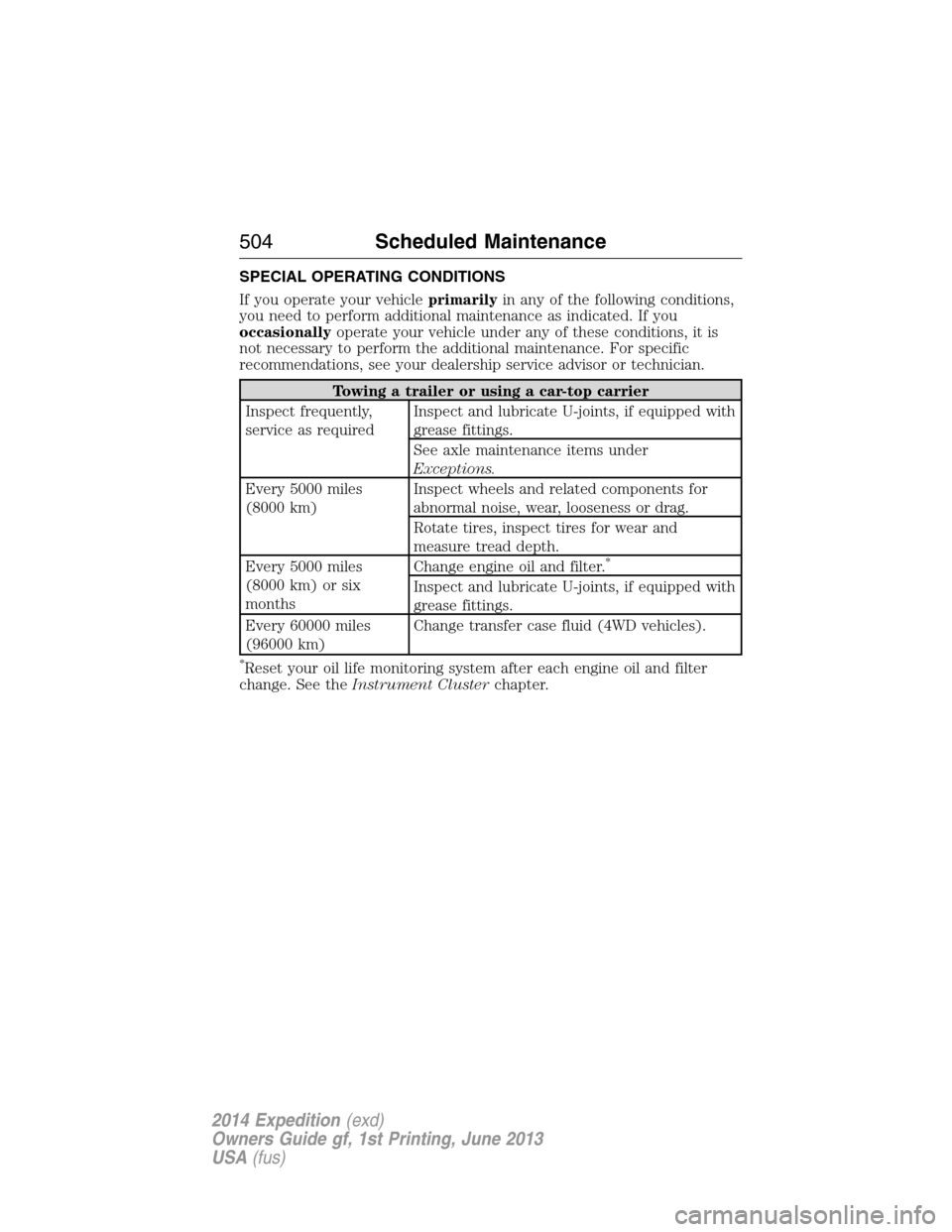
SPECIAL OPERATING CONDITIONS
If you operate your vehicleprimarilyin any of the following conditions,
you need to perform additional maintenance as indicated. If you
occasionallyoperate your vehicle under any of these conditions, it is
not necessary to perform the additional maintenance. For specific
recommendations, see your dealership service advisor or technician.
Towing a trailer or using a car-top carrier
Inspect frequently,
service as requiredInspect and lubricate U-joints, if equipped with
grease fittings.
See axle maintenance items under
Exceptions.
Every 5000 miles
(8000 km)Inspect wheels and related components for
abnormal noise, wear, looseness or drag.
Rotate tires, inspect tires for wear and
measure tread depth.
Every 5000 miles
(8000 km) or six
monthsChange engine oil and filter.
*
Inspect and lubricate U-joints, if equipped with
grease fittings.
Every 60000 miles
(96000 km)Change transfer case fluid (4WD vehicles).
*Reset your oil life monitoring system after each engine oil and filter
change. See theInstrument Clusterchapter.
504Scheduled Maintenance
2014 Expedition(exd)
Owners Guide gf, 1st Printing, June 2013
USA(fus)
Page 506 of 519
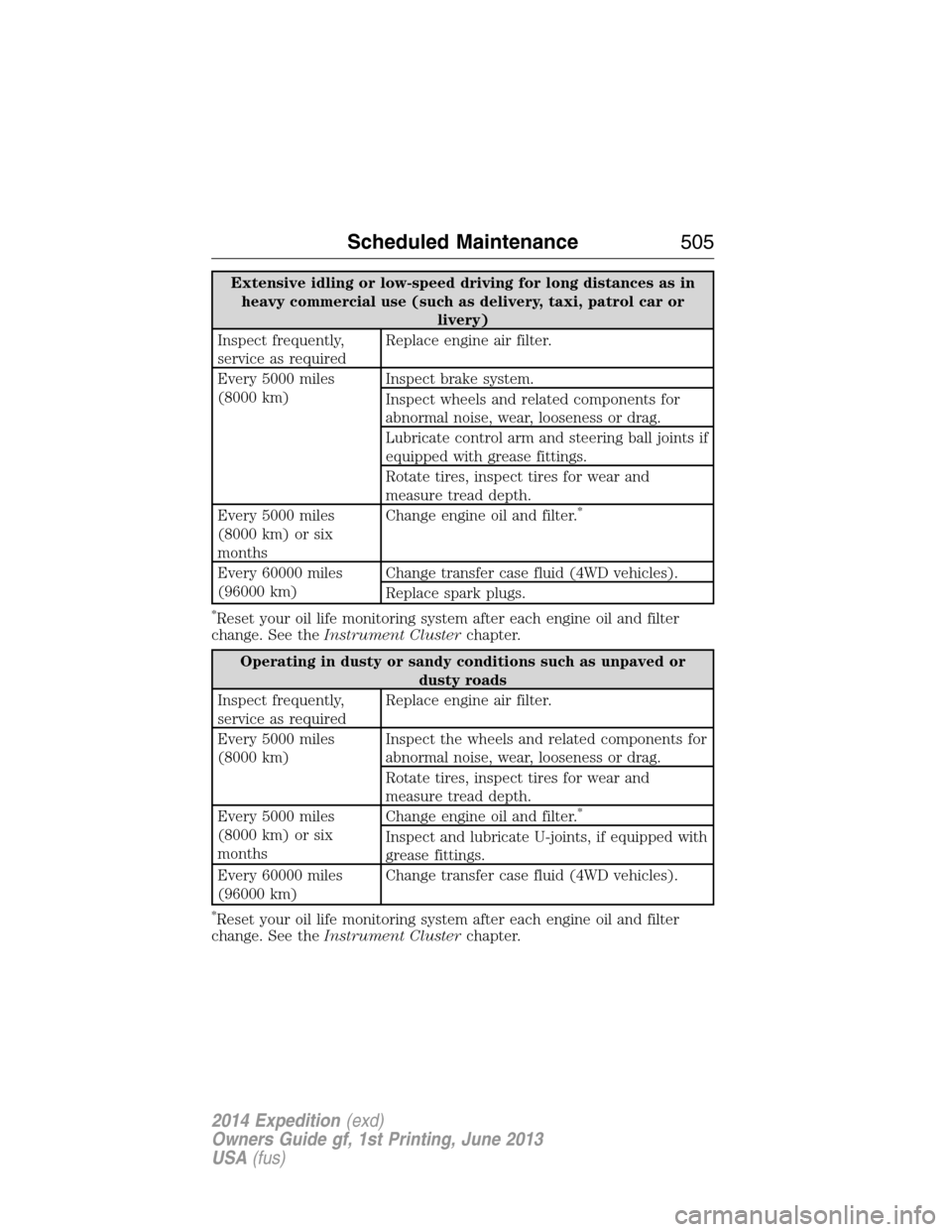
Extensive idling or low-speed driving for long distances as in
heavy commercial use (such as delivery, taxi, patrol car or
livery)
Inspect frequently,
service as requiredReplace engine air filter.
Every 5000 miles
(8000 km)Inspect brake system.
Inspect wheels and related components for
abnormal noise, wear, looseness or drag.
Lubricate control arm and steering ball joints if
equipped with grease fittings.
Rotate tires, inspect tires for wear and
measure tread depth.
Every 5000 miles
(8000 km) or six
monthsChange engine oil and filter.
*
Every 60000 miles
(96000 km)Change transfer case fluid (4WD vehicles).
Replace spark plugs.
*Reset your oil life monitoring system after each engine oil and filter
change. See theInstrument Clusterchapter.
Operating in dusty or sandy conditions such as unpaved or
dusty roads
Inspect frequently,
service as requiredReplace engine air filter.
Every 5000 miles
(8000 km)Inspect the wheels and related components for
abnormal noise, wear, looseness or drag.
Rotate tires, inspect tires for wear and
measure tread depth.
Every 5000 miles
(8000 km) or six
monthsChange engine oil and filter.
*
Inspect and lubricate U-joints, if equipped with
grease fittings.
Every 60000 miles
(96000 km)Change transfer case fluid (4WD vehicles).
*Reset your oil life monitoring system after each engine oil and filter
change. See theInstrument Clusterchapter.
Scheduled Maintenance505
2014 Expedition(exd)
Owners Guide gf, 1st Printing, June 2013
USA(fus)