Page 354 of 438

SYSTEM MENU FEATURES
Your system offers many menu features, such as allowing you to adjust
the touchscreen brightness, time and language, feedback and system
settings. You can access these options by pressing the MENU hard
button.
If you select: You can:
Display Brightnessallows you to adjust screen
brightness by touching + or -.
Contrastallows you to adjust screen contrast
by touching + or -.
Day/Night Modeallows you to select Day
mode, Night mode or have the system
automatically switch for you by selecting Auto
mode.
Daytime Colorallows you to select a light or
dark color for daytime screen lighting.
Note:When the headlamps are on under very
bright outdoor light conditions, the system
remains in day mode, even if you select night.
Clock Display Clockallows you to turn the clock
off and on.
Note:If your vehicle is equipped with an
in-dash analog clock, you can set the time on
this screen, but it may not appear in the
status bar for viewing purposes.
Formatallows you to switch between 12–
and 24–hour clock displays.
Auto Time Zoneallows you to have the
system automatically switch the time
whenever you enter a new time zone.
Note:The system does not implement
daylight savings time.
Restore Defaultsallows you to restore
system defaults.
Navigation System (If Equipped)353
2014 Econoline(eco)
Owners Guide gf, 1st Printing, November 2012
USA(fus)
Page 356 of 438

If you select: You can:
System Settings Languageallows you to choose between
English, Spanish and French.
Unitsallows you to choose between English
and Metric measurements.
Keyboard Layoutallows you to choose
between an ABC and QWERTY keyboard.
Delete Stored Itemsallows you to choose
to delete all of the entries from Address Book,
Previous Destinations, Avoid Areas, Saved
Photos and Voice Recognition Profiles. Touch
View to see what entries have been stored.
Restore Factory Default Settingsallows
you to restore factory default settings.
Valet ModeLock and unlock the system using a four-digit
PIN.
Note:You can reset the PIN by
simultaneously pressing and holding presets 1
and 5 while on the PIN entry screen. After
approximately five seconds, the system
transitions to the valet mode screen indicating
that you reset the PIN. Once you have reset
the PIN, the system then allows you to set a
new PIN.
Voice ControlSet the system to listen automatically for USB
or SYNC voice commands first. This
eliminates the need to say “USB” or “User
Device” before any SYNC media commands.
Navigation System (If Equipped)355
2014 Econoline(eco)
Owners Guide gf, 1st Printing, November 2012
USA(fus)
Page 365 of 438
When you select: You can:
Channel GuideSee a list of channels sorted by genre and
also skip or lock out certain channels. Select
the desired genre and choose a channel by
pressing the channel name button. You can
then choose to Skip or Lock a certain
channel. A skipped channel is not accessible
using the tune knob, scan or seek functions.
(To access the skipped channel, select Direct
Tune and enter the channel number.) You can
only access a locked channel by entering the
Channel Guide and then entering the system’s
PIN.
Direct TuneEnter the desired satellite channel number
using the on-screen keypad.
Set GenrePress this button to choose from a list of
genres. Once you choose a genre, and you
press SEEK, it only looks for channels in that
genre.
364Navigation System (If Equipped)
2014 Econoline(eco)
Owners Guide gf, 1st Printing, November 2012
USA(fus)
Page 369 of 438

Potential reception issues
Station overloadWhen you pass a ground-based
broadcast-repeating tower, a stronger signal
may overtake a weaker one and the audio
system may mute.
Satellite radio signal
interferenceYour display may show ACQUIRING... to
indicate the interference and the audio
system may mute.
Troubleshooting tips
Radio Display Condition Possible Action
Acquiring... Radio requires more
than two seconds to
produce audio for the
selected channel.No action required.
This message should
disappear shortly.
Sat Fault/Sirius
System FailureThere is an internal
module or system
failure present.If this message does
not clear shortly, or
with an ignition key
cycle, your receiver
may have a fault. See
an authorized dealer
for service.
Invalid Channel. The channel is no
longer available.Tune to another
channel or choose
another preset.
Unsubscribed Channel. Your subscription does
not include this
channel.Contact Sirius at
1-888-539-7474 to
subscribe to the
channel, or tune to
another channel.
No Signal. The signal is lost from
the Sirius satellite or
Sirius tower to your
vehicle antenna.The signal is blocked.
When you move into
an open area, the
signal should return.
368Navigation System (If Equipped)
2014 Econoline(eco)
Owners Guide gf, 1st Printing, November 2012
USA(fus)
Page 370 of 438
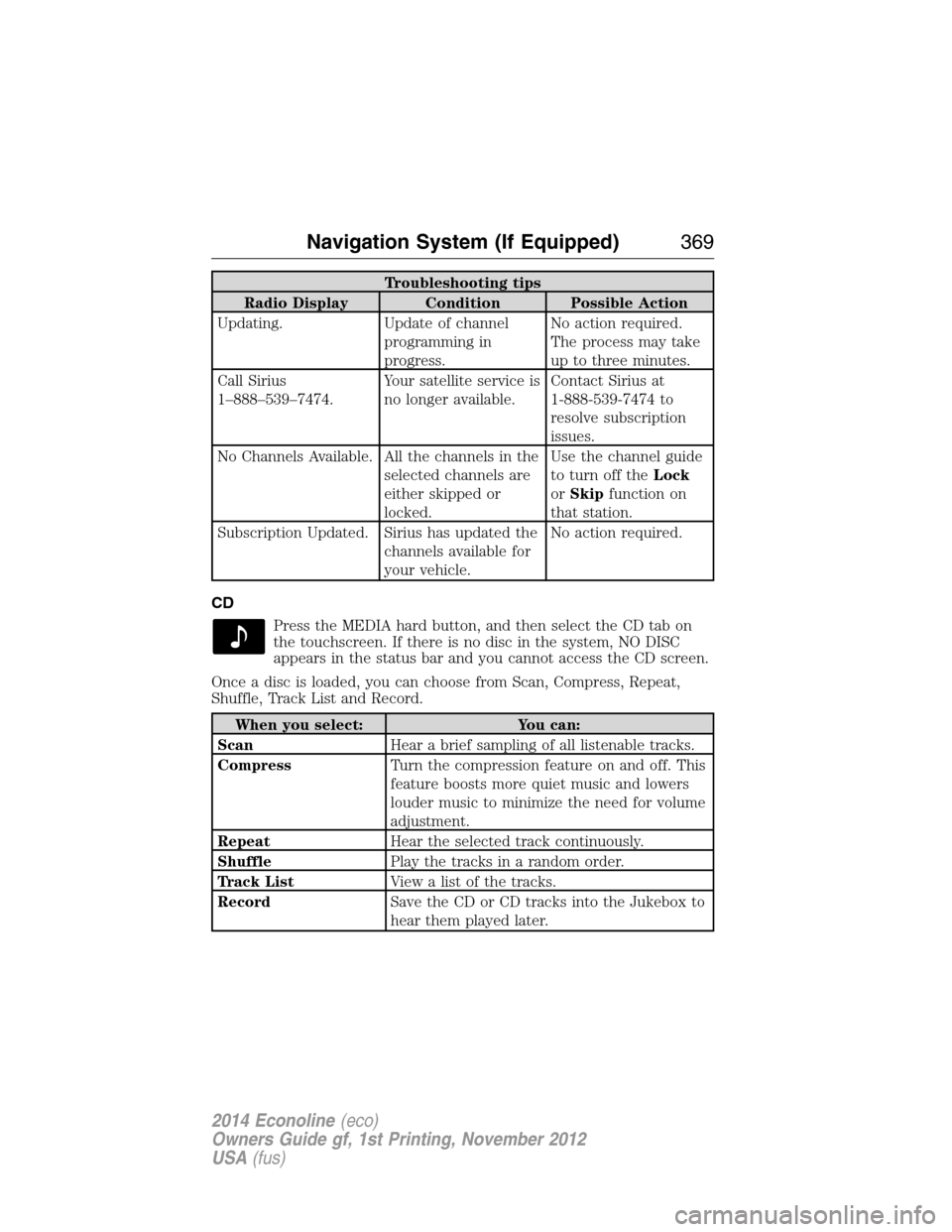
Troubleshooting tips
Radio Display Condition Possible Action
Updating. Update of channel
programming in
progress.No action required.
The process may take
up to three minutes.
Call Sirius
1–888–539–7474.Your satellite service is
no longer available.Contact Sirius at
1-888-539-7474 to
resolve subscription
issues.
No Channels Available. All the channels in the
selected channels are
either skipped or
locked.Use the channel guide
to turn off theLock
orSkipfunction on
that station.
Subscription Updated. Sirius has updated the
channels available for
your vehicle.No action required.
CD
Press the MEDIA hard button, and then select the CD tab on
the touchscreen. If there is no disc in the system, NO DISC
appears in the status bar and you cannot access the CD screen.
Once a disc is loaded, you can choose from Scan, Compress, Repeat,
Shuffle, Track List and Record.
When you select: You can:
ScanHear a brief sampling of all listenable tracks.
CompressTurn the compression feature on and off. This
feature boosts more quiet music and lowers
louder music to minimize the need for volume
adjustment.
RepeatHear the selected track continuously.
ShufflePlay the tracks in a random order.
Track ListView a list of the tracks.
RecordSave the CD or CD tracks into the Jukebox to
hear them played later.
Navigation System (If Equipped)369
2014 Econoline(eco)
Owners Guide gf, 1st Printing, November 2012
USA(fus)
Page 402 of 438
Symptoms Possible Cause Action
A pop-up window
displays “Navigation
fault. A system fault
has been detected that
may cause the
navigation to perform
abnormally. Please
contact your
dealership.”There is a system
hardware or software
error.Contact an authorized
dealer.
A pop-up window
displays “Error. PINs
did not match. Please
re-enter.”You entered the wrong
PIN to unlock the
system for valet mode.PressOKand try
entering your PIN
again. If it does not
work, contact an
authorized dealer.
A pop-up window
displays “Invalid PIN.
Please Re-enter.”You entered the wrong
PIN.PressOKand try
entering your PIN
again to lock the
system.
Navigation System (If Equipped)401
2014 Econoline(eco)
Owners Guide gf, 1st Printing, November 2012
USA(fus)
Page 417 of 438
Owner Checks and Services
Certain basic maintenance checks and inspections should be performed
every month or at six month intervals.
Check every month
Engine oil level.
Function of all interior and exterior lights.
Tires (including spare) for wear and proper pressure.
Windshield washer fluid level.
Check every six months
Battery connections. Clean if necessary.
Body and door drain holes for obstructions. Clean if necessary.
Cooling system fluid level and coolant strength.
Door weatherstrips for wear. Lubricate if necessary.
Hinges, latches and outside locks for proper operation. Lubricate if
necessary.
Parking brake for proper operation.
Safety belts and seat latches for wear and function.
Safety warning lamps (brake, ABS, airbag, safety belt) for operation.
Washer spray and wiper operation. Clean or replace blades as
necessary.
416Scheduled Maintenance
2014 Econoline(eco)
Owners Guide gf, 1st Printing, November 2012
USA(fus)
Page 432 of 438

911 Assist™ ..............................318
A
ABS (see Brakes) .....................128
Accessing call history/phone
book during active call .............307
Accessing the help screen .......380
Accessing the music in your
jukebox ......................................374
Accessing your media menu
features ......................................330
Accessing your phone menu
features ......................................309
Accessory delay ..........................71
Active call menu options .........307
Advanced menu options ...316, 337
Advanced menu options
(prompts, languages, defaults,
master reset, installing
applications) ..............................316
Airbag supplemental restraint
system ..........................................46
and child safety seats ..............47
description ................................46
disposal ......................................53
driver airbag ..............................46
passenger airbag .......................46
passenger deactivation
switch ........................................48
side airbag .................................46
Air cleaner filter ...............213, 279
Air conditioning ....................90–91
manual heating and air
conditioning system ...........90–91
Ambulance packages ..................15
AM/FM .......................................356Antifreeze
(see Engine coolant) ................197
Anti-lock brake system
(see Brakes) ..............................128
Anti-theft system ........................62
arming the system ....................62
AppLink™ .................................325
Audio system
Single CD ........................290–291
Audio system
(see Radio) ........................290–291
Automatic transmission
driving an automatic
overdrive .........................120, 122
fluid, adding ............................201
fluid, checking ........................201
fluid, refill capacities ..............272
fluid, specification ..................272
Auxiliary input jack (Line in) ..296
Auxiliary powerpoint ................102
Axle
lubricant specifications ..........272
refill capacities ........................272
traction lok ..............................127
B
Battery .......................................209
acid, treating emergencies .....209
jumping a disabled battery ....174
maintenance-free ....................209
replacement, specifications ...279
servicing ..................................209
Booster seats ...............................22
Brakes ........................................128
anti-lock ...................................128
anti-lock brake system (ABS)
warning light ...........................128
Index431
2014 Econoline(eco)
Owners Guide gf, 1st Printing, November 2012
USA(fus)


