2014 FIAT 500L LIVING display
[x] Cancel search: displayPage 25 of 420
Note“Trip B” may be disabled (see “Activating Trip
B”). “Range” and “Instantaneous fuel consumption"
parameters cannot be reset.
VALUES DISPLAYED
Outside temperature (for versions/markets, where
provided)
Indicates the temperature outside the passenger
compartment.
Range
This indicates the approximate distance which can be
travelled with the amount of fuel present in the
tank.“----”will appear on the display in the
following cases:
❒range value lower than 50 km (or 30 mi)
❒car parked with engine running for a long period.
IMPORTANT The range value variation can be
affected by several factors: driving style, type of route
(motorway, urban, mountain roads, etc.), conditions
of use (load, tyre pressures, etc.). Trip planning
must therefore take the above into account.
Distance travelled
Shows the distance covered since the start of the
new journey.Average consumption
Shows the approximate average fuel consumption
since the start of the new journey.
Instantaneous consumption
This value shows the fuel consumption. The value is
constantly updated. The display will show “----”
if the car is parked with the engine running.
Average speed
This shows the car average speed as a function of the
overall time elapsed since the start of the new
mission.
Tr i p t i me
Shows the time elapsed since the start of a new
journey.
IMPORTANT If there is no information, the Trip
computer displays "----"inplaceofthevalue.
When normal operating condition is restored,
calculation of different units will restart regularly. No
values displayed before the failure will be reset nor
will a new mission be started.
21GETTING TO
KNOW YOUR CARSAFETY
STARTING AND
DRIVING
WARNING LIGHTS
AND MESSAGES
IN AN EMERGENCY
SERVICING AND
MAINTENANCE
TECHNICAL
SPECIFICATIONS
INDEX
Page 26 of 420
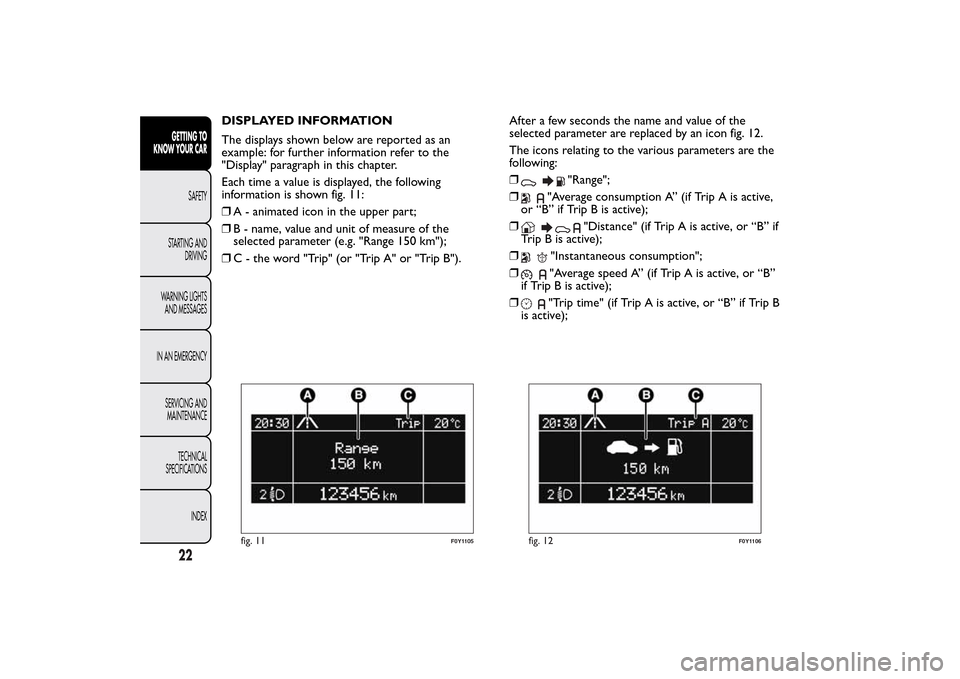
DISPLAYED INFORMATION
The displays shown below are reported as an
example: for further information refer to the
"Display" paragraph in this chapter.
Each time a value is displayed, the following
information is shown fig. 11:
❒A - animated icon in the upper part;
❒B - name, value and unit of measure of the
selected parameter (e.g. "Range 150 km");
❒C - the word "Trip" (or "Trip A" or "Trip B").After a few seconds the name and value of the
selected parameter are replaced by an icon fig. 12.
The icons relating to the various parameters are the
following:
❒
"Range";
❒
"Average consumption A” (if Trip A is active,
or “B” if Trip B is active);
❒
"Distance" (if Trip A is active, or “B” if
Trip B is active);
❒
"Instantaneous consumption";
❒"Average speed A” (if Trip A is active, or “B”
if Trip B is active);
❒"Trip time" (if Trip A is active, or “B” if Trip B
is active);
fig. 11
F0Y1105
fig. 12
F0Y1106
22GETTING TO
KNOW YOUR CAR
SAFETY
STARTING AND
DRIVING
WARNING LIGHTS
AND MESSAGES
IN AN EMERGENCY
SERVICING AND
MAINTENANCE
TECHNICAL
SPECIFICATIONS
INDEX
Page 27 of 420
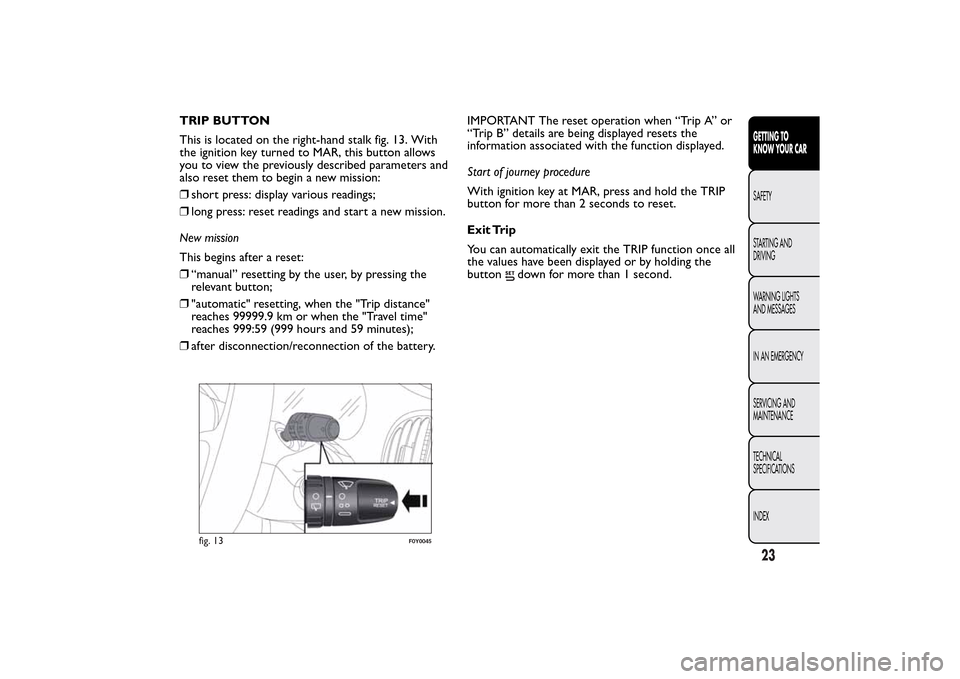
TRIP BUTTON
This is located on the right-hand stalk fig. 13. With
the ignition key turned to MAR, this button allows
you to view the previously described parameters and
also reset them to begin a new mission:
❒short press: display various readings;
❒long press: reset readings and start a new mission.
New mission
This begins after a reset:
❒“manual” resetting by the user, by pressing the
relevant button;
❒"automatic" resetting, when the "Trip distance"
reaches 99999.9 km or when the "Travel time"
reaches 999:59 (999 hours and 59 minutes);
❒after disconnection/reconnection of the battery.IMPORTANT The reset operation when “Trip A” or
“Trip B” details are being displayed resets the
information associated with the function displayed.
Start of journey procedure
With ignition key at MAR, press and hold the TRIP
button for more than 2 seconds to reset.
Exit Trip
You can automatically exit the TRIP function once all
the values have been displayed or by holding the
button
down for more than 1 second.
fig. 13
F0Y0045
23GETTING TO
KNOW YOUR CARSAFETY
STARTING AND
DRIVING
WARNING LIGHTS
AND MESSAGES
IN AN EMERGENCY
SERVICING AND
MAINTENANCE
TECHNICAL
SPECIFICATIONS
INDEX
Page 30 of 420
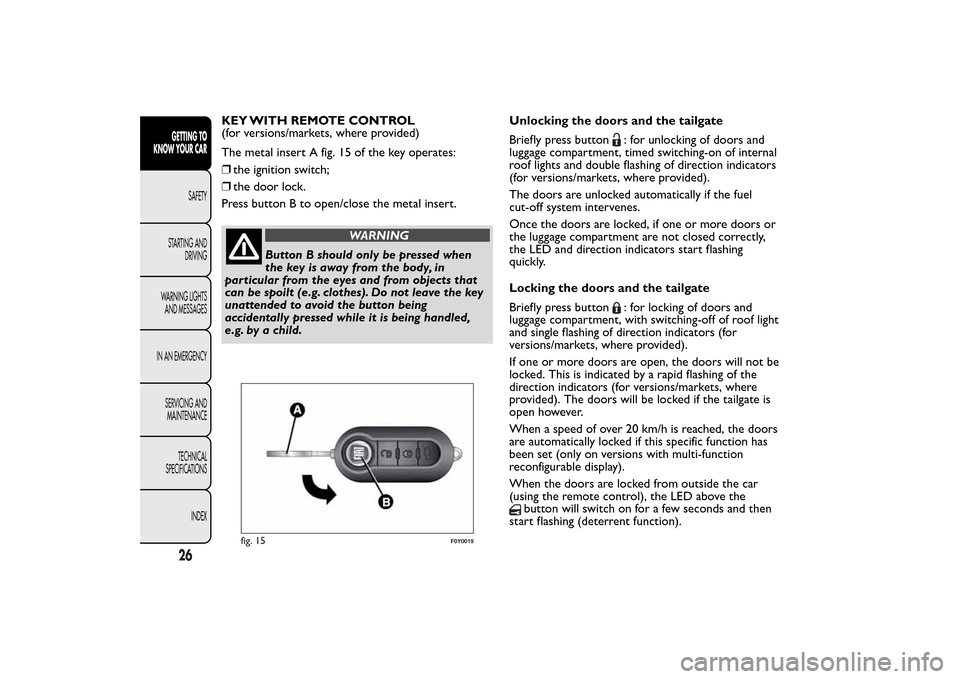
KEY WITH REMOTE CONTROL
(for versions/markets, where provided)
The metal insert A fig. 15 of the key operates:
❒the ignition switch;
❒the door lock.
Press button B to open/close the metal insert.
WARNING
Button B should only be pressed when
the key is away from the body, in
particular from the eyes and from objects that
can be spoilt (e.g. clothes). Do not leave the key
unattended to avoid the button being
accidentally pressed while it is being handled,
e.g. by a child.Unlocking the doors and the tailgate
Briefly press button
: for unlocking of doors and
luggage compartment, timed switching-on of internal
roof lights and double flashing of direction indicators
(for versions/markets, where provided).
The doors are unlocked automatically if the fuel
cut-off system intervenes.
Once the doors are locked, if one or more doors or
the luggage compartment are not closed correctly,
the LED and direction indicators start flashing
quickly.
Locking the doors and the tailgate
Briefly press button: for locking of doors and
luggage compartment, with switching-off of roof light
and single flashing of direction indicators (for
versions/markets, where provided).
If one or more doors are open, the doors will not be
locked. This is indicated by a rapid flashing of the
direction indicators (for versions/markets, where
provided). The doors will be locked if the tailgate is
open however.
When a speed of over 20 km/h is reached, the doors
are automatically locked if this specific function has
been set (only on versions with multi-function
reconfigurable display).
When the doors are locked from outside the car
(using the remote control), the LED above the
button will switch on for a few seconds and then
start flashing (deterrent function).
fig. 15
F0Y0019
26GETTING TO
KNOW YOUR CAR
SAFETY
STARTING AND
DRIVING
WARNING LIGHTS
AND MESSAGES
IN AN EMERGENCY
SERVICING AND
MAINTENANCE
TECHNICAL
SPECIFICATIONS
INDEX
Page 58 of 420
The amount of air introduced into the passenger
compartment is not affected by car speed; it is
regulated by the fan, which is controlled
electronically.
The air temperature is always automatically
controlled according to the temperature set on the
display (except for when the system is off or in
certain conditions when the compressor is
not running).
The system allows the following to be set or adjusted
manually:
❒driver/passenger side air temperature;
❒fan speed (continuous variation);
❒air distribution to 7 positions;
❒compressor enablement;
❒rapid defrosting/demisting function;
❒air recirculation;
❒heated rear window;
❒system deactivation.
The climate control system detects the
passenger compartment temperature
using a mean radiant temperature sensor
located in the interior rear view mirror and
protected by a specific cover. Obstructing the
field of view of this sensor with any object could
cause the climate control system to operate
with less than optimal efficiency.SWITCHING ON THE CLIMATE
CONTROL SYSTEM
The climate control system can be switched on in
different ways: it is advisable to press the AUTO
button and turn the knobs to set the desired
temperatures.
In this way the system operates completely
automatically to adjust the temperature, quantity and
distribution of the air introduced into the passenger
compartment. It also manages the air recirculation
function and the activation of the air conditioning
compressor.
During automatic operation, you can change the set
temperatures, air distribution and fan speed at any
time by using the relevant buttons or knobs: the
system will automatically change the settings to
adjust to the new requirements.
During completely automatic operation (AUTO),
varying the air flow and/or distribution (which are
not displayed) causes the AUTO function LED
to disappear and the system to operate in MANUAL
mode (displaying both the flow and distribution
requested).
When the compressor is deactivated, the AUTO
operation remains active only if the system can
guarantee in-car comfort. Otherwise, the system
switches to MANUAL mode (the set temperatures
will flash on the display). The fan speed is the same in
all the zones of the passenger compartment.
54GETTING TO
KNOW YOUR CAR
SAFETY
STARTING AND
DRIVING
WARNING LIGHTS
AND MESSAGES
IN AN EMERGENCY
SERVICING AND
MAINTENANCE
TECHNICAL
SPECIFICATIONS
INDEX
Page 59 of 420
ADJUSTING THE AIR TEMPERATURE
Turn the A or L knob clockwise or anticlockwise to
adjust the air temperature in the front left (knob
A) or right (knob L) zone of the passenger
compartment.
The set temperatures are shown on the displays.
Press the MONO button to align the air
temperature between the two zones.
Turn the L knob to return to the separate
management of air temperatures in the two zones.
Turning the knobs completely in one direction or the
other activates the "HI" (maximum heating) or
"LO" (maximum cooling) functions respectively.
To deactivate these functions, turn the temperature
knob to the desired temperature.
AIR DISTRIBUTION SELECTION
By pressing buttons H (
/
/
), it is possible to
set one of the 7 possible air distributions manually:
Air flow to the windscreen and front side
window diffusers to demist/defrost them.Air flow at central and side dashboard vents to
ventilate the chest and the face during the hot
season.Air flow to the front and rear footwell diffusers.
This air distribution setting heats the passenger
compartment most quickly, giving a prompt
sensation of warmth.
Air flow distributed between footwell
diffusers (hotter air) and central and side
dashboard vents (cooler air). This distribution
setting is useful in spring and autumn on
sunny days.Air flow distributed between footwell
diffusers and windscreen and front side
window defrosting/demisting diffusers. This
distribution setting allows the passenger
compartment to be warmed effectively and
prevents the windows from misting.Air flow distribution between windscreen
demisting/defrosting diffusers and side and
central dashboard vents. This allows air to be
sent to the windscreen in conditions of
strong sunlight.
Air flow distribution to all diffusers on
the car.
NoteAir always flows from the side dashboard
diffusers: it is, however, possible to interrupt the air
flow by operating the wheel located near the
corresponding vents.
In AUTO mode, the climate control system
automatically manages air distribution (the LEDs on
buttons H are off ).
When set manually, the air distribution is indicated
by the LEDs on the selected buttons switching on.
55GETTING TO
KNOW YOUR CARSAFETY
STARTING AND
DRIVING
WARNING LIGHTS
AND MESSAGES
IN AN EMERGENCY
SERVICING AND
MAINTENANCE
TECHNICAL
SPECIFICATIONS
INDEX
Page 60 of 420
In combined function mode, functions are enabled
together with those already set when the relevant
button is pressed. If a button whose function is
already active is pressed, the operation is cancelled
and the corresponding LED switches off.
To restore automatic control of the air distribution
after a manual selection, press the AUTO button.
ADJUSTING THE FAN SPEED
Turn knob F to increase/decrease the fan speed.
The speed is indicated by the LEDs G on the knob F
switching on.
❒maximum fan speed = all LEDs lit;
❒minimum fan speed = one LED lit.
The fan can only be excluded if the climate control
system compressor has been switched off by pressing
button D.
IMPORTANT To restore automatic control of the fan
speed after a manual adjustment, press the AUTO
button.
AUTO BUTTON
When the AUTO button is pressed (LED on button
lit) the climate control system automatically adjusts
the following settings in the corresponding zones:
❒quantity and distribution of the air introduced into
the passenger compartment
❒climate control system compressor
❒air recirculation
cancelling all previous manual adjustments.This is indicated by the LED on the AUTO button
switching on.
If the AUTO button is pressed when the AUTO LED
is on, the system switches to completely manual
mode; it displays the current flow and distribution
status, which will no longer be managed
automatically.
If a manual intervention is made on at least the air
distribution or on the fan speed, the LED switches
off to indicate that the system is no longer
controlling all functions automatically.
Deactivating the compressor results in the
deactivation of automatic operation only if the
system is no longer able to guarantee comfort
conditions (which depend on the set temperature).
IMPORTANT Should the system no longer be able to
guarantee the required temperature set in various
passenger compartment zones, the set temperature
value will flash for a few seconds on the display.
To restore automatic system control after one or
more manual adjustments, press the AUTO button.
56GETTING TO
KNOW YOUR CAR
SAFETY
STARTING AND
DRIVING
WARNING LIGHTS
AND MESSAGES
IN AN EMERGENCY
SERVICING AND
MAINTENANCE
TECHNICAL
SPECIFICATIONS
INDEX
Page 62 of 420
CLIMATE CONTROL SYSTEM
COMPRESSOR
Press button D to activate/deactivate the
compressor (activation is indicated by the LED on
the button switching on).
The system remembers that the compressor has
been switched off, even after the engine has stopped.
When the compressor is switched off the system
deactivates air recirculation to prevent the windows
from misting up. In this case, if the system is capable
of maintaining the required temperature, the AUTO
LED does not switch off.
The temperatures will instead flash for a few seconds
and the AUTO LED will switch off if the required
temperature cannot be maintained.
To restore automatic control of compressor
engagement, press button C again or press the
AUTO button.
With compressor off:
❒if the outside temperature is higher than the set
one, the climate control system will not be able
to satisfy the request. The temperature values will
then flash on the display for a few seconds to
indicate this;
❒the fan speed can be reset manually.
With the compressor on and the engine running,
manual ventilation cannot be lower than the
minimum speed (only one LED lit).IMPORTANT With the compressor off, air cannot
be introduced to the passenger compartment with a
temperature lower than the outside temperature.
Moreover, under certain environmental conditions,
windows could mist rapidly since the air is not
dehumidified.
RAPID WINDOW DEMISTING/
DEFROSTING (MAX-DEF function)
Press the
button to activate (LED on button on)
the windscreen and side window demisting/
defrosting function.
The climate control system carries out the following
operations:
❒switches on the air conditioning compressor when
environmental conditions are suitable;
❒switches air recirculation off;
❒sets maximum air temperature (HI) in both zones;
❒sets fan speed according to the engine coolant
temperature;
❒directs air flow to windscreen and front side
windows diffusers;
❒activates the heated rear window;
❒activates the heated windscreen (for versions/
markets, where provided);
❒displays the fan speed (LED G lit).
IMPORTANT The MAX-DEF function remains on for
about 3 minutes from when the engine coolant
reaches the appropriate temperature.
58GETTING TO
KNOW YOUR CAR
SAFETY
STARTING AND
DRIVING
WARNING LIGHTS
AND MESSAGES
IN AN EMERGENCY
SERVICING AND
MAINTENANCE
TECHNICAL
SPECIFICATIONS
INDEX