Page 121 of 331
119
E3_en_Chap06_visibilite_ed01-2014
Parking lamps
Switching on
F W ith the ignition off, "flash" the headlamps
using the lighting stalk.
F
A f
urther "headlamp flash" switches the
function off.
Switching off
The manual guide-me-home lighting switches
off automatically after a set time. The temporary illumination of the dipped beam
headlamps after the vehicle's ignition has been
switched off makes the driver's exit easier
when the light is poor.
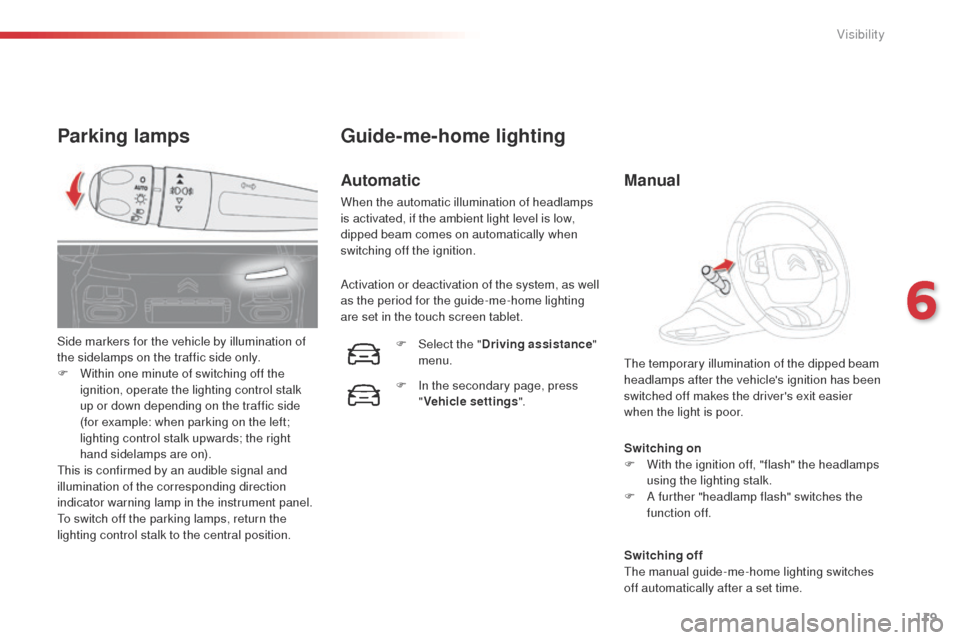
Side markers for the vehicle by illumination of
the sidelamps on the traffic side only.
F
W
ithin one minute of switching off the
ignition, operate the lighting control stalk
up or down depending on the traffic side
(for example: when parking on the left;
lighting control stalk upwards; the right
hand sidelamps are on).
This is confirmed by an audible signal and
illumination of the corresponding direction
indicator warning lamp in the instrument panel.
To switch off the parking lamps, return the
lighting control stalk to the central position.
Guide-me-home lighting
Automatic
When the automatic illumination of headlamps
is activated, if the ambient light level is low,
dipped beam comes on automatically when
switching off the ignition.
Activation or deactivation of the system, as well
as the period for the guide-me-home lighting
are set in the touch screen tablet.
F
Sel
ect the "Driving assistance "
menu.
F
I
n the secondary page, press
" Vehicle settings ".
Manual
6
Visibility
Page 125 of 331

123
E3_en_Chap06_visibilite_ed01-2014
Rear wiper
Park.If a significant accumulation of snow or
ice is present, or when using a bicycle
carrier on the boot, deactivate the
automatic rear wiper.
Intermittent wipe.
Wash-wipe (set duration).
Rear wiper selection ring:
Reverse gear
When reverse gear is engaged, the rear wiper
will come into operation automatically if the
windscreen wipers are operating.
Activation or deactivation of this automatic
function can be set in the touch screen tablet.
Windscreen wash
Pull the wiper stalk towards you.
The
windscreen wash, then the windscreen
wipers, operate for a pre-determined time.
Your vehicle is fitted with an innovative
windscreen wash system.
The screenwash fluid is sprayed all
along the length of the wiper blade, so
avoiding impairment of the driver's view
or that of the passengers.
F
Sel
ect the "
Driving assistance "
menu.
F
I
n the secondary page, press
" Vehicle settings ".
This function is activated by default.
6
Visibility
Page 135 of 331

133
E3_en_Chap07_securite_ed01-2014
Reinitialisation of the system is done in the the
touch screen tablet, with the ignition on and the
vehicle stationary.F
I
n the secondary page, press
" Under-inflation initialisation ".
F
C
onfirm the instruction by pressing " Ye s",
an audible signal and a message confirm
the reinitialisation.
The new pressure settings registered are
considered to be reference values by the
system.
Operating fault
The flashing and then fixed illumination of the
under-inflation warning lamp accompanied
by illumination of the "service" warning lamp
indicates a fault with the system.
In this case, under-inflation monitoring of the
tyres is no longer assured.
Have the system checked by a CITROËN
dealer or a qualified workshop.
Before doing anything to the system,
the pressures of the four tyres must be
checked and the system reinitialised.
The under-inflation alert can only be
considered reliable if reinitialisation of
the system is done with the the four tyre
pressures correctly set.
Snow chains
The system does not have to be
reinitialised after fitting or removing
snow chains.
F
Sel
ect the " Driving assistance "
menu.
7
Safety
Page 169 of 331

167
E3_en_Chap09_info_pratiques_ed01-2014
Range indicators
When switching on the ignition, an indicator
gives an estimate of the distance that can
be travelled with your vehicle before engine
starting is automatically prevented, once the
vehicle starts using the reserve of AdBlue
® or
after a fault is detected with the SCR system.
In the event of simultaneous system fault and
low AdBlue
® level, the shortest range is the one
displayed. Range greater than 1 500 miles (2 400 km)
When switching on the ignition, no information
on range is displayed automatically in the
instrument panel.
You can access this information in the touch
screen tablet.
The engine start prevention system
required by regulations is activated
automatically once the AdBlue
® tank is
e m pt y.
In the event of the risk of non-starting related to a lack of AdBlue®
F Select the " Driving assistance "
menu.
F
I
n the secondary page, press
on " Diagnostic ".
The remaining driving range is displayed
temporarily.
Above 3 000 miles (5 000 km), the value is not
specified.
9
Practical information
Page 198 of 331
196
E3_en_Chap09_info_pratiques_ed01-2014
Before changing a fuse:
F t he cause of the failure must be identified
and rectified,
F
a
ll electrical consumers must b
switched
off,
F
t
he vehicle must be immobilised with the
ignition off,
F
i
dentify the failed fuse using the tables and
layout drawings in the following pages.
Changing a fuse
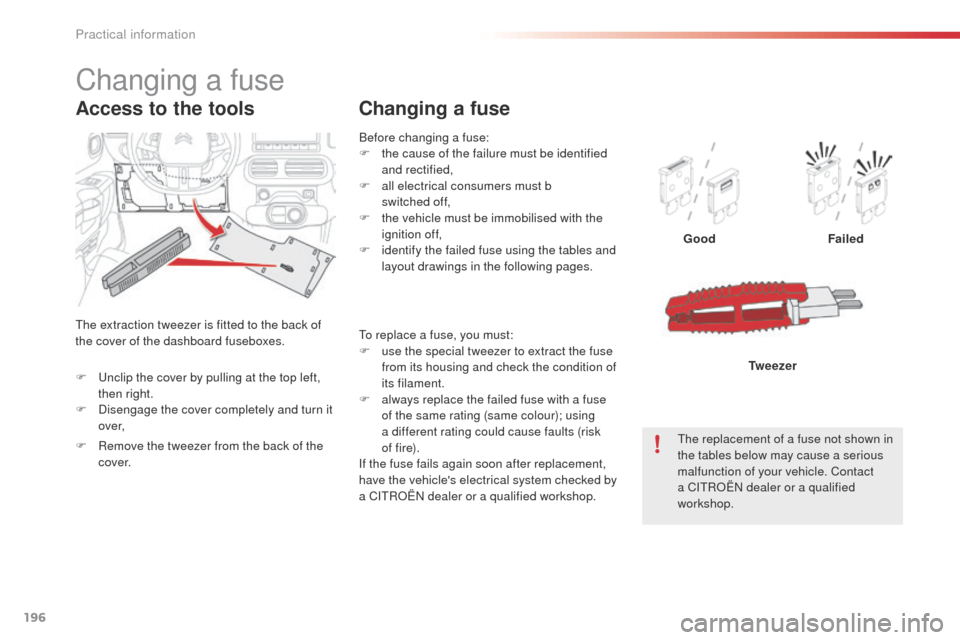
Good Failed
The replacement of a fuse not shown in
the tables below may cause a serious
malfunction of your vehicle. Contact
a CITROËN dealer or a qualified
workshop. Tw e e z e r
Changing a fuse
The extraction tweezer is fitted to the back of
the cover of the dashboard fuseboxes.
Access to the tools
To replace a fuse, you must:
F
u se the special tweezer to extract the fuse
from its housing and check the condition of
its filament.
F
a
lways replace the failed fuse with a fuse
of the same rating (same colour); using
a different rating could cause faults (risk
of f i r e).
If the fuse fails again soon after replacement,
have the vehicle's electrical system checked by
a CITROËN dealer or a qualified workshop.
F
U
nclip the cover by pulling at the top left,
then right.
F
D
isengage the cover completely and turn it
ove r,
F
R
emove the tweezer from the back of the
c ove r.
Practical information
Page 241 of 331
01
E3_en_Chap12b_SMEGplus_ed01-2014
Use the buttons on either side of the touch screen tablet for access to \
the menus, then press
the virtual buttons in the touch screen tablet.
Each menu is displayed in one or two pages (primary page and secondary \
page).
GENERAL OPERATION
In very hot conditions, the system may go into stand-by (screen and sou\
nd completely off) for a minimum period of 5 minutes. Secondary page
239
Primary page
Page 244 of 331
04
242
E3_en_Chap12b_SMEGplus_ed01-2014
MEDIA
Level 1Level 2 Level 3
List of FM stations
"Media"
Primary page
Preset
Page 246 of 331
04
244
E3_en_Chap12b_SMEGplus_ed01-2014
MEDIA
Level 1Level 2 Level 3
Media Photos
Manage Jukebox
244
"Media"
Secondary page List of FM stations
Copy to Jukebox


