Page 69 of 331
67
E3_en_Chap03_confort_ed01-2014
Heating
Temperature adjustment
F Press one of these buttons or move the cursor from blue
(cold) to red (hot) to adjust the
temperature to your wishes.
Air flow adjustment
F Press one of these buttons to increase or decrease the air flow
from the system.
Avoid driving for too long without
ventilation (risk of misting and
deterioration of air quality).
The heating system works only when the engine is running.
The symbol for air flow (a fan) fills progressively
according to the air flow setting made.
By reducing the air flow to the minimum, you
are stopping ventilation of the passenger
compartment.
F
Sel
ect the "
Air conditioning "
menu in the touch screen tablet
to display the controls page for
the system.
3
Comfort
Page 71 of 331
69
E3_en_Chap03_confort_ed01-2014
Manual air conditioning
Temperature adjustment
F Press one of these buttons or move the cursor blue (cold)
to red (hot) to adjust the
temperature to your liking.
The air conditioning system operates with the engine running.
Air flow adjustment
F Press one of these buttons to
increase or decrease the air flow.
The symbol for air flow (a fan) fills progressively
according to the air flow setting made.
By reducing the air flow to minimum, you are
stopping ventilation.
Avoid driving too long without ventilation
(risk of misting and deterioration of air
quality).
F
Sel
ect the "
Air conditioning "
menu in the touch screen tablet
to display the controls page for
the system.
3
Comfort
Page 73 of 331
71
E3_en_Chap03_confort_ed01-2014
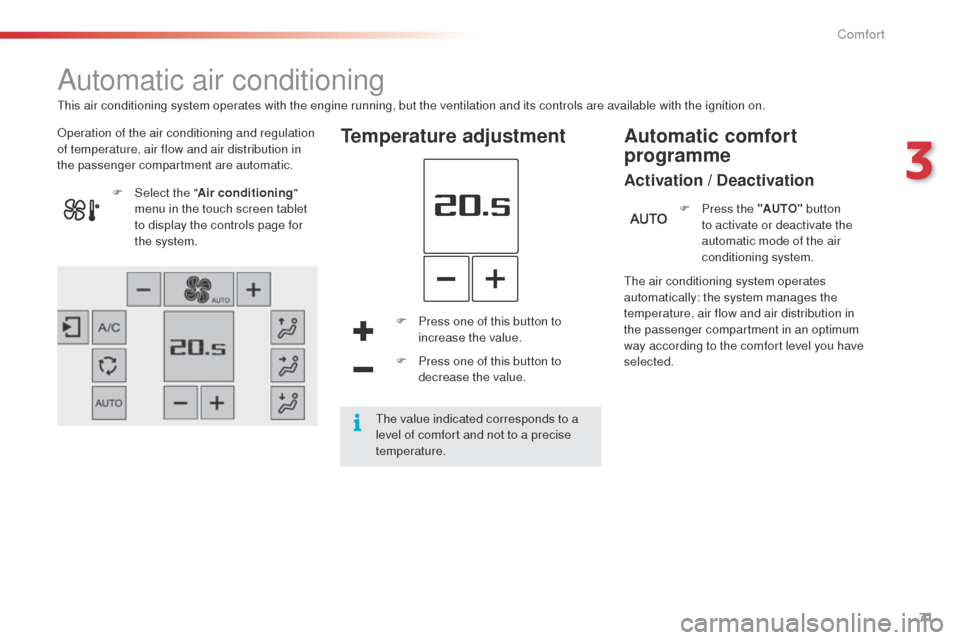
Automatic air conditioning
Operation of the air conditioning and regulation
of temperature, air flow and air distribution in
the passenger compartment are automatic.Temperature adjustment
F Press one of this button to increase the value.
F
P
ress one of this button to
decrease the value.
F
Sel
ect the "
Air conditioning "
menu in the touch screen tablet
to display the controls page for
the system.
The air conditioning system operates
automatically: the system manages the
temperature, air flow and air distribution in
the passenger compartment in an optimum
way according to the comfort level you have
selected.F
P
ress the "AUTO"
button
to activate or deactivate the
automatic mode of the air
conditioning system.
Automatic comfort
programme
Activation / Deactivation
This air conditioning system operates with the engine running, but the ventilation and its controls are available with the ignition on.
The value indicated corresponds to a
level of comfort and not to a precise
temperature.
3
Comfort
Page 74 of 331

72
E3_en_Chap03_confort_ed01-2014
In cold weather with the engine cold,
the air flow is increased gradually until
the system has warmed up, in order
to limit the delivery of cold air into the
passenger compartment.
On entering the vehicle, if the interior
temperature is much colder or warmer
than the comfort value setting, there
is no need to alter the value displayed
in order to reach more quickly the
required level of comfort. The system
compensates automatically and
corrects the temperature difference as
quickly as possible.
This setting is associated with AUTO mode
only. However, on deactivation of AUTO mode,
the last setting used remains on.
Changing the setting does not reactivate AUTO
mode if deactivated. To change the current setting press the button
for the desired mode: "Soft ": provides soft and quiet
operation by limiting air flow.
" Normal ": offers the best
compromise between a comfortable
temperature and quiet operation
(default setting).
" Fast ": provides strong and effective
air f low.
Automatic programme mode
setting
F Go to the secondary page by pressing this button to
modulate the automatic comfort
programme, choosing one of the
modes offered.
Comfort
Page 99 of 331

97
E3_en_Chap05_conduite_ed01-2014
A fault with the system is signalled
in the "Driving assistance " menu
(primary page) of the touch screen
tablet.
Operating fault
In the event of a fault with the
system, the indicator lamp in the
Stop & Start
button flashes for a few
moments, the stays on continuously.
If you press this button to reactivate the
system, the indicator lamp flashes again for a
few moments and then stays on continuously.
The Stop & Start system can be deactivated in
the touch screen tablet.
Deactivation
If the system has been deactivated in STOP
mode, the engine restarts immediately.
When driving on a flooded road, it is
recommended that the Stop & Start
function be deactivated and that you
drive very slowly. The system can be reactivated in the touch
screen tablet.
Reactivation
The system is reactivated automatically
every time the engine is started by
the
driver.
F
P
ress on " Stop & Star t ".
F
Sel
ect the " Driving assistance "
menu.
The indicator lamp in this button comes on
continuously. Pressing this button again reactivates
the Stop & Start system. The
indicator lamp in the button goes off.
Have it checked by a CITROËN dealer or a
qualified workshop.
In the event of a fault in STOP mode, the vehicle
may stall.
All of the instrument panel warning lamps come on.
Depending on version, an alert message may
also be displayed, asking you to change to
neutral (control on N) and put your foot on the
brake pedal.
You must switch off the ignition, then start the
engine again.
5
Driving
Page 106 of 331
104
E3_en_Chap05_conduite_ed01-2014
Memorising speeds
Memorisation
This function allows speeds to be saved, which can then be offered to set the two systems: the speed limiter (to limit the speed of the vehicle) or the
cruise control (for a vehicle cruising speed).
You can memorise up to six speed settings for each of the two systems. By default, some speeds are already memorised.F
I
n the secondary page, press
" Speed settings ".
For safety reasons, the driver must
carry out these operations when
stationary.
F
S
elect the system for which you want to
memorise speeds:
F
Sel
ect the "Driving assistance "
menu.
F
E
nter the new value using the numerical
keypad and confirm.
F
C
onfirm to save the modification and quit
the menu.
●
s
peed limiter or
●
c
ruise control.
F
C
hoose the speed setting you want to
m o di f y. This button restores the factory
settings.
This function is accessible in the touch screen
tablet.
Driving
Page 111 of 331
109
E3_en_Chap05_conduite_ed01-2014
Entering a parallel parking space
F When you have identified a free space, reduce the speed of the vehicle to a
maximum of 12 mph (20 km/h).
F
P
osition your vehicle before this space. To activate the Park Assist system:
OR
A message is displayed in the screen.
F
S
elect the enter parking space manoeuvre.
T
he indicator lamp in the control comes on.F
O
perate the direction indicator on the
parking side.
F
M
ove for wards alongside the parking
space at a speed below 12 mph (20 km/h)
to measure it, keeping at a distance of
between 0.5 and 1.5 metres from the row of
parked vehicles.
Once measurement is complete, if the space is
large enough a message indicates that parking
is possible.
F
Sel
ect the "Driving assistance "
menu in the touch screen tablet.
F
I
n the secondary page, press on
" Park Assist ".
F
P
ress this control to activate the system.
The indicator lamp in the control remains off.
5
Driving
Page 113 of 331

111
E3_en_Chap05_conduite_ed01-2014
Exit from a parallel parking space
With the vehicle stationary, to activate the Park
Assist system: F
W
hen you want to exit from a parallel
parking space, start the engine.
The assisted exit from parking manoeuvre is in
progress.
Without exceeding 5 mph (8 km/h), continue the
manoeuvres following the information given by
the "parking assistance" system, until the end of
manoeuvre message is displayed.
The manoeuvre is complete once the front wheels
of the vehicle are out of the parking space.
The indicator lamp in the control goes off,
accompanied by a audible signal.
The driver takes back control of the vehicle's
steering.
OR
A message is displayed in the screen. F
S
elect the exit parking space manoeuvre.
T
he indicator lamp in the control comes on.
F
O
perate the direction indicator on the exit
from parking side.
T
he direction indicator warning lamp
flashes in the instrument panel throughout
the manoeuvre, whatever the position of
the stalk.
F
S
elect a for ward or reverse gear then
release the steering wheel.
F
Sel
ect the "Driving assistance "
menu in the touch screen tablet.
F
I
n the secondary page, press on
" Park Assist ".
F
P
ress this control.
The indicator lamp in the control remains off.
5
Driving


