2014 CHEVROLET IMPALA wheel
[x] Cancel search: wheelPage 116 of 422
Black plate (2,1)Chevrolet Impala Owner Manual (GMNA-Localizing-U.S./Canada-5772216) -
2014 - 2nd crc - 5/14/13
5-2 Instruments and Controls
Service Vehicle Messages . . . 5-37
Starting the VehicleMessages . . . . . . . . . . . . . . . . . . 5-38
Tire Messages . . . . . . . . . . . . . . . 5-38
Transmission Messages . . . . . 5-39
Vehicle Reminder Messages . . . . . . . . . . . . . . . . . . 5-39
Vehicle Speed Messages . . . . 5-39
Washer Fluid Messages . . . . . 5-40
Window Messages . . . . . . . . . . . 5-40
Vehicle Personalization
Vehicle Personalization . . . . . . 5-40
Universal Remote System
Universal Remote System . . . 5-46
Universal Remote System Programming . . . . . . . . . . . . . . . 5-46
Universal Remote System Operation . . . . . . . . . . . . . . . . . . 5-49
Controls
Steering Wheel
Adjustment
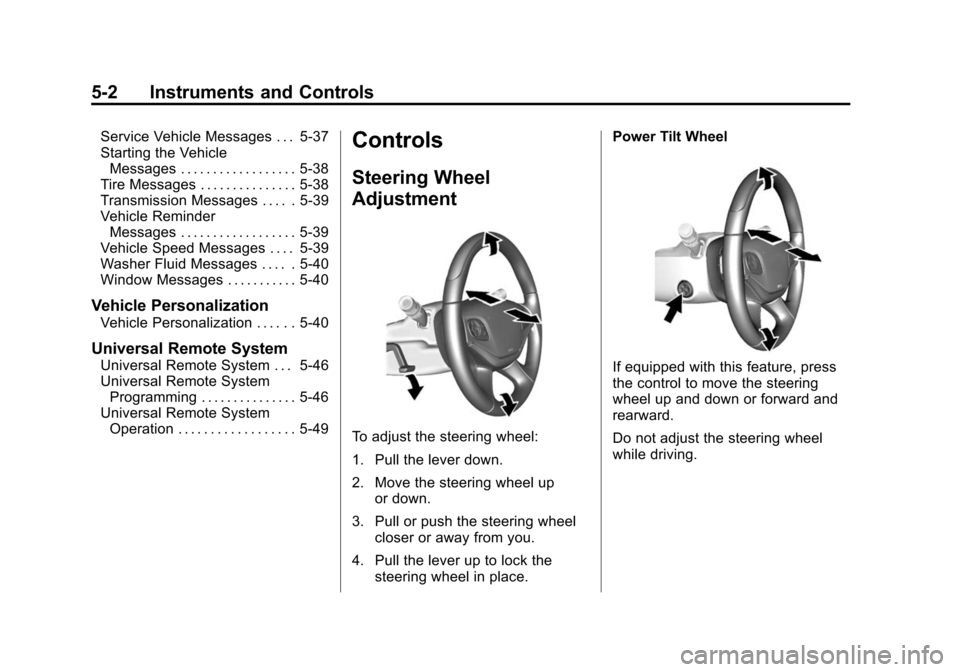
To adjust the steering wheel:
1. Pull the lever down.
2. Move the steering wheel up
or down.
3. Pull or push the steering wheel closer or away from you.
4. Pull the lever up to lock the steering wheel in place. Power Tilt Wheel
If equipped with this feature, press
the control to move the steering
wheel up and down or forward and
rearward.
Do not adjust the steering wheel
while driving.
Page 117 of 422
Black plate (3,1)Chevrolet Impala Owner Manual (GMNA-Localizing-U.S./Canada-5772216) -
2014 - 2nd crc - 5/14/13
Instruments and Controls 5-3
Steering Wheel Controls
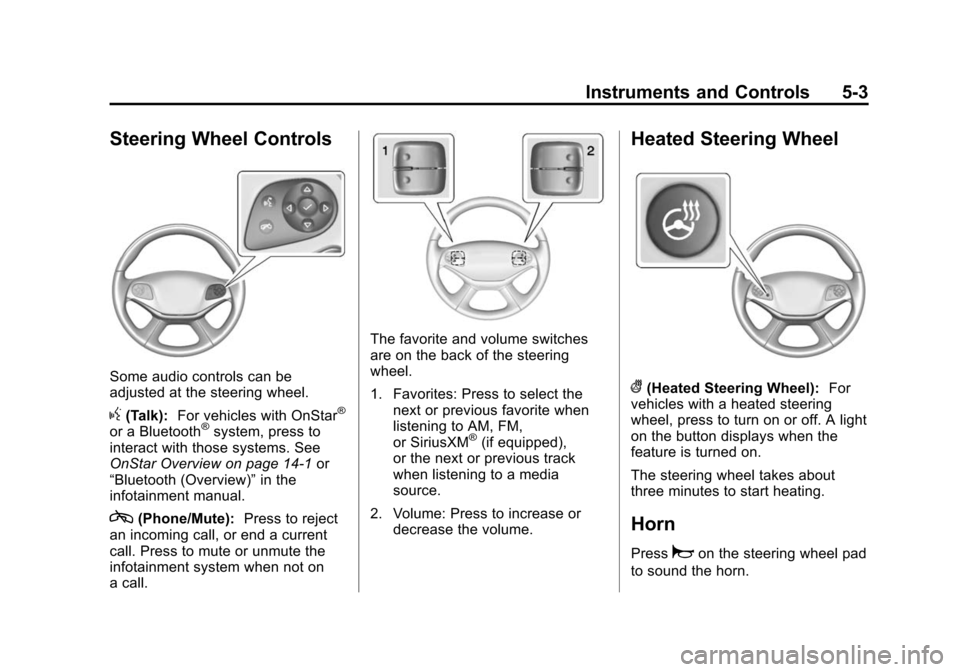
Some audio controls can be
adjusted at the steering wheel.
g(Talk):For vehicles with OnStar®
or a Bluetooth®system, press to
interact with those systems. See
OnStar Overview on page 14-1 or
“Bluetooth (Overview)” in the
infotainment manual.
c(Phone/Mute): Press to reject
an incoming call, or end a current
call. Press to mute or unmute the
infotainment system when not on
a call.
The favorite and volume switches
are on the back of the steering
wheel.
1. Favorites: Press to select the next or previous favorite when
listening to AM, FM,
or SiriusXM
®(if equipped),
or the next or previous track
when listening to a media
source.
2. Volume: Press to increase or decrease the volume.
Heated Steering Wheel
((Heated Steering Wheel): For
vehicles with a heated steering
wheel, press to turn on or off. A light
on the button displays when the
feature is turned on.
The steering wheel takes about
three minutes to start heating.
Horn
Pressaon the steering wheel pad
to sound the horn.
Page 125 of 422
Black plate (11,1)Chevrolet Impala Owner Manual (GMNA-Localizing-U.S./Canada-5772216) -
2014 - 2nd crc - 5/14/13
Instruments and Controls 5-11
Cluster Menu
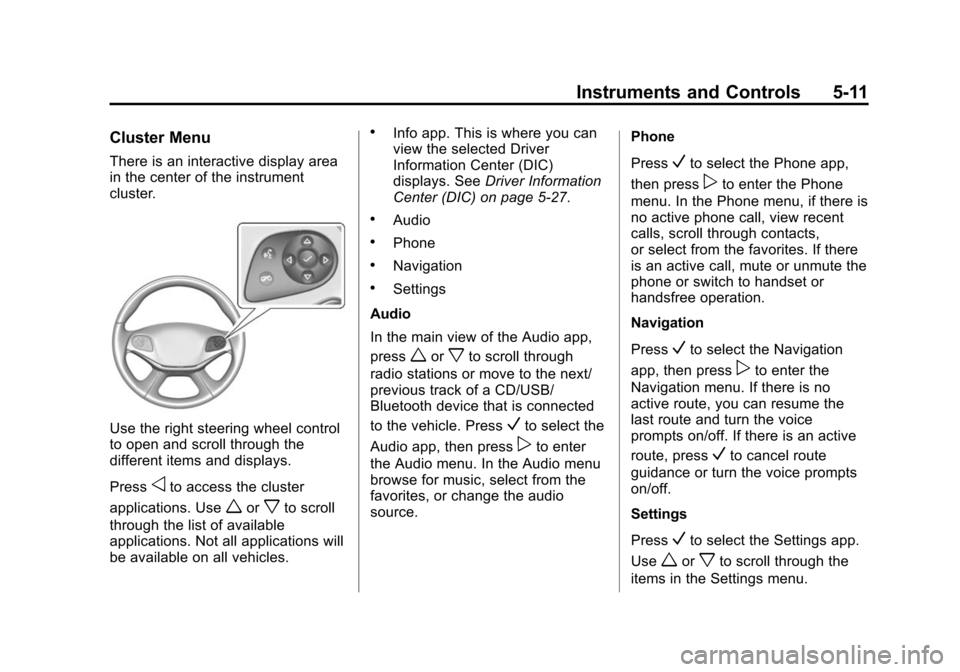
There is an interactive display area
in the center of the instrument
cluster.
Use the right steering wheel control
to open and scroll through the
different items and displays.
Press
oto access the cluster
applications. Use
worxto scroll
through the list of available
applications. Not all applications will
be available on all vehicles.
.Info app. This is where you can
view the selected Driver
Information Center (DIC)
displays. See Driver Information
Center (DIC) on page 5-27.
.Audio
.Phone
.Navigation
.Settings
Audio
In the main view of the Audio app,
press
worxto scroll through
radio stations or move to the next/
previous track of a CD/USB/
Bluetooth device that is connected
to the vehicle. Press
Vto select the
Audio app, then press
pto enter
the Audio menu. In the Audio menu
browse for music, select from the
favorites, or change the audio
source. Phone
Press
Vto select the Phone app,
then press
pto enter the Phone
menu. In the Phone menu, if there is
no active phone call, view recent
calls, scroll through contacts,
or select from the favorites. If there
is an active call, mute or unmute the
phone or switch to handset or
handsfree operation.
Navigation
Press
Vto select the Navigation
app, then press
pto enter the
Navigation menu. If there is no
active route, you can resume the
last route and turn the voice
prompts on/off. If there is an active
route, press
Vto cancel route
guidance or turn the voice prompts
on/off.
Settings
Press
Vto select the Settings app.
Use
worxto scroll through the
items in the Settings menu.
Page 133 of 422

Black plate (19,1)Chevrolet Impala Owner Manual (GMNA-Localizing-U.S./Canada-5772216) -
2014 - 2nd crc - 5/14/13
Instruments and Controls 5-19
If the light continues to flash, find a
safe place to stop and park the
vehicle. Turn the vehicle off, wait at
least 10 seconds, and restart the
engine. If the light is still flashing,
follow the previous steps and see
your dealer for service as soon as
possible.
Light On Steady:An emission
control system malfunction has
been detected on the vehicle.
Diagnosis and service might be
required.
The following may correct an
emission control system
malfunction:
.Check that the fuel cap is fully
installed. See Filling the Tank on
page 9-59. The diagnostic
system can determine if the fuel
cap has been left off or
improperly installed. A loose or
missing fuel cap allows fuel to
evaporate into the atmosphere.
A few driving trips with the cap
properly installed should turn the
light off.
.Check that good quality fuel is
used. Poor fuel quality causes
the engine not to run as
efficiently as designed and may
cause stalling after start-up,
stalling when the vehicle is
changed into gear, misfiring,
hesitation on acceleration,
or stumbling on acceleration.
These conditions might go away
once the engine is warmed up.
If one or more of these conditions
occurs, change the fuel brand used.
It may require at least one full tank
of the proper fuel to turn the light off.
See Recommended Fuel on
page 9-56.
If none of the above have made the
light turn off, your dealer can check
the vehicle. The dealer has the
proper test equipment and
diagnostic tools to fix any
mechanical or electrical problems
that might have developed.Emissions Inspection and
Maintenance Programs
Depending on where you live, your
vehicle may be required to
participate in an emission control
system inspection and maintenance
program. For the inspection, the
emission system test equipment will
likely connect to the vehicle's Data
Link Connector (DLC).
The DLC is under the instrument
panel next to the steering wheel.
See your dealer if assistance is
needed.
Page 137 of 422

Black plate (23,1)Chevrolet Impala Owner Manual (GMNA-Localizing-U.S./Canada-5772216) -
2014 - 2nd crc - 5/14/13
Instruments and Controls 5-23
This light and the StabiliTrak OFF
light come on when StabiliTrak is
turned off.
If the TCS is off, wheel spin is not
limited. Adjust driving accordingly.
SeeTraction Control/Electronic
Stability Control on page 9-33.
StabiliTrak®OFF Light
This light comes on briefly while
starting the engine. If it does not,
have the vehicle serviced by your
dealer.
This light comes on when the
StabiliTrak system is turned off.
If StabiliTrak is off, the Traction
Control System (TCS) is also off. If the StabiliTrak and TCS are off,
the system does not assist in
controlling the vehicle. Turn on the
TCS and the StabiliTrak systems
and the warning light turns off.
See
Traction Control/Electronic
Stability Control on page 9-33.
Traction Control System
(TCS)/StabiliTrak®Light
This light comes on briefly when the
engine is started.
If the light does not come on, have
the vehicle serviced by your dealer.
If the system is working normally,
the indicator light turns off.
If the light is on and not flashing, the
TCS, and potentially the StabiliTrak
system have been disabled. A DIC message may display. Check the
DIC messages to determine which
feature(s) is no longer functioning
and whether the vehicle requires
service.
If the indicator/warning light is on
and flashing, the TCS and/or the
StabiliTrak system is actively
working.
See
Traction Control/Electronic
Stability Control on page 9-33.
Tire Pressure Light
For vehicles with the Tire Pressure
Monitor System (TPMS), this light
comes on briefly when the engine is
started. It provides information
about tire pressures and the TPMS.
Page 140 of 422
Black plate (26,1)Chevrolet Impala Owner Manual (GMNA-Localizing-U.S./Canada-5772216) -
2014 - 2nd crc - 5/14/13
5-26 Instruments and Controls
turns green when the ACC is set
and active. SeeAdaptive Cruise
Control on page 9-37.
Door Ajar Light
This light comes on in the Driver
Information Center (DIC) when a
door is open or not securely latched.
Before driving, check that all doors
are properly closed.
Information Displays
Power Flows
(eAssist Only)
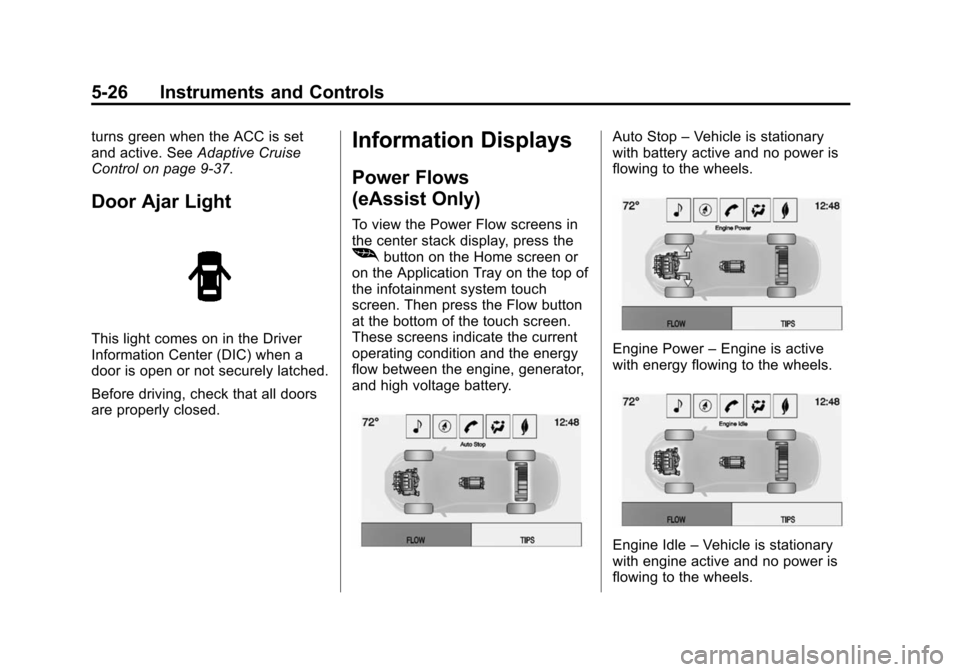
To view the Power Flow screens in
the center stack display, press the
[button on the Home screen or
on the Application Tray on the top of
the infotainment system touch
screen. Then press the Flow button
at the bottom of the touch screen.
These screens indicate the current
operating condition and the energy
flow between the engine, generator,
and high voltage battery.
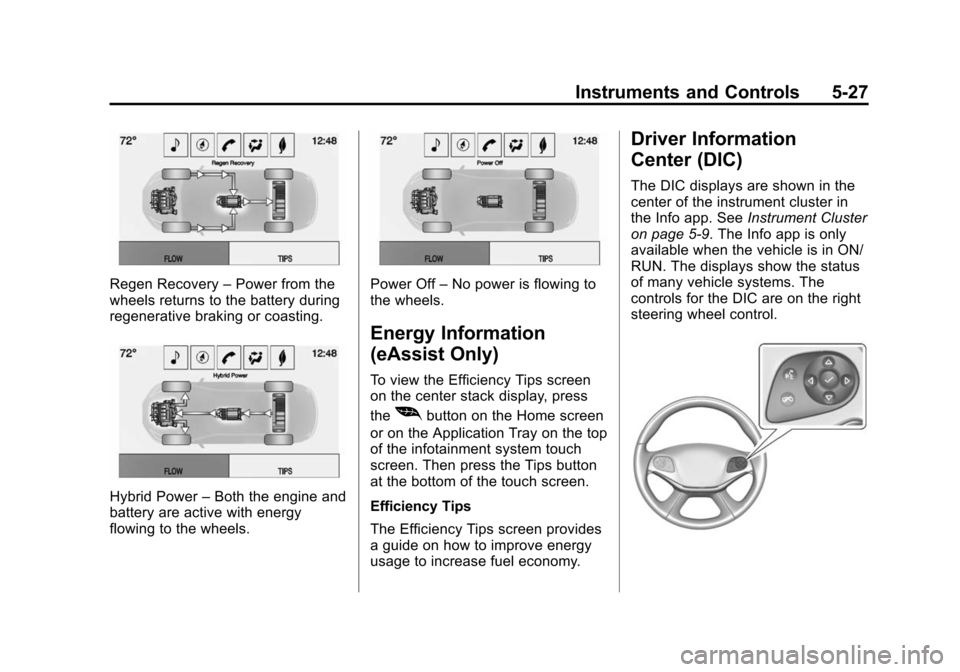
Auto Stop –Vehicle is stationary
with battery active and no power is
flowing to the wheels.
Engine Power –Engine is active
with energy flowing to the wheels.
Engine Idle –Vehicle is stationary
with engine active and no power is
flowing to the wheels.
Page 141 of 422
Black plate (27,1)Chevrolet Impala Owner Manual (GMNA-Localizing-U.S./Canada-5772216) -
2014 - 2nd crc - 5/14/13
Instruments and Controls 5-27
Regen Recovery–Power from the
wheels returns to the battery during
regenerative braking or coasting.
Hybrid Power –Both the engine and
battery are active with energy
flowing to the wheels.
Power Off –No power is flowing to
the wheels.
Energy Information
(eAssist Only)
To view the Efficiency Tips screen
on the center stack display, press
the
[button on the Home screen
or on the Application Tray on the top
of the infotainment system touch
screen. Then press the Tips button
at the bottom of the touch screen.
Efficiency Tips
The Efficiency Tips screen provides
a guide on how to improve energy
usage to increase fuel economy.
Driver Information
Center (DIC)
The DIC displays are shown in the
center of the instrument cluster in
the Info app. See Instrument Cluster
on page 5-9. The Info app is only
available when the vehicle is in ON/
RUN. The displays show the status
of many vehicle systems. The
controls for the DIC are on the right
steering wheel control.
Page 168 of 422
Black plate (4,1)Chevrolet Impala Owner Manual (GMNA-Localizing-U.S./Canada-5772216) -
2014 - 2nd crc - 5/14/13
6-4 Lighting
The turn and lane-change signal
can be turned off manually by
moving the lever back to its original
position.
If after signaling a turn or lane
change, the arrow flashes rapidly or
does not come on, a signal bulb
may be burned out.
Have any burned out bulbs
replaced. If a bulb is not burned out,
check the fuse. SeeFuses on
page 10-36.Interior Lighting
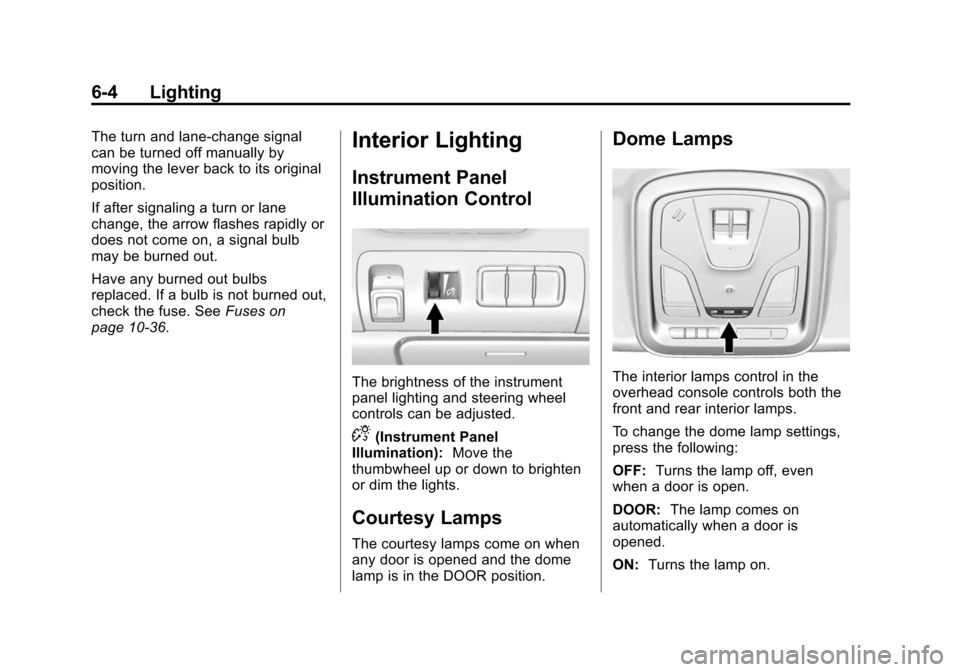
Instrument Panel
Illumination Control
The brightness of the instrument
panel lighting and steering wheel
controls can be adjusted.
D(Instrument Panel
Illumination): Move the
thumbwheel up or down to brighten
or dim the lights.
Courtesy Lamps
The courtesy lamps come on when
any door is opened and the dome
lamp is in the DOOR position.
Dome Lamps
The interior lamps control in the
overhead console controls both the
front and rear interior lamps.
To change the dome lamp settings,
press the following:
OFF: Turns the lamp off, even
when a door is open.
DOOR: The lamp comes on
automatically when a door is
opened.
ON: Turns the lamp on.