2014 AUDI S4 engine
[x] Cancel search: enginePage 116 of 296

114 Audi drive select
-For vehicles with an automatic transmis
sion, selecting the
Dynamic mode re
su lts in sporty shifting characteristics .
The S gear position engages automati
cally.
- In vehicles that have dynamic steering*,
operating noise is heard when starting or
stopping the eng ine . This does not ind i
cate a problem .
Selecting the driving mode
Applies to vehicles: with Audi drive select
You can choose between Comfort, Auto, Dy
namic
and Individual * modes.
Fig. 126 Cen ter console: Control for Au di dri ve select
Fig. 127 MMI•: Aud i drive select
Adjusting the Individual mode
Applies to vehicles: with MMI and Aud i drive select
.,. To set the mode, press the r.:i:.~ button
~ fig. 126 multiple times until the desired
mode is displayed in the instrument cluster .
Or
.,. In the MMI", select:
ICARI function button>
Comfort, Auto, Dynamic or Individual *.
In vehicles without the MMI*, the~:/;,~ button
is found underneath the shift/selector lever .
You can change the driving mode when the ve hicle is stationary or wh ile driving . If traffic
permits, after changing modes, br iefly take
your foot off the acce lerator pedal so that the
recently selected mode is also activated for
the engine and transm ission .
Comfort -provides a comfort-oriented vehicle
setup and is suited for long drives on h igh
ways.
Auto -provides an overall comfortable yet dy
namic driving feel and is suited for every day
use.
Dynamic -gives the driver a sporty driving
feel and is suited to a sporty driving style.
Individual * -¢ page 114.
& WARNING
Pay atte ntion to traffic when operating
drive select to prevent potential risk of an
accident .
You can personally specify the vehicle setup in the MMI* .
.,. Se lect the ICAR I function button > Set indi·
vidual
control but ton. Once you select the
menu, you will automatically drive in the
in·
dividual
mode.
Systems Comfort
Engine /Transmission
balanced
Steering comfortable T
he equipment in your vehicle will determine
wh ich sett ings you can adjust. The following
table provides an overview of the characteris
tics of each driving mode .
Auto Dynamic
balanced spo
rty
balanced sporty
Page 117 of 296

Systems Comfort
Auto
Dynamic steering*
comfortab le/ind ire ct balanced/direct
Adaptive damper s* comfo rtable balanced
Sport different ial* ba lanced agile
Adaptive cruise control* comfo rtable balanced
Engine sound* subtle subtle/sportya>
a)
Subt le in the dri ving pos ition D and sporty in t he dr iv ing pos ition S.
(D Tips
Your Individual * mode settings are auto
mat ically stored and assigned to the re
mote control key being used.
Audi drive select 115
Dynamic
sporty/direct
spo rty
spo rty
spo rty
sporty
Page 126 of 296

124 Homelin k
Homelink
Universal remote
control
Description
Appl ies to vehicles: wit h Homeli nk
The HomeLink universal remote control can
be programmed with the remote control for
devices that are already present.
W ith Home Link, you can control devices such
as the garage door, security systems, house lights, etc. comfortably from the inside of you
vehicle.
Homelink makes it possible for you to replace
three d ifferent remote controls from dev ices
in your home with one universal remote. This
feature works for most garage door and exte
rior door motor signals. Programming the in
div idual remote control for your remote con
trol takes place near the center of the radiator
grille. There is a control module attached at
this location .
A one -time programm ing of the sensor must
be performed before you are able to use sys
tems with Home link. If the system does not
activate after performing the one-time pro
gramm ing, check whether the system uses a
rolling code
q page 127 for vehicles without
the MMI*.
& WARNING
-
- Never use the Homelink transmitter
with any garage door opener that does
have not the safety stop and reverse fea
ture as required by federa l safety stand
ards. This includes any garage door open
er model manufactured before April 1,
1982.
- A garage door opener which cannot de
tect an object, signaling the door to stop
and reverse does not meet current feder
al safety standards. Using a garage door
opener without these features increases
risk of serious injury or death. -
For safety reasons never release the
parking brake or start the engine while
anyone is standing in front of the vehicle.
- A garage door or an estate gate may
sometimes be set in motion when the
Homelink remote control is being pro
grammed. If the device is repeatedly ac
tivated, this can overstrain motor and
damage its e lectrica l components - an
overheated mo tor is a fire hazard!
- To avo id possib le injuries or property
damage, please always make abso lutely
certain that no persons or objects are lo
cated in the range of motion of any
equipment being operated.
{D Tips
- If you would li ke more information on
Homel ink, where to purchase the Home
Link compat ible prod ucts, or wou ld like
to purchase the Homelink Home Light
ing Package, please call toll-free:
1-800-355-3515.
- For Declaration of Compliance to United
States FCC and Industry Canada regula
tions
¢ page 2 78.
- For security reasons, we recommend that
you clear the programmed buttons be
fore selling the vehicle.
Operation
Applies to veh icles : w it h Ho meli nk
~ ,.......,,...--, ........... ~
,;,,, r . o : o . ) .~
®
Fig. 136 Headl iner: controls
Requirement : The buttons must be program-
med
¢ page 125 or ¢page 126. II>
Page 128 of 296

126 Homelink
Programming the transmitter
(version B)
Applies to vehicles: with Homelink
F ig. 138 Distance between t he rad iator grille and the
hand transm itter
P rogramming: phase 1 on th e control unit
1. Sw itch on the ign it ion (do not start the
engine) .
2. Press and hold both of the outer Home
Link buttons
¢ page 124, fig. 136 unti l
the LED @turns off completely (about
20
seconds). Th is procedure clears the stand
ard codes that were set at the factory and
does not need to be repeated again to
p rogram the other buttons .
3 . Briefly press the Homelink button that
you would like to prog ram .
4. Wai t unti l the LED @ beg ins to blin k
q uickly. The Homelink module wi ll now
remain in learning mode for
5 minutes .
5. Now stand in front of your vehicle with
the original hand transmitter for the ga
rage door opener or for the device that
you would like to allocate to the Home
Link button .
P rogramming: pha se 2 on the radiator
gr ille
6 . Hold the orig inal hand transmitter some
what towa rds the center of your vehicle's
r adiato r grille ¢
fig. 138 .
7. Now activate (p ress) the hand transmit
ter.
8 . Pay attention to the tu rn signals fo r your
vehicle when activating the hand trans
mitter . If the emergency flashers blink
three times, the programming was suc
cessful. If the emergency flasher only blinks one time, the S minute time limit f
or the adaptation has expired or the pro
gramming was unsuccessful. Repeat the
programming from step 3 on the controls
or select another distance from the radia
tor grille.
9 . If the garage door or other devices still
fail to be activated w it h the HomeL ink
control buttons after programming is
comple ted, it is possib le tha t these sys
tems mig ht be work ing with a roll ing code
instead of the normal f ixed code .
A Roll
ing code programming must be per
formed
¢ page 127 .
Program the remaining two buttons accord ing
to the instructions mentioned above . Begin
similarly with the 3rd step if the program
ming connection was successful for the first
button.
Remote contro l units for garage door openers
in Canada are set to stop transmitting radio
frequency signa ls after two seconds. This time
may not be suffic ient for the Homelink sys
tem to learn the radio frequency signa l. Per
form all other steps as described above.
E rasing the button s
.,. Switch on the ignition (do not start the en
gine).
.,. Press and hold both of the outer buttons un
til the LED @turns off completely (about
20 seconds) to erase all of the buttons si
multaneously .
.. Programmed buttons cannot be erased ind i
vidua lly. Reprogram the buttons if necessa
ry .
Reprogramming the buttons
.. Switch on the ignition (do not start the en
gine) .
.. To reprogram an individua l button, press
and hold the b utton unt il the L ED@starts
to f lash quickly (after abo ut ten seconds).
Release the button immedia tely. The Home
Link module will now remain in learning
mode for 5 minutes.
.,. Continue with step 5.
Page 141 of 296
Why safety belts?
Frontal collisions and the law of physics
Frontal crashes create very strong forces for
people riding in vehicles .
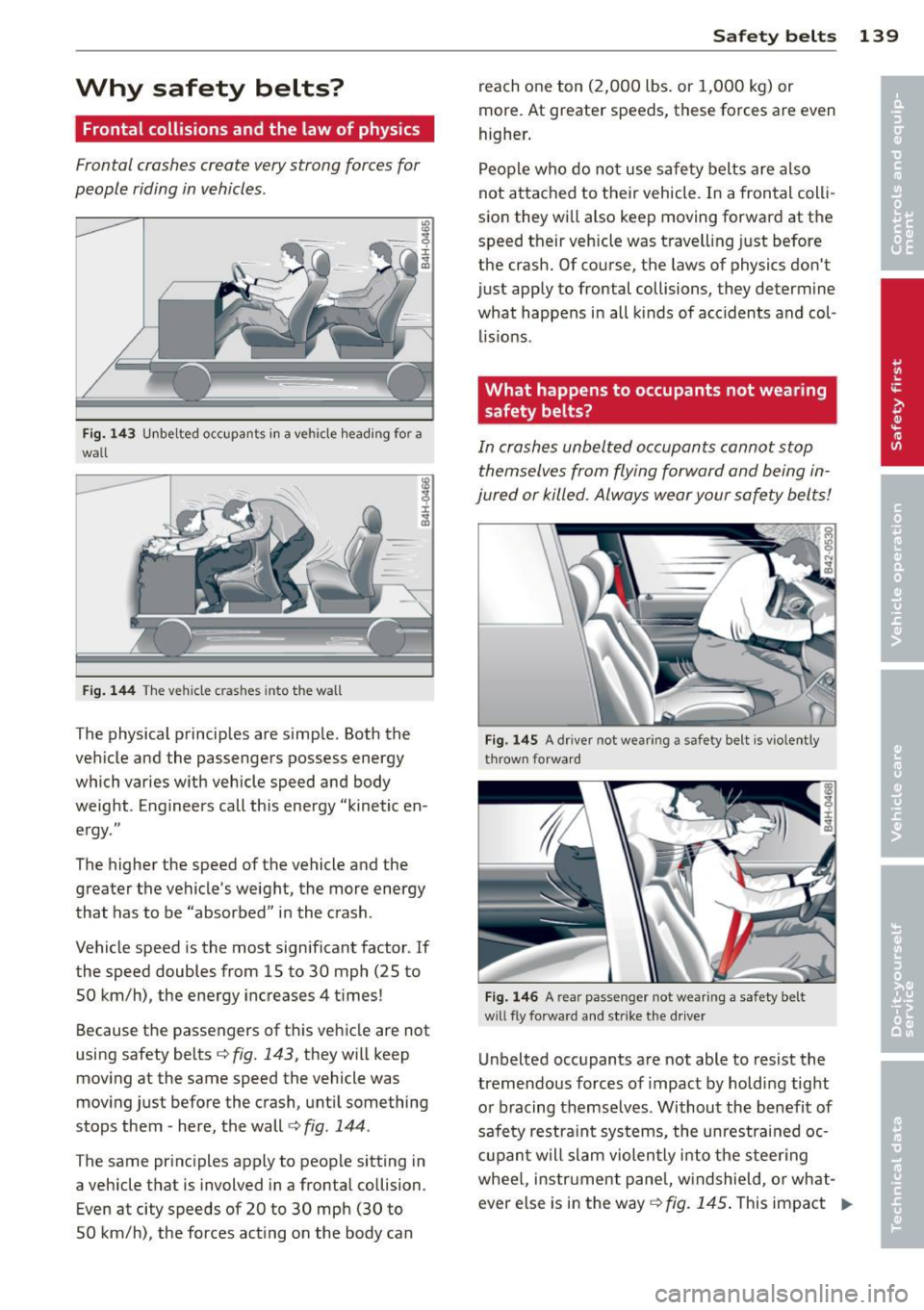
Fig. 14 3 Unbe lted occupa nts in a ve hicle hea ding for a
wall
F ig. 14 4 The ve hicle c ras hes into t he wall
The physical principles are simp le. Both the
ve hicle and the passengers possess energy
which varies w ith vehicle speed and body
weight . Enginee rs call this energy "kinetic en
e rgy ."
The higher the speed of the vehicle and the greater the vehicle 's weight, the more energy
that has to be "absorbed" i n the crash .
Vehicle speed is the most sign ificant factor . If
the speed doubles from 15 to 30 mph (25 to
50 km/h) , the energy inc reases 4 t imes !
Because t he passengers of t his ve hicle are not
using safety belts
r::;, fig . 143, they w ill keep
moving at the same speed the vehicle was
mov ing just before the crash, unt il something
stops them -here, the wall
c:> fig . 144.
The same pr inc iples apply to peop le sitting in
a vehicle that is involved in a frontal co llision .
Even at city speeds of 20 to 30 mph (30 to
50 km/h) , the forces act ing on the body can Safety belts
139
reach one ton (2,000 lbs . or 1,000 kg) or
more . At greater speeds, these forces are
even
higher .
People who do not use sa fe ty belts are also
not attached to their vehicle. In a frontal coll i
sio n they wi ll also keep moving forward at the
speed their veh icle was t ravell ing just before
the crash. Of co urse, the laws of physics don't
just app ly to frontal collisions, they determine
what happens in all kinds of acc idents and col
lis ions .
What happens to occupants not wearing
safety belts?
In crashes unbelt ed o ccupants cannot stop
themselves from flying forward and being in
jured or killed. Always wear your safety belts!
Fig. 145 A driver not wear ing a safety belt is vi ole ntl y
thrown forwa rd
Fig.
14 6 A rear passeng er not w ear ing a safety be lt
w ill fly forwar d and s trike the d river
Unbelted occ upants a re not able to resist the
tremendous forces of impact by hold ing tight
or bracing themselves . Without the benefit of
safe ty restra in t systems, the unrestrained oc
cupan t w ill slam violen tly i nto the s teer ing
whee l, instr ument pane l, w indshield, o r what
ever else is in the way ¢ fig. 145. This impact Ill-
Page 142 of 296
140 Safety belts
with the vehicle interior has all the energy
they had just before the crash. Never rely on airbags alone for protection.
Even when they deploy, airbags provide only
additional protection. Airbags are not sup
posed to deploy in all kinds of accidents. Al
though your Audi is equipped with airbags, all
vehicle occupants, including the driver, must
wear safety belts correctly in order to mini mize the risk of severe injury or death in a
crash.
Remember too, that airbags will deploy only
once and that your safety belts are always
there to offer protection in those accidents in
which airbags are not supposed to deploy or when they have already deployed . Unbelted
occupants can also be thrown out of the vehi
cle where even more severe or fatal injuries
can occur.
It is also important for the rear passengers to
wear safety belts correctly. Unbelted passen
gers in the rear seats endanger not only them
selves but also the driver and other passen
gers ~
fig. 146. In a frontal collision they will
be thrown forward violently, where they can
hit and injure the driver and/or front seat pas
senger.
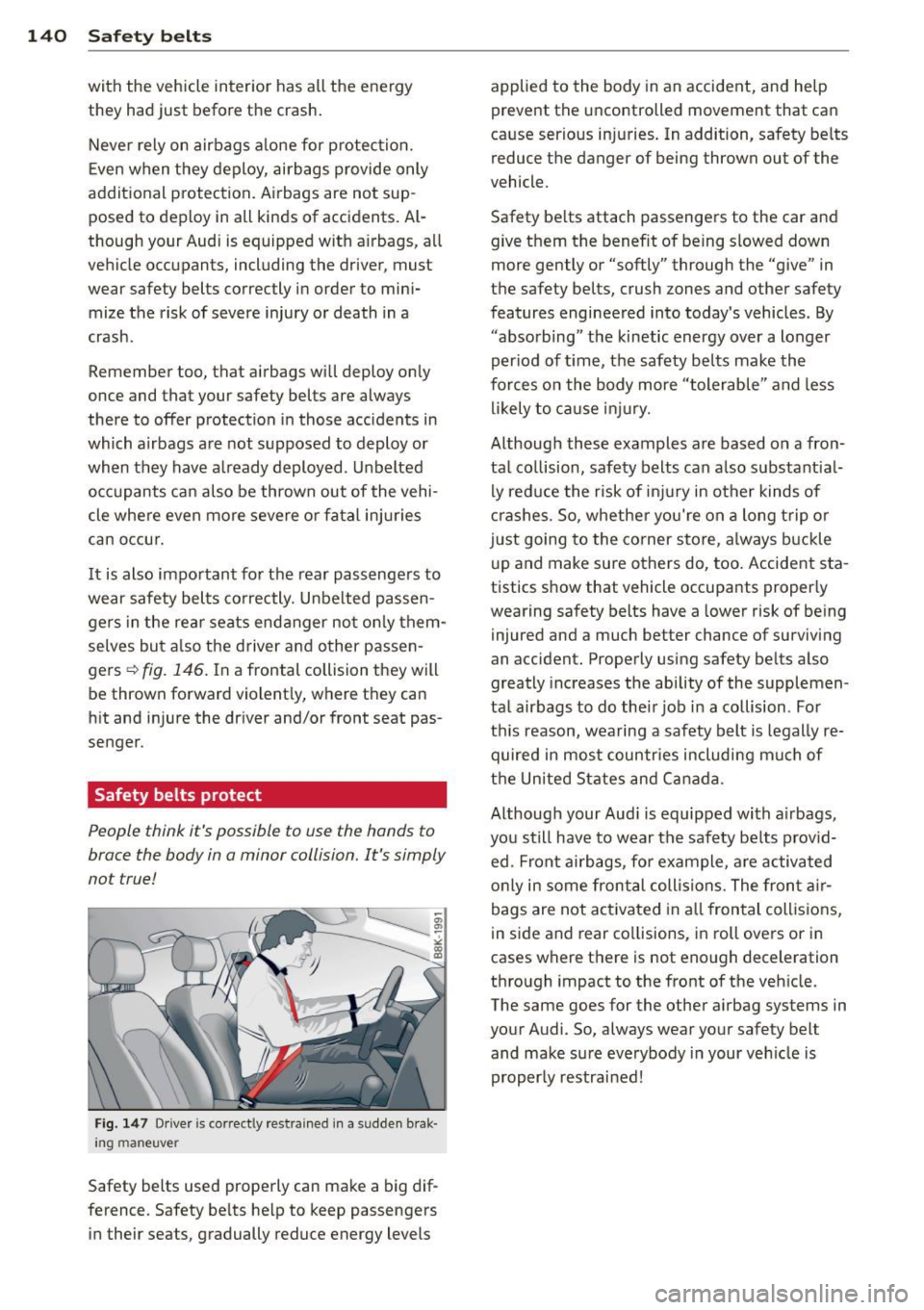
Safety belts protect
People think it's possible to use the hands to
brace the body in a minor collision. It's simply
not true!
Fig . 147 Driver is co rrectly restrained in a s udden brak ·
i n g m an euve r
Safety belts used properly can make a big dif
ference . Safety belts help to keep passengers
in their seats, gradually reduce energy levels applied to
the body in an accident, and help
prevent the uncontrolled movement that can
cause serious injuries. In addition, safety belts
reduce the danger of being thrown out of the
vehicle .
Safety belts attach passengers to the car and give them the benefit of being slowed down
more gently or "softly" through the "give" in
the safety belts, crush zones and other safety
features engineered into today's vehicles. By
"absorbing" the kinetic energy over a longer
period of time, the safety belts make the
forces on the body more "tolerable" and less
likely to cause injury.
Although these examples are based on a fron
tal collision, safety belts can also substantial ly reduce the risk of injury in other kinds of
crashes. So, whether you're on a long trip or
just going to the corner store, always buckle
up and make sure others do, too. Accident sta
tistics show that veh icle occupants properly
wearing safety belts have a lower risk of being
injured and a much better chance of surviving
an accident. Properly using safety belts also
greatly increases the ability of the supplemen
tal airbags to do their job in a collision. For
this reason, wearing a safety belt is legally re
quired in most countries including much of
the United States and Canada .
Although your Audi is equipped with airbags,
you still have to wear the safety belts provid
ed . Front airbags, for example , are activated
only in some frontal collisions. The front air
bags are not activated in all frontal collisions,
in side and rear collisions, in roll overs or in
cases where there is not enough deceleration
through impact to the front of the vehicle.
The same goes for the other airbag systems in
your Audi. So, always wear your safety belt and make sure everybody in your vehicle is
properly restrained!
Page 189 of 296

ESC includes and/or works together with the
anti-lock brake system (ABS), brake assist sys
tem, anti -slip regulation (ASR) , e lectronic dif
ferential lock (EDL), dynamic steering* and electronic i nteraxle differential lock* /selective
wheel torque control* . ESC is switched on all
the t ime. I n certain s ituations when you need
less traction, you can switch
off ASR by press
i ng the button~~
page 188, fig. 174 or
~ page 188, fig. 175. Be sure to sw itch ASR
on again when you no longer need less trac
tion.
Anti-lock b ra king s ystem (ABS)
ABS prevents the wheels from locking up
when braking. The vehicle can still be steered
even d uring hard brak ing . Apply ste ady p res
sure to the brake pedal. Do not pump the ped
a l. A pulsing in the brake peda l indicates t hat
the system is he lping you to brake the vehicle .
Brake assist system
The brake assist system can decrease bra king
d istance. It increases braking power when the
d river presses the brake pedal quick ly in eme r
gency situations . You must press and hold the
brake peda l until the situation is over. In
veh icles w ith adaptive cru ise contro l*, the
brake assist system is more sensit ive if the
d istance detected to the veh icle ahead is too
small.
Anti- slip regulati on (ASR)
ASR reduces engine power when the drive
wheels begin to spin and adapts the force to
the road condit ions. This makes it eas ier to
start, accelerate and drive up hills.
Elect ronic diffe renti al lo ck (EDL )
The ED L brakes wheels that are spinning and
transfers the drive power to the other drive
wheel or wheels if the vehicle is equipped with
all-wheel drive*. This function is available up
to about 60 mph (100 km/h) .
In extreme cases, EDL automatica lly switches
off to help keep the brake on the braked whee l
from overheating. EDL w ill switch on again au-
Intellig ent technolog y 187
tomat ica lly when conditions have returned to
norma l.
Dynamic steering*
On vehicles with dynam ic steering*, ESC helps
stab il ize the s teer ing in crit ica l sit uat io ns.
Electronic interaxle differential lock* /
selective wheel torque control*
T he electronic i nteraxle differential lock (front
whee l dr ive) or the se lective whee l to rque
control (all-whee l dr ive) opera tes when dr iv
ing thro ugh curves. The front wheel on the in
side of the c urve or both whee ls on the inside
of the curve are braked selectively as needed .
This min imizes sliding in the front wheels and
allows for more precise driving through
cu rves . The applicable system may not acti
vate when dr iv ing in wet or snowy conditions.
A WARNING
- ESC, ABS , ASR, EDL dynam ic steering*
a nd the elect ronic interaxle differential
loc k* /se lective wheel torque control*
cannot overcome the laws of physics .
This is especially important on slippery
or wet roads. If the systems begin acting
to stabilize your veh icle, yo u should im
mediately change your speed to match
the road and traff ic conditions. Do not
let the increased safety provided by
these systems tempt you to take r isks.
Doing so will increase the risk of a loss of
veh icle contro l, col lision and ser ious per
sonal injuries.
- Always adapt your speed to road, traffi c
and wea ther conditions. The risk of los
ing con tro l of the vehicle increases when
driving too fast, espec ially through
curves and on slippery or wet roads, and
when dr iv ing too close to vehicles up
ahead. ESC, ABS, the brake ass ist sys
tem, ASR, EDL dynam ic steering* and the
electronic interaxle differentia l lock*/se
lective whee l torque control* cannot p re-
vent co llisions . ..,.
•
•
Page 190 of 296

188 Intelligent technology
-Always accelerate with special care on
even, smooth surfaces such as those that
are wet or covered with ice and snow.
The drive wheels can spin even with
these assistance systems that cannot al
ways help to reduce the risk of loss of ve hicle control.
(i_) Tips
-ABS and ASR only work correctly when
all four wheels are equipped with identi-
Switching on/off
cal tires. Different tire sizes can lead to a
reduction in engine power.
- You may hear noises when the systems
described are working.
- If the indicator light
bl or t!lJ (USA
models)/[IJ (Canada models) appears,
there may be a malfunction
¢page 18,
¢page 19.
ESC turns on automatically when you start the engine.
Fig. 174 Version A: lower center console,~ OFF but·
ton
The ESC is designed to function in levels. De
pending on the level that is selected, the sta
bilization function of the ESC is limited or
switched off. The amount of stabilization con
trol will differ depending on the level.
The following situations are exceptions where
it may be useful to switch on sport mode (Se
dan) or offroad mode (allroad) to allow the
wheels to spin:
Fig. 175 Version B: upper center console,~ OFF but·
to n
-Rocking the vehicle to free it when it is stuck
- Driving in deep snow or on loose ground
- Driving with snow chains
- allroad: Driving on rough terrain when much
of the car's weight is lifted off the wheels
(axle articulation)
- allroad: Driving downhill while braking on
loose ground