2014 AUDI RS7 SPORTBACK ignition
[x] Cancel search: ignitionPage 80 of 292
78 On the road
regular intervals . Any associated noises
are norma l.
Parking
• Press the brake peda l to stop the vehicle .
• Pull the switch(®) to set the parking brake .
• Move the selector lever to P.
• Turn the eng ine off ¢.&_ .
• When on incl ines or declines, turn the steer
i ng wheel so that your vehicle will roll into
the curb if it begins to move.
_& WARNING
- When you leave your veh icle - even if on
ly briefly - always take the ignition key
with you . This applies particu la rly when
children remain in the veh icle. Otherw ise
the ch ildren could start the engine, re
lease the parking brake or operate e lec
trical equipment (e.g . power windows) .
The re is the risk of an accident .
- When the vehicle is locked, no one - par
t icu la rly not children should remain in
the vehicle . Locked doo rs make it more
difficult for emergency wor kers to get in
to the vehicle - putt ing lives at risk.
Starting from rest
The starting assist function ensures that the
parking brake is released automatically upon
starting .
Stopping and applying park ing brake
• Pull the switch© to apply the park ing
brake .
Starting and automat ically releasing the
parking brake
• When you start to drive as usua l, the park
ing brake is automatically re leased and your
vehicle begins to move .
When stopp ing at a traff ic signa l or stopp ing
i n city traffic, the parking brake can be ap
plied . The veh icle does not have to be held
with the footbrake. The par king brake e limi
n ates the te ndency to creep with a drive ra nge engaged. As soon as yo
u drive off as usu a l,
the parking brake is re leased automatically
and the vehicle starts to move .
Starting on slopes
When starting on inclines, the starting assist
prevents the vehi cle from u nintent ionally roll
ing back . The braking force of the parking
brake is not re leased unti l sufficient driving
f orce has been built up at the wheels.
(D Tips
F o r safety reasons, the parking brake is re
l eased a utomatically on ly when t he d riv
er's safety belt is engaged in the buckle.
Emergency braking
In the event that the conventional brake sys
tem fails or locks.
• In an emergency, pu ll the switc h C®> and
continue to pull it to s low your vehicle down
with the parking b rake .
• As soon as you re lease the switch «:El) or ac -
celerate, the brak ing process stops.
If you pu ll the switch «:El) and hold it above a
speed of abo ut 5 mph (8 km/h), the eme rgen
cy brak ing f unct ion is initiated . The vehicle is
braked at all four whee ls by activating the hy
draulic brake system . The brake performa nce
i s sim ila r to making an emergency stop
c::> .&. .
In order not to act ivate the eme rgency brak
ing by mistake, an audib le warning tone (bu z
zer) sounds whe n the switch(®) is pulled . As
soon as the sw itch
®) is released, or the accel
erato r peda l is depressed, eme rgency b raking
stops.
_& WARNING
E mergency br aking should only be u sed in
a n emergency, when the norma l foot bra ke
has fai led or the brake pedal is obstruc ted.
Using the parking brake to pe rform eme r
gency b raking will s low your veh icle down
as if you had made a full brake application.
The laws of physics cannot be suspended
~
Page 82 of 292
80 On the road
th e dista nce between yo ur vehicle and
other vehicles .
- For safet y rea son s, the cruise control
should not be used in the city, i n stop
and-go traff ic, on twist ing roads and
when road conditions are poor (such as ice, fog, gravel, heavy rain and hydro
planing) -risk of accident .
- Turn off the cruise control temporar ily
when ente ring turn lanes, highway exit
lanes or in construct ion zones.
- Please note that inadvertent ly "rest ing"
yo ur foot on the accelerator pedal causes
the cruise control not to brake. This is
because t he cr uise con trol is overridden
by the d river 's a cce le rat ion.
- If a bra ke system malfunction such as
overheat ing occurs when the cru ise con
t ro l system is sw itched on, the braking
f unction in the system may be switched
off. The other cruise control f unctions re
ma in active as long as the indicator light
[~ jrn~14 (US models) !El (Canad ian mod
els) is on.
The brake lights illuminate as soon as the brakes decelerate a utomat ica lly.
Changing speed
Applies to vehicles: with cru ise control
.,. To increase/decrease the speed in incre
me nts, tap the lever in t he
0 10 d irection
¢ page 79, fig . 84
.,. To increase/dec rease the speed qu ickly, hold
the leve r in the
010 direction until the de
s ir ed speed is d isplayed.
You can a lso p ress the accelerato r pedal down
to inc rease your speed, e .g . if you want to
pass someone. The speed yo u saved earlier
will resume as soon as you release the acceler
ator peda l.
I f, however, you exceed your saved speed by
6 mp h (1 0 km/h) fo r longe r th an 5 m inutes,
the cruise cont ro l w ill tu rn off tempora rily.
The green symbo l
@;\1)~14 (US models) !El
(Canadian mode ls) in the display will go out
but the saved speed remains the same .
Presetting your speed
Applies to vehicles: with cruise control
You can preset your desired speed while the
vehicle is not moving .
.,. Swi tch on the ign ition.
.,. Pull lever in to posi tion @¢
page 79,
fig. 84.
.,. Press the lever in the 0 or 0 direction to
increase or decrease your speed .
.,. Release the lever to save that speed.
This function makes it possib le, for examp le,
to save the speed you want before driving on
the highway. Once on the h ighway, act ivate
the cru ise control by pulling the lever toward
@ .
Switching the system off
Applies to vehicles: with cruise control
Temporary deactivation
.,. Press the brake pedal, or
.,. Press the lever into position @(not cl icked
into place)
~ page 79, fig . 84, or
.,. Dr ive fo r longer t han 5 m inutes at mo re
t han 5 mph (10 km/h) above the stored
spee d.
Switching off completely
.,. Press lever into position @ (clicked into
p lace), or
.,. Switch the ignit ion off .
The system retains t he saved speed if you de
activate the c ruise control temporar ily . To re
s u me the saved speed, re lease the brake ped
al a nd pull the leve r to pos it ion @.
Switch ing the ignition off erases the saved
speed .
A WARNING
-You sho ul d only ret urn to the saved speed
if it is no t too fast for the cur ren t traffi c
condi tions -ris k of an a cci dent!
Page 88 of 292

86 Audi adaptive cruise control and braking guard
When approaching a moving vehicle up ahead,
the adaptive cruise control system automati
cally brakes to match that object's speed and
then maintains the stored distance. If the ve
h icle ahead accelerates, adaptive cruise con
trol will also accelerate up to the stored
speed.
The higher the speed , the greater the distance
in yards (meters)
c::> & . The Distance 3 setting
is recommended .
The distances prov ided are spec ified values .
Depending on the driving situation and the
how the vehicle ahead is driving, the actual
d istance may be more or less than these tar
get distances.
The various symbols for the time increments
appear briefly in the information line @
c::> page 83, fig . 91 when you change the set
tings .
~-~- --Distance 1 : This setting corre
sponds to a distance of 92 feet/28 meters
when traveling at 62 mph (100 km/h), or a
time interval of 1 second.
~--~- -Distance 2: This setting corre
sponds to a distance of 118 feet/36 meters
when traveling at 62 mph (100 km/h), or a
time inte rval of 1.3 seconds .
~--- ~-Distance 3: This setting corre
sponds to a distance of 164 feet/SO meters
when traveling at 62 mph (100 km/h), or a
time interval of 1.8 seconds .
~---- ~ Distance 4: This setting corre
sponds to a distance of 210 feet/64 meters
when traveling at 62 mph (100 km/h), or a
time interval of 2.3 seconds .
A WARNING ,. -
Following other vehicles too closely in
creases the risk of collisions and serious
personal inj ury.
- Setting short distances to the traffic
ahead reduces the time and distance
available to bring your vehicle to a safe
stop and makes it even more necessary
to pay close attention to traffic. -
Always obey applicable traffic laws, use
good judgment, and select a safe follow ing d istance for the traff ic, road and
weather conditions.
@ Tips
- Distance 3 is set automatically each time
you switch the ignition on.
- Your standard settings are automatically
stored and assigned to the remote con
trol key being used.
Selecting the driving mode
Applies to veh icles: w ith Audi adaptive cruise co ntrol
.,. Select the desired driving mode in drive se
lect
c::> page 96 .
(D Tips
Your settings are automatically stored and
ass igned to the remote control key being
used.
Prompt for dr iver intervention
Applies to veh icles: w ith Audi adaptive cruise co ntro l
Fig. 95 Instrume nt cluster: req uest fo r drive r inte rven
t ion
In certain situations, the system will prompt
yo u to take action . This could happen, for ex
amp le, if braking by the adap tive cruise con
tro l system is not enough to maintain enough
distance to the veh icle ahead .
T he indicator light
I and the symbol in the
display will war n you abo ut the situat ion
c::>fig. 95 . You wi ll also hear an acoustic signal.
- Press the brake pedal to slow yo ur vehicle
down.
Page 90 of 292

88 Audi adaptive cruise control and braking guard
stopped vehicle or stationary obstacle (end of a traffic jam or vehicle that has
broken down in traffic).
- Always remember that the radar sensor
for the braking guard works only within
defined detection and range limits that
may prevent the proper detection of oth
er vehicles.
- The radar sensor's function and range
can be reduced by rain, snow and heavy
spray . Moving vehicles up ahead may not
be promptly detected or may not be de
tected at all.
- Reflective surfaces including crash barri
ers or tunnel entrances may impair the
function of the radar sensor.
({) Tips
-You can cancel the braking with increas
ing force that is initiated by the system
by braking yourself, by accelerating no
ticeably or by swerving.
- Braking guard error messages
¢page 88.
- Keep in mind that braking guard can
brake unexpectedly . Always secure any
cargo or objects that you are transport
ing to reduce the risk of damage or in
jury.
Settings in the MMI
Applies to vehicles: with Audi adaptive cruise co ntrol
.. Select : I CARI function button > (Car)* sys
tems
control button > Driver assist > Audi
braking guard.
System -
Switch braking guard On and Off.
When you switch the ignition on, the message
Audi braking guard off appears if the system
is switched off.
Early warning -The distance and approach
warnings in the display can be switched
On/
Off.
(D Tips
- Your settings are automatically stored
and assigned to the remote control key being used at the time the settings are
made.
- If you restrict or switch off the ESC, the
braking guard also switches itself off
¢page 191.
- Switch braking guard off when you are
loading the vehicle onto a vehicle carrier,
train, ship or other type of transporta
tion. This can prevent undesired warn
ings from the braking guard system.
Messages
Applies to vehicles: with Aud i adapt ive cru ise contro l
Braking guard: off
This driver message appears if the system is
turned off via the infotainment. Otherwise , if
the system is turned off, the information ap
pears every time shortly after the start of the
trip.
The driver message also appears if the system
is not available due to a malfunction or if the
ESC is not switched on
¢ page 191. If this is
the case, the system will not provide warnings about a possible collision.
Braking guard: activated
This driver message appears if sharp brake
pressure was applied due to an acute warning.
ACC: Unavailable!
ACC and Audi braking guard: not available
The system cannot detect moving vehicles up
ahead correctly and is switched off. The sen
sors have been displaced or are not working
properly. The Audi pre sense functions may al
so be affected . Drive to your authorized Audi
dealer or authorized Audi service facility im
mediately to have the malfunction corrected.
ACC: currently unavailable. No sensor vision
ACC and braking guide: currently unavaila
ble. No sensor vision
This message appears if the sensor view is ob
structed, for example by leaves, snow, heavy
spray or dirt. Clean the sensors¢
page 81,
rg.86. ~
Page 104 of 292
102 Night vision assistant
-they are not in an upright position, for
example if they are s itting, crouching
or lying down and/or
- if the o utline in the display is inc om
plete or interrupted, fo r example be
cause the person is partially hidden by
a parked vehicle.
{D) Tips
- Pedestrian detection and the pedestrian
warming are lim ited to objects that are
detected as pedestrians. The system
does not detect animals. Even though
the shape and warmth radiated by each
object detected is evaluated, the system
does have limitat ions and it can give in
correct warnings.
- For techn ical reasons, the image pauses
in split second intervals .
Switching on and off
Applies to vehicles: with night visio n ass istant
Fig. 113 Area a round the light switch: night vision as ·
sistant button
• Switch the ignition on and turn the light
switch to the
AUTO position or ~D.
• To switch night vision assistant on, press the
~ button c:> fig. 113. The image from the
night vision camera appears in the instru
ment cluster d isplay.
• Press the button~ again to switch night vi
s ion assistant off .
Settings in the MMI
Applies to vehicles: wit h night vision assistant
Fig. 114 Display : example of pedestrian detection and
warning to ne switc hed off
• Select: !CAR I function button > (Car)* sys
tems
control button > Driver assist > Night
vision assist.
Highlight pedestrians -
You can switch pedes
trian detect ion
on and off. If you switch pe
destria n detection off, the pedestrian warning
tone also switches off. The symbols
Bl and ~
appear in the uppe r right area of the instru
ment cluster disp lay
c:> fig. 114.
Warning tone -You can switch the tone for
the pedestrian warning
on and off. When the
warning tone is sw itched off, a yellow symbol
for the deactivated warning tone with a line
through it appears in the upper right of the in
strument cluster display
c:> fig. 114 .
Contrast -When the nig ht vision ass istant is
switched on and the image is visib le in the in
strument cluster display, you can adj ust the
contrast in the image from
Min to Max .
Driver messages
Applies to vehicles: wit h night vision assista nt
Night vision assistant: system malfunction!
The system cannot work properly and is
switched off. See your authorized Audi dealer
for assistance.
Night vision assistant: not available
T he system cannot detect properly under cur
rent conditions and is switched off tempora ri-
~-~
Page 106 of 292
104 Automatic Transmission
Automatic
Transmission
tiptronic
Introduction
The automatic transmission is controlled elec
tronically. The transmission upshifts or down
shifts automatically depending on which drive program is selected.
When a
moderate driving style is used, the
transmission selects the most economical driving mode. It will then change up early and
delay the downshifts to give better fuel econ
omy.
The transmission switches to a sporty mode
after a k ick-down or when the driver uses a
sporty driving style characterized by quick ac
celerator pedal movements, heavy accelera
tion, frequent changes in speed and traveling
at the maximum speed.
If desired, the driver can also select the gears
manually (tiptronic mode ) ¢ page 108.
In the tiptronic transmission, power is trans
ferred by a torque converter.
Selector lever positions
Fig . 115 D isp lay in the instrument cluster: selector
leve r pos itio n
The selector lever position engaged appears
next to the selector lever as well as in the in
strument cluster display.
P- Park
In this selector lever position the transmis
sion is mechanically locked. Engage P only when
the vehicle is
completely stopped¢ &
in Driving the automatic transmission on
page 106.
To shift in or out of posit ion P, you must first
press and hold the brake pedal and then press
the re lease button in the selector lever handle
wh ile moving the selector lever to or from P.
You can shift out of this position only with the
ignition on.
R -Reverse
Select R only when the vehicle is at a full stop
and the engine is running at idle speed¢ & in
Driving the automatic transmission on
page 106.
Before you move the selector lever to R, press
both the button in the hand le of the se lector
lever
and the brake pedal at the same time.
When the ignition is on, the backup lights illu
minate when the selector lever is moved into
R.
N -Neutral
Th e transmission is in neutral in this position.
Shift to this position for standing with the
brakes applied
¢ & in Driving the automatic
transmission on page 106 .
When the vehicle is stat ionary or at speeds
below 1 mph (2 km/h), you must always apply
the footbrake before and wh ile moving the
lever out of N.
D/S - Normal position for driving forward
In the D/S position, the transmission can be
operated either in the normal mode D or in
the sport mode 5. To select the sport mode 5,
pull the selector lever back brie fly. Pulling the
lever back again will select the normal mode
D. The instrument cluster disp lay shows the
se lected driving mode.
In the normal mode D, the transm ission auto
matically selects the suitable gear ratio.
It de
pends on engine load, vehicle speed and driv
ing style.
Select the sport mode 5 for sporty driving.
The vehicle makes full use of the engine's
Page 107 of 292
power. Shi fting may become noticeable when
accelerating .
When the veh icle is stationary or at speeds
be low 1 mph (2 km/h), you must always apply
the foot brake before and while moving the
lever to D/S out of N.
A WARNING
Read and follow all WARNINGS ¢.& in
Driving the automatic transmission on
page 106.
(D Note
Coasting downhill with the transmission in
N and the engine not running will result in
damage to the automatic transmission
and possibly the catalytic converter.
@ Tips
-Audi drive select: you can adj ust the
sporty sh ift characteristics in the
Dy
namic driving mode.Swill appear in the
i nstrument cluster display i nstead of D.
- If you accidenta lly select N while driv ing,
take your foot off the acce lerator pedal
i mmediately and wait fo r the e ngine to
s low down to idle before selecting D/S.
- If there is a power failure, the se lector
lever will not move out of t he P position .
The eme rgency release can be us ed if
t hi s happens
r::!>page 109.
Automatic Tra nsmi ssi on 105
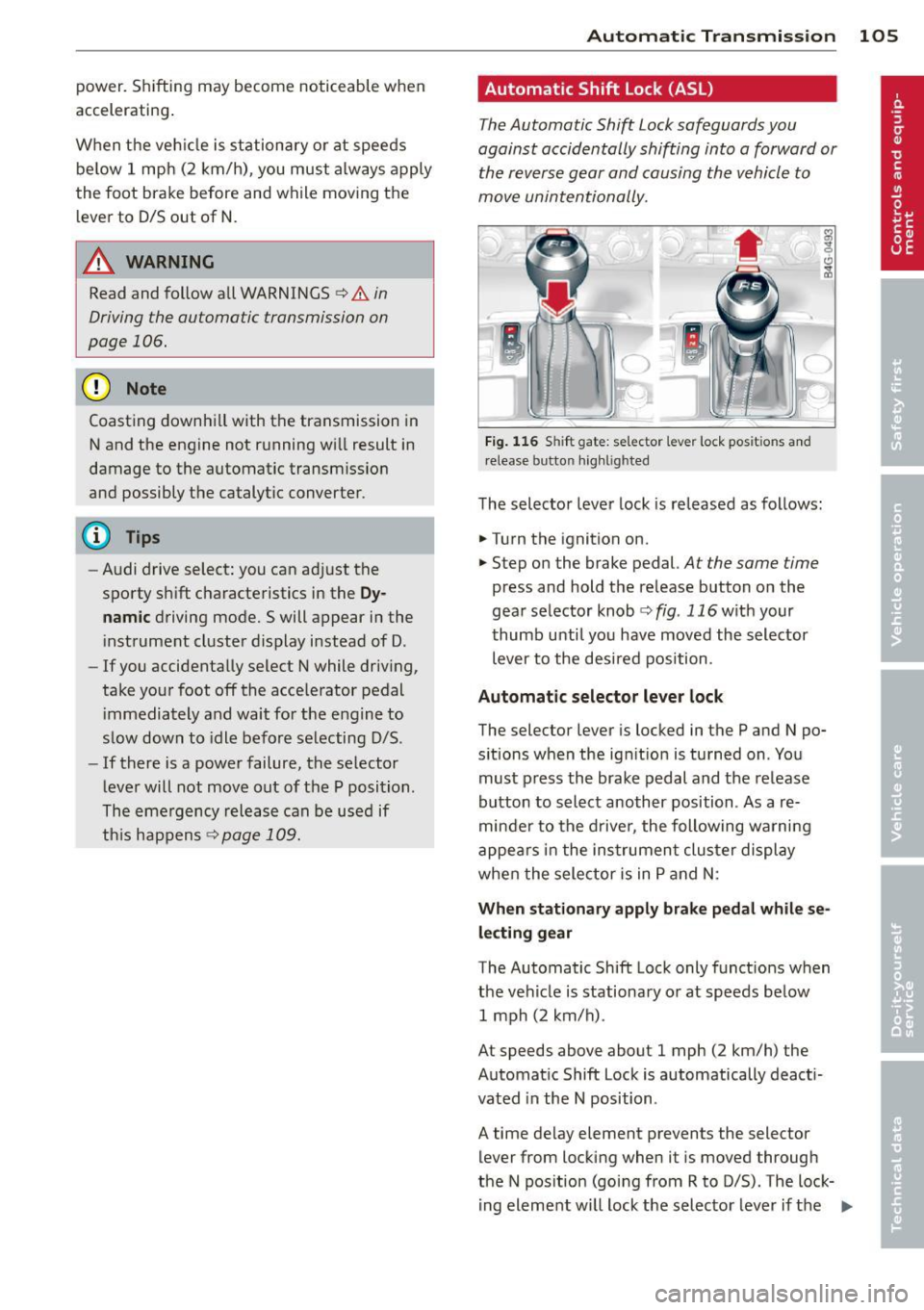
Automatic Shift Lock (ASL)
The Automatic Shift Lock safeguards you
against accidentally shifting into a forward or
the reverse gear and causing the vehicle to
move unintentionally.
*
}
Fig. 1 16 Shift gate: selector lever lock positions and
r elease button highlig hted
T he selector leve r lock is released as follows:
"" Turn the ignition on.
"" Step on the brake pedal.
At the same time
press and hold the re lease button on the
gear selector knob
¢fig . 116w ith your
t humb unti l you have moved the selector
lever to the desired position .
Automatic selector leve r lock
The selector lever is locked in the P and N po·
s itions when the ignition is turned on . You
must p ress the brake pedal and the re lease
button to select another position . As a re
minde r to the d rive r, the following warni ng
appe ars i n the ins trumen t clus ter display
whe n the sele ctor is in P and N:
Wh en stationary apply brake pedal while se
lect ing gear
The Automatic Shift Lock only funct ions when
the veh icle is stationa ry o r at speeds below
1 mph (2 km/h) .
At speeds above about 1 mph (2 km/h) the
Automat ic Shift Lock is automatically deact i
vated in the N position .
A time delay element prevents the selector
lever from locking when it is moved through
the N pos ition (go ing from R to D/S) . The lock·
i ng eleme nt will lock the selec to r l ever if the
IIJ,,
Page 135 of 292
Safety belts
General notes
Always wear safety belts!
Wearing safety belts correctly saves lives!
This chapter explains why safety belts are nec
essary, how they work and how to adjust and
wear them correctly.
~ Read all the information that follows and
heed all of the instructions and WARNINGS.
A WARNING
Not wearing safety belts or wearing them
improperly increases the risk of serious
personal injury and death.
- Safety belts are the single most effective
means available to reduce the risk of se
rious injury and death in automobile acci
dents. For your protection and that of
your passengers, always correctly wear
safety belts when the vehicle is moving.
- Pregnant women, injured, or physically
impaired persons must also use safety
belts. Like all vehicle occupants, they are
more likely to be seriously injured if they
do not wear safety belts. The best way to
protect a fetus is to protect the mother -
throughout the entire pregnancy.
Number of seats
Your Audi has a total of four seating positions:
two in the front and two in the rear. Each seat ing position has a safety belt.
A WARNING
Not wearing safety belts or wearing them
improperly increases the risk of serious
personal injury and death.
- Never strap more than one person, in
cluding small children, into any belt. It is
especially dangerous to place a safety
belt over a child sitting on your lap.
- Never let more people ride in the vehicle
than there are safety belts available.
Safety belts 13 3
-Be sure everyone riding in the vehicle is
properly restrained with a separate safe
ty belt or child restraint.
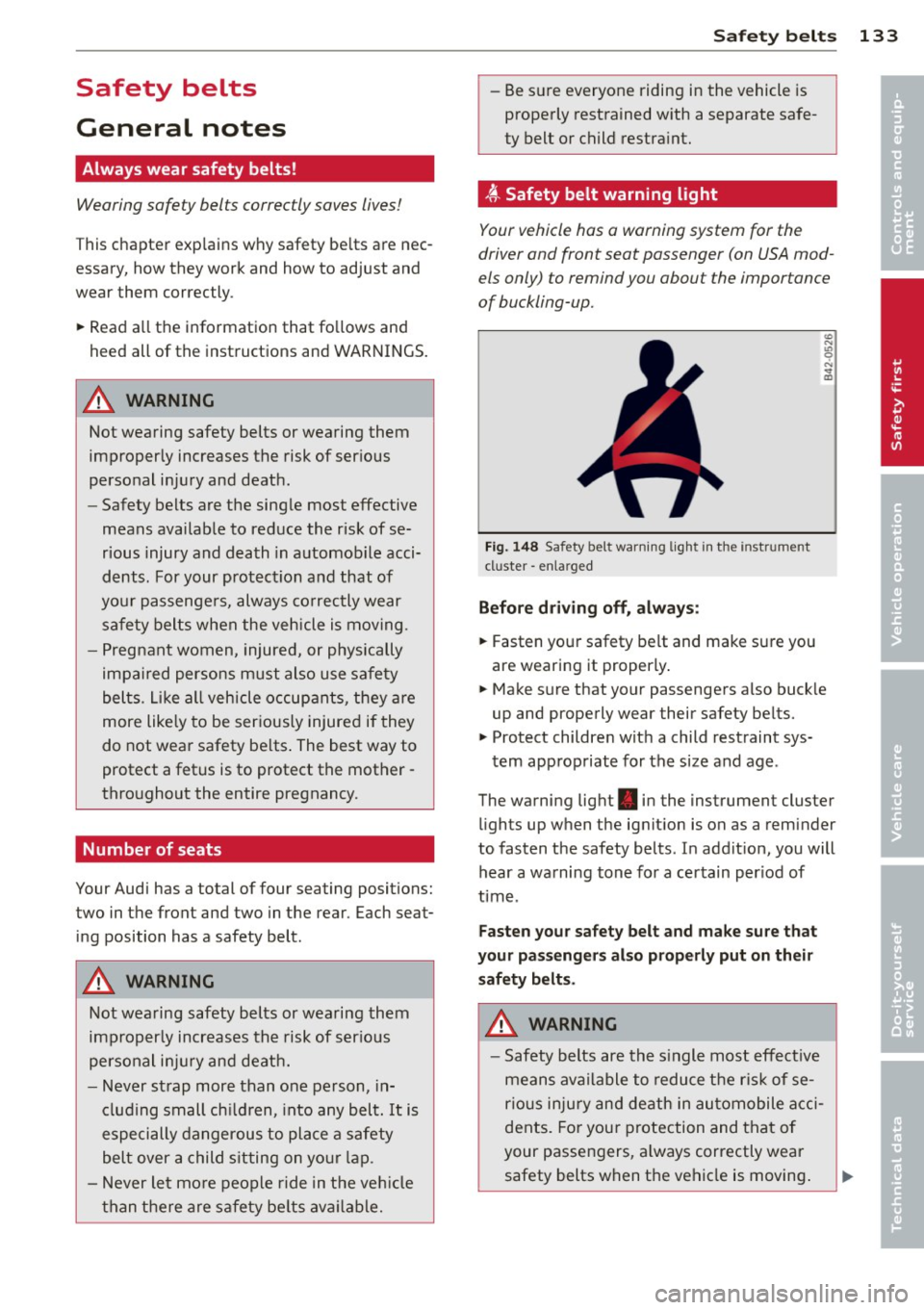
~ Safety belt warning light
Your vehicle has a warning system for the
driver and front seat passenger (on USA mod
els only) to remind you about the importance
of buckling-up.
Fig. 148 Safety belt warning light in the instr ument
cl uster -enla rged
Before driving off, always:
~ Fasten your safety belt and make sure you
are wearing it properly.
~ Make sure that your passengers also buckle
up and properly wear their safety belts.
~ Protect children with a child restraint sys-
tem appropriate for the size and age .
The warning light . in the instrument cluster
lights up when the ignition is on as a reminder
to fasten the safety belts. In addition, you will
hear a warning tone for a certain period of
time .
Fasten your safety belt and make sure that
your passengers also properly put on their
safety belts.
A WARNING
- Safety belts are the single most effective
means available to reduce the risk of se
rious injury and death in automobile acci
dents. For your protection and that of
your passengers, always correctly wear
safety belts when the vehicle is moving.
•
•