2014 AUDI RS7 SPORTBACK ESP
[x] Cancel search: ESPPage 71 of 292
Warm and cold Four-zone automatic
climate control
Description
Applies to vehicles: with four-zone automat ic climate co n
tro l
The climate control system warms, cools and
adds humidity to the a ir in the veh icle inter io r.
It is the most effect ive when the windows and
sunroof* are closed.
If the temperature inside
the parked vehicle becomes very warm, open ing the window briefly will speed up the cool
ing process.
I n all heating mode functions except
defrost,
the blower on ly switches to a higher speed
once the engine coolant has reached a certain
temperature.
Condensation from the cooling system can
drip and form a puddle of water under the ve
hicle. This is normal and does not mean there
is a leak.
Pollutant filt er
The po llutant filter removes pollutants such
as dust and pollen from the air.
The air pollutants filter must be changed at
the intervals spec ified in your Wa rranty
&
Maintenance book let, so that the air condi
tioner can properly work.
I f you d rive your vehicle in an area with h igh
air po llution, the fi lter may need to be
changed more frequent ly than specified in
your Audi Warranty
& Maintenance booklet. If
in doubt, ask your authorized Audi Service Ad·
visor for advice.
Key coded setting s
The clima te control sett ings are a utomat ica lly
stored and assigned to the remote contro l key
that is in use .
Warm and c old 69
A WARNING
-
Reduced visibi lity is dangerous and can
cause acc idents .
- For safe driving it is very important that
all windows be free of ice, snow and con
densat ion.
- Comp letely fam il iarize yourse lf with the
proper use and funct ion of the heat ing
a nd ventilation system and especially
how to defog and defrost the w indows.
- Never use the windshield wiper/washer system in freez ing weathe r unt il you
have warmed the windshie ld first, using
the heating and ventilation system. The
washer sol ution may freeze on the wind
shie ld and red uce visibi lity.
CJ) Note
- If you s uspect that the air conditioner
has been damaged, switch the system
off to avoid furt her damage and have it
inspected by a qualified dea lership .
- Repairs to the Audi air conditioner re
quire specia l technical know ledge and
special tools. Contact an authorized Audi
dealer fo r ass istance.
@ For the sake of the envi ronment
By reducing the amount of f uel you use,
you also red uce the amount of pollutants
emitted into the air.
(D Tips
- Keep the air intake s lo ts ( in front of the
w indshield) free from ice, snow and de
bris in order to maintain the proper func
tion of the climate control system.
- The energy ma nagement system may
switch the seat heating* or rear window defroster off temporar ily. These systems
are available again as soon as the energy
balance has been restored .
- Air escapes through vents under the rear window. When plac ing items of cloth ing
on the luggage compartment cover, en
sure that the openings are not covered.
Page 81 of 292
even with ESC and its associated
components (ABS, ASR, EDL). In corners
and when road or weather conditions are
bad, a full brake application can cause the
vehicle to skid or the rear end to break
away· risking an accident.
Speed warning system
Introduction
The speed warning system helps you to stay
under a specified maximum speed.
The speed warning system wa rns you if you
are exceeding the maximum speed that you
have set. You will hear a warn ing tone when
your speed exceeds the stored value by ap
proximately 3 mph (3 km/h). An indicator
light . (USA models)/ . (Canada models) in
the instrument cluster display also turns on at
the same time. The indicator light ••
turns off when the speed decreases below the
stored maximum speed .
Setting a threshold is recommended if you
would like to be reminded when you reach a certain max imum speed . Situations where you
may want to do so include driving in a country
with a general speed limit or if there is a
specified maximum speed for winter tires.
@ Tips
Even though your vehicle is equipped with
a speed warning system, you should st ill
watch the speedometer to make sure you
are not driving faster than the speed limit.
Setting the threshold
You can set, change and delete the threshold
in the MMI.
.. Se lect : I CARI function button > (Car)* sys
tems
control button > Driver assist > Speed
warning .
You can set any threshold between 20 mph
(30 km/h) and lS0 mph (240 km/h) . Settings
can each be adjusted in inc rements of 6 mph
(10 km/h).
On the road 79
Cruise control
Switching on
Applies to veh icles: w ith cruise control
The cruise control system makes it possible to
drive at a constant speed starting at 20 mph (30km/h) .
0
f
®t
0
Fig. 84 Contro l lever w ith set b utto n
Fig. 85 Display: Se lected speed
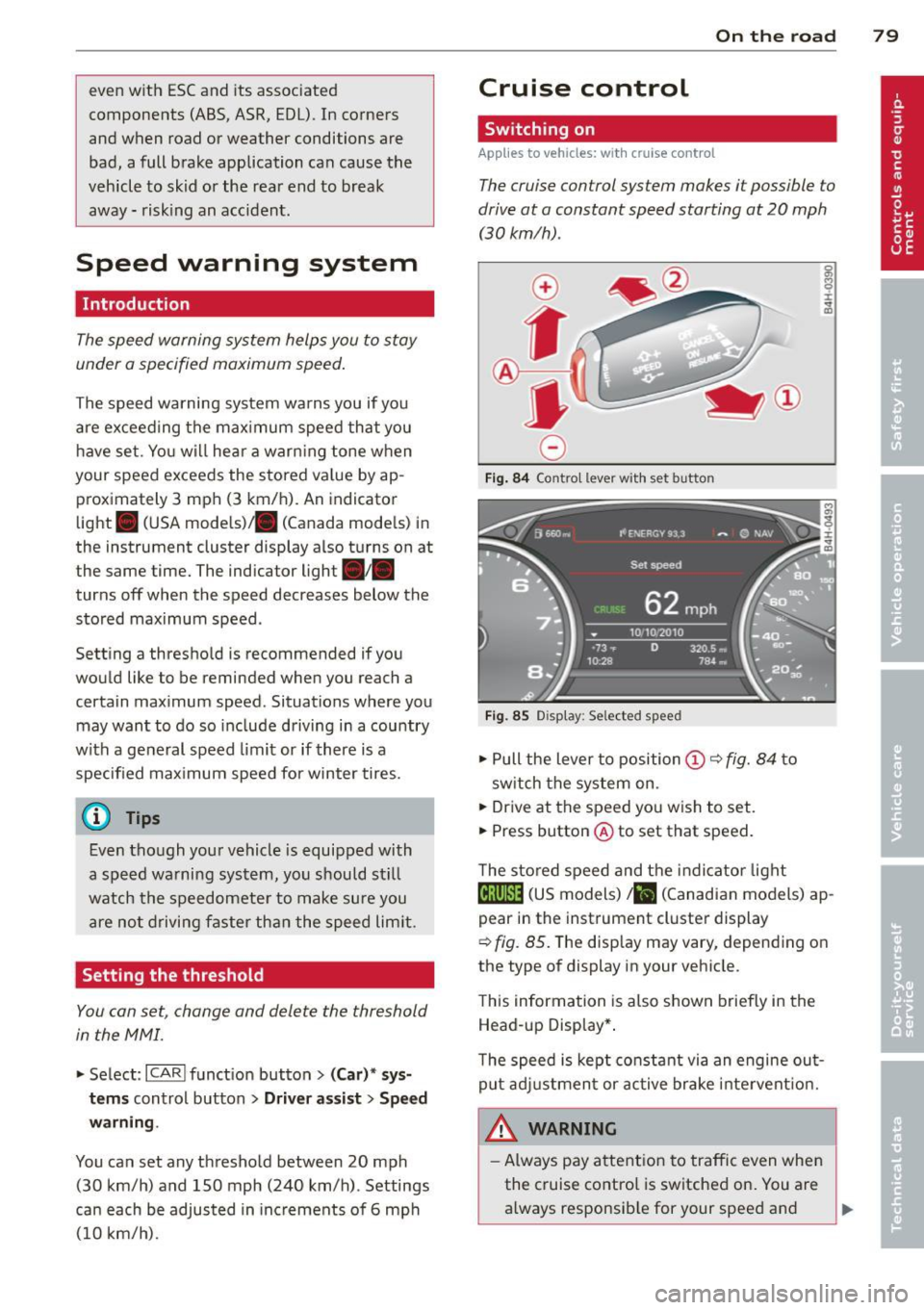
.. Pull the lever to position@¢ fig. 84 to
sw itch the system on .
.. Drive at the speed you wish to set.
.. Press button @ to set that speed.
T he stored speed and the indicator light
@;\1)~14 (US models) Iii (Canadian models) ap
pear in the instrument cluster display
¢
fig. 85. The disp lay may vary, depending on
the type of display in your veh icle.
This information is also shown briefly in the
Head -up Display*.
T he speed is kept constant via an engine out
put adjustment or active brake intervent ion.
A WARNING .c
- Always pay attention to traffic even when
the cruise control is switched on. You are always responsib le for your speed and ...
Page 83 of 292

Audi adapt ive crui se c ontrol an d bra kin g guard 81
Audi adaptive cruise
control and braking
guard
Introduction
App lies to vehicles: with Audi adaptive cruise control
The adaptive cruise control system assists the
driver by regu lating vehicle speed and helping
to maintain a set distance to the vehicle
ahead, within the limits of the system . If the
system detects a moving vehicle up ahead,
adaptive cruise control can brake and then ac
celerate your vehicle. Th is he lps to make driv
ing more comfortable both on long highway
stretches and in stop-and-go traffic.
The braking guard system can warn you about
an impending collision and initiate braking
maneuvers¢
page 87.
Adaptive cruise control and braking guard
have technical limitations that you must
know, so please read this section carefully, un
derstand how the system works and use them
properly at all times.
General information
General information
Applies to vehicles: with Audi adaptive cruise control
Fig. 86 Front of the vehicle: sensors and video came ra
The areas that contain the radar and ultrason
ic sensors and the v ideo camera ¢
fig. 86
must neve r be covered by stickers or other ob
jects or obstructed with dirt, insects, snow or
ice that will interfere with the adaptive cruise
control system and braking guard. For infor
mation on cleaning, refer to¢
page 203. The same applies for any modifications made in
the front area.
T he function of the adaptive cru ise contro l
system and braking guard is limited under
some conditions:
- Objects can on ly be detected when they are
w ith in sensor range
¢page 83, fig. 89 .
-The system has a limited ability to detect
objects that are a shor t distance ahead,
off
t o the side of your vehicle or moving into
your lane.
- Some kinds of ve hicles are hard to detect;
for examp le motorcycles, vehicles with high
ground clearance or overhanging loads may
be detected when it is too late or they may
not be detected at all.
- When driving through curves
¢page 82 .
- Stationary objects¢ page 82.
& WARNING
Always pay attent ion to traffic when adap
tive cruise control is switched on and brak ing g uard is active. As the driver, you are
still respons ible for starting and for ma in
taining speed and distance to other ob
jects . Braking guard is used to assist you .
The driver must always take action to avo id
a collision. The driver is always responsible
for braking at the co rrect time.
- Improper use of adaptive cru ise control
can cause collisions, other acc idents and
serious pe rsonal in jury.
- Never let the comfort and conven ience
that adaptive cruise control and braking
guard offer d istract you from the need to
be alert to traffic condit ions and the
need to rema in in full control of your ve
hicle at all times,
- Always remember that the adaptive
cruise control and braking guard have
limits -they will not s low the vehicle
down or maintain the set distance when
you drive towards an obstacle or some
thing on or near the road that is not
mov ing, such as vehicles stopped in a
traffic jam, a stalled or disabled vehicle .
I f registered by the radar sensors,
Page 84 of 292

82 Audi ad apti ve cruise contr ol a nd bra king gu ard
vehicles or obstacles that are not moving
can trigger a collision warning and if con
firmed by the v ideo camera, an acute col
lis ion warn ing .
- For safety reasons, do not use adaptive
cruise co ntrol when driving on roads with
many curves, when the road surface is in
poor condit ion and/or in bad weather
(such as ice, fog, gravel, heavy rain and
hydroplan ing) . Using the system under
these cond it ions cou ld result in a co lli
sion .
- Swi tch adap tive c ruise control off tempo
rar ily when driv ing in turning lanes, on
expressway exits or in construction
zones. This prevents the vehicle from ac
celerat ing to the set speed when in these
situations.
- The adapt ive cruise control system wi ll
not brake by itse lf if you put your foot on
the accelerator pedal. Doing so can over
ride the speed and distance regulation .
- When approaching stationary objects such as stopped traff ic, adaptive cruise
co ntrol will not respond and braking
guard w ill have limited function.
- The adapt ive cruise control system and
braking guard do not react to people, an
imals, objects c rossing the road or on
coming objects .
- The function of the radar senso rs can be
affected by reflective objects such as
guard rai ls , the entrance to a tunnel,
heavy rain or ice.
- Never follow a ve hicle so closely that you
cannot stop your vehicle safe ly. The
adaptive cruise contro l canno t slow or
brake the vehicle safely when you follow
another vehicle too closely. Always re
member that the automatic braking
function cannot br ing the vehicle to a
sudden or emergency stop under these condit ions.
- To prevent unintended operation, always switch ACC off when it is not being used. (D Note
The sensors can be displaced by impacts or
damage to the bumper, wheel housing and
underbody. That cou ld affect the adaptive
cruise control system and brak ing guard.
Have your authorized Aud i dea ler or au
thorized Audi Service Facility check their
funct ion .
In curves
Applies to vehicles: with Audi adaptive cru ise contro l
I
Fig. 87 Ex ampl e: dri ving in to a curve
When d riving into a curve c> fig. 87 and out of
a curve, the ad aptive cruise control may react
to a vehicle in the next lane and apply the
brakes. You can override or prevent the brak
i ng by pressing the acce lerator pedal briefly .
' Stationary objects
Applies to vehicles: with Audi adaptive cruise control
Fig. 88 Exampl e: objec t ch anging l anes and sta tio nar y
object
T he adaptive cru ise control system only reacts
to objects that are mov ing o r that the system
has already detected as moving . For examp le,
if a vehicle @, which has already been detect-
ed by the adaptive c ruise contro l, tu rns or
ch anges lanes and another stationary vehicle .,.
Page 89 of 292

Audi adaptive cruise control and braking guard 87
Audi braking guard
Description
Applies to vehicles: with Audi adaptive cruise control
Fig. 96 Instrument cluster: approach warning
Braking guard uses radar sensors and a video
camera . It also functions within the limits of
the system when adaptive cruise control is
switched off .
What can braking guard do?
When detected in time, the system can assess
situations when a vehicle ahead brakes sud
denly or if your own vehicle is t raveling at a
high speed and approaching a vehicle up
ahead that is moving more slowly . Braking
guard does not react if it cannot detect the
situation.
The system advises you of various situations:
- The
distance warning is given if you are too
close to the vehicle ahead for a long time. If
the vehicle ahead brakes sharply, you will not be able to avoid a collision . The indicator
light
I in the display comes on .
- The
approach warning is given when a de
tected vehicle up ahead in your lane is mov
i ng much more slowly than you are or if it
brakes sharply . When this warning is given,
it may only be possible to avoid a collision
by swerving or braking sharply. The indicator
l ight
I and indicator in the display will warn
you about the danger
c::> fig . 96. You will a lso
hear an acoustic signal.
11 This is not ava ilable in som e coun tri es.
If you do not react fast enough or do not react
at all to the situation, braking guard will inter
vene by braking.
- I f a collision is imminent, the system will
first provide an
acute warning by briefly and
sharply applying the brakes.
- If you do not react to the acute warning,
braking g uard can brake with increasing
force within the limits of the system . This
reduces the vehicle speed in the event of a
collision.
- The system can initiate maximum braking
shortly before a collision
1 ) . Full deceleration
at high speeds occurs only in vehicles with
adaptive cru ise control and side assist (pre
sense plus) .
- If the braking guard senses that you are not
braking hard enough when a collision is im
minent, it can increase the brak ing force .
- The pre sense functions also engage when a
collision is imm inent
c::> page 187 .
Which function s can be controlled?
You can switch braking guard and the dis
tance/approach warning on or off in the MMI
c::> page 88, Settings in the MMI.
A WARNING
Lack of attention can cause collisions, oth
er accidents and serious personal injuries .
The braking guard is an assist system and
cannot prevent a collision by itself. The
driver must always intervene. The driver is
always responsible for braking at the cor
rect time.
- Always pay close attent ion to traffic,
even when the braking guard is switched
on. Be ready to intervene and be ready to
take comp lete control whenever necessa
ry . Always keep the safe and legal dis
tance between your vehicle and vehicles up ahead .
- Braking guard works within limits and
will not respond outside the system lim its, for example when approaching a
Page 92 of 292
90 Audi acti ve lane a ssi st
Audi active lane assist
Active lane assist
Description
App lies to vehicles: with active lane assist
Active lane assist helps you keep your vehicle
in your lane .
Active lane assist detects lane marker lines
within the limits of the system using a camera
in the windshield . If you are approaching a de
tected lane marker line and it appears likely
that you w ill leave the lane, the system will
warn you by means of corrective steer ing . T he
d river can over ride the correct ive steer ing at
any time. If the veh icle crosses a line, the d riv
er is also warned by a light
vibration in the
steering wheel. The vibration warning must be switched on in the MMI for this to happen.
Active lane ass ist is operable when the line
marking the lane is detected on at least one
side of the vehicle .
If the system is in active standby mode and
the turn signa l is activated before driving over
the lane marker line, the warning does not oc
cur since the system allows for intentional lane changes.
The system is designed for driv ing on free
ways and expanded highways and thus works
only at speeds of 40 mph (65 km/h) or more .
If the vehicle is also equ ipped with Audi adap
tive cruise control*, the corrective steering
will be more specific in regard to the driving
situation . In addition to the lane marker lines,
the system can also take into account other
objects such as guard rails . If they are detect
ed i n close prox imity to the veh icle, Audi ac
tive lane ass ist helps prevent the vehicle from
driving too close to them . There is also pass
ing assistance. The system does not provide
any corrective steering if it detects that you
are passing another vehicle.
A WARNING , ~
- The system warns the driver that the ve
hicle is leaving the lane us ing corrective steer
ing. The driver is always responsible
for keeping the vehicle within the lane .
- The system can assist the driver in keep
ing the vehicle in the lane, but it does
not steer by itself. Always keep your
hands on the steering wheel.
- Corrective steer ing may not occur in cer
tain situat ions, such as dur ing heavy
brak ing .
- The camera does not recognize all lane
marker lines. Corrective steer ing can only
take p lace on the side of the vehicle
where lane marker lines are detected .
- Other road structures or objects cou ld
possibly be identified un intent ional ly as
lane marker lines . As a res ult, correct ive
steer ing may be unexpected or may not
occ ur.
- The camera view can be restricted, for
examp le by vehicles driving ahead o r by
r ai n, snow, heavy spray or light shining
into the camera. T his can result in act ive
lane assist not detecting the lane marker
lines or detect ing them incorrectly .
- Unde r ce rtain condi tions such as ruts in
the road, a banked roadway or cross
winds, the co rrective steering alone may
not be eno ugh to keep the vehicle in the
lane.
- For safety reasons, active lane ass ist
must not be used when there are poor
road and/or weather conditions such as
slippery roads, fog, grave l, heavy rain,
snow and the potential for hydroplaning.
Using act ive lane assist under these con
d itions may increase the risk of a crash.
Page 94 of 292
92 Audi active lane assist
White Act ive l an e assist is switched on
line(s) and ready to p rov ide warnings
on the side tha t is ind ic a ted
¢ fig. 99.
Red line Act ive l ane assist is warning you
(left o r t hat you are about to leave your
r ight) lan e
c'.> fig. 99. In addition, t he
s teer ing whee l v ibrates s lig htly.
G ray Act ive l ane assist is switched on
line(s) but is not ready to provide wa rn-
ings
c-.> fig . 100 .
Messages in the instrument cluster
display
When t he active lane ass ist tu rns off automat
i cally, t he i nstrument cluster i ndicator goes
out and one of t he fo llow ing me ssages ap
pea rs on the disp lay :
Audi active lane ass ist: Currently unavaila
ble. No camera view
This message appears if the camera is no lon
ge r functional after the system has cont inous
ly failed to detect the lane markings . T his
could happe n if:
- The camera field of view
c-.> page 91 , fig . 98
is d irty or covered i n ice. Clean t he area on
t h e windsh ie ld .
- The camera field of view is fogged over. Wait
until the fog has cleared before switching
active lane assis t on .
- The system has been unable to detect the
lanes fo r an extended pe riod of time due to
road cond itions . Switch ac tive lane ass ist
back on w hen the lines are more visible.
Audi active lane ass ist: Currently unava ilable
A tempora ry malf unct ion is preventing lane
assist from operating. Try sw itch ing active
lane assist on again later.
Audi active lane a ssist: System fault!
Dr ive to yo ur authoriz ed Au di dealer soon to
h ave the m alfunc tion co rrec ted .
Audi active lane a ssist : Please take over
steering
T his message ap pears if yo u do no t steer the
vehicle yourself . If th is is the case, active lane
ass ist does not switch off, but it does sw itch
to the "not ready" stat us. T he system can help
you keep t he vehicle in the lane. However it is
yo ur own responsibility to stee r and control
the ve hicle .
Setting the steering wheel vibration
Applies to vehicles: with active lane assist
"' Sele ct: !CARI function button> (Car) * sys
tem s
con trol button > Driver assi st > Audi
active lane assi st.
You can swi tc h the vibrating warn ing in the
stee ring w heel
on or off .
(D Tips
Your s etting is a utom atically store d and
ass igned to the rem ote control key b eing
u sed.
Page 95 of 292
Audi side assist Lane Change Assistant
Description
App lies to vehicles: with side assist
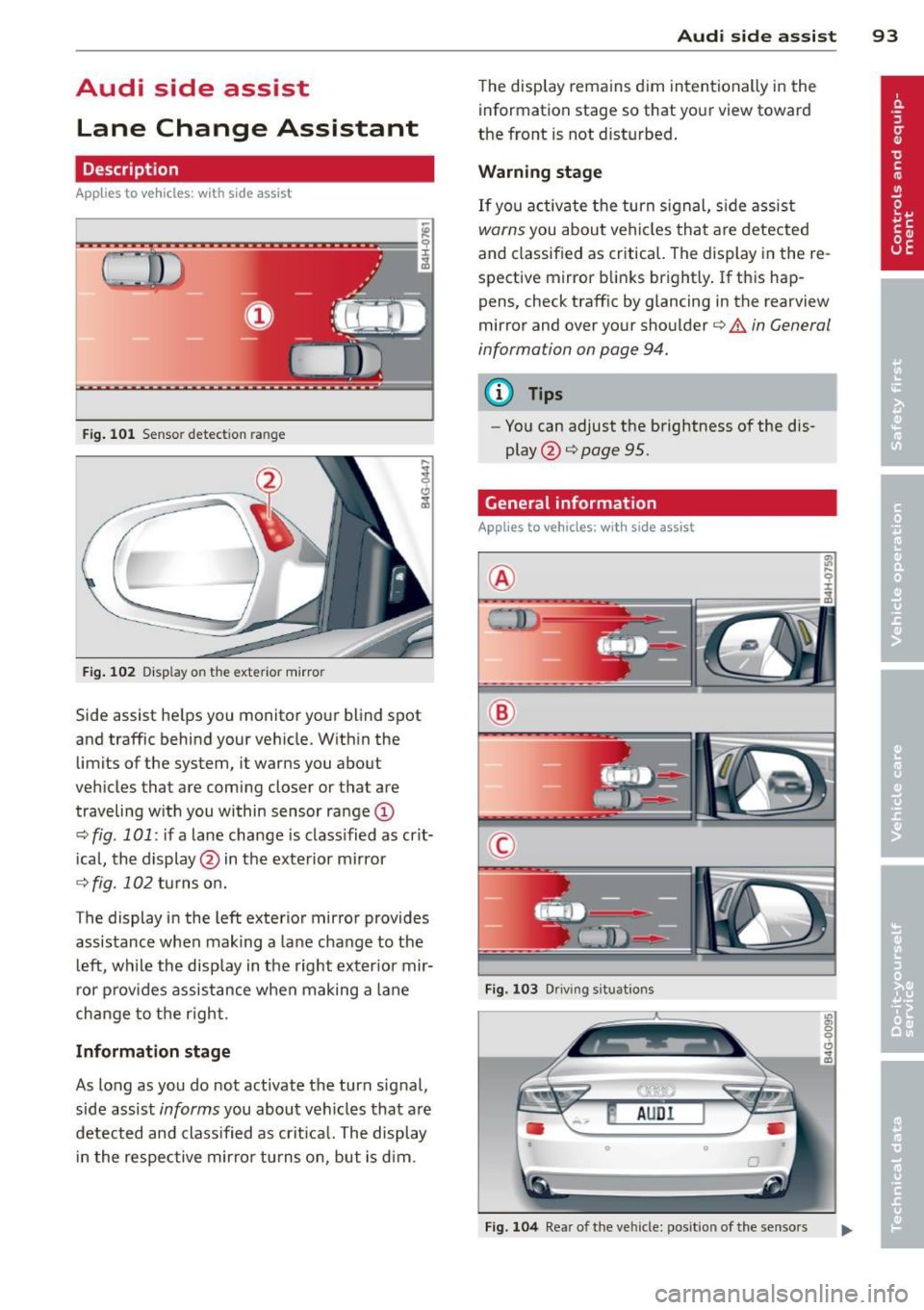
Fig. 101 Sensor detection range
Fig. 102 Display on the exterior mirror
Side assist he lps you monitor your blind spot
and traffic behind your veh icle. With in the
limits of the system, it warns you about
vehicles that are coming closer or that are
traveling w ith you within sensor range
(D
c::, fig . 101: if a lane change is class ified as crit
ical, the display@ in the exterior mirror
c::> fig. 102 turns on.
The display in the left exterior mirror provides
assistance when making a lane change to the
le ft, while the display in the right exterior mir
ror provides assistance when making a lane
change to the right.
Information stage
As long as you do not activate the turn signal,
side assist
informs you about vehicles that are
detected and classified as crit ical. The display
in the respective mirror turns on, but is d im.
Audi side assist 93
The display remains dim intentionally in the
information stage so that your view toward
the front is not disturbed .
Warning stage
If you activate the turn signal, side assist
warns you about veh icles that are detected
and classified as critical. The display in the re
spective mirror blinks brightly . If this hap
pens, check traff ic by glancing in the rearview
mirror and over your shoulder
c::> A in General
information on page 94.
@ Tips
- Yo u can adjust the brightness of the dis
play @
c::> page 95.
General information
Applies to vehicles: with side assist
®
®
©
Fig. 103 Driving situations
Fig. 104 Rear of the vehicle: position of the senso rs