Page 174 of 422
04 Driver support
City Safety™
04
172
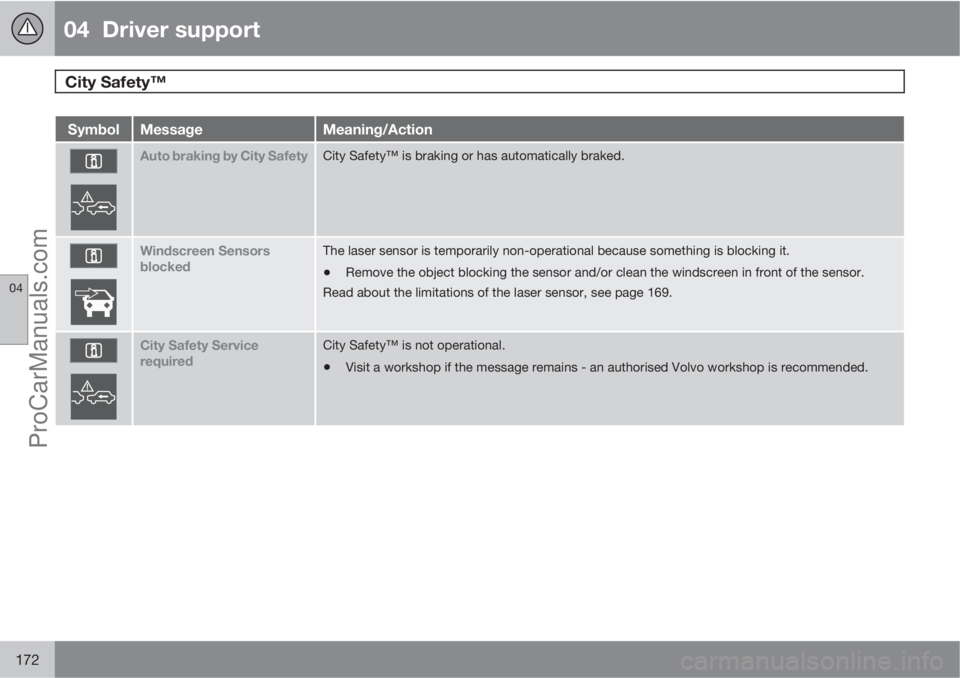
SymbolMessageMeaning/Action
Auto braking by City SafetyCity Safety™ is braking or has automatically braked.
Windscreen Sensors
blockedThe laser sensor is temporarily non-operational because something is blocking it.
•Remove the object blocking the sensor and/or clean the windscreen in front of the sensor.
Read about the limitations of the laser sensor, see page 169.
City Safety Service
requiredCity Safety™ is not operational.
•Visit a workshop if the message remains - an authorised Volvo workshop is recommended.
ProCarManuals.com
Page 182 of 422
04 Driver support
Collision Warning with Auto Brake & Pedestrian Protection*
04
180* Option/accessory, for more information, see Introduction.
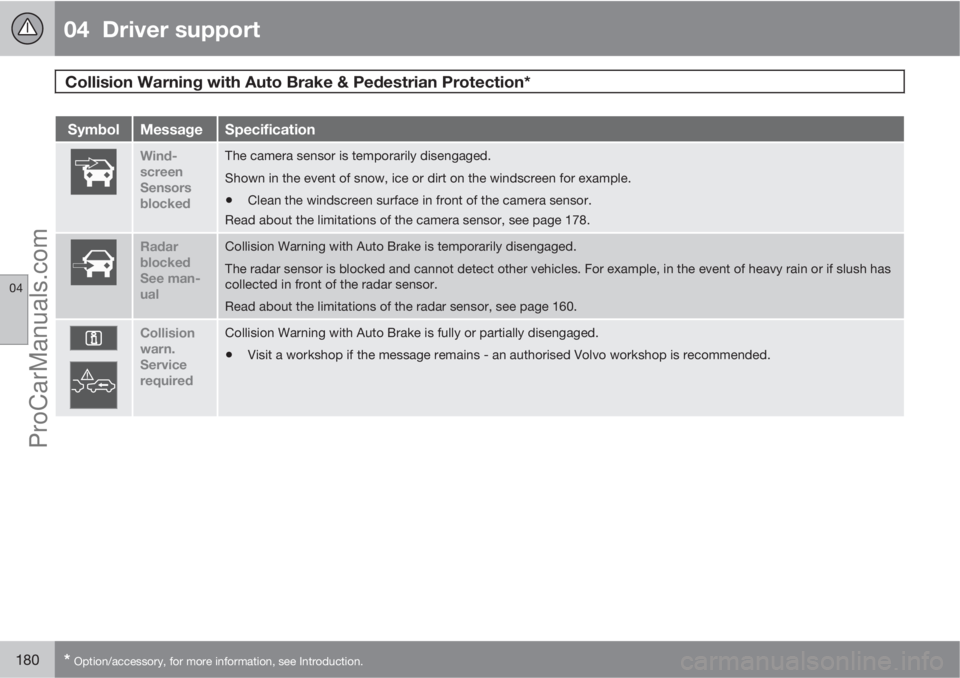
SymbolMessageSpecification
Wind-
screen
Sensors
blockedThe camera sensor is temporarily disengaged.
Shown in the event of snow, ice or dirt on the windscreen for example.
•Clean the windscreen surface in front of the camera sensor.
Read about the limitations of the camera sensor, see page 178.
Radar
blocked
See man-
ualCollision Warning with Auto Brake is temporarily disengaged.
The radar sensor is blocked and cannot detect other vehicles. For example, in the event of heavy rain or if slush has
collected in front of the radar sensor.
Read about the limitations of the radar sensor, see page 160.
Collision
warn.
Service
requiredCollision Warning with Auto Brake is fully or partially disengaged.
•Visit a workshop if the message remains - an authorised Volvo workshop is recommended.
ProCarManuals.com
Page 186 of 422
04 Driver support
Driver Alert System - DAC*
04
184* Option/accessory, for more information, see Introduction.
SymbolMessageSpecification
Driver Alert Time for a
breakThe vehicle has been driven inconsistently - the driver is alerted by an acoustic warning signal + text.
Windscreen Sensors
blockedThe camera sensor is temporarily disengaged.
Shown in the event of snow, ice or dirt on the windscreen for example.
•Clean the windscreen surface in front of the camera sensor.
Read about the limitations of the camera sensor, see page 178.
Driver Alert Sys Service
requiredThe system is disengaged.
•Visit a workshop if the message remains - an authorised Volvo workshop is recommended.
ProCarManuals.com
Page 189 of 422

04 Driver support
Driver Alert System - LDW*
04
* Option/accessory, for more information, see Introduction.187
SymbolMessageSpecification
Windscreen Sensors
blockedThe camera sensor is temporarily disengaged.
Shown in the event of snow, ice or dirt on the windscreen for example.
•Clean the windscreen surface in front of the camera sensor.
Read about the limitations of the camera sensor, see page 178.
Driver Alert Sys Service
requiredThe system is disengaged.
•Visit a workshop if the message remains - an authorised Volvo workshop is recommended.
Personal preferences
Settings are made from the centre console's
display screen via the menu system in MY
CAR. From there, search and locate Settings
Car settingsDriver support systems
Lane Departure Warning. For information
on how the menu system is used - see
page 202.
Select from the options:
•On at start-up - The function enters
standby mode every time the engine isstarted. Otherwise the same value as when
the engine was switched off is obtained.
•Increased sensitivity - The sensitivity
increases, an alarm is triggered earlier and
fewer limitations apply.
ProCarManuals.com
Page 192 of 422

04 Driver support
Park assist syst*
04
190* Option/accessory, for more information, see Introduction.
IMPORTANT
When fitting auxiliary lamps: Remember that
they must not obscure the sensors – the
auxiliary lamps could then be detected as
obstacles.
Fault indicator
If the information symbol illuminates
with constant glow and the informa-
tion display shows
Park assist syst Service
required then parking assistance is disen-
gaged.
IMPORTANT
In certain conditions the parking assistance
system may produce incorrect warning sig-
nals that are caused by external audio
sources that emit the same ultrasonic fre-
quencies that the system works with.
Examples of such sources include horns,
wet tyres on asphalt, pneumatic brakes and
exhaust noises from motorcycles etc.
Cleaning the sensors
Sensor location, front.
Sensor location, rear.
The sensors must be cleaned regularly to
ensure that they work properly. Clean them
with water and car shampoo.
NOTE
Dirt, ice and snow covering the sensors may
cause incorrect warning signals.
ProCarManuals.com
Page 198 of 422
04 Driver support
BLIS* – Blind Spot Information System
04
196* Option/accessory, for more information, see Introduction.
Cleaning
In order to work most effectively the BLIS cam-
era lenses must be clean. The lenses can be
cleaned with a soft cloth or damp sponge.
Clean the lenses carefully so that they are not
scratched.
IMPORTANT
The lenses are electrically heated to melt ice
or snow. If necessary, brush snow away
from the lenses.
Messages on the display
MessageSpecification
Blind-spot info
system ONThe BLIS system is
activated.
Blind spot syst.
Service requiredBlind spot syst. dis-
engaged - contact a
workshop.
Blind spot syst.
Camera blockedThe BLIS camera is
blocked by dirt,
snow or ice - clean
the lenses.
MessageSpecification
Blind spot syst.
Reduced functionReduced function in
the data transmis-
sion between the
BLIS system's cam-
era and the car's
electrical system.
The camera resets
itself when the data
transmission
between the BLIS
system's camera
and the car's electri-
cal system returns to
normal.
Blind-spot info
system OFFThe BLIS system is
deactivated.
IMPORTANT
Repair of the BLIS system components
must only be performed by a workshop - an
authorised Volvo workshop is recom-
mended.
Limitations
In some situations the BLIS indicator lamp may
illuminate despite there being no other vehicle
within the blind spot.
NOTE
If the BLIS indicator lamp illuminates on iso-
lated occasions despite there being no
other vehicle within the blind spot then this
does not mean that a fault has arisen in the
system.
In the event of a fault in the BLIS system the
display shows the text
Blind spot syst.
Service required.
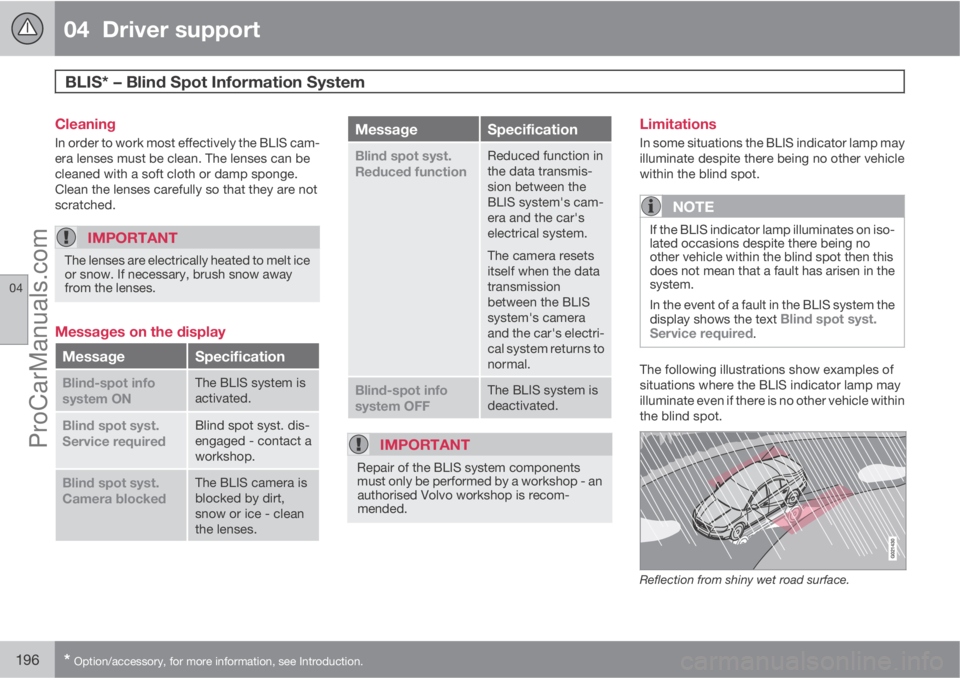
The following illustrations show examples of
situations where the BLIS indicator lamp may
illuminate even if there is no other vehicle within
the blind spot.
Reflection from shiny wet road surface.
ProCarManuals.com
Page 203 of 422
05 Comfort and driving pleasure
Menus and messages
05
201
NOTE
If a warning message appears while you are
using the trip computer, the message must
be read (press OK) before the previous
activity can be resumed.
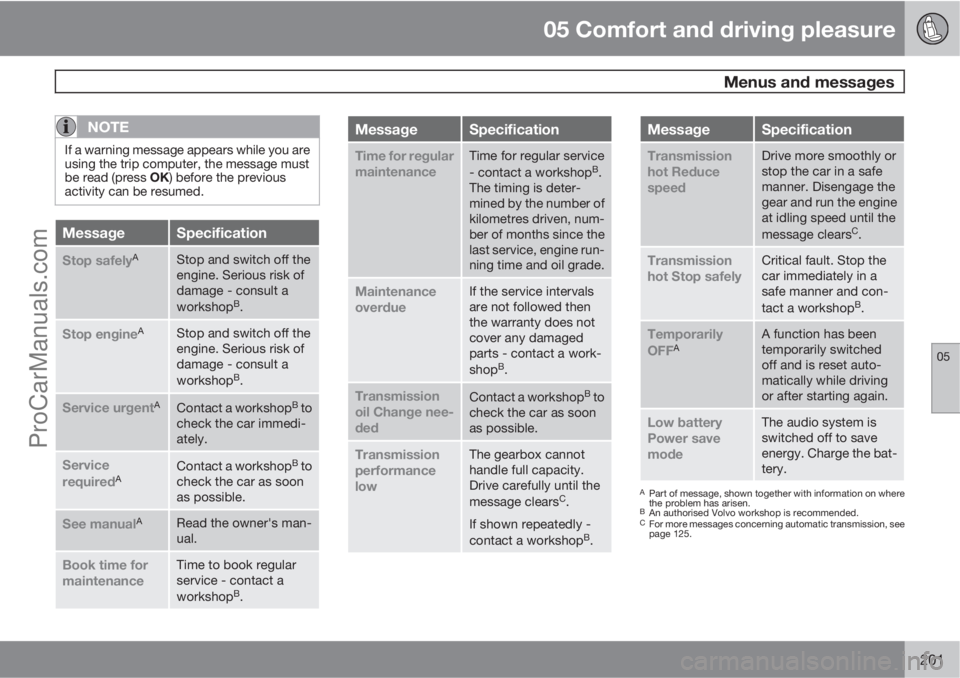
MessageSpecification
Stop safelyAStop and switch off the
engine. Serious risk of
damage - consult a
workshop
B.
Stop engineAStop and switch off the
engine. Serious risk of
damage - consult a
workshop
B.
Service urgentAContact a workshopB to
check the car immedi-
ately.
Service
requiredAContact a workshopB to
check the car as soon
as possible.
See manualARead the owner's man-
ual.
Book time for
maintenanceTime to book regular
service - contact a
workshop
B.
MessageSpecification
Time for regular
maintenanceTime for regular service
- contact a workshopB.
The timing is deter-
mined by the number of
kilometres driven, num-
ber of months since the
last service, engine run-
ning time and oil grade.
Maintenance
overdueIf the service intervals
are not followed then
the warranty does not
cover any damaged
parts - contact a work-
shop
B.
Transmission
oil Change nee-
dedContact a workshopB to
check the car as soon
as possible.
Transmission
performance
lowThe gearbox cannot
handle full capacity.
Drive carefully until the
message clears
C.
If shown repeatedly -
contact a workshop
B.
MessageSpecification
Transmission
hot Reduce
speedDrive more smoothly or
stop the car in a safe
manner. Disengage the
gear and run the engine
at idling speed until the
message clears
C.
Transmission
hot Stop safelyCritical fault. Stop the
car immediately in a
safe manner and con-
tact a workshop
B.
Temporarily
OFFAA function has been
temporarily switched
off and is reset auto-
matically while driving
or after starting again.
Low battery
Power save
modeThe audio system is
switched off to save
energy. Charge the bat-
tery.
APart of message, shown together with information on where
the problem has arisen.
BAn authorised Volvo workshop is recommended.CFor more messages concerning automatic transmission, see
page 125.
ProCarManuals.com
Page 212 of 422

05 Comfort and driving pleasure
Climate control
05
210* Option/accessory, for more information, see Introduction.
General
Climate controlThe car is equipped with electronic climate
control. The climate control system cools or
heats as well as dehumidifies the air in the pas-
senger compartment.
NOTE
The air conditioning system (AC) can be
switched off, but to ensure the best possible
climate comfort in the passenger compart-
ment and to prevent the windows from mist-
ing, it should always be on.
Actual temperatureThe temperature you select corresponds to the
physical experience with reference to factors
such as air speed, humidity and solar radiation
etc. in and around the car.
The system includes a sun sensor which
detects on which side the sun is shining into
the passenger compartment. This means
1 that
the temperature can differ between the right
and left-hand air vents despite the controls
being set for the same temperature on both
sides.
Sensor location
•The sun sensor is located on the top side
of the dashboard.
•The temperature sensor for the passenger
compartment is located below the climate
control panel.
•The outside temperature sensor is located
on the door mirror.
•The humidity sensor* is located by the inte-
rior rearview mirror.
NOTE
Do not cover or block the sensors with
clothing or other objects.
Side windows and sunroof*To ensure that the air conditioning works opti-
mally, the side windows, and sunroof* if speci-
fied, should be closed.
Misting windowsRemove misting on the insides of the windows
by primarily using the defroster function.
To reduce the risk of misting, keep the win-
dows clean and use window cleaner.
Temporary shut-off of the air
conditioning
When the engine requires full power, e.g. for full
acceleration or driving uphill with a trailer, the
air conditioning can be temporarily switched
off. There may then be a temporary increase in
temperature in the passenger compartment.
CondensationIn warm weather, condensation from the air
conditioning may drip under the car. This is
normal.
Ice and snowRemove ice and snow from the climate control
system air intake (the grille between the bonnet
and the windscreen).
Total airing functionThe function opens/closes all side windows
simultaneously and can be used for example to
quickly air the car during hot weather, see
page 58.
Passenger compartment filterAll air entering the car's passenger compart-
ment is cleaned with a filter. This must be
replaced at regular intervals. Follow the Volvo
Service Programme for the recommended
replacement intervals. If the car is used in a
1Only applies to ECC.
ProCarManuals.com