2013 VOLVO V60 mirror controls
[x] Cancel search: mirror controlsPage 5 of 422

Table of contents
* Option/accessory, for more information, see Introduction.3
03
03 Your driving environment
Instruments and controls.......................... 68
Volvo Sensus ........................................... 77
Key positions............................................ 78
Seats......................................................... 80
Steering wheel.......................................... 85
Lighting..................................................... 86
Wipers and washing.................................. 98
Windows, rearview and door mirrors...... 101
Compass*............................................... 106
Power sunroof*....................................... 107
Alcolock*................................................. 109
Starting the engine.................................. 113
Starting the engine – Flexifuel.................118
Starting the engine – external battery..... 120
Gearboxes............................................... 121
DRIVe Start/Stop*................................... 127
All-wheel drive – AWD*...........................134
Foot brake............................................... 135
Parking brake.......................................... 137
HomeLink
Ÿ *............................................ 141
04
04 Driver support
DSTC – Stability and traction control sys-
tem.......................................................... 146
Road sign information - RSI*.................. 148
Speed limiter*.......................................... 150
Cruise control*........................................ 152
Adaptive cruise control*.......................... 154
Distance Warning*..................................165
City Safety™........................................... 168
Collision Warning with Auto Brake &
Pedestrian Protection*............................ 173
Driver Alert System*................................ 181
Driver Alert System - DAC*.....................182
Driver Alert System - LDW*..................... 185
Park assist syst*...................................... 188
Park assist camera*................................ 191
BLIS* – Blind Spot Information System. . 194
05
05 Comfort and driving pleasure
Menus and messages............................. 200
Menu source MY CAR............................202
Climate control........................................ 210
Fuel-driven engine block heater and pas-
senger compartment heater*.................. 220
Additional heater*.................................... 223
Trip computer......................................... 224
Adapting driving characteristics............. 226
Comfort inside the passenger compart-
ment........................................................ 227
ProCarManuals.com
Page 68 of 422

66* Option/accessory, for more information, see Introduction.
Instruments and controls........................................................................ 68
Volvo Sensus ......................................................................................... 77
Key positions.......................................................................................... 78
Seats....................................................................................................... 80
Steering wheel........................................................................................ 85
Lighting................................................................................................... 86
Wipers and washing................................................................................ 98
Windows, rearview and door mirrors....................................................101
Compass*.............................................................................................. 106
Power sunroof*..................................................................................... 107
Alcolock*............................................................................................... 109
Starting the engine................................................................................ 113
Starting the engine – Flexifuel............................................................... 118
Starting the engine – external battery................................................... 120
Gearboxes............................................................................................. 121
DRIVe Start/Stop*................................................................................. 127
All-wheel drive – AWD*.........................................................................134
Foot brake............................................................................................. 135
Parking brake........................................................................................ 137
HomeLink
Ÿ *.......................................................................................... 141
ProCarManuals.com
Page 84 of 422
03 Your driving environment
Seats
03
82
use. This stores the positions of the seat
and door mirrors in the remote control
key's memory
4.
•Unlock the car (by pressing the unlock but-
ton on the same remote control key) and
open the driver's door. The driver's seat
and door mirrors will automatically adopt
the positions that are stored in the remote
control key's memory (if the seat has been
moved since you locked the car).
The key memory can be activated/deactivated
in the menu system MY CAR under Settings
Car settingsCar key memory. For a
description of the menu system, see
page 202.
Emergency stopIf the seat accidentally begins to move, press
one of the setting buttons for the seat or mem-
ory buttons in order to stop the seat.
Restarting to reach the seat position stored in
the key memory is performed by pressing the
unlock button on the remote control key. The
driver's door must then be open.
WARNING
Risk of crushing! Make sure that children do
not play with the controls. Check that there
are no objects in front of, behind or under
the seat during adjustment. Ensure that
none of the backseat passengers will be
trapped.
Heated seatsFor heated seats, see page 215.
Rear seats
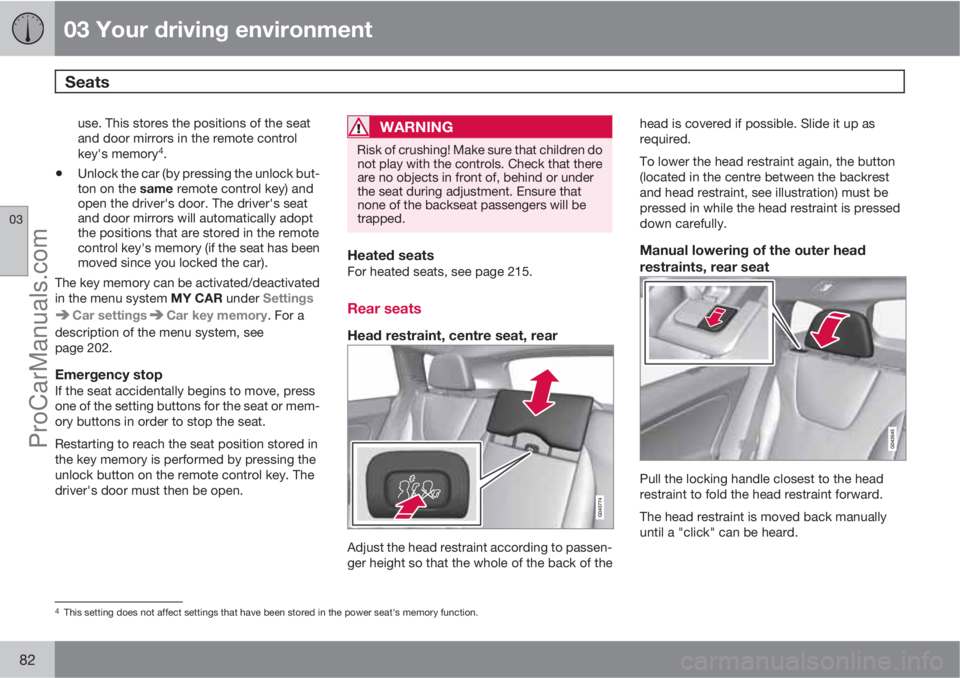
Head restraint, centre seat, rear
Adjust the head restraint according to passen-
ger height so that the whole of the back of thehead is covered if possible. Slide it up as
required.
To lower the head restraint again, the button
(located in the centre between the backrest
and head restraint, see illustration) must be
pressed in while the head restraint is pressed
down carefully.
Manual lowering of the outer head
restraints, rear seat
Pull the locking handle closest to the head
restraint to fold the head restraint forward.
The head restraint is moved back manually
until a "click" can be heard.
4This setting does not affect settings that have been stored in the power seat's memory function.
ProCarManuals.com
Page 103 of 422

03 Your driving environment
Windows, rearview and door mirrors
03
* Option/accessory, for more information, see Introduction.101 General
Laminated glassThe glass is reinforced which pro-
vides better protection against
break-ins and improved sound insu-
lation in the passenger compartment.
The windscreen and other windows* have lami-
nated glass.
Water and dirt-repellent coating*Windows are treated with a coating
that improves the view in difficult
weather conditions. Maintenance, see
page 362.
IMPORTANT
Do not use a metal ice scraper to remove ice
from the windows. Use the defroster to
remove ice from the mirrors, see page 104.
Heat-reflecting windscreen*
Areas where IR film is not applied.
Dimensions
A40 mm
B80 mm
The windscreen is equipped with a heat-
reflecting film (IR) that reduces the solar heat
radiation into the passenger compartment.
The positioning of electronic equipment, such
as a transponder, behind a glass surface with
heat-reflecting film may affect its function and
performance.
For the optimal function of electronic equip-
ment, it should be positioned on the part of thewindscreen with no heat-reflecting film (see the
highlighted area in the above illustration).
Power windows
Driver's door control panel.
Switch for electric child safety locks* and
disengaging rear power window buttons,
see page 62.
Rear window controls
Front window controls
WARNING
Check that none of the rear seat passengers
is in danger of becoming trapped in any way
when closing the windows from the driver's
door.
ProCarManuals.com
Page 104 of 422

03 Your driving environment
Windows, rearview and door mirrors
03
102
WARNING
Make sure that children or other passengers
are not in danger of becoming trapped in
any way when closing the windows, in par-
ticular when the remote control key is used.
WARNING
If there are children in the car - remember to
always switch off the power supply to the
power windows by selecting key position 0
and then take the remote control key with
you when leaving the car. For information on
key positions - see page 79.
Operating
Operating the power windows.
Operating without auto
Operating with auto
All power windows can be operated using the
control panel for the driver's door - the control
panels for the other doors can only each oper-
ate their respective power window. Only one
control panel can be operated at a time.
In order for the power windows to be used the
key position must be at least I - see page 78.
The power windows can be operated for a few
minutes after the engine has been switched off
and after the remote control key has been
removed - although not after a door has been
opened.Closing of the windows is stopped and the
window is opened if anything prevents its
movement. It is possible to override the pinch
protection when closing has been interrupted,
e.g. if there is ice forming. After two successive
closing interruptions the pinch protection will
be forced and the automatic function deacti-
vated for a short while, now it is possible to
close by continually holding the button pulled
up.
NOTE
One way to reduce the pulsating wind noise
when the rear windows are open is to also
open the front windows slightly.
Operating without autoMove one of the controls up/down gently. The
power windows move up/down as long as the
control is held in position.
Operating with autoMove one of the controls up/down to the end
position and release it. The window runs auto-
matically to its end position.
Operating with the remote control key
and central locking
To remotely operate the power windows from
the outside with the remote control key or from
inside with central locking, see pages 46 and
58.
ProCarManuals.com
Page 105 of 422

03 Your driving environment
Windows, rearview and door mirrors
03
103
ResettingIf the battery is disconnected then the function
for automatic opening must be reset so that it
can work correctly.
1. Gently raise the front section of the button
to raise the window to its end position and
hold it there for one second.
2. Release the button briefly.
3. Raise the front section of the button again
for one second.
WARNING
Resetting must be carried out to ensure that
pinch protection works.
Door mirrors
Door mirror controls.
Adjusting1.
Press the L button for the left-hand door
mirror or the R button for the right-hand
door mirror. The light in the button illumi-
nates.
2. Adjust the position with the joystick in the
centre.
3.
Press the L or R button again. The light
should no longer be illuminated.
WARNING
The mirror on the driver's side is the wide-
angle type to provide optimal vision.
Objects may appear further away than they
actually are.
Storing the position1
The mirror positions are stored in the key mem-
ory when the car has been locked with the
remote control key. When the car is unlocked
with the same remote control key the mirrors
and the driver's seat adopt the stored positions
when the driver's door is opened.
The function can be activated/deactivated in
the menu system MY CAR under Settings
Car settingsCar key memoryPersonal
settings in key memory. For a description of
the menu system, see page 203.
Angling the door mirror when parking1
The door mirror can be angled down for the
driver to view the side of the road when parking
for example.
–
Engage reverse gear and press the L or R
button.
When reverse gear is disengaged the mirror
automatically returns to its original position
1Only in combination with power seat with memory, see page 81.
ProCarManuals.com
Page 204 of 422

05 Comfort and driving pleasure
Menu source MY CAR
05
202
General information on MY CAR
Many of the car's functions are handled
in this menu source, such as setting the
clock, door mirrors and locks.
Navigation in the menus is carried out using
buttons on the centre console or with the steer-
ing wheel's right-hand keypad.
Certain functions are standard, others are
optional - the range also varies depending on
the market.
Operation
Centre console controls
Centre console controls for menu navigation.
Press MY CAR to open the menus underMY CAR.
Press OK MENU to select/tick in the high-
lighted menu option or to store the
selected function in the memory.
Turn the TUNE knob to scroll up/down
among the menu options.
EXIT
EXIT functionsDepending on the function the cursor is on
when EXIT is pressed, and on the menu level,
one of the following occurs:
•phone call is rejected
•current function is interrupted
•input characters are deleted
•most recent selections are undone
•leads up in the menu system
Short and long presses can also produce vary-
ing results.
A long press leads to the highest menu level
(Main source view), from where all of the car's
functions/menu sources can be accessed -
see also page 236.
ProCarManuals.com
Page 212 of 422

05 Comfort and driving pleasure
Climate control
05
210* Option/accessory, for more information, see Introduction.
General
Climate controlThe car is equipped with electronic climate
control. The climate control system cools or
heats as well as dehumidifies the air in the pas-
senger compartment.
NOTE
The air conditioning system (AC) can be
switched off, but to ensure the best possible
climate comfort in the passenger compart-
ment and to prevent the windows from mist-
ing, it should always be on.
Actual temperatureThe temperature you select corresponds to the
physical experience with reference to factors
such as air speed, humidity and solar radiation
etc. in and around the car.
The system includes a sun sensor which
detects on which side the sun is shining into
the passenger compartment. This means
1 that
the temperature can differ between the right
and left-hand air vents despite the controls
being set for the same temperature on both
sides.
Sensor location
•The sun sensor is located on the top side
of the dashboard.
•The temperature sensor for the passenger
compartment is located below the climate
control panel.
•The outside temperature sensor is located
on the door mirror.
•The humidity sensor* is located by the inte-
rior rearview mirror.
NOTE
Do not cover or block the sensors with
clothing or other objects.
Side windows and sunroof*To ensure that the air conditioning works opti-
mally, the side windows, and sunroof* if speci-
fied, should be closed.
Misting windowsRemove misting on the insides of the windows
by primarily using the defroster function.
To reduce the risk of misting, keep the win-
dows clean and use window cleaner.
Temporary shut-off of the air
conditioning
When the engine requires full power, e.g. for full
acceleration or driving uphill with a trailer, the
air conditioning can be temporarily switched
off. There may then be a temporary increase in
temperature in the passenger compartment.
CondensationIn warm weather, condensation from the air
conditioning may drip under the car. This is
normal.
Ice and snowRemove ice and snow from the climate control
system air intake (the grille between the bonnet
and the windscreen).
Total airing functionThe function opens/closes all side windows
simultaneously and can be used for example to
quickly air the car during hot weather, see
page 58.
Passenger compartment filterAll air entering the car's passenger compart-
ment is cleaned with a filter. This must be
replaced at regular intervals. Follow the Volvo
Service Programme for the recommended
replacement intervals. If the car is used in a
1Only applies to ECC.
ProCarManuals.com