Page 53 of 556
53
1-3. Opening, closing and locking the doors
1
Before driving
■
Switching the door unlock function
It is possible to set which doors the entry function unlocks using the wireless
remote control.
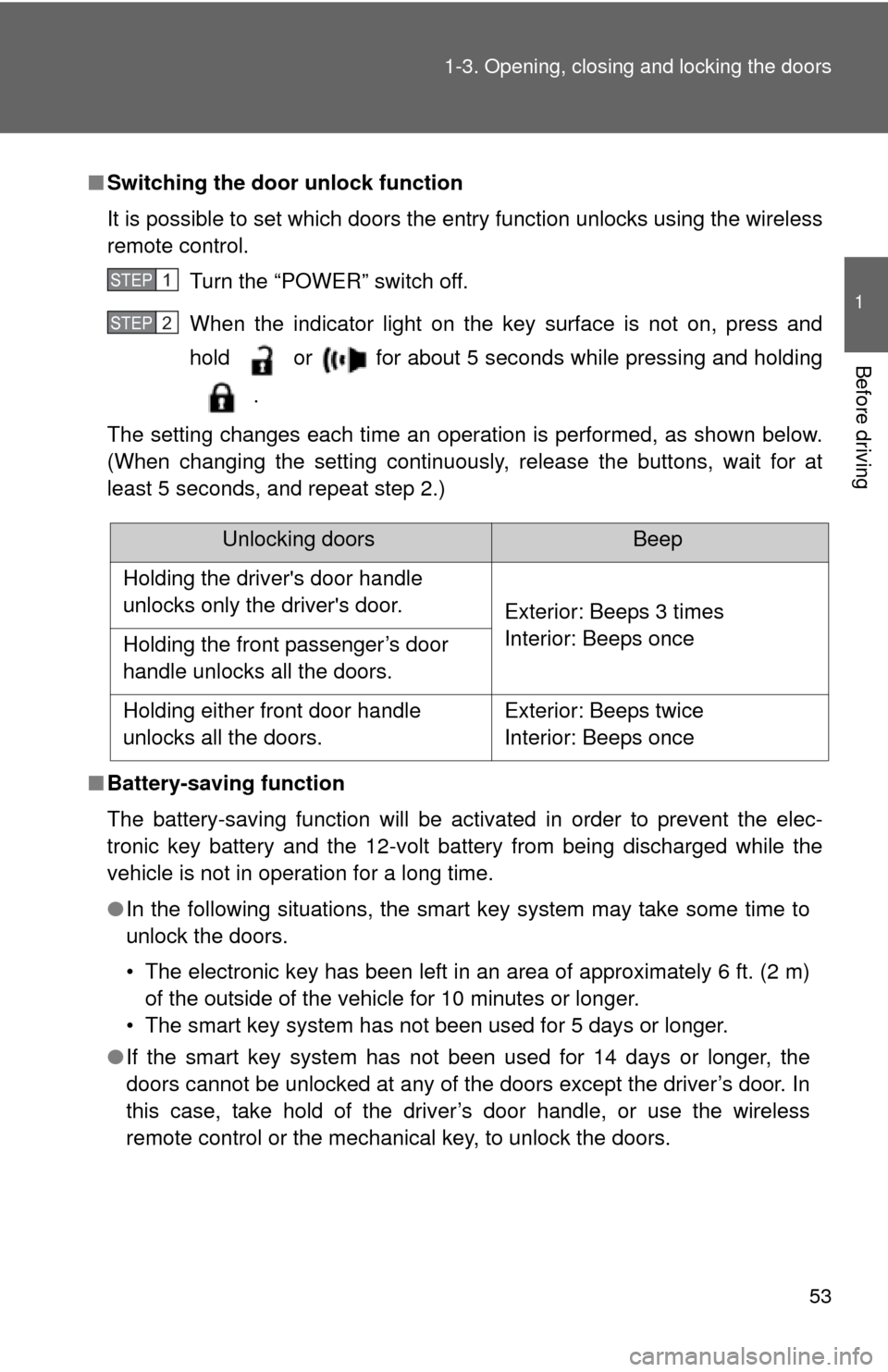
Turn the “POWER” switch off.
When the indicator light on the key surface is not on, press and
hold or for about 5 seconds while pressing and holding
.
The setting changes each time an operation is performed, as shown below.
(When changing the setting continuously, release the buttons, wait for at
least 5 seconds, and repeat step 2.)
■ Battery-saving function
The battery-saving function will be activated in order to prevent the elec-
tronic key battery and the 12-volt battery from being discharged while the
vehicle is not in operation for a long time.
●In the following situations, the smart key system may take some time to
unlock the doors.
• The electronic key has been left in an area of approximately 6 ft. (2 m)
of the outside of the vehicle for 10 minutes or longer.
• The smart key system has not been used for 5 days or longer.
● If the smart key system has not been used for 14 days or longer, the
doors cannot be unlocked at any of the doors except the driver’s door. In
this case, take hold of the driver’s door handle, or use the wireless
remote control or the mechanical key, to unlock the doors.
STEP1
STEP2
Unlocking doorsBeep
Holding the driver's door handle
unlocks only the driver's door. Exterior: Beeps 3 times
Interior: Beeps once
Holding the front passenger’s door
handle unlocks all the doors.
Holding either front door handle
unlocks all the doors. Exterior: Beeps twice
Interior: Beeps once
Page 92 of 556
92 1-4. Adjustable components (seats, mirrors, steering wheel)
CAUTION
■Using a seat belt extender
●Do not wear the seat belt extender if you can fasten the seat belt without
the extender.
● Do not use the seat belt extender when installing a child restraint system
because the belt will not securely hold the child restraint system, increas-
ing the risk of death or serious injury in the event of an accident.
● The personalized extender may not be safe on another vehicle, when
used by another person, or at a different seating position other than the
one originally intended.
NOTICE
■When using a seat belt extender
When releasing the seat belt, press on the buckle release button on the
extender, not on the seat belt.
This helps prevent damage to the vehicle interior and the extender itself.
Page 115 of 556
115
1
1-8. Safety information
Before driving
SRS airbags
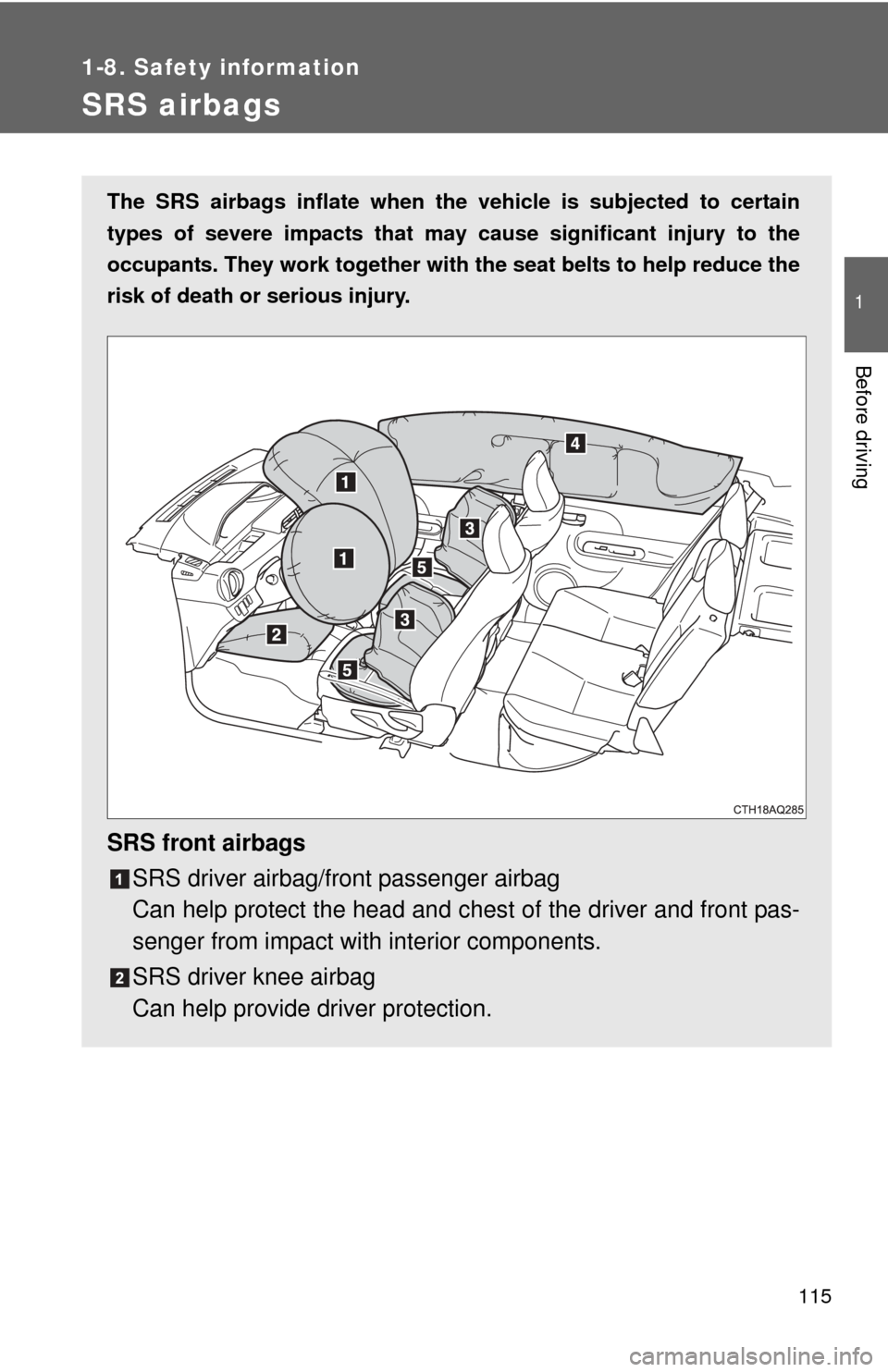
The SRS airbags inflate when the vehicle is subjected to certain
types of severe impacts that may cause significant injury to the
occupants. They work together with the seat belts to help reduce the
risk of death or serious injury.
SRS front airbags
SRS driver airbag/front passenger airbag
Can help protect the head and ches t of the driver and front pas-
senger from impact with interior components.
SRS driver knee airbag
Can help provide driver protection.
Page 136 of 556

136 1-8. Safety information
CAUTION
■Child restraint precautions
●For effective protection in automobile accidents and sudden stops, a child
must be properly restrained, using a seat belt or child restraint system
depending on the age and size of the child. Holding a child in your arms is
not a substitute for a child restraint system. In an accident, the child can be
crushed against the windshield, or between you and the vehicle’s interior.
● Toyota strongly urges the use of a proper child restraint system that con-
forms to the size of the child, installed on the rear seat. According to acci-
dent statistics, the child is safer when properly restrained in the rear seat
than in the front seat.
● Never install a rear-facing child restraint system on the front passenger
seat even if the “AIR BAG OFF” indicator light is illuminated. In the event
of an accident, the force of the rapid inflation of the front passenger airbag
and seat cushion airbag in the front passenger side can cause death or
serious injury to the child if the rear-facing child restraint system is
installed on the front passenger seat.
● A forward-facing child restraint system may be installed on the front pas-
senger seat only when it is unavoidable. A child restraint system that
requires a top tether strap should not be used in the front passenger seat
since there is no top tether strap anchor for the front passenger seat.
Adjust the seatback as upright as possible and always move the seat as
far back as possible even if the “AIR BAG OFF” indicator light is illumi-
nated, because the front passenger airbag and seat cushion airbag in the
front passenger side could inflate with considerable speed and force. Oth-
erwise, the child may be killed or seriously injured.
● Do not use the seat belt extender when installing a child restraint system
on the front or rear passenger seat. If installing a child restraint system
with the seat belt extender connected to the seat belt, the seat belt will not
securely hold the child restraint system, which could cause death or seri-
ous injury to the child or other passengers in the event of a sudden stop,
sudden swerve or an accident.
Page 154 of 556

154 2-1. Driving procedures
CAUTION
■When the vehicle is stopped
●Do not depress the accelerator pedal unnecessarily.
If the vehicle is in any gear other than P or N, the vehicle may accelerate
suddenly and unexpectedly, causing an accident.
● Do not leave the vehicle with the hybrid system on for a long time.
If such a situation cannot be avoided, park the vehicle in an open space
and check that exhaust fumes do not enter the vehicle interior.
● In order to prevent accidents due to the vehicle rolling away, always keep
depressing the brake pedal while the “READY” indicator is on. Apply the
parking brake as necessary.
● If the vehicle is stopped on an incline, in order to prevent accidents caused
by the vehicle rolling forward or backward, always depress the brake pedal
and securely apply the parking brake as needed.
● Avoid revving or racing the engine.
Running the engine at high speed while the vehicle is stopped may cause
the exhaust system to overheat, which could result in a fire if combustible
material is nearby.
■ When the vehicle is parked
●Do not leave glasses, cigarette lighters, spray cans, or soft drink cans in
the vehicle when it is in the sun.
Doing so may result in the following:
• Gas may leak from a cigarette lighter or spray can, and may lead to a
fire.
• The temperature inside the vehicle may cause the plastic lenses and plastic material of glasses to deform or crack.
• Soft drink cans may fracture, causing the contents to spray over the interior of the vehicle, and may also cause a short circuit in the vehi-
cle's electrical components.
● Do not leave cigarette lighters in the vehicle. If a cigarette lighter is in a
place such as the glove box or on the floor, it may be lit accidentally when
luggage is loaded or the seat is adjusted, causing a fire.
Page 201 of 556
201
2-2. Instrument cluster
2
When driving
CAUTION
■
Eco score
Eco score should be used as a guide only. Always drive safely in accor-
dance with road and traffic conditions.
NOTICE
■The multi-information disp lay at low temperatures
Allow the interior of the vehicle to warm up before using the liquid crystal
information display. At extremely low temperatures, the information display
monitor may respond slowly, and display changes may be delayed.
Page 235 of 556

Interior features3
235
3-1. Using the air conditioning system and defogger
Automatic air conditioning system ........................... 236
Rear window and outside rear view
mirror defoggers ............ 245
3-2. Using the audio system Audio system types .......... 246
Using the radio ................. 252
Using the CD player ......... 254
Playing back MP3 and WMA discs ..................... 259
Operating an iPod ............ 266
Operating a USB memory .......................... 274
Optimal use of the audio system.................. 282
Using the AUX port .......... 285
Using the steering wheel audio switches ............... 286
3-3. Using the Bluetooth
®
audio system
Bluetooth
® audio/
phone ............................. 289
Using the Bluetooth
®
audio/phone ................... 293
Operating a Bluetooth
®
enabled portable
player ............................. 298
Making a phone call ......... 301 Using the “SET UP”
menu (“Bluetooth”
menu)............................. 306
Using the “SET UP” menu (“Phone” menu).............. 312
3-4. Using the interior lights Interior lights list ............... 319
• Interior lights/personal lights................ 320
3-5. Using the storage features
List of storage features .... 322
• Glove box....................... 323
• Console box ................... 323
• Auxiliary boxes ............... 325
• Cup holders ................... 327
• Bottle holders ................. 328
3-6. Other interior features Sun visors ........................ 330
Vanity mirrors ................... 331
Outside temperature display............................ 332
Power outlet ..................... 334
Seat heaters..................... 335
Coat hooks ....................... 337
Assist grips....................... 338
Floor mat .......................... 339
Luggage cover ................. 341
Page 237 of 556
237
3-1. Using the air conditioning system
and defogger
3
Interior features
Using the automatic air conditioning system
Press .
The air conditioning system beg ins to operate. Air outlets and
fan speed are automatically adjus ted according to the temper-
ature setting.
To adjust the temperature setting, turn clockwise to
increase the temperature and turn counterclockwise to
decrease the temperature.
Adjusting the settings manually
To adjust the fan speed, press “ ” on to increase the
fan speed and “ ” to decrease the fan speed.
Press to turn the fan off.
To adjust the temperature setting, turn clockwise to
increase the temperature and turn counterclockwise to
decrease the temperature.
To change the air outlets, press .
The air outlets used are switched each time the button is pressed.
( P. 238)
STEP1
STEP2
STEP1
STEP2
STEP3