Page 272 of 720

272 2-4. Using other driving systems
LC200_OM_OM60F57U_(U)
■The Multi-terrain Monitor can be operated when
Normal display mode
The vehicle speed is less than approximately 7 mph (12 km/h).
Automatic display mode
●When automatic display mode is selected
●When the shift lever is shifted to “D”, “S” or “N”
●When the shift lever is in “D”, “S” or “N” and the vehicle speed is below
approximately 6 mph (10 km/h)
■Automatic system cancellation
In the following situations, the image is canceled automatically.
●When the vehicle speed exceeds approximately 7 mph (12 km/h).
After the vehicle speed exceeds approximately 7 mph (12 km/h), the
image will continue to be displayed for a short time.
If the vehicle speed returns to below 7 mph (12 km/h) before the image
extinguishes, the image will continue to be displayed.
●When “MAP” or another switch outside the screen has been pressed
■Interruption screens
An interruption screen is displayed when an obstacle is within the detection
range of the intuitive parking assist. (P. 229)
■When the door mirrors are folded.
The screen will be turned off temporarily while the door mirrors are folding,
and the screen will return to normal once folding has been completed.
Page 280 of 720

280 2-4. Using other driving systems
LC200_OM_OM60F57U_(U)
CAUTION
■When using the Multi-terrain Monitor system
Observe the following precautions to avoid an accident that could result in
death or serious injuries:
●Never depend solely on the monitor system.
●Always check visually and with the mirrors to confirm your intended path is
clear.
●Depicted distances between objects and flat surfaces differ from actual
distances.
●Do not use the system if the hood or doors are open.
■Conditions which may affect the Multi-terrain Monitor system
●If the front or the rear of the vehicle or the outside rear view mirror has
been hit, the camera’s position and mounting angle may have changed.
Have the vehicle inspected by your Toyota dealer.
●As the camera has a water proof construction, do not detach, disassemble
or modify it. This may cause incorrect operation.
●Rapid temperature changes, such as when hot water is poured on the
vehicle in cold weather, may cause the system to function abnormally.
●If the camera lens is dirty, it cannot transmit a clear image. Rinse with
water and wipe with a soft cloth. If the camera lens is extremely dirty, wash
with a mild cleanser and rinse.
●Do not strongly rub the camera lens. If the camera lens is scratched, it
cannot transmit a clear image.
●Do not allow organic solvent, car wax, window cleaner or glass coat to
adhere to the camera. If this happens, wipe it off as soon as possible.
●The displayed image may be darker and moving images may be slightly
distorted when the system is cold.
●Situations unsuitable for Multi-terrain Monitor
• On icy or slick road surfaces, or in snow
• When using tire chains
Page 328 of 720
328 2-5. Driving information
LC200_OM_OM60F57U_(U)
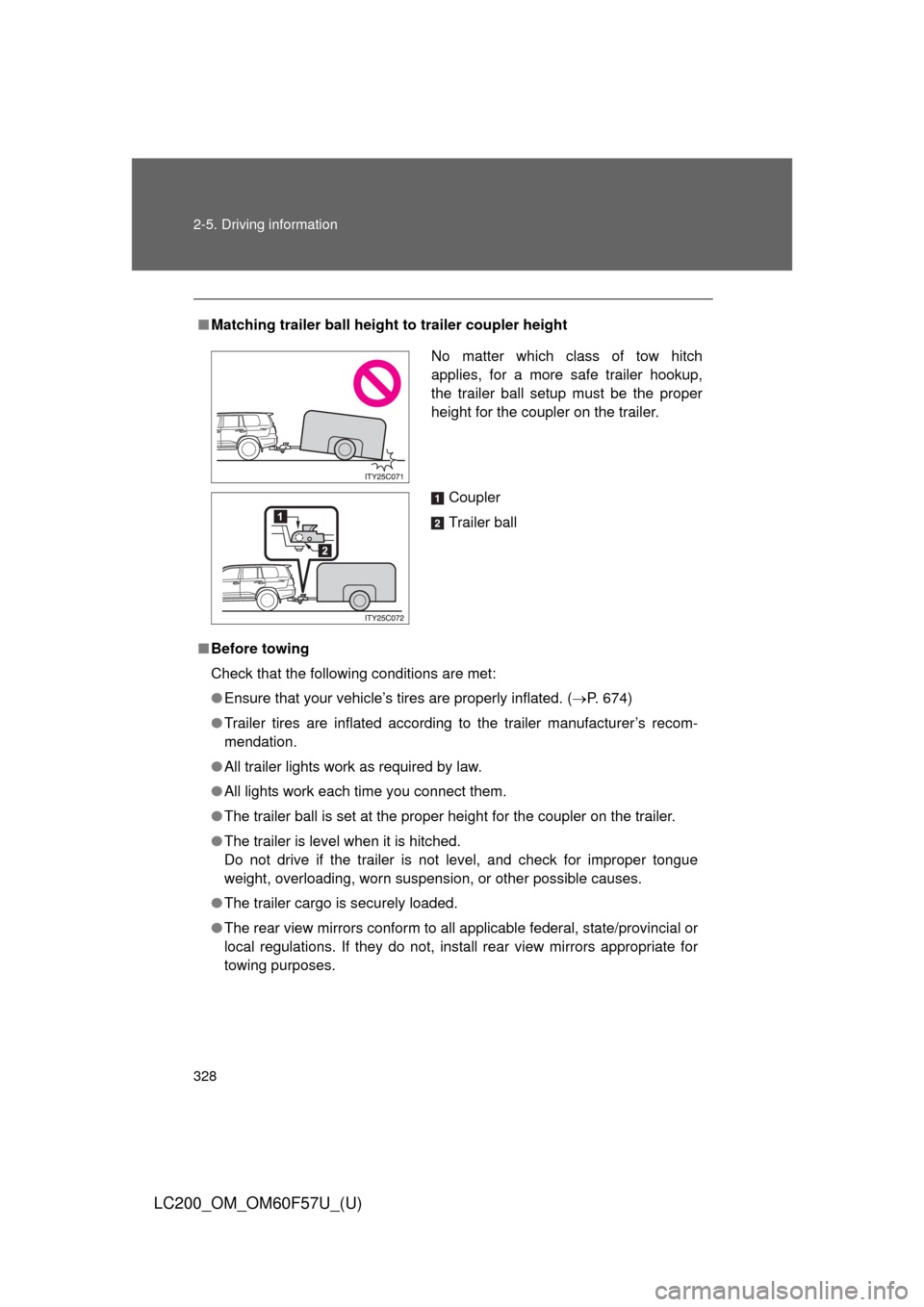
■Matching trailer ball height to trailer coupler height
■Before towing
Check that the following conditions are met:
●Ensure that your vehicle’s tires are properly inflated. (P. 674)
●Trailer tires are inflated according to the trailer manufacturer’s recom-
mendation.
●All trailer lights work as required by law.
●All lights work each time you connect them.
●The trailer ball is set at the proper height for the coupler on the trailer.
●The trailer is level when it is hitched.
Do not drive if the trailer is not level, and check for improper tongue
weight, overloading, worn suspension, or other possible causes.
●The trailer cargo is securely loaded.
●The rear view mirrors conform to all applicable federal, state/provincial or
local regulations. If they do not, install rear view mirrors appropriate for
towing purposes.
No matter which class of tow hitch
applies, for a more safe trailer hookup,
the trailer ball setup must be the proper
height for the coupler on the trailer.
Coupler
Trailer ball
Page 334 of 720
334
LC200_OM_OM60F57U_(U)
3-1. Using the air conditioning
system and defogger
Front air conditioning
system ........................... 336
Rear air conditioning
system ........................... 347
Rear window and
outside rear view
mirror defoggers ............ 351
Windshield wiper
de-icer ............................ 352
3-2. Using the audio system
Audio system type............ 353
Using the radio ................. 356
Using the CD player ......... 365
Playing back MP3 and
WMA discs ..................... 373
Operating an iPod ............ 380
Operating a
USB memory ................. 387
Optimal use of the
audio system .................. 395
Using the AUX port .......... 397
Using the steering
switches ......................... 398
Page 335 of 720
Interior features3
335
LC200_OM_OM60F57U_(U)
3-3. Using the Bluetooth®
audio system
Bluetooth
® audio
system ........................... 402
Using the Bluetooth
®
audio system.................. 406
Operating a Bluetooth
®
enabled portable
player ............................. 412
Setting up a Bluetooth
®
enabled portable
player ............................. 415
Bluetooth
® audio system
setup .............................. 422
3-4. Using the hands-free system
(for cellular phone)
Hands-free system
(for cellular phone) ......... 423
Using the hands-free
system ........................... 428
Making a phone call ......... 436
Setting a cellular
phone ............................. 441
Security and system
setup .............................. 447
Using the phone book ...... 453
3-5. Using the interior lights
Interior lights list ............... 462
• Interior lights .................. 463
• Personal lights ............... 4643-6. Using the storage features
List of storage features .... 466
• Glove box....................... 467
• Console box ................... 468
• Overhead console .......... 469
• Cup holders ................... 470
• Bottle holders ................. 472
• Card holders .................. 474
• Auxiliary boxes ............... 474
3-7. Other interior features
Cool box ........................... 475
Sun visors ........................ 477
Vanity mirror..................... 478
Clock ................................ 479
Outside temperature
display............................ 480
Ashtrays ........................... 482
Cigarette lighter................ 484
Power outlets ................... 485
Heated steering wheel ..... 487
Seat heaters
and ventilators ............... 489
Armrest ............................ 491
Assist grips....................... 492
Floor mats ........................ 493
Luggage compartment
features .......................... 495
Garage door opener......... 497
Safety Connect ................ 504
Page 351 of 720
351
3-1. Using the air conditioning system and defogger
3
Interior features
LC200_OM_OM60F57U_(U)
Rear window and outside rear view mirror defoggers
■The rear window and outside rear view mirror defoggers can be oper-
ated when
The “ENGINE START STOP” switch is in IGNITION ON mode.
CAUTION
■When the outside rear view mirror defoggers are on
Do not touch the rear view mirror surfaces, as they can become very hot and
burn you.
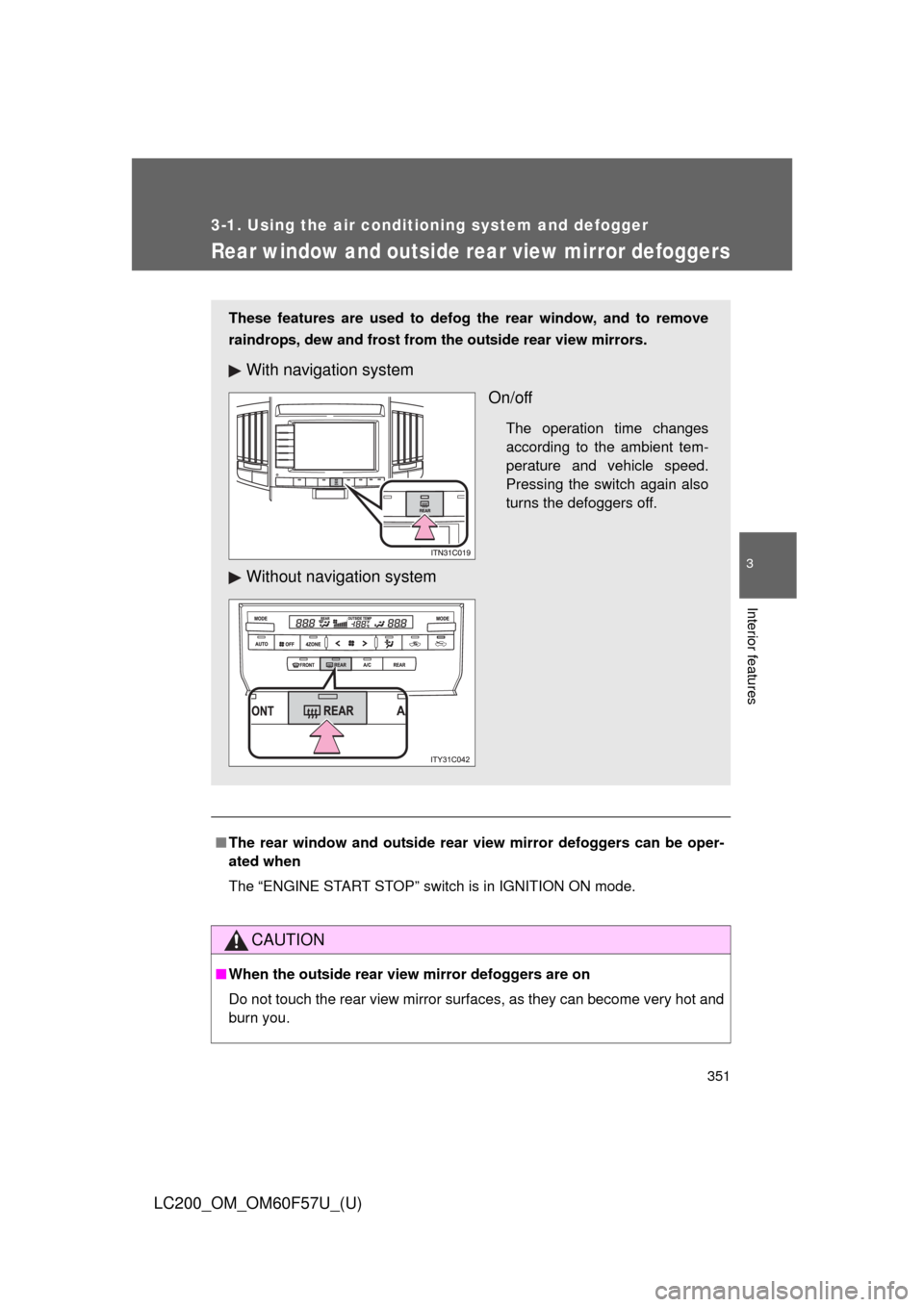
These features are used to defog the rear window, and to remove
raindrops, dew and frost from the outside rear view mirrors.
With navigation system
On/off
The operation time changes
according to the ambient tem-
perature and vehicle speed.
Pressing the switch again also
turns the defoggers off.
Without navigation system
Page 478 of 720
478
3-7. Other interior features
LC200_OM_OM60F57U_(U)
Vanity mirror
NOTICE
■To prevent battery discharge
Do not leave the vanity lights on for extended periods while the engine is off.
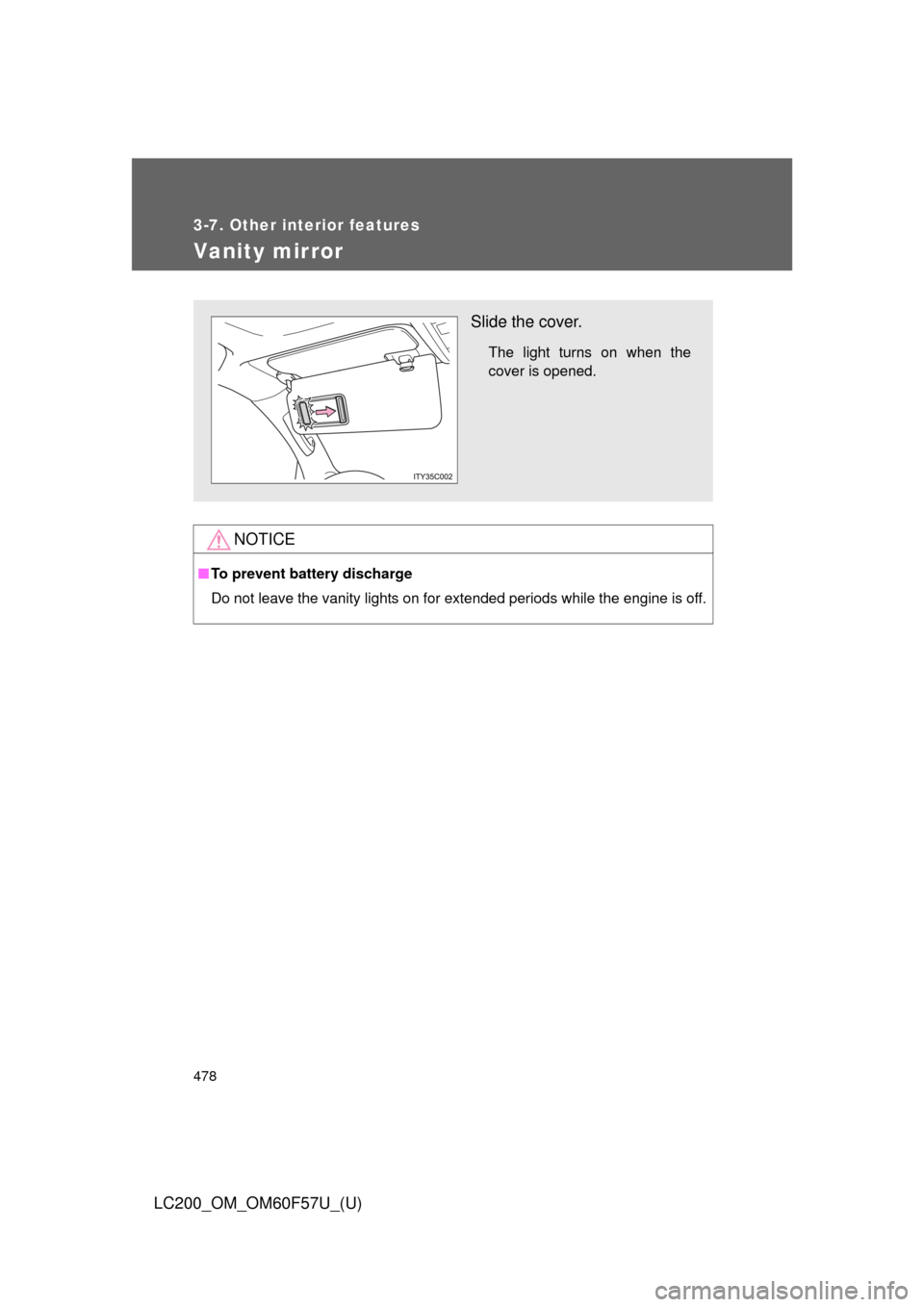
Slide the cover.
The light turns on when the
cover is opened.
Page 512 of 720
512
LC200_OM_OM60F57U_(U)
4-1. Maintenance and care
Cleaning and protecting the vehicle exterior
■Automatic car washes
●Fold the mirrors back and retract the antenna before washing the vehicle.
●Brushes used in automatic car washes may scratch the vehicle surface
and harm your vehicle’s paint.
●Rear spoiler (if equipped) may not be washable in some automatic car
washes. There may also be an increased risk of damage to vehicle.
■High pressure car washes
●Do not allow the nozzles of the car wash to come within close proximity
of the windows.
●Before car wash, check that the fuel filler door is closed.
Perform the following to protect the vehicle and maintain it in prime
condition.
●Working from top to bottom, liberally apply water to the vehicle
body, wheel wells and underside of the vehicle to remove any
dirt and dust.
Wash the vehicle body using a sponge or soft cloth, such as a cham-
ois.
●For hard-to-remove marks, use car wash soap and rinse thor-
oughly with water.
●Wipe away any water.
●Wax the vehicle when the waterproof coating deteriorates.
If water does not bead on a clean surface, apply wax when the vehicle
body is cool.