Page 89 of 720
89 1-3. Adjustable components (seats, mirrors, steering wheel)
1
Before driving
LC200_OM_OM60F57U_(U)
■To prevent sensor error
CAUTION
■While driving
Do not adjust the position of the mirror.
Doing so may lead to mishandling of the vehicle and an accident, or result-
ing in death or serious injury.
To ensure correct functioning of the sen-
sors, do not touch or cover the sensors.
Page 90 of 720
90
1-3. Adjustable components (seats, mirrors, steering wheel)
LC200_OM_OM60F57U_(U)
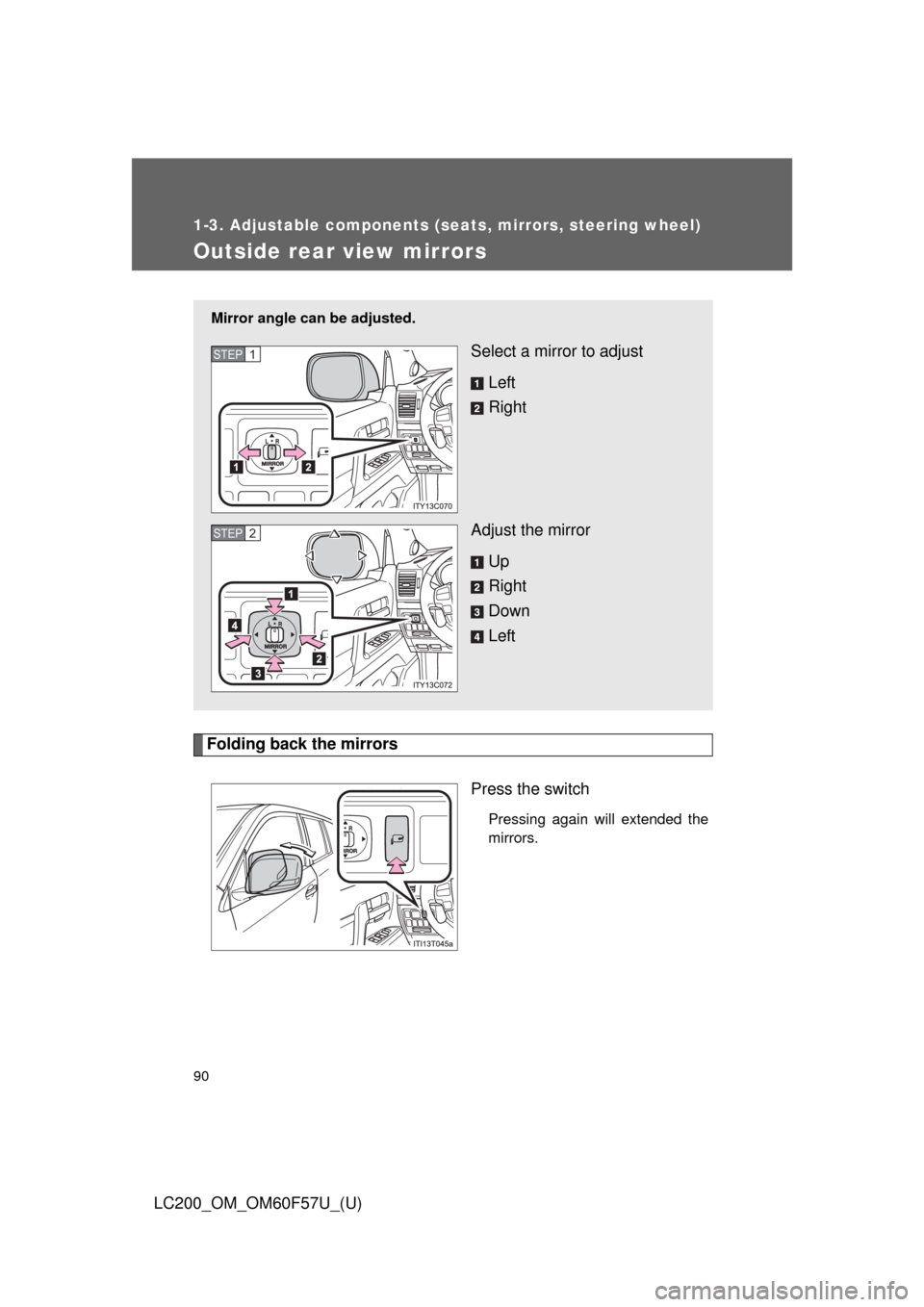
Outside rear view mirrors
Folding back the mirrors
Press the switch
Pressing again will extended the
mirrors.
Mirror angle can be adjusted.
Select a mirror to adjust
Left
Right
Adjust the mirror
Up
Right
Down
LeftSTEP1
STEP2
Page 91 of 720
91 1-3. Adjustable components (seats, mirrors, steering wheel)
1
Before driving
LC200_OM_OM60F57U_(U)
■Mirror angle can be adjusted when
The “ENGINE START STOP” switch is in ACCESSORY or IGNITION ON
mode.
■When the mirrors are fogged up
The outside rear view mirrors can be cleared using the mirror defoggers.
Turn on the rear window defogger to turn on the outside rear view mirror
defoggers. (P. 351)
■Auto anti-glare function
When the anti-glare inside rear view mirror is set to auto mode, the outside
rear view mirrors will activate in conjunction with the anti-glare inside rear
view mirror to reduce reflected light. (P. 88)
■Linked mirror function when reversing
When the mirror select switch is in the “L” or “R” position, the outside rear
view mirrors will automatically angle downwards when the vehicle is revers-
ing in order to give a better view of the ground. To disable this function, move
the mirror select switch to the neutral position (between “L” and “R”).
■One-touch adjustment of the mirror angle
A desired mirror face angle can be entered to memory and adjusted with the
touch of a button. (P. 68)
Page 92 of 720
92 1-3. Adjustable components (seats, mirrors, steering wheel)
LC200_OM_OM60F57U_(U)
CAUTION
■While driving
Observe the following precautions.
Failing to do so may result in losing control of the vehicle and cause an acci-
dent, resulting in death or serious injury.
●Do not adjust the mirrors.
●Do not drive with the mirrors folded back.
●Before driving, be sure to extend mirrors and make an adjustment prop-
erly.
■When a mirror is moving
To avoid personal injury and mirror malfunction, be careful not to get your
hand caught by the moving mirror.
■When the mirror defoggers are operating
Do not touch the rear view mirror surfaces, as they can become very hot and
burn you.
NOTICE
■If ice should jam the mirror
Do not operate the control or scrape the mirror face. Use a spray de-icer to
free the mirror.
Page 158 of 720

158 2-1. Driving procedures
LC200_OM_OM60F57U_(U)
CAUTION
●Do not shift the shift lever to “D” while the vehicle is moving backward.
Doing so can damage the transmission and may result in a loss of vehicle
control.
●Moving the shift lever to “N” while the vehicle is moving will disengage the
engine from the transmission. Engine braking is not available when “N” is
selected.
●During normal driving, do not turn off the engine. Turning the engine off
while driving will not cause loss of steering or braking control, but the
power assist to these systems will be lost. This will make it more difficult to
steer and brake, so you should pull over and stop the vehicle as soon as it
is safe to do so.
However, in the event of an emergency, such as if it becomes impossible
to stop the vehicle in the normal way: P. 663
●Use engine braking (downshift) to maintain a safe speed when driving
down a steep hill.
Using the brakes continuously may cause the brakes to overheat and lose
effectiveness. (P. 171)
●When stopped on an inclined surface, use the brake pedal and parking
brake to prevent the vehicle from rolling backward or forward and causing
an accident.
●Do not adjust the position of the steering wheel, the seat, or the inside or
outside rear view mirrors while driving.
Doing so may result in a loss of vehicle control that can cause accidents
that may result in death or serious injury.
●Always check that all passengers’ arms, heads or other parts of their bod-
ies are not outside the vehicle, as this may result in death or serious injury.
●Do not drive in excess of the speed limit. Even if the legal speed limit per-
mits it, do not drive over 85 mph (140 km/h) unless your vehicle has high-
speed capability tires. Driving over 85 mph (140 km/h) may result in tire
failure, loss of control and possible injury. Be sure to consult a tire dealer
to determine whether the tires on your vehicle are high-speed capability
tires or not before driving at such speeds.
Page 266 of 720
266 2-4. Using other driving systems
LC200_OM_OM60F57U_(U)Minimum projected turning cir-
cle (blue)
Displays the smallest turning cir-
cle projected by the system if the
steering wheel is turned to full
lock. Displayed when the steering
wheel is turned to the right (fur-
ther than 90 from straight
ahead).
Vehicle width line (blue)
Indicates the width of the vehicle
including the outside rear view
mirror.
Rear wheel contact point
Shows the position of the vehi-
cle’s rear tire.
Automatic display mode
Switches the projected course
mode
Page 267 of 720
267 2-4. Using other driving systems
2
When driving
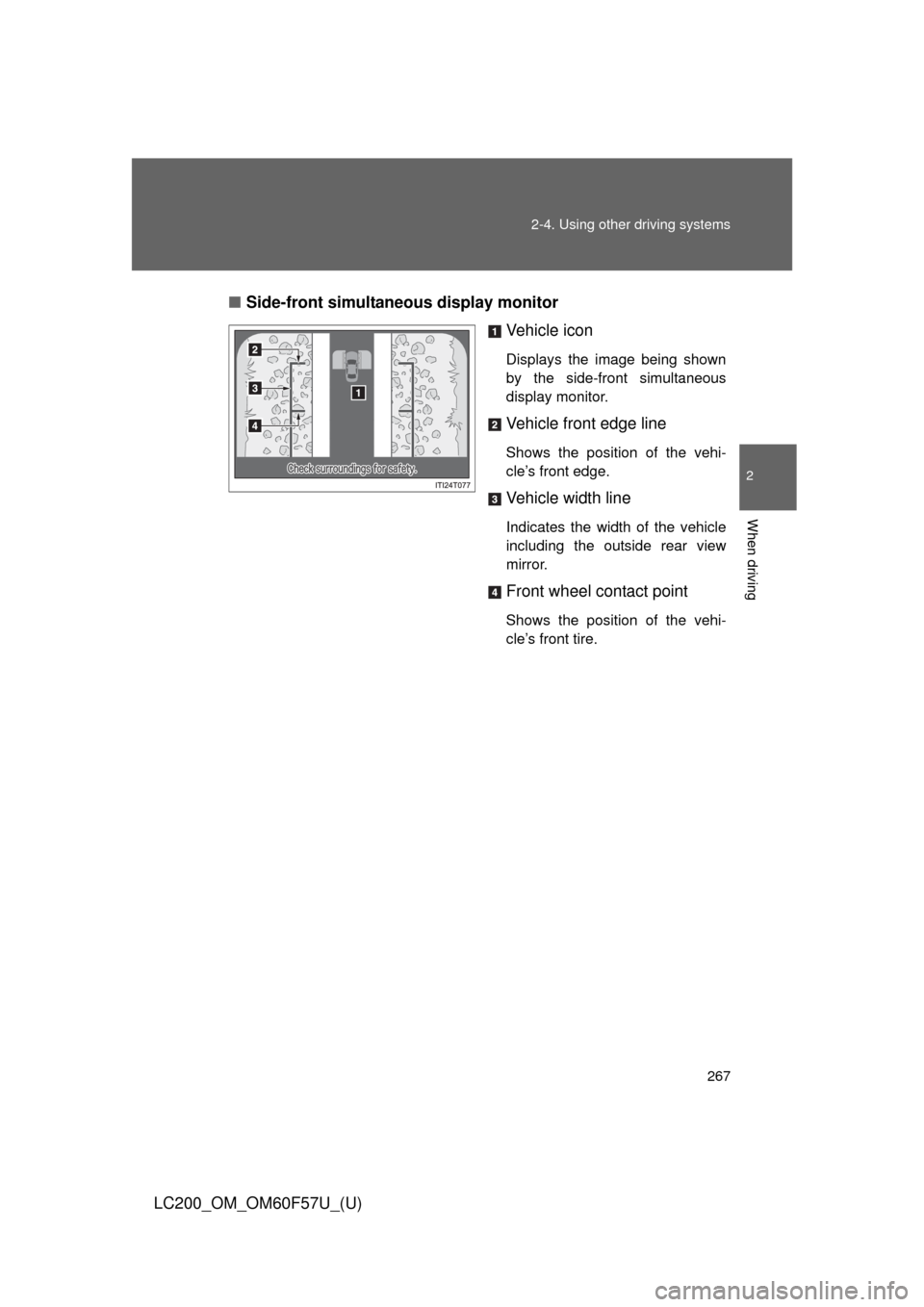
LC200_OM_OM60F57U_(U)■Side-front simultaneous display monitor
Vehicle icon
Displays the image being shown
by the side-front simultaneous
display monitor.
Vehicle front edge line
Shows the position of the vehi-
cle’s front edge.
Vehicle width line
Indicates the width of the vehicle
including the outside rear view
mirror.
Front wheel contact point
Shows the position of the vehi-
cle’s front tire.
Page 268 of 720
268 2-4. Using other driving systems
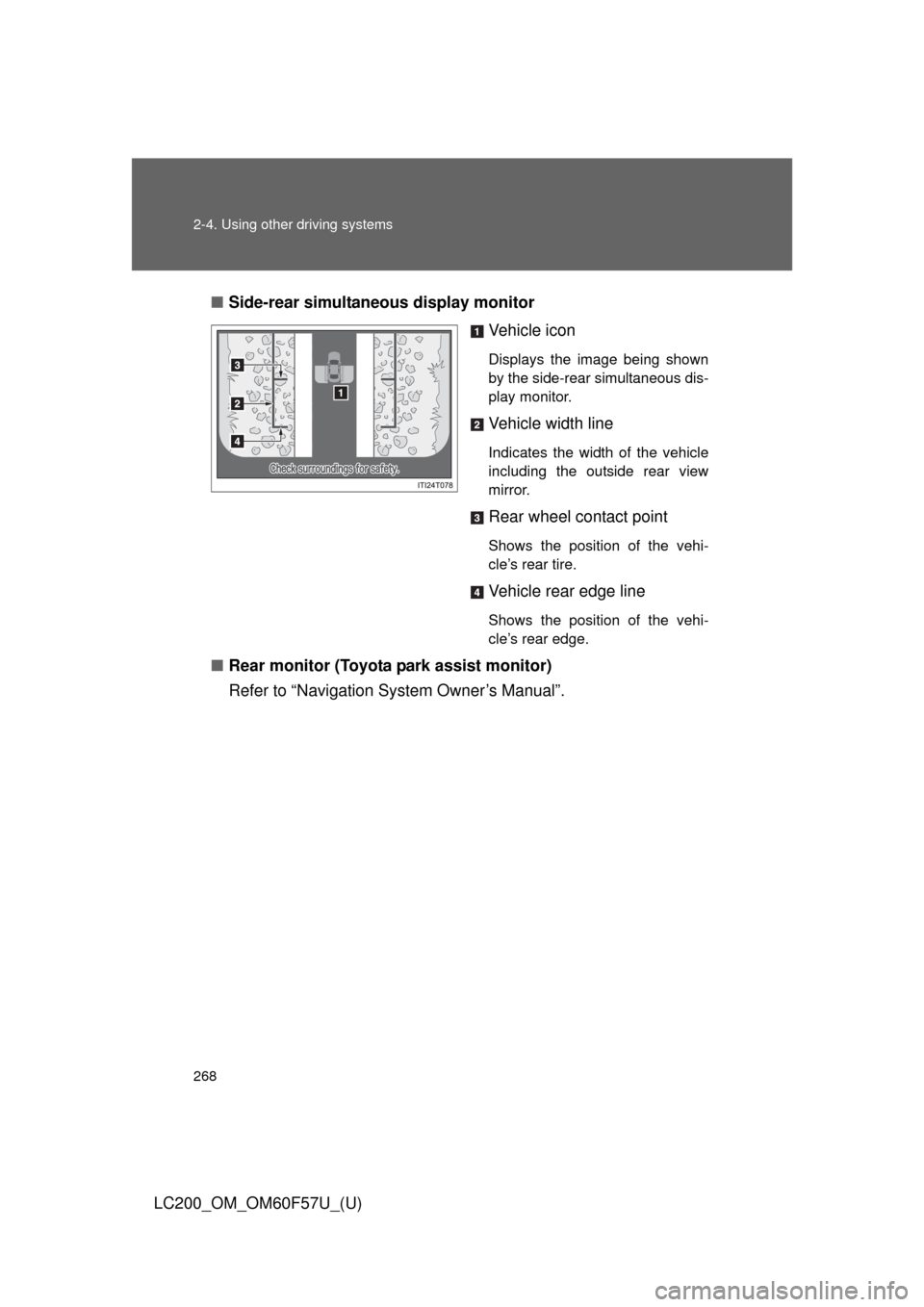
LC200_OM_OM60F57U_(U)■Side-rear simultaneous display monitor
Vehicle icon
Displays the image being shown
by the side-rear simultaneous dis-
play monitor.
Vehicle width line
Indicates the width of the vehicle
including the outside rear view
mirror.
Rear wheel contact point
Shows the position of the vehi-
cle’s rear tire.
Vehicle rear edge line
Shows the position of the vehi-
cle’s rear edge.
■Rear monitor (Toyota park assist monitor)
Refer to “Navigation System Owner’s Manual”.