Page 383 of 644
383 3-3. Using the “touch screen”
3
Interior features
HILUX_OM_OM0K134E_(EE)
CAUTION
While driving
Do not use the portable audio player or connect the Bluetooth
® system.
NOTICE
When leaving the vehicle
Do not leave your portable audio player in the vehicle. The inside of the vehi-
cle may become hot, causing damage to the portable audio player.
Page 385 of 644
385 3-3. Using the “touch screen”
3
Interior features
HILUX_OM_OM0K134E_(EE)
Turning on the power
Press “MODE” when the audio system is turned off.
Changing the audio source
Press “MODE” when the audio system is turned on. The audio source
changes as follows each time “MODE” is pressed. If no discs are
inserted in the player, or if the external device is not connected, that
mode will be skipped.
FMCD playeriPod or USB memoryBluetooth® audioAUXAM
Adjusting the volume
Press “+” on to increase the volume and “-” to decrease the
volume.
Hold the switch in that position to continue increasing or decreasing the
volume.
Silencing a sound
Press and hold the “MODE”.
To cancel, press and hold the “MODE”.
Page 428 of 644
428
3-3. Using the “touch screen”
HILUX_OM_OM0K134E_(EE)
Bluetooth® settings
You can set the Bluetooth® system to your desired settings.
Registered devices settings
Connecting telephone
Connecting audio player
Detailed Bluetooth
settings
To display the screen shown above, press “SETUP”, and touch
“Bluetooth
*” on the “Setup” screen.
*: Bluetooth is a registered trademark of Bluetooth SIG. Inc.
Page 429 of 644
429 3-3. Using the “touch screen”
3
Interior features
HILUX_OM_OM0K134E_(EE)
Registered devices settings
Registering a Bluetooth
® device
Bluetooth
® devices compatible with phones (HFP) and portable audio
players (AVP) can be registered simultaneously. You can register up
to 5 Bluetooth
® devices.
Display the “Bluetooth
* Settings” screen. (P. 428)
Touch “Registered devices” on the “Bluetooth
* Settings”
screen.
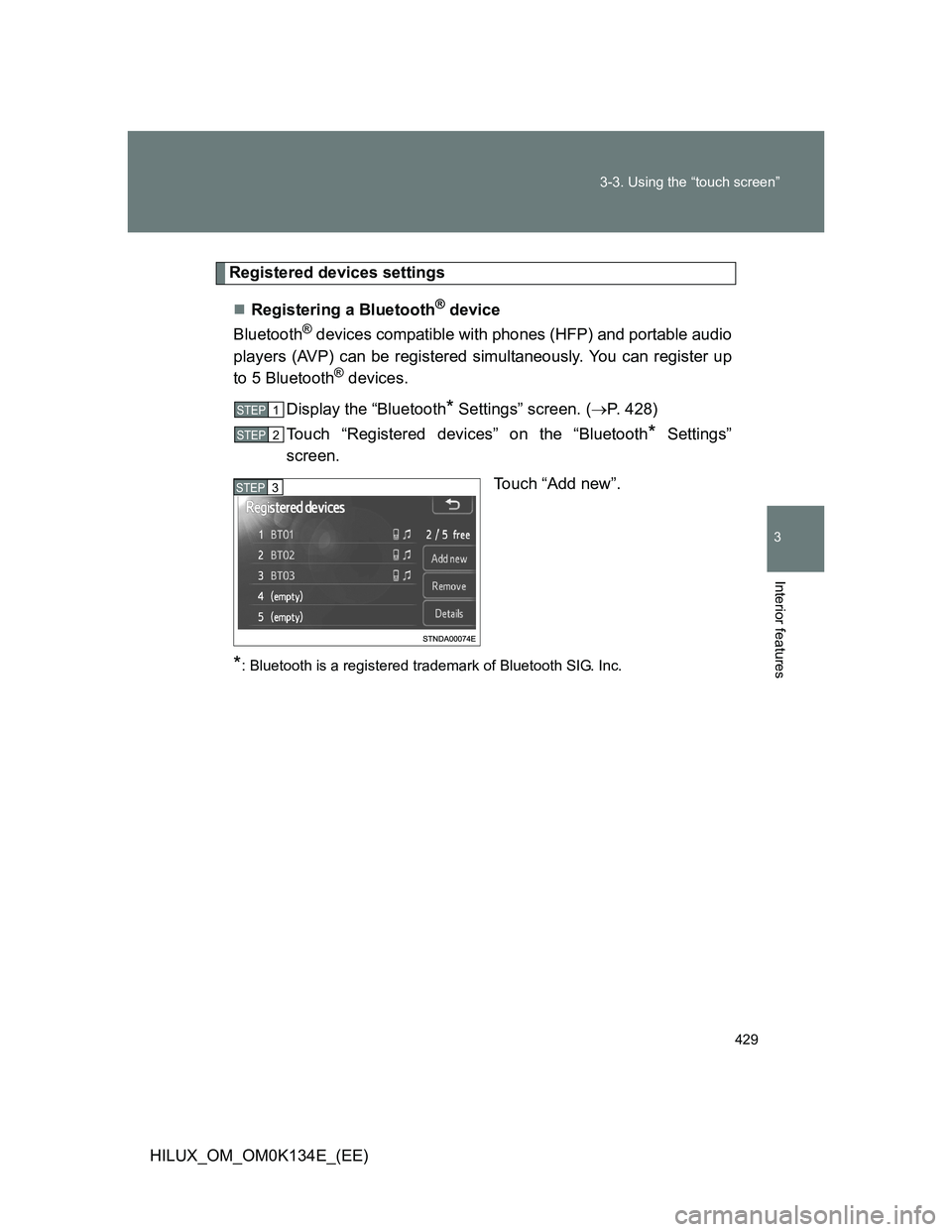
Touch “Add new”.
*: Bluetooth is a registered trademark of Bluetooth SIG. Inc.
STEP1
STEP2
STEP3
Page 433 of 644
433 3-3. Using the “touch screen”
3
Interior features
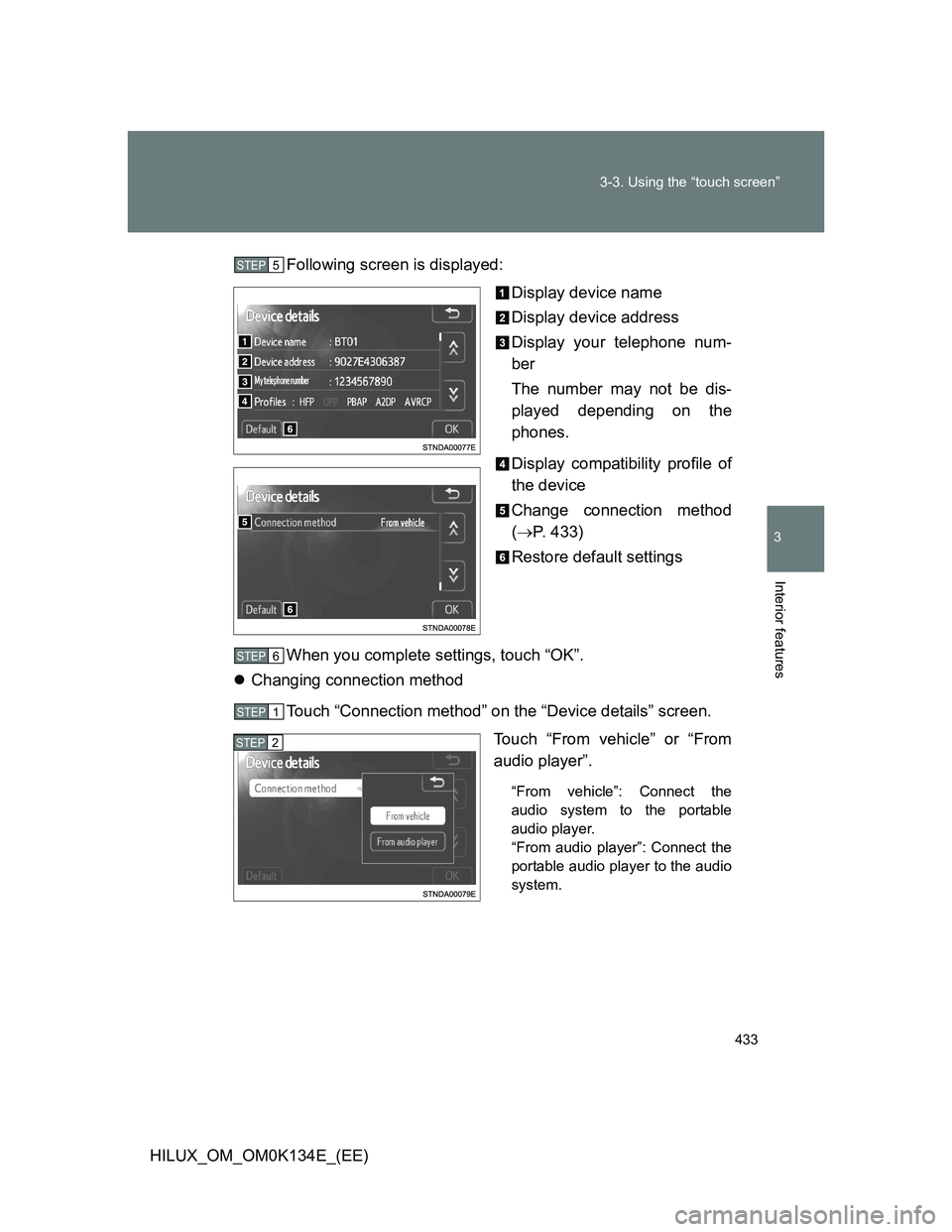
HILUX_OM_OM0K134E_(EE)Following screen is displayed:
Display device name
Display device address
Display your telephone num-
ber
The number may not be dis-
played depending on the
phones.
Display compatibility profile of
the device
Change connection method
(P. 433)
Restore default settings
When you complete settings, touch “OK”.
Changing connection method
Touch “Connection method” on the “Device details” screen.
Touch “From vehicle” or “From
audio player”.
“From vehicle”: Connect the
audio system to the portable
audio player.
“From audio player”: Connect the
portable audio player to the audio
system.
STEP5
STEP6
STEP1
STEP2
Page 435 of 644
435 3-3. Using the “touch screen”
3
Interior features
HILUX_OM_OM0K134E_(EE)
Selecting the audio player
If multiple Bluetooth
® devices are registered, follow the procedure
below to select the Bluetooth® device to be used. You may only use
one device at a time.
Display the “Bluetooth
* Settings” screen. (P. 428)
Touch “Connect audio player” on the “Bluetooth
* Settings”
screen.
Touch the device to connect.
“Add new”: Registering a
Bluetooth® device. (P. 429)
The selection indicator is
displayed on left side of the
selected device name.
The Bluetooth
® mark is displayed
when you connected the device.
*: Bluetooth is a registered trademark of Bluetooth SIG. Inc.
Detailed Bluetooth® settings
You can confirm and change the detailed Bluetooth
® settings.
Display the “Bluetooth
* Settings” screen. (P. 428)
Touch “Detailed Bluetooth
* settings” on the “Bluetooth*
Settings” screen.
*: Bluetooth is a registered trademark of Bluetooth SIG. Inc.
STEP1
STEP2
STEP3
STEP1
STEP2
Page 436 of 644
436 3-3. Using the “touch screen”
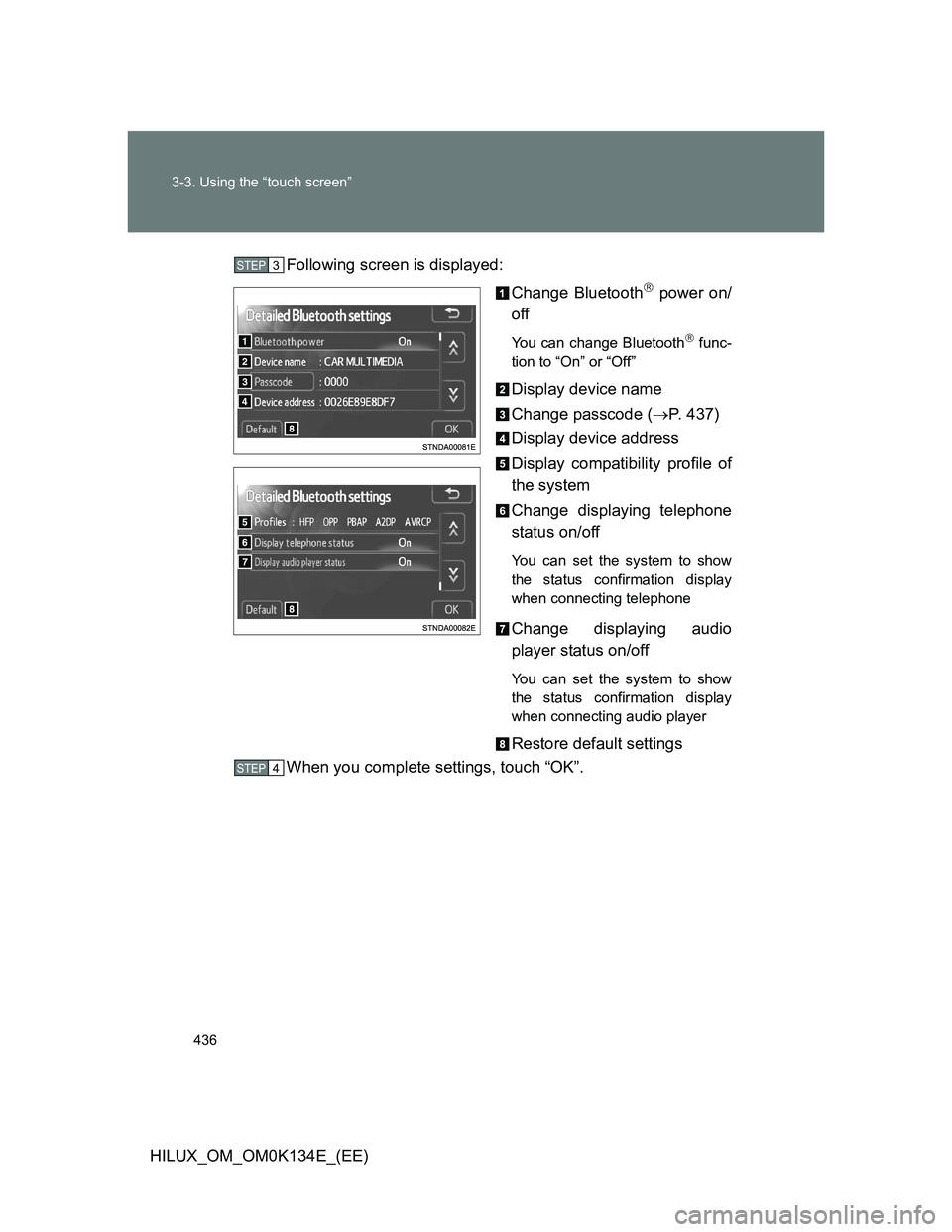
HILUX_OM_OM0K134E_(EE)Following screen is displayed:
Change Bluetooth
power on/
off
You can change Bluetooth func-
tion to “On” or “Off”
Display device name
Change passcode (P. 437)
Display device address
Display compatibility profile of
the system
Change displaying telephone
status on/off
You can set the system to show
the status confirmation display
when connecting telephone
Change displaying audio
player status on/off
You can set the system to show
the status confirmation display
when connecting audio player
Restore default settings
When you complete settings, touch “OK”.
STEP3
STEP4
Page 629 of 644
629
HILUX_OM_OM0K134E_(EE)
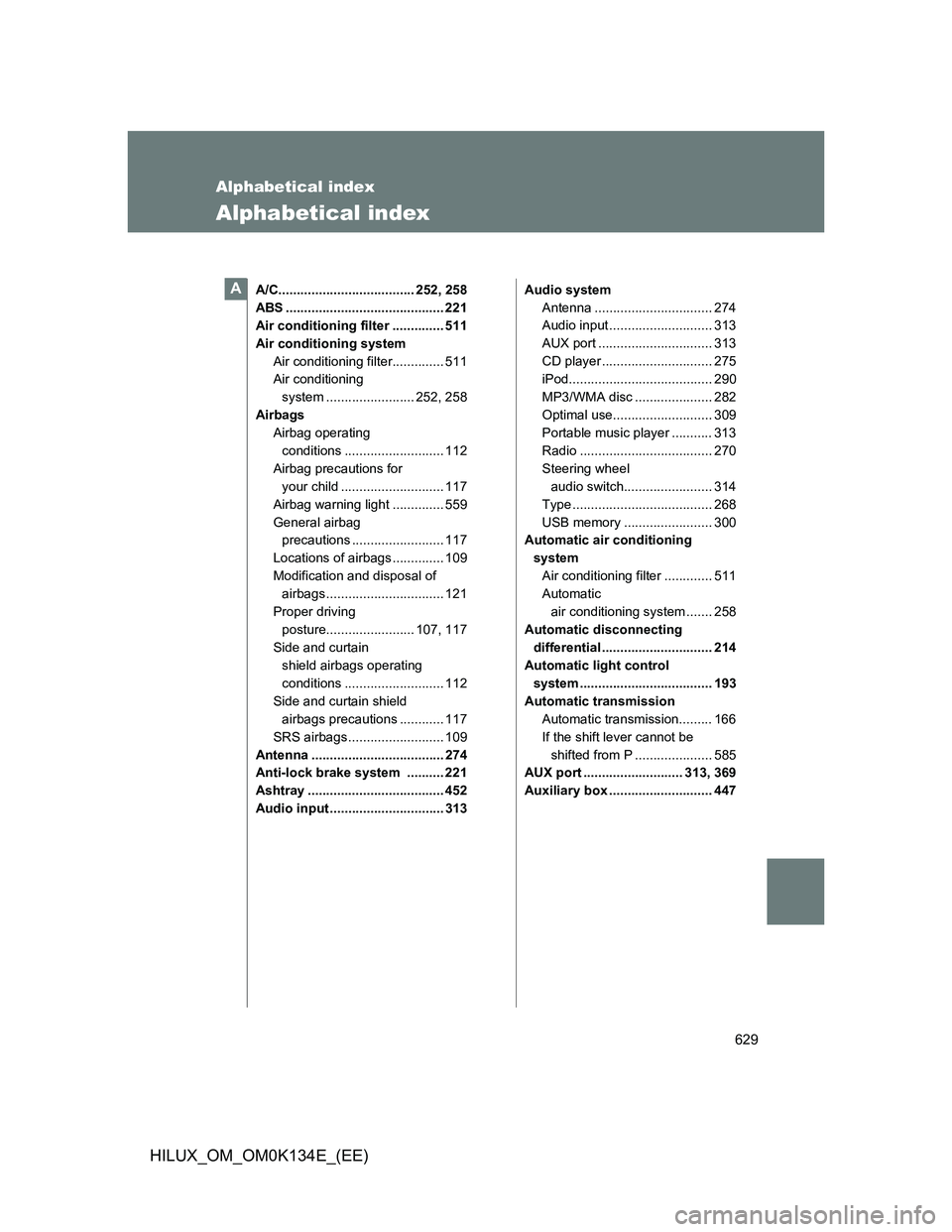
Alphabetical index
Alphabetical index
A/C..................................... 252, 258
ABS ........................................... 221
Air conditioning filter .............. 511
Air conditioning system
Air conditioning filter.............. 511
Air conditioning
system ........................ 252, 258
Airbags
Airbag operating
conditions ........................... 112
Airbag precautions for
your child ............................ 117
Airbag warning light .............. 559
General airbag
precautions ......................... 117
Locations of airbags .............. 109
Modification and disposal of
airbags ................................ 121
Proper driving
posture........................ 107, 117
Side and curtain
shield airbags operating
conditions ........................... 112
Side and curtain shield
airbags precautions ............ 117
SRS airbags .......................... 109
Antenna .................................... 274
Anti-lock brake system .......... 221
Ashtray ..................................... 452
Audio input ............................... 313Audio system
Antenna ................................ 274
Audio input ............................ 313
AUX port ............................... 313
CD player .............................. 275
iPod....................................... 290
MP3/WMA disc ..................... 282
Optimal use........................... 309
Portable music player ........... 313
Radio .................................... 270
Steering wheel
audio switch........................ 314
Type ...................................... 268
USB memory ........................ 300
Automatic air conditioning
system
Air conditioning filter ............. 511
Automatic
air conditioning system ....... 258
Automatic disconnecting
differential .............................. 214
Automatic light control
system .................................... 193
Automatic transmission
Automatic transmission......... 166
If the shift lever cannot be
shifted from P ..................... 585
AUX port ........................... 313, 369
Auxiliary box ............................ 447A