Page 371 of 644
371 3-3. Using the “touch screen”
3
Interior features
HILUX_OM_OM0K134E_(EE)
Audio control screen
Pressing “MEDIA” displays the audio control screen from any
screens of the selected source.
Audio source selection
screen appears
Displaying the album list
Displaying the track list
Connecting a Bluetooth
®
audio player
Playback
Pause
Repeat play
Random playback
Page 373 of 644
373 3-3. Using the “touch screen”
3
Interior features
HILUX_OM_OM0K134E_(EE)
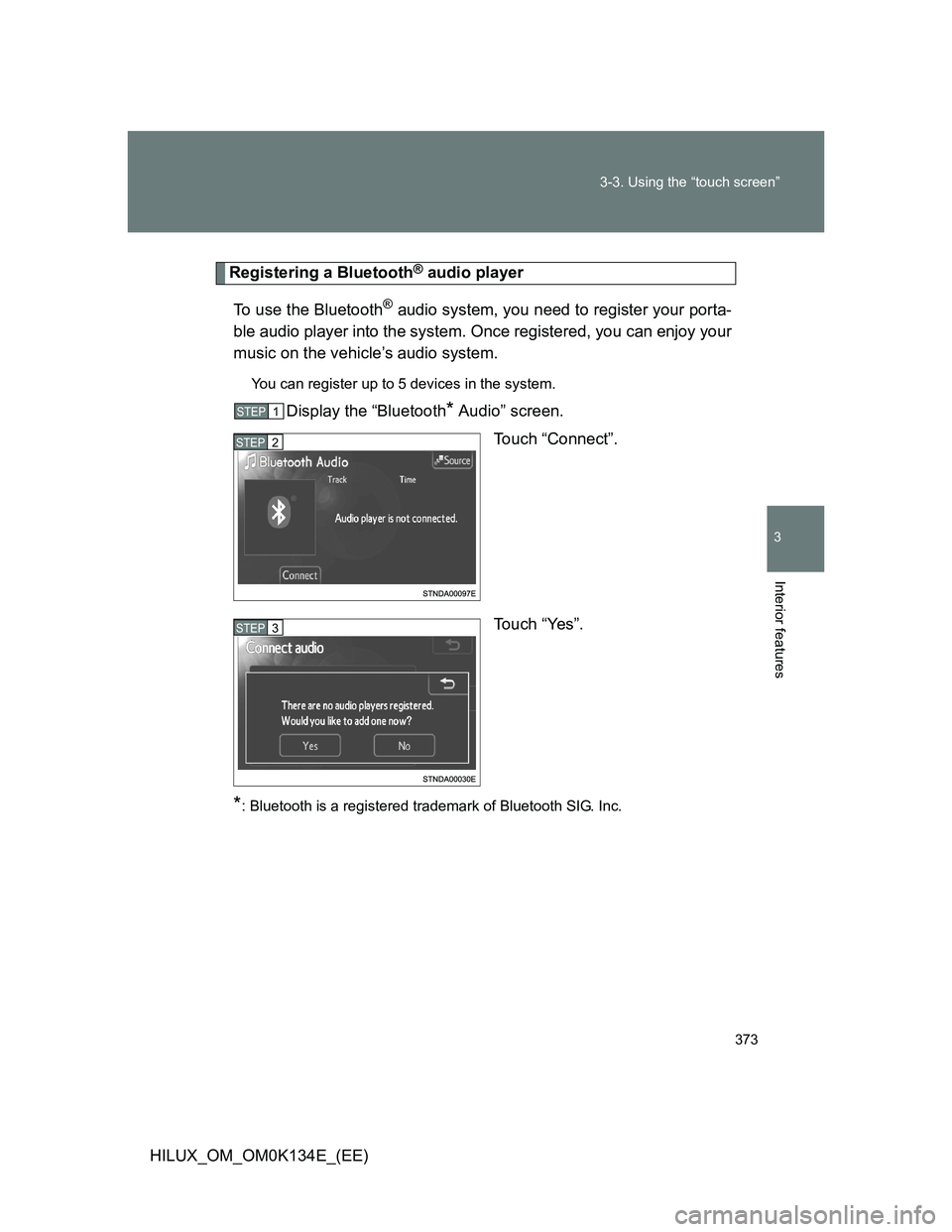
Registering a Bluetooth® audio player
To use the Bluetooth
® audio system, you need to register your porta-
ble audio player into the system. Once registered, you can enjoy your
music on the vehicle’s audio system.
You can register up to 5 devices in the system.
Display the “Bluetooth* Audio” screen.
Touch “Connect”.
Touch “Yes”.
*: Bluetooth is a registered trademark of Bluetooth SIG. Inc.
STEP1
STEP2
STEP3
Page 374 of 644
374 3-3. Using the “touch screen”
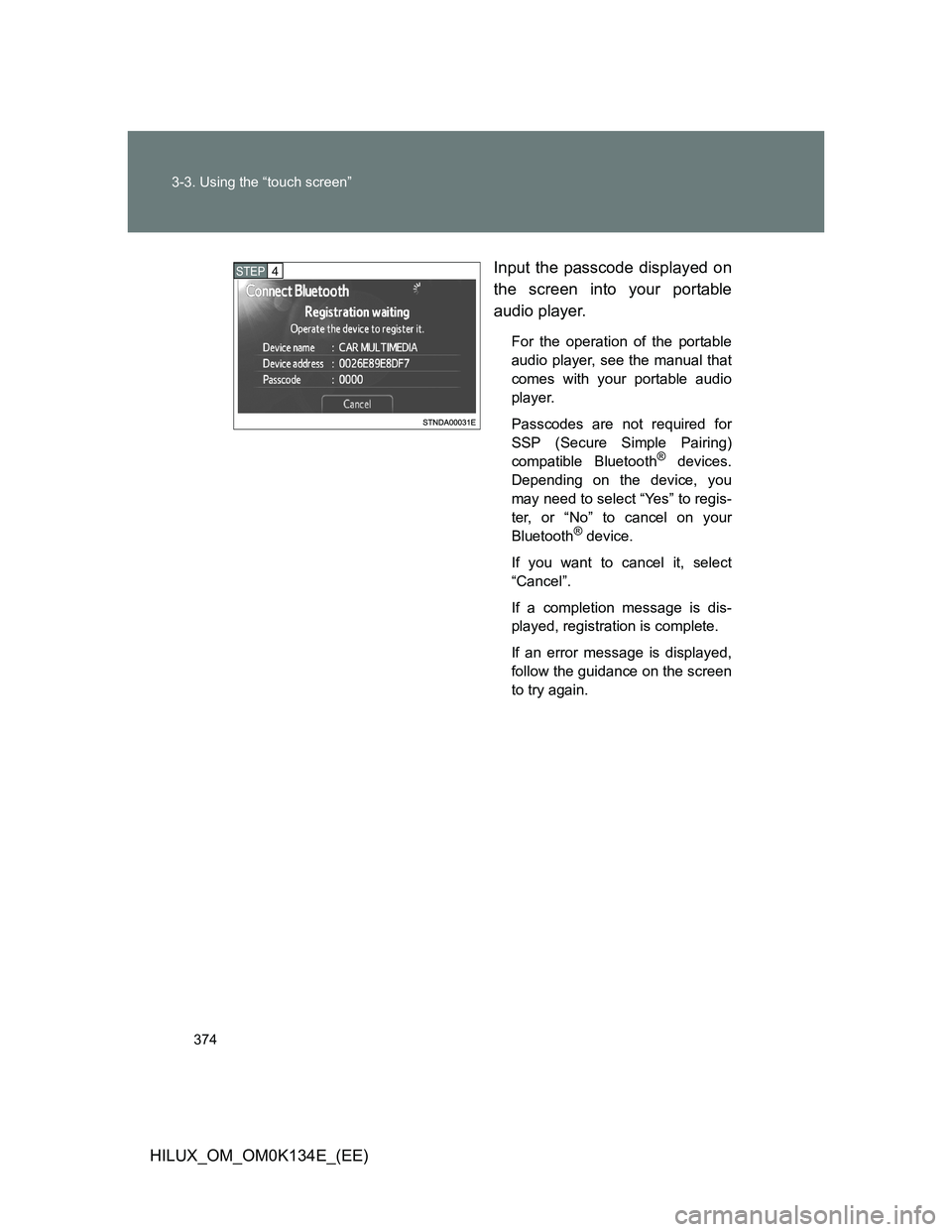
HILUX_OM_OM0K134E_(EE)Input the passcode displayed on
the screen into your portable
audio player.
For the operation of the portable
audio player, see the manual that
comes with your portable audio
player.
Passcodes are not required for
SSP (Secure Simple Pairing)
compatible Bluetooth
® devices.
Depending on the device, you
may need to select “Yes” to regis-
ter, or “No” to cancel on your
Bluetooth
® device.
If you want to cancel it, select
“Cancel”.
If a completion message is dis-
played, registration is complete.
If an error message is displayed,
follow the guidance on the screen
to try again.
STEP4
Page 375 of 644
375 3-3. Using the “touch screen”
3
Interior features
HILUX_OM_OM0K134E_(EE)
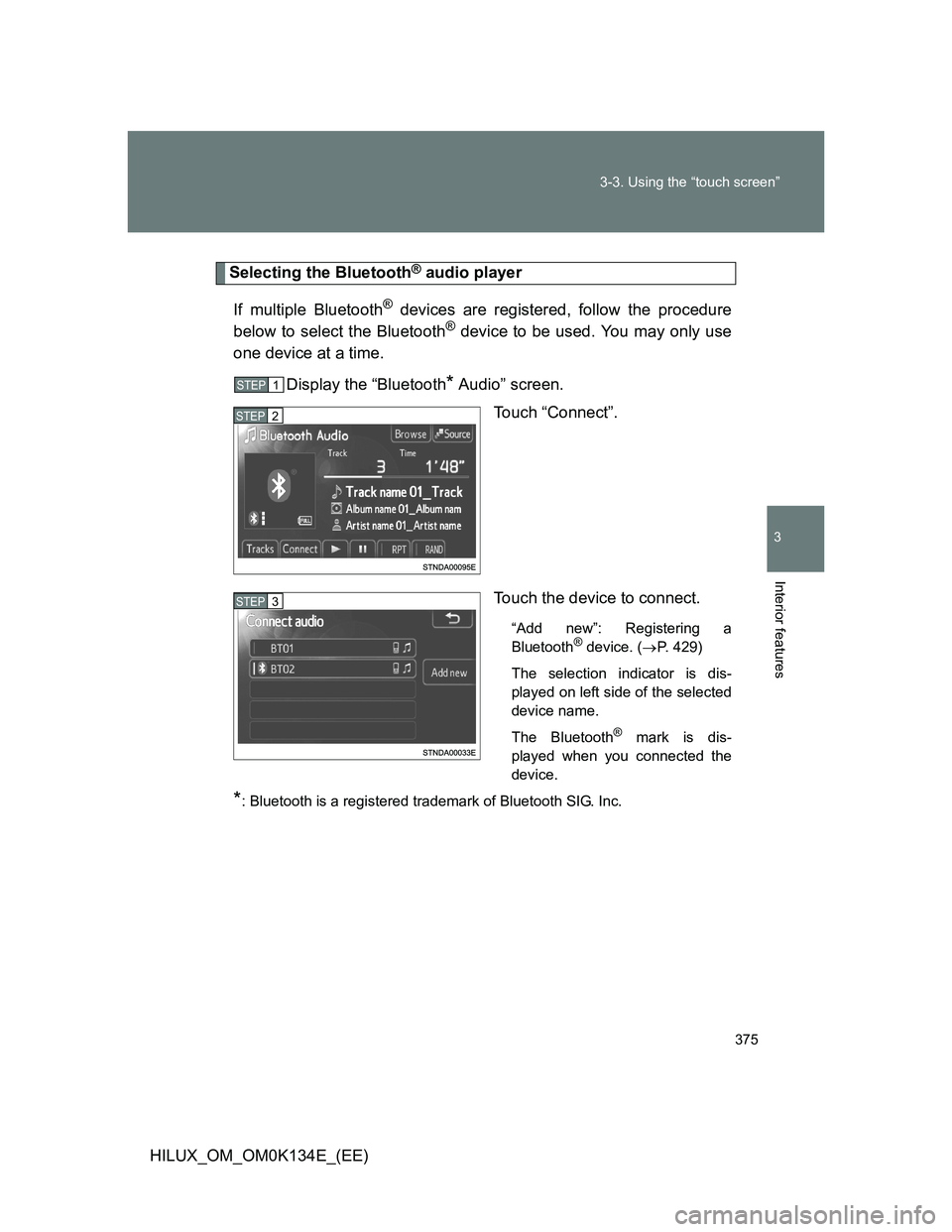
Selecting the Bluetooth® audio player
If multiple Bluetooth
® devices are registered, follow the procedure
below to select the Bluetooth® device to be used. You may only use
one device at a time.
Display the “Bluetooth
* Audio” screen.
Touch “Connect”.
Touch the device to connect.
“Add new”: Registering a
Bluetooth® device. (P. 429)
The selection indicator is dis-
played on left side of the selected
device name.
The Bluetooth
® mark is dis-
played when you connected the
device.
*: Bluetooth is a registered trademark of Bluetooth SIG. Inc.
STEP1
STEP2
STEP3
Page 376 of 644
376 3-3. Using the “touch screen”
HILUX_OM_OM0K134E_(EE)
Connecting the Bluetooth® audio player
There are two connection methods available.
When the connection method is set to “From vehicle”
When the portable audio player is on standby for the connection, it
will be automatically connected whenever the engine switch is in
either the “ACC” or “ON” position.
When the connection method is set to “From audio player”
Operate the portable player and connect it to the Bluetooth
® audio
system.
Display the “Bluetooth
* Audio” screen.
Touch “Connect”.
Touch the device to connect.
A message is shown if connection
has been successful.
If connection fails, a message will
be displayed and connection will
be re-attempted.
*: Bluetooth is a registered trademark of Bluetooth SIG. Inc.
STEP1
STEP2
STEP3
Page 377 of 644
377 3-3. Using the “touch screen”
3
Interior features
HILUX_OM_OM0K134E_(EE)
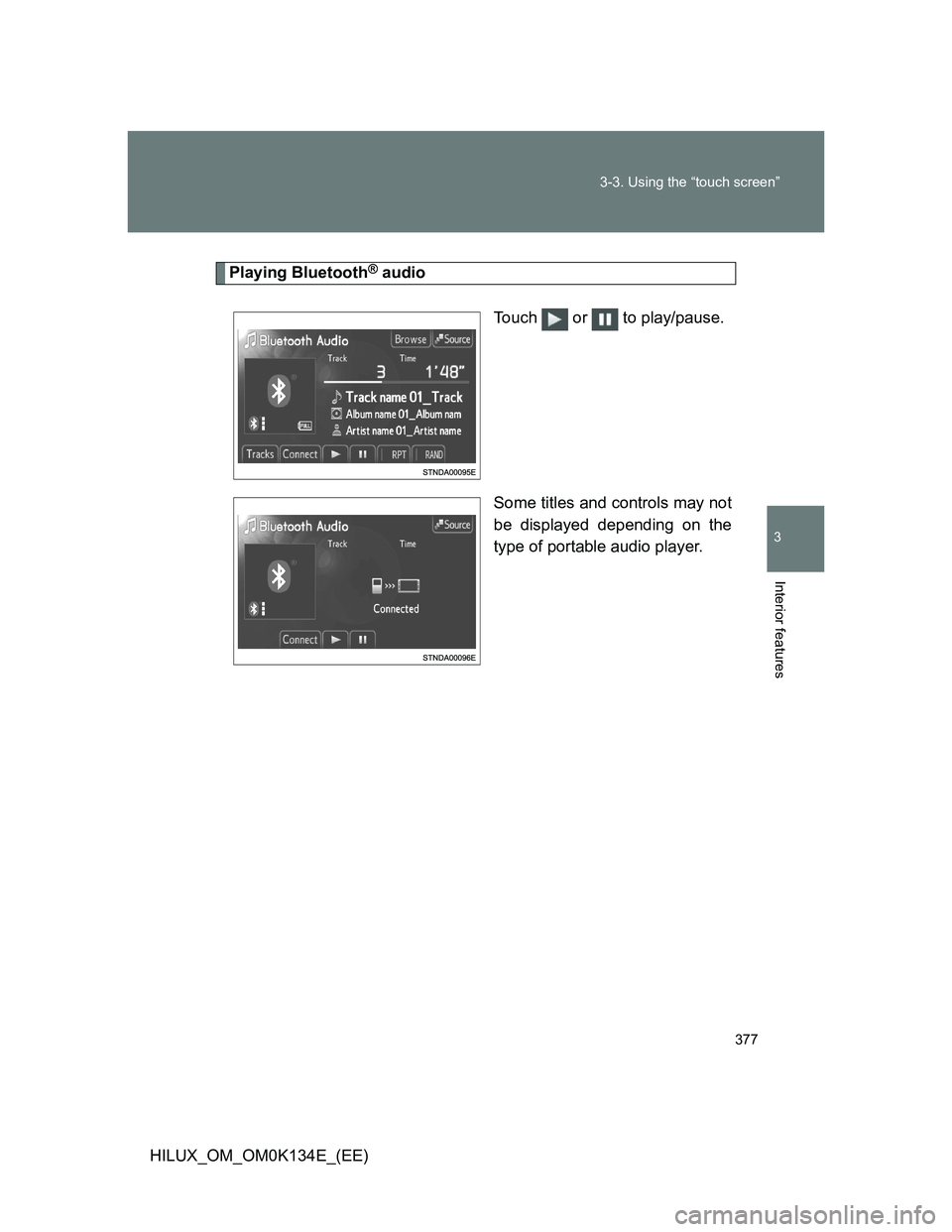
Playing Bluetooth® audio
Touch or to play/pause.
Some titles and controls may not
be displayed depending on the
type of portable audio player.
Page 381 of 644

381 3-3. Using the “touch screen”
3
Interior features
HILUX_OM_OM0K134E_(EE)
When using the Bluetooth® audio system
In the following conditions, the system may not function.
• If the portable audio player is turned off
• If the portable audio player is not connected
• If the portable audio player’s battery is low
There may be a delay if phone connection is carried out during Blue-
tooth
® audio play.
Depending on the type of portable audio player that is connected to the
system, operation may differ slightly and certain functions may not be
available.
Bluetooth
® antenna
The antenna is built into the display. If the portable audio player is behind the
seat or in the glove box or console box, or is touching or covered by metal
objects, connection status may deteriorate.
Battery charge/signal status
This display may not correspond exactly with the portable audio player, and
this system does not have a charging function.
About Bluetooth
®
Bluetooth is a registered trademark of
Bluetooth SIG. Inc.
The Bluetooth word mark and logos are
owned by the Bluetooth SIG, Inc. and any
use of such marks by Panasonic Corpo-
ration is under license. Other trademarks
and trade names are those of their
respective owners.
Page 382 of 644
382 3-3. Using the “touch screen”
HILUX_OM_OM0K134E_(EE)
Compatible models
Portable audio players must correspond to the specifications.
Bluetooth
® specifications:
Ver. 1.1, or higher (Recommended: Ver. 2.1 + EDR or higher)
Profiles:
• A2DP (Advanced Audio Distribution Profile) Ver. 1.0, or higher
(Recommended: Ver. 1.2 or higher)
This is a profile to transmit stereo audio or high quality sounds to the
headphone.
• AVRCP (Audio/Video Remote Control Profile) Ver. 1.0 or higher
(Recommended: Ver. 1.4 or higher)
This is a profile to remote control the A/V equipment.
However, please note that some functions may be limited depending on the
type of portable audio player.
Certification
P. 393
Reconnecting the portable audio player
If the portable audio player is disconnected due to a poor reception when the
engine switch is in the “ACC” or “ON” position, the system automatically
reconnects the portable audio player when possible.
If you have switched off the portable audio player yourself, follow the instruc-
tions below to reconnect:
Select the portable audio player again
Enter the portable audio player
When you release your car
Be sure to initialize your data. (P. 321)