2013 SUBARU FORESTER air condition
[x] Cancel search: air conditionPage 125 of 436
3-14Instruments and controls
The warning light(s) for unfastened
seatbelt(s) will alternate between
steady illumination and flashing at
15-second intervals. The chime will
not sound. –At speeds higher than approxi-
mately 9 mph (15 km/h)
The warning light(s) for unfastened
seatbelt(s) will alternate between
flashing and steady illumination at
15-second intervals and the chime
will sound while the warning light(s)
is/are flashing.
If there is no passenger on the frontpassenger ’s seat, the seatbelt warning
device for the front passenger ’s seat will
be deactivated. The front passenger ’s
occupant detection system monitors
whether or not there is a passenger on
the front passenger ’s seat.
Observe the following precautions. Failure
to do so may prevent the device from
functioning correctly or cause the device
to fail. . Do not install any accessory such as a
table or TV onto the seatback.. Do not store a heavy load in the
seatback pocket.. Do not allow the rear seat occupant to
place his/her hands or legs on the front passenger ’s seatback, or allow him/her to pull the seatback. .
Do not use front seats with their back-
ward-forward position and seatback not
being locked into place securely. If any of
them are not locked securely, adjust them
again. For the adjustment procedure of
the manual seats, refer to “Manual seat ”
F 1-3.
If the seatbelt warning device for the frontpassenger ’s seat does not function cor-
rectly (e.g., it is activated even when the
front passenger ’s seat is empty or it is
deactivated even when the front passen-
ger has not fastened his/her seatbelt),
take the following actions. . Ensure that no article is placed on the
seat other than a child restraint system
and its child occupant, although we
strongly recommend that all children sit
in the rear seat properly restrained. . Ensure that there is no article left in the
seatback pocket.. Ensure that the backward-forward po-
sition and seatback of front passenger ’s
seat are locked into place securely by
moving the seat back and forth.
If still the seatbelt warning device for front passenger ’s seat does not function cor-
rectly after taking relevant corrective ac-
tions described above, immediately con-
tact your SUBARU dealer for an inspec- tion.
& SRS airbag system
warning light
WARNING
If the warning light exhibits any of
the following conditions, there may
be a malfunction in the seatbelt
pretensioners and/or SRS airbag
system. Immediately take your vehi-
cle to your nearest SUBARU dealer
to have the system checked. Unless
checked and properly repaired, the
seatbelt pretensioners and/or SRS
airbag will not operate properly in
the event of a collision, which may
increase the risk of injury. . Flashing or flickering of the warn-
ing light
. No illumination of the warning
light when the ignition switch is
first turned to the “ON ”position
. Continuous illumination of the
warning light
. Illumination of the warning light
while driving
Page 130 of 436

pressure, a tire may have signifi-
cant damage and a fast leak that
causes the tire to lose air rapidly.
If you have a flat tire, replace it
with a spare tire as soon aspossible.
. When a spare tire is mounted or a
wheel rim is replaced without the
original pressure sensor/trans-
mitter being transferred, the low
tire pressure warning light will
illuminate steadily after blinking
for approximately one minute.
This indicates the TPMS is un-
able to monitor all four road
wheels. Contact your SUBARU
dealer as soon as possible for
tire and sensor replacement and/
or system resetting.
CAUTION
. The tire pressure monitoring sys-
tem is NOT a substitute for
manually checking tire pressure.
The tire pressure should be
checked periodically (at least
monthly) using a tire gauge.
. After any change to tire pressure
(s), the tire pressure monitoring
system will not re-check tire inflation pressures until the vehi-
cle is first driven more than 20
mph (32 km/h). After adjusting
the tire pressures, increase the
vehicle speed to at least 20 mph
(32 km/h) to start the TPMS re-
checking of the tire inflation
pressures. If the tire pressures
are now above the severe low
pressure threshold, the low tire
pressure warning light should
turn off a few minutes later.
Therefore, be sure to install the
specified size for the front and
rear tires.
& ABS warning light
CAUTION
. If any of the following conditions
occur, we recommend that you
have the ABS system repaired at
the first available opportunity by
your SUBARU dealer. – The warning light does not
illuminate when the ignition
switch is turned to the “ON ”
position.
– The warning light illuminates
when the ignition switch is turned to the
“ON ”position,
but it does not turn off even
when the vehicle speed ex-
ceeds approximately 8 mph
(12 km/h).
– The warning light illuminates
during driving.
. When the warning light is on (and
the brake system warning light is
off), the ABS function shuts
down. However, the conventional
brake system continues to oper-
ate normally.
The ABS warning light illuminates to-
gether with the brake system warning light
if the EBD system malfunctions. For
further details of the EBD system mal-
function warning, refer to “Brake system
warning light ”F 3-20.
NOTE
If the warning light behaves as follows,
the ABS system may be considerednormal. . The warning light illuminates right
after the engine is started but turns off
immediately, remaining off.. The warning light remains on after
the engine has been started, but it
turns off when the vehicle speed
reaches approximately 8 mph (12 Instruments and controls
3-19
– CONTINUED –
Page 142 of 436
&Automatic headlight beam
leveler (models with HID headlights)
The HID headlights generate more light
than conventional halogen headlights.
Therefore a driver of an oncoming vehicle
may experience too much glare if your
headlight beam height adjustment is high
when the vehicle is carrying a heavy load.
The automatic headlight beam leveler
adjusts the headlight beam height auto-
matically and optimally according to the
load being carried by the vehicle.
The automatic headlight beam leveler has
a warning light on the combination meter.
Refer to “Automatic headlight beam leve-
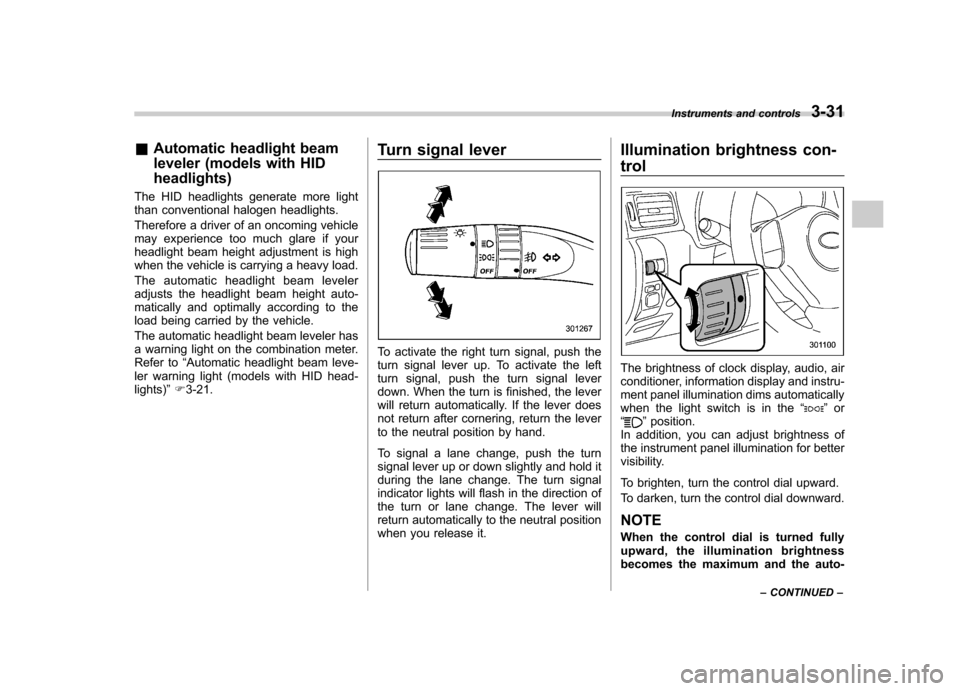
ler warning light (models with HID head-lights) ”F 3-21. Turn signal lever
To activate the right turn signal, push the
turn signal lever up. To activate the left
turn signal, push the turn signal lever
down. When the turn is finished, the lever
will return automatically. If the lever does
not return after cornering, return the lever
to the neutral position by hand.
To signal a lane change, push the turn
signal lever up or down slightly and hold it
during the lane change. The turn signal
indicator lights will flash in the direction of
the turn or lane change. The lever will
return automatically to the neutral position
when you release it. Illumination brightness con- trol
The brightness of clock display, audio, air
conditioner, information display and instru-
ment panel illumination dims automatically
when the light switch is in the
“
”or
“” position.
In addition, you can adjust brightness of
the instrument panel illumination for better
visibility.
To brighten, turn the control dial upward.
To darken, turn the control dial downward. NOTE
When the control dial is turned fully
upward, the illumination brightness
becomes the maximum and the auto- Instruments and controls
3-31
– CONTINUED –
Page 148 of 436

button, the compass display is toggled on
or off. When the compass is on, an
illuminated compass reading will appear
in the upper right corner of the mirror.
Even with the mirror in anti-glare mode,
the mirror surface turns bright if the
transmission is shifted into reverse. This
is to ensure good rearward visibility duringreversing. !Photosensors
The mirror has a photosensor attached on
both the front and back sides. If the glare
from the headlights of vehicles behind you
strikes the mirror, these sensors detect it
and make the reflection surface of the
mirror dimmer to help prevent you from
being blinded. For this reason, use care
not to cover the sensors with stickers, or other similar items. Periodically wipe the
sensors clean using a piece of dry soft
cotton cloth or an applicator. !
Compass zone adjustment
Compass calibration zones
1. The zone setting is factory preset to
Zone 8. Refer to the “Compass calibration
zones ”map shown above to verify that the
compass zone setting is correct for your
geographical location.
2. Press and hold the right button for 3
seconds then release, and the word“ ZONE ”will briefly appear and then the
zone number will be displayed.
3. Press the right-hand button repeatedly
to cycle the display through all possible
zone settings. Stop cycling when the
correct zone setting for your location is displayed.
4. Releasing the button for 3 seconds will
exit the zone setting mode. !
Compass calibration
1. For optimum calibration, switch off all
nonessential electrical accessories (rear
window defogger, heater/air conditioning
system, spotlight, etc.) and ensure all
doors are shut.
2. Drive to an open, level area away from
large metallic objects or structures and
make certain the ignition switch is in the“ ON ”position.
3. Press and hold the right button for 6 - 7
seconds then release, and the compass
will enter the calibration mode. “CAL ”and
direction will be displayed.
4. Drive slowly in a circle until “CAL ”
disappears from the display (approxi-
mately two to three circles). The compass
is now calibrated.
5. Further calibration may be necessary
should outside influences cause the mirror
to read inaccurately. You will know that
this has occurred if your compass begins
to read in only limited directions. Should
you encounter this situation, return to step
one of the above procedure and recali-
brate the mirror. Instruments and controls
3-37
– CONTINUED –
Page 160 of 436

Ventilator control................................................. 4-2
Center ventilators ................................................ 4-2
Side ventilators ................................................... 4-2
Climate control panel .......................................... 4-2
Type A ................................................................ 4-3
Type B ................................................................ 4-4
Type C ................................................................ 4-5
Automatic climate control system (type B and C) ............................................................... 4-6
Type B ................................................................ 4-6
Type C ................................................................ 4-7
Temperature sensors ........................................... 4-7
Manual climate control ....................................... 4-8
Airflow mode selection ........................................ 4-8
Temperature control ............................................ 4-9
Fan speed control ............................................... 4-9
Air conditioner control ........................................ 4-9
Air inlet selection ................................................ 4-9 Defrosting
........................................................... 4-10
Operating tips for heater and air conditioner ...................................................... 4-10
Cleaning ventilation grille ................................... 4-10
Efficient cooling after parking in direct sunlight ........................................................... 4-10
Lubrication oil circulation in the refrigerant circuit .............................................................. 4-11
Checking air conditioning system before summer season ............................................................ 4-11
Cooling and dehumidifying in high humidity and low temperature weather conditions ................. 4-11
Air conditioner compressor shut-off when engine is heavily loaded .............................................. 4-11
Refrigerant for your climate control system ... ..... 4-11
Air filtration system ........................................... 4-11
Replacing an air filter ......................................... 4-12Climate control
4
Page 162 of 436

&Type A1) Temperature control dial (Refer to “Tem-
perature control ”F 4-9.)
2) Fan speed control dial (Refer to “Fan
speed control ”F 4-9.)
3) Airflow control dial (Refer to “Airflow
mode selection ”F 4-8.)
4) Control switch of the defogger and deicer system (Refer to “Defogger and deicer ”
F 3-44.)
5) Air conditioner button (Refer to “Air
conditioner control ”F 4-9.)
6) Air inlet selection button (Refer to “Air
inlet selection ”F 4-9.)
Climate control
4-3
– CONTINUED –
Page 163 of 436

4-4Climate control
& Type B
1) Temperature control dial (driver ’s side)
(Refer to “Temperature control ”F 4-9.)
2) AUTO button (Refer to “Automatic cli-
mate control system (type B and C) ”F 4-
6.)
3) DUAL mode button (Refer to “Automatic
climate control system (type B and C) ”
F 4-6 and “Temperature control ”F 4-9.)
4) OFF button (Refer to “Automatic climate
control system (type B and C) ”F 4-6.)
5) Air inlet selection button (Refer to “Air
inlet selection ”F 4-9.)
6) Fan speed control button (Refer to “Fan
speed control ”F 4-9.)
7) Airflow mode selection button (Refer to “Airflow mode selection ”F 4-8.)
8) Air conditioner button (Refer to “Air
conditioner control ”F 4-9.)
9) Temperature control dial (passenger ’s
side) (Refer to “Temperature control ”
F 4-9.)
10) Defroster button (Refer to “Airflow mode
selection ”F 4-8 and “Defrosting ”F 4-10.)
11) Rear window defogger button (Refer to “Defogger and deicer ”F 3-44.)
Page 164 of 436

&Type C1) Temperature control dial (Refer to “Tem-
perature control ”F 4-9.)
2) Fan speed control dial (Refer to “Auto-
matic climate control system (type B and C) ”F 4-6 and “Fan speed control ”F 4-9.)
3) Airflow control dial (Refer to “Automatic
climate control system (type B and C) ”
F 4-6, “Airflow mode selection ”F 4-8 and
“ Defrosting ”F 4-10.)
4) Control switch of the defogger and deicer system (Refer to “Defogger and deicer ”
F 3-44.)
5) Air inlet selection button (Refer to “Air
inlet selection ”F 4-9.)
6) Air conditioner button (Refer to “Air
conditioner control ”F 4-9.)
NOTE
The controllable temperature range
may differ depending on the model. Climate control
4-5