2013 SKODA SUPERB door lock
[x] Cancel search: door lockPage 60 of 274

Parking lightsFirst read and observe the introductory information and safety warn-ings
on page 51.
Parking light switching on
›
Switch off the ignition.
›
Place the control lever into position
A
or where applicable position
B
as far as
it can go » Fig. 31 on page 53 - the parking light on the right/left side of the ve-
hicle is switched on.
Switching on the side light on both sides
›
Turn the light switch
A
to position » Fig. 30 on page 51 and lock the vehicle.
Note
■
The parking light can only be activated if the ignition is switched off.■If the right or left turn signal light has been switched on and the ignition is
switched off, the parking light is not automatically switched on.
Interior lights
Introduction
This chapter contains information on the following subjects:
Front interior light
57
Rear interior light
58
Rear interior light
58
Front door warning light
59
Entry lighting
59
Front interior lightFig. 35
Switch for front interior light - 2 versions
Fig. 36
Switch for reading lights - 2 versions
First read and observe the introductory information given on page 57.
Rocker switch positions » Fig. 35 .
switching on
switching off
control using the door contact switch (middle position)
For vehicles with interior monitoring there is no icon for the center position (oper-
ation with the door contact switch) » Fig. 35 -
.
Reading lights Switch the reading light on/off » Fig. 36
57Lights and visibility
Page 61 of 274
If operating the light with the door contact switch is enabled the light will come
on when one of the following events occurs:
› The vehicle is unlocked.
› One of the doors or the tailgate is opened.
› The ignition key is removed.
If operating the light with the door contact switch is enabled the light will go off
when one of the following events occurs:
› The vehicle is locked.
› The ignition is switched on.
› About 30 seconds after all the doors have been closed.
Note
■
If the interior light remains switched on when the ignition is switched off or if
one of the doors is open, the light will automatically go out after around 10 mi- nutes.■
Two diffuse lights are integrated in the front interior lighting, that illuminate
the gearshift lever and the middle of the dash panel. These are switched on auto-
matically when the parking light is activated. Also, after switching on the ignition when the parking lights are switched on, the door handle lighting comes on.
Rear interior light
Applies to vehicles without a panoramic sliding roof.
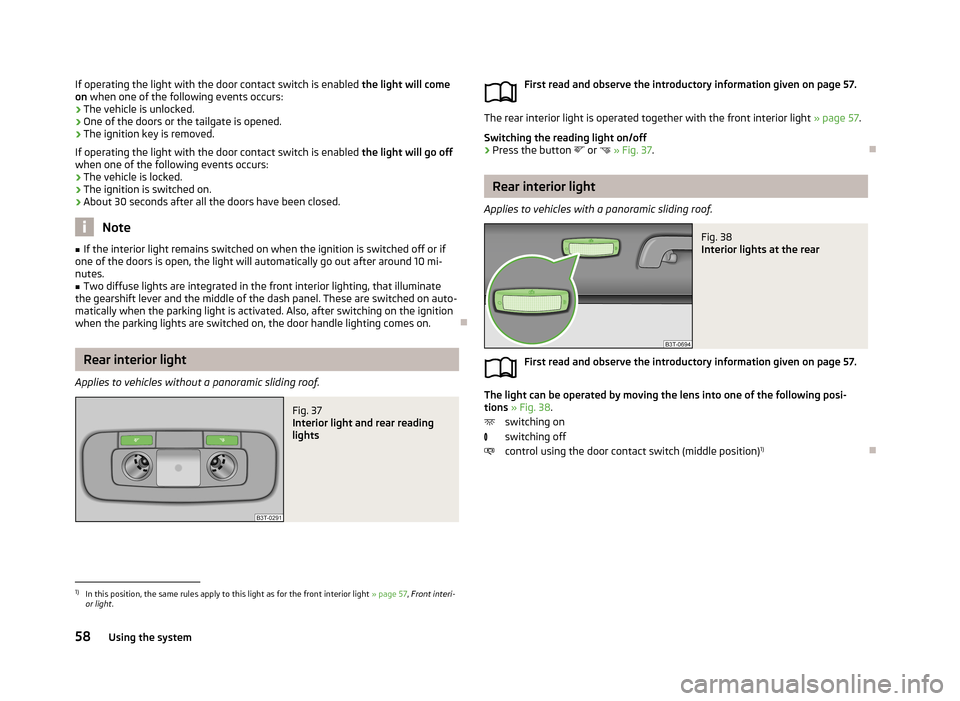
Fig. 37
Interior light and rear reading
lights
First read and observe the introductory information given on page 57.
The rear interior light is operated together with the front interior light » page 57.
Switching the reading light on/off
›
Press the button or
» Fig. 37 .
Rear interior light
Applies to vehicles with a panoramic sliding roof.
Fig. 38
Interior lights at the rear
First read and observe the introductory information given on page 57.
The light can be operated by moving the lens into one of the following posi-
tions » Fig. 38 .
switching on
switching off
control using the door contact switch (middle position) 1)
1)
In this position, the same rules apply to this light as for the front interior light
» page 57, Front interi-
or light .
58Using the system
Page 62 of 274

Front door warning lightFig. 39
Warning light
First read and observe the introductory information given on page 57.
The warning light is located in the lower door trim panel » Fig. 39.
The light switches on/off when the front door is opened or closed.
Vehicles without this warning light have only a reflector at this point.
Note
If the door is open and the ignition switched off, the light will extinguish auto-
matically after around 20 minutes.
Entry lighting
First read and observe the introductory information given on page 57.
The lighting is positioned on the bottom edge of the exterior mirror and illumi-
nates the entry area of the front door.
The light comes on after the vehicle has been unlocked or on opening the front
door. The lighting goes out about 30 seconds after the doors are closed or if the
ignition is switched on.
WARNINGIf the entry light is on, do not touch its cover – risk of burns!NoteIf the door is open and the ignition switched off, the light will extinguish auto-
matically after around 1 minutes.
Visibility
Introduction
This chapter contains information on the following subjects:
Windscreen and rear window heater
59
Sun visors
60
Sun screen
60
Sun screen in the rear doors
61
Windscreen and rear window heater
Fig. 40
Buttons for the rear and front window heating Climatronic / manual
air conditioning
First read and observe the introductory information given on page 59.
Explanation of graphicSwitch the rear window heater on/off
Switching the windscreen heater on/off
When the heater is switched on, a lamp lights up inside the button.
59Lights and visibility
Page 125 of 274

Voice control
Introduction
This chapter contains information on the following subjects:
Dialogue
122
Voice commands - GSM II
123
Voice commands - GSM III
123
Dialogue
Fig. 112
Multifunction steering wheel
First read and observe the introductory information given on page 122.
The voice control system (hereinafter referred to as the system) makes it possible to use voice commands for some functions of the hands-free system.
The period of time during which the system is ready to receive voice commandsand to carry them out is called a dialogue. The system gives audible feedback and guides you if necessary through the relevant functions.
Optimum understanding of the voice commands depends on several factors. › Speak with a normal tone of voice without intonation and excessive pauses.
› Avoid a bad pronunciation.
› Close the doors, windows and sliding roof, to reduce or stop disturbing exterior
noise.
› You are recommended to speak louder at higher speeds, so that the sound of
your voice is not drowned out by the increased ambient noise.
› During the dialogue, limit additional noise in the vehicle, e.g. passengers talking
at the same time.
› Do not speak, if the system makes an announcement.
The microphone for voice control is inserted in the moulded headliner and direc- ted to the driver and front passenger. Therefore the driver and the front passen-
ger can operate the equipment.
Entering a phone number
The telephone number can be entered as a continuous series of individually spo-
ken digits (the whole number at once) or in the form of digital blocks (separated
by short pauses). After each order of digits (separation through brief voice pause)
all of the digits detected up to now are repeated by the system.
The digits 0 - 9, symbols +,
, # are permitted. The system detects no continuous
digit combinations such as twenty-three, but only individually spoken digits (two, three).
Activating voice control - GSM II
By briefly pressing the button 1
» Fig. 112 on the multifunction steering wheel.
Deactivating voice control - GSM II If the system is currently playing a message, you will need to end the message currently being played by briefly pressing the button
1
on the multi-function
steering wheel.
If the system expects a voice command, you can end the dialogue yourself:
› with the
CANCEL voice command;
› by briefly pressing the button
1
on the multifunction steering wheel.
Activating voice control - GSM III
The dialogue can be started at any time by pressing the button
1
» Fig. 112 on
the multifunction steering wheel 1)
.
Deactivating voice control - GSM III If the system is currently playing a message, the message that is currently being
played must be terminated by pressing the button
1
» Fig. 112 on the multi-func-
tion steering wheel.
If the system expects a voice command, you can end the dialogue yourself:
› with the
CANCEL voice command;
› by briefly pressing the button
1
» Fig. 112 on the multifunction steering wheel.
1)
Not valid for vehicles with the Columbus navigation system.
122Using the system
Page 137 of 274

WARNING■Never leave the engine running in unventilated or closed rooms. The ex-
haust gases from the engine contain substances such as odourless and col-
ourless carbon monoxide (a poisonous gas) – risk to life! ■ Carbon monoxide can cause unconsciousness and death.
CAUTION
■The system can recognize the valid key, even if it has been forgotten, for exam-
ple, in the front of the vehicle roof D » Fig. 14 on page 34 - There is danger of
loss or damage to the key! It is therefore not always necessary to know where
the key is.■
The starter must only be operated when the engine is not running and the vehi-
cle is at a standstill. The starter or engine may be damaged if the starter is activa- ted when the engine is running.
■
Do not tow start the engine – there is a risk of damaging the engine and the
catalytic converter. The battery from another vehicle can be used as a jump-start
aid » page 234 , Jump-starting .
CAUTION
■
Avoid high engine revolutions, full throttle and high engine loads before the en-
gine has reached its operating temperature – risk of damaging the engine!■
Do not switch the engine off immediately at the end of your journey after the
engine has been operated over a prolonged period at high loads but leave it to
run at an idling speed for about 1 minute. This prevents any possible accumulation
of heat when the engine is switched off.
For the sake of the environment
Do not warm up the engine while the vehicle is stationary. If possible, start your
journey as soon as the engine has started. Through this the engine reaches its operating temperature more rapidly and the pollutant emissions are lower.Note■ The system is protected against inadvertently switching off the engine while
driving, this means that the engine can only be switched off in an emergen- cy » page 136 .■
After switching off the ignition, the radiator fan may intermittently continue to
operate for approx. 10 minutes.
■
Under certain circumstances (e.g. after switching off the ignition and opening
the driver's door), the steering is enabled only when the ignition is switched on or the engine is started.
Steering lock / unlock
Fig. 119
Starter button
First read and observe the introductory information and safety warn-
ings on page 133.
The steering lock (steering lock) deters attempted theft of your vehicle.
Locking
›
Stop the vehicle.
›
Switch off the engine or the ignition by pressing the starter button » Fig. 119.
›
Open the driver door.
The steering is locked automatically.
If the driver's door is opened and the ignition is switched off afterwards, the
steering is only locked after the vehicle is locked.
Unlocking
›
Open the driver's door and get into the vehicle.
›
Close the driver's door.
The steering is unlocked within 2 seconds.
134Driving
Page 178 of 274

It is also important that rear passengers fasten their seat belts, as they could oth-
erwise be thrown through the vehicle in an uncontrolled manner in the event of
an accident.
A rear seat passenger who has not fastened the seat belt is a danger not only to
himself but also for those seated at the front » Fig. 145 - .
Fastening and unfastening seat belts
Fig. 146
Fastening/unfastening the seat belt
Fig. 147
Routing of belt webbing over the shoulders and the lap belt/Rout-
ing of belt webbing for an expectant mother
First read and observe the introductory information and safety warn-
ings
on page 173.
Fasten
›
Correctly adjust the front seat and head restraint before fastening the seat belt » page 170 .
›Use the lock tongue to slowly pull the webbing over your chest and pelvis.›Insert the lock tongue into the belt buckle
» Fig. 146 – that is part of the seat
until it clicks into place.›
Pull on the belt to check that it has engaged correctly in the lock.
A plastic knob in the belt webbing holds the belt tongue in a position which is
easy to get hold of.
It is important that the belt is properly routed to ensure seat belts offer the maxi- mum protection.
The shoulder part of the seat belt must never run across the neck but must
roughly run over the middle of the shoulder and fit snugly against the chest. The
lap part of the belt must run across the pelvis, must not be positioned across the
stomach and must always fit snugly » Fig. 147 -
.
Expectant women must also always wear a seat belt. This is the only way of en-
suring optimal protection for the unborn child.
On expectant mothers, the lap part of the belt must be positioned as low as pos-
sible on the pelvis to avoid exerting any pressure on the lower abdomen » Fig. 147
-
.
Release
Release the seat belt only when the vehicle is stationary.
›
Press the red button in the belt buckle » Fig. 146 -
, the lock tongue pops out.
›
Manually guide the belt back so that it is easier to fully roll up the webbing, the
seat belt does not twist.
CAUTION
When releasing the seatbelt ensure that the tongue of the lock does not damage
the door trim or other parts of the interior.
175Seat belts
Page 182 of 274

In certain accident situations, the several airbags may be deployed simultaneous-
ly.
The airbags are not deployed in the case of minor frontal and side collisions, rear-
end collisions, tilting of the vehicle and vehicle rollover.
Deployment factors
It is not possible to generally determine which deployment conditions apply to the airbag system in every situation. An important role is played by factors such as the type of object that the vehicle hits (hard/soft), the impact angle, vehicle
speed etc.
A decisive factor for the deployment of the airbags is the deceleration which oc- curs. The control unit analyses the nature of the collision and activates the rele-
vant restraint system.
If the vehicle deceleration which occurs and is measured during the collision re-
mains below the prescribed reference values specified in the control unit, the air-
bags are not deployed although the vehicle may well suffer severe damage to thebodywork as a consequence of the accident.
The following airbags will be deployed in the event of a severe frontal collision.
› Driver’s front airbag.
› Front passenger airbag.
› Driver’s knee airbag.
The following airbags will be deployed in the event of a severe side collision.
› Front side airbag on the side of the accident.
› Rear side airbag on the side of the accident.
› Head airbags on the side of the accident.
In the event of an accident in which the airbags are deployed:
› the interior lighting comes on (if the switch for the interior light is in the door
contact position),
› the hazard warning light is switched on;
› all the doors are unlocked;
› the fuel supply to the engine is interrupted.
Airbag overview
Introduction
This chapter contains information on the following subjects:
Front airbags
180
Driver’s knee airbag
181
Side airbags
181
Head airbags
182
179Airbag system
Page 200 of 274

Washing by handFirst read and observe the introductory information and safety warn-
ings
on page 196.
Soak the dirt with plenty of water and rinse as well as possible.
Clean the vehicle with a soft sponge, a washing glove or a washing brush . Work
from the top to the bottom - starting with the roof.
Only use a car shampoo for stubborn dirt.
Wash out the sponge or washing glove thoroughly at short intervals.
Clean wheels, door sills and similar parts last. Use a second sponge for such
areas.
Give the vehicle a good rinse after washing it and dry it off using a chamois leath- er.
CAUTION
■ When washing the car by hand, protect your hands and arms from sharp-edged
metal parts (e.g. when cleaning the underfloor, the inside of the wheel housings
or the wheel trims, etc.) - risk of cuts!■
Only apply slight pressure when cleaning the vehicle's paintwork.
Automatic car wash systems
First read and observe the introductory information and safety warn-
ings
on page 196.
The usual precautionary measures must be taken before washing the vehicle in
an automatic car wash system (e.g. closing the windows and the sliding/tilting
roof etc.).
If your vehicle is fitted with any particular attached parts, such as a spoiler, roof
rack system, two-way radio aerial etc., it is best to consult the operator of the car
wash system beforehand.
After an automatic wash with wax treatment, the lips of the wipers should be cleaned with cleaning agents specially designed for the purpose, and then de-
greased.
WARNINGFold in the exterior mirrors to prevent damage before washing the vehicle in
an automatic car wash system. Never manually fold in electric exterior mirrors - always use the electric controls.
Washing with a high-pressure cleaner
First read and observe the introductory information and safety warn-
ings
on page 196.
When washing the vehicle with a high-pressure cleaner, the instructions for use
of the equipment must be observed. This applies in particular to the pressure
used and to the spraying distance .
Maintain a sufficiently large distance to the parking aid sensors and soft materials
such as rubber hoses or insulation material.
WARNINGNever use circular spray nozzles or dirt cutters!
CAUTION
■ If washing the vehicle in the winter using a hose or high-pressure cleaner, en-
sure that the jet of water is not aimed directly at the locking cylinders or the
door/panel joints – risk of freezing!■
To avoid damaging the parking aid sensors while cleaning with high-pressure
cleaners or steam jets, the sensors must only be directly sprayed for short periods
while a minimum distance of 10 cm must be observed.
■
The temperature of the water used for cleaning must not exceed 60 °C – risk of
damaging the vehicle.
■
See also Washing cars with decorative films using a high-pressure clean-
er » page 199 .
197Car care