2013 SKODA SUPERB wheel
[x] Cancel search: wheelPage 69 of 274

Seats and useful equipment
Adjusting the seats
Introduction
This chapter contains information on the following subjects:
Manually adjusting the front seats
67
Electric front seat adjustment
67
Head restraints
68
Memory function of the electrically adjustable seat
69
Memory function of the remote control key
69
The driver's seat should be adjusted in such a way that the pedals can be fully
pressed to the floor with slightly bent legs.
The seat backrest on the driver's seat should be adjusted in such a way that the
upper point of the steering wheel can be easily reached with slightly bent arms.
Correct adjustment of the seats is particularly important:
› for safely and quickly reaching the controls;
› for a relaxed body position that reduces fatigue;
› for achieving maximum protection from the seat belts and the airbag system.
WARNINGGeneral information■Caution when adjusting the seat! You may suffer injuries or bruises as a re-
sult of adjusting the seat without paying proper attention.■
The electric front seat adjustment is still functional if the ignition is switch-
ed off (even with the ignition key removed). Therefore, children should never
be left unattended in the vehicle.
■
The seat backrests must not be tilted too far back when driving, as this will
impair the function of the seat belts and of the airbag system – risk of injury!
■
Never carry more people than the number of seats in the vehicle.
■
Each occupant must correctly fasten the seat belt belonging to the seat.
Children must be fastened » page 186, Transporting children safely with a
suitable restraint system.
WARNING (Continued)■ The front seats and head restraints must be adjusted to match the body
size at all times and the seat belt must always be fastened properly to provide
the most effective levels of protection to the passengers.■
Do not carry any objects on the front passenger seat except objects de-
signed for this purpose (e.g. child seats) – risk of accident!
WARNINGInformation for the driver■Only adjust the driver's seat when the vehicle is stationary – risk of accident!■
Maintain a distance of at least 25 cm from the steering wheel, and a dis-
tance of at least 10 cm between the legs and the dash panel at the height of
the knee airbag. Not maintaining this minimum distance will mean that the
airbag system will not be able to properly protect you - hazard!
■
Ensure that there are no objects in the driver's footwell, as these may get
caught in the pedal apparatus when driving or braking » page 139. You would
then no longer be able to operate the clutch, brake or accelerate.
WARNINGInformation for the front seat passenger■Maintain a distance of at least 25 cm to the dash panel. Not maintaining this
minimum distance will mean that the airbag system will not be able to proper-
ly protect you - hazard!■
Always keep your feet in the footwell when the car is being driven - never
place your feet on the instrument panel, out of the window or on the surfaces of the seats. You will be exposed to increased risk of injury if it becomes nec-
essary to apply the brake or in the event of an accident. If an airbag is de-
ployed, you may suffer fatal injuries when adopting an incorrect seated posi- tion!
Note
■ After a certain time, play can develop within the adjustment mechanism of the
backrest angle.■
For safety reasons, it is not possible to store the seat position in the electric
seat memory and remote control key memory if the inclination angle of the seat
backrest is more than 102° in relation to the seat cushion.
■
Each time you store the position of the electrically adjustable driver's seat and
exterior mirrors, the existing setting is deleted.
66Using the system
Page 70 of 274

Manually adjusting the front seatsFig. 48
Controls / setting
First read and observe the introductory information and safety warn- ings
on page 66.
Adjusting a seat in a forward/back direction
›
Pull the lever
A
» Fig. 48 in the direction of the arrow 1 and push the seat in
the required direction.
The lock must click into place after you release the lever.
Adjusting height of seat
›
Again push/pull the lever
B
» Fig. 48 in the direction of one of the arrows 2.
Adjusting the angle of the seat backrest
›
Relieve any pressure from the seat backrest (do not lean on it) and turn the handwheel
C
» Fig. 48 in the direction of the arrow 3.
Adjusting lumbar support
›
Push the lever
D
» Fig. 48 in the direction of one of the arrows 4.
Electric front seat adjustmentFig. 49
Adjusting controls / lumbar support
Fig. 50
Setting: Seat pad / backrest
First read and observe the introductory information and safety warn-
ings
on page 66.
Adjusting a seat in a forward/back direction
›
Push the switch
B
» Fig. 49 in the direction of one of the arrows 3 » Fig. 50 .
Set the height of the seat cushion
›
Push the switch
B
» Fig. 49 in the direction of one of the arrows 5 » Fig. 50 .
Adjust the angle of the seat cushion
›
Push the switch
B
» Fig. 49 in the direction of one of the arrows 4 » Fig. 50 .
Adjusting the angle of the seat backrest
›
Push the switch
C
» Fig. 49 in the direction of one of the arrows 6 » Fig. 50 .
67Seats and useful equipment
Page 90 of 274
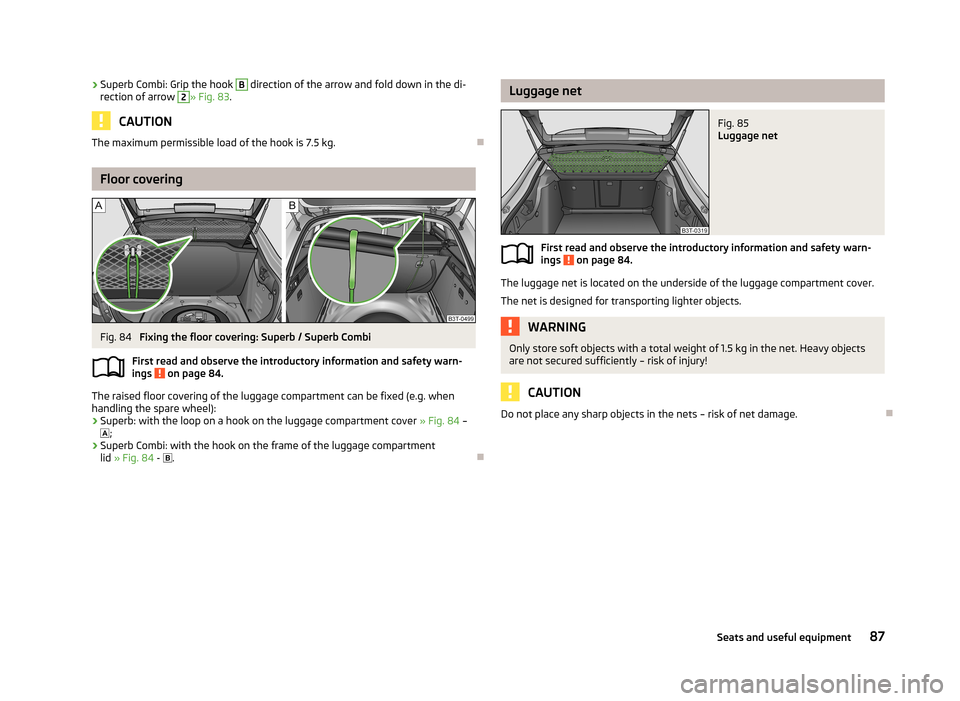
›Superb Combi: Grip the hook B direction of the arrow and fold down in the di-
rection of arrow 2» Fig. 83 .
CAUTION
The maximum permissible load of the hook is 7.5 kg.
Floor covering
Fig. 84
Fixing the floor covering: Superb / Superb Combi
First read and observe the introductory information and safety warn- ings
on page 84.
The raised floor covering of the luggage compartment can be fixed (e.g. when
handling the spare wheel):
› Superb: with the loop on a hook on the luggage compartment cover
» Fig. 84 –
;
› Superb Combi: with the hook on the frame of the luggage compartment
lid » Fig. 84 -
.
Luggage netFig. 85
Luggage net
First read and observe the introductory information and safety warn-
ings on page 84.
The luggage net is located on the underside of the luggage compartment cover.
The net is designed for transporting lighter objects.
WARNINGOnly store soft objects with a total weight of 1.5 kg in the net. Heavy objects are not secured sufficiently – risk of injury!
CAUTION
Do not place any sharp objects in the nets – risk of net damage.
87Seats and useful equipment
Page 113 of 274

Communication and multimedia
General information
Introduction
This chapter contains information on the following subjects:
Mobile phones and two-way radio systems
110
Universal telephone preinstallation (hands free)
110
Operating the phone on the multifunction steering wheel
111
Symbols in the MAXI DOT display
112
Phone Phonebook
113
Mobile phones and two-way radio systems
First read and observe the introductory information given on page 110.
ŠKODA permits the operation of mobile phones and two-way radio systems with
a professionally installed external aerial and a maximum transmission power of
up to 10 watts.
Please consult a ŠKODA Partner for information about the possibility of installing
and operating mobile phones and two-way radio systems with a transmission
power of more than 10 W.
Operating mobile phones or two-way radio systems may interfere with the func-tionality of the electronic systems in your vehicle.
The reasons for this are as follows: › no external aerial;
› external aerial incorrectly installed;
› transmission power greater than 10 watts.
WARNING■
If a mobile phone or a two-way radio system is operated in a vehicle without
an external aerial or an external aerial which has been installed incorrectly,
this can increase the strength of the electromagnetic field inside the vehicle.■
Two-way radio systems, mobile phones or mounts must not be installed on
airbag covers or within the immediate deployment range of the airbags.
■
Never leave a mobile phone on a seat, on the dash panel or in any area from
where it becomes a projectile during a sudden braking manoeuvre, an acci-
dent or a collision — risk of injury.
■
Before transport of the vehicle by air, the Bluetooth ®
function must be
switched off by a specialist company.
Universal telephone preinstallation (hands free)
First read and observe the introductory information given on page 110.
The universal telephone preinstallation (“hands-free system”) includes a conven-
ience mode for the mobile phone via voice control, the multifunction steering
wheel, the radio or navigation system.
WARNING■ Concentrate fully at all times on your driving! As the driver you are fully re-
sponsible for the operation of your vehicle. Only use the hands-free system to the extent that you are in full control of your vehicle in any traffic situation.■
The national regulations for using a mobile phone in a vehicle must be ob-
served.
110Using the system
Page 114 of 274

Note■We recommend that the installation of mobile phones and two-way radio sys-
tems in a vehicle be carried out by a specialist firm.■
Not all mobile phones that enable Bluetooth ®
communication are compatible
with the universal telephone preinstallation GSM II or GSM III. Ask a ŠKODA Part-
ner whether your phone is compatible with the universal telephone preparation
GSM II or GSM III.
■
The range of the Bluetooth ®
connection to the hands-free system is restricted
to the vehicle interior. The range is dependent on local factors, e.g. obstacles be- tween the devices and mutual interferences with other devices. If your mobile phone is in a jacket pocket, for example, this can lead to difficulties when estab-
lishing a connection with the hands-free-system or transferring data.
Operating the phone on the multifunction steering wheel
Fig. 111
Multifunction steering wheel: Control buttons for the telephone
First read and observe the introductory information given on page 110.
To minimize driver distraction when operating the telephone, the basic tele-
phone's functions can be set by simply operating the buttons located on the
steering wheel » Fig. 111.
This applies only if your vehicle has been equipped with the universal telephone
preinstallation at the factory.
The buttons operate the functions for the operating mode of the current tele-
phone.
If the side lights are switched on, the buttons on the multifunction steering
wheel are illuminated.Button/wheelActionOperation1Press brieflyMute (MUTE )1Turn upwardsIncrease the volume1Turn downwardsDecrease the volume 111Communication and multimedia
Page 115 of 274

Button/wheelActionOperation2Press brieflyAccept call, End call
Display telephone's basic menu → Telephone main menu → List of dialled numbers → Call selected contact2Press and hold buttonReject the incoming call3Turn up/downPrevious / next menu item3Press brieflyConfirm selected menu item3Press and hold buttonContinuously display first letter of the phone book3Quickly turn upwardsTo the previous initial letter in the telephone book3Quickly turn downwardsTo the next initial letter in the telephone book4Press brieflyReturn to a previous level on menu4Press and hold buttonExit telephone menu
Symbols in the MAXI DOT display
First read and observe the introductory information given on page 110.
SymbolImportanceValid forCharge status of the phone battery a)GSM II, GSM IIISignal strengtha)GSM II, GSM IIIA phone is connected with the hands-free systemGSM II, GSM III when connected via the HFP profileThe hands-free system is visible to other devicesGSM II, GSM III when connected via the HFP profileA phone is connected with the hands-free systemGSM III when connected via the rSAP profileThe hands-free system is visible to other devicesGSM III when connected via the rSAP profileA multimedia unit is connected to the hands-free systemGSM II, GSM IIIA UMTS network is availableGSM IIIInternet connection via the hands-free systemGSM III when connected via the rSAP profilea)
This function is only supported by some mobile phones.
112Using the system
Page 116 of 274

Phone PhonebookFirst read and observe the introductory information given on page 110.
A phone phonebook is part of the hands-free system. This phone phonebook can
be used depending on the type of mobile phone.
After the telephone's first connection to the hands-free system, the phone bookfrom the phone and the SIM card loads into the hands-free memory.
Each time the telephone has established a new connection with the hands-freesystem, an update of the relevant phone book is performed. The updating can
take a few minutes. During this period, the available phone book is the one stored
at the previous update. Newly stored telephone numbers are only shown after the updating has ended.
The update is interrupted if a telephone event (e.g. incoming or outgoing call,
voice control dialogue) occurs during the updating procedure. After the telephone
event has ended, the updating starts anew.
GSM II
The internal phonebook provides 2 500 free memory locations. Each contact can contain up to 4 numbers.
On vehicles fitted with the Columbus navigation system, a maximum of 1 200 tel-
ephone contacts are shown on the display of this appliance.
If the number of contacts loaded exceeds 2 500, the phone book is not complete.
GSM III
The internal phonebook provides 2 000 free memory locations. Each contact can
contain up to 5 numbers.
On vehicles fitted with the Columbus navigation system, a maximum of 1 000 tel- ephone contacts are shown on the display of this appliance.
If the mobile phone's telephone book has more than 2,000 contacts, the follow-
ing message will appear in the MAXI DOTdisplay:
Phone book not fully loaded
Universal telephone preinstallation GSM II
Introduction
This chapter contains information on the following subjects:
Connecting the mobile phone to the hands-free system
113
Telephone operation in the MAXI DOT display
114
The universal telephone preinstallation GSM II comprises the following functions.
› Phone Phonebook
» page 113.
› Convenience operation of the telephone via the multifunction steering
wheel » page 111 .
› Telephone operation in the MAXI DOT display
» page 111.
› Voice control of the telephone
» page 122.
› Music playback from the telephone or other multimedia units
» page 126.
All communication between a mobile phone and your vehicle's hands-free system
is established with the help of Bluetooth ®
technology.
Note
The following guidelines must be observed » page 110, Mobile phones and two-
way radio systems .
Connecting the mobile phone to the hands-free system
First read and observe the introductory information given on page 113.
To connect a mobile phone with the hands-free system, the two devices must be
paired. Detailed information on this is provided in the operating instructions for
your mobile phone.
The following steps must be carried out for the connection.
›
Activate Bluetooth ®
and the visibility of your mobile phone on your telephone.
›
Switch on the ignition.
›
Select the Phone - New user menu in the MAXI DOT display and wait until the
hands-free system has completed the search.
›
Select the phone you wish to connect from the list of units found.
113Communication and multimedia
Page 118 of 274

Dial number
Any telephone number can be entered in the Dial number menu item. The re-
quired digits must be selected one after the other using the adjustment wheel,
and then confirmed by pressing the adjustment wheel. You can select digits 0-9,
symbols , , # and the Cancel, Call and Delete functions.
Call list
The following menu items can be selected in the Call list menu item.
■ Missed calls - List of missed calls
■ Dialled Nos. - List of dialled numbers
■ Received calls - list of received calls
Voice mailbox
In the Voice mailbox menu item, you can set the number of the voice mailbox 1)
and then dial the number.
Bluetooth
The following menu items can be selected from the Bluetooth menu item.
■ User - Overview of the stored telephones
■ New user - Search for new mobile phones that are in the reception range
■ Visibility - Switches on the visibility of the hands-free system for other devices
■ Media player - Playback via Bluetooth ®
■ Active device - Connected device
■ Paired Devices - List of paired devices
■ Search - Device search
■ Phone name - option to change the name of the phone (default SKODA_BT)
Settings
The following menu items can be selected from the Settings menu item.
■ Telephone book - Phonebook
■ Update 1)
- Update the phone book
■ List - Arrange the entries in the phone book
■ Surname - Arrange according to surname
■ First name - Arrange according to first name
■ Ring tone - Ring tone setting
Back
Return to the telephone's basic menu.
Universal telephone preinstallation GSM IIl
Introduction
This chapter contains information on the following subjects:
Connecting the phone to the hands-free system
116
Telephone operation in the MAXI DOT display
117
Internet connection via Bluetooth ®
118
The following functions are included in the universal telephone preinstallation
GSM III:
› Phone Phonebook
» page 113.
› Convenience operation via the multifunction steering wheel
» page 111.
› Telephone operation in the MAXI DOT display
» page 117.
› Voice control of the telephone
» page 122.
› Music playback from the telephone or other multimedia units
» page 126.
› Internet connection
» page 118.
› Display of SMS messages
» page 117.
All communication between a telephone and the hands-free system of your vehi- cle can only be established with the help of the following profiles of Bluetooth ®
technology.
rSAP - Remote SIM access profile
After connecting the telephone with the hands-free system via the rSAP profile,
the telephone deregisters from the GSM network, and communication with the
network is only enabled by the hands-free system via the vehicle's external aerial. In the telephone only the interface for Bluetooth ®
remains active. In this case,
you can only use the mobile phone to disconnect from the hands-free system, de- activate the Bluetooth ®
connection or dial the emergency number 112 (only valid
in some countries).
HFP - Hands Free Profile
After connecting the telephone with the hands-free system via the HFP profile,
the telephone continues to use its GMS module and the internal antenna to com-
municate with the GSM network.
1)
On vehicles fitted with the Amundsen+ navigation system, this function can be accessed via the navi-
gation system menu; refer to the » operating instructions for the Amundsen+ navigation system .
115Communication and multimedia