2013 SKODA SUPERB aux
[x] Cancel search: auxPage 111 of 274

Switching on/offFig. 109
Button for switching on/off the system directly on the operating
part of the air conditioning/Climatronic
First read and observe the introductory information and safety warn-ings
on page 107.
The auxiliary heating (aux. heating) can be switched on/off as follows.
Manually switching on using the button on the operating part of the manual air conditioning/Clima-
tronic. The warning light in the button lights up » Fig. 109;
by using the radio remote control » page 109.
Manually switching off
using the button on the operating part of the manual air conditioning/Clima-
tronic. The warning light in the button goes out » Fig. 109;
by using the radio remote control » page 109.
After switching off the auxiliary heating, the coolant pump runs for a short period.
Automatic switching on/off
The following menu items can be selected from the Aux. heating menu item in
the information display » page 28 (depending on the vehicle equipment):
■ Day of the week - set the current day of the week;
■ Running time - Set the required running time in 5 minute increments. The run-
ning time can be 10 to 60 minutes.
■ Mode - Set the desired heating/ventilation mode;
■
Starting time 1 , Starting time 2 , Starting time 3 - for each pre-set time, the day
and the time (hour and minute) can be set for switching on the auxiliary heating
and ventilation. An empty position can be found between Sunday and Monday
when selecting the day. If this empty position is selected, the activation is per-
formed without taking into account the day.
■ Activate - Activate pre-set mode;
■ Deactivate - Deactivate pre-set mode;
■ Factory setting - Restore factory setting;
■ Back - Return to main menu
Only one programmed pre-set time can be active.
The last programmed pre-set time remains active.
After the auxiliary heating (aux. heating) automatically activates at the set time, it is necessary to pre-set a time again.
If the menu item Back is selected or no changes are made on the display for lon-
ger than 10 seconds, the set values are stored, but the pre-set time is not activa-
ted.
The system switches itself off at the end of the running time set under the menu item Running time .
Note
An indicator light on the button » Fig. 109 is illuminated when the system is
running.
108Using the system
Page 112 of 274

Radio remote controlFig. 110
Auxiliary heating (aux. heating):
Radio remote control
First read and observe the introductory information and safety warn-
ings on page 107.
Explanation of graphic
Aerial
Warning light
Switch on aux. heating
Switch off aux. heating
The transmitter and the battery are housed in the housing of the remote control. The receiver is located in the interior of the vehicle.
When the battery is fully charged, the range of the remote control is a few hun-
dred metres. Obstacles between the remote control and the vehicle, bad weather
conditions and a weaker battery in the remote control can clearly reduce the range.
To switch the auxiliary heating (aux. heating) on or off, hold the remote control
vertical, with the aerial
A
pointing upwards. The antenna must not be covered
with the fingers or the palm of the hand during this process.
The auxiliary heating can only be switched on/off safely using the radio remote control, if the distance between the radio remote control and the vehicle is at
least 2 m.
ABAfter pressing the button, the warning light in the remote control gives the
user different kinds of feedback:Display warning light B » Fig. 110ImportanceLights up green for around 2 seconds.The auxiliary heating was switched on.Lights up red for around 2 seconds.The auxiliary heating (aux. heating) is
switched off.Slowly flashes green for around 2 sec-
onds.The ignition signal was not received.Quickly flashes green for around 2 sec-
onds.The auxiliary heating (aux. heating) is
blocked, e. g. because the tank is near-
ly empty or there is a fault in the auxili-
ary heating (aux. heating).Flashes red for around 2 seconds.The switch off signal was not received.Lights up orange for around 2 seconds,
then green or red.The battery is weak, however the
switching on or off signal was received.Lights up orange for around 2 seconds,
then flashes green or red.The battery is weak, however the
switching on or off signal was not re-
ceived.Flashes orange for around 5 seconds.The battery is discharged, however the
switching on or off signal was not re-
ceived.
Replace the battery » page 239.
CAUTION
The radio remote control comprises electronic components and must therefore be
protected against water, severe impacts and direct sunlight.
109Air conditioning system
Page 129 of 274

Multimedia
Introduction
This chapter contains information on the following subjects:
Music playback via Bluetooth ®
126
Operating the radio and navigation system on the multifunction steering
wheel
126
AUX- and MDI inputs
127
CD change
128
DVD-preinstallation
128
Music playback via Bluetooth ®
First read and observe the introductory information given on page 126.
The universal telephone preinstallation makes it possible to play back music via
Bluetooth ®
from devices such as MP3 players, mobile phones or notebooks.
To ensure that music can be played via Bluetooth ®
, you must first pair the device
with the hands-free system in the Phone - Bluetooth - Media player menu.
The music playback process is performed on the connected device.
The universal telephone preinstallation GSM II ensures that the music played back
via the hands-free system can be controlled with the remote control » page 123,
Voice commands - GSM II .
Note
The device being connected must support the Bluetooth ®
A2DP profile; refer to
the operating instructions for the relevant device being connected.
Operating the radio and navigation system on the multifunction steering wheel
Fig. 113
Multifunction steering wheel: control buttons
First read and observe the introductory information given on page 126.
The multifunction steering wheel comprises buttons for setting the basic func-
tions for the factory-fitted radio and navigation system » Fig. 113.
The radio and navigation system can of course still be operated on the devices. A
description is included in the relevant operating instructions.
If the side lights are switched on, the buttons on the multifunction steeringwheel are illuminated.
The buttons apply for the respective operating mode of the current radio, audio,
video or navigation system.
The following functions can be completed by pressing or turning the buttons.
126Using the system
Page 130 of 274

Button/wheelActionRadioTVAudio sourcesDVD videoNavigation1PressChange audio source2
PressSwitch tone off/on (MUTE )Interrupt current
navigation an-nouncement2Turn upwardsIncrease the volume2Turn downwardsDecrease the volume3Press brieflySkip to next channelSkip to next channelSkip to next trackSkip to next chapterNo functionStop traffic announcement3Press and hold but- tonNo functionFast forwardNo function4
Press brieflySwitch to previous channelSwitch to previouschannelSwitch to start of tracka)Switch to previous
chapterNo functionStop traffic announcement4Press and hold but- tonNo functionFast rewindNo function5Turn upwardsSwitch to previous channel and displayList of stored/accessible channelsSkip to next channelSkip to next trackSkip to next chapterShow the option tostop navigation ordisplay the list of recent destina- tions5Turn downwardsSwitch to the next channel and displayList of stored / accessible channelsSwitch to previous channelSwitch to start of tracka)Switch to previous
chapter6Press brieflyCall up the main menua)
To go to the previous track, press the adjustment wheel twice or rotate it by two positions.
AUX- and MDI inputs
First read and observe the introductory information given on page 126.
The AUX- and MDI inputs are used to connect external audio sources (e.g. iPod or
MP3 player) and to play back music from these devices via the factory-fitted radio
or navigation system.
The AUX-input is located in the storage compartment below the front armrest
and is marked with .
The MDI input is located in the storage compartment below the front armrest.
For a description of use, refer to the operating instructions for the relevant radio or navigation system.
127Communication and multimedia
Page 207 of 274

Inspecting and replenishing
Fuel
Introduction
This chapter contains information on the following subjects:
Refuelling
204
Unleaded petrol
205
Diesel fuel
206
The correct grades of fuel for your vehicle are stated on a sticker affixed to the
inside of the fuel filler flap » Fig. 160 on page 204 -
.
WARNINGThe national legal requirements must be observed if carrying a spare canister
in the vehicle. We do not recommend carrying any fuel canisters in your vehi-
cle for safety reasons. in the event of an accident, these canisters can become damaged and fuel may escape – risk of fire!
CAUTION
■ Never drive until the fuel tank is completely empty! The irregular supply of fuel
can cause misfiring, which can result in considerable damage to parts of the en-
gine and the exhaust system.■
Immediately remove any fuel that has spilled onto the vehicle's paintwork – risk
of paint damage!
■
If the vehicle was not purchased in the country where it was intended to be op-
erated, you should check whether the fuel specified by the manufacturer is of-
fered in the country where the vehicle will be operated. You should also perhaps
check whether the manufacturer has recommended a different fuel for operation
of the vehicle in the corresponding country. Is this not the case, then you must
check whether it is permitted by the manufacturer to operate the vehicle with an-
other fuel type.
RefuellingFig. 160
Open fuel filler flap/fuel filler flap with cap unscrewed
First read and observe the introductory information and safety warn- ings
on page 204.
Before refuelling, switch off the auxiliary heating system (auxiliary heating and ventilation) » page 108.
›
Press on the fuel filler flap in the direction of the arrow » Fig. 160 -
.
›
Unscrew the filler cap by turning it in a counterclockwise direction and place the
cap onto the top of the fuel filler flap » Fig. 160 -
.
›
Insert the pump nozzle into the fuel filler tube as far as it will go.
The fuel tank is full just as soon as the pump nozzle switches off for the first time »
.
›
Remove the pump nozzle from the fuel filler tube and put it back in the pump.
›
Insert the filler cap onto the fuel filler neck and screw it in a clockwise direction
until it clicks into place.
›
Close the fuel filler flap until it clicks into place.
Check that the fuel filler flap is closed properly.
CAUTION
The fuel tank is full just as soon as the pump nozzle switches off for the first time, provided the nozzle has been operated properly. Do not continue filling the
fuel tank otherwise the expansion volume is filled up. 204General Maintenance
Page 216 of 274

■A coolant additive that does not comply with the correct specifications can sig-
nificantly reduce the corrosion protection.■
Any faults resulting from corrosion may cause a loss of coolant and can conse-
quently result in major engine damage!
■
Do not fill the coolant above the mark
A
» Fig. 165 on page 213.
■
If a fault causes the engine to overheat, we recommend visiting a specialist ga-
rage, as otherwise serious engine damage may occur.
Capacity
First read and observe the introductory information and safety warn-
ings
on page 212.
Coolant capacity (in litres) 1)
Petrol enginesFilling level1.4 ltr./92 kW TSI7.71.8 ltr/112 kW TSI
1.8 ltr/118 kW TSI8.62.0 l/147 kW TSI8.63.6 l/191 kW FSI9.0Diesel enginesFilling level1.6 l./77 kW TDI CR8.42.0 ltr./103 kW TDI CR8.42.0 ltr./125 kW TDI CR8.4
Checking the coolant levelFig. 165
Engine compartment: Coolant
expansion reservoir
First read and observe the introductory information and safety warn-
ings on page 212.
The coolant expansion bottle is located in the engine compartment.
Inspecting the coolant level
›
Switch off the engine.
›
Open the bonnet.
›
Check the level of coolant in the coolant expansion bottle. » Fig. 165.
Coolant level above mark
A
No coolant may be added.
The level may also rise slightly above the
A
marking when the engine is hot.
Coolant level between markings
A
and
B
Coolant may be added.
The coolant level must lie between the
A
and
B
markings when the engine is
cold.
Coolant level below mark
B
Coolant must be added.
Top up the coolant level to between the
A
and
B
markings when the engine is
cold.
1)
The coolant capacity is approximately 1 l greater on vehicles that are fitted with an auxiliary heater
(auxiliary heating and ventilation).
213Inspecting and replenishing
Page 241 of 274

Rear towing eyeFig. 188
Rear bumper: Removing the cap/installing the towing eye
First read and observe the introductory information and safety warn- ings
on page 236.
›
Press onto the bottom part of the cap in the rear bumper » Fig. 188 -
and re-
move it.
›
Screw in the towing eye by turning to the left up to the stop » Fig. 188 -
and
tighten as much as possible. For tightening purposes, we recommend, for exam-
ple, using the wheel wrench, towing eye from another vehicle or a similar object
that can be pushed through the eye.
›
After unscrewing the towing eye, put the cap on and press into place. The cap must engage firmly.
On vehicles with a factory-fitted towing device, there is no mount for the screw-
in towing eye behind the cap » page 238, Vehicles with a tow hitch .
CAUTION
The towing eye must always be screwed in fully and firmly tightened, otherwise
the towing eye can tear when towing in or tow-starting.
Vehicles with a tow hitch
First read and observe the introductory information and safety warn-
ings
on page 236.
On vehicles with a factory-fitted towing device, there is no mount for the screw-
in towing eye behind the cap.
Use the built-in detachable ball rod for towing » page 162, Towing device .
Towing the vehicle using the towing device is a viable alternative solution to us-
ing the towing eye.
If the towing device is removed completely, it must be replaced with the standard
reinforcement of the rear bumper which is part of the mount for the towing eye.
If this procedure is not observed, the vehicle may not meet the national legal pro- visions.
CAUTION
The detachable ball rod and/or the vehicle can be damaged if an unsuitable towbar is used.
Note
The detachable ball rod must always be in the vehicle so that it can be used for
towing, if necessary.
Radio remote control
Introduction
This chapter contains information on the following subjects:
Replacing the battery in the remote control key
239
Synchronising the remote control
239
Replace the battery in the remote control of the auxiliary heater (parking
heater)
239
CAUTION
■ The replacement battery must have the same specification as the original bat-
tery.■
When replacing the battery, pay attention to the correct polarity.
For the sake of the environment
Dispose of the used battery in accordance with national legal provisions.
238Do-it-yourself
Page 242 of 274
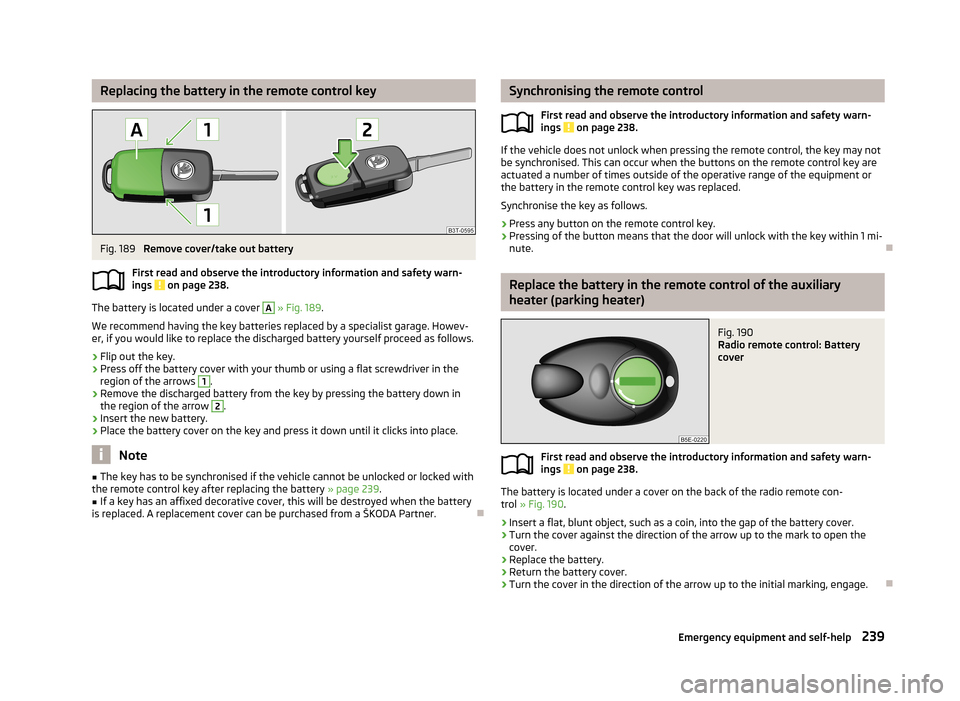
Replacing the battery in the remote control keyFig. 189
Remove cover/take out battery
First read and observe the introductory information and safety warn-
ings
on page 238.
The battery is located under a cover
A
» Fig. 189 .
We recommend having the key batteries replaced by a specialist garage. Howev- er, if you would like to replace the discharged battery yourself proceed as follows.
›
Flip out the key.
›
Press off the battery cover with your thumb or using a flat screwdriver in theregion of the arrows
1
.
›
Remove the discharged battery from the key by pressing the battery down inthe region of the arrow
2
.
›
Insert the new battery.
›
Place the battery cover on the key and press it down until it clicks into place.
Note
■ The key has to be synchronised if the vehicle cannot be unlocked or locked with
the remote control key after replacing the battery » page 239.■
If a key has an affixed decorative cover, this will be destroyed when the battery
is replaced. A replacement cover can be purchased from a ŠKODA Partner.
Synchronising the remote control
First read and observe the introductory information and safety warn-
ings
on page 238.
If the vehicle does not unlock when pressing the remote control, the key may not
be synchronised. This can occur when the buttons on the remote control key are actuated a number of times outside of the operative range of the equipment or
the battery in the remote control key was replaced.
Synchronise the key as follows.
›
Press any button on the remote control key.
›
Pressing of the button means that the door will unlock with the key within 1 mi-
nute.
Replace the battery in the remote control of the auxiliary
heater (parking heater)
Fig. 190
Radio remote control: Battery
cover
First read and observe the introductory information and safety warn-
ings on page 238.
The battery is located under a cover on the back of the radio remote con-
trol » Fig. 190 .
›
Insert a flat, blunt object, such as a coin, into the gap of the battery cover.
›
Turn the cover against the direction of the arrow up to the mark to open the
cover.
›
Replace the battery.
›
Return the battery cover.
›
Turn the cover in the direction of the arrow up to the initial marking, engage.
239Emergency equipment and self-help