2013 SKODA RAPID warning
[x] Cancel search: warningPage 70 of 226
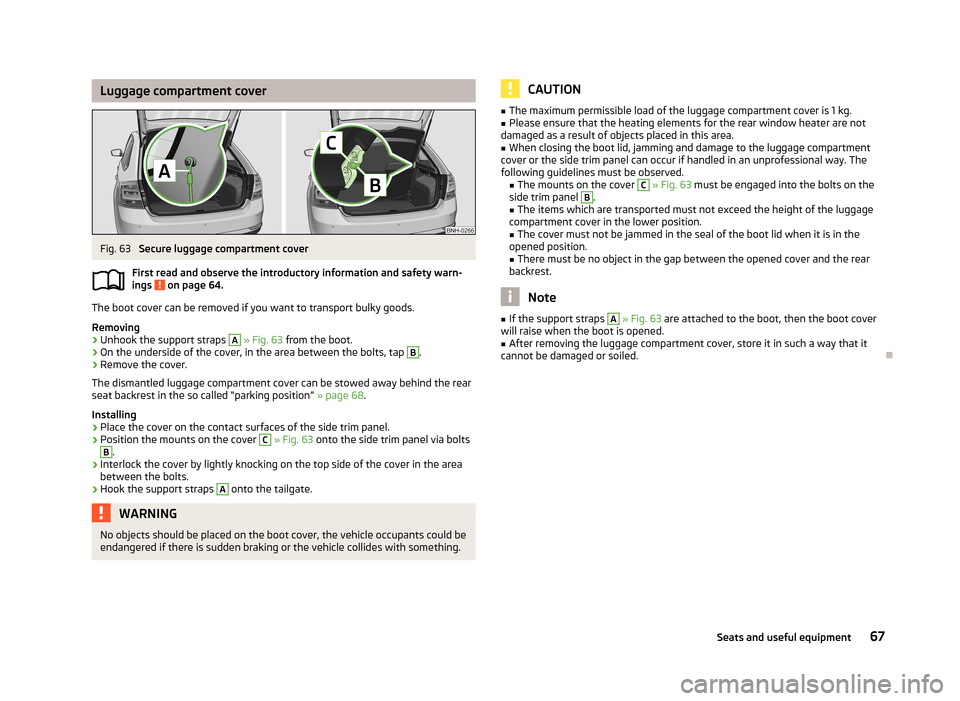
Luggage compartment coverFig. 63
Secure luggage compartment cover
First read and observe the introductory information and safety warn- ings
on page 64.
The boot cover can be removed if you want to transport bulky goods.
Removing
›
Unhook the support straps
A
» Fig. 63 from the boot.
›
On the underside of the cover, in the area between the bolts, tap
B
.
›
Remove the cover.
The dismantled luggage compartment cover can be stowed away behind the rear
seat backrest in the so called “parking position” » page 68.
Installing
›
Place the cover on the contact surfaces of the side trim panel.
›
Position the mounts on the cover
C
» Fig. 63 onto the side trim panel via bolts
B
.
›
Interlock the cover by lightly knocking on the top side of the cover in the area
between the bolts.
›
Hook the support straps
A
onto the tailgate.
WARNINGNo objects should be placed on the boot cover, the vehicle occupants could be
endangered if there is sudden braking or the vehicle collides with something.CAUTION■ The maximum permissible load of the luggage compartment cover is 1 kg.■Please ensure that the heating elements for the rear window heater are not
damaged as a result of objects placed in this area.■
When closing the boot lid, jamming and damage to the luggage compartment
cover or the side trim panel can occur if handled in an unprofessional way. The
following guidelines must be observed. ■ The mounts on the cover
C
» Fig. 63 must be engaged into the bolts on the
side trim panel
B
.
■ The items which are transported must not exceed the height of the luggage
compartment cover in the lower position.
■ The cover must not be jammed in the seal of the boot lid when it is in the
opened position. ■ There must be no object in the gap between the opened cover and the rear
backrest.
Note
■ If the support straps A » Fig. 63 are attached to the boot, then the boot cover
will raise when the boot is opened.■
After removing the luggage compartment cover, store it in such a way that it
cannot be damaged or soiled.
67Seats and useful equipment
Page 71 of 226

“Parking position” of the boot coverFig. 64
Parking position of the luggage compartment cover: Rapid / Rapid
Spaceback
First read and observe the introductory information and safety warn-ings
on page 64.
Adjustment
›
Rapid: Slide the dismantled cover between the rear seat backrest and the bolt
A
» Fig. 64 .
›
Rapid Spaceback: Slide the dismantled cover between bolt
B
and contact sur-
face
C
of the side panel.
WARNING■ The luggage compartment cover in the “parking position” restricts the driv-
er's view at the back 1)
.■
When adjusting the “parking position”, the boot cover must be between the
bolt
B
» Fig. 64 and the rear seat backrest 2)
- risk of damaging the rear seat
backrest and the boot cover.
CAUTION■ The following information applies to Rapid Spaceback vehicles.
■ Before setting the “parking position” of the luggage compartment cover, the
variable loading floor must be put in the desired position » page 70.
■ If the luggage compartment cover is in the “parking position”, the “parking po-
sition” of the variable loading floor cannot be set » page 732)
.1)
Applies to Rapid.
2)
Applies to Rapid Spaceback.
68Using the system
Page 76 of 226

CAUTION■When removing or inserting the variable loading floor, the maximum distance of
15 cm B » Fig. 73 underneath the boot cover must be adhered to - risk of damag-
ing the boot lid seal.■
When inserting the variable loading floor into the vehicle, the luggage compart-
ment cover must not be in the “parking position” » page 68.
Note
After removing the variable cargo floor, place it down in such a way that it cannot
be damaged or soiled.
Folding up/down
Fig. 74
Fold up/fold down variable loading floor
First read and observe the introductory information and safety warn- ings
on page 70.
The variable loading floor can be folded up in both positions (upper and lower).
Folding up
›
Grasp the variable loading floor at handle
A
» Fig. 74 .
›
Lift the variable loading floor in the direction of the arrow
1
until the folding
corners
B
lock into place in area
C
.
Folding down
›
Grasp the variable loading floor in the middle or at handle
A
.
›
Unlock the variable loading floor by pulling it in the direction of the arrow
2
» Fig. 74 .
“Parking position”Fig. 75
Set parking position / fold down from the parking position
First read and observe the introductory information and safety warn-
ings
on page 70.
The variable loading floor can only be in set to the “parking position” when it is in the lower position » page 72 and the luggage compartment cover has been taken
out » page 67 .
Folding up
›
Remove the luggage compartment cover from the vehicle » page 67.
›
Grasp the variable loading floor at handle
A
» Fig. 75 .
›
Lift the variable loading floor in the direction of the arrow
1
until the folding
corners
B
lock into place in area
C
.
Folding down
›
Push the folding corners
B
» Fig. 75 on both sides of the variable loading floor
in the direction of the arrow
2
and remove these from positions
C
.
›
Grasp the variable loading floor in the middle or at handle
A
.
›
Fold down the variable loading floor in the direction of arrow
3
.
WARNINGThe variable loading floor in the “parking position” restricts the driver's view
at the back. 73Seats and useful equipment
Page 77 of 226

CAUTION■The variable loading floor can only be set to the “parking position” when in the
lower position.■
If the variable loading floor is in the “parking position”, the “parking position” on
the luggage compartment cover cannot be set » page 68.
Roof rack system
Introduction
This chapter contains information on the following subjects:
Attachment points
74
Roof load
75WARNING■ The transported items on the roof rack must be securely attached – risk of
accident!■
Always secure the load with appropriate and undamaged lashing straps or
tensioning straps.
■
Distribute the load evenly over the roof rack system.
■
When transporting heavy objects or objects which take up a large area on
the roof rack system, handling of the car may change as a result of the dis-
placement of the centre of gravity. The style of driving and speed must there-
fore be adapted to the current circumstances.
■
Avoid abrupt and sudden driving/braking manoeuvres.
■
Adjust the speed and driving style to the visibility, weather, road and traffic
conditions.
■
The permissible roof load, permissible axle loads and permissible total vehi-
cle weight must not be exceeded under any circumstance – risk of accident!
CAUTION
■ Only use roof rack systems approved by ŠKODA AUTO a.s.■When dealing with roof rack systems, the installation instructions supplied with
the roof luggage rack system must be observed.■
On models fitted with a power sliding/tilting roof, ensure that the extended
sliding/tilting roof does not hit any items of luggage transported on the roof.
■
Ensure that the boot lid does not hit the roof load when opened.
■ The height of the vehicle changes after mounting a roof luggage rack system
and the load that is secured to it. Compare the vehicle height with available clear- ances, such as underpasses and garage doors.■
Always remove the roof luggage rack system before entering an automated car
wash.
■
Ensure the roof aerial is not impaired by the secured load.
For the sake of the environment
The increased aerodynamic drag results in a higher fuel consumption.
Attachment points
Fig. 76
Attachment points for roof bars
First read and observe the introductory information and safety warn- ings
on page 74.
Installation position of the attachment points for roof bars » Fig. 76:
Rear attachment points
Front attachment points
Perform the assembly and disassembly according to the enclosed instructions.
CAUTION
Observe the information regarding the assembly and disassembly in the enclosed
instructions.
AB74Using the system
Page 79 of 226

Heating and air-conditioning
Heating, ventilation, cooling
Introduction
This chapter contains information on the following subjects:
Air outlets
76
Using the cooling system economically
77
Operational problems
77
The heating effect is dependent upon the coolant temperature, thus full heat
output only occurs when the engine has reached its operating temperature.
If the cooling system is switched on, the temperature and air humidity drops in
the vehicle. The cooling system prevents the windows from misting up during
winter months.
It is possible to briefly activate recirculated air mode to enhance the cooling ef-
fect.
Please refer to the information regarding recirculated air mode for the air-condi-
tioning system » page 81 or for Climatronic » page 83.
WARNINGFor your own safety and that of other road users, ensure that all the windows
are free of ice, snow and misting. Please familiarize yourself about how to cor-
rectly operate the heating and ventilation systems, how to demist and defrost
the windows, as well as with the cooling mode.
CAUTION
■ The air inlet in front of the windscreen must be free from ice, snow or leaves,
for example, to ensure that the heating and cooling system works properly.■
After switching on the cooling Condensation from the evaporator of the air con-
ditioning may drip down and form a puddle below the vehicle. This is not a leak!
Note■ The used air escapes through the vents at the back of the boot.■We recommend that you do not smoke in the vehicle when the recirculating air
mode is operating since the smoke which is drawn at the evaporator from the in-
terior of the vehicle forms deposits in the evaporator of the air conditioning sys- tem. This produces a permanent odour when the air conditioning system is oper-ating which can only be eliminated through considerable effort and expense (re-
placement of compressor).
Air outlets
Fig. 77
Air outlet vents
First read and observe the introductory information and safety warn- ings
on page 76.
Warmed, unwarmed or cooled air flows out of the air outlet vents depending on
the regulator position for the heating or the air-conditioning system and the at-
mospheric conditions.
On air outlet vents 3 and 4 » Fig. 77 , the direction of air flow can be changed and
the vents can also be opened or closed individually and the amount of airflow ad-
justed.
Set the air flow direction
›
To adjust the height of the air flow, turn the horizontal fins upward or down- ward using the movable adjuster
A
» Fig. 77 .
76Using the system
Page 81 of 226

Control elementsFig. 78
Heating: Control elements
First read and observe the introductory information given on page 77.
Functions of the individual controls » Fig. 78 .
Set the temperature (turn to the left to reduce the temperature, turn to the right to increase the temperature)
Set the blower stage (stage 0: fan off, stage 4: highest blower speed)
Set the direction of the air outlet » page 76
Switch recirculation on/off » page 79
Controls
A
and
C
» Fig. 78 can be set to any intermediate position.
WARNINGThe blower should always be on to prevent the windows from misting up.
ABC
Adjusting
First read and observe the introductory information given on page 77.
Recommended basic settings of the heating controls.
AdjustmentControl dial settings » Fig. 78 on page 78Symbol button » Fig. 78
on page 78Air outlet vents 4 » Fig. 77 on
page 76ABCDefrosting the windshield and side windowsTo the right up to thestop3Do not switch onOpen and align with the side win- dowFree windshield and side windows
from mistDesired temperature2 or 3
Do not switch onOpen and align with the side win-
dowFastest heatingAs far as it will go tothe right3Briefly switch onOpeningComfortable heatingDesired temperature2 or 3
Do not switch onOpeningFresh air mode – ventilationTo the left up to the
stop1-4Do not switch onOpening 78Using the system
Page 82 of 226

We recommend that you leave the air outlet vents 3 » Fig. 77 on page 76 in the
open position in all operating modes.
Note
If the air distribution is positioned only towards the windows, the total amount of
air is used to defrost the windows and thus no air will be fed to the footwell. This
can lead to restriction of the heating comfort.
Recirculated air mode
First read and observe the introductory information given on page 77.
Recirculated air mode prevents polluted air outside the vehicle from getting into
the vehicle, e.g. when driving through a tunnel or in a traffic jam.
Switching on/off
›
Press the symbol button
.
The indicator light in the button lights up.
›
Press the symbol button
again.
The indicator light in the button goes out.
Recirculated air mode is switched off automatically if the air distribution control
C
» Fig. 78 on page 78 is turned to position
. Recirculated air mode can be
switched on again from this position by repeatedly pressing the symbol button
.
WARNINGNever leave recirculated air mode switched on over a longer period of time, as
“stale air” can cause driver and passenger fatigue, reduce attention levels and also cause the windows to mist up. Increased risk of accident. Switch off recir-
culated air mode as soon as the windows start to mist up.
Air conditioning system (manual air conditioning
system)
Introduction
This chapter contains information on the following subjects: Control elements
80
Adjusting
81
Recirculated air mode
81
The cooling system only operates if the following conditions are met. The cooling system is switched on » page 80, Control elements .
The engine is running.
The outside temperature is above approx. +2 °C.
The blower switch is switched on (positions 1-4).
If the desired interior temperature can also be achieved without activating the cooling system, fresh air mode should be selected.
The cooling system is switched off at excessive coolant temperatures in order to guarantee a cooling effect when the engine is under a high load.
CAUTION
■ Under certain circumstances, air at a temperature of about 5 °C can flow out of
the vents when the cooling system is switched on.■
Lengthy and uneven distribution of the air flow out of the vents (especially
around the feet) and large differences in temperature, for example, when getting
out of the vehicle, can cause susceptible individuals to catch a cold.
Note
We recommend that you have the air conditioning system cleaned by a specialist
garage once every year.79Heating and air-conditioning
Page 83 of 226

Control elementsFig. 79
The air conditioning system: Control elements
First read and observe the introductory information and safety warn- ings
on page 79.
Functions of the individual controls » Fig. 79 .
Set the temperature (turn to the left to reduce the temperature, turn to the
right to increase the temperature)
Set the blower stage (stage 0: fan off, stage 4: highest blower speed)
Set the direction of the air outlet » page 76
Switch recirculation on/off » page 81
Switching the cooling system on/off
Note
The indicator light in the symbol button lights up when the ignition is switch-
ed on, even if not all of the conditions for the function of the cooling system have
been met » page 79.. By lighting up of the warning light in the button, the opera-
tional readiness of the cooling system is signalled.
ABC80Using the system