2013 SKODA RAPID lock
[x] Cancel search: lockPage 40 of 226

Switching off›Switch off the ignition.›
Open the driver door.
›
Press the symbol button » Fig. 17 on the B-column on the driver's side. The
symbol lighting in the button changes from red to orange.
›
Lock the vehicle within 30 seconds.
The interior monitor and the towing protection are activated automatically after
the vehicle is locked.
Deactivate the interior monitor and the towing protection if there is a possibility
of the alarm being triggered by movement (e.g. children or animals) from within
the vehicle interior or if the vehicle has to be transported (e.g. by train or ship) or
towed.
CAUTION
■ The opened glasses storage compartment reduces the effectiveness of the in-
terior monitor. To ensure the full functionality of the interior monitor, the glasses storage compartment must always be closed before locking the vehicle.■
The anti-theft alarm system is activated when the vehicle is locked, even if the
safe securing system is deactivated. The interior monitor is however not activa-
ted.
Luggage compartment lid
Introduction
This chapter contains information on the following subjects:
Opening/closing
38
Automatic locking
38WARNING■ Ensure that the lock is properly engaged after closing the boot lid. Other-
wise, the boot lid might open suddenly while the vehicle is moving, even if it was locked – risk of accident!■
Never drive with the boot lid open or unlatched, as otherwise exhaust gases
may get into the interior of the vehicle – risk of poisoning!
■
Do not press on the rear window when closing the luggage compartment lid,
as otherwise it could crack – risk of injury!
CAUTION■ If the vehicle was locked before the boot lid was closed, the lid is immediately
locked automatically when closed.■
Do not press on the rear window when closing the tailgate, it could crack.
Note
The function of the button in the grip above the licence plate is deactivated when
starting off or at a speed of 5 km/hour or more for vehicles with central locking.
The function is restored after the vehicle stops and the door is opened.
37Unlocking and opening
Page 41 of 226

Opening/closingFig. 18
Boot lid handle/opening the boot lid
Fig. 19
Handle in the inner panelling of
the boot lid
First read and observe the introductory information and safety warn-
ings on page 37.
After unlocking, the boot lid can be opened with the button in the handle above
the number plate.
Opening
›
Press the button in handle
1
» Fig. 18 and lift the flap in the direction of the
arrow
2
.
Closing
›
Pull the lid down with handle
3
» Fig. 19 and close with a slight swing.
Automatic locking
First read and observe the introductory information and safety warn-
ings
on page 37.
If the vehicle was locked before the boot lid was closed, the lid is immediately
locked automatically when closed.
The period after which the boot lid is locked automatically can be extended by a specialist garage.
Delayed locking
If the boot lid was locked using the symbol button on the remote control key,
it is possible to open the boot lid within a limited period of time after it has been
closed.
There is a risk of unwanted entry into the vehicle before the boot lid is locked au- tomatically. Therefore, the vehicle must always be locked
using the symbol but-
ton on the remote control.
Delayed locking can be deactivated by a specialist garage at any time.
Note
More detailed information about this is available from a ŠKODA Partner.
Electrical power windows
Introduction
This chapter contains information on the following subjects:
Opening/closing the windows
39
Force limit
40
The electrical power windows can only be operated when the ignition is switched
on.
38Using the system
Page 42 of 226

WARNING■Ensure that no persons are still left in the vehicle when locking it. In an
emergency, it will no longer be possible to open the windows from the inside.■
It is recommended to deactivate the electrically operated power windows in
the rear doors (safety switch)
S
if there are children in the rear seats » Fig. 20
on page 39.
■
The electrical power windows are fitted with a force limiter » page 40. If
there is an obstacle, the closing process is stopped and the window goes
down by several centimetres. However, the windows should be closed care-
fully – risk of injury!
CAUTION
■ Keep the windows clean to ensure the correct functionality of the electric win-
dows.■
In the event that the windows are frozen, first of all eliminate the
ice » page 155 , Windows and exterior mirrors and only then operate the electrical
power windows. Otherwise, the window sealing and the electrical power window mechanism could be damaged.
■
Make sure that the windows are closed whenever you leave the locked vehicle.
For the sake of the environment
At high speeds, you should keep the windows closed to prevent unnecessarily
high fuel consumption.
Note
When driving always use the existing heating, air conditioning and ventilation
system for ventilating the interior of the vehicle. If the windows are opened, dust
as well as other dirt can get into the vehicle and in addition the wind noise is
more at certain speeds.
Opening/closing the windowsFig. 20
Buttons on the driver's door/in the rear doors
First read and observe the introductory information and safety warn-
ings
on page 38.
Buttons for the electrical power windows » Fig. 20 .
Button for electrical power window of the driver's door
Button for electrical power window of the front passenger door
Button for power window at the rear right door
Button for power window at the rear left door
Safety pushbutton
Opening
›
The window can be opened by pressing lightly on the corresponding button. The opening process stops when one releases the button.
Additionally, the driver's window can be opened automatically (fully open) by
pressing the button to the stop. Renewed pressing of the button causes the win-
dow to stop immediately.
Closing
›
The window can be closed by pulling lightly on the top corner of the corre- sponding button. The closing process stops when one releases the button.
Safety pushbutton
The buttons for power windows in the rear doors can be deactivated by pressing
the safety switch
S
» Fig. 20 . The buttons for the electrical power windows at
the rear doors are activated again by pressing the safety push-button
S
again.
If the buttons for the rear doors are deactivated, the warning light
in the safe-
ty switch
S
lights up.
ABCDS39Unlocking and opening
Page 48 of 226

Parking lightFirst read and observe the introductory information and safety warn-
ings
on page 41.
Parking light switching on
›
Switch off the ignition.
›
Place the control lever into position
A
or
B
as far as it can go » Fig. 22 on
page 43 - the parking light on the right/left-hand side of the vehicle is switched
on.
Switching on the side light on both sides
›
Turn the light switch
A
to position » Fig. 21 on page 41 and lock the vehicle.
Note
■
The parking light can only be activated if the ignition is switched off.■If the right or left turn signal light has been switched on and the ignition is
switched off, the parking light is not automatically switched on.■
On vehicles with a MAXI DOT display, the symbol in the light switch also
lights up when the two-sided parking light is switched on.
Interior lighting
Front interior lighting – version 1
Fig. 25
Front interior lighting – version 1
Slide switch positions
A
» Fig. 25 .
switching on
switching off (middle position)
Control with the door contact switch
Switch for reading light B » Fig. 25
Switch the reading light on/off
If light operation with the door contact switch is enabled, the light will come on
when one of the following events occurs:
› The vehicle is unlocked.
› One of the doors is opened.
› The ignition key is removed.
If light operation with the door contact switch is enabled, the light will go off
when one of the following events occurs:
› The vehicle is locked.
› The ignition is switched on.
› About 30 seconds after all the doors have been closed.
Note
If the interior light remains switched on when the ignition is switched off or if one
of the doors is open, the light will automatically go out after around 10 minutes.
Interior lighting – version 2
Fig. 26
Interior lighting – version 2
Slide switch positions » Fig. 26 .
switching on
switching off
control using the door contact switch (middle position)
The same principles apply for interior lighting version 2 as for » page 45, Front in-
terior lighting – version 1 .
45Lights and visibility
Page 56 of 226

Adjusting the front seatsFig. 35
Controls on the seat / controls on the sport seat
Fig. 36
Adjusting the seat
First read and observe the introductory information and safety warn-
ings on page 52.
Adjusting a seat in a forward/back direction
›
Pull lever
A
» Fig. 35 (in the centre) in the direction of arrow
1
» Fig. 36 and
push the seat in the required direction.
The lock must click into place after you release the lever.
Adjusting height of seat
›
Push or pull lever
B
» Fig. 35 in the direction of one of the arrows
2
» Fig. 36
again.
Adjusting the angle of the seat backrest
›
Remove the load on the seat backrest (do not lean on it), pull the lever
C
» Fig. 35 in the direction of the arrow
3
» Fig. 36 and set the desired angle
of the seat backrest with the back.
After releasing the lever C, the seat backrest will remain in the set position.
Head restraints
Fig. 37
Head restraint: adjusting/removing
First read and observe the introductory information and safety warn- ings
on page 52.
Best protection is achieved if the top edge of the head restraint is at the same
level as the upper part of the head.
Setting the height
›
Grasp the side of the head restraint with both hands and push it upwards as re-
quired.
›
To move the head restraint downwards, press and hold the locking button
A
» Fig. 37 with one hand and push the head restraint downwards with the
other hand.
Removing and installing head restraints
›
Pull the head restraint out of the seat backrest as far as it will go.
›
Press the locking button
A
» Fig. 37 and pull out the head restraint.
›
To re-insert the head restraint, push it far enough down into the seat backrest
until the locking button audibly clicks into place.
Removing and installing rear head restraints
›
Pull the head restraint out of the seat backrest as far as it will go.
›
Press the locking button in the direction of the arrow
1
» Fig. 37 while simulta-
neously pressing the locking button into the opening in the direction of the ar- row
2
using a flat screwdriver with a maximum width of 5 mm, and pull out the
head restraint.
53Seats and useful equipment
Page 57 of 226

›To re-insert the head restraint, push it far enough down into the seat backrest
until the locking button audibly clicks into place.WARNING■ The head restraints must be correctly adjusted in order to offer effective
protection for the occupants in the event of an accident.■
Never drive with the head restraints removed - risk of injury.
■
If the rear seats are occupied, the rear head restraint must not be in the
lower position.
Note
For the sport seats, the head restraints are integrated into the front seat backr-
ests. These headrests cannot be adjusted by height or removed.
Seat features
Introduction
This chapter contains information on the following subjects:
Front seat heating
54
Front armrest
55
Rear armrest
55
Rear seat backrests
55
Front seat heating
Fig. 38
Heated front seats
First read and observe the introductory information given on page 54.
The seat backrests and seats can be heated electrically. The seat heating can only be switched on when the engine is running.
Switching on
›
Press the corresponding symbol button or » Fig. 38 .
Pressing once switches the seat heating on at its maximum level.
With repeated pressing of the switch, the level of the seat heating is down-regu- lated up to the switch-off. The level of the seat heating is indicated by the num-
ber of illuminated warning lights in the switch.
WARNINGIf you have a controlled pain and/or temperature sensitivity, e.g. through med-
ication, paralysis or because of chronic illness (e.g. diabetes), we recommend
not to use the seat heating. This can lead to burns on the back, the posterior
and the legs which are difficult to heal. If the seat heating is used, we recom-
mend to make regular breaks in your journey when driving long distances, so
that the body can recuperate from the stress of the journey. Please consult
your doctor, who can evaluate your specific condition.
CAUTION
■ Do not kneel on the seats or otherwise apply concentrated pressure to them.■Do not turn on the seat heater if seats are not occupied.■
Do not switch on the seat heating if the seats have objects attached to or
placed on them, for example a child seat, a bag, etc. A fault of the heating ele-
ments in the seat heating can occur.
■
If additional seat covers or protective covers are attached to the seats, do not
turn on the seat heater - there is a risk of damaging the seat covers and seat
heating.
■
Do not clean the seats using moisture » page 159.
Note
If the on-board voltage drops, the seat heating is switched off automatically, in
order to provide sufficient electrical energy for the engine control » page 174,
Automatic load deactivation .
54Using the system
Page 58 of 226

Front armrestFig. 39
Adjusting armrest
First read and observe the introductory information given on page 54.
Setting the height
›
Lift the armrest fully upwards in the direction of the arrow » Fig. 39 and then
move it back down completely.
›
Move the armrest into one of the 5 locking positions.
The armrest includes a storage compartment » page 62.
Rear armrest
Fig. 40
Fold the armrest forwardFirst read and observe the introductory information given on page 54.
Folding forward
›
Pull on the loop
A
» Fig. 40 and fold the armrest forward in the direction of the
arrow.
A cup holder may be located in the armrest » page 58.
Rear seat backrests
Fig. 41
Opening for inserting the belt tongue: Rapid / Rapid Space Back /
Fold back seat rest forward
First read and observe the introductory information given on page 54.
The luggage compartment can be increased in size by folding the seat backrests
forward. The seat backrests can be folded forward individually on vehicles with
divided rear seats.
Folding forward
Before folding the rear seats forwards, adapt the position of the front seats in
such a way that they are not damaged by the folded rear seat backrests 1)
.
›
Put the belt tongue into the opening
A
» Fig. 41 on the corresponding side of
the vehicle – safety position.
›
Press the locking button
B
and completely fold the back seat rest forward in
the direction of the arrow.
1)
If the front seats are too far back, we recommend that you have the rear head restraints removed
before the seat backrests are folded forward. Store the removed head restraints in such a way that
they are not be damaged or soiled.
55Seats and useful equipment
Page 59 of 226
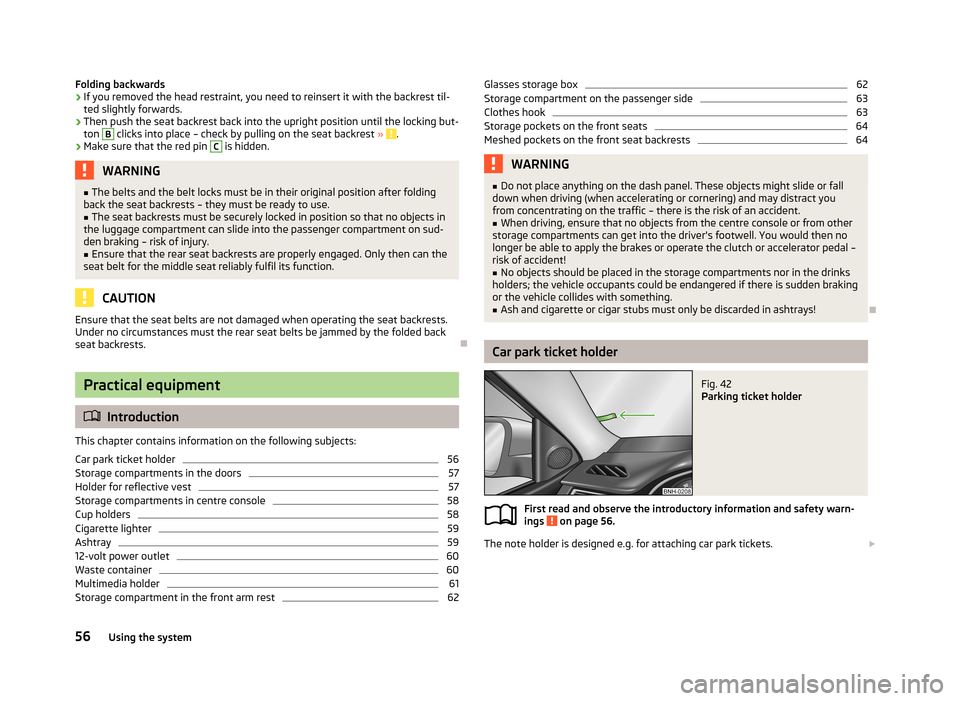
Folding backwards›If you removed the head restraint, you need to reinsert it with the backrest til-ted slightly forwards.›
Then push the seat backrest back into the upright position until the locking but-
ton
B
clicks into place – check by pulling on the seat backrest » .
›
Make sure that the red pin
C
is hidden.
WARNING■
The belts and the belt locks must be in their original position after folding
back the seat backrests – they must be ready to use.■
The seat backrests must be securely locked in position so that no objects in
the luggage compartment can slide into the passenger compartment on sud- den braking – risk of injury.
■
Ensure that the rear seat backrests are properly engaged. Only then can the
seat belt for the middle seat reliably fulfil its function.
CAUTION
Ensure that the seat belts are not damaged when operating the seat backrests. Under no circumstances must the rear seat belts be jammed by the folded back
seat backrests.
Practical equipment
Introduction
This chapter contains information on the following subjects:
Car park ticket holder
56
Storage compartments in the doors
57
Holder for reflective vest
57
Storage compartments in centre console
58
Cup holders
58
Cigarette lighter
59
Ashtray
59
12-volt power outlet
60
Waste container
60
Multimedia holder
61
Storage compartment in the front arm rest
62Glasses storage box62Storage compartment on the passenger side63
Clothes hook
63
Storage pockets on the front seats
64
Meshed pockets on the front seat backrests
64WARNING■ Do not place anything on the dash panel. These objects might slide or fall
down when driving (when accelerating or cornering) and may distract you
from concentrating on the traffic – there is the risk of an accident.■
When driving, ensure that no objects from the centre console or from other
storage compartments can get into the driver's footwell. You would then no
longer be able to apply the brakes or operate the clutch or accelerator pedal –
risk of accident!
■
No objects should be placed in the storage compartments nor in the drinks
holders; the vehicle occupants could be endangered if there is sudden braking
or the vehicle collides with something.
■
Ash and cigarette or cigar stubs must only be discarded in ashtrays!
Car park ticket holder
Fig. 42
Parking ticket holder
First read and observe the introductory information and safety warn-
ings on page 56.
The note holder is designed e.g. for attaching car park tickets.
56Using the system