2013 SKODA RAPID lock
[x] Cancel search: lockPage 66 of 226

Storage compartment on the passenger sideFig. 56
Open tray / control air supply
First read and observe the introductory information and safety warn- ings
on page 56.
Opening
›
Pull the lid handle in the direction of the arrow » Fig. 56 -
and fold down the
lid.
Closing
›
Lift the lid upwards until it clicks into place.
Air supply
›
Turn the control dial » Fig. 56 -
anti-clockwise to open the air supply.
›
Turn the control dial clockwise to close the air supply.
Opening the air supply when the air conditioning system is switched on allows cooled air to flow into the storage compartment.
Opening the air inlet when the air conditioning system is on causes fresh or inte-rior air to flow into the storage compartment.
We recommend closing the air supply if it is operated in heating mode or the cool- ing system for the storage compartment is not being used.
WARNINGThe storage compartment must always be closed when driving for safety rea-
sons.Note■ A 1 litre bottle (max. capacity) can be stored in the storage compartment on the
front passenger's side.■
When the storage compartment is opened, a light lights up.
Clothes hook
First read and observe the introductory information and safety warn-ings
on page 56.
The clothes hooks are located on the middle pillar and on the handle of the head-
liner above each of the rear doors.
WARNING■ Only hang light items of clothing on the hooks. Never leave any heavy or
sharp-edged objects in the pockets of the items of clothing.■
Do not use clothes hangers for hanging up items of clothing; this may re-
duce the effectiveness of the head airbags.
■
Ensure that any clothes hanging from the hooks do not impair your vision to
the rear.
CAUTION
The maximum permissible load of the hooks is 2 kg.
63Seats and useful equipment
Page 70 of 226
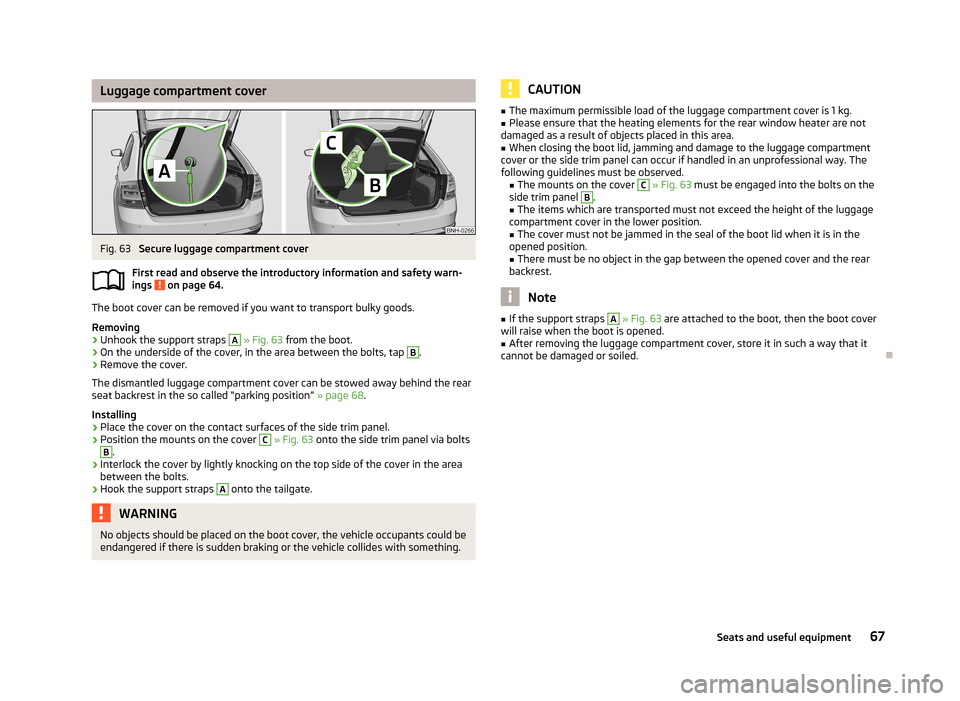
Luggage compartment coverFig. 63
Secure luggage compartment cover
First read and observe the introductory information and safety warn- ings
on page 64.
The boot cover can be removed if you want to transport bulky goods.
Removing
›
Unhook the support straps
A
» Fig. 63 from the boot.
›
On the underside of the cover, in the area between the bolts, tap
B
.
›
Remove the cover.
The dismantled luggage compartment cover can be stowed away behind the rear
seat backrest in the so called “parking position” » page 68.
Installing
›
Place the cover on the contact surfaces of the side trim panel.
›
Position the mounts on the cover
C
» Fig. 63 onto the side trim panel via bolts
B
.
›
Interlock the cover by lightly knocking on the top side of the cover in the area
between the bolts.
›
Hook the support straps
A
onto the tailgate.
WARNINGNo objects should be placed on the boot cover, the vehicle occupants could be
endangered if there is sudden braking or the vehicle collides with something.CAUTION■ The maximum permissible load of the luggage compartment cover is 1 kg.■Please ensure that the heating elements for the rear window heater are not
damaged as a result of objects placed in this area.■
When closing the boot lid, jamming and damage to the luggage compartment
cover or the side trim panel can occur if handled in an unprofessional way. The
following guidelines must be observed. ■ The mounts on the cover
C
» Fig. 63 must be engaged into the bolts on the
side trim panel
B
.
■ The items which are transported must not exceed the height of the luggage
compartment cover in the lower position.
■ The cover must not be jammed in the seal of the boot lid when it is in the
opened position. ■ There must be no object in the gap between the opened cover and the rear
backrest.
Note
■ If the support straps A » Fig. 63 are attached to the boot, then the boot cover
will raise when the boot is opened.■
After removing the luggage compartment cover, store it in such a way that it
cannot be damaged or soiled.
67Seats and useful equipment
Page 72 of 226

Storage compartments in the bootFig. 65
Remove storage compartment
cover (Rapid)
Fig. 66
Remove storage compartment cover (Rapid Spaceback): left/right
First read and observe the introductory information and safety warn-
ings
on page 64.
The side compartment covers can be removed to increase the size of the luggage
compartment.
Removing/Inserting
›
Grasp the top part of the cover and remove it in the direction of the ar- row » Fig. 65 or » Fig. 66 .
Insertion takes place in reverse order.
CAUTION■ The storage compartments are designed for storing small objects of up to 1.5 kg.
in weight in total.■
When using the storage compartment, take care not to damage the storage
compartment or the luggage compartment lining.
Flexible storage compartment (Rapid Spaceback)
Fig. 67
Flexible storage compartment
First read and observe the introductory information and safety warn-
ings on page 64.
The flexible storage compartment can be installed on the right-hand side of the
boot » Fig. 67 .
Installing
›
Place both ends of the storage compartment into the openings on the right side
panel of the luggage compartment.
›
Push the storage compartment down to lock it.
Removing
›
Grasp the storage compartment on the two upper corners.
›
Remove the storage compartment by pulling upwards and then towards you.
CAUTION
The storage compartment is designed for storing small objects with a maximum
total weight of 8 kg. 69Seats and useful equipment
Page 76 of 226

CAUTION■When removing or inserting the variable loading floor, the maximum distance of
15 cm B » Fig. 73 underneath the boot cover must be adhered to - risk of damag-
ing the boot lid seal.■
When inserting the variable loading floor into the vehicle, the luggage compart-
ment cover must not be in the “parking position” » page 68.
Note
After removing the variable cargo floor, place it down in such a way that it cannot
be damaged or soiled.
Folding up/down
Fig. 74
Fold up/fold down variable loading floor
First read and observe the introductory information and safety warn- ings
on page 70.
The variable loading floor can be folded up in both positions (upper and lower).
Folding up
›
Grasp the variable loading floor at handle
A
» Fig. 74 .
›
Lift the variable loading floor in the direction of the arrow
1
until the folding
corners
B
lock into place in area
C
.
Folding down
›
Grasp the variable loading floor in the middle or at handle
A
.
›
Unlock the variable loading floor by pulling it in the direction of the arrow
2
» Fig. 74 .
“Parking position”Fig. 75
Set parking position / fold down from the parking position
First read and observe the introductory information and safety warn-
ings
on page 70.
The variable loading floor can only be in set to the “parking position” when it is in the lower position » page 72 and the luggage compartment cover has been taken
out » page 67 .
Folding up
›
Remove the luggage compartment cover from the vehicle » page 67.
›
Grasp the variable loading floor at handle
A
» Fig. 75 .
›
Lift the variable loading floor in the direction of the arrow
1
until the folding
corners
B
lock into place in area
C
.
Folding down
›
Push the folding corners
B
» Fig. 75 on both sides of the variable loading floor
in the direction of the arrow
2
and remove these from positions
C
.
›
Grasp the variable loading floor in the middle or at handle
A
.
›
Fold down the variable loading floor in the direction of arrow
3
.
WARNINGThe variable loading floor in the “parking position” restricts the driver's view
at the back. 73Seats and useful equipment
Page 94 of 226

Entering a phone number
The telephone number can be entered as a continuous sequence of numbers spo-
ken one after the other (the whole number at once) or in the form of digit blocks
(separated by short pauses). After each string of digits (separated by a brief pause
in speaking), all of the digits detected up to now are repeated by the system.
The digits 0-9 and symbols +, , # are permitted. The system does not recognize
any combination of connected numbers, e.g. "twenty-three".
Switching on voice control
Briefly press the button 1
» Fig. 83 on the multifunction steering wheel.
Switching off voice control
If the system is currently playing a message, the message that is currently being
played must be terminated by briefly pressing button
1
» Fig. 83 on the multi-
function steering wheel.
If the system is expecting a voice command, you can end the dialogue yourself:
› with the
CANCEL voice command;
› by briefly pressing the button
1
» Fig. 83 on the multifunction steering wheel.
Note
■
The dialogue is immediately terminated in the event of an incoming call.■The voice control is only possible in vehicles fitted with a multifunction steering
wheel with telephone control.
Dialogue – version 2
Fig. 84
Multifunction steering wheel:
Voice control
First read and observe the introductory information given on page 90.
The period of time during which the system is ready to receive voice commands and to carry them out is called "dialogue". The system gives audible feedback and
guides you through the relevant functions if necessary.
Optimum understanding of the voice commands depends on several factors. › Speak at a normal volume without intonation or excessive pauses.
› Avoid poor pronunciation.
› Close the doors, windows and sliding roof in order to reduce or eliminate dis-
turbing noise from outside.
› It is recommended to speak louder at higher speeds, so that your voice is louder
than the increased surrounding noise.
› During the dialogue, limit background noise in the vehicle, e.g. passengers talk-
ing at the same time.
› Do not speak when the system is making an announcement.
The microphone for voice control is housed in the moulded headliner and directed towards the driver and front passenger. Therefore, the driver and the front pas-
senger can operate the equipment.
Entering a phone number
The telephone number can be entered as a continuous sequence of numbers spo-
ken one after the other (the whole number at once) or in the form of digit blocks
(separated by short pauses). After each string of digits (separated by a brief pause
in speaking), all of the digits detected up to now are repeated by the system.
The digits 0-9 and symbols +,
, # are permitted. The system does not recognize
any combination of connected numbers, e.g. "twenty-three".
Switching on voice control
Briefly press the button
1
» Fig. 84 on the multifunction steering wheel.
Switching off voice control
If the system is currently playing a message, the message that is currently being
played must be terminated by briefly pressing button
1
» Fig. 84 on the multi-
function steering wheel.
If the system is expecting a voice command, you can end the dialogue yourself:
› with the
CANCEL voice command;
› by briefly pressing the button
1
» Fig. 84 on the multifunction steering wheel.
91Communication and multimedia
Page 99 of 226

Driving
Starting-off and Driving
Steering
Introduction
Fig. 88
Correct seated position for the
driver
This chapter contains information on the following subjects:
Adjusting the steering wheel position
96
Power steering
97WARNING■ When driving, hold the steering wheel with both hands firmly on the outer
edge in the 9 o'clock and 3 o'clock position. Never hold the steering wheel in
the 12 o'clock position or in any other way (e.g. in the middle or inner edge of
the steering wheel). In such cases, you could severely injure the arms, hands
and head when the driver airbag is deployed.■
Never adjust the steering wheel when the vehicle is moving only when the
vehicle is stationary!
WARNING (Continued)■ Adjust the steering wheel so that the distance A » Fig. 88 between the
steering wheel and your chest is at least 25 cm. Not maintaining this minimum
distance will mean that the airbag system will not be able to properly protect
you - hazard!■
If the steering wheel is adjusted further towards the head, the protection
provided by the driver airbag in the event of an accident is reduced. Check
that the steering wheel is aligned to the chest.
Adjusting the steering wheel position
Fig. 89
Adjustable steering wheel: Lever
below steering wheel
First read and observe the introductory information and safety warn-
ings on page 96.
The height and forward/back position of the steering wheel can be adjusted.
›
First of all adjust the driver's seat » page 52.
›
Swivel the lever underneath the steering wheel downwards » Fig. 89.
›
Adjust the steering wheel to the desired position (with regard to the height and
forward/back position).
›
Push the lever upwards to the stop.
WARNINGThe lever for adjusting the steering wheel must be locked whilst driving so
that the steering wheel cannot accidentally change position during the jour-
ney – risk of accident!
96Driving
Page 100 of 226

Power steeringFirst read and observe the introductory information and safety warn-ings
on page 96.
The power steering enables you to steer the vehicle with less physical force.
The power steering only works when the engine is running. It is still fully possible to steer the vehicle if the power steering fails or if the en-gine is not running (e.g. when towing). However, greater physical effort is re-
quired to turn the steering wheel.
Starting and stopping the engine
Introduction
This chapter contains information on the following subjects:
Electronic immobiliser
98
Ignition switch
98
Starting the engine
98
Switching off the engine
99
The engine can only be started using a correctly coded original key. The engine running noises may louder at first be louder for a short time afterstarting the cold engine. This is quite normal and is not an operating problem.
WARNING■ When driving without the engine running, the ignition key must always be in
the position 2 » Fig. 90 on page 98 (ignition switched on). This position is
indicated by the illumination of certain indicator lights in the instrument clus-
ter. ■ If the key is not in position 2
, this could lead to unexpected the steering
locking - risk of accident!
■
Only pull the ignition key from the ignition lock when the vehicle has come
to a complete stop (by applying the handbrake). Otherwise, the steering could
be blocked – risk of accident!
WARNING (Continued)■ When leaving the vehicle, the ignition must always be removed. This is par-
ticularly important if children are left in the vehicle. Children could otherwise
start the engine for example – risk of accident or injury!■
Never leave the vehicle unattended with the engine running.
■
Never switch off the engine before the vehicle is stationary – risk of acci-
dent!
WARNING■ Never leave the engine running in unventilated or closed rooms. The ex-
haust gases from the engine contain substances such as odourless and col-
ourless carbon monoxide (a poisonous gas) – risk to life! ■ Carbon monoxide can cause unconsciousness and death.
CAUTION
■The starter must only be operated when the engine is not running and the vehi-
cle is at a standstill. The starter or engine may be damaged if the starter is activa- ted when the engine is running 3
» Fig. 90 on page 98.
■
Do not tow start the engine – there is a risk of damaging the engine and the
catalytic converter. The battery from another vehicle can be used as a jump-start
aid » page 189 , Jump-starting .
CAUTION
■
Avoid high engine revolutions, full throttle and high engine loads before the en-
gine has reached its operating temperature – risk of damaging the engine!■
Do not switch the engine off immediately at the end of your journey after the
engine has been operated over a prolonged period at high loads but leave it to
run at an idling speed for about 1 minute. This prevents any possible accumulation
of heat when the engine is switched off.
For the sake of the environment
Do not warm up the engine while the vehicle is stationary. If possible, start your
journey as soon as the engine has started. Through this the engine reaches its
operating temperature more rapidly and the pollutant emissions are lower. 97Starting-off and Driving
Page 101 of 226

NoteAfter switching off the ignition, the radiator fan may intermittently continue to
operate for approx. 10 minutes.
Electronic immobiliser
First read and observe the introductory information and safety warn-
ings
on page 97.
An electronic chip is integrated in the head of the key. The immobiliser is deacti-
vated with the aid of this chip when the key is inserted in the ignition lock.
The electronic immobiliser is automatically activated when the ignition key is
withdrawn from the lock.
The engine will not start if a non-authorized ignition key is used.
The following message is shown in the information cluster display. Immobilizer active.
IMMOBILISER
Ignition switch
Fig. 90
Positions of the vehicle key in
the ignition lockFirst read and observe the introductory information and safety warn- ings on page 97.
Petrol engines » Fig. 90
Ignition switched off, engine off, the steering can be locked
Ignition switched on Starting engine
Diesel engines » Fig. 90
Fuel supply interrupted, ignition switched off, engine switched off, the steer-
ing can be locked.
Heating glow plugs on, ignition switched on
Starting engine
To lock the steering , with the ignition key withdrawn, turn the steering wheel
until the steering locking pin engages audibly.
If the steering is locked and it is impossible or difficult to turn the key into posi-
tion
2
» Fig. 90 , move the steering wheel back and forth to unlock the steering.
Note
We recommend locking the steering wheel whenever leaving the vehicle. This
acts as a deterrent against the attempted theft of your car.
Starting the engine
First read and observe the introductory information and safety warn-
ings
on page 97.
Vehicles with a diesel engine are equipped with a glow plug system. The glow
plug warning light
illuminates after the ignition has been switched on. Start
the engine after the warning light
has gone out.
You should not switch on any major electrical components during the heating pe- riod otherwise the vehicle battery will be drained unnecessarily.
Procedure for starting the engine
›
Firmly apply the handbrake.
›
Move the gearshift lever into neutral or move the selector lever into position P
or N.
›
Switch on the ignition
2
» Fig. 90 on page 98.
12312398Driving