2013 SKODA OCTAVIA cruise control
[x] Cancel search: cruise controlPage 5 of 57

AbbreviationsAbbreviationDefinitionA2DPAdvanced Audio Distribution Profile - a software profile for da-ta transfer via Bluetooth ®,
designed for a one-way transfer of
audio dataACCAdaptive cruise controlAFAlternative frequencies - alternative frequencies of the cur-
rent radio stationAMAmplitude modulation - denomination of the radio frequency
rangeTCSTraction Control of the drive wheelsAVRCPA software profile for data transmission by means of Blue- tooth ®,
supports welcehs multimedia functionsAVAudio / visual source signal - typical for DVD player or TV tunerBTBluetooth ®
- wireless communication for reception and trans-
mission of voice and data informationDABDigital Audio Broadcasting - digital radio receptionDRMDigital Rights Management - technical methods to monitor or
restrict the use of digital media contentESCElectronic Stability ControlFMFrequency modulation - Identification of the radio frequency
rangeHFPHands-free profile - a software profile for data transfer via
Bluetooth ®,
which allows for communication between a mo-
bile phone and the in-vehicle hands-free equipmentGSMGroupe Spécial Mobile - Global System for Mobile communica-
tion, the most popular standard for mobile phonesID3 tagan additional feature of a music file, which allows for the dis- play of artist, title, album name, etc.KESSYkeyless unlocking, starting and lockingNTSCNational Television System Committee - Audio-visual encoding
standard in North and Central America and some countries in Southeast AsiaAbbreviationDefinitionPALphase alternating line - Audio-visual encoding standard in
most European countriesPIProgram identification - Station identification by means of a
RDS codeRDSRadio Data System - system for the transmission of additional information for FM radio receptionTPTraffic Program identification - Program identifier for the
transmission of traffic informationVINVehicle identification numberWMAWindows Media Audio - compressed audio format
3Abbreviations
Page 47 of 57
■Individual - Activates the Individual mode
■ Cancel - Cancel the menu to select the driving mode
■ Setup - Individual setting
■ Steering: - Set the power steering characteristics
■ Normal - Normal
■ Sport - Sports
■ Engine: - Set the engine (drive) characteristics
■ Normal - Normal
■ Sport - Sports
■ Eco - Economical
■ ACC: - Set the vehicle acceleration when adaptive cruise control is activated
■ Normal - Normal
■ Sport - Sports
■ Eco - Economical
■ Dynamic bend light.: - Set the characteristics of the adaptive headlights
■ Normal - Normal
■ Sport - Sports
■ Eco - Economical
■ Air conditioning: - Sets the Climatronic characteristics
■ Normal - Normal
■ Eco - Economical
■ Reset mode - Sets the profile Normal
Note
If you do not operate the unit for longer than approx. 10 seconds in the "Select
driving mode" menu, it will switch to the last selected menu or switch itself off.
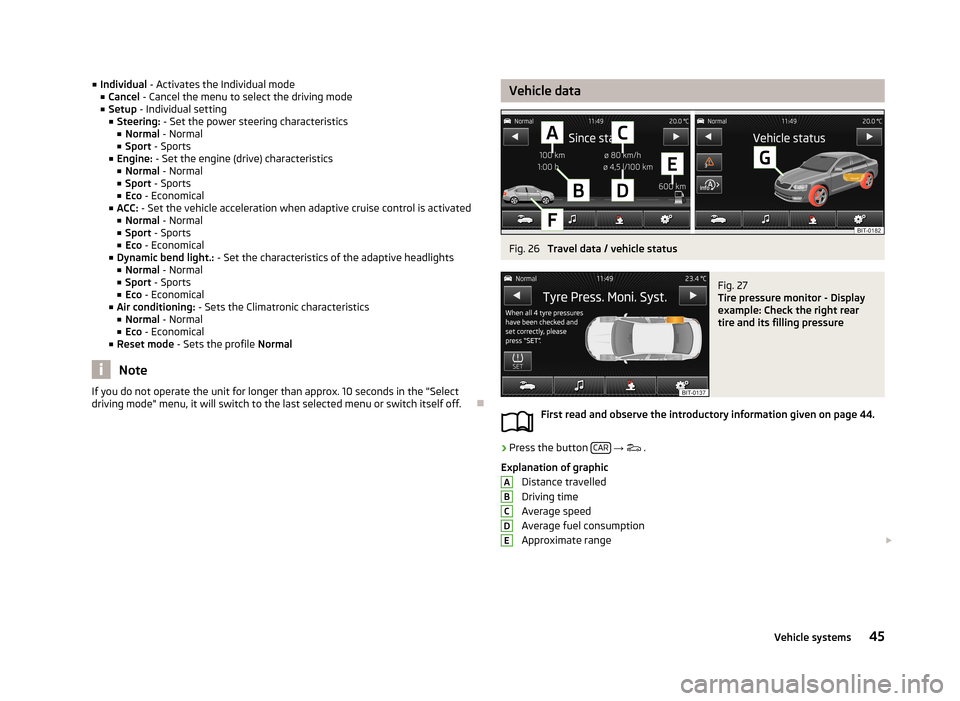
Vehicle dataFig. 26
Travel data / vehicle status
Fig. 27
Tire pressure monitor - Display
example: Check the right rear
tire and its filling pressure
First read and observe the introductory information given on page 44.
›
Press the button CAR
→
.
Explanation of graphic Distance travelled
Driving time
Average speed
Average fuel consumption
Approximate range
ABCDE45Vehicle systems
Page 49 of 57
ESC systemFirst read and observe the introductory information given on page 44.›
Press the button CAR
→ → ESC system: .
■ Activated - Switch on all components of the ESC system
■ ASR off - Switch off the ASR system
■ ESC sport - activation of ESC Sport
Tyre
First read and observe the introductory information given on page 44.
›
Press the button CAR
→
→ Tyres .
■ TPMS - Tyre pressure monitoring system
■ SET - Start a new calibration process
■ Winter tyres - Sets the speed limit for winter tyres
■ Speed warning - Snow tyres speed warning on/off
■ Warning at - Sets the speed for the warning
Driver assistance
First read and observe the introductory information given on page 44.
›
Press the button CAR
→
→ Driver assistance .
■ ACC (adaptive cruise control) - Set the adaptive cruise control
■ Driving programme: - Set the vehicle acceleration when adaptive cruise con-
trol is activated 1)
■ Normal - Normal
■ Sport - Sports
■ Eco - Economical
■ Last distance selected - Last selected distance on/off
■
Distance: - Set the distance monitoring to the vehicles ahead
■ Very close - Very small distance
■ Close - Small distance
■ Medium - Medium distance
■ Far - Large distance
■ Very far - Very large distance
■ Front Assist - Sets the assistant for monitoring the distance to the vehicles
ahead
■ Active - Activate/deactivate the assistant
■ Advance warning - Activate/deactivate advance warning
■ Display distance warning - Activate/deactivate distance warnings
■ Lane Assist - Settings for Lane Assist
■ Active - Activate/deactivate the assistant
■ Adaptive lane guidance - Activate/deactivate adaptive lane guidance
■ Driver Alert System - Activate/deactivate the driver alert system
■ Proactive passenger protection - Activate/deactivate proactive passenger pro-
tection
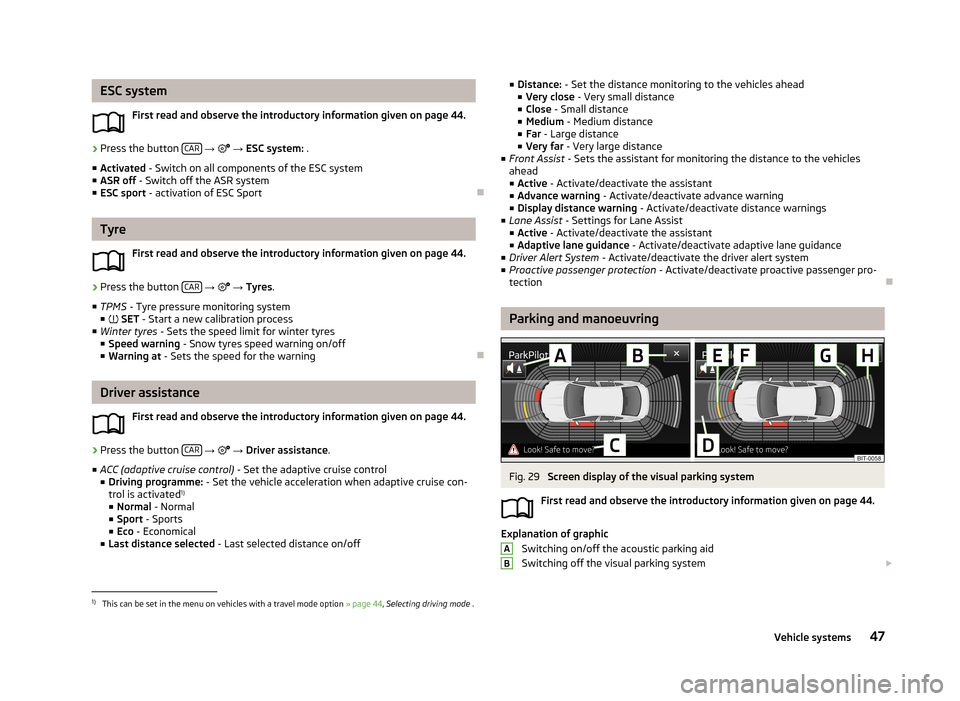
Parking and manoeuvring
Fig. 29
Screen display of the visual parking system
First read and observe the introductory information given on page 44.
Explanation of graphic Switching on/off the acoustic parking aidSwitching off the visual parking system
AB1)
This can be set in the menu on vehicles with a travel mode option
» page 44, Selecting driving mode .
47Vehicle systems
Page 53 of 57
Index
A
ACC
47
Adaptive Cruise Control47
Additional keyboard languages19
Adjusting volume
6
AM21
Anti-theft protection4
Apple - device32
ASR47
Audio Media
26
Radio21
Automatic front window wiping in rain48
Automatic headlight in rain48
Automatic locking49
Automatic rear window wiping48
Automatic search for radio station22
AUX31
Auxiliary heater and ventilation Settings
46
B
Bluetooth Connect the device with the phone
37
settings20
switch on/off20
visibility20
Bluetooth audio29
Bluetooth player29
C
CD
30
Climatronic automatic air recirculation50
Automatic operation50
mode50
COMING HOME48
Communication34
Phonebox36
Component protection4
Connect the device with the phone
37
Convenience consumer45
D
DAB
21
Settings25
Station information24
Data Convenience consumer
45
Travel45
Vehicle status45
date19
Daytime running lights48
Declaration of conformity4
Description of the device5
Device menus6
Device operation8
device screen8
Device screen8
MAXI DOT display10
Multifunction steering wheel11, 12
Operating lever10
device screen keyboard
9
maintenance5
numerical keyboard9
operation8
Device screen18
Operation8
Device Settings17
Digital radio reception Settings25
display5
Door release49
Driver Alert System47
Driving mode44
E
Eco tips
49
External input AUX
31
MEDIA IN32
USB32
F
factory settings
20
Factory settings20, 50
File formats28
Requirements and Limitations29
FM21
Settings25
Folder list Media
27
Folding down the exterior mirrors - folding in while parking
48
Frequency range See main menu
21
Front Assist47
Function key8
Function keys8
H
Head Light Assist
48
I
Important notes
4
51Index