2013 SKODA CITIGO front
[x] Cancel search: frontPage 57 of 176
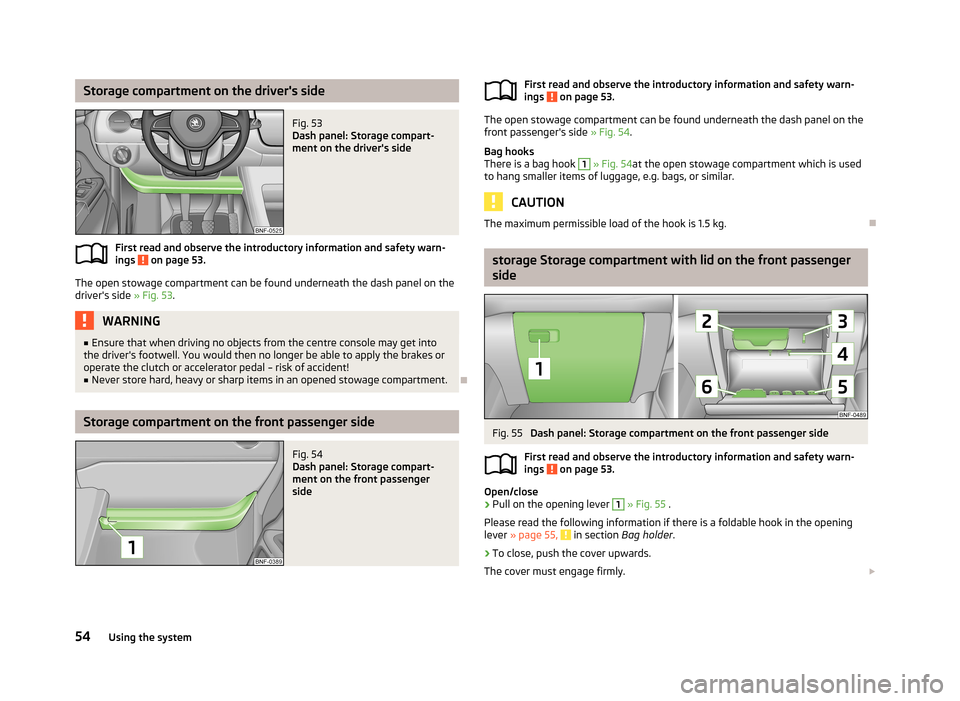
Storage compartment on the driver's sideFig. 53
Dash panel: Storage compart-
ment on the driver's side
First read and observe the introductory information and safety warn-
ings on page 53.
The open stowage compartment can be found underneath the dash panel on the
driver's side » Fig. 53.
WARNING■
Ensure that when driving no objects from the centre console may get into
the driver's footwell. You would then no longer be able to apply the brakes or
operate the clutch or accelerator pedal – risk of accident!■
Never store hard, heavy or sharp items in an opened stowage compartment.
Storage compartment on the front passenger side
Fig. 54
Dash panel: Storage compart-
ment on the front passenger
sideFirst read and observe the introductory information and safety warn-
ings on page 53.
The open stowage compartment can be found underneath the dash panel on the
front passenger's side » Fig. 54.
Bag hooks
There is a bag hook
1
» Fig. 54 at the open stowage compartment which is used
to hang smaller items of luggage, e.g. bags, or similar.
CAUTION
The maximum permissible load of the hook is 1.5 kg.
storage Storage compartment with lid on the front passenger
side
Fig. 55
Dash panel: Storage compartment on the front passenger side
First read and observe the introductory information and safety warn-
ings
on page 53.
Open/close
›
Pull on the opening lever
1
» Fig. 55 .
Please read the following information if there is a foldable hook in the opening
lever » page 55,
in section Bag holder .
›
To close, push the cover upwards.
The cover must engage firmly.
54Using the system
Page 58 of 176

Overview of the stowage compartment:Opening lever
Glasses storage box
Notepad holder
Pen holder
Coin holder
Card holderWARNINGThe storage compartment must always be closed when driving for safety rea-
sons.
Bag holder
Fig. 56
Dash panel: folding hooks
First read and observe the introductory information and safety warn-
ings on page 53.
There is a foldable hook in the opening lever of the storage compartment on the
front passenger's side » Fig. 56, which is used to suspend smaller items of lug-
gage, e.g. bags, etc.
CAUTION
■ The maximum permissible load of the hook is 1.5 kg.■When the hook is folded forward, it folds back automatically when the storage
compartment is opened.■
We recommend detaching suspended luggage from the hook before the stor-
age compartment lid is opened.
123456Photo holderFig. 57
Dash panel: Photo holder
First read and observe the introductory information and safety warn- ings on page 53.
The middle part of the dashboard has a holder » Fig. 57which is used to fasten
e.g. photos, notes, etc.
CAUTION
Do not damage the holders when handling them.
Storage compartment in the front centre console
Fig. 58
Front centre console: Stowage
compartment
First read and observe the introductory information and safety warn-
ings on page 53.
The open stowage compartment in the centre console » Fig. 58.
55Seats and stowing
Page 59 of 176

Multimedia holderFig. 59
Front centre console: Multimedia
holder
First read and observe the introductory information and safety warn-
ings on page 53.
The multimedia holder can be found in the stowage compartment of the front
centre console » Fig. 59.
You can use this holder to store e.g. a mobile phone, MP3 player or similar devi-
ces.
WARNINGNever use the multimedia holder as an ashtray or for storing flammable ob-
jects – risk of fire!
Meshed pockets on the front seat rests
Fig. 60
Front seat rests: Meshed pockets
First read and observe the introductory information and safety warn- ings on page 53.
The insides of the front seat rests have meshed pockets » Fig. 60.
These meshed pockets are designed for small, light objects, such as a mobile phone or MP3 player.
WARNINGYou can use the meshed pockets to store items with a gross weight of up to
150 g. Heavy objects are not secured sufficiently – risk of injury!
CAUTION
Never put large objects into the meshed pockets, e.g. bottles or objects with
sharp edges – risk of damaging the meshed pockets.
Storage compartments in front of the rear seats
Fig. 61
In front of the rear seats: Stow-
age compartment
First read and observe the introductory information and safety warn-
ings on page 53.
There are open stowage compartments located in front of the rear seats » Fig. 61.
56Using the system
Page 60 of 176

Heating and air-conditioning
Heating, ventilation and cooling
Introduction
This chapter contains information on the following subjects:
Air outlet vents
57
The heating effect is dependent upon the coolant temperature, thus full heat output only occurs when the engine has reached its operating temperature.
If the cooling system is switched on, the temperature and air humidity drops in
the vehicle. The cooling system prevents the windows from misting up during
winter months.
It is possible to briefly activate recirculated air mode to enhance the cooling ef-
fect.
Please refer to the information regarding the recalculated air mode for air-condi-
tioning » page 61 .
WARNINGFor your own safety and that of other road users, ensure that all the windows
are free of ice, snow and misting. Please familiarize yourself about how to cor- rectly operate the heating and ventilation systems, how to demist and defrost
the windows, as well as with the cooling mode.
CAUTION
■ The air inlet in front of the windscreen must be free from ice, snow or leaves,
for example, to ensure that the heating and cooling system works properly.■
After switching on the cooling Condensation from the evaporator of the air con-
ditioning may drip down and form a puddle below the vehicle. This is not a leak!
Note■ The used air streams out through the vents in the luggage compartment.■We recommend that you do not smoke in the vehicle when the recirculating air
mode is operating since the smoke which is drawn at the evaporator from the in-
terior of the vehicle forms deposits in the evaporator of the air conditioning sys- tem. This produces a permanent odour when the air conditioning system is oper-ating which can only be eliminated through considerable effort and expense (re-
placement of compressor).
Air outlet vents
Fig. 62
Air outlet vents
First read and observe the introductory information and safety warn-
ings
on page 57.
Warmed, not warmed fresh or cooled air will flow out of the opened air outlet
vents according to the setting of the control dial and the outside atmospheric
conditions.
Opening
›
To open the air outlet vents
1
» Fig. 62 , press on the air outlet vent.
Closing
›
To close the air outlet vents
1
» Fig. 62 , fold the fins back.
Changing the air flow direction
›
Adjust the flow direction by turning the fins.
57Heating and air-conditioning
Page 72 of 176

WARNING■Greater physical effort is required for braking when the engine is switched
off – risk of accident!■
The clutch pedal must be actuated when braking on a vehicle with manual
transmission, when the vehicle is in gear and at low revs. Otherwise, the func-
tion of the brake booster may be impaired – risk of accident!
■
In the event of damage occurring to the standard fitted front spoiler or the
retrofitting of another front spoiler, wheel hubs etc. » page 110, Modifica-
tions, adjustments and technical alterations , It must be ensured that the air
supply to the front brake is not impaired. The front brakes may overheat,
which can have a negative impact on the functioning of the braking system –
risk of accident!
■
Never leave children unattended in the vehicle. The children might, for ex-
ample, release the handbrake or take the vehicle out of gear. The vehicle could then start to move – risk of accident!
CAUTION
■ Observe the recommendations on the new brake pads » page 74.■Never let the brakes slip with light pressure on the pedal if braking is not neces-
sary. This causes the brakes to overheat and can also result in a longer braking distance and excessive wear.
Information on braking
First read and observe the introductory information and safety warn-
ings
on page 68.
If the brakes are applied in full and the control unit for the braking system consid-
ers the situation to be dangerous for the following traffic, the brake light flashes
automatically.
After the speed was reduced below around 10 km/h or the vehicle was stopped,
the brake light stops flashing and the hazard warning light system switches on.
The hazard warning light system is switched off automatically after accelerating
or driving off again.
Before travelling a long distance at a steep gradient, reduce speed and shift into
the next lowest gear. As a result, the braking effect of the engine will be used,
reducing the load on the brakes. Any additional braking should be completed in-
termittently, not continuously.
Wear-and-tear
The wear of the brake pads is dependent on the operating conditions and driving
style.
The brake pads wear more quickly if a lot of journeys are completed in towns and over short distances or if a very sporty style of driving is adopted.
Under these severe conditions , the thickness of the brake pads must also be
checked by a specialist garage between service intervals.
Wet roads or road salt
The performance of the brakes can be delayed as the brake discs and brake pads
may be moist or have a coating of ice or layer of salt on them in winter. The
brakes are cleaned and dried by applying the brakes several times.
Corrosion
Corrosion on the brake discs and dirt on the bake pads occur if the vehicle has
been parked for a long period and if you do not make much use of the braking
system. The brakes are cleaned and dried by applying the brakes several times.
Faults in the brake surface
If it is found that the braking distance has suddenly become longer and that the
brake pedal can be depressed further, the brake system may be faulty.
Visit a specialist garage immediately and adjust your style of driving appropriatelyas you will not know the exact extent of the damage.
Low brake fluid level
An insufficient level of brake fluid may result in problems in the brake system. The
level of the brake fluid is monitored electronically » page 16,
Braking system .
Brake booster The brake booster increases the pressure generated with the brake pedal. The brake booster only operates when the engine is running.
69Starting-off and Driving
Page 81 of 176

NoteYou can find more detailed information about the trade-in and recycling of old
cars from a specialist garage.
Avoiding damage to your vehicle
Introduction
This chapter contains information on the following subjects:
General information
78
Driving through water on streets
78
General information
First read and observe the introductory information given on page 78.
Pay attention to low-slung parts of the vehicle, such as the spoiler and exhaust,particularly in the following situations.
› When driving on poorly maintained roads and paths.
› When driving over kerbs.
› When driving on steep ramps, etc.
Particular attention is required for vehicles with sport suspension and when the vehicle is fully laden.
Driving through water on streets
Fig. 76
Driving through waterFirst read and observe the introductory information given on page 78.
The following instructions must be observed if vehicle damage is to be avoided
when driving through water (e.g. flooded roads).
›
Determine the depth of the water before driving through.
The water level must not reach above the bar on the lower beam » Fig. 76.
›
Do not drive any faster than at a walking speed.
At a higher speed, a water wave can form in front of the vehicle, which can cause
water to penetrate into the engine's air induction system or other parts of the ve-
hicle.
›
Never stop in the water, do not reverse and do not switch the engine off.
›
Deactivate the START-STOP system before driving through water » page 85,
START-STOP .
WARNING■
Driving through water, mud, sludge etc. can impair the braking power and
extend the braking distance – risk of accident!■
Avoid abrupt and sudden braking immediately after water crossings.
■
After driving through bodies of water, the brakes must be cleaned and dried
as soon as possible by intermittent braking. Only apply the brakes for the pur-
pose of drying and cleaning the brake discs if the traffic conditions permit this.
Do not place any other road users in jeopardy.
CAUTION
■ When driving through water, some parts of the vehicle such as the engine,
gearbox, chassis or electrics can be severely damaged.■
Oncoming vehicles can generate water waves which can exceed the permissible
water level for your vehicle.
■
Potholes, mud or rocks can be hidden under the water making it difficult or im-
possible to drive through the body of water.
■
Do not drive through salt water. The salt can lead to corrosion. Any vehicle parts
that have come into contact with salt water must be rinsed immediately with
fresh water.
78Driving
Page 89 of 176
›The engine has not reached the minimum temperature for the START STOP
mode.
› The temperature inside the vehicle has not reached the desired temperature
set in the air-conditioning system/heating.
› The external temperature is very low/high.
› The windscreen defroster / ventilation is switched on at the maximum air tem-
perature (air conditioning) setting.
› The parking aid is activated.
› The charge state of the vehicle battery is too low.
› The stationary vehicle is on a steep slope or a steep downhill section.
› The idling speed is too high.
› The steering angle is too large (manoeuvring).
The warning symbol
appears in the instrument cluster display.
The automatic start procedure takes place again
During the STOP phase, the engine fires up without any active driver intervention, e.g. in the following situations.
› The vehicle begins to roll, e.g. on a slope.
› The difference between the temperature setting of the air-conditioning sys-
tem/heating and the temperature of the interior is too large.
› The windscreen defroster / ventilation is switched on at the maximum air tem-
perature (air conditioning) setting.
› The brake pedal was pressed several times (the pressure in the braking system
is too low).
› The charge state of the vehicle battery is too low.
› The current consumption is too high.
Manually activating/deactivating the system
Fig. 80
Button for the START-STOP sys-
tem
First read and observe the introductory information and safety warn-
ings on page 85.
Activation/deactivation
›
Press the symbol button » Fig. 80 .
When start-stop mode is deactivated, the warning light in the button lights up.
Note
If the system is deactivated during the STOP phase, the automatic start proce-
dure takes place.
City Safe Drive
Introduction
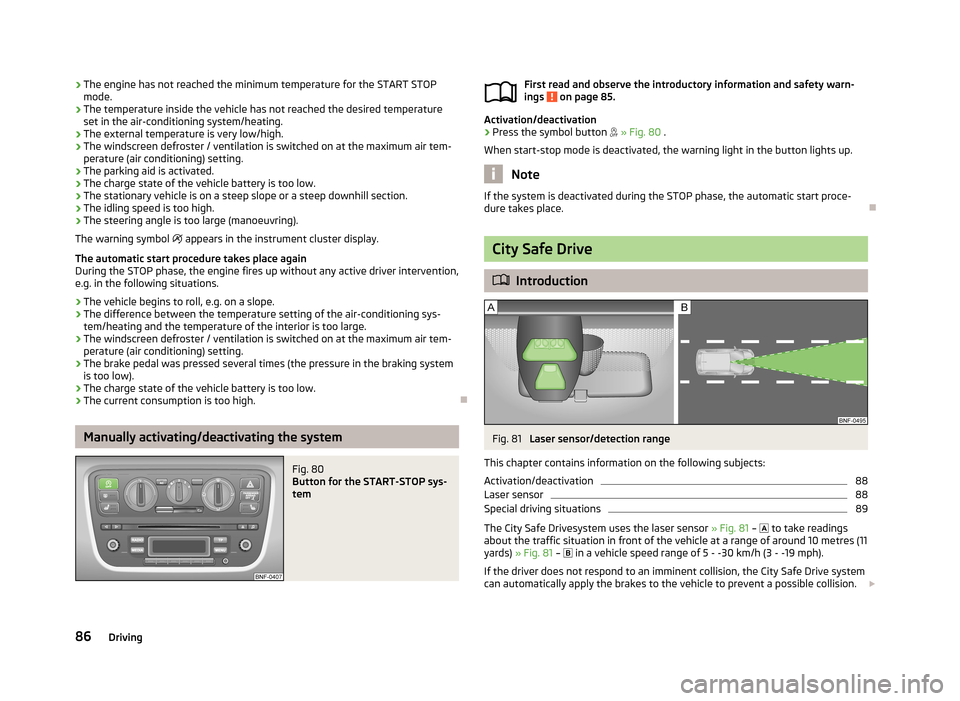
Fig. 81
Laser sensor/detection range
This chapter contains information on the following subjects:
Activation/deactivation
88
Laser sensor
88
Special driving situations
89
The City Safe Drivesystem uses the laser sensor » Fig. 81 –
to take readings
about the traffic situation in front of the vehicle at a range of around 10 metres (11
yards) » Fig. 81 –
in a vehicle speed range of 5 - -30 km/h (3 - -19 mph).
If the driver does not respond to an imminent collision, the City Safe Drive system
can automatically apply the brakes to the vehicle to prevent a possible collision.
86Driving
Page 91 of 176

Activation/deactivationFig. 82
Lower part of the centre con-
sole: Button for the City Safe
Drive system
First read and observe the introductory information and safety warn-
ings on page 86.
Activating
The City Safe Drivesystem is automatically switched on after turning on the igni- tion.
Disable and re-enable
The City Safe Drivesystem is switched off by pressing the button » Fig. 82 in the
front centre console.
When the City Safe Drivesystem is switched off while the vehicle is travelling at a
speed between 5–30 km/h (3-19 mph), the warning light
will light up in the
instrument cluster display.
You can switch on the City Safe Drivesystem again with the button » Fig. 82 . The
warning light
lights up for around 5 seconds in the instrument cluster dis-
play.
The City Safe Drivesystem must be switched off in the following cases.
› When the vehicle is being towed away.
› When the vehicle is driven though an automatic car wash.
› When the vehicle is on a rolling test bench.
› When the laser sensor is faulty.
› After force is applied to the laser sensor.
› When driving off-road (overhanging branches).
› When objects are extending into the area above the bonnet, e.g. when a rood
load sticks out far ahead.
› When the windscreen is damaged in the region of the laser sensor.
Laser sensor
First read and observe the introductory information and safety warn-
ings
on page 86.
Possible impairment of the laser sensor
If the functioning of the laser sensor is impaired by e.g. heavy rain, snow or slush,
the City Safe Drivesystem will temporarily shut down. The warning light flashes
slowly in the instrument cluster display.
If the laser sensor is no longer impaired, the City Safe Drive system will automati-
cally switch back to ready. The warning light goes out.
88Driving